

In the last article on the site, I showed
the incredible pint library for handling units, and a way to computationally
solve the conversion problem that left an airplane without fuel in mid-flight,
as described in that other article.
Today, we will keep talking about units with the pint library, showing how it
integrates with the numpy library and with plots made with matplotlib.
First, let’s import the necessary packages:
import pint
import numpy as np
import matplotlib.pyplot as plt
Now, create the unit registry and the quantity constructor of pint:
ureg = pint.UnitRegistry()
Q_ = ureg.Quantity
Let’s describe a motion #
As an example, I decided to take a high school physics problem. I picked up the book I used in high school and found an exercise on graphs of uniformly accelerated motion (UAM).
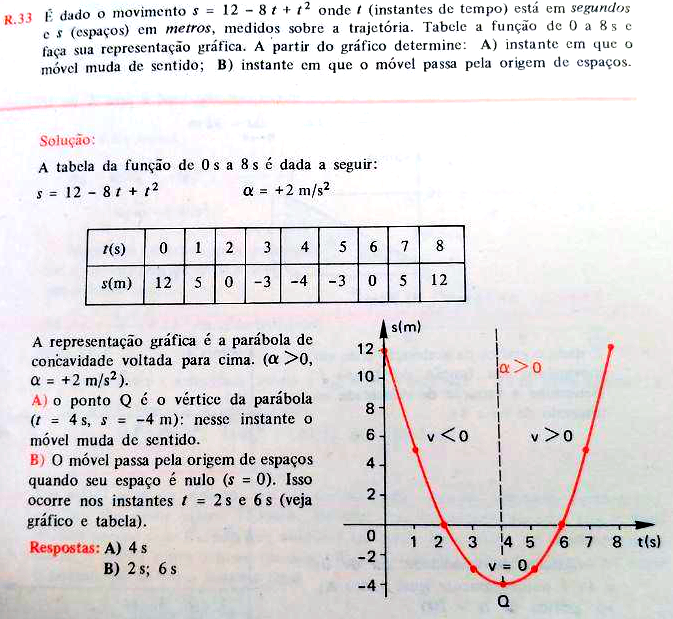
The book is “Fundamentos de Física - Volume 1: Mecânica” by Francisco Ramalho Júnior and others, Ed. Moderna, 1976.
Relax, if you don’t remember what UAM is, here is a quick recap (read it to the sound of Telecurso 2000, in Portuguese):
- Motions are classified into two broad categories: uniform motions, which have constant velocity, and accelerated motions, those whose velocity varies in time.
- In uniform motion, the average velocity computed over any time interval is always the same, which does not happen in accelerated motion.
- Uniformly accelerated motion (UAM) is a motion in which the velocity varies uniformly with time. Acceleration is measured by the change of velocity in time.
- In UAM the acceleration is constant over time.
- A UAM has scalar acceleration constant in time and a velocity that varies according to the function $$ v = v_0 + \alpha t $$ where \(v_0\) is the initial velocity, \(\alpha\) is the acceleration and \(t\) is time.
- For the description of the motion to be complete, we must know how the position \(x\) varies in time:
Now that we have reviewed, let’s define what we want:
- we want to build a plot of position as a function of time, that is, \(x(t)\);
- therefore, we need points for this plot in the (time, position) format;
- the points assume that position is in meters and time in seconds;
- to have a minimally acceptable plot, we need a few points. Since we are using
a computer and have a library like
numpyavailable to do computations quickly, we will consider an acceptable minimum of 50 points, and the user may select more or fewer points if desired; - we will use the fact that we can define the position at any time \(t\) in a UAM knowing only the initial position, the initial velocity and the acceleration;
- we know that a Python function can return more than one value and, when it does, it returns the values as a tuple;
- we will use the data from the book exercise as a test for the function to be defined;
- by default, the function takes the initial time to be zero, leaving it up to the user to pass the final time.
Let’s split the problem into two parts:
- Obtaining the (time, position) points
- Plotting the graph
We can then sketch our desired function, which we will call
uniformly_accelerated_motion, as:
# SKETCH
def uniformly_accelerated_motion(initial_position, initial_velocity, acceleration, final_time, initial_time=Q_('0 s'), points=50):
    # define the array of time values with numpy linspace
    # compute the position at each time, generating an array of position values
    # attach units to the values
    return time, position
The linspace method of numpy is excellent for obtaining equally spaced
values, in this case time values, generating an array (vector). Then it is
enough to take that array and compute the position at each time. Using the
wraps of pint, explained in the last
article, we can
define each desired unit. Implementing the function then:
@ureg.wraps(('second', 'meter'), ('meter', 'm/s', 'm/(s**2)', 'second', 'second', None))
def uniformly_accelerated_motion(initial_position, initial_velocity, acceleration, final_time, initial_time=Q_('0 s'), points=50):
    '''
    Returns (time, position) pairs for an equation that describes the position in a uniformly accelerated motion

    Parameters:
    -----------
    initial_position: pint.Quantity, a quantity in meters is expected
    initial_velocity: pint.Quantity, a quantity in meters per second is expected
    acceleration: pint.Quantity, a quantity in meters per second squared is expected
    final_time: pint.Quantity, a quantity in seconds is expected
    initial_time: pint.Quantity, a quantity in seconds is expected, default 0
    points: integer, number of points to be computed, default 50

    Returns:
    --------
    tuple, 2 arrays for (time, position) with units via pint
    '''
    time = np.linspace(initial_time, final_time, points)
    position = initial_position + initial_velocity * time + 1/2 * acceleration * time**2
    return time, position
Now let’s create the variables that will be passed as parameters of the function, with the values from the exercise:
init_pos = Q_('12 m')
init_vel = Q_('-8 m/s')
accel = Q_('2 m/(s**2)')
final_t = Q_('8 s')
uam = uniformly_accelerated_motion(init_pos, init_vel, accel, final_t)Let’s check what the uam variable looks like:
uam(array([0. , 0.16326531, 0.32653061, 0.48979592, 0.65306122,
0.81632653, 0.97959184, 1.14285714, 1.30612245, 1.46938776,
1.63265306, 1.79591837, 1.95918367, 2.12244898, 2.28571429,
2.44897959, 2.6122449 , 2.7755102 , 2.93877551, 3.10204082,
3.26530612, 3.42857143, 3.59183673, 3.75510204, 3.91836735,
4.08163265, 4.24489796, 4.40816327, 4.57142857, 4.73469388,
4.89795918, 5.06122449, 5.2244898 , 5.3877551 , 5.55102041,
5.71428571, 5.87755102, 6.04081633, 6.20408163, 6.36734694,
6.53061224, 6.69387755, 6.85714286, 7.02040816, 7.18367347,
7.34693878, 7.51020408, 7.67346939, 7.83673469, 8. ]) <Unit('second')>,
array([12. , 10.72053311, 9.49437734, 8.32153269, 7.20199917,
6.13577676, 5.12286547, 4.16326531, 3.25697626, 2.40399833,
1.60433153, 0.85797584, 0.16493128, -0.47480217, -1.06122449,
-1.59433569, -2.07413578, -2.50062474, -2.87380258, -3.1936693 ,
-3.46022491, -3.67346939, -3.83340275, -3.94002499, -3.99333611,
-3.99333611, -3.94002499, -3.83340275, -3.67346939, -3.46022491,
-3.1936693 , -2.87380258, -2.50062474, -2.07413578, -1.59433569,
-1.06122449, -0.47480217, 0.16493128, 0.85797584, 1.60433153,
2.40399833, 3.25697626, 4.16326531, 5.12286547, 6.13577676,
7.20199917, 8.32153269, 9.49437734, 10.72053311, 12. ]) <Unit('meter')>)
Notice that it is a tuple of two arrays, one for time and another for position,
and that these arrays have associated units, as desired through the use of the
pint package.
Integration between pint and matplotlib #
To plot, there is no need to create a function. Just pass the values of the
horizontal and vertical axes to the plot method of matplotlib.pyplot:
plt.plot(uam[0], uam[1])/home/chicolucio/Dropbox/work/cienciaprogramada/code/pint/.venv/lib/python3.8/site-packages/numpy/core/_asarray.py:83: UnitStrippedWarning: The unit of the quantity is stripped when downcasting to ndarray.
return array(a, dtype, copy=False, order=order)
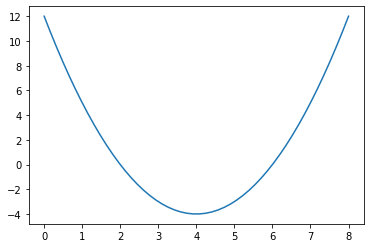
Note that a warning was displayed, informing that the units were stripped.
This happens because we have not configured the unit registry to work with
matplotlib. To configure it, just use the following command:
ureg.setup_matplotlib(True)Requesting the plot again:
plt.plot(uam[0], uam[1])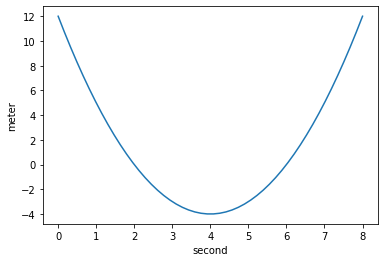
The warning is gone. But there is still a lot to improve.
Improving code readability #
I try, within the limits of my knowledge of the language of course, to always follow the Zen of Python:
import thisThe Zen of Python, by Tim Peters
Beautiful is better than ugly.
Explicit is better than implicit.
Simple is better than complex.
Complex is better than complicated.
Flat is better than nested.
Sparse is better than dense.
Readability counts.
Special cases aren't special enough to break the rules.
Although practicality beats purity.
Errors should never pass silently.
Unless explicitly silenced.
In the face of ambiguity, refuse the temptation to guess.
There should be one-- and preferably only one --obvious way to do it.
Although that way may not be obvious at first unless you're Dutch.
Now is better than never.
Although never is often better than *right* now.
If the implementation is hard to explain, it's a bad idea.
If the implementation is easy to explain, it may be a good idea.
Namespaces are one honking great idea -- let's do more of those!
Especially Readability counts. That is why I defined the function with
parameters whose names actually mean something (and not that madness of x, v,
t and the like, that works on paper, not in code). And it really bothers me
to have to call tuples by indices. It would be better to be able to do
something like uam.time and uam.position. And in fact that is possible…
Named tuples, namedtuple, are made for this:
from collections import namedtupleSlightly adapting the function defined previously:
@ureg.wraps(('second', 'meter'), ('meter', 'm/s', 'm/(s**2)', 'second', 'second', None))
def uniformly_accelerated_motion(initial_position, initial_velocity, acceleration, final_time, initial_time=Q_('0 s'), points=50):
    '''
    Returns (time, position) pairs for an equation that describes the position in a uniformly accelerated motion

    Parameters:
    -----------
    initial_position: pint.Quantity, a quantity in meters is expected
    initial_velocity: pint.Quantity, a quantity in meters per second is expected
    acceleration: pint.Quantity, a quantity in meters per second squared is expected
    final_time: pint.Quantity, a quantity in seconds is expected
    initial_time: pint.Quantity, a quantity in seconds is expected, default 0
    points: integer, number of points to be computed, default 50

    Returns:
    --------
    named tuple, 2 arrays for (time, position) with units via pint
    '''
    time = np.linspace(initial_time, final_time, points)
    position = initial_position + initial_velocity * time + 1/2 * acceleration * time**2
    Data = namedtuple('UAM', ['time', 'position'])
    return Data(time, position)
uam = uniformly_accelerated_motion(init_pos, init_vel, accel, final_t)
uamUAM(time=<Quantity([0. 0.16326531 0.32653061 0.48979592 0.65306122 0.81632653
0.97959184 1.14285714 1.30612245 1.46938776 1.63265306 1.79591837
1.95918367 2.12244898 2.28571429 2.44897959 2.6122449 2.7755102
2.93877551 3.10204082 3.26530612 3.42857143 3.59183673 3.75510204
3.91836735 4.08163265 4.24489796 4.40816327 4.57142857 4.73469388
4.89795918 5.06122449 5.2244898 5.3877551 5.55102041 5.71428571
5.87755102 6.04081633 6.20408163 6.36734694 6.53061224 6.69387755
6.85714286 7.02040816 7.18367347 7.34693878 7.51020408 7.67346939
7.83673469 8. ], 'second')>, position=<Quantity([12. 10.72053311 9.49437734 8.32153269 7.20199917 6.13577676
5.12286547 4.16326531 3.25697626 2.40399833 1.60433153 0.85797584
0.16493128 -0.47480217 -1.06122449 -1.59433569 -2.07413578 -2.50062474
-2.87380258 -3.1936693 -3.46022491 -3.67346939 -3.83340275 -3.94002499
-3.99333611 -3.99333611 -3.94002499 -3.83340275 -3.67346939 -3.46022491
-3.1936693 -2.87380258 -2.50062474 -2.07413578 -1.59433569 -1.06122449
-0.47480217 0.16493128 0.85797584 1.60433153 2.40399833 3.25697626
4.16326531 5.12286547 6.13577676 7.20199917 8.32153269 9.49437734
10.72053311 12. ], 'meter')>)
Now we can call them by name:
uam.time| Magnitude | [0.0 0.16326530612244897 0.32653061224489793 0.4897959183673469 |
|---|---|
| Units | second |
uam.position| Magnitude | [12.0 10.720533111203665 9.494377342773845 8.321532694710536 |
|---|---|
| Units | meter |
But the interesting part is that the logic of calling by indices still works:
uam[0]| Magnitude | [0.0 0.16326530612244897 0.32653061224489793 0.4897959183673469 |
|---|---|
| Units | second |
uam[1]| Magnitude | [12.0 10.720533111203665 9.494377342773845 8.321532694710536 |
|---|---|
| Units | meter |
But see whether the following plot command isn’t much easier to understand:
plt.plot(uam.time, uam.position)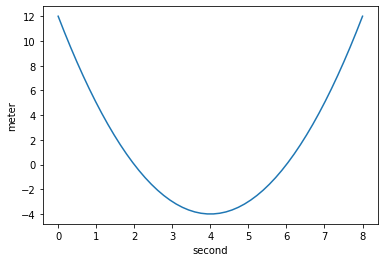
I don’t know about you, but to me this code is much more expressive, it communicates much better what is being requested.
Of course, the full power of pint can be used in plots as well. If you want a
plot with time in milliseconds and position in feet:
plt.plot(uam.time.to('ms'), uam.position.to('ft'))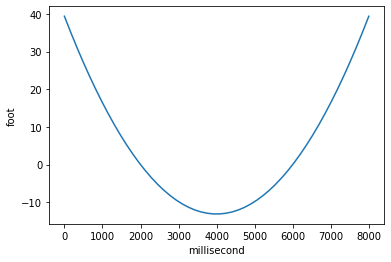
Exploring the integration with matplotlib further #
For the purposes of this article, what has been shown so far would already be
enough. But I will take the opportunity to show some slightly more advanced
matplotlib things and how to combine them with pint.
matplotlib has some predefined plot styles that can be seen
here.
But I particularly like making my own styles, since I have some more specific
needs. For example, since I work in education, I like plots to show grid lines
at the major and minor divisions, because this makes reading easier for the
student, whether in reference material or in an exercise.
A good way to have standardized plots throughout a document is to have a function that defines the grid, tick and font parameters for a given axis, and to call that function in the body of each plot function used in the document. After all, there may be more than one plot function, since there may be plots that do not need, for example, unit handling, or plots of different mathematical functions (in the context of this article, uniform or accelerated motions).
So, let’s define a function that returns axes with the settings I want. I still
plan to write a more detailed article about matplotlib terminology, but in
case you don’t know the difference between axes and figure, I recommend this
link in the
documentation and this
one from
StackOverflow.
def _plot_params(ax=None):
        """Custom parameters for plots.

        Parameters:
        ----------
        ax : Matplotlib axes, optional, axes where the plot will be drawn, default None

        Returns:
        --------
        Matplotlib axes, axes for a figure
        """

        linewidth = 2
        size = 12

        # grid and ticks
        ax.minorticks_on()
        ax.grid(b=True, which='major', linestyle='--',
                linewidth=linewidth - 0.5)
        ax.grid(b=True, which='minor', axis='both',
                linestyle=':', linewidth=linewidth - 1)
        ax.tick_params(which='both', labelsize=size+2)
        ax.tick_params(which='major', length=6, axis='both')
        ax.tick_params(which='minor', length=3, axis='both')

        # axis names
        ax.xaxis.label.set_size(size+4)
        ax.yaxis.label.set_size(size+4)

        return
Now let’s define a function to plot our UAM data. A way of working that I
usually adopt is to always work with matplotlib axes, because this gives me
more flexibility if I want, for example, to make figures with side-by-side
plots. I will illustrate this later, in case it wasn’t clear. But that is why
the function has an ax parameter. This parameter is, by default, None and,
if an axes is really not passed to the function, a figure with one axes will be
created (the if conditional clause in the function):
def plot_uam(time_array, position_array, time_unit='s', position_unit='m', y_axis_name='Position', x_axis_name='Time', ax=None, fig_size=(8, 6)):
    '''
    Function to plot the graph of a Uniformly Accelerated Motion

    Parameters:
    ----------
    time_array: pint array, array of time-related values with an associated unit
    position_array: pint array, array of position-related values with an associated unit
    time_unit: string, unit to use with the time values, default "seconds"
    position_unit: string, unit to use with the position values, default "meters"
    y_axis_name: string, name for the vertical axis, default 'Position'
    x_axis_name: string, name for the horizontal axis, default 'Time'
    ax: Matplotlib axes, axes where the plot will be drawn, default None
    fig_size: tuple, size of the figure that will be created if no axes is passed, default (8, 6)

    Returns:
    --------
    Matplotlib axes, axes for a figure
    '''

    if ax is None:
        fig, ax = plt.subplots(figsize=fig_size, facecolor=(1.0, 1.0, 1.0))

    # calling the function for the custom parameters
    _plot_params(ax)

    # plot, converting the data to the units passed
    ax.plot(time_array.to(time_unit), position_array.to(position_unit))

    # customizing the axis names with the standard adopted by the scientific community (Axis name / unit)
    ax.set_xlabel(x_axis_name + ' / ' + f'{ureg(time_unit).units:~P}')
    ax.set_ylabel(y_axis_name + ' / ' + f'{ureg(position_unit).units:~P}')
Let’s check what the plot looks like with the data we already have:
plot_uam(uam.time, uam.position)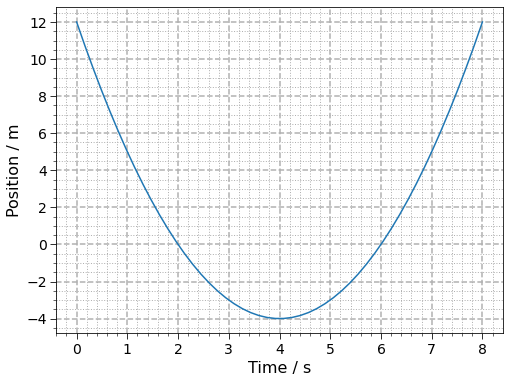
Much better, don’t you think?
Let’s customize it with other units, changing the axis names and the size:
plot_uam(uam.time, uam.position, time_unit='ms', position_unit='ft', x_axis_name='Time', y_axis_name='Position', fig_size=(7, 5))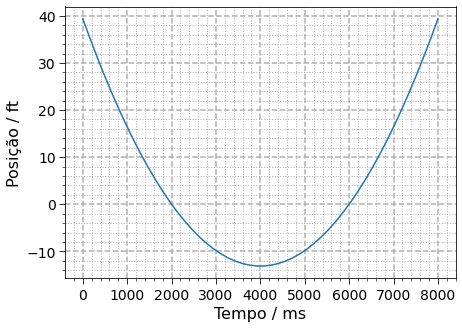
Now let’s check the power of working with axes in matplotlib. We can create a
grid of plots, each with its own system of units. I will use the subplots
method, whose documentation is here.
# creating a grid of plots with 2 columns and 2 rows
fig, arr = plt.subplots(nrows=2, ncols=2, figsize=(14,10), constrained_layout=True, facecolor=(1,1,1))

# arr is a matrix of positions for the plots. See the documentation link above

plot_uam(uam.time, uam.position, time_unit='s', position_unit='m', x_axis_name='Time', y_axis_name='Position', ax=arr[0, 0])

plot_uam(uam.time, uam.position, time_unit='ms', position_unit='ft', x_axis_name='Time', y_axis_name='Position', ax=arr[0, 1])

plot_uam(uam.time, uam.position, time_unit='s', position_unit='yards', x_axis_name='Time', y_axis_name='Position', ax=arr[1, 0])

plot_uam(uam.time, uam.position, time_unit='s', position_unit='cm', x_axis_name='Time', y_axis_name='Position', ax=arr[1, 1])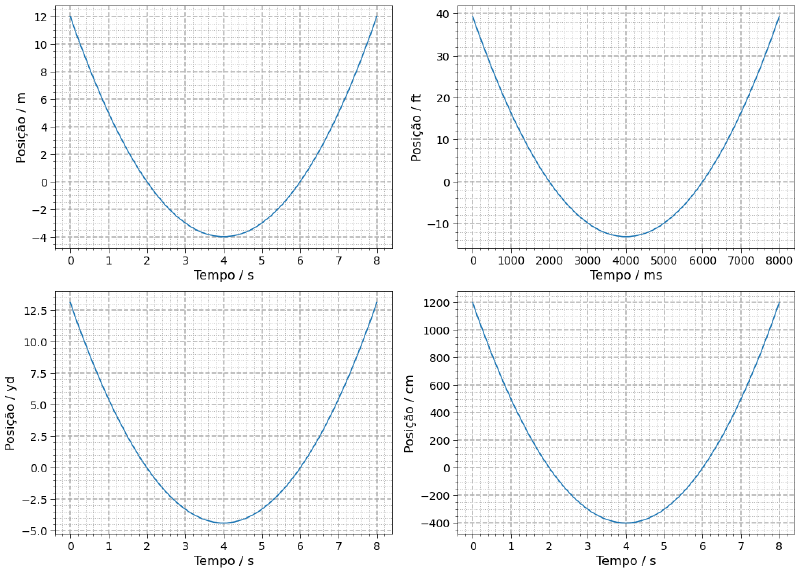
Notice what we just did. It is the same data set, passed only once, and four
plots were generated with a few lines of code. Conversions become very simple
with pint.
We can elaborate our function even further to show the axes in scientific notation and modify the axis name to display the order of magnitude (the power of 10 of the notation).
def plot_uam(time_array, position_array, time_unit='s', position_unit='m', y_axis_name='Position', x_axis_name='Time', ax=None, fig_size=(8, 6)):
    '''
    Function to plot the graph of a Uniformly Accelerated Motion

    Parameters:
    ----------
    time_array: array, array of time-related values with an associated unit
    position_array: array, array of position-related values with an associated unit
    time_unit: string, unit to use with the time values, default seconds
    position_unit: string, unit to use with the position values, default meters
    y_axis_name: string, name for the vertical axis, allowing translation to other languages, default 'Position'
    x_axis_name: string, name for the horizontal axis, allowing translation to other languages, default 'Time'
    ax: Matplotlib axes, axes where the plot will be drawn, default None
    fig_size: tuple, size of the figure that will be created if no axes is passed, default (8, 6)

    Returns:
    --------
    Matplotlib axes, axes for a figure
    '''

    if ax is None:
        fig, ax = plt.subplots(figsize=fig_size, facecolor=(1.0, 1.0, 1.0))

    # calling the function for the custom parameters
    _plot_params(ax)

    # plot, converting the data to the units passed
    ax.plot(time_array.to(time_unit), position_array.to(position_unit))

    # formats the axes in scientific notation style, using a power of 10 instead of "E"
    ax.ticklabel_format(style='sci', axis='both', scilimits=(0, 0))
    ax.yaxis.major.formatter._useMathText = True
    ax.xaxis.major.formatter._useMathText = True
    ax.figure.canvas.draw()  # needs a redraw to take effect

    # removes the multiplication sign from the power of 10, storing it in order-of-magnitude variables
    order_magnitude_y = ax.yaxis.get_offset_text().get_text().replace('\\times', '')
    order_magnitude_x = ax.xaxis.get_offset_text().get_text().replace('\\times', '')

    # turns off matplotlib's default display so we can show our custom one
    ax.yaxis.offsetText.set_visible(False)
    ax.xaxis.offsetText.set_visible(False)

    # customizing the axis names with the standard adopted by the scientific community (Axis name / unit)
    ax.set_xlabel(x_axis_name + ' / ' + order_magnitude_x + f' {ureg(time_unit).units:~P}')
    ax.set_ylabel(y_axis_name + ' / ' + order_magnitude_y + f' {ureg(position_unit).units:~P}')
Let’s test this new implementation:
plot_uam(uam.time, uam.position)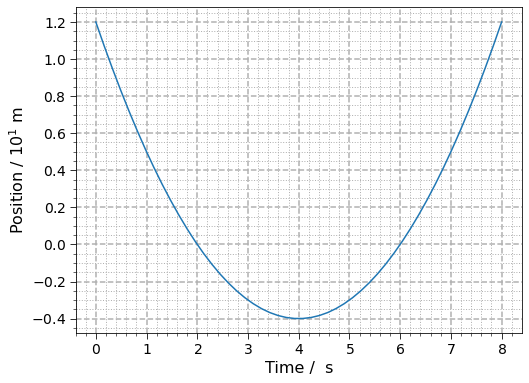
Now the position axis is in scientific notation, making that clear in the axis name. The time axis does not need a power of 10, so it is not displayed. Let’s test with other units:
plot_uam(uam.time, uam.position, time_unit='ms', position_unit='ft', x_axis_name='Time', y_axis_name='Position')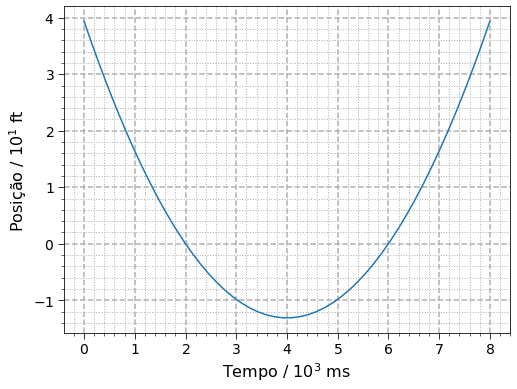
Notice that both axes are in scientific notation and display this information in the axis names.
Creating our grid of plots again:
# creating a grid of plots with 2 columns and 2 rows
fig, arr = plt.subplots(nrows=2, ncols=2, figsize=(14,10), constrained_layout=True, facecolor=(1,1,1))

# arr is a matrix of positions for the plots. See the documentation link above

plot_uam(uam.time, uam.position, time_unit='s', position_unit='m', x_axis_name='Time', y_axis_name='Position', ax=arr[0, 0])

plot_uam(uam.time, uam.position, time_unit='ms', position_unit='ft', x_axis_name='Time', y_axis_name='Position', ax=arr[0, 1])

plot_uam(uam.time, uam.position, time_unit='s', position_unit='yards', x_axis_name='Time', y_axis_name='Position', ax=arr[1, 0])

plot_uam(uam.time, uam.position, time_unit='s', position_unit='cm', x_axis_name='Time', y_axis_name='Position', ax=arr[1, 1])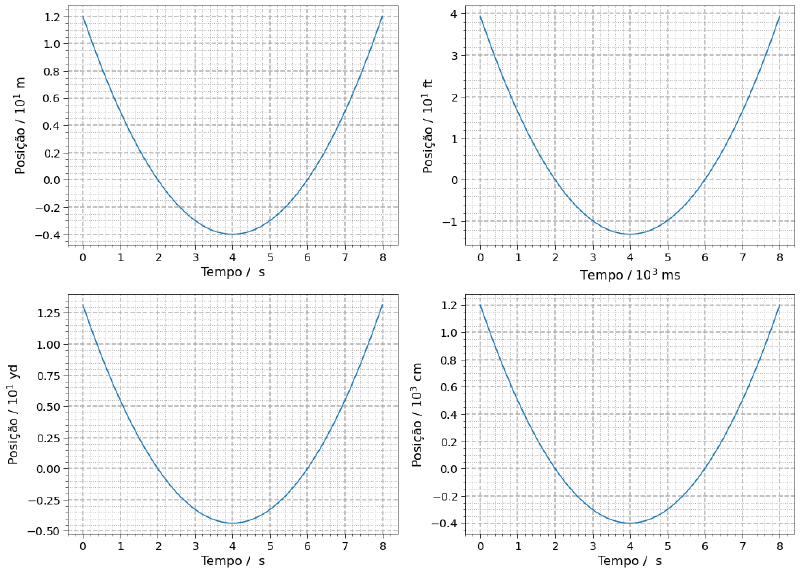
Conclusion #
The combination of pint, numpy and matplotlib is sensational. With a few
lines of code we can attach units to data sets and create different plots for
different unit systems using the same data set.
There are no more excuses for not using this combination in code involving physical quantities, right? And there is more to come, this trio of libraries will be very present here in the articles.
See you next time!


