

Colorless, made of invisible constituents, and odorless (we hope!). We often forget that we are surrounded by the gases that make up our atmosphere. In this article, we will see how to easily get a list of the main constituents of air with Python and web scraping. We will also do some calculations, such as density and mean molar mass, and, of course, present everything in spectacular plots.
Here is a short list of the tools we will use:
- Pint
- ChemPy
- SciPy
- pandas
- Web scraping with pandas
- Regular expressions
- Matplotlib
- ready-made styles
- color scale
- scatter plot
- advanced plot customization
- Standard Python
- map
- anonymous functions (lambda)
- list comprehensions
Lots of useful stuff, so let’s go.
In physics, chemistry, and engineering courses, situations often come up where we need calculations that depend on characteristics of air. It might be, for example, a combustion reaction happening in the open air, where we need to consider a certain percentage of oxygen in the air, or a compressor, where we need to know the mass of air it holds under certain conditions. Whatever the situation, we usually need the density of air or its mean molar mass. In fact, these quantities are closely related, as we will see.
Initial setup #
To start, let’s import some libraries we will use. The role of each one will be
detailed along the article. pint has already appeared in other articles on
this site, and you can read more about it
here.
from scipy.constants import gas_constant
import matplotlib.pyplot as plt
import pint
import chempy
import pandas as pd
Let’s create a unit registry and a quantity constructor from pint and also
configure the package to work with plots created via matplotlib.
ureg = pint.UnitRegistry()
ureg.setup_matplotlib(True)
Q_ = ureg.Quantity
Theoretical background and getting chemical data #
Now let’s get to know the chempy package a little, whose project site is
this one. With chempy we can easily get
information about a compound from its formula. Let’s start with hydrogen gas as
an example:
hydrogen_gas = chempy.Substance.from_formula('H2')The code above, quite self-explanatory, instantiates a Substance from the
formula as a string.
Let’s look at the attributes and methods publicly available on the
hydrogen_gas object we created:
[x for x in dir(hydrogen_gas) if not x.startswith('_')]['attrs',
'charge',
'composition',
'composition_keys',
'data',
'from_formula',
'html_name',
'latex_name',
'mass',
'molar_mass',
'name',
'unicode_name']
It is interesting to have the option of exporting the formula in formats such as LaTeX and Unicode:
hydrogen_gas.latex_name'H_{2}'
hydrogen_gas.unicode_name'H₂'
But, for our purposes here, the important thing is to have the molar mass value.
We can access it in two ways, through the mass attribute and the molar_mass
method:
hydrogen_gas.mass2.016
hydrogen_gas.molar_mass()array(2.016) * g/mol
As we can see, mass returns a dimensionless float, while molar_mass
returns it with units. We can separate the magnitude from the unit if desired:
hydrogen_gas.molar_mass().magnitudearray(2.016)
hydrogen_gas.molar_mass().unitsarray(1.) * g/mol
Working with units is always desirable. However, chempy does not use pint to
manage units. Instead, it uses the quantities
project, which is not
as flexible as pint and does not integrate very well with other packages. So,
in this article we will work with the mass attribute and associate a pint
unit with it.
When we work with a gas, we need to decide which model will be used to describe it. The choice of model depends on the context. In a context where great accuracy is needed or near unusual conditions (very high pressure, for example), there are several models that can be used, the Van der Waals model probably being the best known. In our case, the simple ideal gas model, which is taught in high school physics and/or chemistry, is enough.
The ideal gas equation is:
$$ PV = nRT $$where P, V, and T are pressure, volume, and temperature; n is the amount of substance; and R is the so-called ideal gas constant. Since the amount of substance of a given material is the mass of the substance m divided by its molar mass M, we can rewrite the equation as:
$$ PV = \frac{m}{M} RT $$Remembering that the density of a given material is its mass divided by its volume, we can rearrange the equation:
$$ \frac{m}{V} = \frac{PM}{RT} \therefore d = \frac{PM}{RT} $$Thus, we see that there is a link between the molar mass of a substance and its density.
The SciPy library provides a large set of constants. At the beginning we
imported the gas constant with the line
from scipy.constants import gas_constantLet’s check the value:
gas_constant8.314462618
According to the library
documentation, the
value of the constant is in the International System of Units (SI). We can
associate the unit with the value using the pint quantity constructor that we
instantiated at the beginning of the article:
Q_(gas_constant, 'J/(mol K)')8.314462618 joule/(kelvin mole)
Of course, you would not need to import SciPy just to get the value of this constant. You could simply put the value in a variable in the code and associate the unit. But I did it here in the article for two reasons. The first is informative: to show that SciPy, one of the most sensational scientific libraries, has this collection of constants. The second is to show the number of significant figures in the value that the library provides. I will write a bit more about that.
It is a (bad) widespread practice in Brazilian schools to round values without a more detailed discussion of the consequences. As a result, large errors end up appearing in calculations because of the roundings. You, who have read this article up to here, certainly have an interest in science, so keep one thing in mind: what must limit the precision of your calculations is the precision of your measurements. Every measurement has an associated uncertainty. But common constants in science, such as the ideal gas constant or the speed of light, usually go through several determination methods with high precision, and there is even the Committee on Data of the International Science Council (CODATA), which periodically publishes updated values of the main physical constants from which other constants can be derived.
If you clicked the link, notice the number of significant figures of the
constants. It is highly likely that none of these constants will be what limits
the precision of your calculations. It is no use, for example, to make an effort
to get a pressure value that can be expressed with 4 significant figures, such
as 1,200 Pa, and then round the magnitude of the gas constant to 8.31. You
threw away all your experimental effort. Use physical constants with as many
significant figures as are available. Each badly done rounding makes you lose a
year of life (an exaggeration so that you remember the message).
Oh, and you may find the value shown for the gas constant strange. Maybe you thought “wait, wasn’t it 0.082?” Yes, in another system of units. The SciPy value is in the International System of Units (SI). In high school, and even in practical situations, we usually use the value best suited to working with the units atmosphere and liter. See the conversion:
Q_(gas_constant, 'J/(mol K)').to('atm l / (mol K)')0.08205736607944732 liter standard_atmosphere/(kelvin mole)
Again, pay attention to the significant figures of the value.
The function that will support all the work #
Well, let’s go back to our ideal gas. We can create a function that calculates
the density of a gas. According to the equation we obtained above, we only need
the pressure, the molar mass, and the temperature. But, with the help of
chempy, we can get the molar mass from the gas formula. So, our function can
receive a formula, the pressure, and the temperature. We can consider default
values for the pressure and temperature, for ambient conditions, for example:
def gas_density(formula, pressure=Q_('1 atm'), temperature=Q_(25, 'degC')):
    """Calculate the density of an ideal gas"""

    R = Q_(gas_constant, 'J/(mol K)')
    M = chempy.Substance.from_formula(formula).mass
    M = Q_(M, 'g/mol')

    return (pressure * M/(R * temperature.to('kelvin'))).to_base_units()
The details of using the pint package can be read
here.
Now we can pass a formula and we will get the density for conditions of 1 atm and 25 °C.
gas_density('CO2')1.7988258254712144 kilogram/meter<sup>3</sup>
If we want other conditions, we just pass the pressure and temperature
parameters. In any unit, in fact, since pint takes care of the conversion
internally.
gas_density('CO2', pressure=Q_('1 * 10^4 Pa'), temperature=Q_(0, 'degC'))0.1937787323145848 kilogram/meter<sup>3</sup>
Great, we can already calculate the density of a gas. But what about our atmosphere, which is a mixture of gases?
Web scraping with pandas #
First we need a source that gives us the gases and their relative amounts. This Wikipedia link has a table with this information. Let’s assign this link to a variable:
url = 'https://en.wikipedia.org/wiki/Atmosphere_of_Earth'Now let’s understand one of the imports we made at the beginning of the article, the pandas library. This library is widely used for data analysis and manipulation and is excellent for data that can be organized in tables. In the context of pandas, a set of tabular data is called a DataFrame.
The read_html method gives us a list of the tables at a URL as DataFrame
objects:
len(pd.read_html(url))14
Note that 14 objects that can be handled as DataFrames were found at the link. You can go through each one to see which is the one you are interested in. In our case, it is right at the first position of the list, remembering that storage structures in Python, such as lists, start at index zero. So:
pd.read_html(url)[0]| Gas | Volume(A) | |||
|---|---|---|---|---|
| Name | Formula | in ppmv(B) | in % | |
| 0 | Nitrogen | N2 | 780840 | 78.084 |
| 1 | Oxygen | O2 | 209460 | 20.946 |
| 2 | Argon | Ar | 9340 | 0.9340 |
| 3 | Carbon dioxide(December, 2020)(C)[13] | CO2 | 415.00 | 0.041500 |
| 4 | Neon | Ne | 18.18 | 0.001818 |
| 5 | Helium | He | 5.24 | 0.000524 |
| 6 | Methane | CH4 | 1.87 | 0.000187 |
| 7 | Krypton | Kr | 1.14 | 0.000114 |
| 8 | Not included in above dry atmosphere: | Not included in above dry atmosphere: | Not included in above dry atmosphere: | Not included in above dry atmosphere: |
| 9 | Water vapor(D) | H2O | 0-30,000(D) | 0-3%(E) |
| 10 | notes: (A) volume fraction is equal to mole fr... | notes: (A) volume fraction is equal to mole fr... | notes: (A) volume fraction is equal to mole fr... | notes: (A) volume fraction is equal to mole fr... |
The notes section of the table was also recognized by pandas as part of the
object. We are not interested in this part, so let’s remove it. Since this part
starts at index 8 of the DataFrame (the index is the first column), let’s take a
slice with iloc:
pd.read_html(url)[0].iloc[:8]| Gas | Volume(A) | |||
|---|---|---|---|---|
| Name | Formula | in ppmv(B) | in % | |
| 0 | Nitrogen | N2 | 780840 | 78.084 |
| 1 | Oxygen | O2 | 209460 | 20.946 |
| 2 | Argon | Ar | 9340 | 0.9340 |
| 3 | Carbon dioxide(December, 2020)(C)[13] | CO2 | 415.00 | 0.041500 |
| 4 | Neon | Ne | 18.18 | 0.001818 |
| 5 | Helium | He | 5.24 | 0.000524 |
| 6 | Methane | CH4 | 1.87 | 0.000187 |
| 7 | Krypton | Kr | 1.14 | 0.000114 |
This will be our DataFrame, so let’s assign it to a variable:
df = _It is always interesting to take a look at how pandas recognized the data. For
that we have the info and describe methods:
df.info()<class 'pandas.core.frame.DataFrame'>
RangeIndex: 8 entries, 0 to 7
Data columns (total 4 columns):
# Column Non-Null Count Dtype
--- ------ -------------- -----
0 (Gas, Name) 8 non-null object
1 (Gas, Formula) 8 non-null object
2 (Volume(A), in ppmv(B)) 8 non-null object
3 (Volume(A), in %) 8 non-null object
dtypes: object(4)
memory usage: 384.0+ bytes
df.describe()| Gas | Volume(A) | |||
|---|---|---|---|---|
| Name | Formula | in ppmv(B) | in % | |
| count | 8 | 8 | 8 | 8 |
| unique | 8 | 8 | 8 | 8 |
| top | Nitrogen | Ar | 1.87 | 0.041500 |
| freq | 1 | 1 | 1 | 1 |
Note that pandas recognized all the columns as being of type object. This type
is generic in pandas. Usually, when the algorithm does not recognize the type
exactly, it classifies it as object. For all purposes, the data in these
columns behave like strings. This is clear in the result of describe because,
if the columns with numbers had been recognized as such, metrics such as mean,
maximum value, and minimum value would appear. So, one of the things we will
need to do is convert the column of volume in percentage to the correct type,
float, so that we can use the values in our calculations.
Another aspect that these methods let us see more clearly is that there are subcolumns or, in language closer to that used in the pandas context, there are multi-indexes. Inside the Gas index there are Name and Formula, and there are also indexes inside Volume(A). Let’s see how to view the values of the Formula column:
df['Gas']['Formula']0 N2
1 O2
2 Ar
3 CO2
4 Ne
5 He
6 CH4
7 Kr
Name: Formula, dtype: object
Another way would be using the notation of the loc method:
df.loc[:, ('Gas', 'Formula')]0 N2
1 O2
2 Ar
3 CO2
4 Ne
5 He
6 CH4
7 Kr
Name: (Gas, Formula), dtype: object
We can see only the data under Volume(A), which are our numerical data:
df['Volume(A)']| in ppmv(B) | in % | |
|---|---|---|
| 0 | 780840 | 78.084 |
| 1 | 209460 | 20.946 |
| 2 | 9340 | 0.9340 |
| 3 | 415.00 | 0.041500 |
| 4 | 18.18 | 0.001818 |
| 5 | 5.24 | 0.000524 |
| 6 | 1.87 | 0.000187 |
| 7 | 1.14 | 0.000114 |
Now let’s convert this data to the float type:
df['Volume(A)'] = df['Volume(A)'].astype(float)
df| Gas | Volume(A) | |||
|---|---|---|---|---|
| Name | Formula | in ppmv(B) | in % | |
| 0 | Nitrogen | N2 | 780840.00 | 78.084000 |
| 1 | Oxygen | O2 | 209460.00 | 20.946000 |
| 2 | Argon | Ar | 9340.00 | 0.934000 |
| 3 | Carbon dioxide(December, 2020)(C)[13] | CO2 | 415.00 | 0.041500 |
| 4 | Neon | Ne | 18.18 | 0.001818 |
| 5 | Helium | He | 5.24 | 0.000524 |
| 6 | Methane | CH4 | 1.87 | 0.000187 |
| 7 | Krypton | Kr | 1.14 | 0.000114 |
Let’s now get ready to create a column for the density of each gas listed in the
Formula subcolumn. Let’s see what the result would be of applying the
gas_density function to each formula using Python’s map function:
list(map(gas_density, df['Gas']['Formula']))[1.145045483304565 <Unit('kilogram / meter ** 3')>,
1.3078876766894934 <Unit('kilogram / meter ** 3')>,
1.6328363306579126 <Unit('kilogram / meter ** 3')>,
1.7988258254712144 <Unit('kilogram / meter ** 3')>,
0.8248259562876108 <Unit('kilogram / meter ** 3')>,
0.1636025323611701 <Unit('kilogram / meter ** 3')>,
0.6557422963038172 <Unit('kilogram / meter ** 3')>,
3.4251631830497584 <Unit('kilogram / meter ** 3')>]
Note that the units appear, since our function uses pint. It would be
interesting to have only the numerical value, using the magnitude attribute of
a pint quantity, since it makes no sense for a unit to appear in every row of
a table. It would also make our lives easier in future calculations to have only
numbers. We can create an anonymous function for that and apply it with map to
the previous result:
list( map(lambda quantity: quantity.magnitude, map(gas_density, df['Gas']['Formula'])) )[1.145045483304565,
Let’s store the previous result in a column of our DataFrame:
df['density'] = _
df['density']
0 1.145045
Recalling our assumptions, these values are the density of each gas separately, considering an ideal gas model, a pressure of 1 atm, and a temperature of 25 °C.
Density and mean molar mass of air #
As explained in the Wikipedia link from which we took the table, the percentage values shown consider dry air, since the moisture content varies a lot even in a given location. So, when we talk about the density of air, we usually mean the density of dry air. This density is nothing more than the weighted average of the densities of each constituent of air. The weights are the percentages of each constituent. Thus:
dry_air_density = sum([gas_density * gas_percentage for gas_density, gas_percentage in
                       zip(df['density'], df['Volume(A)']['in %'])]) / sum(df['Volume(A)']['in %'])
dry_air_density
1.1839692449104982
This is the calculated value of the density of dry air. Considering the number of significant figures of the data presented and adding the proper unit, it is more appropriate to represent the result as:
print(f"{Q_(dry_air_density, 'kg/m^3'):.2~P}")1.2 kg/m³
Following the same line of reasoning, we can calculate the mean molar mass:
df['molar mass'] = [chempy.Substance.from_formula(formula).mass for formula in df['Gas']['Formula']]

mean_molar_mass_dry_air = sum([gas_molar_mass * gas_percentage for gas_molar_mass, gas_percentage in zip(df['molar mass'], df['Volume(A)']['in %'])]) / sum(df['Volume(A)']['in %'])

print(f"{Q_(mean_molar_mass_dry_air, 'g/mol'):.4~P}")
28.97 g/mol
Plots! I want images #
Now let’s use all the power of Matplotlib to create plots that make our analysis easier to visualize and even expand our understanding further.
pandas has a plot method that is built on top of Matplotlib’s plot. We can,
for example, easily create a bar plot with the densities of each gas in our
DataFrame:
df.plot.bar(x=('Gas', 'Formula'), y='density')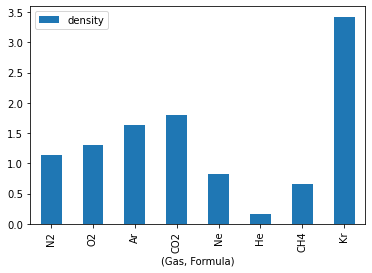
Matplotlib’s default settings are good, but there is a lot to improve in this plot. After all, the unit is missing on the vertical axis, the axis titles could be better, and the numbers in the chemical formulas should be subscripts. Let’s fix these issues.
For the chemical formulas, we can create a function that, with the help of regular expressions, returns the LaTeX code needed to display the formulas correctly. That is because Matplotlib interacts very well with LaTeX, which is great for those of us in science who use it a lot in our work.
import re

def format_formula(formula):
        """ Return LaTeX code to display chemical formulas correctly"""

        label_formula = re.sub("([0-9])", r"_\1", formula)

        return ''.join(['$\mathregular{', label_formula, '}$'])
Basically, the function adds a _ before any digit so that the LaTeX code
recognizes the digit as a subscript. To learn more about regular expressions,
read this excellent article here on the
site.
Matplotlib’s default color scheme is good and presentable, but I particularly like plots with a dark background. So, I will use one of the ready-made styles available in the library:
plt.style.use('seaborn-whitegrid')Now let’s create a figure, associate a set of axes with it, and add the information we wanted: units, axis names, correct chemical formulas, and, while we’re at it, a line indicating the density of dry air that we calculated earlier:
fig, ax = plt.subplots(nrows=1, ncols=1, figsize=(8,6), constrained_layout=True)

# Data
ax.bar(df['Gas']['Formula'], df['density'], color='blue', label='Gas density')
ax.axhline(dry_air_density, color='red', label='Dry air density')

# Correct chemical formulas
ax.set_xticklabels(list(map(format_formula, df['Gas']['Formula'])))

# Labels
ax.set_xlabel('Compound', size=14)
ax.set_ylabel('Density / kg/m³', size=14)
ax.set_title('Density of the gases that make up dry air - 1 atm and 25 °C', size=16)
ax.legend(fontsize=12)

# Tick label font size
ax.tick_params(labelsize=14)

plt.show()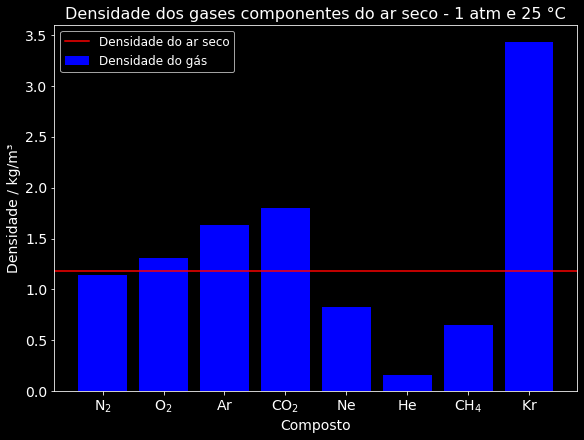
This plot is interesting, but it does not give the reader enough information to understand why the density of dry air is much closer to that of nitrogen gas than to that of krypton gas. Of course, the more attentive will deduce that this probably happens because there is very little krypton in the atmosphere, but it would be useful for this data to be explicit in the plot.
In addition, if the audience is more academic, for example in a class, the plot could also include some indication that the density of a given gas is proportional to its molar mass. That way, more discussions could be had about gas models and even about other consequences, depending on the instructor’s goal.
So, now let’s make a bolder plot to end this article with a flourish. We can create a color intensity scale to indicate the concentration of the gas in the atmosphere. For example, a pale yellow would indicate low concentration and a strong red, high concentration. A bar plot limits us a bit, so let’s switch to a scatter plot. In this type of plot, the size of the point, or rather the circle, can be associated with a quantity. So, we will associate it with the molar mass value to get the additional information we want.
To create the color scale, we will need two Matplotlib modules that we have not imported yet:
import matplotlib.colors as mcolors
import matplotlib.cm as cm
So, let’s create a figure with a set of axes and make the necessary adjustments
to our plot. We will use Matplotlib’s YlOrRd colormap and normalize the colors
based on the volume percentage values. That way, the gas with the lowest
percentage will have the palest yellow and the one with the highest, a dark red.
With this data, we will use Matplotlib methods to build a color scale. Using
chempy, we will get the molar mass of each formula in the DataFrame and
associate the values with the area of each circle. The following code does all
these steps. I recommend that you run the code on your machine and interact with
it, modifying each part and seeing its effects. You can learn a lot of
Matplotlib here.
fig, ax = plt.subplots(nrows=1, ncols=1, figsize=(10,6), constrained_layout=True)

# circle size based on molar mass
base_radius = 15  # change for smaller or larger circles
circle_areas = [chempy.Substance.from_formula(i).mass * base_radius for i in df['Gas']['Formula']]

# circle colors based on volume percentage values
circle_colors = df['Volume(A)']['in %']
normalize = mcolors.Normalize(vmin=min(circle_colors), vmax=max(circle_colors))
colormap = cm.rainbow

# data
sc = ax.scatter(df['Gas']['Formula'], df['density'], label='Gas density - Circle proportional to molar mass',
                s=circle_areas, c=circle_colors, cmap=colormap)
ax.axhline(dry_air_density, color='red', label='Dry air density')

# color scale
scalar_mappable = cm.ScalarMappable(norm=normalize, cmap=colormap)
scalar_mappable.set_array(circle_colors)
colorbar = fig.colorbar(scalar_mappable)

# Labels
ax.set_xticklabels(list(map(format_formula, df['Gas']['Formula'])))
legend = ax.legend(scatterpoints=3, fontsize=12)
legend.legendHandles[1]._sizes = [30]
ax.set_xlabel('Compound', size=18)
ax.set_ylabel('Density / kg/m³', size=18)
colorbar.ax.set_ylabel('Dry air composition, in % by volume', rotation=270, labelpad=20, size=15)
fig.suptitle('Density of the gases that make up dry air - 1 atm and 25 °C', size=20)

# Tick label font size
colorbar.ax.tick_params(labelsize=14)
ax.tick_params(labelsize=14)

plt.show()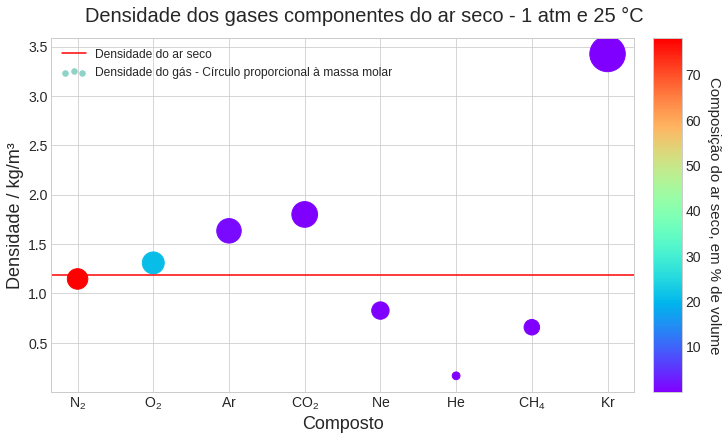
Now we have a plot very rich in information: the density of each gas in isolation, the density of dry air, the relation between density and molar mass, and the percentage composition of air. All of this in just two dimensions, which is excellent for static visualization. Three-dimensional plots are great when the person can interact, rotating them and zooming in. But in printed or online material that is static, they can be a bit confusing. So, putting more information into a two-dimensional plot is a better choice.
Conclusion #
So, did you like it? Here is a short list of the tools we used:
- Pint
- ChemPy
- SciPy
- pandas
- Web scraping with pandas
- Regular expressions
- Matplotlib
- ready-made styles
- color scale
- scatter plot
- advanced plot customization
- Standard Python
- map
- anonymous functions (lambda)
- list comprehensions
If you think this article helped you, share it on your social networks. It helps this project, which is only now starting to become better known, a lot. It is a simple request, but it helps a lot.
See you next time!


