

The Olympics are coming to an end… and, besides nostalgia and stories of perseverance, every Olympics leaves behind an enormous amount of data! In this article, we will see how to use Pandas to analyze part of that data, looking at how athletes’ times have evolved in track and field events.
If you prefer to watch a video, click the player below. The full article follows the video.
Getting the data #
The first step is to get the data for the analysis. Basically, there are three ways:
- direct retrieval from a reliable source that makes the data available in a proper form;
- direct retrieval from a reliable source that does not make the data available in a proper form;
- indirect retrieval, through third parties.
A reliable source would be https://olympics.com/, the website of the International Olympic Committee. However, it does not provide the data in a proper form, such as tables that could be downloaded directly from the site. Nor does it offer an API for requests. So one way to get the data would be scraping it, using, for example, Beautiful Soup or Selenium. Or even Pandas, as I have already shown in this article. But that would require studying the structure of the pages, especially because the site makes use of dynamically generated data.
Now, think about it… the Olympics is the most important sporting event in the world, so surely many people have already looked for the data for all sorts of reasons and, eventually, some of them may have made it available in a format suitable for our purposes. And the place where such data would probably be found is Kaggle, a site focused on data science and machine learning.
Try searching for “olympics” on Kaggle and you will see a reasonable number of datasets on the subject. In this case, I chose this one, which, according to its creator, contains the track and field data from https://olympics.com/ from 1896 to 2016. Obviously, we will need to test the consistency of the data, since we are getting it indirectly, but that is not much different from what we would do even when getting it directly. Note also that the dataset does not include 2020, which is quite reasonable considering that I am writing during the Olympics. But, as we will see, it is not very hard to insert current data, at least on a small scale.
With those considerations made, let’s go to the code. We start by importing
pandas and checking the data file which, in this case, was saved in a folder
called data under the name results.csv. The path to the file was assigned to
a variable file:
import pandas as pd
file = 'data/results.csv'
Looking at the first 5 and the last 5 lines of the file gives us a general idea of its organization:
!head -5 data/results.csvGender,Event,Location,Year,Medal,Name,Nationality,Result
M,10000M Men,Rio,2016,G,Mohamed FARAH,USA,25:05.17
M,10000M Men,Rio,2016,S,Paul Kipngetich TANUI,KEN,27:05.64
M,10000M Men,Rio,2016,B,Tamirat TOLA,ETH,27:06.26
M,10000M Men,Beijing,2008,G,Kenenisa BEKELE,ETH,27:01.17
!tail -5 data/results.csvW,Triple Jump Women,Athens,2004,S,Hrysopiyi DEVETZI,GRE,15.25
W,Triple Jump Women,Athens,2004,B,Tatyana LEBEDEVA,RUS,15.14
W,Triple Jump Women,Atlanta,1996,G,Inessa KRAVETS,UKR,15.33
W,Triple Jump Women,Atlanta,1996,S,Inna LASOVSKAYA,RUS,14.98
W,Triple Jump Women,Atlanta,1996,B,Sarka KASPARKOVA,CZE,14.98
The column called Result in the file refers to the athletes’ times, so I think it makes more sense to name it Time. A visual inspection of the file as a whole shows that some lines also have a column with information about the wind during the competition, even though this column is not named at the beginning of the file. I show this inspection in the video at the start of the article. And why there is wind data will be explained later in the article.
So, the following column names seem appropriate to me:
columns = ('Gender', 'Event', 'Location', 'Year', 'Medal', 'Name', 'Nationality', 'Time', 'Wind')Let’s then create our pandas dataframe with these columns, remembering to skip the first line of the file since it holds the column names we do not want to use:
df = pd.read_csv(file, names=columns, skiprows=1)
df| Gender | Event | Location | Year | Medal | Name | Nationality | Time | Wind | |
|---|---|---|---|---|---|---|---|---|---|
| 0 | M | 10000M Men | Rio | 2016 | G | Mohamed FARAH | USA | 25:05.17 | NaN |
| 1 | M | 10000M Men | Rio | 2016 | S | Paul Kipngetich TANUI | KEN | 27:05.64 | NaN |
| 2 | M | 10000M Men | Rio | 2016 | B | Tamirat TOLA | ETH | 27:06.26 | NaN |
| 3 | M | 10000M Men | Beijing | 2008 | G | Kenenisa BEKELE | ETH | 27:01.17 | NaN |
| 4 | M | 10000M Men | Beijing | 2008 | S | Sileshi SIHINE | ETH | 27:02.77 | NaN |
| ... | ... | ... | ... | ... | ... | ... | ... | ... | ... |
| 2389 | W | Triple Jump Women | Athens | 2004 | S | Hrysopiyi DEVETZI | GRE | 15.25 | NaN |
| 2390 | W | Triple Jump Women | Athens | 2004 | B | Tatyana LEBEDEVA | RUS | 15.14 | NaN |
| 2391 | W | Triple Jump Women | Atlanta | 1996 | G | Inessa KRAVETS | UKR | 15.33 | NaN |
| 2392 | W | Triple Jump Women | Atlanta | 1996 | S | Inna LASOVSKAYA | RUS | 14.98 | NaN |
| 2393 | W | Triple Jump Women | Atlanta | 1996 | B | Sarka KASPARKOVA | CZE | 14.98 | NaN |
2394 rows × 9 columns
The structure of the dataframe seems quite self-explanatory. But we can already notice some details. The format of the athletes’ times is not consistent. In the first rows we see the format minutes:seconds.hundredths and, in the last rows, we see only seconds.hundredths. Of course, from a sporting point of view it makes no sense to show minutes in short events, but this can make the analysis of the times harder if we decide to do an analysis involving more than one type of event. This is not necessarily a problem, just an observation.
Another observation is that there is redundancy in the gender information, since there is a column for it and the event names also include it.
To deepen our initial understanding of the data, let’s use the info and
describe methods. Both are used to get information about the dataframe:
df.info()<class 'pandas.core.frame.DataFrame'>
RangeIndex: 2394 entries, 0 to 2393
Data columns (total 9 columns):
# Column Non-Null Count Dtype
--- ------ -------------- -----
0 Gender 2394 non-null object
1 Event 2394 non-null object
2 Location 2394 non-null object
3 Year 2394 non-null int64
4 Medal 2394 non-null object
5 Name 2164 non-null object
6 Nationality 2394 non-null object
7 Time 2394 non-null object
8 Wind 12 non-null float64
dtypes: float64(1), int64(1), object(7)
memory usage: 168.5+ KB
With info we see that Pandas recognized the year column as integer and the
wind column as float. All the others are of type object which, according to
the package
documentation,
is the type for columns with strings or columns with mixed types. The time
column being of type object will have consequences later in the article.
The Wind column has only 12 non-null values, indicating that a good part of
the records lack this information. It may be that there really was no wind in
those cases, that is, it would be equivalent to zero, or that the information is
missing from the database for some reason.
There are also null records in the Name column, let’s see how this reflects in
our analysis throughout the article.
df.describe()| Year | Wind | |
|---|---|---|
| count | 2394.000000 | 12.00000 |
| mean | 1970.379282 | -0.02500 |
| std | 34.711777 | 0.56909 |
| min | 1896.000000 | -0.90000 |
| 25% | 1948.000000 | -0.15000 |
| 50% | 1976.000000 | 0.10000 |
| 75% | 2000.000000 | 0.22500 |
| max | 2016.000000 | 0.60000 |
The describe method, when used without any parameter, presents a brief
statistical summary of the numeric columns. In this case, the year and wind
columns. Note that the data apparently do go from 1896 to 2016, since these are
the minimum and maximum values, respectively. But that does not guarantee that
every Olympic year in this interval is present. To check:
df['Year'].unique()array([2016, 2008, 2000, 1992, 1984, 1976, 1968, 1960, 1952, 1936, 1928,
1920, 2012, 2004, 1996, 1980, 1972, 1964, 1956, 1948, 1932, 1924,
1912, 1908, 1900, 1904, 1896, 1988])
The unique method shows the unique values in a given column. Note that the
years are out of order, which makes the analysis a bit harder. Let’s sort them in
ascending order with the sort_values method:
df['Year'].sort_values().unique()array([1896, 1900, 1904, 1908, 1912, 1920, 1924, 1928, 1932, 1936, 1948,
1952, 1956, 1960, 1964, 1968, 1972, 1976, 1980, 1984, 1988, 1992,
1996, 2000, 2004, 2008, 2012, 2016])
Note that the years 1916, 1940 and 1944 are missing from this list. But that makes sense, those are world war years… with no Olympics.
The describe method can take parameters, among them include, which allows us
to force the presence of other types. Let’s see a description of the object types:
df.describe(include='object')| Gender | Event | Location | Medal | Name | Nationality | Time | |
|---|---|---|---|---|---|---|---|
| count | 2394 | 2394 | 2394 | 2394 | 2164 | 2394 | 2394 |
| unique | 2 | 47 | 23 | 3 | 1681 | 97 | 1947 |
| top | M | Marathon Men | London | B | Merlene OTTEY | USA | None |
| freq | 1632 | 84 | 253 | 799 | 7 | 639 | 43 |
Note that the information shown has changed. The count row is self-explanatory
and shows us something we already had from info. The unique row is similar
to the method we used earlier, showing how many unique values there are in each
column. The values for gender and medals are easy to understand. Besides that,
we find that there are 47 events in the dataset, that 23 locations have hosted
the Olympics, that athletes from 97 different nationalities have won medals in
track and field (at least up to 2016) and that 2164 - 1681 = 483 athletes won
more than one medal.
The top row shows the values that repeated the most, while the freq row shows how many times the values in the top row repeated. Thus, we see that the country that won the most medals was the United States.
But we need to be careful with the way the top and freq rows are presented, because if more than one entry occurs the same number of times, only one will be shown. Let’s look for the athlete who won the most medals in a more complete way. To do that, we show the beginning of the medal column, in descending order, after grouping the data by athlete name:
df.groupby(by='Name').count()['Medal'].sort_values(ascending=False).head()Name
Merlene OTTEY 7
Paavo NURMI 7
Tirunesh DIBABA 6
Usain BOLT 6
Irena KIRSZENSTEIN 6
Name: Medal, dtype: int64
We see that two athletes won 7 medals in track and field according to the dataset: Paavo Nurmi and Merlene Ottey, both well worth reading about. And Bolt also appears among the top ones, an athlete already covered here on the site. However, these numbers do not exactly match those that appear on the links I placed for each of them. This may be a sign of problems with the dataset. It could be, for example, a typo in the athletes’ names or simply an incomplete dataset. Let’s move on, but already aware of these signs of problems.
Notice that with just a few small commands we were already able to find relevant
information. Get used to doing this preliminary analysis with info and
describe. It helps a lot to understand how the data is presented, to get an
idea of its completeness and consistency, and to guide later analyses.
Now is the moment to choose what we want to do. There are several possibilities but, for this article, I decided to focus on the women’s 100 m. After all, I have already written an article about Usain Bolt’s data so let’s give the women some space too, especially with the Olympic record broken now in 2020.
Focusing on one event #
To filter the data we can use the loc method, searching the Event column
for 100M Women:
df.loc[df['Event'] == '100M Women']| Gender | Event | Location | Year | Medal | Name | Nationality | Time | Wind | |
|---|---|---|---|---|---|---|---|---|---|
| 1687 | W | 100M Women | Rio | 2016 | G | Elaine THOMPSON | JAM | 10.71 | NaN |
| 1688 | W | 100M Women | Rio | 2016 | S | Tori BOWIE | USA | 10.83 | NaN |
| 1689 | W | 100M Women | Rio | 2016 | B | Shelly-Ann FRASER-PRYCE | JAM | 10.86 | NaN |
| 1690 | W | 100M Women | Beijing | 2008 | G | Shelly-Ann FRASER-PRYCE | JAM | 10.78 | NaN |
| 1691 | W | 100M Women | Beijing | 2008 | S | Sherone SIMPSON | JAM | 10.98 | NaN |
| 1692 | W | 100M Women | Beijing | 2008 | S | Kerron STEWART | JAM | 10.98 | NaN |
| 1693 | W | 100M Women | Sydney | 2000 | S | Ekaterini THANOU | GRE | 11.12 | NaN |
| 1694 | W | 100M Women | Sydney | 2000 | S | Tanya LAWRENCE | JAM | 11.18 | NaN |
| 1695 | W | 100M Women | Sydney | 2000 | B | Merlene OTTEY | JAM | 11.19 | NaN |
| 1696 | W | 100M Women | Barcelona | 1992 | G | Gail DEVERS | USA | 10.82 | NaN |
| 1697 | W | 100M Women | Barcelona | 1992 | S | Juliet CUTHBERT | JAM | 10.83 | NaN |
| 1698 | W | 100M Women | Barcelona | 1992 | B | Irina PRIVALOVA | EUN | 10.84 | NaN |
| 1699 | W | 100M Women | Los Angeles | 1984 | G | Evelyn ASHFORD | USA | 10.97 | NaN |
| 1700 | W | 100M Women | Los Angeles | 1984 | S | Alice BROWN | USA | 11.13 | NaN |
| 1701 | W | 100M Women | Los Angeles | 1984 | B | Merlene OTTEY | JAM | 11.16 | NaN |
| 1702 | W | 100M Women | Montreal | 1976 | G | Annegret RICHTER-IRRGANG | FRG | 11.08 | NaN |
| 1703 | W | 100M Women | Montreal | 1976 | S | Renate STECHER | GDR | 11.13 | NaN |
| 1704 | W | 100M Women | Montreal | 1976 | B | Inge HELTEN | FRG | 11.17 | NaN |
| 1705 | W | 100M Women | Mexico | 1968 | G | Wyomia TYUS | USA | 11.0 | NaN |
| 1706 | W | 100M Women | Mexico | 1968 | S | Barbara FERRELL | USA | 11.1 | NaN |
| 1707 | W | 100M Women | Mexico | 1968 | B | Irena KIRSZENSTEIN | POL | 11.1 | NaN |
| 1708 | W | 100M Women | Rome | 1960 | G | Wilma RUDOLPH | USA | 11.0 | NaN |
| 1709 | W | 100M Women | Rome | 1960 | S | Dorothy HYMAN | GBR | 11.3 | NaN |
| 1710 | W | 100M Women | Rome | 1960 | B | Giuseppina LEONE | ITA | 11.3 | NaN |
| 1711 | W | 100M Women | Helsinki | 1952 | G | Marjorie JACKSON | AUS | 11.5 | NaN |
| 1712 | W | 100M Women | Helsinki | 1952 | S | Daphne HASENJAGER | RSA | 11.8 | NaN |
| 1713 | W | 100M Women | Helsinki | 1952 | B | Shirley STRICKLAND | AUS | 11.9 | NaN |
| 1714 | W | 100M Women | Berlin | 1936 | G | Helen STEPHENS | USA | 11.5 | NaN |
| 1715 | W | 100M Women | Berlin | 1936 | S | Stanislawa WALASIEWICZ | POL | 11.7 | NaN |
| 1716 | W | 100M Women | Berlin | 1936 | B | Käthe KRAUSS | GER | 11.9 | NaN |
| 1717 | W | 100M Women | Amsterdam | 1928 | G | Elizabeth ROBINSON | USA | 12.2 | NaN |
| 1718 | W | 100M Women | Amsterdam | 1928 | S | Fanny ROSENFELD | CAN | None | NaN |
| 1719 | W | 100M Women | Amsterdam | 1928 | B | Ethel SMITH | CAN | None | NaN |
| 1720 | W | 100M Women | London | 2012 | G | Shelly-Ann FRASER-PRYCE | JAM | 10.75 | NaN |
| 1721 | W | 100M Women | London | 2012 | S | Carmelita JETER | USA | 10.78 | NaN |
| 1722 | W | 100M Women | London | 2012 | B | Veronica CAMPBELL-BROWN | JAM | 10.81 | NaN |
| 1723 | W | 100M Women | Athens | 2004 | G | Yuliya NESTSIARENKA | BLR | 10.93 | NaN |
| 1724 | W | 100M Women | Athens | 2004 | S | Lauryn WILLIAMS | USA | 10.96 | NaN |
| 1725 | W | 100M Women | Athens | 2004 | B | Veronica CAMPBELL-BROWN | JAM | 10.97 | NaN |
| 1726 | W | 100M Women | Atlanta | 1996 | G | Gail DEVERS | USA | 10.94 | NaN |
| 1727 | W | 100M Women | Atlanta | 1996 | S | Merlene OTTEY | JAM | 10.94 | NaN |
| 1728 | W | 100M Women | Atlanta | 1996 | B | Gwen TORRENCE | USA | 10.96 | NaN |
| 1729 | W | 100M Women | Moscow | 1980 | G | Lyudmila KONDRATYEVA | URS | 11.06 | NaN |
| 1730 | W | 100M Women | Moscow | 1980 | S | Marlies OELSNER-GÃHR | GDR | 11.07 | NaN |
| 1731 | W | 100M Women | Moscow | 1980 | B | Ingrid AUERSWALD-LANGE | GDR | 11.14 | NaN |
| 1732 | W | 100M Women | Munich | 1972 | G | Renate STECHER | GDR | 11.07 | NaN |
| 1733 | W | 100M Women | Munich | 1972 | S | Raelene Ann BOYLE | AUS | 11.23 | NaN |
| 1734 | W | 100M Women | Munich | 1972 | B | Silvia CHIVAS BARO | CUB | 11.24 | NaN |
| 1735 | W | 100M Women | Tokyo | 1964 | G | Wyomia TYUS | USA | 11.4 | NaN |
| 1736 | W | 100M Women | Tokyo | 1964 | S | Edith MCGUIRE | USA | 11.6 | NaN |
| 1737 | W | 100M Women | Tokyo | 1964 | B | Ewa KLOBUKOWSKA | POL | 11.6 | NaN |
| 1738 | W | 100M Women | Melbourne / Stockholm | 1956 | G | Betty CUTHBERT | AUS | 11.5 | NaN |
| 1739 | W | 100M Women | Melbourne / Stockholm | 1956 | S | Christa STUBNICK | EUA | 11.7 | NaN |
| 1740 | W | 100M Women | Melbourne / Stockholm | 1956 | B | Marlene MATHEWS-WILLARD | AUS | 11.7 | NaN |
| 1741 | W | 100M Women | London | 1948 | G | Fanny BLANKERS-KOEN | NED | 11.9 | NaN |
| 1742 | W | 100M Women | London | 1948 | S | Dorothy HALL | GBR | 12.2 | NaN |
| 1743 | W | 100M Women | London | 1948 | B | Shirley STRICKLAND | AUS | 12.2 | NaN |
| 1744 | W | 100M Women | Los Angeles | 1932 | G | Stanislawa WALASIEWICZ | POL | 11.9 | NaN |
| 1745 | W | 100M Women | Los Angeles | 1932 | S | Hilda STRIKE | CAN | 11.9 | NaN |
| 1746 | W | 100M Women | Los Angeles | 1932 | B | Wilhelmina VON BREMEN | USA | 12.0 | NaN |
Now we need to choose again what to do, which path of analysis to take. We could, for example, evaluate the relative distance between the gold, silver and bronze medalists to check whether the times are getting closer over the years. Or evaluate the gain/loss of time between each edition of the event. There are many possibilities. Here, I will choose a relatively simple analysis, so that the article is an introduction to pandas. We will look at the evolution of the gold medalists’ times from the first Olympics that had the women’s 100 m competition up to the current edition.
Therefore, we need to add one more condition to our filter, searching for G (for gold) in the Medal column. The & symbol indicates that both conditions must be satisfied:
df.loc[(df['Event'] == '100M Women') & (df['Medal'] == 'G')]| Gender | Event | Location | Year | Medal | Name | Nationality | Time | Wind | |
|---|---|---|---|---|---|---|---|---|---|
| 1687 | W | 100M Women | Rio | 2016 | G | Elaine THOMPSON | JAM | 10.71 | NaN |
| 1690 | W | 100M Women | Beijing | 2008 | G | Shelly-Ann FRASER-PRYCE | JAM | 10.78 | NaN |
| 1696 | W | 100M Women | Barcelona | 1992 | G | Gail DEVERS | USA | 10.82 | NaN |
| 1699 | W | 100M Women | Los Angeles | 1984 | G | Evelyn ASHFORD | USA | 10.97 | NaN |
| 1702 | W | 100M Women | Montreal | 1976 | G | Annegret RICHTER-IRRGANG | FRG | 11.08 | NaN |
| 1705 | W | 100M Women | Mexico | 1968 | G | Wyomia TYUS | USA | 11.0 | NaN |
| 1708 | W | 100M Women | Rome | 1960 | G | Wilma RUDOLPH | USA | 11.0 | NaN |
| 1711 | W | 100M Women | Helsinki | 1952 | G | Marjorie JACKSON | AUS | 11.5 | NaN |
| 1714 | W | 100M Women | Berlin | 1936 | G | Helen STEPHENS | USA | 11.5 | NaN |
| 1717 | W | 100M Women | Amsterdam | 1928 | G | Elizabeth ROBINSON | USA | 12.2 | NaN |
| 1720 | W | 100M Women | London | 2012 | G | Shelly-Ann FRASER-PRYCE | JAM | 10.75 | NaN |
| 1723 | W | 100M Women | Athens | 2004 | G | Yuliya NESTSIARENKA | BLR | 10.93 | NaN |
| 1726 | W | 100M Women | Atlanta | 1996 | G | Gail DEVERS | USA | 10.94 | NaN |
| 1729 | W | 100M Women | Moscow | 1980 | G | Lyudmila KONDRATYEVA | URS | 11.06 | NaN |
| 1732 | W | 100M Women | Munich | 1972 | G | Renate STECHER | GDR | 11.07 | NaN |
| 1735 | W | 100M Women | Tokyo | 1964 | G | Wyomia TYUS | USA | 11.4 | NaN |
| 1738 | W | 100M Women | Melbourne / Stockholm | 1956 | G | Betty CUTHBERT | AUS | 11.5 | NaN |
| 1741 | W | 100M Women | London | 1948 | G | Fanny BLANKERS-KOEN | NED | 11.9 | NaN |
| 1744 | W | 100M Women | Los Angeles | 1932 | G | Stanislawa WALASIEWICZ | POL | 11.9 | NaN |
OK, the filter seems to make sense, so let’s assign this dataframe to a variable so that we can do further analyses:
df_women_100m = df.loc[(df['Event'] == '100M Women') & (df['Medal'] == 'G')]
df_women_100m| Gender | Event | Location | Year | Medal | Name | Nationality | Time | Wind | |
|---|---|---|---|---|---|---|---|---|---|
| 1687 | W | 100M Women | Rio | 2016 | G | Elaine THOMPSON | JAM | 10.71 | NaN |
| 1690 | W | 100M Women | Beijing | 2008 | G | Shelly-Ann FRASER-PRYCE | JAM | 10.78 | NaN |
| 1696 | W | 100M Women | Barcelona | 1992 | G | Gail DEVERS | USA | 10.82 | NaN |
| 1699 | W | 100M Women | Los Angeles | 1984 | G | Evelyn ASHFORD | USA | 10.97 | NaN |
| 1702 | W | 100M Women | Montreal | 1976 | G | Annegret RICHTER-IRRGANG | FRG | 11.08 | NaN |
| 1705 | W | 100M Women | Mexico | 1968 | G | Wyomia TYUS | USA | 11.0 | NaN |
| 1708 | W | 100M Women | Rome | 1960 | G | Wilma RUDOLPH | USA | 11.0 | NaN |
| 1711 | W | 100M Women | Helsinki | 1952 | G | Marjorie JACKSON | AUS | 11.5 | NaN |
| 1714 | W | 100M Women | Berlin | 1936 | G | Helen STEPHENS | USA | 11.5 | NaN |
| 1717 | W | 100M Women | Amsterdam | 1928 | G | Elizabeth ROBINSON | USA | 12.2 | NaN |
| 1720 | W | 100M Women | London | 2012 | G | Shelly-Ann FRASER-PRYCE | JAM | 10.75 | NaN |
| 1723 | W | 100M Women | Athens | 2004 | G | Yuliya NESTSIARENKA | BLR | 10.93 | NaN |
| 1726 | W | 100M Women | Atlanta | 1996 | G | Gail DEVERS | USA | 10.94 | NaN |
| 1729 | W | 100M Women | Moscow | 1980 | G | Lyudmila KONDRATYEVA | URS | 11.06 | NaN |
| 1732 | W | 100M Women | Munich | 1972 | G | Renate STECHER | GDR | 11.07 | NaN |
| 1735 | W | 100M Women | Tokyo | 1964 | G | Wyomia TYUS | USA | 11.4 | NaN |
| 1738 | W | 100M Women | Melbourne / Stockholm | 1956 | G | Betty CUTHBERT | AUS | 11.5 | NaN |
| 1741 | W | 100M Women | London | 1948 | G | Fanny BLANKERS-KOEN | NED | 11.9 | NaN |
| 1744 | W | 100M Women | Los Angeles | 1932 | G | Stanislawa WALASIEWICZ | POL | 11.9 | NaN |
Checking the completeness of the dataset #
Before doing more analyses on top of the data, let’s check whether it is complete and seemingly coherent. We saw earlier that the years 1916, 1940 and 1944 are not present in the dataset because there were no Olympics in those years. But let’s see whether the dataset is complete for the women’s 100 m. After all, earlier we did not have such a granular analysis, event by event, so some might be incomplete without our being able to know.
Following the same procedure as before, let’s sort the year column:
df_women_100m.sort_values(by='Year')| Gender | Event | Location | Year | Medal | Name | Nationality | Time | Wind | |
|---|---|---|---|---|---|---|---|---|---|
| 1717 | W | 100M Women | Amsterdam | 1928 | G | Elizabeth ROBINSON | USA | 12.2 | NaN |
| 1744 | W | 100M Women | Los Angeles | 1932 | G | Stanislawa WALASIEWICZ | POL | 11.9 | NaN |
| 1714 | W | 100M Women | Berlin | 1936 | G | Helen STEPHENS | USA | 11.5 | NaN |
| 1741 | W | 100M Women | London | 1948 | G | Fanny BLANKERS-KOEN | NED | 11.9 | NaN |
| 1711 | W | 100M Women | Helsinki | 1952 | G | Marjorie JACKSON | AUS | 11.5 | NaN |
| 1738 | W | 100M Women | Melbourne / Stockholm | 1956 | G | Betty CUTHBERT | AUS | 11.5 | NaN |
| 1708 | W | 100M Women | Rome | 1960 | G | Wilma RUDOLPH | USA | 11.0 | NaN |
| 1735 | W | 100M Women | Tokyo | 1964 | G | Wyomia TYUS | USA | 11.4 | NaN |
| 1705 | W | 100M Women | Mexico | 1968 | G | Wyomia TYUS | USA | 11.0 | NaN |
| 1732 | W | 100M Women | Munich | 1972 | G | Renate STECHER | GDR | 11.07 | NaN |
| 1702 | W | 100M Women | Montreal | 1976 | G | Annegret RICHTER-IRRGANG | FRG | 11.08 | NaN |
| 1729 | W | 100M Women | Moscow | 1980 | G | Lyudmila KONDRATYEVA | URS | 11.06 | NaN |
| 1699 | W | 100M Women | Los Angeles | 1984 | G | Evelyn ASHFORD | USA | 10.97 | NaN |
| 1696 | W | 100M Women | Barcelona | 1992 | G | Gail DEVERS | USA | 10.82 | NaN |
| 1726 | W | 100M Women | Atlanta | 1996 | G | Gail DEVERS | USA | 10.94 | NaN |
| 1723 | W | 100M Women | Athens | 2004 | G | Yuliya NESTSIARENKA | BLR | 10.93 | NaN |
| 1690 | W | 100M Women | Beijing | 2008 | G | Shelly-Ann FRASER-PRYCE | JAM | 10.78 | NaN |
| 1720 | W | 100M Women | London | 2012 | G | Shelly-Ann FRASER-PRYCE | JAM | 10.75 | NaN |
| 1687 | W | 100M Women | Rio | 2016 | G | Elaine THOMPSON | JAM | 10.71 | NaN |
Some interesting things already appear. The first edition in the dataset is 1928 and this is correct. The first women’s edition really was in 1928, while the men’s has taken place since 1896.
Now, there are two strange absences: 1988 and 2000. Let’s look for those years in the full dataframe, starting with the year 2000:
df.loc[(df['Year'] == 2000) & (df['Event'] == '100M Women')]| Gender | Event | Location | Year | Medal | Name | Nationality | Time | Wind | |
|---|---|---|---|---|---|---|---|---|---|
| 1693 | W | 100M Women | Sydney | 2000 | S | Ekaterini THANOU | GRE | 11.12 | NaN |
| 1694 | W | 100M Women | Sydney | 2000 | S | Tanya LAWRENCE | JAM | 11.18 | NaN |
| 1695 | W | 100M Women | Sydney | 2000 | B | Merlene OTTEY | JAM | 11.19 | NaN |
Note that there is, indeed, a record of the event in the dataset, but without a gold medalist. And, strange as it may seem, this is also correct. The gold medalist would have been Marion Jones but, due to the use of substances banned in the sport, she ended up losing the medal and the International Olympic Committee decided not to promote Ekaterini Thanou, given that she too had been involved in doping cases. It is a long story that can be read at the links I left here.
What matters here is that the dataset is coherent on this point. It remains to decide what to do with this information. Since we chose to filter only gold medalists, the year 2000 would indeed be left without a time record. Another approach would be to consider Thanou’s time, since it would officially be the best time of that year’s final, perhaps adding some visual indication that she is not a gold medalist. It all depends on the story you want to tell and the kind of analysis you want to do. Here, I will keep the decision to include only gold medalists and, therefore, the year 2000 will be left without a record.
Let’s evaluate the year 1988 now:
df.loc[(df['Year'] == 1988) & (df['Event'] == '100M Women')]| Gender | Event | Location | Year | Medal | Name | Nationality | Time | Wind |
|---|
Here the case is different, there is no record of the event for 1988, which is wrong. It may be that this year is compromised in the dataset, let’s check:
df.loc[(df['Year'] == 1988)]| Gender | Event | Location | Year | Medal | Name | Nationality | Time | Wind | |
|---|---|---|---|---|---|---|---|---|---|
| 423 | M | 20Km Race Walk Men | Seoul | 1988 | G | Jozef PRIBILINEC | TCH | 1:19:57 | NaN |
| 424 | M | 20Km Race Walk Men | Seoul | 1988 | S | Ronald WEIGEL | GDR | 1:20:00 | NaN |
| 425 | M | 20Km Race Walk Men | Seoul | 1988 | B | Maurizio DAMILANO | ITA | 1:20:14 | NaN |
| 911 | M | 50Km Race Walk Men | Seoul | 1988 | G | Vyacheslav IVANENKO | URS | 3:38:29 | NaN |
| 912 | M | 50Km Race Walk Men | Seoul | 1988 | S | Ronald WEIGEL | GDR | 3:38:56 | NaN |
| 913 | M | 50Km Race Walk Men | Seoul | 1988 | B | Hartwig GAUDER | GDR | 3:39:45 | NaN |
| 1058 | M | Decathlon Men | Seoul | 1988 | G | Christian SCHENK | GDR | 8488.0 | NaN |
| 1059 | M | Decathlon Men | Seoul | 1988 | S | Torsten VOSS | GDR | 8399.0 | NaN |
| 1060 | M | Decathlon Men | Seoul | 1988 | B | Dave STEEN | CAN | 8328.0 | NaN |
| 1426 | M | Marathon Men | Seoul | 1988 | G | Gelindo BORDIN | ITA | 2:10:32 | NaN |
| 1427 | M | Marathon Men | Seoul | 1988 | S | Douglas WAKIIHURI | KEN | 2:10:47 | NaN |
| 1428 | M | Marathon Men | Seoul | 1988 | B | Hussein AHMED SALAH | DJI | 2:10:59 | NaN |
| 2162 | W | Heptathlon Women | Seoul | 1988 | G | Jackie JOYNER | USA | 7291 P. | NaN |
| 2163 | W | Heptathlon Women | Seoul | 1988 | S | Sabine JOHN | GDR | 6897.0 | NaN |
| 2164 | W | Heptathlon Women | Seoul | 1988 | B | Anke BEHMER | GDR | 6858.0 | NaN |
| 2319 | W | Marathon Women | Seoul | 1988 | G | Rosa MOTA | POR | 2:25:40 | NaN |
| 2320 | W | Marathon Women | Seoul | 1988 | S | Lisa ONDIEKI | AUS | 2:25:53 | NaN |
| 2321 | W | Marathon Women | Seoul | 1988 | B | Katrin DÃRRE | GDR | 2:26:21 | NaN |
There really is a problem in the dataset, all the short-distance events are missing. And, unfortunately, there is no warning about it on the dataset’s Kaggle page. That is why it is important to do these coherence tests. Note that even if the data came directly from the official Olympics website this kind of check is essential, because errors happen. Here, it may be that the site did not have the data at the time of collection or that there was some error in the algorithm used to scrape the data. Anyway, countless possibilities; what matters is that we noticed the problem and it is simple to fix.
A quick search on the Olympics website
itself
shows that the 1988 gold medalist was Florence Griffith
Joyner,
another athlete whose story is interesting (and short…). With the data from
the site, we can update our dataframe, also taking the opportunity to add the
2020 gold medalist, Elaine
Thompson. To do that, we
will use the loc method, adding rows after the existing records:
df_women_100m.loc[len(df_women_100m.index)] = ['W', '100M Women', 'Seoul', 1988, 'G', 'Florence Griffith JOYNER', 'USA', 10.54, 3.0]
df_women_100m.loc[len(df_women_100m.index)] = ['W', '100M Women', 'Tokyo', 2020, 'G', 'Elaine THOMPSON', 'JAM', 10.61, -0.6]
df_women_100m| Gender | Event | Location | Year | Medal | Name | Nationality | Time | Wind | |
|---|---|---|---|---|---|---|---|---|---|
| 1687 | W | 100M Women | Rio | 2016 | G | Elaine THOMPSON | JAM | 10.71 | NaN |
| 1690 | W | 100M Women | Beijing | 2008 | G | Shelly-Ann FRASER-PRYCE | JAM | 10.78 | NaN |
| 1696 | W | 100M Women | Barcelona | 1992 | G | Gail DEVERS | USA | 10.82 | NaN |
| 1699 | W | 100M Women | Los Angeles | 1984 | G | Evelyn ASHFORD | USA | 10.97 | NaN |
| 1702 | W | 100M Women | Montreal | 1976 | G | Annegret RICHTER-IRRGANG | FRG | 11.08 | NaN |
| 1705 | W | 100M Women | Mexico | 1968 | G | Wyomia TYUS | USA | 11.0 | NaN |
| 1708 | W | 100M Women | Rome | 1960 | G | Wilma RUDOLPH | USA | 11.0 | NaN |
| 1711 | W | 100M Women | Helsinki | 1952 | G | Marjorie JACKSON | AUS | 11.5 | NaN |
| 1714 | W | 100M Women | Berlin | 1936 | G | Helen STEPHENS | USA | 11.5 | NaN |
| 1717 | W | 100M Women | Amsterdam | 1928 | G | Elizabeth ROBINSON | USA | 12.2 | NaN |
| 1720 | W | 100M Women | London | 2012 | G | Shelly-Ann FRASER-PRYCE | JAM | 10.75 | NaN |
| 1723 | W | 100M Women | Athens | 2004 | G | Yuliya NESTSIARENKA | BLR | 10.93 | NaN |
| 1726 | W | 100M Women | Atlanta | 1996 | G | Gail DEVERS | USA | 10.94 | NaN |
| 1729 | W | 100M Women | Moscow | 1980 | G | Lyudmila KONDRATYEVA | URS | 11.06 | NaN |
| 1732 | W | 100M Women | Munich | 1972 | G | Renate STECHER | GDR | 11.07 | NaN |
| 1735 | W | 100M Women | Tokyo | 1964 | G | Wyomia TYUS | USA | 11.4 | NaN |
| 1738 | W | 100M Women | Melbourne / Stockholm | 1956 | G | Betty CUTHBERT | AUS | 11.5 | NaN |
| 1741 | W | 100M Women | London | 1948 | G | Fanny BLANKERS-KOEN | NED | 11.9 | NaN |
| 1744 | W | 100M Women | Los Angeles | 1932 | G | Stanislawa WALASIEWICZ | POL | 11.9 | NaN |
| 19 | W | 100M Women | Seoul | 1988 | G | Florence Griffith JOYNER | USA | 10.54 | 3.0 |
| 20 | W | 100M Women | Tokyo | 2020 | G | Elaine THOMPSON | JAM | 10.61 | -0.6 |
Here we notice something interesting. Joyner’s time in 1988 was better than Thompson’s now in 2020. However, since Joyner had a large tailwind of 3.0 m/s, it was not considered an Olympic record. The previous Olympic record was Joyner’s own, with a time of 10.62 s set in the quarterfinals of the 1988 Olympics with a tailwind of 1.0 m/s and, therefore, within the limit accepted for record purposes.
By the way, a brief tangent about wind. The world record to this day is again Florence Joyner’s, with a time of 10.49 s set at the trials for the 1988 Olympics. The wind officially recorded during the race was 0 m/s. However, Joyner’s time was so striking that people took a closer look at the records of the whole event that day. In several events, winds of around 5.0 m/s were recorded, so it is believed that there was a failure in the anemometer (an instrument that measures the speed of a fluid) used in the race. In any case, the record was kept and, even if it were removed, the second best time is still Joyner’s, with 10.61 s without wind assistance. That time has now been equaled by Thompson.
Again, here we have something to think about. The goal is to show the evolution of the gold medalists’ times. From this standpoint, Joyner’s time is better, but there was wind assistance. It is up to whoever is telling the story to decide how to handle this situation. Whether to make it evident in some way, or to replace it with the best unassisted time. Anyway, choices to be made, and we will deal with them ahead.
Tidying up the dataframe #
Now that we are confident in the consistency of our data and have learned more about it, let’s tidy up. We can remove redundant columns:
df_women_100m = df_women_100m.drop(columns=['Gender', 'Event', 'Medal'])
df_women_100m| Location | Year | Name | Nationality | Time | Wind | |
|---|---|---|---|---|---|---|
| 1687 | Rio | 2016 | Elaine THOMPSON | JAM | 10.71 | NaN |
| 1690 | Beijing | 2008 | Shelly-Ann FRASER-PRYCE | JAM | 10.78 | NaN |
| 1696 | Barcelona | 1992 | Gail DEVERS | USA | 10.82 | NaN |
| 1699 | Los Angeles | 1984 | Evelyn ASHFORD | USA | 10.97 | NaN |
| 1702 | Montreal | 1976 | Annegret RICHTER-IRRGANG | FRG | 11.08 | NaN |
| 1705 | Mexico | 1968 | Wyomia TYUS | USA | 11.0 | NaN |
| 1708 | Rome | 1960 | Wilma RUDOLPH | USA | 11.0 | NaN |
| 1711 | Helsinki | 1952 | Marjorie JACKSON | AUS | 11.5 | NaN |
| 1714 | Berlin | 1936 | Helen STEPHENS | USA | 11.5 | NaN |
| 1717 | Amsterdam | 1928 | Elizabeth ROBINSON | USA | 12.2 | NaN |
| 1720 | London | 2012 | Shelly-Ann FRASER-PRYCE | JAM | 10.75 | NaN |
| 1723 | Athens | 2004 | Yuliya NESTSIARENKA | BLR | 10.93 | NaN |
| 1726 | Atlanta | 1996 | Gail DEVERS | USA | 10.94 | NaN |
| 1729 | Moscow | 1980 | Lyudmila KONDRATYEVA | URS | 11.06 | NaN |
| 1732 | Munich | 1972 | Renate STECHER | GDR | 11.07 | NaN |
| 1735 | Tokyo | 1964 | Wyomia TYUS | USA | 11.4 | NaN |
| 1738 | Melbourne / Stockholm | 1956 | Betty CUTHBERT | AUS | 11.5 | NaN |
| 1741 | London | 1948 | Fanny BLANKERS-KOEN | NED | 11.9 | NaN |
| 1744 | Los Angeles | 1932 | Stanislawa WALASIEWICZ | POL | 11.9 | NaN |
| 19 | Seoul | 1988 | Florence Griffith JOYNER | USA | 10.54 | 3.0 |
| 20 | Tokyo | 2020 | Elaine THOMPSON | JAM | 10.61 | -0.6 |
And also fix the index of the records, which still refers to row numbers of the original full dataframe, and take the chance to leave the dataframe sorted by year to make it easier to understand:
df_women_100m = df_women_100m.sort_values(by='Year').reset_index(drop=True)
df_women_100m| Location | Year | Name | Nationality | Time | Wind | |
|---|---|---|---|---|---|---|
| 0 | Amsterdam | 1928 | Elizabeth ROBINSON | USA | 12.2 | NaN |
| 1 | Los Angeles | 1932 | Stanislawa WALASIEWICZ | POL | 11.9 | NaN |
| 2 | Berlin | 1936 | Helen STEPHENS | USA | 11.5 | NaN |
| 3 | London | 1948 | Fanny BLANKERS-KOEN | NED | 11.9 | NaN |
| 4 | Helsinki | 1952 | Marjorie JACKSON | AUS | 11.5 | NaN |
| 5 | Melbourne / Stockholm | 1956 | Betty CUTHBERT | AUS | 11.5 | NaN |
| 6 | Rome | 1960 | Wilma RUDOLPH | USA | 11.0 | NaN |
| 7 | Tokyo | 1964 | Wyomia TYUS | USA | 11.4 | NaN |
| 8 | Mexico | 1968 | Wyomia TYUS | USA | 11.0 | NaN |
| 9 | Munich | 1972 | Renate STECHER | GDR | 11.07 | NaN |
| 10 | Montreal | 1976 | Annegret RICHTER-IRRGANG | FRG | 11.08 | NaN |
| 11 | Moscow | 1980 | Lyudmila KONDRATYEVA | URS | 11.06 | NaN |
| 12 | Los Angeles | 1984 | Evelyn ASHFORD | USA | 10.97 | NaN |
| 13 | Seoul | 1988 | Florence Griffith JOYNER | USA | 10.54 | 3.0 |
| 14 | Barcelona | 1992 | Gail DEVERS | USA | 10.82 | NaN |
| 15 | Atlanta | 1996 | Gail DEVERS | USA | 10.94 | NaN |
| 16 | Athens | 2004 | Yuliya NESTSIARENKA | BLR | 10.93 | NaN |
| 17 | Beijing | 2008 | Shelly-Ann FRASER-PRYCE | JAM | 10.78 | NaN |
| 18 | London | 2012 | Shelly-Ann FRASER-PRYCE | JAM | 10.75 | NaN |
| 19 | Rio | 2016 | Elaine THOMPSON | JAM | 10.71 | NaN |
| 20 | Tokyo | 2020 | Elaine THOMPSON | JAM | 10.61 | -0.6 |
From our earlier analysis, we have already seen that the Time column is seen
by Pandas as being of type object, which is wrong. We need to turn it into a
numeric type to continue our analyses. But, before that, pay a bit more
attention to the time data. Do you notice any difference in the way it is
presented over time?
The records up to 1968 have only one decimal place. A detailed history of the use of automatic timing devices in track and field can be read here but, in short, times with precision to the hundredths only really began to be used in the Olympics in 1972. However, since the 1928 Olympics automatic timers had already been used, together with manual records. At the Olympics of the 1960s the official results were obtained with automatic timers, but officially published rounded to the first decimal place. Only in 1972 did they begin to officially publish values to the hundredths. One more interesting piece of information that can be obtained by looking at how the data was presented.
Pandas has two very useful methods for dealing with time records,
to_datetime
and
to_timedelta
which would certainly be necessary to handle the times of longer events, where
the clock format Hour:minute:second.millisecond is used. However, in our case,
the values are similar enough to the float format that we can risk a direct
conversion to that type, since it will certainly be less work:
df_women_100m['Time'].astype(float)0 12.20
1 11.90
2 11.50
3 11.90
4 11.50
5 11.50
6 11.00
7 11.40
8 11.00
9 11.07
10 11.08
11 11.06
12 10.97
13 10.54
14 10.82
15 10.94
16 10.93
17 10.78
18 10.75
19 10.71
20 10.61
Name: Time, dtype: float64
Great, Pandas managed to convert all the records to float without problems. But notice that we lost the information that the data before 1972 has only one decimal place, because the conversion gives all of them two. That is why a preliminary analysis is important before doing major manipulations, since the preliminary analysis often provides many insights that lead to interesting research.
Let’s save the column data as float:
df_women_100m['Time'] = df_women_100m['Time'].astype(float)And, to make it easier to understand, let’s make the unit of this time explicit, seconds. This will also help us later in the plots.
df_women_100m = df_women_100m.rename(columns={'Time': 'Time / s'})Let’s then evaluate info and describe of our dataframe:
df_women_100m.info()<class 'pandas.core.frame.DataFrame'>
RangeIndex: 21 entries, 0 to 20
Data columns (total 6 columns):
# Column Non-Null Count Dtype
--- ------ -------------- -----
0 Location 21 non-null object
1 Year 21 non-null int64
2 Name 21 non-null object
3 Nationality 21 non-null object
4 Time / s 21 non-null float64
5 Wind 2 non-null float64
dtypes: float64(2), int64(1), object(3)
memory usage: 1.1+ KB
df_women_100m.describe()| Year | Time / s | Wind | |
|---|---|---|---|
| count | 21.000000 | 21.000000 | 2.000000 |
| mean | 1975.809524 | 11.150476 | 1.200000 |
| std | 27.927798 | 0.453315 | 2.545584 |
| min | 1928.000000 | 10.540000 | -0.600000 |
| 25% | 1956.000000 | 10.820000 | 0.300000 |
| 50% | 1976.000000 | 11.000000 | 1.200000 |
| 75% | 1996.000000 | 11.500000 | 2.100000 |
| max | 2020.000000 | 12.200000 | 3.000000 |
df_women_100m.describe(include='object')| Location | Name | Nationality | |
|---|---|---|---|
| count | 21 | 21 | 21 |
| unique | 18 | 17 | 9 |
| top | Los Angeles | Gail DEVERS | USA |
| freq | 2 | 2 | 9 |
See that now we have Year and Time as numeric columns, which is what we need for presenting our results. Besides that, no athlete won gold more than twice in this event and the country with the most gold medals is the United States.
Presenting the results. Images! #
Finally, let’s get to the plots. Pandas has good integration with Matplotlib,
about which I have already written some
articles here on the site. Just call the plot
method and pass the columns for the x and y axes:
df_women_100m.plot(x='Year', y='Time / s')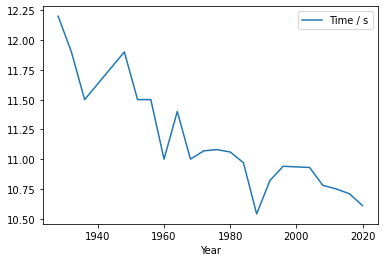
The best way to present this would be a scatter plot, since the lines connecting the periods do not make much sense:
df_women_100m.plot.scatter(x='Year', y='Time / s')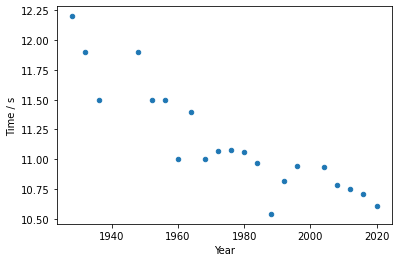
OK, it is not one of the prettiest plots and a lot could be improved. I have already written an article about customizing plots with Matplotlib and we could go that way. However, it may be more practical to try using ready-made styles:
import matplotlib.pyplot as plt
plt.style.use('ggplot')df_women_100m.plot.scatter(x='Year', y='Time / s')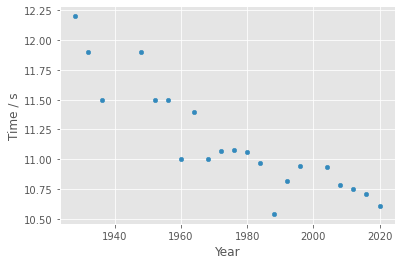
Better, it really looks more presentable and perhaps, for a static media format, such as print, it would be adequate with a few more adjustments. But for a presentation in digital media, more interactivity would be interesting. For that, let’s replace the pandas plotting backend with Plotly, an excellent package for building interactive plots:
pd.options.plotting.backend = "plotly"

df_women_100m.plot.scatter(x='Year', y='Time / s')
We already have a significant visual improvement. But try hovering the mouse (or your finger, if you are on a touch device) over each point. Information about the values on the horizontal and vertical axes appears. Besides that, there is a toolbar at the top of the plot, which lets you zoom into regions and even save the figure. Excellent for digital media, right? And we can still improve. Let’s enrich the information that appears on each point, showing the athlete’s name and nationality:
df_women_100m.plot.scatter(x='Year', y='Time / s',
                           hover_name='Name',
                           hover_data=['Nationality'])
It is still possible to pass more information. We can play with the size of each point and its color. We can tie these two aspects to each athlete’s time:
df_women_100m.plot.scatter(x='Year', y='Time / s',
                           hover_name='Name',
                           hover_data=['Nationality'],
                           size='Time / s',
                           color='Time / s')
Notice what plotly did. Each circle has an area proportional to the athlete’s time. This can be a bit hard to notice since the range of times is small, but look at the 1928 time and the 2020 time and perhaps you will see it. In the video I explain how we could make this difference more evident. But what draws the most attention is that plotly automatically created a color scale that varies gradually with each athlete’s time. The level of visual information this adds is high, since the reader identifies that it is something gradual even from a distance and easily finds the maxima and minima.
Even so, there is room for improvement. Usually these scales are built so that the highest value gets the most striking or “hot” color. However, in our context, the lower time is the more important one, so it would be nice to be able to change this color scheme. For that, we will import plotly directly. That way, we have access to the themes and color scales.
Among the color scales, I really like the one called Viridis. Note that in the
code below it was used under the name Viridis_r, the _r is for using the
reversed color scale, so that the lowest time gets the most attractive color.
import plotlydf_women_100m.plot.scatter(x='Year', y='Time / s',
hover_name='Name',
hover_data=['Nationality'],
size='Time / s',
color='Time / s',
color_continuous_scale=plotly.colors.sequential.Viridis_r,
)Finally, let’s give the plot a title. Always make what you want to show as explicit as possible with a good title and with properly labeled axes.
df_women_100m.plot.scatter(x='Year', y='Time / s',
                           hover_name='Name',
                           hover_data=['Nationality'],
                           size='Time / s',
                           color='Time / s',
                           color_continuous_scale=plotly.colors.sequential.Viridis_r,
                           title="Summer Olympics - Women's 100 m - Gold medalists time progression")
Conclusion #
Certainly there is still much to explore in this dataset and other improvements could also be made to our plot. But I believe that a lot has been done in this article and I want to keep it as a simple introduction to Pandas. I will reinforce some of the points discussed:
- obtaining data;
- checking the quality, completeness and consistency of the data;
- always do the check, even when the data comes from original sources or was obtained by you, because errors can happen;
- seek to understand the history and context behind the data;
infoanddescribeare very useful;- make transformations only when they prove necessary;
- think about which story can be told;
- be open to new possibilities for stories;
- the absence of a data point or an outlier also tells stories;
- a plot does not live by x and y alone, explore sizes, shapes and colors.
I’ll leave some ideas here:
- Surely there is some way to indicate that the 1988 time is not the Olympic record. Perhaps a black circle (any color really, as long as it is outside the scale already used), or colorless with a wider border? Or a symbol other than a circle? And, of course, a footnote explaining it;
- Likewise, Thanou’s time could appear as the 2000 time, but with some distinction from the others;
- The dataset is large, explore it:
- Has the gap between medalists shrunk over time? Are the contests closer today than in the past?
- Which events are missing from this dataset?
- How does the distribution of medals change over time? Has any country that was part of the Soviet Union managed to keep the relevance it had in the USSR era? What is the progression of athletes from underdeveloped or developing countries in these sports?
- Would it be possible to build a predictive model of the times for the next Olympics?
Each of these ideas can be applied to each event and some to the whole set. Have fun and share your explorations in the comments.
See you next time.


