

Is it possible to study for the college entrance exam and still learn Python? Of course! And that is one of the goals of the Brazilian Exam Problems category on this site. In it, we use computational tools to analyze and expand problems from the ENEM (Exame Nacional do Ensino Médio), the national high school exam that Brazilian students take to enter universities.
In today’s article, we analyze a problem from the 2019 exam. And, along the way, we learn to make 3D and 4D(?!) plots with Matplotlib.
The Jupyter Notebook file with all the code in this article is available at this link. The code in the notebook is in Portuguese, while the code shown here is in English.
The problem statement #
Below is the statement of the problem, taken from the regular yellow exam given in 2019 (the original is in Portuguese):
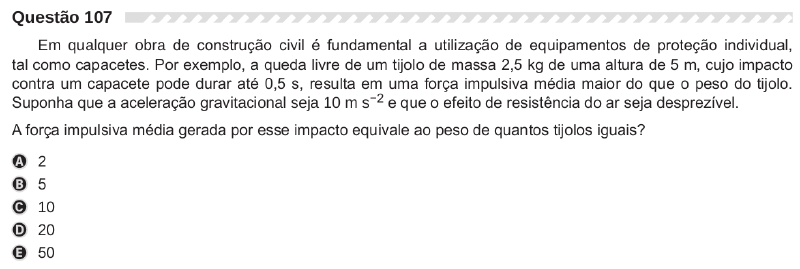
Clearly, this is a Physics problem. Let’s look at the topics involved:
- free fall of a brick
- impulse
The physics of the problem #
It is nothing new that some ENEM statements leave something to be desired when it comes to the clarity of the information. For example, there is no information about the type of collision (elastic or inelastic?), about the final velocity after the collision (we have to take 0 m/s, but it is a bit unrealistic to assume it stops abruptly), about what counts as the mean impulsive force (the net force, or the force acting opposite to the fall at the moment of impact?), and the “can last” in the passage the impact can last up to 0.5 s is imprecise. But let’s model the problem with what we have.
Considering the conservation of mechanical energy, where the final kinetic energy equals the initial potential energy, we have:
$$ \frac{m v^2}{2} = mgh \therefore v = \sqrt{2gh} $$From this we get the velocity of the brick immediately before the impact.
From the Impulse-Momentum Theorem:
$$ I = \Delta Q \\ F_m \cdot \Delta t = m \cdot \Delta v \therefore F_m = \frac{m \cdot \Delta v}{\Delta t} $$where I is the impulse, Q is the linear momentum, and Fm is the mean force of the impact.
Since the problem asks for the answer in terms of the weight of the brick, with N the number of bricks and P the weight of one brick, what is being asked is:
$$ N = \frac{F_m}{P} $$Note that, since the mass of the brick appears in both the mean force and the weight, we are in fact also computing the ratio between the (de)celeration of the brick and the acceleration of gravity. We will come back to this point later.
Solving with Python #
Let’s start by importing the necessary libraries. Since we want to work with
units, we will use the
pint
library, already famous on this site. For the math, we could use the
math library, which is part of
the standard Python installation. However, since we will build plots later to
expand the problem by varying values, we will use
NumPy.
import pint
import numpy as np
The following lines create a unit registry and a quantity constructor, and already configure the library to be used in future Matplotlib plots.
ureg = pint.UnitRegistry()
Q_ = ureg.Quantity
ureg.setup_matplotlib(True)
Now let’s assign the values in the statement to variables:
GRAVITY_ACCELERATION = Q_('10 m/s^2')

brick_mass = Q_('2.5 kg')
brick_fall_height = Q_('5 m')
brick_helmet_impact_time = Q_('0.5 s')
The great advantage of programming is being able to encapsulate repetitive calculations in functions. So let’s define functions for the physical relations we found earlier:
def weight_force(mass):
    return mass * GRAVITY_ACCELERATION


def free_fall_velocity(fall_height):
    return np.sqrt(2 * GRAVITY_ACCELERATION * fall_height)


def linear_momentum_change(mass, velocity_change):
    return mass * velocity_change


def mean_impulsive_force(mass, fall_height, impact_time):
    return linear_momentum_change(mass, free_fall_velocity(fall_height)) / impact_time
With these functions and the variables created earlier, we can compute the mean force of the impact:
mean_impulsive_force(brick_mass, brick_fall_height, brick_helmet_impact_time)50.0 kilogram meter/second<sup>2</sup>
The unit kg m/s2 is equivalent to the newton (mass times
acceleration, right?). Checking with the internal conversion of pint:
mean_impulsive_force(brick_mass, brick_fall_height, brick_helmet_impact_time).to('N')50.0 newton
Notice that we pass only the data from the statement to the function
mean_impulsive_force. Internally, the function calls the other functions. This
line of thought is fundamental in programming: create specialized functions and
take advantage of the idea of composition. Those with more programming
experience may even see classes here, but I will leave that for another
article.
Now let’s create the function that answers the problem. It needs to divide the mean impulsive force by the weight force. So we can reuse the functions already created and pass only the data from the statement to it:
def impact_g_force(mass, fall_height, impact_time):
    return mean_impulsive_force(mass, fall_height, impact_time) / weight_force(mass)


impact_g_force(brick_mass, brick_fall_height, brick_helmet_impact_time)
2.0 dimensionless
Since it is a ratio of forces, the result is dimensionless and the answer is (apparently, as we will see later) choice A of the problem. But wait, we are not done yet. Did you see the name I gave this function?
The impact g-force #
As written earlier in the article, since the answer is a ratio of forces on the same body, it is also the ratio between the acceleration of the body and the acceleration of gravity. Let’s see:
brick_deceleration = free_fall_velocity(brick_fall_height) / brick_helmet_impact_time
brick_deceleration
20.0 meter/second<sup>2</sup>
brick_deceleration / GRAVITY_ACCELERATION2.0 dimensionless
The calculations are in magnitude.
The so-called g-force is a measure of force per unit mass, therefore an acceleration, that causes the sensation of weight. The g-force experienced by an object is due to the vector sum of all non-gravitational and non-electromagnetic forces acting on the object, which is free to move.
In the case at hand, we see that the value is 2g, with g the acceleration of gravity, hence the value of 20 m/s2.
The term force is unfortunate in this case, since it is a measure of acceleration, but the term is so popular that we will use it here too.
If you follow motorsport, you have probably seen figures like the one below, showing the g-force on a driver at a given point of a circuit.
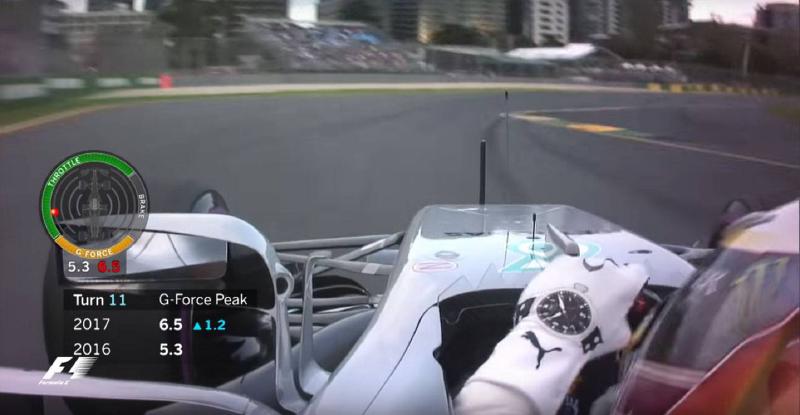
In the figure, we see Hamilton driving a Mercedes in 2017 at the Australian circuit. We see that in turn 1 of the circuit he was subjected to 6.5g. The full lap can be seen by clicking on the image, which opens a video showing the g-force throughout the lap.
Think that is little? How about a race that was canceled because of the high accelerations the drivers were subjected to? That is what happened at the Texas oval in 2001. After hearing complaints of severe nausea and dizziness from all the drivers who took part in the practice sessions, the doctors concluded that the banking of the turns subjected the athletes to a force of approximately 5.5g during 18 of the 22 seconds needed to complete a lap. 3g for long periods is considered the limit to preserve a driver’s health in races. The video below is from the ESPN coverage of the event at the time:
The next two videos show what happens to a person subjected to this level of acceleration for some time:
No wonder drivers like Barrichello say the neck is one of the most strained parts of the body in races, since the head is pushed all the time and has to withstand this level of acceleration.
This value is impressive, but it is nothing compared to the values that can be reached in crashes. In fact, given the safety of today’s racing cars, the biggest risk in crashes is the sudden deceleration, since the driver can suffer internal injuries or pass out. It is no coincidence that we see cars breaking into pieces in crashes. It is a way of trying to dissipate as much energy as possible without causing an abrupt stop. We also have deformable walls and many other technologies to try to minimize the effect of sudden decelerations in crashes.
Even so, the g-force that can be reached in short time intervals is very high. In Grosjean’s recent spectacular crash, shown in the video below, the impact is estimated to have been on the order of 50g. Notice that the car split in two and there was a fire. Fortunately the driver did not pass out despite the incredible deceleration and suffered only light burns on his hands and feet.
To end this motorsport tangent, watch the next video of Kenny Brack’s crash in 2003. The impact was on the order of 210g. The driver suffered several injuries, which he himself describes in the video. He was able to return to racing in 2005, after 18 months of recovery.
Pics or it didn’t happen! Plots and interactivity #
If I let myself, I’ll keep talking about racing here forever… Let’s now
explore the physics of the subject a bit more. Let’s create a series of values
for height, mass, and impact time, using the NumPy linspace method.
height = np.linspace(0.01, 20, 50) * ureg('m')
mass = np.linspace(0.01, 10, 50) * ureg('kg')
impact_time = np.linspace(0.01, 0.5, 50) * ureg('s')
And import the Matplotlib library for the plots.
import matplotlib.pyplot as pltFor simple plots, such as the variation of the fall velocity with the fall height, this command is enough:
plt.plot(height, free_fall_velocity(height))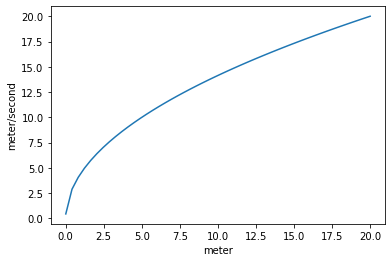
But the plot can be much more expressive, as I have already shown on this site. Let’s define a function with plot customizations.
def _plot_params(ax=None):
        """Custom parameters for plots.

        Parameters:
        ----------
        ax : Matplotlib axes, optional, axes where the plot will be drawn, default None

        Returns:
        --------
        Matplotlib axes, axis for a figure
        """

        linewidth = 2
        size = 12

        # grid and ticks
        ax.minorticks_on()
        ax.grid(b=True, which='major', linestyle='--',
                linewidth=linewidth - 0.5)
        ax.grid(b=True, which='minor', axis='both',
                linestyle=':', linewidth=linewidth - 1)
        ax.tick_params(which='both', labelsize=size+2)
        ax.tick_params(which='major', length=6, axis='both')
        ax.tick_params(which='minor', length=3, axis='both')

        # axis names
        ax.xaxis.label.set_size(size+4)
        ax.yaxis.label.set_size(size+4)

        return ax
Let’s create a figure and an associated axis:
fig1, ax1 = plt.subplots(figsize=(8, 6), facecolor=(1,1,1))

_plot_params(ax1)
ax1.plot(height, free_fall_velocity(height))
ax1.set_xlabel("Height" + " / " + f"{height.units:~P}")
ax1.set_ylabel("Velocity" + " / " + f"{free_fall_velocity(height).units:~P}")
plt.show()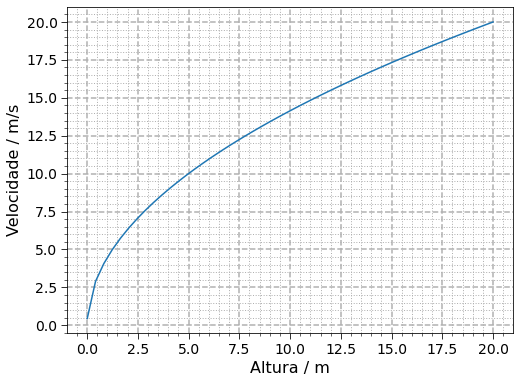
Now we have an informative plot.
We can also generate plots for the mean impulsive force and the g-force with the data from the statement.
fig2, axarr = plt.subplots(ncols=2, nrows=1, facecolor=(1,1,1), figsize=(12, 6), constrained_layout=True)

for ax in axarr:
    _plot_params(ax)

axarr[0].plot(height, mean_impulsive_force(brick_mass, height, brick_helmet_impact_time))
axarr[0].set_xlabel("Height" + " / " + f"{height.units:~P}")
axarr[0].set_ylabel("Mean impulsive force" + " / " + f"{mean_impulsive_force(brick_mass, height, brick_helmet_impact_time).to('N').units:~P}")

axarr[1].plot(height, impact_g_force(brick_mass, height, brick_helmet_impact_time))
axarr[1].set_xlabel("Height" + " / " + f"{height.units:~P}")
axarr[1].set_ylabel("g-force")

fig2.suptitle("Mean impulsive force and g-force for a brick (2.5 kg) in free fall and impact time of 0.5 s",
             fontsize=18)
plt.show()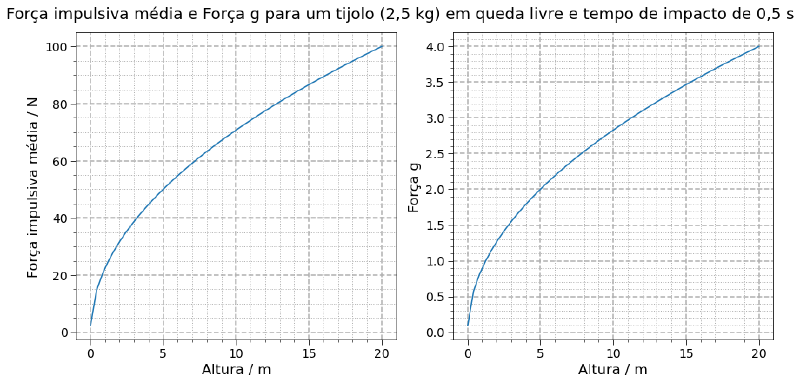
Now stop and think: both the impulsive force and the g-force depend on the mass, the height, and the impact time. We can make plots in three dimensions. Actually, up to 4 dimensions.
3D and 4D(?!) plots #
Let’s start by checking how the g-force varies as a function of mass and
height. We need a set of points in two dimensions over which a third will be
built. Hence the NumPy
meshgrid
method:
Mass, Height = np.meshgrid(mass, height)Since the return values are matrices, the variables are named with capital letters, a custom in the scientific community.
Computing the resulting g-force, still considering the impact time given in the statement:
G_force = impact_g_force(Mass, Height, brick_helmet_impact_time)Now let’s create a surface with the values. Passing the subplot_kw parameter
with the instruction to use a 3D projection in the subplots and using the
plot_surface method of the created axis, we have:
fig3, ax3 = plt.subplots(facecolor=(1,1,1), figsize=(8, 6), subplot_kw={'projection': '3d'})
ax3.plot_surface(Mass.magnitude, Height.magnitude, G_force.magnitude)
ax3.set_xlabel("Mass" + " / " + f"{Mass.units:~P}")
ax3.set_ylabel("Height" + " / " + f"{Height.units:~P}")
ax3.set_zlabel("g-force")
plt.show()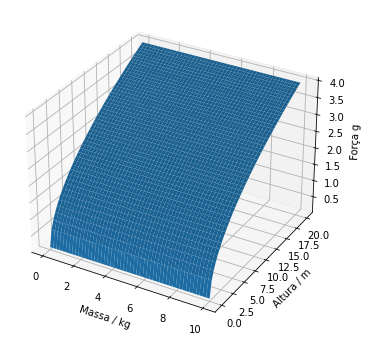
From the surface, we see that the g-force does not depend on the mass, consistent with what we showed earlier.
As for viewing options, Matplotlib projections have two angles that can be
changed: the elevation angle and the rotation angle of the axis system. Let’s
illustrate this below with the view_init method. We kept the elevation angle
fixed at 30° and changed the rotation angle in steps of 60° from an array of
values (angle).
fig4, axarr4 = plt.subplots(nrows=3, ncols=2, facecolor=(1,1,1),
                            figsize=(10, 10), subplot_kw={'projection': '3d'})

angle = np.arange(60, 361, 60)

for i, ax in enumerate(axarr4.flat):
    ax.plot_surface(Mass.magnitude, Height.magnitude, G_force.magnitude)
    ax.set_xlabel("Mass" + " / " + f"{Mass.units:~P}")
    ax.set_ylabel("Height" + " / " + f"{Height.units:~P}")
    ax.set_zlabel("g-force")
    ax.view_init(30, angle[i])

plt.subplots_adjust(hspace=0.3)
plt.show()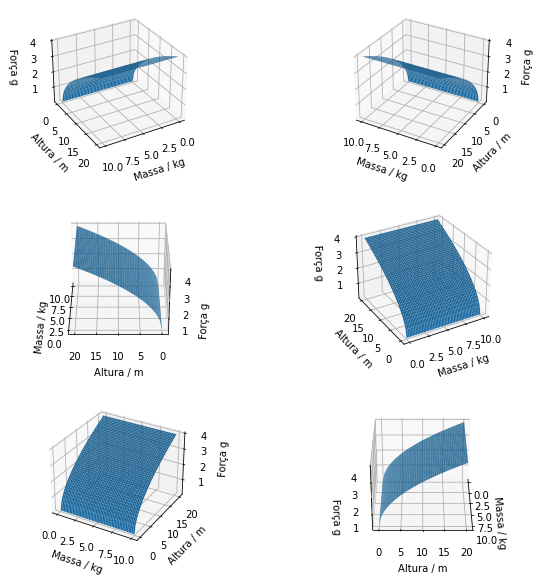
Of course, static figures are not very illustrative in this case. It would be better to have an animation with the axis rotating. Let’s create one.
To do that, we import the animation module and create a function that will
take care of our animation. Basically, the function receives an angle and
applies it to the currently active axis using plt.gca(), where gca stands
for get current axis.
from matplotlib import animation


def animate(angle, save_fig=False):
    ax = plt.gca()  # gca = get current axis
    ax.view_init(30, angle)
Since this whole article is being written in a Jupyter Notebook, for the animation to work we need the following special command:
%matplotlib notebookNow let’s create a figure with an axis system and pass the figure to the
FuncAnimation method together with the function created for the animation.
fig5, ax5 = plt.subplots(facecolor=(1,1,1), figsize=(6, 6), subplot_kw={'projection': '3d'})

ax5.plot_surface(Mass.magnitude, Height.magnitude, G_force.magnitude)
ax5.set_xlabel("Mass" + " / " + f"{Mass.units:~P}")
ax5.set_ylabel("Height" + " / " + f"{Height.units:~P}")
ax5.set_zlabel("g-force")

anim = animation.FuncAnimation(fig5,
                               animate,
                               frames=361,    # 360° rotation
                               interval=10,   # interval between frames in milliseconds
                               repeat=False)  # if True, it runs indefinitely, like a gif


plt.show()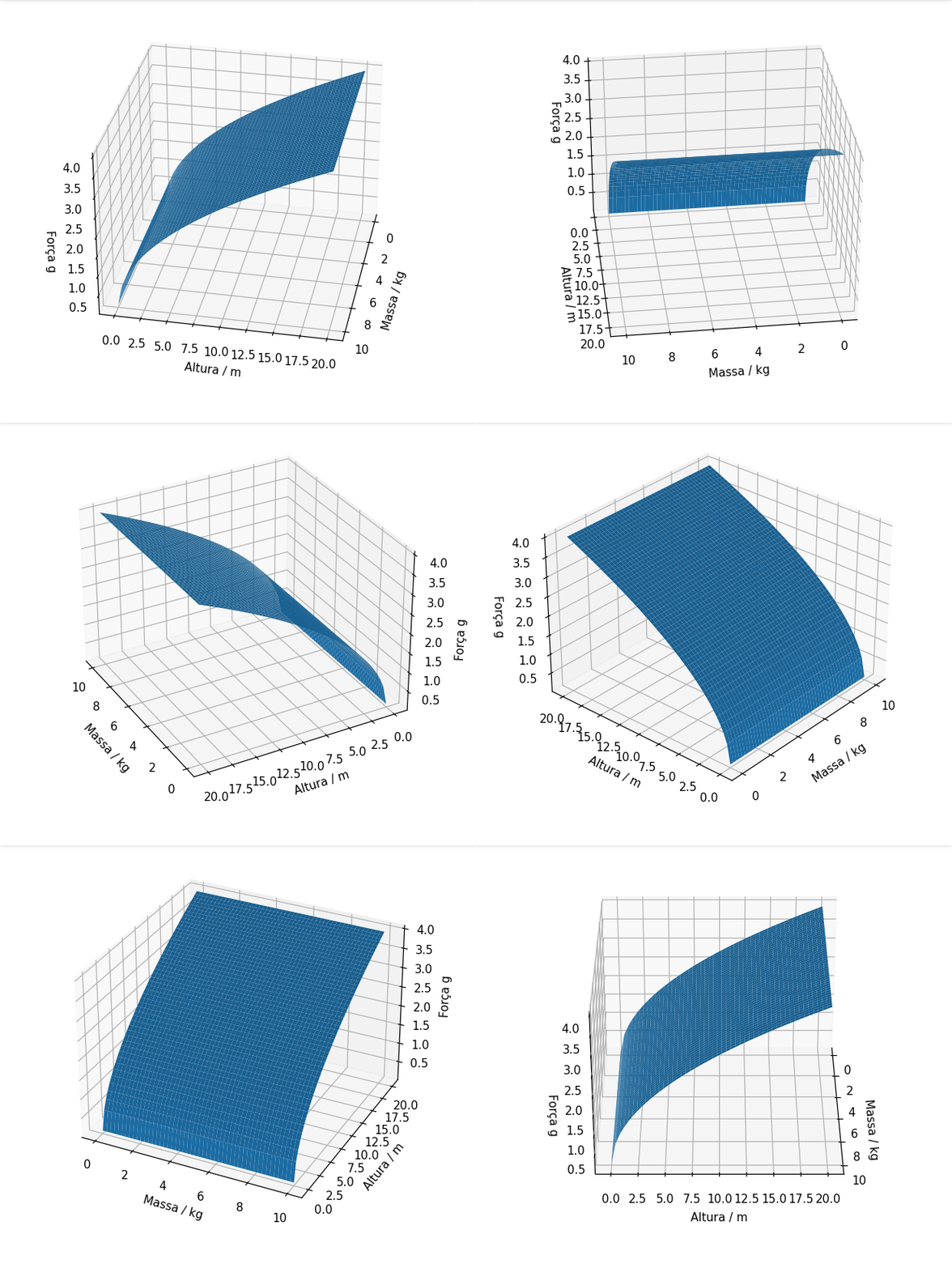
Interesting! Now, we know that the g-force also depends on the impact time. In the figure above, the value is fixed at the value in the statement. Let’s also create a plot that shows this dependence. First, creating a set of points in 3 dimensions and computing the g-force:
Mass, Height, Impact_time = np.meshgrid(mass, height, impact_time)

G_force = impact_g_force(Mass, Height, Impact_time)
Let’s visualize the set of points we created:
%matplotlib inline
fig6, ax6 = plt.subplots(facecolor=(1,1,1), figsize=(6, 6), subplot_kw={'projection': '3d'})

ax6.scatter(Mass.magnitude, Height.magnitude, Impact_time.magnitude)
ax6.set_xlabel("Mass" + " / " + f"{Mass.units:~P}")
ax6.set_ylabel("Height" + " / " + f"{Height.units:~P}")
ax6.set_zlabel("Impact time" + " / " + f"{Impact_time.units:~P}")

plt.show()
Ok, there is no useful information at all in the figure above, since all the points have the same color. There is no way to add yet another axis, since we are visually limited to understanding up to 3D, but there is a way to add one more dimension of information by making the color of the points meaningful. That way, we get 3D visually but 4D informationally.
In a recent article I already used this approach, see how in this article where we study the atmosphere with Python. I will use some ideas from that article here, especially the Matplotlib modules to create a color scale and the idea of normalization:
import matplotlib.colors as mcolors
import matplotlib.cm as cm
The values of the points will be normalized based on G_force and a value
scale will be shown next to the projection:
%matplotlib inline
fig7, ax7 = plt.subplots(facecolor=(1,1,1), figsize=(12, 12), subplot_kw={'projection': '3d'})

colors= G_force.magnitude
normalize_colors = mcolors.Normalize(vmin=np.min(colors), vmax=np.max(colors))
colormap = cm.YlOrRd

img = ax7.scatter(Mass.magnitude, Height.magnitude, Impact_time.magnitude,
                  c=colors, cmap=colormap, norm=normalize_colors)

scalarmappaple = cm.ScalarMappable(norm=normalize_colors, cmap=colormap)
scalarmappaple.set_array(colors)
colorbar = fig7.colorbar(scalarmappaple)

ax7.set_xlabel("Mass" + " / " + f"{Mass.units:~P}")
ax7.set_ylabel("Height" + " / " + f"{Height.units:~P}")
ax7.set_zlabel("Impact time" + " / " + f"{Impact_time.units:~P}")
colorbar.ax.set_ylabel('g-force', rotation=270, labelpad=20, size=15)

plt.show()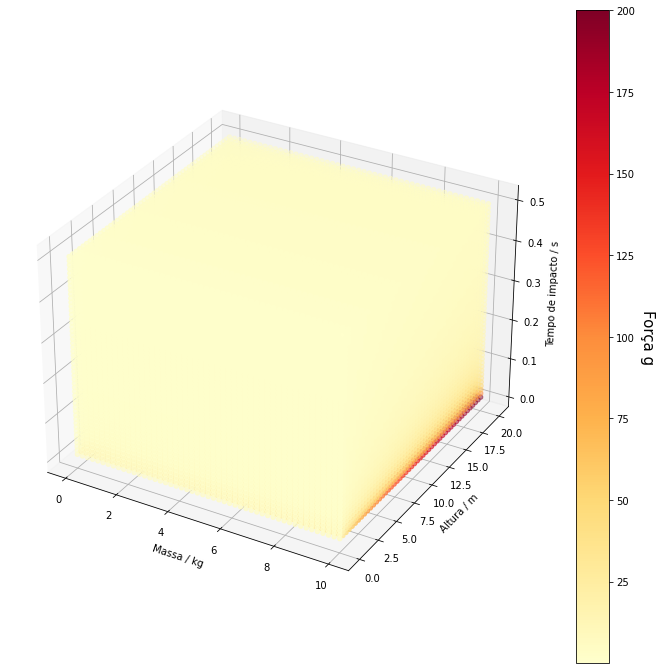
Ok, now we have a bit more information here. We notice that larger g-force values (more intense red colors) are obtained for larger masses and heights and shorter impact times. This is consistent with our mathematical definition, since the impact time is the denominator in the calculation of the impulsive force, so shorter impact times result in a larger impulsive force and, consequently, a larger g-force.
But the color distribution could be better, since a good part of the points
ended up light yellow. We can use a logarithmic color scale to give more
contrast. We just need to change mcolors.Normalize, which creates a scalar
normalization, to mcolors.LogNorm, which creates a logarithmic-scale
normalization. The rest of the code stays the same:
%matplotlib inline
fig8, ax8 = plt.subplots(facecolor=(1,1,1), figsize=(12, 12), subplot_kw={'projection': '3d'})

colors= G_force.magnitude
normalize_colors = mcolors.LogNorm(vmin=np.min(colors), vmax=np.max(colors))
colormap = cm.YlOrRd

img = ax8.scatter(Mass.magnitude, Height.magnitude, Impact_time.magnitude,
                  c=colors, cmap=colormap, norm=normalize_colors)

scalarmappaple = cm.ScalarMappable(norm=normalize_colors, cmap=colormap)
scalarmappaple.set_array(colors)
colorbar = fig8.colorbar(scalarmappaple, fraction=0.04, pad=0.05)

ax8.set_xlabel("Mass" + " / " + f"{Mass.units:~P}", fontsize=14)
ax8.set_ylabel("Height" + " / " + f"{Height.units:~P}", fontsize=14)
ax8.set_zlabel("Impact time" + " / " + f"{Impact_time.units:~P}", fontsize=14)
colorbar.ax.set_ylabel('g-force', rotation=270, labelpad=20, size=15)

ax8.tick_params(axis='both', which='major', labelsize=13)
colorbar.ax.tick_params(labelsize=13)

fig8.suptitle("ENEM and the killer brick problem", fontsize=20, y=0.85)

plt.show()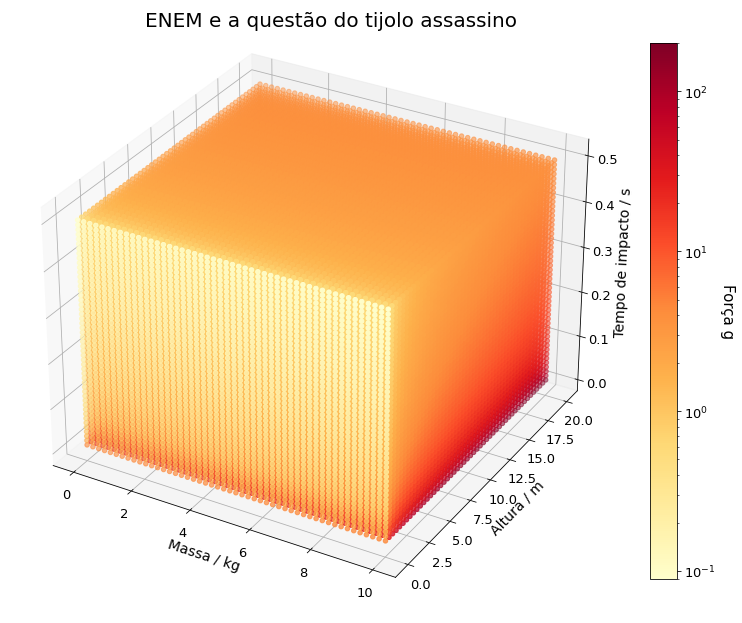
Look at the face of the cube of points facing you and parallel to the mass axis: it is now noticeable that even falls from small heights of low-mass objects can reach considerable g-force values as long as the impact time is very short. The points have a more intense orange color, indicating g-forces already close to 10 times the acceleration of gravity. Of course, the most intense red colors are still for larger heights and masses and shorter impact times.
This is an important tip: when you need more contrast between values, try a logarithmic scale.
Of course, you can now use the previous idea and animate this cube, making it rotate. Just be careful, since there are many points (can you work out how many? Leave it in the comments), so it can be slow. That is left as an exercise. In the future I may write a post about how Matplotlib is slow, but can be optimized.
This figure helps make explicit a problem with the statement that I had already mentioned at the beginning of the article. The passage (…) the impact can last up to 0.5 s. Notice that the imprecision creates a range of g-force values that varies by 4 orders of magnitude (10-1 to 102), depending on the effective impact time. Let’s discuss this further.
Criticisms of the statement #
In an excellent article (in Portuguese), the Reference Center for Physics Teaching (CREF) of UFRGS makes harsh criticisms of this problem’s statement. As we already pointed out at the beginning of the article, the statement lacks much information. But let’s focus on the passage about time.
Since 0.5 second is the maximum time the impact can last, there is a large range of values the resulting force can have, as we saw in the previous section. So the answer to the problem is at least 2P. Therefore, any choice except A. Why? Well, since time is the denominator in the calculation of the impulsive force, any value smaller than 0.5 second will result in larger forces. The answer key chose the choice that is certainly the most wrong answer…
Besides, with this data the brick would certainly go through the helmet! Let’s suppose that during the impact the mean relative velocity is about 5 m/s. The brick would penetrate 5 m/s . 0.5 s = 2.5 m into the helmet. That makes no sense. The collision surely has to last much less time for the penetration to be on the order of centimeters. But, as we saw, with less time the impact force is much larger.
Conclusion #
So, did you learn more Python and/or more physics? It is a shame that statements like this appear in the ENEM. And there is not much to be done since it is a centralized exam and, directly or indirectly, forced down the throats of the country’s educational institutions. But at least we can use these slips to dig deeper into our studies and exercise critical thinking.
Share this article with students and with anyone else you like. Follow Ciência Programada to know when more articles are released.
See you next time!


