

Top 3 Python Libraries for Chemistry #
Chemistry students and professionals need to perform many calculations every day. Such calculations are often complex because of the large amount of data and the approximations involved. Computational tools make these tasks easier.
In this article, we explore 3 chemistry libraries available for the Python language, showing how they are useful in our routine.
Molmass #
We start our Top 3 with Molmass, a Python package that calculates molar mass in a very simple way. Instead of tediously calculating the molar masses of compounds by adding up those of their constituent elements, you just pass the formula, as we will see.
Installation can be done via pip install molmass. And, to import:
from molmass import FormulaLet’s start with a simple example: beer! More specifically, the ethanol found in beers.
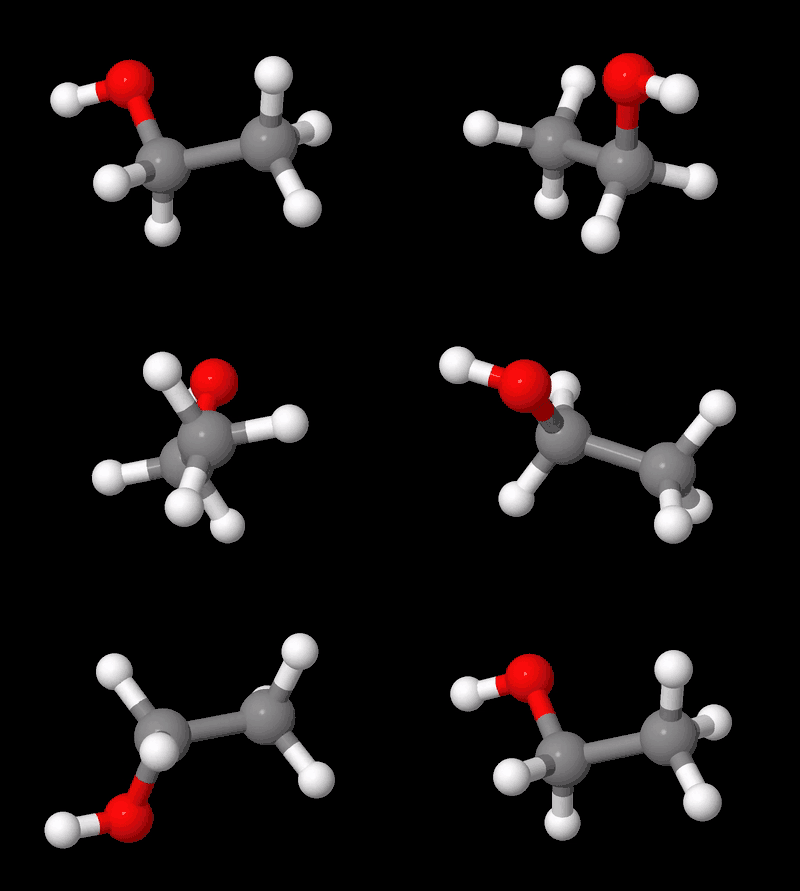
We can easily calculate the molar mass of ethanol with Molmass. To do so, we
pass a string with the ethanol formula to the Formula class and request the
mass attribute. The unit is g/mol, as noted in the comment:
formula = Formula('C2H5OH')
formula.mass  # g/mol
46.068531
We can see that the package uses molar masses without rounding, which is excellent, since the use of approximations leads to error propagation.
Oh, and if you want to keep talking about beer, see how it has already given rise to a Python library in this article. But only after you finish this article :-)
Molmass accepts different inputs for the same compound. Let’s pass another
string, with the classic abbreviation of the ethyl radical in organic
chemistry, Et, to obtain the molar mass of ethanol:
formula = Formula('EtOH')
formula.mass
46.068531
Note that formulas are case sensitive.
To get information on the elemental composition of the compound, we can use the
composition method:
formula.composition()(('C', 2, 24.02148, 0.5214292593788155),
('H', 6, 6.047646, 0.13127499116479316),
('O', 1, 15.999405, 0.34729574945639136))
We see that the composition method provides columns with the attributes
element, number, relative_mass, and fraction, respectively.
Mendeleev #
Another Python package that is very useful in our daily work is Mendeleev. It gives access to many properties of elements, ions, and isotopes.
The package can be installed via pip install mendeleev.
Periodic table #
One of the coolest features of Mendeleev is the ability to import a periodic
table with just one line of code. For that we need the vis dependency, which
can be installed via pip install mendeleev[vis].
One way to visualize the periodic table is to use the periodic_table function
from the mendeleev.vis module:
from mendeleev.vis import periodic_tableTo see the default visualization of the periodic table, let’s call the imported function:
periodic_table()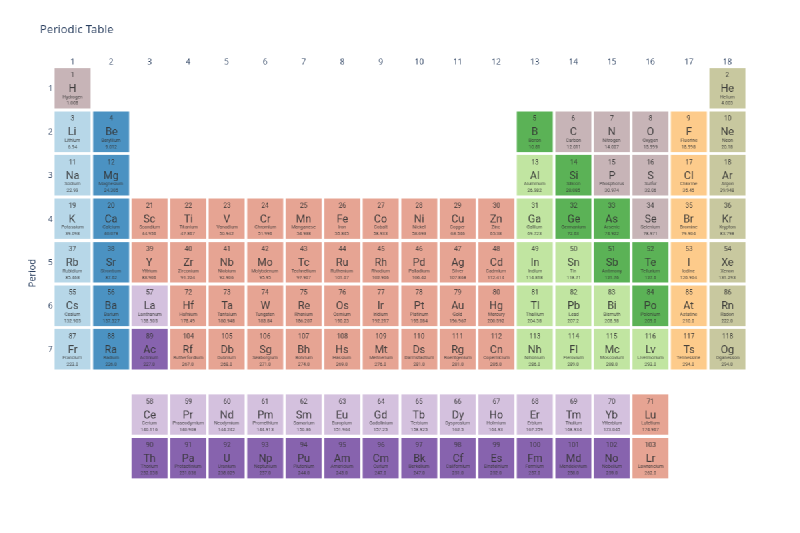
Properties of elements #
Now from a more technical point of view. To access the data of an element, we just import it by its symbol. For example, consider chromium:
from mendeleev import CrTo extract some information we can request an attribute, for example,
boiling_point, which gives the boiling temperature in kelvin, as noted in the
comment:
Cr.boiling_point # K2945.0
An alternative way to access the data is through element, a method that
returns a single instance or a tuple of such instances, depending on the
arguments:
from mendeleev import elementThe element method accepts the element name, the atomic symbol, or the atomic
number. Let’s see an example in which we pass the atomic number of bromine to
the element method and request the atomic_radius attribute, which gives the
atomic radius in picometers, as noted in the comment:
bromine = element(35)
bromine.atomic_radius  # pm
115.0
The element method also accepts a list or tuple. Look at this example, in
which we pass a list to the element method and request the econf attribute,
which gives the electron configuration of the elements:
hydrogen, zinc, bromine = element(['Hydrogen', 'Zn', 35])
hydrogen.econf, zinc.econf, bromine.econf
('1s', '[Ar] 3d10 4s2', '[Ar] 3d10 4s2 4p5')
With Mendeleev we can also obtain the electron configuration of an ion from
its element. Take the Fe3+ ion as an example. First, we pass the
element name to the element method and request the ec attribute, which
gives the electron configuration of the iron atom:
iron = element('Iron')
iron.ec
<ElectronicConfiguration(conf="1s2 2s2 2p6 3s2 3p6 3d6 4s2")>
To obtain the electron configuration of the Fe3+ ion we use the
ionize method to remove the 2 electrons of the outermost shell and not
from the highest-energy subshell and 1 electron, now yes, from the
highest-energy subshell, returning the following electron configuration:
iron.ec.ionize(3)<ElectronicConfiguration(conf="1s2 2s2 2p6 3s2 3p6 3d5")>
There are some attributes such as isotopes, which returns a list of objects
with the properties of each isotope: atomic_number, mass_number, mass,
and abundance, respectively:
sulfur = element('S')
for iso in sulfur.isotopes:
    print(iso)
16 32 31.97207 0.944
16 33 32.97146 0.008
16 34 33.96787 0.048
16 36 35.96708 0.000
ionic_radii returns a list of objects with the attributes charge,
coordination, crystal_radius in pm, and ionic_radius in pm:
gold = element('Au')
for ir in gold.ionic_radii:
    print(ir)
charge= 1, coordination=VI , crystal_radius=151.000, ionic_radius=137.000
charge= 3, coordination=IVSQ , crystal_radius=82.000, ionic_radius=68.000
charge= 3, coordination=VI , crystal_radius=99.000, ionic_radius=85.000
charge= 5, coordination=VI , crystal_radius=71.000, ionic_radius=57.000
ionenergies returns a dictionary with ionization energies:
oxygen = element('O')
oxygen.ionenergies
{1: 13.618054,
2: 35.12111,
3: 54.93554,
4: 77.4135,
5: 113.8989,
6: 138.1189,
7: 739.32679,
8: 871.40985}
Another attribute is oxistates, which returns a list of the most common
oxidation states of a given element:
manganese = element('Mn')
manganese.oxistates
[7, 6, 4, 3, 2]
The element method has several other attributes and/or methods that let us
access many properties of the elements. Let’s look at all of those available on
the manganese object we created:
manganese = element('Mn')
[x for x in dir(manganese) if not x.startswith('_')]
['abundance_crust',
'abundance_sea',
'annotation',
'atomic_number',
'atomic_radius',
'atomic_radius_rahm',
'atomic_volume',
'atomic_weight',
'atomic_weight_uncertainty',
'block',
'boiling_point',
'c6',
'c6_gb',
'cas',
'covalent_radius',
'covalent_radius_bragg',
'covalent_radius_cordero',
'covalent_radius_pyykko',
'covalent_radius_pyykko_double',
'covalent_radius_pyykko_triple',
'cpk_color',
'density',
'description',
'dipole_polarizability',
'dipole_polarizability_unc',
'discoverers',
'discovery_location',
'discovery_year',
'ec',
'econf',
'electron_affinity',
'electronegativity',
'electronegativity_allen',
'electronegativity_allred_rochow',
'electronegativity_cottrell_sutton',
'electronegativity_ghosh',
'electronegativity_gordy',
'electronegativity_li_xue',
'electronegativity_martynov_batsanov',
'electronegativity_mulliken',
'electronegativity_nagle',
'electronegativity_pauling',
'electronegativity_sanderson',
'electronegativity_scales',
'electrons',
'electrophilicity',
'en_allen',
'en_ghosh',
'en_pauling',
'evaporation_heat',
'fusion_heat',
'gas_basicity',
'geochemical_class',
'glawe_number',
'goldschmidt_class',
'group',
'group_id',
'hardness',
'heat_of_formation',
'init_on_load',
'ionenergies',
'ionic_radii',
'is_monoisotopic',
'is_radioactive',
'isotopes',
'jmol_color',
'lattice_constant',
'lattice_structure',
'mass',
'mass_number',
'mass_str',
'melting_point',
'mendeleev_number',
'metadata',
'metallic_radius',
'metallic_radius_c12',
'molcas_gv_color',
'name',
'name_origin',
'neutrons',
'nvalence',
'oxides',
'oxistates',
'period',
'pettifor_number',
'proton_affinity',
'protons',
'registry',
'sconst',
'screening_constants',
'series',
'softness',
'sources',
'specific_heat',
'symbol',
'thermal_conductivity',
'uses',
'vdw_radius',
'vdw_radius_alvarez',
'vdw_radius_batsanov',
'vdw_radius_bondi',
'vdw_radius_dreiding',
'vdw_radius_mm3',
'vdw_radius_rt',
'vdw_radius_truhlar',
'vdw_radius_uff',
'zeff']
Properties of ions #
mendeleev has the Ion class for working with ions instead of elements. Ions
can be created from elements and charge information:
from mendeleev.ion import Ion

iron_3 = Ion("Fe", 3)
Let’s access some properties of the ions:
iron_3.electrons23
iron_3.name'Iron 3+ ion'
iron_3.unicode_ion_symbol()'Fe³⁺'
ChemPy #
ChemPy is a Python package that can solve problems in analytical chemistry, physical chemistry, and inorganic chemistry.
The package can be installed via pip install chempy.
Balancing equations #
With ChemPy we can balance the stoichiometric coefficients of a reaction. To import, simply:
from chempy import balance_stoichiometryLet’s imagine an example in which we need to balance the combustion reaction of acetylene, a fuel gas used in blowtorches.
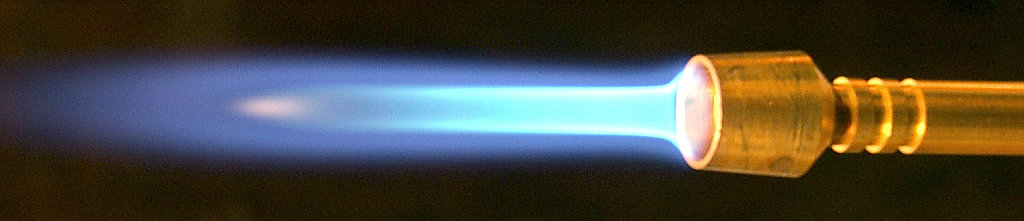
To do so, we pass the reactants and the products to the
balance_stoichiometry function:
balance_stoichiometry({'C2H2', 'O2'}, {'CO2', 'H2O'})(OrderedDict([('C2H2', 2), ('O2', 5)]), OrderedDict([('CO2', 4), ('H2O', 2)]))
We got two dictionaries, one for the reactants and one for the products, with the stoichiometric coefficients that balance the equation.
Let’s now consider another example to show that we can obtain the balanced equation directly. We will balance the following reaction, which is used in space rocket boosters to help launch them:
$$ NH_4ClO_4 + Al \rightarrow Al_2O_3 + HCl + H_2O + N_2 $$reac, prod = balance_stoichiometry({'NH4ClO4', 'Al'}, {'Al2O3', 'HCl', 'H2O', 'N2'})
reacOrderedDict([('Al', 10), ('NH4ClO4', 6)])
prodOrderedDict([('Al2O3', 5), ('H2O', 9), ('HCl', 6), ('N2', 3)])
This returns an ordered dictionary; by calling the dict function we create a
standard dictionary:
dict(reac){'Al': 10, 'NH4ClO4': 6}
dict(prod){'Al2O3': 5, 'H2O': 9, 'HCl': 6, 'N2': 3}
We can build the balanced equation using the Reaction class:
from chempy import Reaction

reaction = Reaction(reac, prod)
reaction
10 Al + 6 NH4ClO4 -> 5 Al2O3 + 9 H2O + 6 HCl + 3 N2
Redox systems #
Among the most beautiful and interesting chemistry experiments are the reactions that change color. These color-change experiments can occur, for example, as a result of reduction and oxidation reactions.
The GIF below shows one of these reactions:

In the GIF example, the color change occurs because purple permanganate ions, MnO4-, receive electrons to form colorless manganese(II) ions, Mn+2. In addition, gas forms because hydrogen peroxide, H2O2, and the oxygen of MnO4- are converted into H2O and O2.
If you need to balance this redox reaction, we can also do it with ChemPy.
Let’s obtain the balanced overall equation from the following half-reactions:
To do so, we pass the reactants and products of the respective half-reactions
to the Equilibrium class:
from chempy import Equilibrium

sr_red = Equilibrium({'MnO4-': 1, 'H+': 8, 'e-': 5}, {'Mn+2': 1, 'H2O': 4})
sr_ox = Equilibrium({'H2O2': 1}, {'O2': 1, 'H+':2, 'e-':2})
Now we need to eliminate the electrons and multiply each reaction by its respective coefficient to obtain the balanced overall equation:
coeff = Equilibrium.eliminate([sr_red, sr_ox], 'e-')
coeff
[2, 5]
redox = sr_red * coeff[0] + sr_ox * coeff[1]
redox
6 H+ + 5 H2O2 + 2 MnO4- -> 8 H2O + 2 Mn+2 + 5 O2
Chemical kinetics #
Besides balancing, ChemPy is very useful in the study of chemical kinetics.
The Arrhenius equation gives the dependence of the rate constant on temperature as:
$$ k = A \exp \left( -\frac{E_a}{RT} \right) $$Taking the natural logarithm of the Arrhenius equation and rearranging, we get the form of a linear equation:
$$ \ln k = - \frac{E_a}{R}\frac{1}{T} + \ln A $$ChemPy lets us obtain the activation energy and the parameter A using the
fit_arrhenius_equation function. Let’s start by importing the function:
from chempy.kinetics.arrhenius import fit_arrhenius_equationNow we will pass a set of temperature values in kelvin, rate constants in
L/(mol.s), and errors of the rate constant. To do so, we import the
NumPy library in order to create the arrays and to later
use the natural logarithm (log) and exponential (exp) functions:
import numpy as np

temperatures = np.array((1125, 1053, 1001, 838))    # K
k_values = np.array((11.59, 1.67, 0.380, 0.0011))   # L / (mol.s)
k_errors = np.array((1E-2, 1E-2, 1E-3, 1E-5))
Passing the variables temperatures, k_values, and k_errors to the
fit_arrhenius_equation function, we obtain the values of the activation
energy and of the parameter A:
fit = fit_arrhenius_equation(temperatures, k_values, kerr=k_errors)
fit
(array([5.13001705e+12, 2.51435472e+05]),
array([[inf, inf],
[inf, inf]]))
Internally, fit_arrhenius_equation uses the curve_fit method from
SciPy.
The return value is two arrays. The first holds the parameter values; the
second holds the covariances, when they can be computed.
To create the variables for the parameter A and the activation energy, we access the elements of the first array, which is quite simple. The first array is ([5.13001705e+12, 2.51435472e+05]), whose values can be accessed as follows:
A = fit[0][0]

activation_energy = fit[0][1]

print(f'A = {A:.3e} L/(mol.s) \nEa = {activation_energy:.3e} J/mol')
A = 5.130e+12 L/(mol.s)
Ea = 2.514e+05 J/mol
We can also obtain the activation energy and the parameter A from the graph of \(\ln k\) vs \(\frac{1}{T}\).
import matplotlib.pyplot as plt
from scipy.stats import linregress

# plot config
params = {
    'lines.linewidth': 2.0,
    'axes.facecolor': 'white',
    'figure.facecolor': 'white',
    'axes.labelsize': 14,
    'axes.titlesize': 16,
    'xtick.labelsize': 12,
    'ytick.labelsize': 12,
    'figure.autolayout': True,
    'figure.titlesize': 18,
    'figure.figsize': (12, 6),
    'legend.shadow': False,
    'legend.fontsize': 14,
}

plt.rcParams.update(params)

# data points
fig, (ax1, ax2) = plt.subplots(nrows=1, ncols=2)
ax1.errorbar(temperatures, k_values, yerr=k_errors, marker='o', linestyle='')
ax2.scatter(1/temperatures, np.log(k_values), label='Data')

# regression
slope, intercept, r_value, p_value, std_err = linregress(1/temperatures, np.log(k_values))
regression = slope * 1/temperatures + intercept
ax2.plot(1/temperatures, regression,
         color='red', alpha=0.5,
         label=r'$\ln k={:.0f}\frac{{1}}{{T}}+{:.2f}$'.format(slope,intercept))
ax2.legend()

# visuals
for ax in (ax1, ax2):
    ax.ticklabel_format(style='sci', axis='x', scilimits=(0,0))
    ax.xaxis.major.formatter._useMathText = True
    ax.figure.canvas.draw()
    order_magnitude = ax.xaxis.get_offset_text().get_text().replace('\\times', '')
    ax.xaxis.offsetText.set_visible(False)
    if ax == ax1:
        ax.set_xlabel(r'$T$ / ' + order_magnitude + ' $K$', )
        ax.set_ylabel(r'$k / \frac{\ell}{mol \cdot s}$')
        ax.set_title('Exponential form', color='dimgray')
    else:
        ax.set_xlabel(r'$\frac{1}{T}$ / ' + order_magnitude + ' $K^{-1}$', )
        ax.set_ylabel(r'$\ln k$')
        ax.set_title('Linearized form', color='dimgray')

plt.suptitle('Plots for the Arrhenius equation',
             color='dimgray')
plt.show()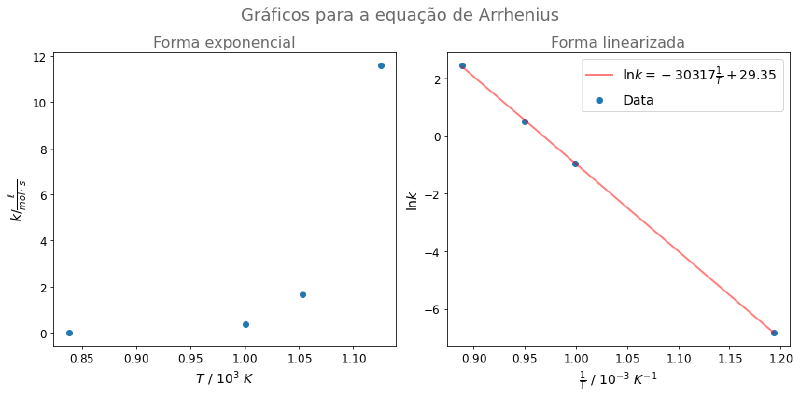
If you want to see how the graph was generated with the Matplotlib library, see this repository.
Systems at equilibrium #
ChemPy also performs pH calculations. Imagine an example in which we need to
find the pH of a 0.015 mol/L acetate solution.
Let’s start by creating a system with the equilibrium equations and their constants:
from chempy.equilibria import EqSystem

equation = 'H3CCOOH = H+ + H3CCOO-; 10**-4.756'
water_autoionization = 'H2O = H+ + OH-; 10**-14/55.5'

system = EqSystem.from_string('\n'.join((equation, water_autoionization)))
For ChemPy to solve the system and give the concentrations of all species in
solution, we need to pass the concentrations of the species that are known. The
acetate concentration is 0.015 mol/L and the molecular concentration of water
is 55.5 mol/L:
from collections import defaultdict

condition = defaultdict(float, {'H2O': 55.5, 'H3CCOO-': 0.015})

concentrations, _, _ = system.root(condition)
result = dict(zip(system.substances, concentrations))
result
{'H+': 3.4177702795991742e-09,
'H2O': 55.499997074115974,
'H3CCOO-': 0.014997077533741783,
'H3CCOOH': 2.922466258210992e-06,
'OH-': 2.9258840281057227e-06}
Passing the H+ concentration to the following function returns the pH:
def pH(hydronium_concentration):
    return -np.log10(hydronium_concentration)

print(f"{pH(result['H+']):.2f}")
8.47
We can also obtain the species diagram for acetic acid. For that, we need the mole fractions of acetate and acetic acid. Let’s create a function that takes all the species in the system and removes the species that will not be used, returning a dictionary of the mole fractions of the species of interest, acetate and acetic acid:
def mole_fractions(substances):
    for key in ('H+', 'OH-', 'H2O'):
        substances.pop(key, None)
    frac = dict()
    total = sum(substances.values())
    for key, value in substances.items():
        frac[key] = value / total
    return frac
Now let’s create a dictionary to store the mole fractions of the species of
interest and create the pH range. fractions was initially created as an
empty list to later store the mole fraction values for each pH value.
species = [item for item in system.substance_labels() if item not in ('H+', 'OH-', 'H2O')]
fractions = defaultdict(list, {k: [] for k in species})

pH_range = np.arange(0, 14.1, 0.1)

for value in pH_range:
    condition = defaultdict(float, {'H2O': 55.5, 'H+': 10**-value})
    concentrations, _, _ = system.root(condition)
    result = dict(zip(system.substances, concentrations))
    mf = mole_fractions(result)
    for key, value in zip(fractions.keys(), mf.values()):
        fractions[key].append(value)
We can obtain the species diagram plot using the Matplotlib library. To do so, we create a figure, pass the axes, and label the plot:
fig, ax = plt.subplots()

for compound in fractions:
    ax.plot(pH_range, fractions[compound],
            label=f'${system.substances[compound].latex_name}$')

ax.set_xlabel('pH')
ax.set_ylabel(r'$\alpha$')
ax.grid(b=True, axis='both', which='major', linestyle='--', linewidth=1.5)
ax.minorticks_on()
ax.grid(b=True, axis='both', which='minor', linestyle=':', linewidth=1.0)
ax.set_axisbelow(True)

ax.legend()
ax.set_title('Species diagram for acetic acid', color='dimgray')

plt.show()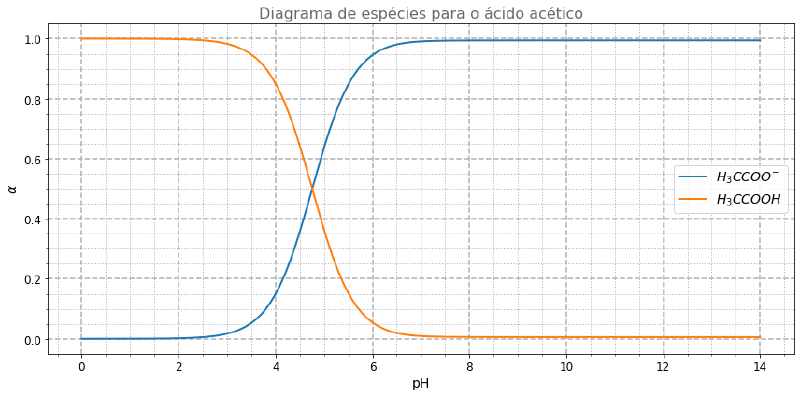
Conclusion #
In this article, we saw some features of the Molmass, Mendeleev, and
ChemPy libraries and how useful these tools are for the routine tasks of
chemistry students and professionals. We saw that we can speed up simple
calculations, such as molar mass, and even more complex ones, such as species
concentration and kinetics.
This article is a collaboration between me, Helena Benevenuto, and Ciência Programada. Follow me on LinkedIn for more chemistry content (in Portuguese).
Share this article on your networks and follow the Ciência Programada project to always stay up to date. See you next time.


