

What do ocean waves, soap bubbles, and DNA have in common? That is what I show in this article, with the help of Python.
Not everyone has fond memories of trigonometric functions from school. And even in science and engineering degrees, some people turn up their noses whenever they see sine, cosine, and tangent. In this article we will see how to use SymPy to make our lives easier when working with trigonometric functions (and their “cousins,” the hyperbolic ones!), and we will also illustrate some real applications of these functions.
Trigonometric functions #
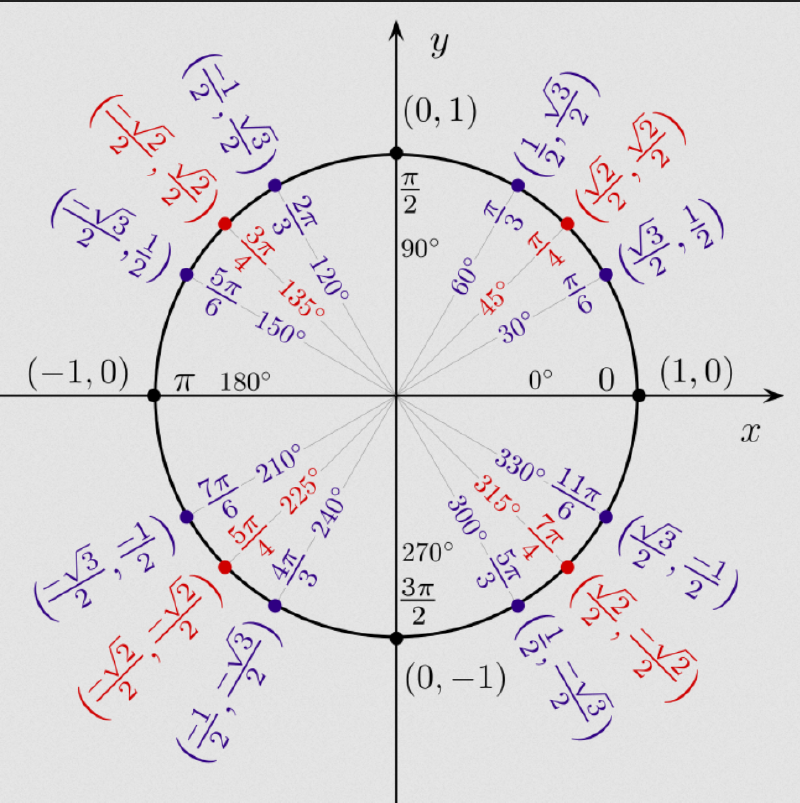
Just as a reminder, trigonometric functions can be defined as ratios between two sides of a right triangle as a function of an angle or, more generally, as ratios of the coordinates of points on the unit circle, illustrated below:
Let us start by importing the libraries we will use. The role of each one will be explained throughout the article.
import sympy

from sympy import (sin, cos, tan, asin, acos, atan, sqrt, symbols, simplify,
                   trigsimp, log, exp, expand, expand_trig, Symbol, rad, deg,
                   sinh, cosh, tanh)

from sympy.plotting import (plot, plot3d, plot3d_parametric_line,
                            plot_implicit, plot3d_parametric_surface)

import numpy as np

import matplotlib.pyplot as plt
from matplotlib.ticker import FuncFormatter, MultipleLocator

# setting for better outputs in the article, can be ignored
sympy.init_printing(scale=1.0, order='grlex',
                    forecolor='Black', backcolor='White',)
Note that we import the SymPy trigonometric functions directly. That way, we
can call them directly, without having to write sympy.<function>.
By default, SymPy’s trigonometric functions take angles in radians. So, if we want the sine, cosine, and tangent of 30°, we must provide the value in radians, π/6, as shown in the unit circle figure at the beginning of the article:
sin(sympy.pi / 6)\(\displaystyle \frac{1}{2}\)
cos(sympy.pi / 6)\(\displaystyle \frac{\sqrt{3}}{2}\)
tan(sympy.pi / 6)\(\displaystyle \frac{\sqrt{3}}{3}\)
The same line of reasoning applies to the other trigonometric functions: secant
(sec), cosecant (csc), and cotangent (cot).
If you do not know the value in radians for a given angle, there is SymPy’s
rad function:
rad(30)\(\displaystyle \frac{\pi}{6}\)
sin(rad(30))\(\displaystyle \frac{1}{2}\)
There is also the deg function, to get the value in degrees of an angle given
in radians:
deg(sympy.pi / 6)\(\displaystyle 30\)
Inverse functions… and beware of floats #
Inverse functions are also called arc functions. They are the famous arcsine,
arccosine, arctangent… These functions return the angle associated with a
value. For example, we know that the sine of 30° is 1/2. So, the arc whose sine
is 1/2 is 30° or, in radians, π/6. Let us see, then, the result of
asin(1/2):
asin(1/2)\(\displaystyle 0.523598775598299\)
Note that the result was not π/6. At least not symbolically: the return value was a numerical approximation, a float, of pi divided by 6. Check it on your calculator. But why? We have already talked about the problem with floats:
1/2\(\displaystyle 0.5\)
In simple terms, when we pass 1/2 we are passing the float 0.5 which,
internally, does not necessarily correspond to the fraction 1/2. For SymPy to
understand that you really want the fraction 1/2 and not its approximate float
representation, we can pass it as a string:
asin('1/2')\(\displaystyle \frac{\pi}{6}\)
Now we got the expected result.
As we also saw in the first article about SymPy, in a division, if one of the operands is a SymPy object, the whole division becomes a SymPy object. That is why the following cell returns a SymPy fraction:
acos(sympy.sqrt(3)/2)\(\displaystyle \frac{\pi}{6}\)
Here comes one of the great advantages of working symbolically. Remember that when there was a root in the denominator you had to go through a process called rationalizing the denominator? When we pass a SymPy object, it takes care of that internally. Note that the results of the following two cells are equal:
atan(1 / sympy.sqrt(3))\(\displaystyle \frac{\pi}{6}\)
atan(sympy.sqrt(3) / 3)\(\displaystyle \frac{\pi}{6}\)
Trigonometric identities #
A considerable part of the time spent studying trigonometric functions goes to studying identities. There is a long list of trigonometric identities and I will certainly not present all of them here. The goal is just to show, with a few examples, that SymPy recognizes trigonometric identities.
Let us start by creating symbols for the variables that will represent the angles:
x, y = symbols('x y')Let us start by showing that SymPy recognizes identities involving complementary angles:
sin(x) == cos(x - sympy.pi/2)True
Now, observe what happens in the following comparison, which is one of the trigonometric identities known as the angle sum and difference identities:
sin(x + y) == sin(x) * cos(y) + cos(x) * sin(y)False
Note that the result was False. But the identity holds, so why didn’t it
return True? Let us see how SymPy stores the right-hand side of the
comparison above:
sin(x) * cos(y) + cos(x) * sin(y)\(\displaystyle \sin{\left(x \right)} \cos{\left(y \right)} + \sin{\left(y \right)} \cos{\left(x \right)}\)
Note that, although we know that this sum equals sin(x + y), SymPy does not
simplify it automatically. As we saw in another
article,
SymPy compares form, not mathematical equivalence. That is why the comparison
returned False. Except for very simple cases, like the first comparison in
this section of the article, it is usually recommended to compare expressions
after
simplifying them
to get a result closer to what is mathematically expected. Let us see:
simplify( sin(x) * cos(y) + cos(x) * sin(y) )\(\displaystyle \sin{\left(x + y \right)}\)
sin(x + y) == simplify( sin(x) * cos(y) + cos(x) * sin(y) )True
Notice that we used the simplify function. However, there is a function
specific to situations involving trigonometric functions, trigsimp:
sin(x + y) == trigsimp( sin(x) * cos(y) + cos(x) * sin(y) )True
Even though the result was the same for both functions in this case, the
documentation recommends using trigsimp when trigonometric functions are
involved, since its algorithm is optimized for these situations.
Of course, the fundamental trigonometric identity could not be missing from this article. We will use it to show once more that SymPy does not simplify automatically:
sin(x)**2 + cos(x)**2\(\displaystyle \sin^{2}{\left(x \right)} + \cos^{2}{\left(x \right)}\)
We know that this sum equals 1, but SymPy shows the complete expression.
Let us create an expression and assign it to a variable expr:
expr = 2 * sin(x)**2 + 2 * cos(x)**2

expr
\(\displaystyle 2 \sin^{2}{\left(x \right)} + 2 \cos^{2}{\left(x \right)}\)
Notice that, by factoring out the 2, it becomes clear that this expression has value 2. But we need to explicitly ask SymPy to simplify it:
trigsimp(expr)\(\displaystyle 2\)
The same holds for operations on trigonometric expressions:
log(expr)\(\displaystyle \log{\left(2 \sin^{2}{\left(x \right)} + 2 \cos^{2}{\left(x \right)} \right)}\)
log(expr).trigsimp()\(\displaystyle \log{\left(2 \right)}\)
trigsimp(log(expr))\(\displaystyle \log{\left(2 \right)}\)
Note above that we called trigsimp both as a method and directly, two
equivalent forms. I personally find the second form more readable, but I am just
showing that both possibilities exist.
Just as there are simplification procedures, there are expansion procedures. Let us create an expression involving one of the multiple-angle formulas:
expr = sin(2*x)We saw in the introductory article about
SymPy
that there is the expand function:
expand(expr)\(\displaystyle \sin{\left(2 x \right)}\)
Notice that the expression was not expanded. Here, just as with
simplification, there is a specific method for expansion involving trigonometric
functions, expand_trig:
expand_trig(expr)\(\displaystyle 2 \sin{\left(x \right)} \cos{\left(x \right)}\)
Now, yes, the expected result.
To reinforce the point, it is good practice, when trigonometric functions are involved, to use SymPy methods specific to those cases.
Plots of sine, cosine, and tangent #
I do not know if the reader is as crazy as I am, but I am hooked on plots. And
the plots of trigonometric functions have always caught my attention because of
their periodic nature. And one cannot truly understand the applications of these
functions without a clear notion of that nature.
Let us start by defining a standard for the plots in the article. We already saw in this article that SymPy uses Matplotlib under the hood, so by configuring Matplotlib we are indirectly also configuring the plots generated by SymPy’s plot functions:
params = {
    'lines.linewidth': 2.0,
    'axes.labelsize': 14,
    'axes.titlesize': 14,
    'axes.spines.top': False,
    'axes.spines.right': False,
    'xtick.labelsize': 14,
    'ytick.labelsize': 14,
    'figure.autolayout': True,
    'figure.titlesize': 20,
    'figure.figsize': (10, 6),
    'legend.shadow': False,
    'legend.fontsize': 12,
}

plt.rcParams.update(params)
Let us first plot the sine and cosine functions:
plot(sympy.sin(x), sympy.cos(x),    # functions
     (x, -2*sympy.pi, 2*sympy.pi),  # plot interval
     legend=True);                  # show legend with the functions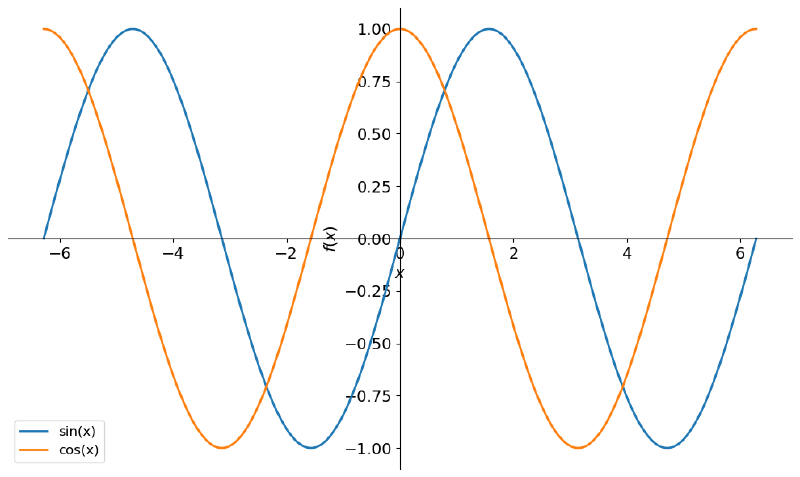
OK, an expected and familiar profile. But… you probably did not use x for angles in your math classes. You used Greek letters like alpha, beta, theta… Since we are here anyway, let us see how to use those letters in SymPy.
SymPy lets us pass LaTeX code to create symbols:
theta = Symbol(r'\theta')
theta
\(\displaystyle \theta\)
sin(theta), cos(theta)\(\displaystyle \left( \sin{\left(\theta \right)}, \ \cos{\left(\theta \right)}\right)\)
Great! That seems to be what we want. Note that the LaTeX code was passed as a
raw
string
(the r prefix before the string). This is so that Python does not wrongly
interpret the \ that is part of the LaTeX code.
Let us see the plot:
plot(sin(theta), cos(theta),
     (theta, -2*sympy.pi, 2*sympy.pi),
     legend=True);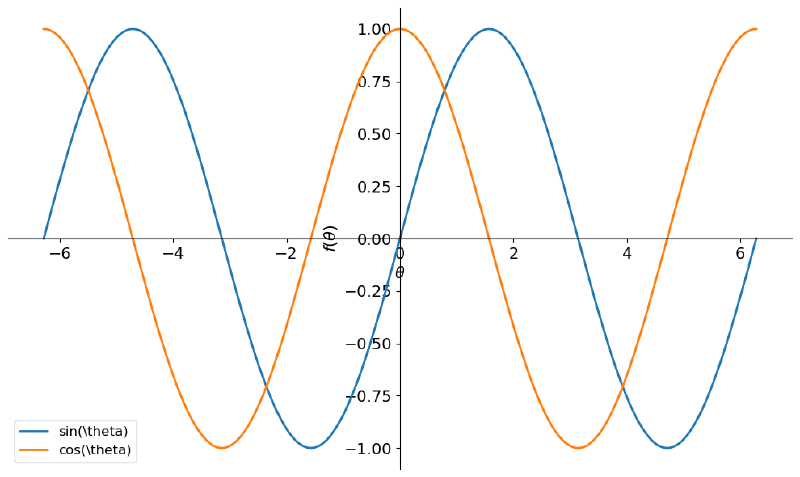
Unfortunately, in the plot generated by SymPy’s plot function the symbol does
not appear, only the LaTeX code for the symbol. However, Matplotlib accepts
LaTeX code; it is the passing of this SymPy symbol to Matplotlib that, for some
reason, is not done correctly. But there is no problem: we already saw in this
article that it is possible to
extract the data from SymPy plots and pass it directly to Matplotlib. That is,
eliminating SymPy as the middleman. To do this, we follow the procedure from the
cited article, assigning the plot to a variable and extracting the point data
and the labels:
p = plot(sin(theta), cos(theta),
         (theta, -2*sympy.pi, 2*sympy.pi),
         legend=True,
         show=False)
plots = []
for line in p:
data = line.get_points()
label = line.label
plots.append((data, label))Now, let us create our own plot and pass in the data and labels we obtained:
fig, ax = plt.subplots()

for data, label in plots:
    ax.plot(*data, label=f'${label}$')

ax.legend(fontsize=14)
ax.set_xlabel(r'$\theta$')
ax.set_ylabel(r'$f(\theta)$')

plt.show()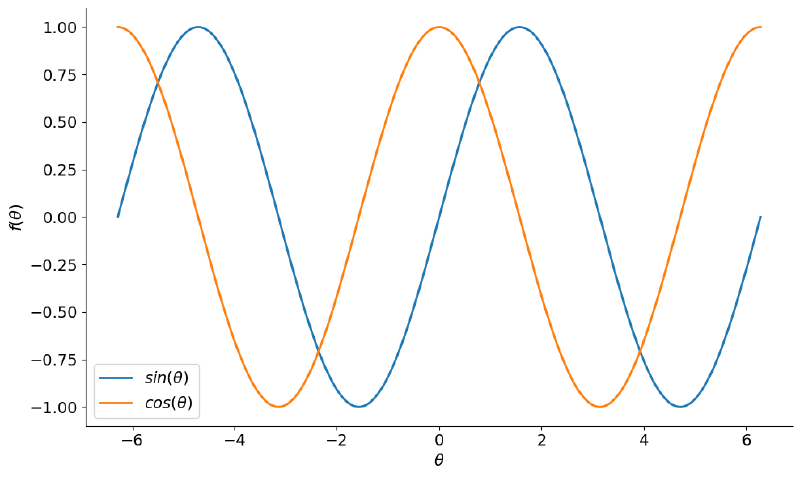
Now we are talking! Note that the labels, which are LaTeX code, are surrounded
by the $ symbol. This symbol tells Matplotlib that the content inside is LaTeX
code.
However… if you remember your math classes, the plots had a scale showing the
angles in radians, usually in multiples of π. Let us try, with Matplotlib’s
MultipleLocator, to place the major ticks of the angle axis at multiples of
π/2 and the minor ones at multiples of π/4:
fig, ax = plt.subplots()

for data, label in plots:
    ax.plot(*data, label=f'${label}$')

ax.legend()
ax.set_xlabel(r'$\theta$')
ax.set_ylabel(r'$f(\theta)$')

ax.xaxis.set_major_locator(plt.MultipleLocator(np.pi / 2))
ax.xaxis.set_minor_locator(plt.MultipleLocator(np.pi / 4))


plt.show()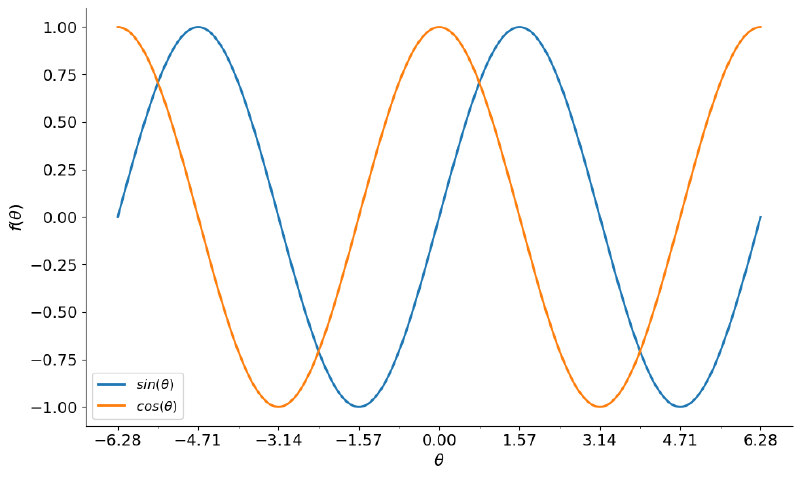
This is almost what we want. We do not want the float representation of the
fractions, but for them to be shown as actual fractions. For that, we need to
create a function that does this formatting and use Matplotlib’s
FuncFormatter. The following function, adapted from
here
and
from here,
does the job.
def format_func(value, tick_number):
    """find number of multiples of pi/2"""

    N = int(np.round(2 * value / np.pi))
    if N == 0:
        return "0"
    elif N == 1:
        return r"$\dfrac{1}{2}\pi$"
    elif N == 2:
        return r"$\pi$"
    elif N % 2 > 0:
        return r"$\dfrac{{{0}}}{{2}}\pi$".format(N)
    else:
        return r"${0}\pi$".format(N // 2)


fig, ax = plt.subplots()

for data, label in plots:
    ax.plot(*data, label=f'${label}$')

ax.legend()
ax.set_xlabel(r'$\theta$')
ax.set_ylabel(r'$f(\theta)$')
ax.tick_params(axis='both', which='major')

ax.xaxis.set_major_locator(plt.MultipleLocator(np.pi / 2))
ax.xaxis.set_minor_locator(plt.MultipleLocator(np.pi / 4))
ax.xaxis.set_major_formatter(plt.FuncFormatter(format_func))

plt.show()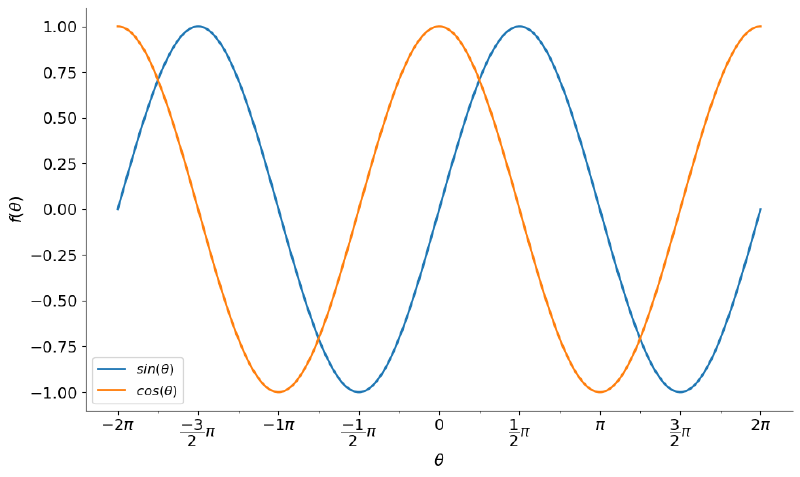
Perfect! If you think it is necessary, you can add grid lines to make it easier to read:
fig, ax = plt.subplots()

for data, label in plots:
    ax.plot(*data, label=f'${label}$')

ax.legend()
ax.set_xlabel(r'$\theta$')
ax.set_ylabel(r'$f(\theta)$')
ax.tick_params(axis='both', which='major')

ax.xaxis.set_major_locator(plt.MultipleLocator(np.pi / 2))
ax.xaxis.set_minor_locator(plt.MultipleLocator(np.pi / 4))
ax.xaxis.set_major_formatter(plt.FuncFormatter(format_func))

ax.axhline(color="gray", zorder=-1)
ax.axvline(color="gray", zorder=-1)

ax.grid(which='major', linestyle='--', linewidth=1.5)
ax.grid(which='minor', axis='both', linestyle=':', linewidth=1)
ax.set_axisbelow(True)

plt.show()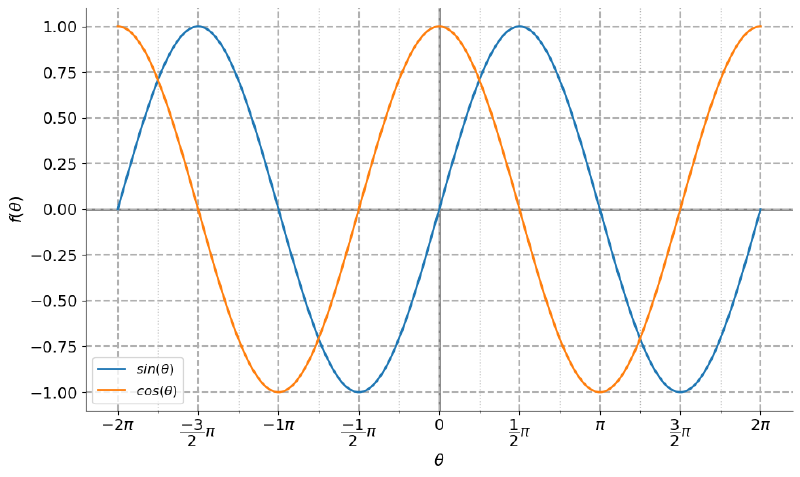
Done. A plot that is easy to read and has a scale suited to the context.
Let us now repeat the procedure for the tangent plot. This one is more challenging:
plot(tan(theta),
     (theta, -2*sympy.pi, 2*sympy.pi),
     legend=True);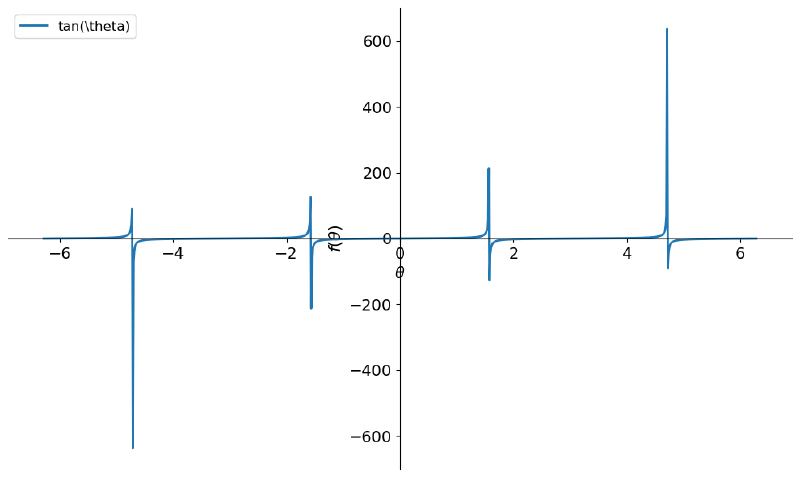
Can you understand what happened here? The tangent function has a peculiarity. It does not exist when the cosine is 0 (because division by zero is not defined), so the domain is all real numbers except those that make the cosine zero.
So, the closer the cosine is to zero, the larger the tangent, so the function tends to infinity near those angles and is not defined at them. Basically, we are saying that there are vertical asymptotes at these angles.
Because of this tendency toward infinity, we see large values on the vertical axis. If we limit the plot to a smaller interval on the vertical axis, we start to see the profile we know:
plot(tan(theta), (theta, -2*sympy.pi, 2*sympy.pi), ylim=(-4, 4), legend=True);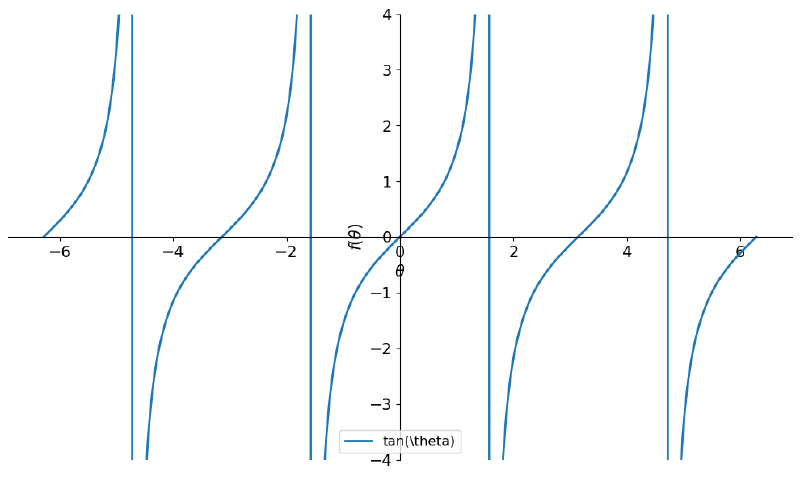
We see that there are still lines that should not really be there. These lines are SymPy’s attempt to “connect” the positive infinite end before an undefinedness to the negative infinite end after the undefined angle. In other words, a frustrated attempt, since, in reality, the function is not continuous.
To solve the plotting problem, we will again need to extract the data from
SymPy. Notice in the cell below that I request more points than the default
with nb_of_points, since I will need to get rid of some of them (the lines):
p = plot(tan(theta), (theta, -2*sympy.pi, 2*sympy.pi), ylim=(-4, 4),
         legend=True, show=False, nb_of_points=1000)
Let us see how Matplotlib shows the plot:
fig, ax = plt.subplots()

ax.plot(*p[0].get_points(), label=f'${p[0].label}$', linewidth=3)

ax.legend()
ax.set_xlabel(r'$\theta$')
ax.set_ylabel(r'$\tan(\theta)$')
ax.tick_params(axis='both', which='major')

ax.xaxis.set_major_locator(plt.MultipleLocator(np.pi / 2))
ax.xaxis.set_minor_locator(plt.MultipleLocator(np.pi / 4))
ax.xaxis.set_major_formatter(plt.FuncFormatter(format_func))

ax.axhline(color="gray", zorder=-1)
ax.axvline(color="gray", zorder=-1)

ax.grid(which='major', linestyle='--', linewidth=1.5)
ax.grid(which='minor', axis='both', linestyle=':', linewidth=1)
ax.set_axisbelow(True)

plt.show()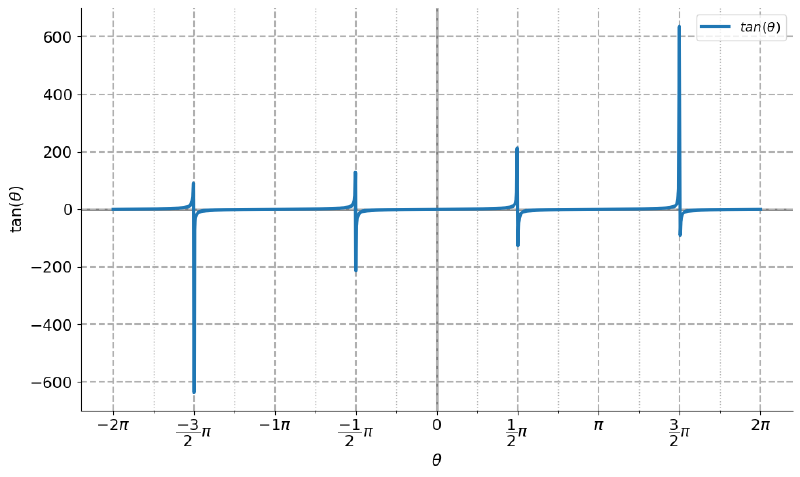
As expected, the same problem. After all, we have not dealt with it yet.
Here we will use NumPy, more specifically the
masked_where
method. This method lets us create what NumPy calls a mask and is ideal for
handling invalid
data.
Basically, we will define a value beyond which values are considered invalid. In
the following cell, I took that value to be 20. It is an arbitrary value, it
could be larger or smaller. Since I will limit the plot between -4 and 4, I
chose a slightly larger value to have more points so the curves have a smoother
profile.
theta_values, tan_values = p[0].get_points()

tan_masked = np.ma.masked_where(np.abs(tan_values) > 20., tan_values)

fig, ax = plt.subplots()

ax.plot(theta_values, tan_masked, label=f'${p[0].label}$')

ax.legend()
ax.set_xlabel(r'$\theta$')
ax.set_ylabel(r'$\tan(\theta)$')
ax.tick_params(axis='both', which='major')

ax.xaxis.set_major_locator(plt.MultipleLocator(np.pi / 2))
ax.xaxis.set_minor_locator(plt.MultipleLocator(np.pi / 4))
ax.xaxis.set_major_formatter(plt.FuncFormatter(format_func))

ax.axhline(color="gray", zorder=-1)
ax.axvline(color="gray", zorder=-1)

ax.set_ylim(-4, 4)

ax.grid(which='major', linestyle='--', linewidth=1.5)
ax.grid(which='minor', axis='both', linestyle=':', linewidth=1)
ax.set_axisbelow(True)

plt.show()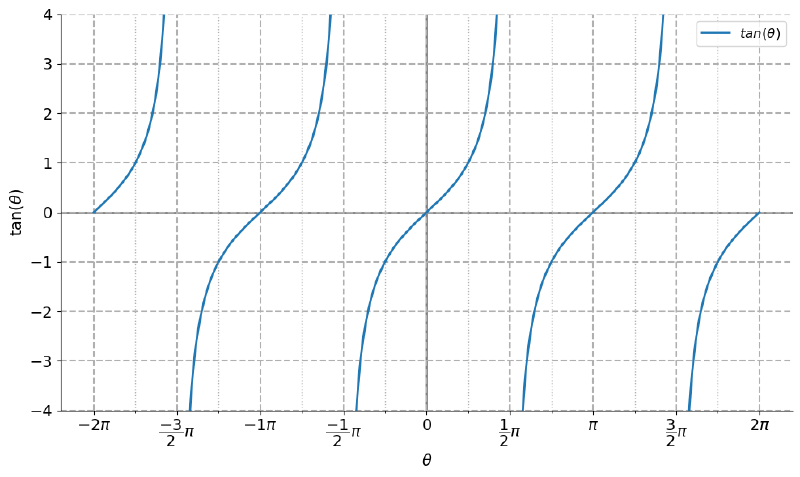
Now we have the profile we know.
What did we learn? A lot of Matplotlib and NumPy, I hope. And, in the case of the tangent plot, what usually happens when a function has a discontinuity. Remember: for “the computer” it is just a set of x values being passed to a function and generating pairs of points. It will do its best, or rather, what it was programmed to do, with what it was given, but it does not understand the concept of discontinuity, a human concept, a human semantics. Hence the need to process the data, removing the values beyond an arbitrary cutoff. Almost whenever “strange lines” show up, it is because of a discontinuity that went unnoticed.
And another thing can be learned and is often ignored: try to reproduce material you already know in order to learn programming. You certainly already knew these plots, but did you think you would have these details to reproduce them faithfully?
3D plots #
Stop and think of a word: helix. What comes to mind? Think about the geometric shape. Can you relate it to the subject we are discussing?
At the beginning of the section on two-dimensional plots I highlighted the periodic profile of the plots. For this reason, the harmonic motions studied in high school physics are usually the first applied examples of trigonometric functions that we come across. At least formally, because in everyday life we have plenty of them, we just do not think about it.
In the Wikipedia article on the helix shape and related ones, there are some interesting figures and examples. For example, what is the first thing you learn about DNA in biology class? The famous double helix:
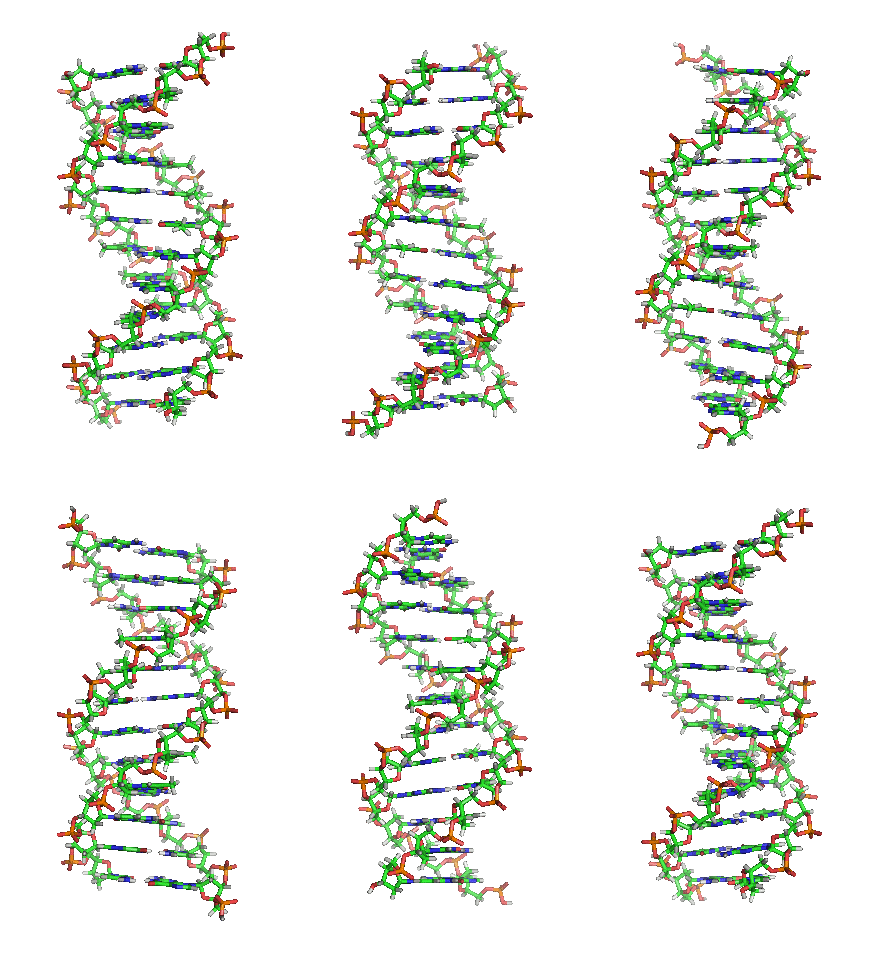
Another classic example: a spring. Plants such as climbing vines with their tendrils. The path a charged particle follows in a magnetic field is also helical. Just search the internet and you will find more and more examples.
And this shape can be obtained with parametric equations in Cartesian coordinates. For example:
t = sympy.Symbol('t')

plot3d_parametric_line(cos(t),
                       sin(t),
                       t,
                       (t, 0, 6*sympy.pi),
                       );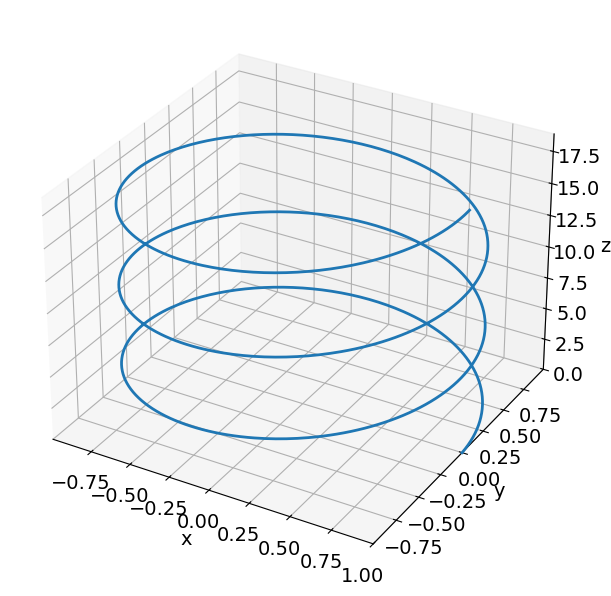
Simple, right? It is a periodic behavior, look, there are the sine and cosine functions.
Now look at the following excerpts from cheesy 80s songs (in Portuguese):
A vida vem em ondas, como um mar
Num indo e vindo infinito
Tudo vem tudo vai
Como as ondas do mar
Well, besides apparently being a source of heartache for musicians, ocean waves are examples of periodic behavior, which even shows up figuratively in the lyrics. Although I prefer to remember the sea in great epic adventures, thanks to Iron Maiden.
Look at the following plot, generated by multiplying two trigonometric functions:
plot3d(sin(y) * cos(x),
       (x, -sympy.pi, sympy.pi),
       (y, -sympy.pi, sympy.pi),);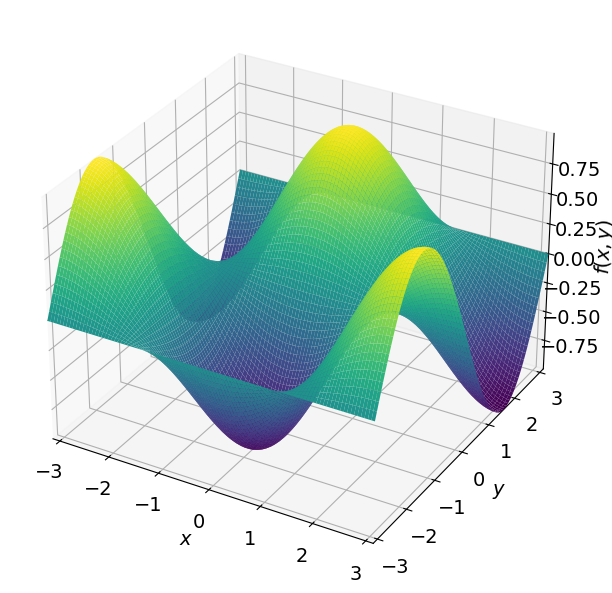
Can you see it as a good analogy to a wave? Observe the behavior of the maxima and minima. Here chemists and physicists might recall the most classic example in those fields: atomic orbitals. You know those orbital shapes they made you memorize in high school? Look at the equations at the link: sine and cosine appear in them. Not by chance, these equations arise from the so-called wave function studied in quantum mechanics, but that is for another article.
Go back to the previous figure. Imagine a plane parallel to the xy plane that cuts the plot. For example, take a plane at z = 0.25, with z = f(x,y) being our vertical axis. What would you see on that plane? What would the plot of this intersection, this cut, between the surface and the plane look like?
Well, basically, we are looking for the plot of the equation sin(y) cos(x) =
0.25, right? That is an implicit
function. Conveniently, SymPy
has the plot_implicit method, to which we can pass the equation and get the
plot:
plot_implicit(sympy.Eq(sin(y) * cos(x), 0.25),
              (x, -sympy.pi, sympy.pi),
              (y, -sympy.pi, sympy.pi),
              );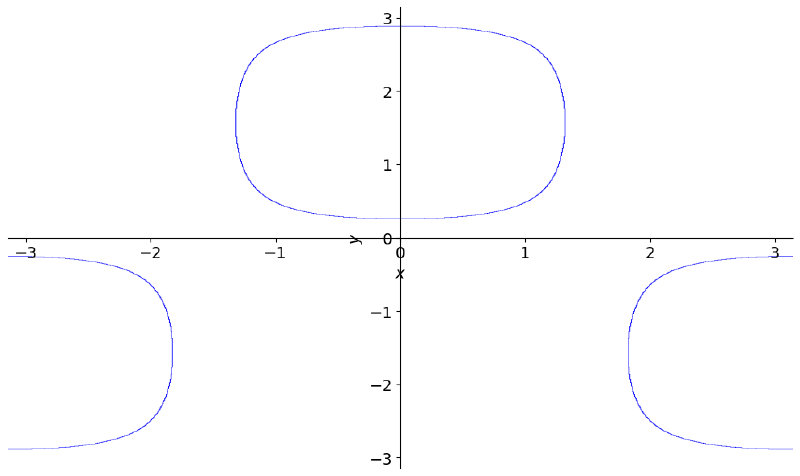
Can you understand the plot? It is the set of points where the surface intersects the plane at z = 0.25, at height 0.25, at level 0.25.
Imagine that, instead of a wave, the plot represents terrain, with valleys and mountains. That is where the concept of contour lines comes from: basically, we made the contour line at height 0.25. It is an important subject in topography and a classic example in college calculus classes, usually Calculus 2.
What would we see if we put several contour lines in the same plot, as if we were stacking the curves but viewing them from above, on the same plane?
Here we will again need some help from NumPy and Matplotlib, because we want to
obtain many numerical values of an equation. SymPy has the lambdify function,
which lets us turn a SymPy expression into a function that can be used in NumPy
numerical computations. And Matplotlib has the contour method for contour
lines. Let us see:
# create function with lambdify
f = sympy.lambdify((x, y), sin(y) * cos(x), 'numpy')

# create set of values
x_values = np.linspace(-np.pi, np.pi, 1000)
y_values = np.linspace(-np.pi, np.pi, 1000)
X, Y = np.meshgrid(x_values, y_values)

# create contour lines
cp = plt.contour(X, Y, f(X, Y));

# put the value of each level on the plot
plt.clabel(cp);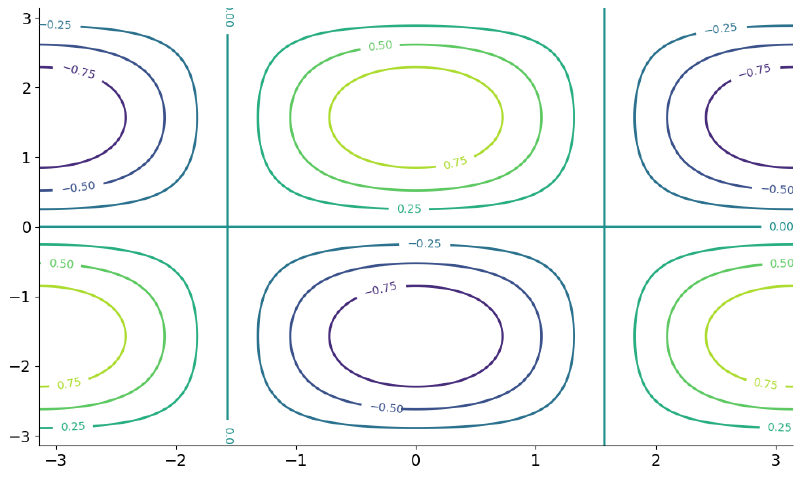
The color scheme is the same one used in the 3D plot. Compare the contour lines with the 3D surface to make sure you understood what was done.
We can set the number of levels we want in the plot:
cp = plt.contour(X, Y, f(X, Y), 20);
plt.clabel(cp);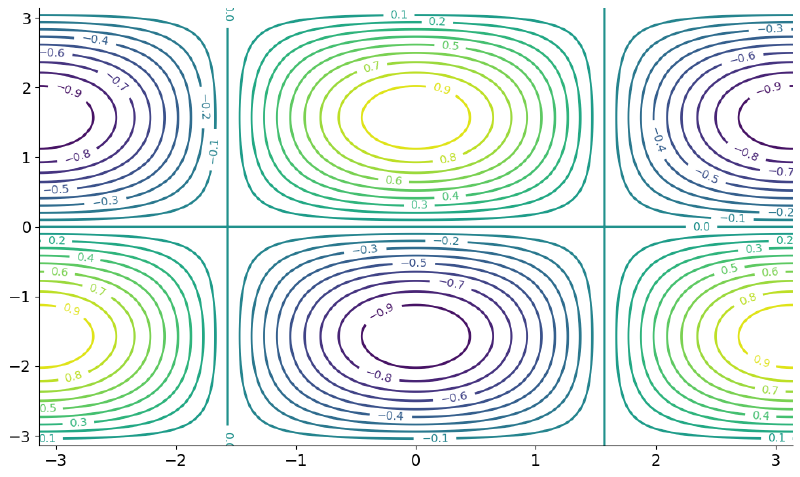
It is very common, when we want to show many levels, to use colored maps and
present a color scale. For that, we have the contourf method (the f is for
filled):
plt.contourf(X, Y, f(X, Y), 30);
plt.colorbar();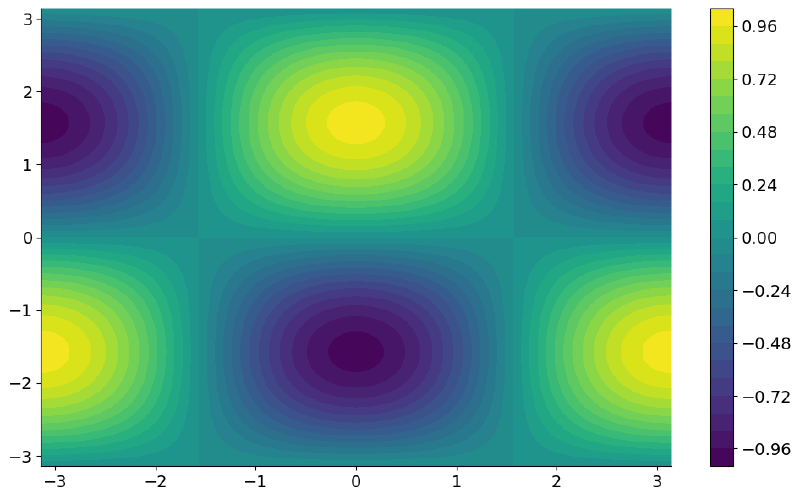
A really beautiful and hallucinogenic plot. Our periodic pattern is clearly
visible here, even though we have “lost” one of the dimensions of the plot.
Still alive? Did you expect to see all this in an article about trigonometric functions? There is a bit more, but it is almost over…
Hyperbolic functions #
If ordinary trigonometric functions already scare some people, the hyperbolic ones even more so… But, if you made it this far, it is because I managed to show how interesting, and useful, trigonometric functions are. And the hyperbolic ones are just as much so, as I intend to show.
The geometric origin can be seen here, but in this article I intend to go straight to the applications. So, let us briefly look at the definitions.
Hyperbolic functions can be defined from exponential functions:
(exp(x) + exp(-x))/2\(\displaystyle \frac{e^{x}}{2} + \frac{e^{- x}}{2}\)
simplify( (exp(x) + exp(-x))/2 )\(\displaystyle \cosh{\left(x \right)}\)
(exp(x) - exp(-x))/2\(\displaystyle \frac{e^{x}}{2} - \frac{e^{- x}}{2}\)
simplify( (exp(x) - exp(-x))/2 )\(\displaystyle \sinh{\left(x \right)}\)
simplify(sinh(x) / cosh(x))\(\displaystyle \tanh{\left(x \right)}\)
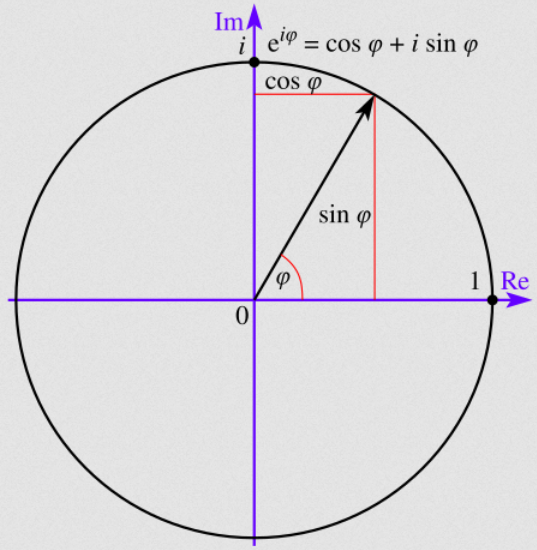
But what is the relationship between hyperbolic and trigonometric functions? Why are they appearing in the same article? Because trigonometric functions can also be defined from exponential functions, only they are complex exponential functions according to Euler’s formula:
$$ e^{ix} = \cos(x) + i \sin(x) $$Which we can represent on a complex plane:
SymPy has the symbol I to denote the imaginary unit:
exp(sympy.I * x)\(\displaystyle e^{i x}\)
We can use the rewrite method to ask SymPy to rewrite a given expression
using other mathematical functions:
exp(sympy.I * x).rewrite(cos)\(\displaystyle i \sin{\left(x \right)} + \cos{\left(x \right)}\)
Thus, we see above that Euler’s formula equality appears.
We can ask SymPy to rewrite the sine and cosine functions in exponential form:
sin(x).rewrite(exp)\(\displaystyle - \frac{i \left(e^{i x} - e^{- i x}\right)}{2}\)
cos(x).rewrite(exp)\(\displaystyle \frac{e^{i x}}{2} + \frac{e^{- i x}}{2}\)
Note that they are very similar to the definitions of hyperbolic sine and cosine, the difference being the presence of complex arguments in the exponentials.
Well, this means that if we pass complex arguments to the sine and cosine functions, the hyperbolic sine and cosine functions will appear:
sin(sympy.I * x).rewrite(exp)\(\displaystyle i \left(\frac{e^{x}}{2} - \frac{e^{- x}}{2}\right)\)
expand_trig(sin(sympy.I * x))\(\displaystyle i \sinh{\left(x \right)}\)
cos(sympy.I * x).rewrite(exp)\(\displaystyle \frac{e^{x}}{2} + \frac{e^{- x}}{2}\)
expand_trig(cos(sympy.I * x))\(\displaystyle \cosh{\left(x \right)}\)
We see, therefore, that trigonometric and hyperbolic functions are closely related. I will soon write articles about complex numbers so, if you had difficulty understanding what was discussed here, I will return to the subject soon. In the meantime, this link shows the relationships between trigonometric and hyperbolic functions in more detail and may help.
Just like trigonometric functions, there are also important identities among hyperbolic functions, for example:
cosh(x)**2 - sinh(x)**2\(\displaystyle - \sinh^{2}{\left(x \right)} + \cosh^{2}{\left(x \right)}\)
simplify(_)\(\displaystyle 1\)
Let us see the plot of the hyperbolic sine, cosine, and tangent:
plot(sinh(x), cosh(x), tanh(x),
     (x, -3, 3),
     ylim=(-3, 3),
     legend=True,);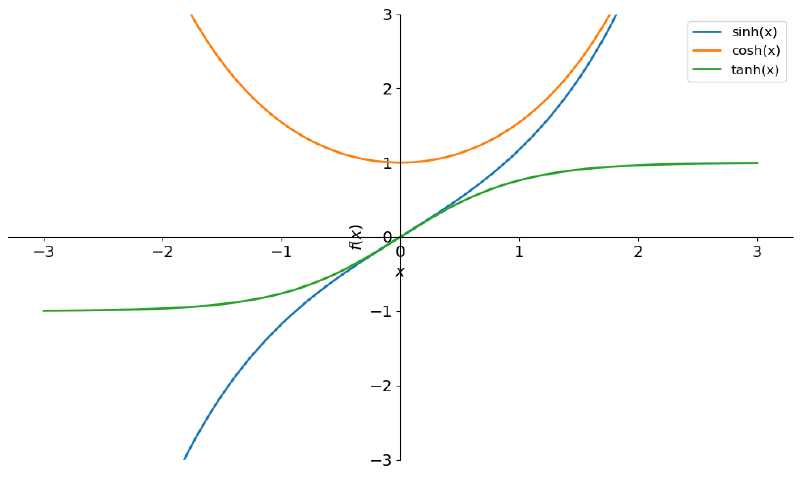
Here it starts to get (more) interesting.
Plots of the catenary and the catenoid #
Look at the following two photos:


Can you relate the photos to any of the curves shown in the previous plot?
Both photos illustrate real examples of catenaries. A catenary is the curve assumed by a hanging chain, or flexible cable, fixed only at its ends and subject only to the force of its own weight (gravity). Catenaries are important in engineering and architecture. A force applied at any point of the curve is distributed equally throughout the material, providing greater stability to the structure. The shape is widely used in the construction of architectural arches, cathedral domes, and igloos. There are several examples at this link.
The mathematical definition of a catenary in Cartesian coordinates is quite simple:
a = Symbol('a')

catenary = a * cosh(x/a)
catenary
\(\displaystyle a \cosh{\left(\frac{x}{a} \right)}\)
Where a is a constant. Let us see the effect of this constant by plotting a few values:
plots = []

for i in range(1, 6):
    expr = catenary.subs({a: i})
    p = plot(expr, (x, -6, 6), show=False)
    data = p[0].get_points()
    plots.append(data)

fig, ax = plt.subplots()

for i, p in enumerate(plots, 1):
    ax.plot(*p, label=f'a = {i}', linewidth=3)
    ax.set_ylim(0, 10)
    ax.legend()
    ax.set_xlabel('x')
    ax.set_ylabel('y')

ax.set_title(r"Catenary: $y = a \cosh \left( \dfrac{x}{a} \right)$")

plt.show()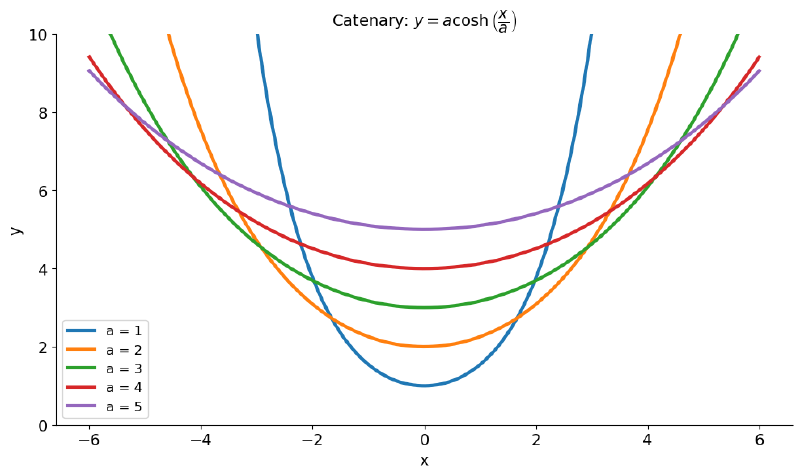
Graphically, we see that a defines the “opening” of the curve. But, structurally, taking a chain as an example, this factor is related to the horizontal tension in the chain and to its weight. Makes sense, right?
Now, look at the following photo:

Yes, it is a soap bubble that was stretched by the blue rings in the photo. Look at the shape of the resulting surface and get ready for a mental exercise. Go back to the previous plot and pick the catenary with the widest opening, that is, with a = 5. Mentally, lay it on its side, pointing its opening to the left, and rotate it around an imaginary vertical axis. Congratulations, you just generated a catenoid in your mind, which is very similar to the phenomenon illustrated in the photo.
A catenoid is a minimal surface, that is, a surface in which, once all the points of the boundary are fixed, any two points are joined by infinitely many curves, one of which is a catenary. Put in a way that is a bit easier to understand, it is the surface with the smallest possible area given its edges (boundary conditions). Its mean curvature is zero at every point.
It is a heavily studied structure, from studies of self-assembled molecular structures, through the study of tensile structures in architecture, to the evaluation of the surface tension of materials.
Its definition in a Cartesian space can be given by the following parametric equations:
c, v = sympy.symbols('c v')

catenoid_x = c * cosh(v / c) * cos(t)
catenoid_y = c * cosh(v / c) * sin(t)
catenoid_z = v

catenoid_x, catenoid_y, catenoid_z
\(\displaystyle \left( c \cos{\left(t \right)} \cosh{\left(\frac{v}{c} \right)}, \ c \sin{\left(t \right)} \cosh{\left(\frac{v}{c} \right)}, \ v\right)\)
Note that there are trigonometric and hyperbolic functions in the definitions. We have a nonzero real constant c, a real variable t in the interval [-π, π), and a real variable v.
Let us replace the constant c with some value, for example 1, and generate our surface:
catenoid_x = catenoid_x.subs({c: 1})
catenoid_y = catenoid_y.subs({c: 1})

catenoid_x, catenoid_y, catenoid_z
\(\displaystyle \left( \cos{\left(t \right)} \cosh{\left(v \right)}, \ \sin{\left(t \right)} \cosh{\left(v \right)}, \ v\right)\)
plot3d_parametric_surface(catenoid_x, catenoid_y, catenoid_z,
                          (t, -sympy.pi, sympy.pi),
                          (v, -1, 1),);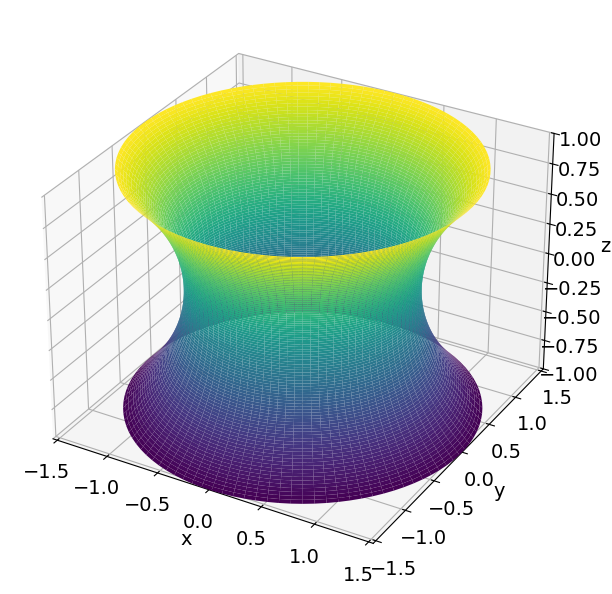
Very similar to the photo, right?
And what is the effect of this constant? Let us replace it with 0.5:
catenoid_x = c * cosh(v / c) * cos(t)
catenoid_y = c * cosh(v / c) * sin(t)
catenoid_x = catenoid_x.subs({c: 0.5})
catenoid_y = catenoid_y.subs({c: 0.5})

plot3d_parametric_surface(catenoid_x, catenoid_y, catenoid_z,
                          (t, -sympy.pi, sympy.pi),
                          (v, -1, 1),);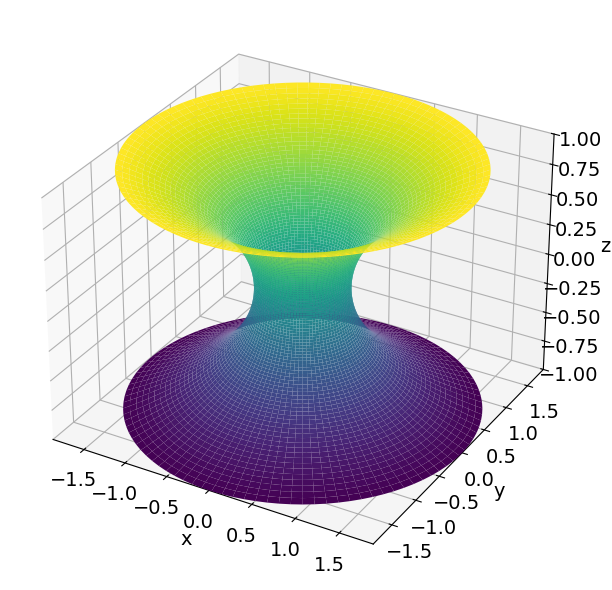
We see that the catenoid’s “waist got thinner.”
Conclusion and more SymPy articles #
It was a long trip through trigonometric and hyperbolic functions, but I hope I made the subject interesting. Unfortunately, the teaching environment sometimes focuses too much on the mathematics and forgets to show real examples, applications, and connections between subjects. If, besides finding it interesting, you also learned a bit of Python, my goal was achieved.
Until next time.


