

The start of a calculus course tends to feel abstract because of the concept of a limit, which we saw in a recent article. But it soon becomes more tangible with the introduction of the derivative, which has many obvious practical applications.
In this article, we will see how to work with derivatives using SymPy, a Python package.
The concept of the derivative and its interpretation #
Let’s recall a bit of calculus to make the article easier to follow. Look at the animation below. It shows the curve of an arbitrary function, two marked points, A and B, and the triangle formed to obtain the change in the y axis quantity and the x axis quantity, with the help of a third point C. In the animation, the points get closer and closer. Notice that, in the limit where the points become closer, the hypotenuse of the triangle, initially a secant line of the curve, becomes a tangent line at the point of virtual meeting A. The blue line is the tangent at point A, shown precisely to display how the secant gets closer and closer to a tangent.
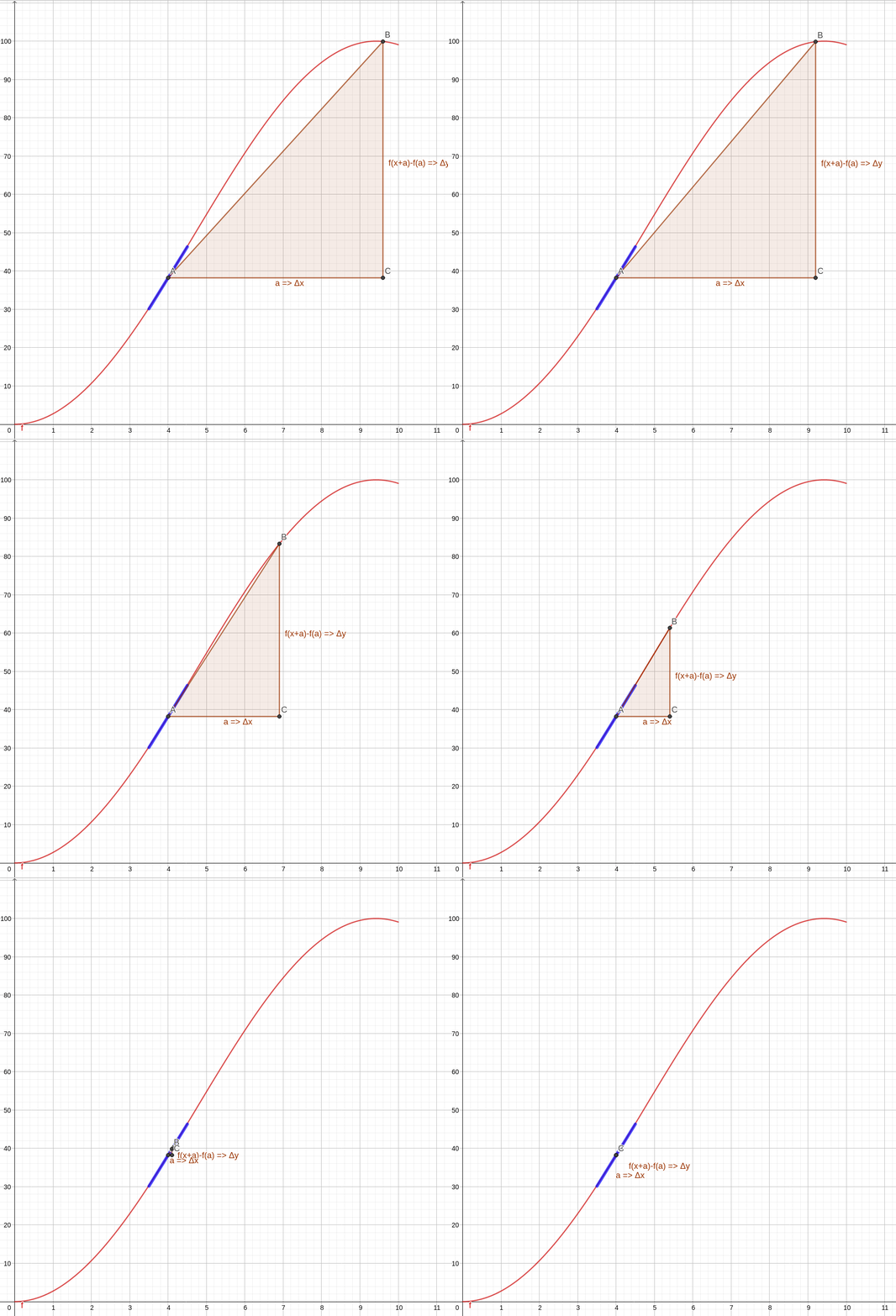
Notice that the word limit appears in the text, and we have already written about the concept of limit. Basically, we see in the animation that the secant line approaches a tangent in the limit where points A and B get closer. We can formalize this better by writing that the slope of the tangent line to \( (a, f(a)) \) must be
$$ \lim\limits_{h \to 0} \frac{f(a + h) - f(a)}{h} $$We say that a function \(f\) is differentiable at \(a\) if the limit above exists. In this case, the limit is denoted by \(f^{\prime}(a)\) and called the derivative of \(f\) at \(a\). We will return to this idea of a tangent line and its consequences later in the article.
But so what? Well, this idea of a tangent line to a curve leads to many applications. It is the origin of the idea of instantaneous velocity in physics, for example. After all, we can picture instantaneity as two measurements in a very short time interval, virtually in the limit of this interval tending to zero. Just like the points in our animation. In fact, we have already written about how to use Python to determine Usain Bolt’s speed, the Olympic and world champion athlete, and in that article we used exactly this idea and a bit of calculus :-)
In this article we will focus more on the operational side, showing how to handle functions and their derivatives with SymPy. But it is always important to keep in mind the interpretation and applications of what we are doing.
The diff function #
To begin, let’s consider a very simple function:
$$ f(x) = x^3 $$From the simple differentiation rules studied in introductory calculus courses, we know that:
$$ f'(x) = 3x^2 \qquad f''(x) = 6x \qquad f'''(x) = 6 $$But how do we obtain these results with SymPy? We need to use the package’s
diff function. Let’s see, starting by importing what we need:
# setup for better outputs in the article, can be ignored
from sympy import init_printing
init_printing(use_latex='png', scale=1.05, order='grlex',
              forecolor='Black', backcolor='White', fontsize=10)

from sympy import diff, Symbol
Let’s create the symbol needed to represent x and create our variable that will represent the function. Then we request the first derivative, passing the function and the variable with respect to which the function will be differentiated:
x = Symbol('x')
f = x**3
diff(f, x)
\( 3 x^{2} \)
Simple, right? And for higher-order derivatives, just pass the order as the third parameter. For example, for the second derivative:
diff(f, x, 2)\(6 x\)
And for the third derivative:
diff(f, x, 3)\(6\)
For more complicated functions, in calculus we learn several differentiation rules, such as the product, quotient and chain rules, among others. SymPy handles such cases smoothly, directly giving the final result. See the examples below, compare the results with those obtained by hand applying differentiation rules, taking the chance to study calculus ;-)
from sympy import sin, cos, exp

# product rule
diff(x**2 * sin(x), x)
\( 2 x \sin{\left(x \right)} + x^{2} \cos{\left(x \right)} \)
# chain rule
diff(sin(x**2))
\( 2 x \cos{\left(x^{2} \right)} \)
# quotient rule
diff(x**2 / sin(x), x)
\( - \dfrac{x^2 \cos(x)}{\sin^2(x)} + \dfrac{2x}{\sin(x)} \)
Notice that the result above can be written as a single fraction, making the
quotient rule more explicit. For that, we use the factor method already
covered in another
article
of the SymPy series:
diff(x**2 / sin(x), x).factor()\( - \dfrac{ x (x \cos(x) - 2 \sin(x))}{\sin^2(x)} \)
Differential equations #
Differential equations have many applications, making up a world of their own
within calculus. They will certainly appear often here on the site. We have
already seen in another
article
how to use the solve function to solve the common equations studied in high
school. Now, let’s look at the dsolve function for differential equations.
We have already seen in this and other articles that we can define symbols in
SymPy with the Symbol class or with the symbols function, to represent
variables and constants in our expressions and equations. To make it explicit
that something is a function, we can use the Function class. Let’s import what
we need and show how to create a representation of a function f:
from sympy import Function, dsolve, Eq
f = Function('f')
f(x)
\( f(x) \)
Now that we have our function, let’s create the differential equation
$$ f(x) - f'(x) = 0 $$For that, we will use the Eq class and the diff function:
diff_eq = Eq(f(x) - diff(f(x), x), 0)
diff_eq
\( f(x) - \frac{d}{dx} f(x) = 0 \)
Notice above that we used our function f by writing f(x), to indicate the
function’s variable. A notation identical to the one most used in calculus. Now,
we just pass this equation to the dsolve function, indicating that it should
be solved for f(x):
dsolve(diff_eq, f(x))\( f(x) = C_{1} e^{x} \)
Do you agree with the result? Remember, the exponential function has the curious property of being equal to its own derivative ;-) This also holds for multiples of this function, hence the indication that there may be a constant \(C_1\) multiplying the function. Exactly the same notation that is usually used in calculus classes.
Tangent lines #
By definition, the tangent line to a function \(f(x)\) at \(x = x_0\) is the line that passes through the point \((x_0, f(x_0))\) and has the same slope as the function at that point. Such a line is described by the equation
$$ T(x) = f(x_0) + f'(x_0) (x - x_0) $$Let’s see this concept starting from the following very simple function:
$$ f(x) = \frac{1}{2} x^2 $$Let’s begin by creating the function with SymPy:
from sympy import S

f = S('1/2')*x**2
f
\( \frac{1}{2} x^{2} \)
Now, let’s create the representation of its derivative:
df = diff(f, x)
df
\( x \)
Following the definition, we can create a representation for the line T:
x0 = Symbol('x_0')
T = f.subs({x: x0}) + df.subs({x: x0}) * (x - x0)
T
\(\dfrac{x_{0}^{2}}{2} + x_{0} (x - x_{0}) \)
So, if we want the tangent line to our function f at \(x_0 = 1\), all we need
is:
T.subs({x0: 1})\( x - \dfrac{1}{2} \)
By definition, this line has the same value and the same slope as the function \(f(x)\) at \(x = 1\). Let’s check:
# checking that T(x0) == f(x0)
T.subs({x0: 1}).subs({x: 1}) == f.subs({x: 1})
True
# checking that the slope of T is the same as the function's at the desired point
diff(T, x).subs({x0: 1}) == diff(f, x).subs({x: 1})
True
It is easier to visualize with a graph. Look at the graph generated by the code below, showing the function and its tangent line at \(x_0 = 1\):
from sympy.plotting import plot
import matplotlib.pyplot as plt


def move_sympy_plot_to_axes(sympy_plot, plt_ax):
    """Moves a SymPy plot to a Matplotlib axes

    Adapted from: https://stackoverflow.com/a/46813804/8706250

    Parameters
    ----------
    sympy_plot : SymPy plot
    plt_ax : Matplotlib axes
    """

    backend = sympy_plot.backend(sympy_plot)
    backend.ax = plt_ax
    backend._process_series(backend.parent._series, plt_ax, backend.parent)
    backend.ax.spines['right'].set_color('none')
    backend.ax.spines['bottom'].set_position('zero')
    backend.ax.spines['top'].set_color('none')
    plt.close(backend.fig)


fig, ax = plt.subplots(figsize=(8, 6))

p1 = plot(f, (x, -3, 3), show=False, label=r'$f(x) = \frac{1}{2}x^2$')
p2 = plot(x-S('1/2'), (x, -3, 3), show=False, label=r"$f'(x) = x - \frac{1}{2}$")

move_sympy_plot_to_axes(p1, ax)
move_sympy_plot_to_axes(p2, ax)

ax.scatter(1, 1/2, color='red', label='Point (1, 1/2)')

ax.set_title('Derivative as the slope of the tangent line at a point \n')
ax.legend()

plt.show()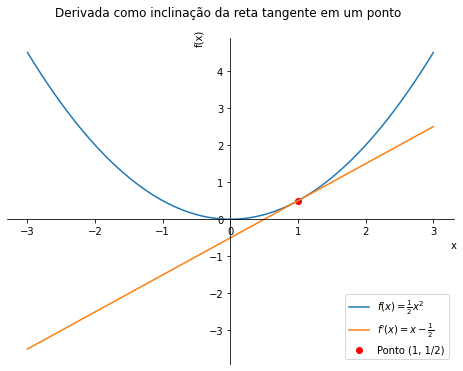
Conclusion #
Did that bring back the calculus classes? We saw how simple it is to work with derivatives in SymPy, and we will use this simplicity in many of the future articles on the site.
See you next time.


