

A large part of fundamental math education is devoted to solving equations and systems of equations. In this article we will see how to use SymPy for these tasks quickly and intuitively.
The famous quadratic equation #
Let’s start by importing SymPy and creating a few symbols. We already talked about creating symbols in the first article of this series on SymPy, so, if you have any doubts, take a look there.
import sympy

# setup for better outputs in the article, can be ignored
sympy.init_printing(use_latex='png', scale=1.0, order='grlex',
                    forecolor='Black', backcolor='White',)

x, y, a, b, c = sympy.symbols('x y a b c')
Using expressions and solve #
Let’s now create an expression in the variable x:
expr = x**2 + 2*x - 8As we can see, the expression has degree 2 in x:
expr\(\displaystyle x^{2} + 2 x - 8\)
So, if we set the expression equal to zero, we get a quadratic equation, and we
can solve it. That is, find the values of x for which the equation equals
zero, the roots of the equation. For that, we use the solve method with the
signature solve(expr, var), where var is the variable for which we want to
solve the equation:
sympy.solve(expr, x)\(\displaystyle \left[ -4, \ 2\right]\)
So, we see that the roots of the equation x2+2x-8=0 are -4 and 2.
Now, the great power of SymPy is being a symbolic CAS. So, we can get the general expressions for the roots of a quadratic equation written in the general form ax2+bx+c=0:
sympy.solve( a*x**2 + b*x + c, x)\(\displaystyle \left[ \frac{- b - \sqrt{- 4 a c + b^{2}}}{2 a}, \ \frac{- b + \sqrt{- 4 a c + b^{2}}}{2 a}\right]\)
Well, that is nothing more than the famous quadratic formula. The formula usually presented in books contains the symbol ± to indicate that there are two roots. Above we have the two roots in a more explicit form.
We saw earlier that the solution is presented as a list with each root. Let’s, then, look at each solution separately by accessing each item of the list in the usual Python way:
solutions = sympy.solve( a*x**2 + b*x + c, x)

solutions[0]
\(\displaystyle \frac{- b - \sqrt{- 4 a c + b^{2}}}{2 a}\)
solutions[1]\(\displaystyle \frac{- b + \sqrt{- 4 a c + b^{2}}}{2 a}\)
Since lists are iterable, we can write a loop substituting a, b and c with the values used in the first expression of this article and check that the roots are, indeed, -4 and 2:
roots = []
for solution in solutions:
    roots.append(solution.subs({'a': 1, 'b': 2, 'c': -8}))

roots
\(\displaystyle \left[ -4, \ 2\right]\)
Using equalities and solve #
The previous approach is perfectly correct and is widely used in scripts and tutorials you find on the internet. However, there is another way to approach the problem, which uses an abstraction of equality that exists in SymPy and that, personally, I find more interesting because it is more semantic, closer to what we actually want to represent mathematically.
SymPy has the class
Equality,
which is meant to express the equality between two objects. There is the
abbreviation Eq, which makes code easier to write. So, the same expression as
before, which we implicitly treated as an equation only when we ran
solve(expr, x), could be recognized more explicitly, directly as an equation,
with:
equation = sympy.Eq(x**2 + 2*x - 8, 0)
equation
\(\displaystyle x^{2} + 2 x - 8 = 0\)
Notice that now we actually wrote it as an equation, with a left-hand side and a right-hand side. The right-hand side, in this case, being the number zero. Certainly this form is easier to understand.
And, of course, we can pass this equation to solve and get the same roots:
sympy.solve(equation, x)\(\displaystyle \left[ -4, \ 2\right]\)
The right-hand side does not necessarily have to be zero. The same equation could be represented by:
sympy.Eq(x**2 + 2*x, 8)\(\displaystyle x^{2} + 2 x = 8\)
Which, obviously, would result in the same roots when passed to solve:
sympy.solve(sympy.Eq(x**2 + 2*x, 8), x)\(\displaystyle \left[ -4, \ 2\right]\)
Systems of equations #
We have seen that we can solve an equation, but what about a system? We easily
can. The first way is to pass an iterable of expressions to solve and, also,
the variables of the system. Suppose a system formed by the equations x + y = 3 and 3x - 2y = 0. We
could write:
sympy.solve((x + y - 3, 3*x - 2*y),
            (x, y))
\(\displaystyle \left\{ x : \frac{6}{5}, \ y : \frac{9}{5}\right\}\)
We could also be more explicit by creating each equation with Eq and passing
them to solve:
eq1 = sympy.Eq(x + y, 3)
eq2 = sympy.Eq(3*x - 2*y, 0)

sympy.solve((eq1, eq2),
            (x, y))
\(\displaystyle \left\{ x : \frac{6}{5}, \ y : \frac{9}{5}\right\}\)
Beware of floats! #
Notice that the result of the system came out as a dictionary. And we can actually substitute it into any equation to see the result:
eq1.subs({x: 6/5, y: 9/5})\(\displaystyle \text{True}\)
What does the result True mean? It means that the equality of the equation is
satisfied. Look at the representation of eq1:
eq1\(\displaystyle x + y = 3\)
So, True means that, when the given values replace x and y in the
equation, the equality is satisfied, it is true.
Well, one would expect that the same substitution in eq2 would return True,
right?
eq2.subs({x: 6/5, y: 9/5})\(\displaystyle \text{False}\)
Huh…?!
Beware of floats! In the first article about SymPy we already covered a bit of this and saw how we can represent fractions in SymPy. See, when you write 6/5 in Python, what we get is:
6/5\(\displaystyle 1.2\)
That is, a float. And operations with floats involve approximations, as we saw in the article already cited. So, it pays to convert them into SymPy’s fraction representations:
eq2.subs({x: sympy.S('6/5'), y: sympy.S('9/5')})\(\displaystyle \text{True}\)
Now we have the equality as valid.
Completing the square #
Completing the square is a technique to convert a polynomial in the form ax2+bx+c to the form a(x-h)2+k for some values of h and k. It is used in many teaching contexts, the best known being the derivation of the quadratic formula.
In the following animation, we see that h=-b ⁄ (2a) and k= c-(b2 ⁄ 4a):
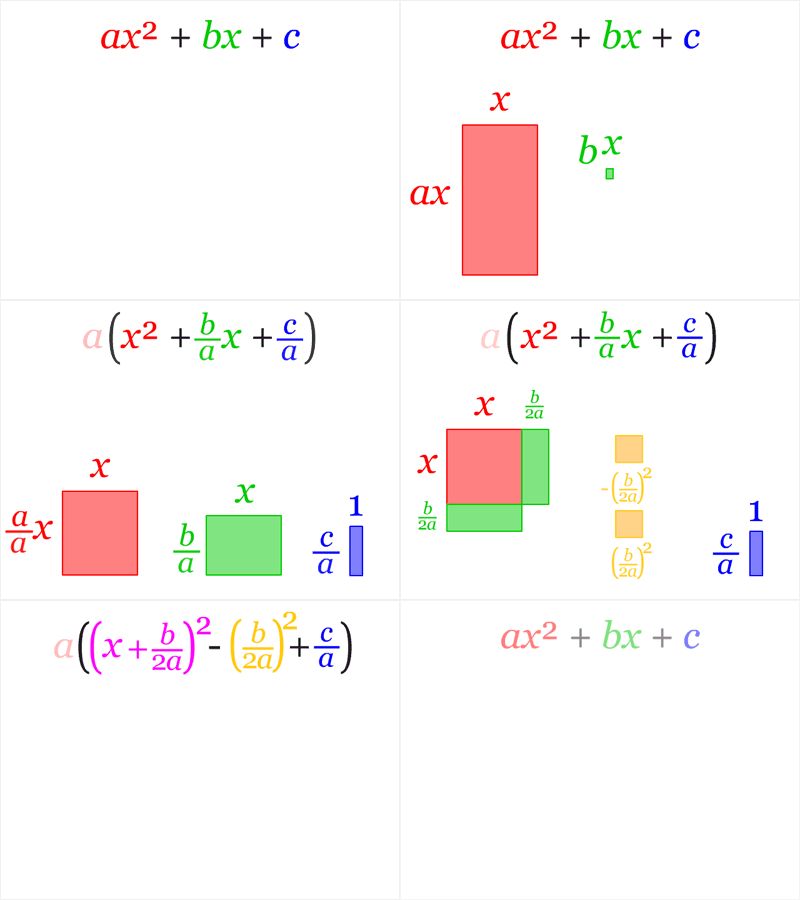
We then need to create two new symbols:
h, k = sympy.symbols('h k')We can, just as a teaching resource, express the equality in SymPy:
square = sympy.Eq(a * x**2 + b*x + c, a * (x - h)**2 + k)
square
\(\displaystyle a x^{2} + b x + c = a \left(- h + x\right)^{2} + k\)
Let’s now take any quadratic equation and try to find the values of h and k. For example: x2-4x+7 = (x-h)2+k
square_example = sympy.Eq(x**2 - 4*x + 7, (x - h)**2 + k)
sympy.solve(square_example, (h, k))
\(\displaystyle \left\{ h : 2, \ k : 3\right\}\)
Getting to know the Equality object #
Let’s take the opportunity to get to know the Equality object better with
this example. So far, we have used it as a way to represent a mathematical
equation, but we have already seen that the return can also be a boolean,
True or False. Let’s understand.
First, let’s substitute the values found for h and k into our object:
square_example.subs({h: 2, k: 3})\(\displaystyle x^{2} - 4 x + 7 = \left(x - 2\right)^{2} + 3\)
We can get each side of the equality with the attributes rhs (right-hand
side) and lhs (left-hand side):
square_example.subs({h: 2, k: 3}).rhs\(\displaystyle \left(x - 2\right)^{2} + 3\)
square_example.subs({h: 2, k: 3}).lhs\(\displaystyle x^{2} - 4 x + 7\)
We can expand the square on the right-hand side:
square_example.subs({h: 2, k: 3}).rhs.expand()\(\displaystyle x^{2} - 4 x + 7\)
Well, this shows that the two sides are indeed equal, right? So, the following equality comparison should be true:
square_example.subs({h: 2, k: 3}).lhs == square_example.subs({h: 2, k: 3}).rhsFalse
But no… why? According to the SymPy documentation, the library checks for structural equality, not mathematical equivalence. For details, see this part of the SymPy documentation and this FAQ in the SymPy repository.
From what we have seen, if the comparison is between the left-hand side and the
expansion of the right-hand side, the result should be True:
square_example.subs({h: 2, k: 3}).lhs == square_example.subs({h: 2, k: 3}).rhs.expand()True
Now it works. And everything could be summed up in the following line, which tells SymPy to carry out the possible expansions and check the equality:
square_example.subs({h: 2, k: 3}).expand()\(\displaystyle \text{True}\)
Conclusion and more articles about SymPy #
The temptation to solve every single equation that shows up in front of you with SymPy must now be great. Systems, even more so! But see how important it is to have a good mathematical foundation to understand what can be done with the library. Don’t go skipping math class (or do, but then study from the books ;-) ).
See you next time.


