

Many people consider mathematics, physics, and related subjects difficult, usually because of the traditional approach found in schools. But the truth is that, when presented in a more suitable way, they are amazing fields that, once mastered, give us a different view of the world. And computers can help with the more complex and tedious steps of arithmetic manipulation. In this article, we will start exploring the SymPy library, taking the chance to do a good review of fundamental mathematical concepts.
Introduction and installation of SymPy #
A computer algebra system (CAS) can be used for calculations with complicated mathematical expressions, solving equations, simulations, among other applications.
There are free systems such as SymPy and Octave, and commercial ones such as Maple, MATLAB, and Mathematica. In essence, they all offer the same features, so the choice comes down to technical aspects and cost-benefit, especially with respect to integration with other tools. In this sense, SymPy has a big advantage, since Python is widely used in many contexts, so its functionality can easily be expanded. In fact, on the SymPy project website, these are the highlighted points:
- free, under the BSD license
- based on Python
- lightweight, with
mpmathas its only dependency - it is a library, so it can be used in other applications and easily extended
And, the main reason to choose SymPy: you can check your answers to the calculus problem sets from college, or to those exams by uncreative professors, full of calculations and with no real application or context ;-) Just don’t say I wrote this.
That is the face of someone tackling one of those problem sets:

And if you are a professor and the shoe fits, calm down and breathe. Of course students need to learn calculus; if they don’t know the basics they won’t even know how to use the package, since computers don’t work miracles, they return exactly what was asked. The criticism is about applying this knowledge to real cases. Create projects where the calculations are applied, create problem solvers and not human calculators.
SymPy is a symbolic computer algebra system. This means that numbers and operations are represented symbolically, which makes it possible to obtain exact results. Let’s understand this better.
Consider the number \(\sqrt{2}\). In SymPy, this number is represented by the
object Pow(2, 1/2), whereas in numerical CAS, such as Octave, it is
represented as an approximation 1.41421356237310 (a float). So what? Well,
depending on the application, there is no problem in having this approximation,
but it can lead to problems. Let’s see an example.
If we use the sqrt function from Python’s math package, we also get the root
stored as a float:
import math

math.sqrt(2)
1.4142135623730951
Well, we know that if we square \(\sqrt{2}\), we should get the number 2, right? Let’s see:
math.sqrt(2)**22.0000000000000004
Did you see what happened? There is a stray “4” there that, in a very simplified way, arises from the fact that the representation is an approximation.
And what is the consequence of this? We could list a few, but I will focus on
one that catches many beginners by surprise. It is very common to use
comparisons with == in conditionals or in function tests. These comparisons
run a serious risk of failing when they involve floats:
math.sqrt(2)**2 == 2False
What to do in these cases? Well, if the context requires continuing to use numerical approximations and floats, a simple but not always reliable way is to compare with a tolerance that is acceptable in the context. For example, say that an error of 1 in 10,000 is acceptable in a given context. Then the test could be written as:
abs(math.sqrt(2)**2 - 2) < 1E-4True
At some point I will write articles covering in more depth the care needed when working with floats, but for now here is a reading recommendation: floating point arithmetic from the Python documentation itself.
Let’s see how SymPy behaves in this simple example.
First, installation can be done with a simple pip install sympy. If you use
Anaconda, which we have already written about
here,
SymPy is already installed. Importing it is simple:
import sympyLet’s see how the square root of 2 is represented:
sympy.sqrt(2)\(\displaystyle \sqrt{2}\)
Note that the symbol \(\sqrt{2}\) appeared, not an approximation in the form of a float. Let’s do the squaring operation:
sympy.sqrt(2)**2\(\displaystyle 2\)
We got the exact result 2. We can even verify that it is really the number 2 with the comparison:
sympy.sqrt(2)**2 == 2True
And, since the expression is treated symbolically, it can be simplified symbolically. Remember that \(\sqrt{8} = 2\sqrt{2}\)? Then:
sympy.sqrt(8)\(\displaystyle 2 \sqrt{2}\)
SymPy took care of this simplification for you. And, what is more, the relationship becomes explicit symbolically, whereas if you compute \(\sqrt{8}\) on your calculator or with a numerical package you will hardly notice that the result corresponds to \(2\sqrt{2}\):
math.sqrt(8)2.8284271247461903
Let’s now see the basics of mathematics with SymPy.
Basic mathematics with SymPy #
Let’s understand how SymPy represents mathematical objects and simple operations. But first, let’s remember that in Python there are two main numeric types: integers and floats.
3 # int3
3.0 # float3.0
Floats are approximate representations of real numbers, up to the 16th decimal place. When we do a division, even of integers, the result is a float:
1/11.0
1/70.14285714285714285
The so-called floor division, represented by two slashes, gives the integer part of the division:
1//70
While the % sign, known as modulo, gives the remainder of the division:
1 % 71
Rational numbers #
Now, we know that 1/7 belongs to the set of rational numbers and its decimal
representation is infinitely long. For an exact representation, we need
SymPy’s sympify function:
sympy.sympify('1/7')\(\displaystyle \frac{1}{7}\)
Which can be called by the short name S:
sympy.S('1/7')\(\displaystyle \frac{1}{7}\)
Note how the fraction was passed to the function, as a string. Let’s see the type of the generated object:
type(sympy.S('1/7'))sympy.core.numbers.Rational
So, the same fraction could be created as:
sympy.Rational(1, 7)\(\displaystyle \frac{1}{7}\)
Note that in the form above we passed the numerator and the denominator as integers. We can do operations between rationals:
sympy.Rational(1, 2) + sympy.S('1/3')\(\displaystyle \frac{5}{6}\)
A SymPy object divided by an integer results in a SymPy object:
sympy.S('1')/7\(\displaystyle \frac{1}{7}\)
Obtaining numerical approximations #
When solving problems, it is better to leave obtaining the numerical
representation until the end. To get the numerical approximation of a SymPy
object as a float, we use the evalf() method. Let’s see an example with the
number \(\pi\):
sympy.pi\(\displaystyle \pi\)
type(sympy.pi)sympy.core.numbers.Pi
Note that it is a SymPy-specific type, since the library has some built-in numbers. We will see some of them over time. Let’s see the representation as a float:
sympy.pi.evalf()\(\displaystyle 3.14159265358979\)
type(sympy.pi.evalf())sympy.core.numbers.Float
Note above that SymPy has its own Float class (the same goes for integers and
other kinds of numbers), not using Python’s standard float. So, be careful
when mixing standard Python types and SymPy types. When in doubt, apply the
sympify function already shown to make sure everything is a SymPy object.
A short way to call the evalf method is simply to use the n method:
sympy.pi.n()\(\displaystyle 3.14159265358979\)
It is possible to request more decimal places. For example, if we want 50 decimal places for the number \(\pi\):
sympy.pi.n(50)\(\displaystyle 3.1415926535897932384626433832795028841971693993751\)
This is possible because SymPy uses the mpmath library under the hood, which allows calculations with arbitrary-precision arithmetic.
There is also a global function N to obtain a numerical representation of
SymPy objects:
sympy.N(sympy.pi)\(\displaystyle 3.14159265358979\)
Since this is symbolic mathematics, we can use, for example, the notion of
infinity, which has the curious symbol oo:
sympy.oo\(\displaystyle \infty\)
sympy.oo > 100\(\displaystyle \text{True}\)
Symbols #
Since we are talking about symbolic algebra, there is nothing better than seeing
how to create symbols with SymPy. From Python, we know that if we use a symbol
not previously defined, a NameError will be raised:
x + 2---------------------------------------------------------------------------
NameError Traceback (most recent call last)
/tmp/ipykernel_342/917526016.py in <module>
----> 1 x + 2
NameError: name 'x' is not defined
Once we define x, it can be used. And, in Python, there is no need to declare
the type of x:
x = 2
x + 2
4
The point is that we would like x to be recognized as a symbol. Think of the
x from middle school math classes, from the famous “find x” questions:
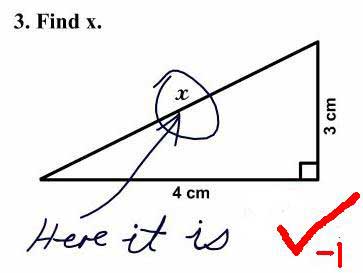
Hehe…
That is, we want x with the classic meaning of a mathematical variable. We can
do it as follows:
x = sympy.Symbol('x')
x + 2
\(\displaystyle x + 2\)
Note that it now appears as a mathematical expression. We can create several
symbols at the same time; notice that now the function is symbols:
y, z = sympy.symbols('y z')
x + y + z - 5
\(\displaystyle x + y + z - 5\)
SymPy allows creating symbols that follow a pattern. For example, in the study
of polynomials it is very common to represent all the coefficients with the
letter a, changing only the subscript number. This can be created with a
notation very similar to that of Python sequence slices, in which the last
number is exclusive:
a1, a2, a3, a4 = sympy.symbols('a1:5')

a4 * x**4 + a3 * x**3 + a2 * x**2 + a1 * x + 2
\(\displaystyle a_{1} x + a_{2} x^{2} + a_{3} x^{3} + a_{4} x^{4} + 2\)
Note that by default SymPy presents the polynomial from the lowest degree in x
to the highest, leaving the \(x^0\) term for last. It is possible to change the
order by changing the monomial
order setting of the
init_printing function, which configures how SymPy expressions are displayed.
Let’s see:
sympy.init_printing(order='grlex')
a4 * x**4 + a3 * x**3 + a2 * x**2 + a1 * x + 2
\(\displaystyle a_{4} x^{4} + a_{3} x^{3} + a_{2} x^{2} + a_{1} x + 2\)
grlex comes from graded lexicographic
order,
going from the highest degree to the lowest, which is more usual in mathematical
texts and the like. To return to SymPy’s default, we use the lex option:
sympy.init_printing(order='lex')
a4 * x**4 + a3 * x**3 + a2 * x**2 + a1 * x + 2
\(\displaystyle a_{1} x + a_{2} x^{2} + a_{3} x^{3} + a_{4} x^{4} + 2\)
According to the SymPy
documentation, some letters are
reserved and should be avoided as symbols: I, E, N, S, O, Q, and
C. We have already seen N and S. I and E represent the imaginary
number \(i \equiv \sqrt{-1}\) and the base of the natural logarithm,
respectively:
sympy.I\(\displaystyle i\)
sympy.E\(\displaystyle e\)
The O is used for big-O
notation:
sympy.Osympy.series.order.Order
sympy.O(x**2) * x\(\displaystyle O\left(x^{3}\right)\)
C and Q have more specific uses, which are beyond the scope of this
introductory material, but can be seen in the documentation already cited.
Expressions #
Expressions can be created by combining symbols with mathematical operations and other functions:
expr = 2 * x + 3 * x - sympy.sin(x) - 3 * x + 42

expr
\(\displaystyle 2 x - \sin{\left(x \right)} + 42\)
Note that the expression was already presented simplified, since this is a simple case of addition. In more elaborate cases, SymPy is not proactive about simplification, given that the user may want the raw expression, without manipulations. But it is possible to request simplification.
Simplifying expressions and obtaining coefficients #
There is a specific function for simplification:
(x + x * y) / x\(\displaystyle \frac{x y + x}{x}\)
sympy.simplify(_)\(\displaystyle y + 1\)
The underscore _ takes the result of the previous cell and passes it to
simplify.
Back to our expression expr, it is possible to check the coefficients of the
terms in x with the coeff method, treating the expression as a polynomial in
x:
expr.coeff(x)\(\displaystyle 2\)
Since the expression is of order 1 in x, there is, for example, no coefficient
for a term of order 2 or, better put, that coefficient is zero:
expr.coeff(x, 2)\(\displaystyle 0\)
If we want the 42 term in the expression, we just ask for the coefficient of
the x^0 term:
expr.coeff(x, 0)\(\displaystyle 42\)
It is also possible to check the coefficients relative to other terms; just treat them as if they were the polynomial’s variable:
expr.coeff(sympy.sin(x))\(\displaystyle -1\)
Factoring and expanding (distributive property) #
There are functions for many usual mathematical operations on expressions. For example, the factoring operation:
sympy.factor(x**2 - 2*x - 8)\(\displaystyle \left(x - 4\right) \left(x + 2\right)\)
And its opposite, expansion or distributive multiplication:
sympy.expand( (x - 4)*(x + 2) )\(\displaystyle x^{2} - 2 x - 8\)
It is also possible to expand trigonometric expressions. For example:
sympy.cos(x + y)\(\displaystyle \cos{\left(x + y \right)}\)
sympy.expand(_, trig=True)\(\displaystyle - \sin{\left(x \right)} \sin{\left(y \right)} + \cos{\left(x \right)} \cos{\left(y \right)}\)
The collect function #
When symbols are used as coefficients, SymPy does not group them. But we can use
the collect function, which additively collects terms with respect to a power.
To understand, let’s create two symbols, a and b, and create an expression
with them:
a, b = sympy.symbols('a b')

expr = x**2 + x*b + a*x + a*b

expr
\(\displaystyle a b + a x + b x + x^{2}\)
Let’s then pass the expression to the collect function, telling it to group
the coefficients of the x^1 term:
sympy.collect( expr, x )\(\displaystyle a b + x^{2} + x \left(a + b\right)\)
Note that the expression was written so as to make explicit that the
coefficient of the x term is (a + b). This can be useful in some contexts,
especially for presentation.
However, even without writing it explicitly, SymPy already recognizes the
coefficient internally as (a + b), as can be seen with the coeff method:
expr.coeff(x, 1)\(\displaystyle a + b\)
Substituting values in an expression #
Something of great interest in the context of mathematical expressions is being able to substitute values to check the value of the expression after such a substitution. Let’s create a new expression:
expr = sympy.sin(x) + sympy.cos(y)

expr
\(\displaystyle \sin{\left(x \right)} + \cos{\left(y \right)}\)
With the subs method, we can pass a dictionary with the desired values for
each symbol:
expr.subs({x: 1, y:2})\(\displaystyle \cos{\left(2 \right)} + \sin{\left(1 \right)}\)
Note that the return was still symbolic, but we can see a float approximation
using the n method seen earlier:
expr.subs({x: 1, y:2}).n()\(\displaystyle 0.425324148260754\)
If the result of the substitution is exact, the return will be presented directly. For example, we know that \(\sin(\pi) = 0\) and \(\cos(0) = 1\). So the sum would be 1. Let’s see:
expr.subs({x: sympy.pi, y:0})\(\displaystyle 1\)
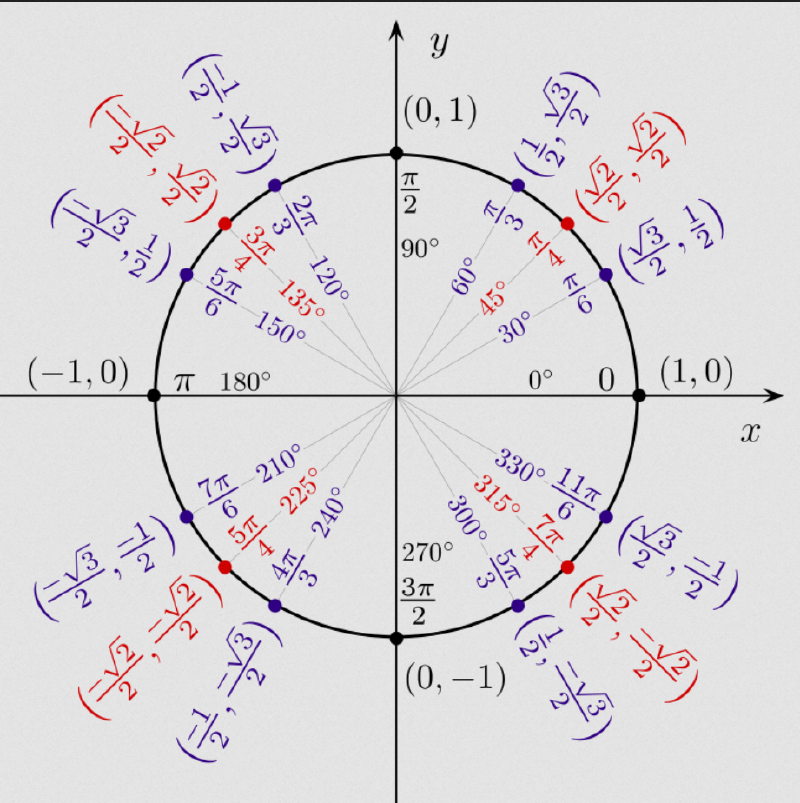
The same goes for other special angles, which have symbolic representations. For example:
expr.subs({x: sympy.pi/2, y:sympy.pi/4})\(\displaystyle \frac{\sqrt{2}}{2} + 1\)
If you did not understand, review the special angles with the following image of the unit circle:
If we request a substitution with already approximated values, we get the following kind of result:
expr.subs({x: sympy.pi/2.5, y:sympy.pi/4.3})\(\displaystyle \cos{\left(0.232558139534884 \pi \right)} + \sin{\left(0.4 \pi \right)}\)
Conclusion and more articles about SymPy #
In this article we saw the basics of SymPy, and I hope it was possible to see the power of this library. This is only the first in a series of articles about the library.
Until next time.


