

Most likely your first contact with complex numbers was in high school, in a very quick and abstract way. However, it is a fascinating topic with many practical applications, ranging from vector graphics and sound frequency analysis to the study of fractals. In this article, we will see how the Python language handles complex numbers natively and how the SymPy package extends the power of the language.
A (very) brief review of complex numbers #
This article does not even remotely intend to give a thorough treatment of the theory of complex numbers. But in case the reader needs a little help because it has been a long time since they saw the subject, here is a brief review.
A complex number is an element of a number system that contains the real numbers and an element denoted i, called the imaginary unit, which satisfies the equation \(i^2 = -1\). In engineering and computing, it is common to use the letter j for the imaginary unit. In fact, this is the form used natively by Python.
Complex numbers allow every polynomial equation to have solutions. That was probably the starting point of the study of complex numbers for many who saw this topic in high school. For example, equations such as \((x + 1)^2 + 9 = 0\) were once considered to have no solution. However, they have no real solution, since they are usually represented on a real plane. Let’s use a bit of what we have already seen in another article to plot this equation on the real plane:
from sympy import Symbol, solve, init_printing
from sympy.plotting import plot

# settings for better outputs in the article, can be ignored
init_printing(scale=1.25, order='grlex',
              forecolor='Black', backcolor='White', fontsize=12)

x = Symbol('x')
example = (x + 1)**2 + 9

plot(example, axis_center=(0, 0))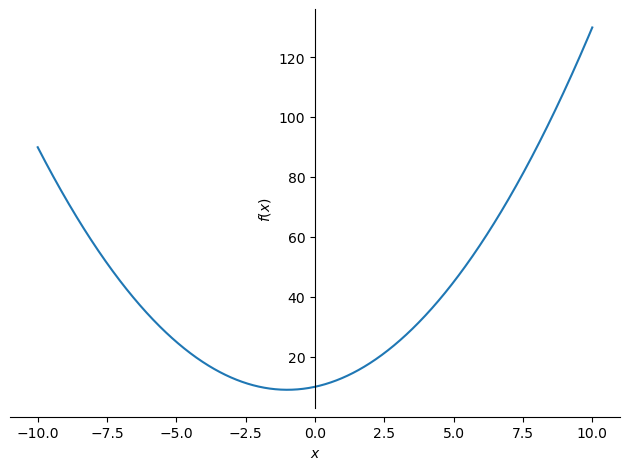
You learned that the plot above shows there are no real roots for the equation in question, since there is no intersection with the x axis. But this equation does have complex solutions: \(-1 +3i\) and \(-1 -3i\). We can check with SymPy itself:
solve(example)\(\displaystyle \left[ -1 - 3 i, \ -1 + 3 i\right]\)
There is certainly much more to say about complex numbers, but I prefer to show it little by little. Before we continue exploring the subject with SymPy, let’s see how Python handles complex numbers natively. Along the way, we will keep reviewing the main aspects of complex numbers.
Complex numbers in Python #
As already mentioned, the language uses the letter j to represent complex numbers:
z = 4 + 3j
type(z)
complex
It is useful to split a complex number into two parts: the real part and the imaginary part, the latter being the real number that multiplies the imaginary unit. We can get these parts as attributes of our object z:
z.real\(\displaystyle 4.0\)
z.imag\(\displaystyle 3.0\)
Another useful concept in the study of complex numbers is the complex
conjugate. The conjugate of a given complex number has the same real part, but
the sign of the imaginary part is flipped. The conjugate can be obtained with
the conjugate method:
z.conjugate()(4-3j)
Graphical representations of complex numbers #
The first representation usually presented in the study of complex numbers is the Argand-Gauss plane. In this plane, the horizontal axis represents the real part of the complex number and the vertical axis the imaginary part. Thus, given a complex number in algebraic form \(z = a + bi\), we get a point (a, b) in this plane.
Now, if we have a point in a plane we can define a vector from the origin of the coordinate system to the point. Let’s see, with the help of Matplotlib:
import matplotlib.pyplot as plt

# to standardize the style of the plots in the article:
params = {
    'axes.labelsize': 12,
    'axes.titlesize': 12,
    'axes.spines.top': False,
    'axes.spines.right': False,
    'xtick.labelsize': 12,
    'ytick.labelsize': 12,
    'figure.autolayout': True,
    'figure.facecolor': 'white',
    'figure.titlesize': 16,
    'figure.figsize': (12, 8),
    'legend.shadow': False,
    'legend.fontsize': 10,
    'lines.linewidth': 2.0,
}

plt.rcParams.update(params)

fig, ax = plt.subplots(figsize=(6, 6))

# point
ax.scatter(z.real, z.imag, s=100, color='red')

# vector
ax.quiver(0, 0, z.real, z.imag, units='xy', angles='xy', scale=1)

# labeling the plot properly
ax.set_xlabel('Re')
ax.set_ylabel('Im')
fig.suptitle('Argand-Gauss plane', color='dimgray')
ax.set_title('Complex number: $z = 4 + 3i$')

plt.show()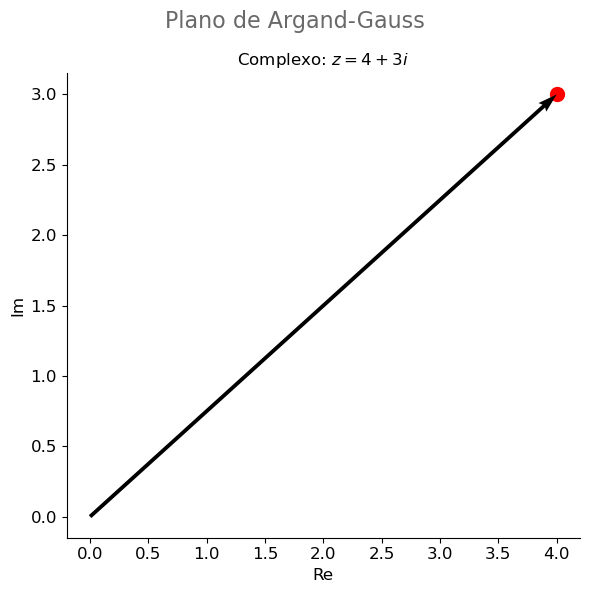
Being a vector, by definition it must have a magnitude, or modulus (the length of the vector), and it can be decomposed into its component vectors. Let’s improve our representation even further:
import math
from matplotlib.ticker import MultipleLocator
from matplotlib.patches import Arc

fig, ax = plt.subplots()

# building our coordinate system and cleaning up the plot
ax.spines['top'].set_color('none')
ax.spines['bottom'].set_position('center')
ax.spines['left'].set_position('center')
ax.spines['right'].set_color('none')
ax.xaxis.set_ticks_position('bottom')
ax.yaxis.set_ticks_position('left')
ax.xaxis.set_major_locator(MultipleLocator(1))
ax.yaxis.set_major_locator(MultipleLocator(1))
ax.grid(which='both', color='grey', linewidth=1, linestyle='-', alpha=0.2)

# point and vector
ax.scatter(z.real, z.imag, s=100, color='red')
ax.quiver(0, 0, z.real, z.imag, units='xy', angles='xy', scale=1)

# circle
circle = plt.Circle((0, 0), 5, color='blue', fill=False)
ax.set_aspect('equal', adjustable='datalim')
ax.add_patch(circle)

# component vectors
ax.quiver(0, 0, z.real, 0, units='xy', angles='xy', scale=1, color='red',
          width=0.075, alpha=0.25)
ax.quiver(0, 0, 0, z.imag, units='xy', angles='xy', scale=1, color='red',
          width=0.075, alpha=0.25)

# lines to highlight the triangles
ax.hlines(z.imag, 0, z.real, linestyle='--', color='purple')
ax.vlines(z.real, 0, z.imag, linestyle='--', color='purple')

# showing the angle
angle = math.degrees(math.asin(z.imag/abs(z)))  # thanks, Pythagoras!

arc = Arc(xy=(0, 0), width=2, height=2,
          theta1=0, theta2=angle,
          linewidth=2)
ax.add_patch(arc)

ax.text(1.1, 0.4, f'{angle:.1f}°', fontsize=14)

# labeling the plot properly
ax.set_xlabel('Re', loc='right')
ax.set_ylabel('Im', rotation='horizontal', ha='right', y=0.96, labelpad=-50)
fig.suptitle('Argand-Gauss plane', color='dimgray')
ax.set_title('Complex number: $z = 4 + 3i$')

plt.show()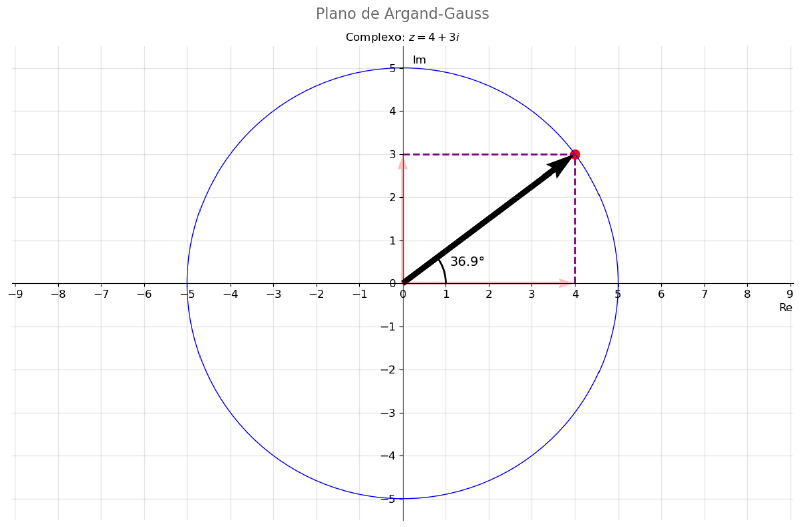
In our representation, we see that the magnitude of the vector is 5 (see how the vector rotated around the origin traces a circle of radius 5, shown in blue). We can reach the same conclusion by noticing that a right triangle is formed, as the dashed lines in the plot try to highlight. It is clear that the vector is the hypotenuse of the triangle and the value can be found with the Pythagorean theorem.
Python’s abs function can be used to get the value:
abs(z)\(\displaystyle 5.0\)
We can verify that it is the same value obtained by the Pythagorean theorem from the lengths of the component vectors:
abs(z) == math.sqrt(z.real**2 + z.imag**2)True
Another aspect related to the plot that is worth recalling: the complex number can be represented by a point. Python knows this:
complex(4, 3) == 4 + 3jTrue
That is, instead of writing out the algebraic form, we just pass the real part
and the imaginary part to the complex function as if they were a coordinate
pair.
Go back to the previous plot. Notice that I highlighted the angle formed by the vector with the horizontal axis. Well, if we have an angle and a triangular representation, we can use trigonometric functions, as we already saw in another article of this SymPy series.
The complex number can therefore be represented in what we call the trigonometric form:
$$ z = \rho (\cos \theta + i \sin \theta) $$where \(\rho\) represents the modulus of the vector.
Now, it would be interesting if we could go from the algebraic form to the trigonometric form with little effort. And, of course, it is possible. See, mathematically it is quite simple to go from one form to the other, just apply a bit of Pythagoras (by the way, see the code that generated the plot for a demonstration of this and for an easter egg). What we are after here is a way to do this with code.
First, let’s see how the math library, which already comes with Python,
handles the following situation:
math.sqrt(-4)---------------------------------------------------------------------------
ValueError Traceback (most recent call last)
Cell In[12], line 1
----> 1 math.sqrt(-4)
ValueError: math domain error
OK, as expected, it raised an error because it does not know how to compute
the square root of a negative number. But we know it is possible to compute,
the result will just be complex and not real. So there is also the standard
library cmath to handle situations where complex numbers may be involved.
Let’s see:
import cmath

cmath.sqrt(-4)
2j
Bingo! It computed correctly, giving the complex result.
cmath has a method, polar, that gives us exactly what we are after:
cmath.polar(z)\(\displaystyle \left( 5.0, \ 0.643501108793284\right)\)
Let’s understand the result piece by piece. First, the name of the method:
polar. Another name for the trigonometric form is the polar form. That is
because a complex number can be represented in a polar coordinate system.
Mathematically, if something can be represented by a point in a plane with a
given distance from a reference point and a given angle against a reference
direction, then it can be represented in a polar coordinate system. That is
exactly our situation. If that is not clear, later on we will see a
representation.
What did the method return? Well, the distance to the reference point (our modulus) and the value of the angle. It happens that the value of the angle is in radians and not in degrees as in the plot. If we convert it, we will see that they are equal:
math.degrees(cmath.polar(z)[1])\(\displaystyle 36.869897645844\)
The code above can be simplified if we know that the angle is also called the
phase (phase) and, if we round the result to the first decimal place, we get
exactly the same angle as in the plot:
round(math.degrees(cmath.phase(z)), 1)\(\displaystyle 36.9\)
If you are still not convinced, let’s work out the trigonometric/polar form in full and observe that we get the algebraic form as the result:
abs(z) * (math.cos(cmath.phase(z)) + math.sin(cmath.phase(z))*1j)(4+3j)
After all, it is just applying the modulus and the angle:
cmath.polar(z) == (abs(z), cmath.phase(z))True
Convinced?
To finish this section, let’s see the representation of our example complex number in a polar coordinate system:
fig, ax = plt.subplots(subplot_kw={'projection': 'polar'}, figsize=(6, 6))

ax.plot(cmath.phase(z), abs(z), marker='o', markersize=15, color='red')
plt.show()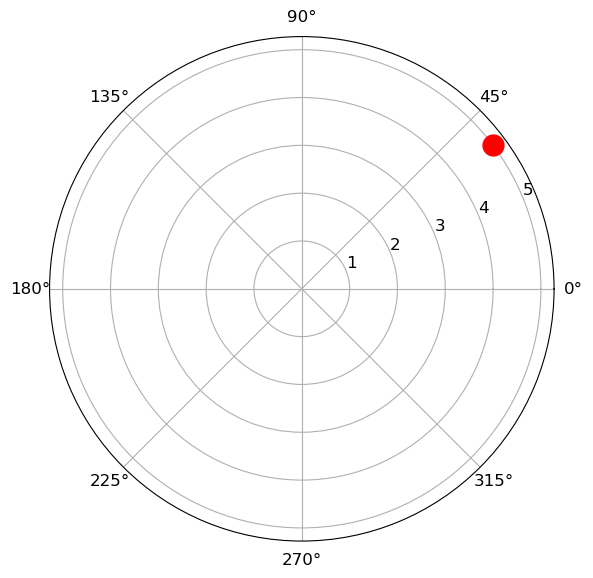
Note that so far we have used only what plain Python gives us. What will SymPy add?
Complex numbers with SymPy #
Well, let’s start by importing a few things we will use:
from sympy import I, re, im, Abs, arg, conjugate, solve, SymbolSymPy’s representation of the imaginary unit is I:
I\(\displaystyle i\)
It is an internal representation of SymPy itself:
type(I)sympy.core.numbers.ImaginaryUnit
Since SymPy is for symbolic algebra, we see that the product of two imaginary units is indeed -1:
I * I\(\displaystyle -1\)
Let’s recreate the complex number we have been using as an example since the beginning of the article, but now as a SymPy symbol:
z = 4 + 3 * I
z
\(\displaystyle 4 + 3 i\)
Instead of treating the imaginary part and the real part as attributes of the
object, SymPy has functions to which we pass a complex number and which return
the parts. They are the functions re and im for the real and imaginary
parts, respectively:
re(z)\(\displaystyle 4\)
im(z)\(\displaystyle 3\)
Likewise, there is Abs to get the modulus, and conjugate to get the
conjugate:
Abs(z)\(\displaystyle 5\)
conjugate(z)\(\displaystyle 4 - 3 i\)
We saw earlier that a complex number can be represented in polar coordinates
from its modulus and its phase, the angle it makes with a reference axis.
Another name for this angle is the argument. So there is the function arg to
get the argument of a complex number:
arg(z)\(\displaystyle \operatorname{atan}{\left(\frac{3}{4} \right)}\)
See the difference of a symbolic library. SymPy effectively returned that the angle is the one whose tangent is 3/4. Go back to the plot we made earlier and you will see that it really is the angle with tangent 3/4.
If you want the explicit value, use the n method as shown in the first
article of this series to get a
numerical approximation:
arg(z).n()\(\displaystyle 0.643501108793284\)
The result comes out in radians. To get it in degrees and represent it with the same number of significant digits shown earlier in the plot, we do:
from sympy import deg

deg(arg(z)).n(3)
\(\displaystyle 36.9\)
Now, let’s see the real power of a symbolic library.
Euler’s formula #
In a recent article about trigonometric functions, we saw that these can be written in terms of exponential functions with the so-called Euler’s formula:
$$ e^{i \theta} = \cos(\theta) + i \sin(\theta) $$Let’s see how SymPy recognizes this equality. First, let’s represent the left-hand side of the equality:
from sympy import exp, sin, cos, symbols

# SymPy recognizes LaTeX symbols :-)
rho, theta = symbols(r'\rho \theta', real=True)
exp(I * theta)
\(\displaystyle e^{i \theta}\)
Now, let’s use the expand method, passing the information that it should
consider complex numbers:
exp(I * theta).expand(complex=True)\(\displaystyle i \sin{\left(\theta \right)} + \cos{\left(\theta \right)}\)
Note that this is exactly the right-hand side of the equality.
And the reverse? Given the right-hand side of the equation, we can ask for it to be simplified:
(cos(theta) + I * sin(theta)).simplify()\(\displaystyle e^{i \theta}\)
We got exactly the left-hand side of the equality.
We can multiply both sides of the equality by any value. Let’s multiply by the symbol \(\rho\), which we are using to represent the modulus:
$$ \rho e^{i \theta} = \rho (\cos(\theta) + i \sin(\theta)) $$Well, the right-hand side has become the polar form representation of a generic complex number, which we already saw earlier.
Let’s then try to obtain the algebraic form of a complex number from its exponential form. We will use the complex number \(4 + 3i\), our example since the beginning. We already know the modulus and the argument for this complex number, so we can substitute the values, obtaining an expression for the left-hand side of the equality:
from sympy import atan
expr = (rho * exp(I * theta)).subs({rho: 5, theta: atan('3/4')})
expr
\(\displaystyle 5 e^{i \operatorname{atan}{\left(\frac{3}{4} \right)}}\)
SymPy has the as_real_imag method which, as the name suggests, tries to
represent the object as a tuple (real part, imaginary part). That is, as a
point in the plane, as seen earlier in the article. Let’s see the result of
this method:
expr.as_real_imag()\(\displaystyle \left( 4, \ 3\right)\)
Exactly as expected! That is, SymPy takes the ability to work with complex expressions to another level. With plain Python, we need to know the relations and build them manually. With SymPy, the transformations can be done easily, with simple method calls.
Conclusion, more complex numbers, and more SymPy #
Complex numbers are not such a complex subject ;-). With the right tools and visualizations the subject becomes more tangible.
See you next time.


