

We have already written here on the site about the concepts of limit and derivative and how we can do the related computations with Python. Continuing our journey through calculus, in this article we will see how to work with integrals using SymPy and SciPy, Python packages. Along the way, we will pick up some notions of numerical methods.
There are two approaches to integral calculus. One considers the integral as an antiderivative. That is, integration is regarded as the inverse of differentiation. The other considers the integral as the sum of many infinitesimal elements. This second approach is the one that allows us to give physical meaning to an integral. Let’s look at a bit of each.
Integral as an antiderivative #
In calculus courses, we usually represent the differentiation of a function \(y = f(x)\) as:
$$ \frac{dy}{dx} = \frac{df(x)}{dx} = f'(x) $$Which we can also represent in differential form
$$ dy = f'(x)dx $$We have already seen how to handle derivatives in SymPy in this article.
In our context, we can ask ourselves the following question: which function \(F(x)\), when differentiated, results in the function \(f^{\prime}(x)\)? Such a function is called the integral of the differential and is written as
$$ F(x) = \int f'(x) dx $$For example, for \(f^{\prime}(x) = 2x\), the function we are looking for is
$$ F(x) = \int 2xdx = x^2 + C $$Note the constant of integration C. Let whoever has never forgotten to write the constant of integration on a calculus exam cast the first derivative! Given the differentiation rules studied in any calculus course, the derivative of a constant is zero, so there are infinitely many functions that satisfy our conditions. Just as an example, in the following plot we see 5 of the antiderivatives of \(2x\).
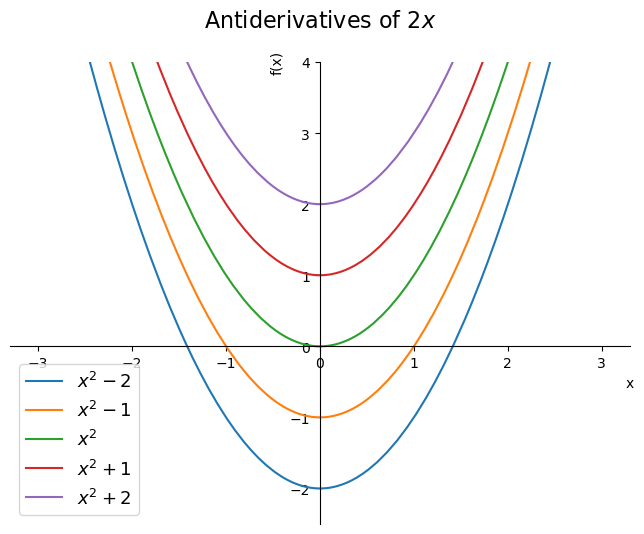
The code for this plot is in this repository of mine.
Integral as a sum of infinitesimal elements #
The previous approach is the mathematical one, the one that lets us know how to obtain an expression for an integral and that gives rise to the rules we learn in calculus courses. But what is the meaning of an integral?
Consider that our function of interest is
$$ f(x) = \frac{1}{x^2 + 1} $$From any table of integrals, you will see that
$$ \int \frac{1}{x^2 + 1} dx = \arctan(x) + C $$And, with a bit of the SymPy we saw in the article on plotting, we can obtain the plot of the function over a given domain:
from sympy import Symbol, plot

x = Symbol('x')
expr = 1 / (x**2 + 1)

plot(expr, (x, -0.5, 5.5));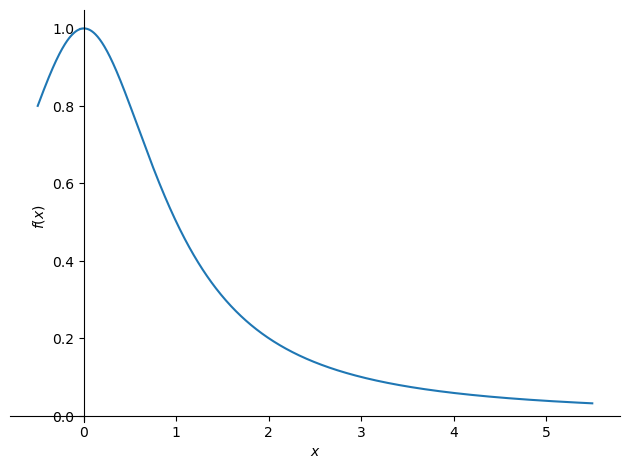
The integral we obtained is called indefinite, because we did not specify the limits of integration. If the limits of integration are specified, the integral is called definite and we can obtain a value. For example,
$$ \int_0^5 \frac{1}{x^2 + 1} dx = \arctan(5) - \arctan(0) = \arctan(5) \approx 1.3734 $$We could highlight this region between the limits of integration in the plot by shading it:
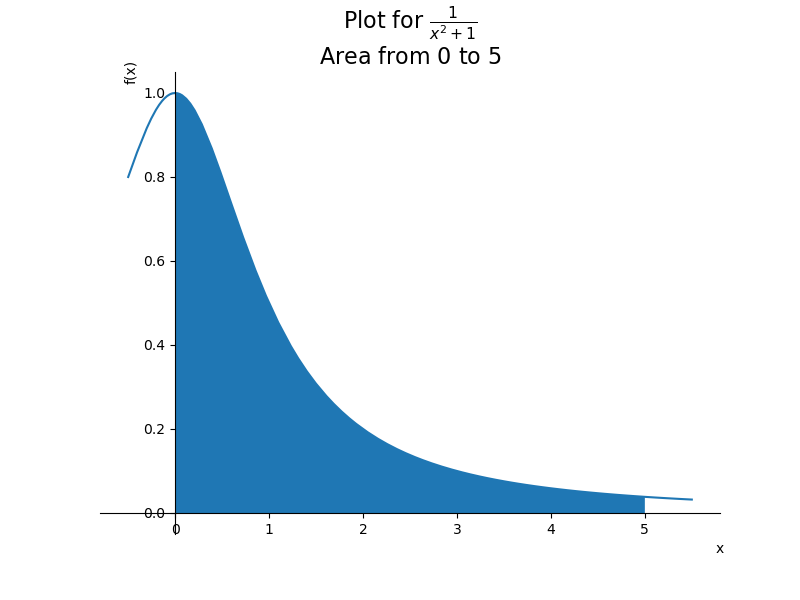
And… that is the meaning of an integral, more specifically of a definite integral! It is the area of the region between the graph and the horizontal axis of the plane.
Now that we have a graphical meaning, it is easy to extend it to a physical meaning. For example, if the vertical axis is the pressure on a gas and the horizontal axis is the change in the gas volume, the area is simply the work done on the gas. That is why physics and engineering courses take such an interest in areas under graphs.
OK, when we have the plot it is relatively easy to see the meaning. But how do we obtain a value? After all, for simple geometric figures, such as rectangles, triangles and circles, we learn formulas to compute the area in basic math courses. But what about the area of a region like the one in the plot above? How do a calculator or a computer manage to present a value to you?
Well, we know how to compute the area of, say, a rectangle. So we keep placing rectangles side by side, trying to imitate the shape of the graph as closely as possible. Yes, seriously. That is the idea behind the so-called Riemann sum. See in the following animation how, by using ever smaller rectangles, we get an ever better approximation of our integral:
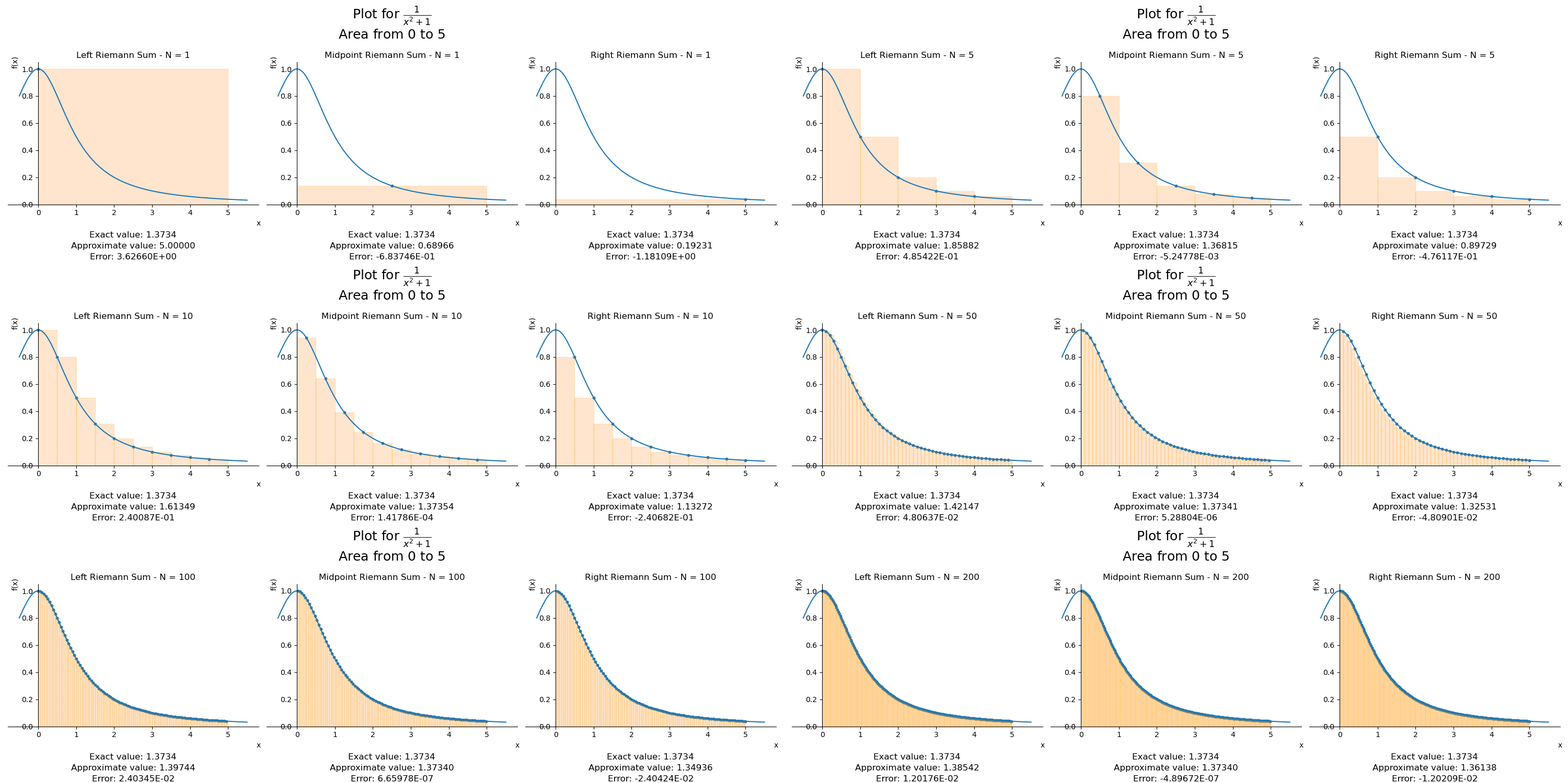
We see three plots in the figure. When we decide the number of subintervals into which we will divide our interval, we can align the rectangles at the left or right endpoint of each subinterval, or at the midpoint of the interval. That is why there are three plots.
Did you like the animation? Here is the repository with the code:
In other words, the values that calculators or computer programs return for integrals are the results of numerical approximations. Following this line of reasoning, there are other approximation methods, such as the trapezoid rule or Simpson’s rules. These numerical approximations are usually covered in Numerical Analysis courses.
OK, and Python?
Integrals with SymPy #
Let’s create this same function we used as an example with SymPy, taking the opportunity to import other functions we will use later:
# setup for nicer outputs in the article, can be ignored
from sympy import init_printing
init_printing(scale=1.05, order='grlex',
              forecolor='Black', backcolor='White', fontsize=10)

from sympy import integrate, Symbol, dsolve, Function, diff, Eq

x = Symbol('x')
expr = 1 / (x**2 + 1)

expr
\(\displaystyle \frac{1}{x^{2} + 1}\)
To obtain the indefinite integral of the function, just pass its expression
expr to the integrate function:
integrate(expr, x)\(\displaystyle \operatorname{atan}{\left(x \right)}\)
Same result that appeared in the text earlier except for one detail… where is the constant of integration?
SymPy “simplifies” the result by omitting the constant of integration, in order to make it easier to pass the result to other SymPy functions if desired. However, we must be aware that it exists. Or we can force it to show up :-)
We saw earlier that we can interpret an integral as an antiderivative, which is nothing more than a function that equals a given derivative. So we have a differential equation, and we have already seen how to solve differential equations with SymPy.
Let’s create the function we are looking for and set up our equation:
F = Function('F')
diff_eq = Eq(diff(F(x)), expr)
diff_eq
\(\displaystyle \frac{d}{d x} F{\left(x \right)} = \frac{1}{x^{2} + 1}\)
Therefore, the function we are looking for (which is the desired integral) is:
dsolve(diff_eq, F(x))\(\displaystyle F{\left(x \right)} = C_{1} + \operatorname{atan}{\left(x \right)}\)
There is the constant of integration ;-)
See how important it is to know the fundamentals of what you are doing. Unfortunately, many teachers are wary of introducing computational tools in teaching, thinking that students will use them and not learn to do the math “by hand”. Likewise, many students think it is a waste of time to manually do what a computer does in a matter of seconds. The point is that the computer only does what it is asked to do. If you don’t know what to ask for…
Besides, critically analyzing the result is up to the user. The absence of the
constant of integration in the return of integrate was a choice of the
developers, but noticing that it was missing must come from the user, based on
their knowledge of calculus. It is to be expected that everything presented here
in terms of calculus is known to anyone who has taken a basic calculus course.
So, with this very simple example involving a simple constant of integration, I hope that both teachers and students are aware that basic knowledge of the subject is still necessary when using programming.
Continuing…
And definite integrals? Simple, we pass a second argument to integrate with
the variable symbol and the desired interval:
integrate(expr, (x, 0, 5))\(\displaystyle \operatorname{atan}{\left(5 \right)}\)
If we want a numerical approximation, we can use the evalf method:
integrate(expr, (x, 0, 5)).evalf()\(\displaystyle 1.37340076694502\)
By the way, the documentation of the method has a section dedicated just to the approximation algorithms used for integrals. If you enjoyed the beginning of the article about the Riemann method, you may be interested in reading the documentation.
Speaking of approximation methods…
Integrals with SciPy #
We have written a lot about SymPy here on the site. The great power of SymPy is
that it is a symbolic library, so we can enter and obtain results in a way very
similar to what we are used to in everyday materials, such as books. You must
have noticed this while reading the article: the notation used is very close to
what we see in books and papers. The very fact that the result of the definite
integral is presented as atan(5) instead of its approximate numerical value is
quite characteristic of a symbolic library.
From my point of view, it is very useful to start studying scientific Python with a symbolic library, hence the number of articles I write about it. It is much simpler to create the symbols and manipulate them as in a regular math course or similar, without the need to keep creating lists or arrays of numbers and functions.
However, everything has its pros and cons. SymPy can be relatively slow when used to obtain numerical values from very long computations. And it is not focused on numerical approximations, so it has few tools in that direction. Hence the existence of NumPy and of libraries built on top of it, such as SciPy. We will use the latter now.
The easiest way to get SciPy is through the Anaconda package, which we have already seen here on the site.
Oh, we have already shown SciPy here before when we computed the speed of the athlete Usain Bolt with Python. I recommend reading it ;-)
SciPy is divided into subpackages that cover different domains of knowledge.
In the integrate subpackage, intended for problems involving integrals and
differential equations, there is the quad method. quad comes from
quadrature, a
historical term that refers to integrals.
We can pass a function and the limits of integration and obtain a numerical approximation of the result:
from scipy.integrate import quad

def example(x):
    return 1 / (x**2 + 1)

quad(example, 0, 5)
\(\displaystyle \left( 1.37340076694502, \ 7.16706990454181 \cdot 10^{-9}\right)\)
Note that a tuple was returned. The first value is the desired approximation;
the second is an estimate of the error of this approximation. The value obtained
for the approximation is equal to the one displayed by SymPy earlier when we
asked for a numerical approximation. But the internal algorithm of quad is
different from the one used by SymPy, being the
Clenshaw-Curtis
one.
Note that when it was written above that we can pass a function, function is actually a Python function and not a function in the mathematical sense, as when we used SymPy. In SymPy, we created a variable that represents a mathematical function, making everything more fluid. Here, with SciPy, we need to create a Python function that represents the idea of a mathematical function. Be careful with the meaning of the same word in different contexts so you don’t get confused.
But let’s recall the variable that represented our function back in SymPy:
expr\(\displaystyle \frac{1}{x^{2} + 1}\)
By default, SymPy objects do not communicate with SciPy objects. However, SymPy
has the lambdify function, which lets us transform SymPy objects into objects
that can be understood by SciPy and NumPy. We pass the symbol used in the
object and the SymPy object itself:
from sympy import lambdify

f = lambdify(x, expr)
f
<function _lambdifygenerated(x)>
type(f)function
Note that the return is a function-type object. Let’s pass it to quad:
quad_approx = quad(f, 0, 5)
quad_approx
\(\displaystyle \left( 1.37340076694502, \ 7.16706990454181 \cdot 10^{-9}\right)\)
We got the same result. lambdify is incredibly useful in this symbolic ->
numerical transition.
I wrote above that there are several approximation methods in SciPy. At the beginning of the article, we saw the Riemann sum, showing the idea of ever narrower rectangles approaching the area under the curve. And I mentioned other approximation methods: trapezoid and Simpson. Let’s see the implementation of these methods with SciPy.
Starting with the trapezoid rule. The idea is the same as the one seen in the
Riemann animation but, instead of rectangles, trapezoids are used. So, we need
points that will serve as the vertices of these trapezoids. Let’s start by
creating 10 values for x and their corresponding function values. We will use
NumPy’s linspace to generate 10 evenly spaced values between our limits of
integration 0 and 5:
import numpy as np

x = np.linspace(0, 5, 10)

x, f(x)
(array([0. , 0.55555556, 1.11111111, 1.66666667, 2.22222222,
2.77777778, 3.33333333, 3.88888889, 4.44444444, 5. ]),
array([1. , 0.76415094, 0.44751381, 0.26470588, 0.16839917,
0.11473088, 0.08256881, 0.06202144, 0.0481856 , 0.03846154]))
Now, we will see the estimate given by SciPy’s trapezoid method:
from scipy.integrate import trapezoid

trap_approx = trapezoid(f(x), x)
trap_approx
\(\displaystyle 1.37305961354302\)
Let’s see the difference between the value obtained by this method and the one
obtained by the quad method:
trap_approx - quad_approx[0]\(\displaystyle -0.00034115340199925\)
We see that, even with only 10 points, the error only shows up from the fourth decimal place on. And if we have more points?
points = (5, 10, 20, 50, 100, 200)

print('Approximation       Difference vs. quad')
for count in points:
    x = np.linspace(0, 5, count)
    trap_approx = trapezoid(f(x), x)
    print(trap_approx, trap_approx - quad_approx[0])
Approximation Difference vs. quad
1.3922446845579102 0.018843917612893613
1.3730596135430173 -0.00034115340199925015
1.3733154390709228 -8.532787409376574e-05
1.3733879321834697 -1.2834761546898221e-05
1.3733976225738 -3.1443712165124538e-06
1.3733999887221857 -7.782228308439443e-07
As expected, the more points, the smaller the difference between the methods.
Since the approximation given by quad uses a more elaborate form of
computation, we can take it as a reference.
The simpson method follows the same logic, but using the Simpson rule
mentioned earlier:
from scipy.integrate import simpson

print('Approximation       Difference vs. quad')
for count in points:
    x = np.linspace(0, 5, count)
    simpson_approx = simpson(f(x), x)
    print(simpson_approx, simpson_approx - quad_approx[0])
Approximation Difference vs. quad
1.3086914096492739 -0.06470935729574268
1.3697275044800366 -0.0036732624649800094
1.373392141184242 -8.625760774538804e-06
1.3734007318507901 -3.50942264137899e-08
1.373400764926956 -2.0180606075115293e-09
1.3734007668239518 -1.2106471380946005e-10
Likewise, the difference shrinks the more points are provided.
Conclusion #
I hope the article has helped you review calculus and integrate your mathematical knowledge with your Python programming knowledge. And, moreover, that it has made you aware that almost every value presented by a program is the result of approximations. Forgetting this fact can lead to problems. It is no accident that I call attention to approximations fairly often in the articles.
See you next time.


