

We learn in math that we can only add matrices of the same order. And such a sum results in a matrix of the same order as those that were added. Matrix multiplication also has a requirement: the number of columns of the first matrix must equal the number of rows of the second matrix. But in computational math problems we sometimes have matrices or vectors of different orders that we would like to add or multiply and that do not meet the requirements just mentioned. In this article we will see how the NumPy broadcasting concept is useful in these contexts and how it relates to vector quantization.
Mathematical definitions #
Just to make sure everyone is on the same page, let’s quickly lay out the mathematical definitions for matrix addition and multiplication, with an example of each operation.
To add two matrices, they must have the same number of rows and columns, and the result will have these same numbers of rows and columns. Mathematically, the sum of a matrix A and a matrix B resulting in a matrix C can be described as:
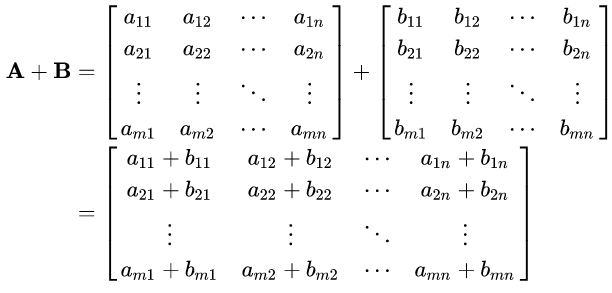
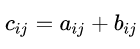
In short, each entry of matrix C can be described as:
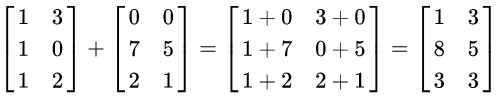
As an example, see the following sum:
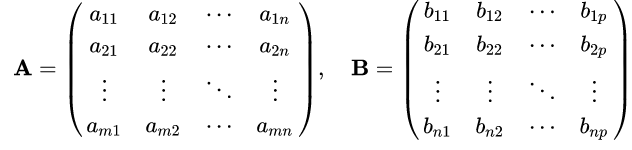
For multiplication, the number of columns of the first matrix must equal the number of rows of the second matrix. The resulting matrix has the number of rows of the first and the number of columns of the second matrix. In mathematical notation, we have:
The product C is:

Or, more succinctly, each entry of matrix C can be described as:

with i ranging from 1 to m, and j going from 1 to p, considering that A is an m x n matrix and that B is an n x p matrix.
Here is an example:
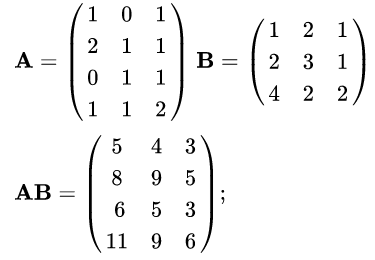
The mathematical notation and the examples were taken from Wikipedia.
Now that we have recalled the definitions, let’s move on to Python.
Arrays in pure Python? #
If you clicked on this article, you are very likely already slightly familiar with NumPy for numerical computing. Perhaps it is even natural to start by importing the library without thinking much at the beginning of any numerical problem. But let’s take a step back and think about the reasons that make NumPy the most widely used library for computing with Python.
At first, we could consider using lists. After all, we could put our numerical data in them and, for example, ask for a sum as shown below:
a = [1, 2, 3]
b = [1, 2, 3]
c = a + b
c
[1, 2, 3, 1, 2, 3]
We already see that the result is not what we expect mathematically. What happens is the concatenation of the lists, not the item-by-item sum. Try multiplication and you will see that it is not even defined between lists. Test with tuples too and you will not get the desired result either.
There is yet another reason not to use Python’s built-in lists. They accept several types as items of the same list. For example:
["a", 1, [True, False], 2.0]['a', 1, [True, False], 2.0]
Imagine doing numerical operations, or even non-numerical ones, with a list like that. It would make no sense. That is why Python treats lists as a mutable store of items that can be of different types. The “+” symbol in the first code cell of this article, in the context of lists, only tells the Python interpreter that the two lists must be joined into a single one, and the types of their items make no difference. However, it would be interesting to have some object that could restrict the type of item it can contain.
Hence the concept of arrays in programming. The word “array” is one of several English terms that are often used in texts even when they are not written in English, and in Portuguese-language material about programming it is common to see it left untranslated. It is worth being clear about its meaning, though. A translation sometimes used for array in Portuguese is vetor (vector). In a context of mathematical operations, that is an acceptable translation. But it is important to know that there is a more general one, valid in any context. Notice that I introduced the term when I was showing the problem of lists accepting several types in their sequence of items. So the best translations of array would be either “arranjo” or “sequência” (sequence). And, in the context of programming, a sequence of items of the same type. This last part is the most important. For a good discussion about the translation of this and other terms into Portuguese, I recommend this link.
Knowing that all items of an array are of the same type is what guarantees predictability in operations. We also get better memory management, but we will not go into that last aspect here.
Well, now that we know what we are talking about, let’s see whether there are built-in implementations of arrays in Python.
In the standard Python installation, there is the array module from which we
can import the array constructor. As already stressed, the items of an array
must be of the same type. In this module, the way to indicate the type is
through a type code, a letter placed before the items are passed, which
indicates the expected type. For example, by passing the letter u we indicate
that it is an array of Unicode characters:
import array

a = array.array("u", ["a", "b", "c"])
a
array('u', 'abc')
Following the logic, the letter i indicates that the array is of integers:
a = array.array("i", [1, 10, 20])
a
array('i', [1, 10, 20])
All type codes are listed in the documentation.
If we try to pass an item that is not of the indicated type, a TypeError is
raised:
# note how mixing the float 1.0 with the integers 10 and 20 results in an error
try:
    a = array.array("i", [1.0, 10, 20])
except TypeError as e:
    print(repr(e))
TypeError('integer argument expected, got float')
Now, our goal here is to do mathematical operations. Does the module handle that naturally?
a = array.array("i", [1, 2, 3])
b = array.array("i", [1, 2, 3])
c = a + b
c
array('i', [1, 2, 3, 1, 2, 3])
No… as we see, Python’s built-in array object deals with the problem of
different types. But it is not suitable for mathematical operations with
numerical arrays. Hence the need to use an external library, NumPy being the
most widely used.
Arrays with NumPy. Broadcasting. #
Well, let’s see right away that NumPy correctly performs the mathematical operation we are using as an example:
from numpy import array

a = array([1, 2, 3])
b = array([1, 2, 3])
c = a + b
c
array([2, 4, 6])
The result is what we expect considering the mathematical definition we saw at the beginning of the article. Now, consider the following cell:
a = array((1, 2, 3))
b = 2

c = a + b
c
array([3, 4, 5])
The result is intuitive, don’t you agree? What NumPy does is, virtually,
replicate the value 2 into an array of three equal items and perform the sum.
Pay attention to the word virtually. It is not that NumPy actually creates
copies in memory (that would be inefficient); it is just an analogy to make it
easier to understand. See the following figure to better understand what was
written:
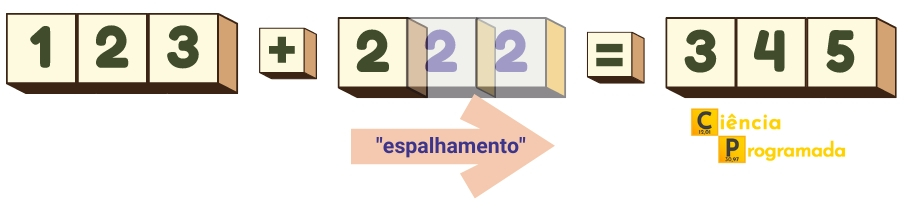
This replication is called broadcasting, literally “casting broadly”. The term makes sense given that values are “spread” until the desired dimension is reached. It is worth remembering that the transmission of messages to scattered receivers in telecommunications uses the same term. For example, the famous broadcaster BBC has its acronym originating from British Broadcasting Corporation. There are interesting discussions about the term broadcasting in programming at this StackOverflow link and about the translation of the term on the Portuguese language StackExchange.
Now let’s start to deepen our discussion. We can describe the operation above as the sum of a scalar, the number 2, to a one-dimensional array.
Recently, in the article about NumPy
reshape, we had some
discussions about dimensions of NumPy arrays. The ndim attribute shows that
our array a has dimension 1:
a.ndim1
A similar behavior is observed with a two-dimensional array:
A = array([[1, 2, 3], [1, 2, 3]])
A
array([[1, 2, 3],
[1, 2, 3]])
A.ndim2
C = A + b
C
array([[3, 4, 5],
[3, 4, 5]])
See how the (virtual) replication of the scalar to perform the sum was repeated.
We can check what happens in the sum of a two-dimensional array and a one-dimensional one:
A = array([[1, 2, 3], [1, 2, 3]])

b = array([1, 2, 3])

C = A + b
C
array([[2, 4, 6],
[2, 4, 6]])
Again, we notice that the array b had its row “replicated” downward so as to
allow the sum.
Limitations of broadcasting #
There is no doubt that NumPy broadcasting speeds up numerical operations a lot. However, it is not always possible for the library to carry out this procedure. There are rules that define when broadcasting is possible. Given two arrays, NumPy will compare their shapes starting from the rightmost dimension. Dimensions are compatible when their sizes:
- are equal, or
- one of them has size 1
If these conditions are not met, the exception ValueError: operands could not be broadcast together is raised.
The initial arrays do not need to have the same number of dimensions. And the resulting array will have the same number of dimensions as the initial array with more dimensions, where the size of each dimension is the largest size of the corresponding dimension among the initial arrays. Missing dimensions are considered to have size one.
Surely the previous paragraphs were quite abstract, so let’s go to an example. Consider again A, b and C defined as in the last example and their respective dimension, shape and size:
from numpy import array2string

A = array([[1, 2, 3], [1, 2, 3]])
b = array([1, 2, 3])
C = A + b


def broadcasting_table(names, arrays, alignment=(5, 4, 6, 4)):
    columns = ("array", "ndim", "shape", "size")

    print(" | ".join([f"{col:^{align}}" for col, align in zip(columns, alignment)]))
    print(" | ".join([f"{'-'*align}" for align in alignment]))

    for name, arr in zip(names, arrays):
        elements = (name, arr.ndim, arr.shape, arr.size)
        print(
            " | ".join(
                [f"{str(el):^{align}}" for el, align in zip(elements, alignment)]
            )
        )

print("C =", array2string(C, prefix="C = "))

print()

broadcasting_table(("A", "b", "C"), (A, b, C))
C = [[2 4 6]
[2 4 6]]
| array | ndim | shape | size |
| ----- | ---- | ------ | ---- |
| A | 2 | (2, 3) | 6 |
| b | 1 | (3,) | 3 |
| C | 2 | (2, 3) | 6 |
If you have difficulty understanding what ndim, shape and size are, see
this article
here on the site.
Let’s understand the rules step by step considering the result above:
- the initial arrays are A and b
- the dimensions are 2 and 1, respectively
- the rightmost dimension of both has size 3, being equal, allowing broadcasting
- the next dimension, moving to the left, is 2 in A and 1 in b (by absence), allowing broadcasting
- the resulting array C has dimension 2 (the larger of A and b), with sizes (2, 3), equal to array A (the largest among the initial ones)
The example of an array added to a scalar can be better understood based on the rules we have seen:
a = array((1, 2, 3))
b = 2

c = a + b

print("c =", array2string(c, prefix="c = "))

print()

broadcasting_table(("a", "b", "c"), (a, array((b,)), c))
c = [3 4 5]
| array | ndim | shape | size |
| ----- | ---- | ----- | ---- |
| a | 1 | (3,) | 3 |
| b | 1 | (1,) | 1 |
| c | 1 | (3,) | 3 |
Comparing with the rules:
- the initial arrays are a and b
- the dimensions are 1 and 1, respectively
- the rightmost dimension of a has size 3, and that of b has size 1, allowing broadcasting
- the resulting array c has dimension 1 (the larger of a and b), with size 3, equal to array a (the largest among the initial ones)
Let’s consider an example where broadcasting is not possible. Below, we redefine our arrays and try to perform the sum:
A = array([
    [1, 2, 3],
    [1, 2, 3]])

b = array([1, 2])

try:
    C = A + b
except ValueError as e:
    print(repr(e))
ValueError('operands could not be broadcast together with shapes (2,3) (2,) ')
Note that the sum was not possible, giving an error that cites the shape of
the arrays. The sizes of the rightmost dimensions of each array differ from one
another and neither has value 1, so the operation is not possible. Compare each
attribute of the arrays in the following table:
broadcasting_table(("A", "b"), (A, b)) | array | ndim | shape | size |
| ----- | ---- | ------ | ---- |
| A | 2 | (2, 3) | 6 |
| b | 1 | (2,) | 2 |
Application: vector quantization #
This seemingly simple concept of broadcasting is at the heart of one of the most important applications in information technology: vector quantization.
What is quantization? #
Quantization is the process of restricting a continuous or large set of values (such as real numbers) to a discrete set (such as integers). For example:
| Input | Quantization |
|---|---|
| 0 < x ≤ 1 | 0.5 |
| 1 < x ≤ 2 | 1.5 |
| 2 < x ≤ 3 | 2.5 |
In the case above, we have infinite sets of real numbers in each interval restricted to a single value, the center of each interval. These single values are called quantization symbols. Considering that we can expand the table above indefinitely following the logic, if we have an input such as 5.8 we expect 5.5 as output.
The example above is one of scalar quantization, since the inputs become a single number that represents the sample.
Let’s create a function that performs scalar quantization, with the help of
NumPy’s digitize method. digitize returns an array of indices that indicate
which interval each input value falls into. We can use these indices to obtain
the quantization symbols corresponding to the items of the input array:
from numpy import digitize, linspace, printoptions


def scalar_quantization(input_array, cut_points, quantization_symbols):
    """
    Performs scalar quantization
    """

    # Finding the indices of the intervals corresponding to each input value
    quantized_indexes = digitize(input_array, cut_points, right=True) - 1

    # Using the indices to obtain the corresponding quantization symbols
    quantized_array = quantization_symbols[quantized_indexes]

    return quantized_array

# ---------- First example:

# Defining the cut points of the intervals
cut_points_first_example = [0, 1, 2, 3]

# Defining the quantization symbols for each interval
quantization_symbols_first_example = array([0.5, 1.5, 2.5])

# Generating an array of input values
first_example = linspace(0.001, 3, 10)

# Printing the results
print("First example")
with printoptions(precision=3, suppress=True):
    print("Input values:\n", first_example)
print(
    "Output values after quantization:\n",
    scalar_quantization(
        first_example, cut_points_first_example, quantization_symbols_first_example
    ),
)
First example
Input values:
[0.001 0.334 0.667 1.001 1.334 1.667 2. 2.334 2.667 3. ]
Output values after quantization:
[0.5 0.5 0.5 1.5 1.5 1.5 2.5 2.5 2.5 2.5]
Now consider the following table:
| Input | Quantization |
|---|---|
| -0.5 < x ≤ 0.5 | 0 |
| 0.5 < x ≤ 1.5 | 1 |
| 1.5 < x ≤ 2.5 | 2 |
In this last case, quantization still restricts the interval to the central value. And, following the logic, if we have an input such as 5.8 we expect the value 6 as output. We can apply our function to this second example:
# ---------- Second example:

# Defining the cut points of the intervals
cut_points_second_example = [-0.5, 0.5, 1.5, 2.5]

# Defining the quantization symbols for each interval
quantization_symbols_second_example = array([0, 1, 2])

# Generating an array of input values
second_example = linspace(-0.499, 2.5, 10)

# Printing the results
print("Second example")
with printoptions(precision=3, suppress=True):
    print("Input values:\n", second_example)
print(
    "Output values after quantization:\n",
    scalar_quantization(
        second_example, cut_points_second_example, quantization_symbols_second_example
    ),
)
Second example
Input values:
[-0.499 -0.166 0.167 0.501 0.834 1.167 1.5 1.834 2.167 2.5 ]
Output values after quantization:
[0 0 0 1 1 1 2 2 2 2]
Notice in both examples that we are taking an input of values and simplifying them into an output that has limits, restrictions. We can think of it as if the input data were being compressed into a particular format. That is exactly the main application of the concept: data compression. And we do not need to be restricted to just one dimension, hence the application of the concept of vectors.
Vector quantization #
Vector quantization is a data compression technique widely used in image and signal processing. It is based on the idea of grouping data vectors into clusters and then replacing each vector with the centroid of the nearest cluster. This reduces the amount of data that needs to be stored or transmitted, without greatly affecting the quality of the information.
In other words, vector quantization is a data reduction technique, where information is mapped to a smaller number of symbols. It is useful in situations where bandwidth or storage space is limited, or when it is desirable to reduce computational complexity in data processing algorithms.
To understand the above, let’s consider the following example, adapted and extended from the NumPy documentation.
- 200 points are known, corresponding to weight and height values for athletes of 4 sports: basketball, football, gymnastics and marathon.
- A new point is given, for which we want to know the likely sport of the corresponding athlete.
Let’s start by visualizing the initial situation, the 200 points. For this
simulation of points, we will use Scikit-Learn’s make_blobs method.
from sklearn.datasets import make_blobs
import matplotlib.pyplot as plt
from matplotlib.colors import from_levels_and_colors
import matplotlib.image as image
from PIL import Image
from numpy import arange

# defining the plot style and the colors
plt.style.use("seaborn-v0_8-muted")
prop_cycle = plt.rcParams["axes.prop_cycle"]
colors = prop_cycle.by_key()["color"]

# creating the clusters for the classes
classes = ["Basketball", "Football", "Gymnast", "Marathon"]

X, y_true, centers = make_blobs(
    n_samples=200,
    centers=((102, 203), (132, 193), (45, 155), (57, 173)),  # starting centroids
    cluster_std=3.5,
    random_state=0,
    shuffle=False,
    return_centers=True,
)

# creating the plot
fig, ax = plt.subplots()
with Image.open("images/CP_banner_transp.png") as logo:
    logo_width, logo_height = logo.size
    axin = ax.inset_axes([100,140,45,15], transform=ax.transData)
    axin.imshow(logo)
    axin.axis('off')

cmap, norm = from_levels_and_colors(arange(0, y_true.max() + 2), colors[: len(classes)])

scatter = ax.scatter(X[:, 0], X[:, 1], c=y_true, cmap=cmap, norm=norm)
ax.legend(handles=scatter.legend_elements()[0], labels=classes)

ax.set_xlabel("Weight / kg")
ax.set_ylabel("Height / cm")
ax.set_title("Height vs weight for 4 athlete classes")
plt.show() 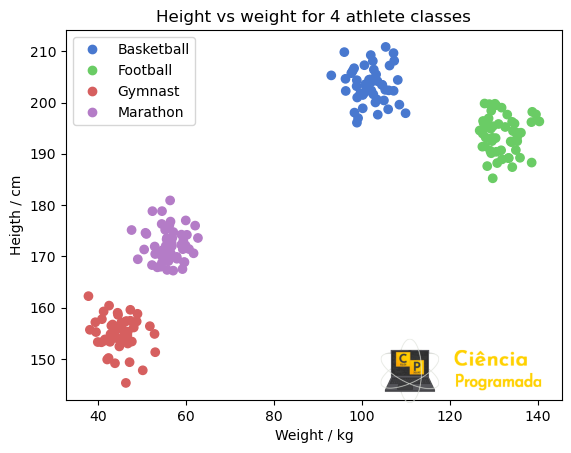
See in the plot above that we have already highlighted the four classes of athletes. This classification can be done with an algorithm of the K-means type, which tries to separate samples into groups of equal variance by minimizing the sum of squares within a given cluster.
With the clusters created, we can summarize them by their centroids. Then,
given a new point, which we will call observation (as if it were an
experimental point), we can assign it to a given cluster based on the smallest
distance between this new point and the center of each centroid. Note that we
are describing exactly a vector quantization, with the creation of the
clusters, their centroids and the smallest distance to the centroid. Let’s
start by enhancing our visualization with the centroids, the point we want to
classify and the distance vectors:
from numpy import tile, sqrt, sum

fig, ax = plt.subplots()

# creating the cluster plot, highlighting the center of each with a black circle
base_scatter = ax.scatter(X[:, 0], X[:, 1], c=y_true, cmap=cmap, norm=norm)

# the centers are the quantization symbols of our example and were stipulated in
# the previous cell, manually, as the start of our simulation
centers_scatter = ax.scatter(
    centers[:, 0],
    centers[:, 1],
    c=["black"] * len(centers),
    s=200,
    alpha=0.5,
    label="Centers",
)

# creating a red square to highlight our athlete to be classified
observation = array((111, 188))
observation_scatter = ax.scatter(
    *observation, c=["red"], marker="s", s=150, label="Observation", zorder=2
)

# computing the distance from each cluster center to our athlete
origin = tile(observation, (4, 1))
diff = centers - observation
dist = sqrt(sum(diff**2, axis=1))

# creating vectors to represent the distances
distance_vectors = ax.quiver(
    origin[:, 0],
    origin[:, 1],
    diff[:, 0],
    diff[:, 1],
    units="xy",
    angles="xy",
    scale_units="xy",
    scale=1,
    color=colors,
    linewidth=0.5,
    edgecolor="black",
)

# finishing the plot with the legend, the axis labels and the titles
handles = base_scatter.legend_elements()[0] + ax.get_legend_handles_labels()[0]
labels = classes + ax.get_legend_handles_labels()[1]
ax.legend(handles=handles, labels=labels)

ax.set_xlabel("Weight / kg")
ax.set_ylabel("Height / cm")
ax.set_title(
    "Arrows show distance from observation (athlete to be classified)", fontsize=10
)
fig.suptitle("Height vs weight for 4 athlete classes")

with Image.open("images/CP_banner_transp.png") as logo:
    logo_width, logo_height = logo.size
    axin = ax.inset_axes([100,140,45,15], transform=ax.transData)
    axin.imshow(logo)
    axin.axis('off')

plt.show() 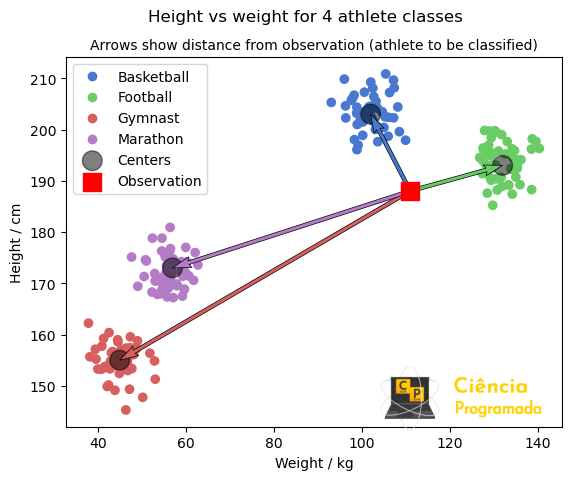
Since the shortest vector is the one joining our point to the centroid of the basketball players cluster, then this point probably represents a basketball player. A simple idea, right?
But where is the broadcasting here?
In the code, we created a simulation from the values of the cluster centers, the centroids, whose values are:
centersarray([[102, 203],
[132, 193],
[ 45, 155],
[ 57, 173]])
Afterwards, we added the point we want to classify:
observationarray([111, 188])
Note that the two arrays have different dimensions. But the distance
computation first goes through the difference between these two arrays. So
broadcasting took place in this operation. The value of the difference was
stored in the variable diff according to the code shown earlier:
diffarray([[ -9, 15],
[ 21, 5],
[-66, -33],
[-54, -15]])
Let’s understand why the computation is possible based on the broadcasting rules:
broadcasting_table(
    ("centers", "observation", "diff"), (centers, observation, diff), (12, 5, 6, 4)
)
| array | ndim | shape | size |
| ----------- | ---- | ------ | ---- |
| centers | 2 | (4, 2) | 8 |
| observation | 1 | (2,) | 2 |
| diff | 2 | (4, 2) | 8 |
- the initial arrays are centers and observation
- the dimensions are 2 and 1, respectively
- the rightmost dimension of both has size 2, being equal, allowing broadcasting
- the next dimension, moving to the left, is 2 in centers and 1 in observation (by absence), allowing broadcasting
- the resulting array diff has dimension 2 (the larger of the initial arrays), with sizes (4, 2), equal to array centers (the largest among the initial ones)
Finally, the distance itself from the point to each centroid is given by the
square root of the sum of the squared differences, and these distances were
assigned to the variable dist in the code:
for class_, distance in zip(classes, dist):
    print(f"Class: {class_:^11}| Distance: {distance:.2f}")
Class: Basketball | Distance: 17.49
Class: Football | Distance: 21.59
Class: Gymnast | Distance: 73.79
Class: Marathon | Distance: 56.04
Again, since the smallest distance is to the centroid of the basketball players class, we classify the athlete as a basketball player.
With this example, we have the basic idea of vector quantization and how it relates to NumPy broadcasting when used in this context. Soon I intend to cover image and signal compression in articles here on the site, which underneath apply the same idea as this example.
Conclusion #
In this article, we revisited the concept of array and saw how NumPy broadcasting significantly facilitates mathematical operations with arrays. We saw how broadcasting works in a vector quantization example.
See you next time!


