

Both NumPy and pandas have the concept of an axis, but they are used in slightly different ways.
In NumPy, the axis refers to the dimension along which a given operation is
performed. In pandas, the axis parameter has a slightly different meaning: it
refers to the direction along which an operation should be performed.
In this article, we will see examples and consequences of this concept in each library.
NumPy #
As written at the beginning of the article, in NumPy the axis refers to the
dimension along which a given operation is performed. For example, when
computing the sum of a NumPy array, you can specify the axis along which the sum
should be computed. If the array has shape (3, 4), then the axis parameter can
be set to 0 or 1. If axis=0, the sum is computed along the first dimension,
resulting in a 1D array of length 4. If axis=1, the sum is computed along the
second dimension, resulting in a 1D array of length 3.
We will see this example with two dimensions, and then expand to more complex examples with more dimensions.
Two dimensions #
Let us start by importing the library and creating a two-dimensional array,
checking the length of its dimensions with the shape attribute. If you have
questions about the concepts of dimension and shape in the context of NumPy, see
this article.
import numpy as np

arr = np.array([[1, 2, 3, 4], [5, 6, 7, 8], [9, 10, 11, 12]])
arr
array([[ 1, 2, 3, 4],
[ 5, 6, 7, 8],
[ 9, 10, 11, 12]])
arr.shape(3, 4)
As explained earlier, axis defines along which dimension a given operation
will be performed. So let us sum the values along the first dimension:
sum_axis_0 = np.sum(arr, axis=0)
sum_axis_0
array([15, 18, 21, 24])
We got 4 values in a one-dimensional array. Each of them is the sum of the
values along the dimension of size 3. Since the original array arr is
two-dimensional, you can visualize it more easily by imagining that the values
are the sums of each column of a two-dimensional matrix. But do not get too
attached to this visualization, because it will not be very useful when we
increase the number of dimensions.
Now the sum along the second dimension:
sum_axis_1 = np.sum(arr, axis=1)
sum_axis_1
array([10, 26, 42])
Here, we have a one-dimensional array of 3 values. Each of them is the sum of the values along the dimension of size 4. Following our visual analogy, you can see it as the sum of each row of our two-dimensional matrix.
It is important to note that the axis parameter can be used with many other NumPy methods, not only the sum. For example, when computing the mean, the median, or the standard deviation of an array, the axis parameter can be used to specify along which dimension the computation should be done. This is especially useful when working with high-dimensional arrays, where operations can become complex. Hence the axis parameter is one of the main tools data scientists use to manipulate and transform data in NumPy arrays.
Slice operations remain valid, so we can also perform operations on parts of our array, indicating the desired axis:
# Summing the first two rows along axis 0
sum_rows = np.sum(arr[:2, :], axis=0)
sum_rows
array([ 6, 8, 10, 12])
# Summing all rows of the first and third columns along axis 0
sum_cols = np.sum(arr[:, [0, 2]], axis=0)
sum_cols
array([15, 21])
Three dimensions #
For three dimensions, the line of reasoning is the same, but the rows-and-columns analogy we used above may not help much. Here we will use visual aids to truly grasp the idea of the axis of an operation. First, let us create a 3D array with random integers:
# Setting a fixed seed so that the article can be reproduced exactly
rng = np.random.default_rng(seed=42)

# Creating a 3D array with random integers from 0 to 9
arr_3d = rng.integers(low=0, high=9, size=(2, 3, 4), endpoint=True)
Checking the shape:
arr_3d.shape(2, 3, 4)
Let us see how NumPy presents this array:
arr_3darray([[[0, 7, 6, 4],
[4, 8, 0, 6],
[2, 0, 5, 9]],
[[7, 7, 7, 7],
[5, 1, 8, 4],
[5, 3, 1, 9]]])
Notice that it is displayed as if there were two sets of data. In fact, we can
take each set and check its shape:
arr_3d[0]array([[0, 7, 6, 4],
[4, 8, 0, 6],
[2, 0, 5, 9]])
arr_3d[0].shape(3, 4)
arr_3d[1]array([[7, 7, 7, 7],
[5, 1, 8, 4],
[5, 3, 1, 9]])
arr_3d[1].shape(3, 4)
That is, we have two two-dimensional matrices with 3 rows and 4 columns, arranged along a dimension of length 2. Confusing? See the following image:
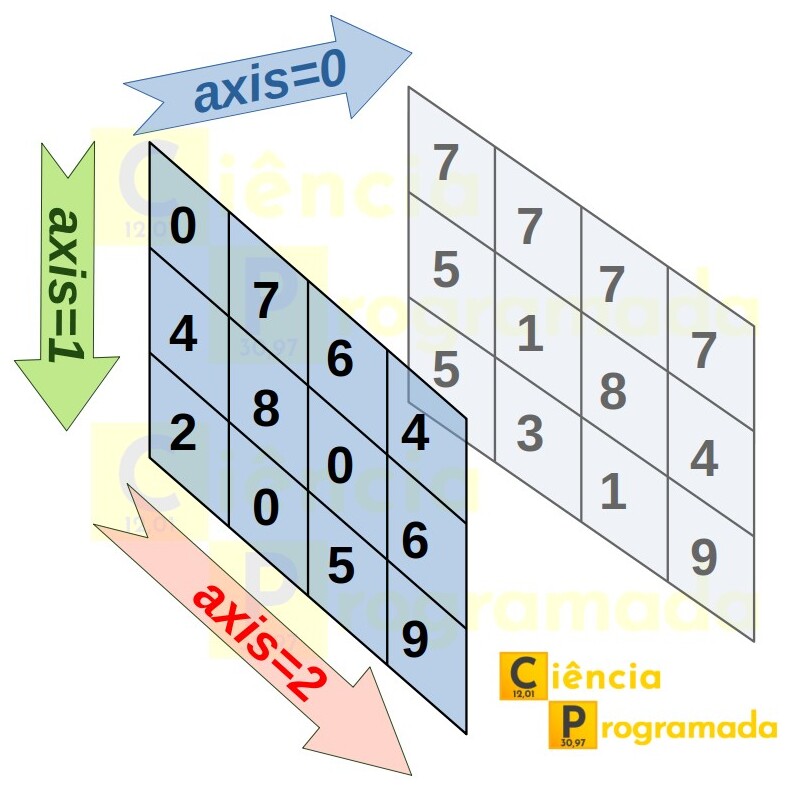
With the help of the image, what happens if we ask for the sum along axis 0?
Well, it is as if we were pushing the front matrix against the back matrix. So
it should be the item-by-item sum of one matrix with the other, and the
resulting shape should be (3, 4), the shape of each of the matrices:
sum_axis_0 = arr_3d.sum(axis=0)
display(sum_axis_0)
display(sum_axis_0.shape)
array([[ 7, 14, 13, 11],
[ 9, 9, 8, 10],
[ 7, 3, 6, 18]])
(3, 4)
Check the result and see that it is indeed what was described. And here we
already have a first tip that is very useful when analyzing results of very high
dimensions, which are hard to visualize: the resulting shape is the original
one with the dimension on which the operation is applied removed. In our case,
the original array has shape (2, 3, 4), and we are performing the sum along the
dimension of length 2, so the resulting shape excludes this dimension, ending up
as (3, 4). Keep this tip in mind to analyze the following examples.
In the specific case of this sum, the result is the same as explicitly adding
each two-dimensional matrix present at each position of the first axis
(axis=0):
arr_3d[0] + arr_3d[1]array([[ 7, 14, 13, 11],
[ 9, 9, 8, 10],
[ 7, 3, 6, 18]])
But, of course, it is more efficient and concise to use the axis notation.
Now let us modify our example, asking for the sum along axis 1:
sum_axis_1 = arr_3d.sum(axis=1)
display(sum_axis_1)
display(sum_axis_1.shape)
array([[ 6, 15, 11, 19],
[17, 11, 16, 20]])
(2, 4)
See that the shape is the expected one according to the tip we gave earlier.
Since we are looking at the second dimension, of length 3, the resulting shape
is given by the lengths of the remaining dimensions, that is, (2, 4).
The values are nothing more than the sums along axis 1, which can be understood as the sums of each column of each two-dimensional matrix, according to the figure shown. Since there are two matrices, each with four columns, we get a 2 x 4 two-dimensional matrix as a result.
Notice how NumPy’s syntax makes this operation much easier, and also performs it efficiently in terms of memory and execution speed. If we were to perform this sum manually, with a function of our own, we would need to iterate over each matrix of our three-dimensional array and, in each matrix, iterate over each column, storing the sums of each one. Just as an exercise, we can create such a function and perform the sum along axis 1:
def sum_column(matrix):
    result = []
    for column in range(len(matrix[0])):
        total = 0
        for row in matrix:
            total += row[column]
        result.append(total)
    return result


sum_axis_1_function = []
for matrix in arr_3d:
    sum_axis_1_function.append(sum_column(matrix))

np.array(sum_axis_1_function)
array([[ 6, 15, 11, 19],
[17, 11, 16, 20]])
The result is the same as the one obtained by NumPy, but the code is certainly harder to maintain and inefficient in terms of memory and speed. This is the beauty of NumPy and its vectorized operations. That is, it is optimized to apply algorithms usually designed for element-by-element operations, like our function above, to whole sets of values. The gain in performance and semantics is significant.
We still have one more dimension in our array. Following the same logic, we know that the array resulting from the sum along this axis will have shape (2, 3), since we are looking at the dimension of length 4 of our original array. And, by the figure, it can be understood as the sums of each row of each two-dimensional matrix. Since there are two matrices, each with three rows, we get a 2 x 3 two-dimensional matrix as a result. Checking:
sum_axis_2 = arr_3d.sum(axis=2)
display(sum_axis_2)
display(sum_axis_2.shape)
array([[17, 18, 16],
[28, 18, 18]])
(2, 3)
As before, for didactic purposes only, we can verify that this is exactly the same result that would be obtained by creating a function to iterate over each row of each matrix, performing the sum:
def sum_row(matrix):
    result = []
    for row in matrix:
        total = sum(row)
        result.append(total)
    return result


sum_axis_2_function = []
for matrix in arr_3d:
    sum_axis_2_function.append(sum_row(matrix))

np.array(sum_axis_2_function)
array([[17, 18, 16],
[28, 18, 18]])
Again, it is much more efficient to use NumPy’s vectorized operations. But I leave the functions in this article to make it easier to understand and visualize the results obtained.
More than three dimensions #
Up to 3 dimensions, figures and diagrams help us get a visual idea. However, the great power of NumPy is that it lets us work on problems that, conceptually, may involve multiple dimensions. If you understood the logic presented so far, the results for higher dimensions will be quite natural, even though our ability to visualize is hampered by our visual limitation to three dimensions.
Let us generate an array of integers with 4 dimensions:
arr_4d = rng.integers(low=0, high=9, size=(2, 2, 3, 4), endpoint=True)
arr_4d
array([[[[7, 6, 4, 8],
[5, 4, 4, 2],
[0, 5, 8, 0]],
[[8, 8, 2, 6],
[1, 7, 7, 3],
[0, 9, 4, 8]]],
[[[6, 7, 7, 1],
[3, 4, 4, 0],
[5, 1, 7, 6]],
[[9, 7, 3, 9],
[4, 3, 9, 3],
[0, 4, 7, 1]]]])
See that we generated an array of shape (2, 2, 3, 4). This means that the first dimension has length 2, and each position of this dimension stores a three-dimensional array of shape (2, 3, 4). Not by chance, in the way NumPy presents the array we see two clear sets of arrays. And, within each of them, two other sets that we can visualize as two-dimensional arrays of shape (3, 4). Everything we described in this paragraph follows the same line of reasoning we adopted in 3 dimensions; we just expanded it by one additional dimension.
We can view each position of the first dimension of our four-dimensional array:
arr_4d[0]array([[[7, 6, 4, 8],
[5, 4, 4, 2],
[0, 5, 8, 0]],
[[8, 8, 2, 6],
[1, 7, 7, 3],
[0, 9, 4, 8]]])
arr_4d[1]array([[[6, 7, 7, 1],
[3, 4, 4, 0],
[5, 1, 7, 6]],
[[9, 7, 3, 9],
[4, 3, 9, 3],
[0, 4, 7, 1]]])
Now, let us sum along this dimension, along axis=0:
sum_axis_0_4d = arr_4d.sum(axis=0)
display(sum_axis_0_4d)
display(sum_axis_0_4d.shape)
array([[[13, 13, 11, 9],
[ 8, 8, 8, 2],
[ 5, 6, 15, 6]],
[[17, 15, 5, 15],
[ 5, 10, 16, 6],
[ 0, 13, 11, 9]]])
(2, 3, 4)
The shape is the result we expect following the tip given earlier in the article and the discussion above. And the values are the result of adding, item by item, the 3D arrays present along the axis.
For axis=1 we have:
display(arr_4d.sum(axis=1))
display(arr_4d.sum(axis=1).shape)
array([[[15, 14, 6, 14],
[ 6, 11, 11, 5],
[ 0, 14, 12, 8]],
[[15, 14, 10, 10],
[ 7, 7, 13, 3],
[ 5, 5, 14, 7]]])
(2, 3, 4)
Here it is the dimension where we enter the 3D array present at each position of axis 0. Thus, we are adding, item by item, the two-dimensional matrices in each 3D array.
For axis=2:
display(arr_4d.sum(axis=2))
display(arr_4d.sum(axis=2).shape)
array([[[12, 15, 16, 10],
[ 9, 24, 13, 17]],
[[14, 12, 18, 7],
[13, 14, 19, 13]]])
(2, 2, 4)
Following the logic, it is the sum of each column (there are 4 columns) within each two-dimensional matrix, within each 3D array (there are 2 arrays), within each position of our 4D array (there are 2 positions).
Finally, for axis=3:
display(arr_4d.sum(axis=3))
display(arr_4d.sum(axis=3).shape)
array([[[25, 15, 13],
[24, 18, 21]],
[[21, 11, 19],
[28, 19, 12]]])
(2, 2, 3)
Similarly, it is the sum of each row (there are 3 rows) within each two-dimensional matrix, within each 3D array (there are 2 arrays), within each position of our 4D array (there are 2 positions).
If you have difficulty, read it again, work it out on a piece of paper, or draw diagrams. I did this myself to understand it when I first came across these operations. But once you understand it, you will never again have trouble understanding the result of an operation involving axes in NumPy!
pandas #
We have already written on this site about how the basic pandas structures, Series and DataFrames, are built on top of NumPy arrays. However, pandas dataframes are, by definition, designed to be similar to tabular, two-dimensional structures, with columns and rows. So we need to understand how the concept of axis should be understood in this library.
Simple DataFrames #
I believe the simplest example is to turn the two-dimensional array that served as our first NumPy example into a pandas dataframe. As a reminder, the array was:
arrarray([[ 1, 2, 3, 4],
[ 5, 6, 7, 8],
[ 9, 10, 11, 12]])
Turned into a dataframe:
import pandas as pd

arr_to_df = pd.DataFrame(arr)
arr_to_df| 0 | 1 | 2 | 3 | |
|---|---|---|---|---|
| 0 | 1 | 2 | 3 | 4 |
| 1 | 5 | 6 | 7 | 8 |
| 2 | 9 | 10 | 11 | 12 |
Let us see the result of asking for the sum along axis=0:
arr_to_df.sum(axis=0, numeric_only=True)0 15
1 18
2 21
3 24
dtype: int64
Well, this is nothing more than the sum of each column. And the values are the
same ones we obtained, as an array, when we summed along axis=0 in the
original NumPy array.
Similarly, for axis=1:
arr_to_df.sum(axis=1, numeric_only=True)0 10
1 26
2 42
dtype: int64
This is the sum of each row. And the values are the same ones we obtained, as an
array, when we summed along axis=1 in the original NumPy array.
But if the results are the same, is there any difference?
In this specific case, no. But let us consider a more typical dataframe example that will help us notice some particularities of the library and will serve as a basic model for the next discussions.
As said at the beginning of this section, pandas was designed to handle tabular data. This means that columns represent variables, each with a unique name and a specific data type, and rows represent the observations or records in the dataset. Consider the following dataframe, with name, age, and salary for three fictitious people:
data = {
    "Name": ["Alice", "Bruno", "Carlos"],
    "Age": [25, 30, 35],
    "Salary": [50000, 60000, 70000],
}
df = pd.DataFrame(data)
df| Name | Age | Salary | |
|---|---|---|---|
| 0 | Alice | 25 | 50000 |
| 1 | Bruno | 30 | 60000 |
| 2 | Carlos | 35 | 70000 |
Now our data has more meaning. It is clear that, if we want the mean age and
salary of the people, we are looking at the columns, which means axis=0 in
pandas:
mean_axis_0 = df.mean(axis=0, numeric_only=True)
mean_axis_0
Age 30.0
Salary 60000.0
dtype: float64
Since the library always expects a tabular format, where each column has several
records of the same type, the axis=0 parameter is usually the default in
pandas methods. So this would be enough:
df.mean(numeric_only=True)Age 30.0
Salary 60000.0
dtype: float64
Those more used to the library probably have the habit of applying a filter selecting the desired column(s). Thus, we could compute the mean only for the Age column, for example:
df["Age"].mean()30.0
This way, it is explicit that the operation is acting on a column. We could also do it as below, for both columns:
df[["Age", "Salary"]].mean()Age 30.0
Salary 60000.0
dtype: float64
Of course, we could ask for the mean per row with axis=1:
mean_axis_1 = df.mean(axis=1, numeric_only=True)
mean_axis_1
0 25012.5
1 30015.0
2 35017.5
dtype: float64
But what would be the meaning of these values? I cannot see any. Of course, there may be contexts where applying operations to rows makes sense, and we will see some below, but the idea is to show that, since pandas works with the idea of tabular data, operations are primarily designed to be applied to columns. Just like how we deal with spreadsheets in programs such as Excel.
From the above, the reader may have already inferred that axis=2 or higher
values make no sense in pandas. After all, if we are always reduced to tabular
data, we will have either columns (axis=0) or rows (axis=1). However, this
does not mean that we cannot have more dimensions; we just need to understand
what they mean in the context of the library.
DataFrames with MultiIndex #
Just as in the previous section we turned the two-dimensional array studied with NumPy into a dataframe, let us now do the same with our three-dimensional array. The question is how to convey the idea of dimensions. For this we can work with dataframes with multiple indexes.
index = pd.MultiIndex.from_product(
    [range(s) for s in arr_3d.shape], names=["dim1", "dim2", "dim3"]
)

df_multi = pd.DataFrame(
    {"data": arr_3d.flatten()},
    index=index,
)

df_multi| data | |||
|---|---|---|---|
| dim1 | dim2 | dim3 | |
| 0 | 0 | 0 | 0 |
| 1 | 7 | ||
| 2 | 6 | ||
| 3 | 4 | ||
| 1 | 0 | 4 | |
| 1 | 8 | ||
| 2 | 0 | ||
| 3 | 6 | ||
| 2 | 0 | 2 | |
| 1 | 0 | ||
| 2 | 5 | ||
| 3 | 9 | ||
| 1 | 0 | 0 | 7 |
| 1 | 7 | ||
| 2 | 7 | ||
| 3 | 7 | ||
| 1 | 0 | 5 | |
| 1 | 1 | ||
| 2 | 8 | ||
| 3 | 4 | ||
| 2 | 0 | 5 | |
| 1 | 3 | ||
| 2 | 1 | ||
| 3 | 9 |
Let us understand what we did above. The values of our array were listed in the
column data, but were organized hierarchically into levels with the help of
the indexes dim1, dim2, dim3. See how the indexes create the idea of
levels, groups, categories, or hierarchy within our dataframe. You will often
see these words I listed when studying dataframes with multiple indexes. Notice,
also, that although we are in a two-dimensional structure, the indexes add
semantic dimensions to our data. This will become more evident in the next
examples but, first, let us see some consequences.
As said, the indexes create an idea of groups in levels. Thus, we can use the
groupby method and group by a given level. And, with the data grouped, pass
some function such as sum to add up the data of a given level:
df_multi.groupby(level="dim1").sum()| data | |
|---|---|
| dim1 | |
| 0 | 51 |
| 1 | 64 |
df_multi.groupby(level="dim2").sum()| data | |
|---|---|
| dim2 | |
| 0 | 45 |
| 1 | 36 |
| 2 | 34 |
And nothing prevents us from passing more than one level:
df_multi.groupby(level=["dim1", "dim2"]).sum()| data | ||
|---|---|---|
| dim1 | dim2 | |
| 0 | 0 | 17 |
| 1 | 18 | |
| 2 | 16 | |
| 1 | 0 | 28 |
| 1 | 18 | |
| 2 | 18 |
Perhaps this example with generic index names dim1, dim2, and dim3 is too
abstract to make clear the potential of what we are doing here. So let us add
more semantics to the example, keeping our three-dimensional array as the base:
dates = pd.date_range("2022-01", periods=arr_3d.shape[0], freq="M", name="Date")
stores = ["Store1", "Store2", "Store3"]
products = ["ProductA", "ProductB", "ProductC", "ProductD"]
multi_index = pd.MultiIndex.from_product(
    [dates, stores, products], names=["Date", "Store", "Product"]
)

df_sales = pd.DataFrame({"Sales": arr_3d.flatten()}, index=multi_index)

df_sales| Sales | |||
|---|---|---|---|
| Date | Store | Product | |
| 2022-01-31 | Store1 | ProductA | 0 |
| ProductB | 7 | ||
| ProductC | 6 | ||
| ProductD | 4 | ||
| Store2 | ProductA | 4 | |
| ProductB | 8 | ||
| ProductC | 0 | ||
| ProductD | 6 | ||
| Store3 | ProductA | 2 | |
| ProductB | 0 | ||
| ProductC | 5 | ||
| ProductD | 9 | ||
| 2022-02-28 | Store1 | ProductA | 7 |
| ProductB | 7 | ||
| ProductC | 7 | ||
| ProductD | 7 | ||
| Store2 | ProductA | 5 | |
| ProductB | 1 | ||
| ProductC | 8 | ||
| ProductD | 4 | ||
| Store3 | ProductA | 5 | |
| ProductB | 3 | ||
| ProductC | 1 | ||
| ProductD | 9 |
The values are exactly the same as in our previous dataframe. However, now we see that there are levels for our data: the product they refer to, the stores of these products, the month the values refer to. And the values represent the total number of units sold of each product.
The groupings will now have much more meaning for us. Grouping by date and asking for the sum, we get the total number of units sold per month:
df_sales.groupby(level="Date").sum()| Sales | |
|---|---|
| Date | |
| 2022-01-31 | 51 |
| 2022-02-28 | 64 |
We can break it down by month and store:
df_sales.groupby(level=["Date", "Store"]).sum()| Sales | ||
|---|---|---|
| Date | Store | |
| 2022-01-31 | Store1 | 17 |
| Store2 | 18 | |
| Store3 | 16 | |
| 2022-02-28 | Store1 | 28 |
| Store2 | 18 | |
| Store3 | 18 |
Compare the results with the one obtained in the NumPy section, when the sum was
performed along axis=2.
We can also break it down by month and product:
df_sales.groupby(level=["Date", "Product"]).sum()| Sales | ||
|---|---|---|
| Date | Product | |
| 2022-01-31 | ProductA | 6 |
| ProductB | 15 | |
| ProductC | 11 | |
| ProductD | 19 | |
| 2022-02-28 | ProductA | 17 |
| ProductB | 11 | |
| ProductC | 16 | |
| ProductD | 20 |
Compare the results with the one obtained in the NumPy section, when the sum was
performed along axis=1.
Did you manage to follow the comparisons? We obtained the same numerical results, but now with an attached meaning, given by the pandas indexes. It is the indexes that add more dimensions to the dataframe. These are dimensions from the semantic point of view: the dataframe remains a tabular structure of rows and columns.
We can do the same with the four-dimensional array we created in the NumPy section:
dates = pd.date_range("2022-01", periods=arr_4d.shape[0], freq="M", name="Date")
stores = ["Store1", "Store2", "Store3"]
products = ["ProductA", "ProductB", "ProductC", "ProductD"]
multi_index = pd.MultiIndex.from_product(
    [dates, stores, products], names=["Date", "Store", "Product"]
)

# Create a DataFrame from the 4D NumPy array and the MultiIndex
df_sales_unit_price = pd.DataFrame(
    arr_4d.reshape(-1, 2),
    index=multi_index,
    columns=["UnitsSold", "UnitPrice"],
)

# Print the DataFrame
df_sales_unit_price| UnitsSold | UnitPrice | |||
|---|---|---|---|---|
| Date | Store | Product | ||
| 2022-01-31 | Store1 | ProductA | 7 | 6 |
| ProductB | 4 | 8 | ||
| ProductC | 5 | 4 | ||
| ProductD | 4 | 2 | ||
| Store2 | ProductA | 0 | 5 | |
| ProductB | 8 | 0 | ||
| ProductC | 8 | 8 | ||
| ProductD | 2 | 6 | ||
| Store3 | ProductA | 1 | 7 | |
| ProductB | 7 | 3 | ||
| ProductC | 0 | 9 | ||
| ProductD | 4 | 8 | ||
| 2022-02-28 | Store1 | ProductA | 6 | 7 |
| ProductB | 7 | 1 | ||
| ProductC | 3 | 4 | ||
| ProductD | 4 | 0 | ||
| Store2 | ProductA | 5 | 1 | |
| ProductB | 7 | 6 | ||
| ProductC | 9 | 7 | ||
| ProductD | 3 | 9 | ||
| Store3 | ProductA | 4 | 3 | |
| ProductB | 9 | 3 | ||
| ProductC | 0 | 4 | ||
| ProductD | 7 | 1 |
Observe, now, that we have two columns of values. One indicates the number of units sold of each product, in each store, in each month. The other, the price of each unit of product, in each store, in each month. Think of it as a report from a medium or large company, which has stores with the same products, but in different geographic regions. Thus, each region may have different prices for the same product depending on the supply/demand relations arising from the socioeconomic situation of each region.
In this context, a multiplication operation on each row makes sense, to obtain
the sales revenue, which is the number of units sold multiplied by the price of
each unit. The prod method lets us perform this operation easily:
df_sales_unit_price.prod(axis=1)Date Store Product
2022-01-31 Store1 ProductA 42
ProductB 32
ProductC 20
ProductD 8
Store2 ProductA 0
ProductB 0
ProductC 64
ProductD 12
Store3 ProductA 7
ProductB 21
ProductC 0
ProductD 32
2022-02-28 Store1 ProductA 42
ProductB 7
ProductC 12
ProductD 0
Store2 ProductA 5
ProductB 42
ProductC 63
ProductD 27
Store3 ProductA 12
ProductB 27
ProductC 0
ProductD 7
dtype: int64
The return is not a dataframe, as we can verify with the type function:
type(_)pandas.core.series.Series
What we got is a pandas series. We can assign this series to a column of our original dataframe:
df_sales_unit_price["TotalRevenue"] = df_sales_unit_price.prod(axis=1)
df_sales_unit_price| UnitsSold | UnitPrice | TotalRevenue | |||
|---|---|---|---|---|---|
| Date | Store | Product | |||
| 2022-01-31 | Store1 | ProductA | 7 | 6 | 42 |
| ProductB | 4 | 8 | 32 | ||
| ProductC | 5 | 4 | 20 | ||
| ProductD | 4 | 2 | 8 | ||
| Store2 | ProductA | 0 | 5 | 0 | |
| ProductB | 8 | 0 | 0 | ||
| ProductC | 8 | 8 | 64 | ||
| ProductD | 2 | 6 | 12 | ||
| Store3 | ProductA | 1 | 7 | 7 | |
| ProductB | 7 | 3 | 21 | ||
| ProductC | 0 | 9 | 0 | ||
| ProductD | 4 | 8 | 32 | ||
| 2022-02-28 | Store1 | ProductA | 6 | 7 | 42 |
| ProductB | 7 | 1 | 7 | ||
| ProductC | 3 | 4 | 12 | ||
| ProductD | 4 | 0 | 0 | ||
| Store2 | ProductA | 5 | 1 | 5 | |
| ProductB | 7 | 6 | 42 | ||
| ProductC | 9 | 7 | 63 | ||
| ProductD | 3 | 9 | 27 | ||
| Store3 | ProductA | 4 | 3 | 12 | |
| ProductB | 9 | 3 | 27 | ||
| ProductC | 0 | 4 | 0 | ||
| ProductD | 7 | 1 | 7 |
Now, we have in a column information obtained by row-by-row operations. Being in a column, it can be used in groupings. For example, total units and revenue per month:
df_sales_unit_price.groupby(level="Date")[["UnitsSold", "TotalRevenue"]].sum()| UnitsSold | TotalRevenue | |
|---|---|---|
| Date | ||
| 2022-01-31 | 50 | 238 |
| 2022-02-28 | 64 | 244 |
Notice that it does not make sense to include the unit price column, hence the column selection. The grouping could also have been done by store, considering the whole time span of our dataset:
df_sales_unit_price.groupby(level="Store")[["UnitsSold", "TotalRevenue"]].sum()| UnitsSold | TotalRevenue | |
|---|---|---|
| Store | ||
| Store1 | 40 | 163 |
| Store2 | 42 | 213 |
| Store3 | 32 | 106 |
Or, by product:
df_sales_unit_price.groupby(level="Product")[
    ["UnitsSold", "TotalRevenue"]
].sum()| UnitsSold | TotalRevenue | |
|---|---|---|
| Product | ||
| ProductA | 23 | 108 |
| ProductB | 42 | 129 |
| ProductC | 25 | 159 |
| ProductD | 24 | 86 |
Or, still, by store in each month:
df_sales_unit_price.groupby(level=["Date", "Store"])[
    ["UnitsSold", "TotalRevenue"]
].sum()| UnitsSold | TotalRevenue | ||
|---|---|---|---|
| Date | Store | ||
| 2022-01-31 | Store1 | 20 | 102 |
| Store2 | 18 | 76 | |
| Store3 | 12 | 60 | |
| 2022-02-28 | Store1 | 20 | 61 |
| Store2 | 24 | 137 | |
| Store3 | 20 | 46 |
By product in each month:
df_sales_unit_price.groupby(level=["Date", "Product"])[
    ["UnitsSold", "TotalRevenue"]
].sum()| UnitsSold | TotalRevenue | ||
|---|---|---|---|
| Date | Product | ||
| 2022-01-31 | ProductA | 8 | 49 |
| ProductB | 19 | 53 | |
| ProductC | 13 | 84 | |
| ProductD | 10 | 52 | |
| 2022-02-28 | ProductA | 15 | 59 |
| ProductB | 23 | 76 | |
| ProductC | 12 | 75 | |
| ProductD | 14 | 34 |
The type of grouping will depend on the interest, as will the aggregation
operation (sum, mean, etc.). The focus here is to understand when to use
axis=0 or axis=1 and to understand that, in pandas, the idea of higher
dimensions is given by the indexes.
Conclusion #
Understanding the concept of axis is essential for working with data in libraries such as NumPy and pandas. In NumPy, the axis is used to indicate the dimension along which an operation should be applied in an array. In pandas, which is a library geared toward tabular data, the axis is used for operations on columns or rows.
We saw that NumPy can handle arrays of different dimensions, from 1D to 4D or more, while pandas is geared toward 2D tabular data. However, pandas lets us create indexes with multiple levels, which makes it possible to organize data in more dimensions without the need for complex data structures.
We hope this article has helped clarify the differences between the concepts of axis in NumPy and pandas and how they can be applied when working with data in Python.
See you next time!


