

Computer systems do not “understand” numbers the way we do. In hardware, all information (instructions, addresses, characters, and numeric values) must be encoded as electrical signals with a few stable states. That is why the conceptual foundation of digital computing is the use of number systems, especially those that fit naturally with electronics and with the organization of bits.
In practice, you will switch between representations depending on the context: binary is the circuit’s native language; hexadecimal (and, historically, octal) exist to make bit patterns readable; and decimal remains the most convenient system for human interaction, reading, and checking results.
In this article, you will learn:
- what positional notation is and how it works;
- how to convert integers between common bases (decimal, binary, octal, and hexadecimal);
- when you can speed up conversions by grouping/expanding digits (bases related by a power).
The focus here is on nonnegative integers. In future articles, we will cover signed conversions (including two’s complement representation) and floating-point numbers.
A few quick definitions before we start:
- Binary (base-2) is the base of digital systems: bits and logical operations work directly with 0 and 1.
- Hexadecimal (base-16) and Octal (base-8) are used to compact and “see” binary sequences without losing the correspondence with the bits.
- The Decimal system (base-10) is the everyday standard and appears naturally in inputs/outputs, documentation, and manual checking.
- Other systems almost never appear in computing, but they left a legacy in everyday life: Duodecimal (base-12) survives in counting by dozens and grosses, in the 12 hours on a clock face, and in the 12 inches of a foot; and Sexagesimal (base-60), inherited from the Babylonians, is the reason a minute has 60 seconds and a degree has 60 arc minutes.
Types of Number Systems #
A number system is defined by its base (radix), which determines how many symbols exist and what the weights of each position are. Below are the four systems most common in computing.
Before listing them, a contrast makes the word “positional” much more concrete. All the systems in this article are weighted positional: the same symbol is worth different things depending on the position it occupies. Not every number system works this way.
| System | How it writes 1989 | Value of the highlighted symbol |
|---|---|---|
| Decimal (positional) | 1989 | 900, because it is in the hundreds place |
| Roman (non-positional) | MCMLXXXIX | 50, anywhere in the sequence |
In Roman numerals, L is worth 50 wherever it is, and what changes the result
is the relative order of the symbols: in IX the I subtracts, in XI it
adds. In decimal, the same 9 is worth 900 in one position and 9 in another:
the position carries the weight. This difference is exactly what makes
positional arithmetic mechanical: adding two numbers becomes a column
procedure, with carries, that works the same for 12 or for 12 million.
The positional system of ten symbols with an explicit zero was born in India between the 5th and 7th centuries, was systematized by mathematicians such as Brahmagupta (7th century, who treated zero as a number and not just as an empty space), and reached Europe through the Arab world, hence the name Hindu-Arabic numeral system. Its popularization in the West is usually credited to the Liber Abaci (1202), by Leonardo of Pisa, known as Fibonacci. What made it superior to the Roman system was the positional zero: without it you cannot tell \(15\) from \(105\) without inventing a blank space, and without that distinction there is no column algorithm.
Decimal Number System #
- The Decimal system is a base-10 number system.
- It uses ten digits: 0, 1, 2, 3, 4, 5, 6, 7, 8, and 9.
- The positional value of each digit is a power of 10 (for example, \(10^{0}\), \(10^{1}\), \(10^{2}\)).
- It is the standard system for everyday counting and calculation.
Binary Number System #
- The Binary system is a base-2 number system.
- It uses two digits: 0 and 1.
- The positional value of each digit is a power of 2 (for example, \(2^{0}\), \(2^{1}\), \(2^{2}\)).
- The Binary system is the basis for data representation in computers and digital electronics.
Octal Number System #
- The Octal system is a base-8 number system.
- It uses eight digits: 0, 1, 2, 3, 4, 5, 6, and 7.
- The positional value of each digit is a power of 8 (for example, \(8^{0}\), \(8^{1}\), \(8^{2}\)).
- It is often used to simplify the representation of binary numbers by grouping them into sets of three bits.
Hexadecimal Number System #
- The Hexadecimal system is a base-16 number system.
- It uses sixteen symbols: 0, 1, 2, 3, 4, 5, 6, 7, 8, 9, A, B, C, D, E, and F.
- The symbols A to F represent decimal values 10 to 15 (for example, \(A = 10\), \(B = 11\), …, \(F = 15\)).
- The positional value of each digit is a power of 16 (for example, \(16^{0}\), \(16^{1}\), \(16^{2}\)).
- Hexadecimal simplifies binary by representing every 4 bits as one digit (from 0 to F).
- Using the letters A to F was neither obvious nor an immediate consensus: there were competing notations until the current standard settled (Hexadecimal).
In summary:
| System (base) | Available symbols | Positional value (weights) | Typical use in computing | Quick conversion with binary (when applicable) |
|---|---|---|---|---|
| Decimal (10) | 0 to 9 | powers of 10: \(10^0,10^1,10^2,\dots\) | Human interaction, reading, documentation, manual checking of results | not applicable |
| Binary (2) | 0 and 1 | powers of 2: \(2^0,2^1,2^2,\dots\) | Native hardware representation (bits), logical operations | not applicable |
| Octal (8) | 0 to 7 | powers of 8: \(8^0,8^1,8^2,\dots\) | Readability/compaction of bits (historical context and some systems) | \(8=2^3\): 1 octal digit ↔ 3 bits |
| Hexadecimal (16) | 0 to 9 and A to F (\(A=10,\dots,F=15\)) | powers of 16: \(16^0,16^1,16^2,\dots\) | Addresses, memory dumps, readable bit patterns (very common) | \(16=2^4\): 1 hex digit ↔ 4 bits |
Let us look more closely at what we mean by positional value.
Integers and Positional Notation #
As highlighted earlier, this article focuses on integers and their representations in different bases. The positional notation is the most common method for representing numbers in any base: the value of each digit depends on its position, and each position has a weight given by a power of the base.
In practical terms, this idea explains why:
- the positional expansion lets us convert a number from any base to decimal (by adding up weights);
- successive divisions “extract” the digits of the number in the desired base, from least significant to most significant.
A number \(N\) in a base \(b\) can be represented as:
$$ N_b = \sum_{i=0}^{n} d_i \cdot b^i = d_n \cdot b^n + d_{n-1} \cdot b^{n-1} + ... + d_1 \cdot b^1 + d_0 \cdot b^0 $$where \(d_i\) are the digits of the number and \(b\) is the base. Each digit \(d_i\) must satisfy \(0 \leq d_i < b\).
Note a consequence of this restriction: since the base is never among the
available symbols, the value of the base itself is always written 10, in any
base.
In binary, \(10_2 = 2\); in octal, \(10_8 = 8\); in hexadecimal,
\(10_{16} = 16\). In other words, “10” does not mean “ten”: it means “one times
the base, plus zero units”.
Note: the same logic holds for the fractional part, using negative powers (\(b^{-1}, b^{-2}, ...\)). Since the focus here is on integers, we will come back to fractions and floating point in dedicated articles.
For example, the number \(123_{10}\) in decimal base can be expanded as:
$$ 123_{10} = 1 \cdot 10^2 + 2 \cdot 10^1 + 3 \cdot 10^0 = 100 + 20 + 3 $$From here on, we will use the following notations for bases in this article:
- \(s\) as the source base (s for source);
- \(r\) as the target base (r for result);
- \(b\) only when the base is generic in a formula.
Conversion Methods #
To convert integers between bases, you do not need to memorize dozens of rules. In fact, we only need to master two fundamental methods, using the Decimal system as a “bridge” or “universal translator”:
- Positional Expansion (Multiplication): Used when we want to find out how much a number in any base is worth in Decimal.
- Successive Divisions: Used when we have a Decimal value and want to encode it into another base.
From Any Base to Decimal (Expansion) #
When you have a number in binary, octal, or hexadecimal and want to know its numeric value (“what is this worth in my everyday life?”), you use Positional Expansion.
The process is simple: add up the value of each digit multiplied by the weight of its position (the base raised to the power of the position).
$$ N_{10} = \sum (\text{digit} \times \text{base}^{\text{position}}) $$
Example: Convert \(1101_2\) to Decimal
We identify the base (\(2\)) and the positions (starting from 0, right to left).
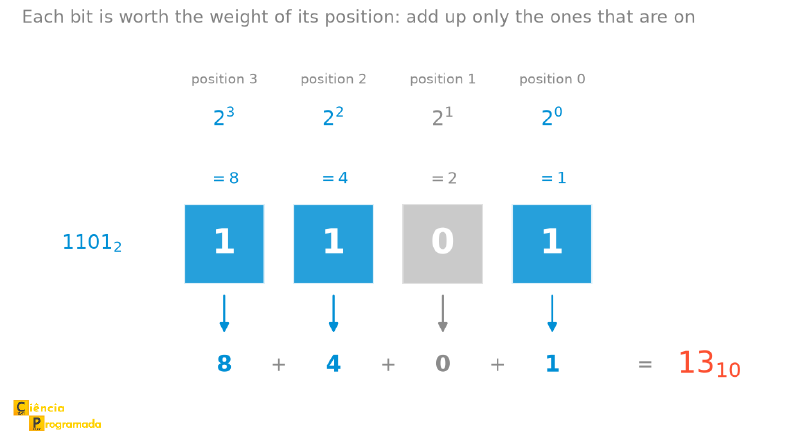
$$ \begin{align*} 1101_2 & = 1 \cdot 2^3 + 1 \cdot 2^2 + 0 \cdot 2^1 + 1 \cdot 2^0 \\ & = 1 \cdot 8 + 1 \cdot 4 + 0 \cdot 2 + 1 \cdot 1 \\ & = 8 + 4 + 0 + 1 \\ & = 13_{10} \end{align*} $$Verification tip: in binary, \(1101_2\) must lie between \(8_{10}\) (represented as \(1000_2\)) and \(16_{10}\) (represented as \(10000_2\)), so \(13_{10}\) makes sense.
This same computation fits in a figure, and it is worth looking at it even if the expansion above is already clear, because they are two paths to the same idea. The ruler below puts the weight of each position right above the corresponding bit and, below it, the term that bit contributes. The bit that is off appears in gray precisely because it adds nothing:
Example: Convert \(2F_{16}\) to Decimal
Remember that in Hexadecimal, \(F = 15\).
$$ \begin{align*} 2F_{16} & = 2 \cdot 16^1 + 15 \cdot 16^0 \\ & = 32 + 15 \\ & = 47_{10} \end{align*} $$From Decimal to Any Base (Successive Divisions) #
When you have a decimal number and need to represent it in binary, octal, or any other base, the standard method is Successive Divisions.
The algorithm is:
-
1
Divide by the base
Divide the decimal number by the target base. -
2
Write down the remainder
Write down the remainder (it will be one of the digits). -
3
Divide the quotient
Take the quotient and divide it by the base again. -
4
Repeat until zero
Repeat until the quotient is zero. -
5
Read the remainders from bottom to top
The result is formed by the remainders read from last to first (bottom to top).
Example: Convert \(45_{10}\) to Binary (Base 2)
Reading from bottom to top: \(\mathbf{101101_2}\).
Verification tip: convert \(101101_2\) back to decimal via positional expansion and check that you get \(45_{10}\) again.
The “Decimal Bridge” Method (Base \(A \to\) Base \(B\)) #
What if we want to convert from Base 9 to Base 4? Or from Base 5 to Base 7?
Since these bases do not talk directly to each other, we use Decimal as an intermediary. The process has two steps:
- Source \(\to\) Decimal (using Expansion).
- Decimal \(\to\) Target (using Divisions).
Example: Convert \(87_9\) to Base 4
Step 1: Base 9 to Decimal
$$ 87_9 = 8 \cdot 9^1 + 7 \cdot 9^0 = 72 + 7 = \mathbf{79_{10}} $$Step 2: Decimal (79) to Base 4
$$ \begin{align*} 79 \div 4 & = 19 \quad & \text{remainder } \mathbf{3} \\ 19 \div 4 & = 4 \quad & \text{remainder } \mathbf{3} \\ 4 \div 4 & = 1 \quad & \text{remainder } \mathbf{0} \\ 1 \div 4 & = 0 \quad & \text{remainder } \mathbf{1} \end{align*} $$Reading the remainders from bottom to top: \(\mathbf{1033_4}\).
Therefore, \(87_9 = 1033_4\).
One more example:
Example: Convert \(2F_{16}\) to base \(2\)
- Convert from hexadecimal to decimal. Note that \(F\) is a symbol, not a number. Before doing any computation, replace each symbol with the value it represents (here, \(F = 15\)): $$ 2F_{16} = 2 \times 16^1 + F \times 16^0 = 2 \times 16^1 + 15 \times 16^0 $$
Now, with everything in decimal:
$$ 2 \times 16 + 15 \times 1 = 32 + 15 = 47_{10} $$- Convert from decimal to binary: $$ \begin{align*} 47 \div 2 & = 23 & \quad \text{remainder } 1 \\ 23 \div 2 & = 11 & \quad \text{remainder } 1 \\ 11 \div 2 & = 5 & \quad \text{remainder } 1 \\ 5 \div 2 & = 2 & \quad \text{remainder } 1 \\ 2 \div 2 & = 1 & \quad \text{remainder } 0 \\ 1 \div 2 & = 0 & \quad \text{remainder } 1 \end{align*} $$
Reading from bottom to top: \(2F_{16} = 101111_2\).
Verification tip: you can check the result in hexadecimal by grouping \(101111_2\) into 4 bits with padding (filling with zeros) on the left, which gives \(0010\) and \(1111\), that is, \(2F_{16}\), which is where we started.
Example: Convert \(1101_2\) to hexadecimal (\(16\))
-
Convert to decimal:
$$ 1101_2 = 1 \times 2^3 + 1 \times 2^2 + 0 \times 2^1 + 1 \times 2^0 = 13_{10} $$ -
Convert decimal to hexadecimal:
$$ 13_{10} = D_{16} $$
Thus, \(1101_2 = D_{16}\).
Verification tip: since 4 bits form 1 hexadecimal digit, \(1101_2\) must indeed map to \(D_{16}\).
These last two cases in particular can be simplified, without going through decimal, because \(16 = 2^4\). Thus, each hexadecimal digit corresponds exactly to 4 binary bits. See the section Making Conversion Easier When the Bases Are Related by a Power for more details. But the “via decimal” approach works for any pair of bases.
General Summary of the Methods #
| Goal | Method |
|---|---|
| Find the value (Any \(\to\) Decimal) | Positional Expansion (Sum of the products) |
| Encode the value (Decimal \(\to\) Any) | Successive Divisions (Read remainders bottom to top) |
| Change of representation (Base \(A \to\) Base \(B\)) | Bridge via Decimal (Expansion \(\to\) Division) |
Common Mistakes (and How to Avoid Them) #
- Reading the remainders in the wrong order: in successive divisions, the result is read from bottom to top.
- Forgetting the base in the subscript: always keep the notation (\(N_s\) and \(N_r\)) so you do not mix up interpretations.
- When grouping (binary→octal/hex), group starting from the right; if the leftmost group is short of bits, fill it with zeros (padding).
- In the “via decimal” method, forgetting to convert the symbols \(A\) to \(F\) into the values \(10\) to \(15\).
Making Conversion Easier When the Bases Are Related by a Power #
If \(s\) and \(r\) have a power relationship (\(s = r^k\) or \(r = s^k\)), you can convert directly by grouping or expanding digits, without long computations.
The most common practical rule in computing is:
- if you are going from binary to a larger base, group bits;
- if you are going from a larger base to binary, expand each digit into bits.
Case 1: Smaller Base to Larger Base (\(s < r\)) #
If \(r = s^k\), each digit in base \(r\) corresponds exactly to \(k\) digits in base \(s\). In computing, the classic case is \(s=2\) and \(r \in \{8,16\}\), where:
- \(8 = 2^3\) (so \(k=3\));
- \(16 = 2^4\) (so \(k=4\)).
Example: Conversion from Binary (\(2\)) to Octal (\(8\))
We know that \(8 = 2^3\), so each group of 3 bits represents one octal digit.
Step 1: Split the binary number into blocks of 3 bits, from right to left
$$ 101011_2 $$We group:
$$ \mathbf{101} \quad \mathbf{011} $$Step 2: Convert each group to octal
$$ 101_2 = 5_8, \quad 011_2 = 3_8 $$Final result:
$$ 101011_2 = 53_8 $$
Example: Conversion from Binary (\(2\)) to Hexadecimal (\(16\))
Since \(16 = 2^4\), we group the digits in fours.
Step 1: Split the binary number into blocks of 4 bits
$$ 11010101_2 $$We group:
$$ \mathbf{1101} \quad \mathbf{0101} $$Step 2: Convert each group to hexadecimal
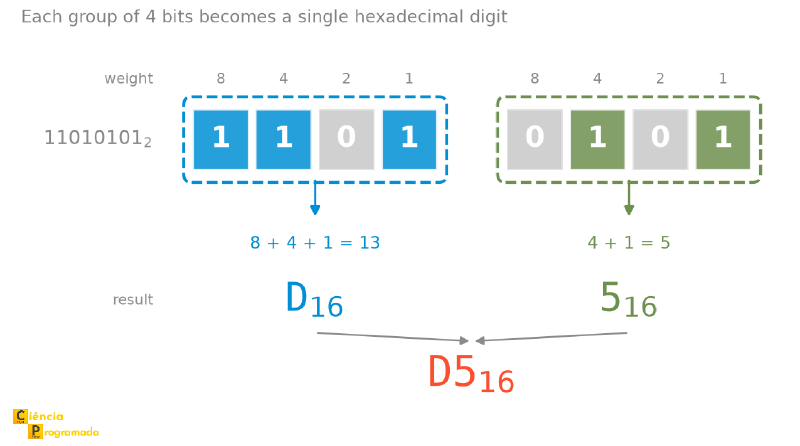
$$ 1101_2 = D_{16}, \quad 0101_2 = 5_{16} $$Final result:
$$ 11010101_2 = D5_{16} $$The step-by-step above becomes even more direct when seen all at once. In the figure, the two 4-bit blocks appear side by side, each with the sum of the weights that produces its hexadecimal digit, and the two digits join into the final result, in the same order the blocks were in:
Example with other bases:
Example: Convert \(2120_{3}\) to base \(9\)
Since \(9 = 3^{2}\), each digit in base \(9\) corresponds to a block of 2 digits in base \(3\).
Step 1: Group the digits in twos, from right to left:
$$ 2120_{3} \quad \Rightarrow \quad \mathbf{21} \quad \mathbf{20} $$Step 2: Convert each block (in base \(3\)) to a digit (in base \(9\)):
$$ \begin{align*} 21_{3} & = 2\cdot 3^{1} + 1\cdot 3^{0} = 6 + 1 = 7_{10} = 7_{9} \\ 20_{3} & = 2\cdot 3^{1} + 0\cdot 3^{0} = 6 + 0 = 6_{10} = 6_{9} \end{align*} $$Final result: \(2120_{3} = 76_{9}\)
Case 2: Larger Base to Smaller Base (\(s > r\)) #
If \(s = r^k\), you can expand each digit of the larger base into \(k\) digits of the smaller base. In computing, again the most common case is expanding octal/hexadecimal to binary.
Example: Conversion from Octal (\(8\)) to Binary (\(2\))
Since \(8 = 2^3\), each octal digit can be written as 3 binary digits.
Step 1: Replace each octal digit with its 3-bit binary form
$$ 753_8 $$We expand:
$$ 7_8 = 111_2, \quad 5_8 = 101_2, \quad 3_8 = 011_2 $$Final result:
$$ 753_8 = 111101011_2 $$
Example: Conversion from Hexadecimal (\(16\)) to Binary (\(2\))
Since \(16 = 2^4\), each hexadecimal digit can be written as 4 binary digits.
Step 1: Replace each hexadecimal digit with its 4-bit binary form
$$ 4F2_{16} $$We expand:
$$ 4_{16} = 0100_2, \quad F_{16} = 1111_2, \quad 2_{16} = 0010_2 $$Final result:
$$ 4F2_{16} = 010011110010_2 $$Summary of the Strategies When the Bases Are Related by a Power #
| Conversion | Simplified Method |
|---|---|
| Binary \(\to\) Octal (\(2 \to 8\)) | Group into blocks of 3 bits |
| Binary \(\to\) Hexadecimal (\(2 \to 16\)) | Group into blocks of 4 bits |
| Octal \(\to\) Binary (\(8 \to 2\)) | Expand each octal digit into 3 bits |
| Hexadecimal \(\to\) Binary (\(16 \to 2\)) | Expand each hexadecimal digit into 4 bits |
Method Selection Flowchart #
To make it easier to choose the right method for converting between bases, here is a summary flowchart:
flowchart TD
    Start([Convert from base s
to base r]) --> CheckDest{r = 10?}

    %% Caso 1: Destino é Decimal
    CheckDest -->|Yes| Method1[Method 1: Positional Expansion
Multiply each digit by the
weight of its position]
    Method1 --> Result([Result in Decimal])

    %% Caso 2: Origem é Decimal
    CheckDest -->|No| CheckOrig{s = 10?}
    CheckOrig -->|Yes| Method2[Method 2: Successive Divisions
Divide N successively by r
and read the remainders from bottom to top]
    Method2 --> Result2([Result in Base r])

    %% Caso 3: Bases Arbitrárias (Ponte ou Atalho)
    CheckOrig -->|No| CheckPower{sk = r?
Or rk = s?
E.g.: 2, 8, 16}

    %% Atalho
    CheckPower -->|Yes| Method3a[Shortcut: Grouping or Expansion
Replace digits with bits or
group bits into digits]
    Method3a --> Result2

    %% Ponte Decimal
    CheckPower -->|No| Method3b[Method 3: Decimal Bridge
1. Convert s to 10 Expansion
2. Convert 10 to r Division]
    Method3b --> Result2

    %% Estilização para ficar bonito no blog
    style Start fill:#f9f,stroke:#333,stroke-width:2px,color:black
    style Result fill:#ccf,stroke:#333,stroke-width:2px,color:black
    style Result2 fill:#ccf,stroke:#333,stroke-width:2px,color:black

    style Method1 fill:#e1f7d5,stroke:#333,color:black
    style Method2 fill:#e1f7d5,stroke:#333,color:black
    style Method3a fill:#fff4e6,stroke:#f66,stroke-width:2px,stroke-dasharray: 5 5,color:black
    style Method3b fill:#e1f7d5,stroke:#333,color:black
Visual explanation of the colors used in the chart:
- Light green: The “standard” methods (mathematical algorithms).
- Orange/Dashed: The shortcut (a special path).
- Purple: Start and end points.
Practical Representation: Number Bases in Python #
In mathematics, we use subscripts (like \(101_2\) or \(75_{16}\)) to indicate the base. However, when programming, we cannot easily type subscripts. That is why programming languages adopt prefixes to tell the interpreter which base a number is written in.
Since Python is the main language covered on this site, here is how to represent and manipulate these bases natively:
Literals (Writing Numbers in Code) #
To write an integer directly in a specific base, we use the digit 0 followed by an identifying letter:
- Binary: Prefix
0b(e.g.,0b1010) - Octal: Prefix
0o(e.g.,0o52) - Hexadecimal: Prefix
0x(e.g.,0x2F)
When you type these values, Python interprets them and stores them internally as ordinary integers.
# Python understands all of these values as the same number (42)
n_dec = 42
n_bin = 0b101010
n_oct = 0o52
n_hex = 0x2A

print(n_dec == n_bin == n_oct == n_hex) # Output: True
print(n_hex) # Output: 42 (The default print always shows decimal)
Conversion Functions #
If you need to convert a number to a string formatted in another base, or convert a string to an integer, use the built-in functions:
| Function | Description | Example Input | Example Output |
|---|---|---|---|
bin(x) |
Converts an integer to a binary string | bin(10) |
'0b1010' |
oct(x) |
Converts an integer to an octal string | oct(10) |
'0o12' |
hex(x) |
Converts an integer to a hexadecimal string | hex(10) |
'0xa' |
int(s, base) |
Converts a string in base (b) to an integer | int('101', 2) |
5 |
Useful notes:
int(s, base)accepts bases from 2 to 36, plusbase=0, which detects the base from the prefix (0b,0o,0x) and treats the string as a Python literal.- With an explicit base, the prefix is accepted as long as it matches the base:
int('0b101', 2)returns5,int('0o52', 8)returns42, andint('0x1A', 16)returns26. What fails is a contradiction between prefix and base:int('0b101', 10)raisesValueError. - There is a fun trap in this rule:
int('0b101', 16)neither raises an error nor equals 5. It returns45313, because in base 160b101is not a prefix at all, it is a perfectly valid hexadecimal numeral (\(\mathtt{0B101}_{16}\)). - With
base=0, literals follow Python’s rules:int('101', 0)is101, butint('010', 0)raisesValueError, since leading zeros are not allowed.
Practical usage example:
value = 255

# Formatting for display (using modern f-strings)
# :b for binary, :o for octal, :x for lowercase hex, :X for uppercase hex
# Use # to include the prefix (0b, 0o, 0x) in the output: {value:#b}, {value:#x}, etc.
print(f"Decimal: {value}")      # 255
print(f"Binary:  {value:b}")    # 11111111
print(f"Octal:   {value:o}")    # 377
print(f"Hex:     {value:X}")    # FF
print(f"Hex w/ prefix: {value:#x}")  # 0xff

# Reading user input (which always comes as a string)
user_input = "1A"
number = int(user_input, 16)
print(number) # Prints 26
Algorithm Exercise: Implementing “By Hand” #
Although Python’s built-in functions (int(), bin(), etc.) are highly optimized and should be used in production code, implementing these converters from scratch is an excellent programming-logic exercise for understanding what happens “under the hood”.
Below, we present didactic implementations of the Positional Expansion and Successive Divisions methods.
This code is purely educational. In real projects, always prefer the language’s built-in functions, which are written in C and much faster.
# Mapping for digits greater than 9 (A=10, B=11, etc.)
DIGITS = "0123456789ABCDEFGHIJKLMNOPQRSTUVWXYZ"

def any_base_to_decimal(number_str: str, source_base: int) -> int:
    """
    Implements the Positional Expansion method.
    Converts a numeric string in source_base to an integer (decimal).
    """
    decimal_result = 0
    # We reverse the string to start from power 0 (right to left)
    # E.g.: "101" reversed becomes "101" -> indices 0, 1, 2 correspond to 2^0, 2^1, 2^2
    reversed_number = number_str[::-1].upper()

    for position, digit_char in enumerate(reversed_number):
        # Validate BEFORE looking up: a character outside the alphabet (e.g., '#') would
        # make DIGITS.index() blow up with a message that helps no one
        if digit_char not in DIGITS:
            raise ValueError(f"Character {digit_char} is not a valid digit")

        # Find the numeric value of the character (e.g., 'A' -> 10)
        digit_value = DIGITS.index(digit_char)

        if digit_value >= source_base:
            raise ValueError(f"Digit {digit_char} is invalid for base {source_base}")

        # Accumulate: digit * (base ^ position)
        decimal_result += digit_value * (source_base ** position)

    return decimal_result

def decimal_to_any_base(decimal_number: int, target_base: int) -> str:
    """
    Implements the Successive Divisions method.
    Converts an integer (decimal) to a string in target_base.
    """
    if decimal_number == 0:
        return "0"

    remainders = []
    dividend = decimal_number

    while dividend > 0:
        # Get the remainder of the division
        remainder = dividend % target_base

        # Get the quotient for the next iteration
        dividend = dividend // target_base

        # Convert the remainder to a character (e.g., 15 -> 'F') and store it
        remainders.append(DIGITS[remainder])

    # The algorithm requires reading the remainders from bottom to top (last to first)
    return "".join(remainders[::-1])

# --- Testing the functions ---

# Test 1: Binary to Decimal (Expansion)
binary = "1101"
dec = any_base_to_decimal(binary, 2)
print(f"Expansion: {binary}_2 to decimal is {dec}")
# Output: Expansion: 1101_2 to decimal is 13

# Test 2: Decimal to Hexadecimal (Division)
decimal = 47
hexa = decimal_to_any_base(decimal, 16)
print(f"Division: {decimal}_10 to hex is {hexa}")
# Output: Division: 47_10 to hex is 2F

# Test 3: The Bridge (Base 9 to Base 4)
# We use decimal as the intermediary
base9_value = "87"
step1_decimal = any_base_to_decimal(base9_value, 9)
step2_base4 = decimal_to_any_base(step1_decimal, 4)
print(f"Conversion: {base9_value}_9 -> {step1_decimal}_10 -> {step2_base4}_4")
# Output: Conversion: 87_9 -> 79_10 -> 1033_4
Summary Table #
Everything this article has established, on a single page:
| Idea | Rule | Example from the article |
|---|---|---|
| Positional notation | \(N_b = \sum_i d_i \cdot b^i\) | \(1101_2 = 8 + 4 + 0 + 1 = 13_{10}\) |
| Valid digits | \(0 \leq d_i < b\) | in base 9 the digit 9 does not exist |
| The base itself | always written as 10 |
\(10_2 = 2\), \(10_8 = 8\), \(10_{16} = 16\) |
| Any base \(\to\) decimal | positional expansion | \(2F_{16} = 2 \times 16 + 15 = 47_{10}\) |
| Decimal \(\to\) any base | successive divisions, remainders from bottom to top | \(45_{10} = 101101_2\) |
| Base \(s \to\) base \(r\) | bridge via decimal | \(87_9 = 79_{10} = 1033_4\) |
| Binary \(\to\) base \(2^k\) | group \(k\) bits, from right to left | \(101011_2 = 53_8\) (\(k = 3\)) |
| Base \(2^k \to\) binary | expand each digit into \(k\) bits | \(4F2_{16} = 010011110010_2\) (\(k = 4\)) |
| Padding | fill with zeros on the left only | \(101111_2 \to 0010 1111\) |
| Verification | convert back and compare with the original | \(13_{10} \to D_{16} \to 13_{10}\) |
| In Python | bin, oct, hex, int(s, base) |
int('2F', 16) returns 47 |
Next Steps #
At this point, you already have two essential tools: (1) positional expansion, which lets you interpret a number in any base, and (2) successive divisions, which let you build the representation in another base. In addition, when the bases are related by a power (such as \(2 \leftrightarrow 8\) and \(2 \leftrightarrow 16\)), you can convert almost “in your head” using grouping and expansion.
If you really want to consolidate this, practice with the golden rule: always validate the result by doing the inverse conversion. Start with a few exercises (for example, 5 conversions in each direction) and try alternating methods: one day, use positional expansion; the next, use successive divisions; then use only grouping/expansion when it fits.
In the next articles, the idea is to move through the topics that show up all the time in Computer Science. First, we will see how hardware performs arithmetic operations (addition and subtraction) in any base. Then we will understand how to represent signed integers (including Two’s Complement) and how to deal with the limits of memory (Overflow). Finally, we will get into real numbers and floating-point representation. These topics explain, for example, why overflow, underflow, and subtle differences between “the number” and “what fits in the register” exist.
If you like, leave in the comments which conversions you get wrong most often (decimal↔binary, binary↔hex, etc.) and I will include a short section of “common mistakes + quick checks” with additional examples.
See you next time!


