

In the previous article, we learned to add and subtract integers the way we do on paper, and we ended with a question: does the hardware do the same, borrowing from neighboring bits? And what if I told you that the computer, in fact, does not subtract at all?
As we saw at the end of that article, a subtractor circuit costs about the same as an adder; what makes no sense is keeping the two side by side doing almost identical work. For a single circuit to get the job done, computer engineering developed a method to turn subtractions into additions. Instead of computing \(A - B\), the computer computes \(A + (-B)\).
But how do we represent a negative number using only zeros and ones? If we have just two symbols, where do we put the “minus” sign? This is where Two’s Complement comes in, the fundamental basis of integer arithmetic in modern processors.
The Idea of the Complement #
Before thinking about bits, let us analyze the problem in our ordinary decimal
base. Imagine a very simple calculator with a display of only 4 digits. The
largest number it can show is 9999.
If we add 1 to that value (9999 + 1), the mathematical result would be
10000. But since the display only has room for 4 digits, the leftmost 1
disappears (it overflows past the limit of the display), and the screen shows
only 0000.
Now imagine the opposite path. If the screen shows 0000 and we try to
subtract 1, the calculator wraps around the other way and shows 9999.
In this limited system, the number 9999 behaves mathematically as if it were
-1. Shall we test it? If we add 5 to 9999 (our “fake -1”):
Discarding the first digit, which does not fit on the display, leaves 0004.
That is, \(5 + (-1) = 4\). The computation worked perfectly using only
addition!
This is the Radix Complement: we use the “large” numbers at the top of the count to represent the negatives.
Let us now formalize this idea.
The complement of a number \(N\) in a given base \(b\) is the difference between the next power of \(b\) and the number, in that order: the power on top, the number below.
Complement in base 10
The base 10 complement of a number \(N\) is given by \(10^d - N\), where \(d\) is the number of digits of the system. Let us represent the equivalent of “-734” in a 3-digit system, the smallest one that holds 734:
$$ \begin{array}{r r r r} 1 & 0 & 0 & 0\\ -{} & 7 & 3 & 4\\ \hline &2 & 6 & 6 \end{array} $$The number 266 is the “complement” of 734. Adding 266 will have the same effect as subtracting 734 (ignoring the overflow, that is, the carry that goes past the limit of the display).
The size of the system is a choice, and it must be respected from beginning to end: on the 4-digit display from the start of the article, the complement of 734 would be \(10^4 - 734 = 9266\), and it is 9266 that would behave as \(-734\) there. The reasoning is the same; only the number of places in the system changes. We will visualize this a little later in this article. First, we need to understand how negative numbers are represented in binary.
Signed Numbers in Binary #
In the computer, we have a fixed number of bits (usually 8, 16, 32, or 64). To tell positives from negatives, we use the Most Significant Bit (the leftmost bit, called the MSB) as the Sign Bit.
- A 0 at the start indicates a Positive number.
- A 1 at the start indicates a Negative number.
So far, so good. The question that remains is: what do we do with the other bits? Reserving the MSB for the sign is only half of the decision, and historically there have been three different answers for the other half (signed number representations).
| Scheme | How it writes \(-5\) in 8 bits | How many zeros exist | Does the same adder work for adding and subtracting? |
|---|---|---|---|
| Sign-magnitude | 10000101 (sign bit + the usual 5) |
two: 00000000 and 10000000 |
no |
| One’s complement | 11111010 (flip the bits) |
two: 00000000 and 11111111 |
no, it needs an extra step in the addition |
| Two’s complement | 11111011 (flip and add 1) |
just one | yes |
The first two are far more intuitive for a human (sign-magnitude is literally
“write the sign and then the usual number”) and yet they lost the contest. The
reason has a name: double zero. In both schemes, \(+0\) and \(-0\) are
different bit patterns that mean exactly the same thing. This wastes one of the
available combinations and, worse, forces the hardware to check two patterns
every time someone writes if (x == 0). Add to that the extra circuitry both
require in the addition, and the contest settles itself.
Two’s complement has a single zero, needs no adjustment when adding, and is what practically every processor uses today. It charges a price, which we will meet again later when discussing the limits of the representation: one combination is left over on the negative side, precisely the one that \(-0\) would occupy in the other schemes.
For example, in an 8-bit system:
00000101represents+5.11111011represents-5(in two’s complement).
Why is 11111011 equal to -5? Let us find out. Using positional notation:
Interpreting negative numbers in two’s complement
Let us interpret the binary number 11111011 as a signed integer (8 bits).
Expanding:
Computing the values:
$$ 128 + 64 + 32 + 16 + 8 + 0 + 2 + 1 = 251 $$Since the leftmost bit is 1, we know the number is negative. To find its real value, we subtract \(256\) (which is \(2^8\), the next power of 2):
$$ 251 - 256 = -5 $$
Therefore, 11111011 represents -5 in two’s complement.
This method works for any number of bits.
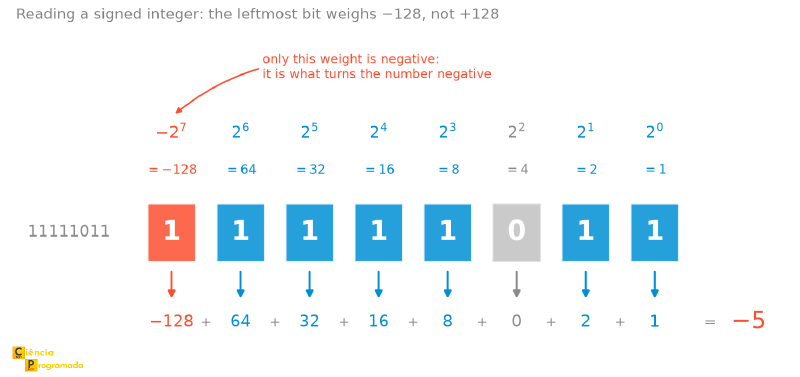
Another way is to consider positional notation with a negative sign bit:
$$ -1 \times 2^7 + 1 \times 2^6 + 1 \times 2^5 + 1 \times 2^4 + 1 \times 2^3 + 0 \times 2^2 + 1 \times 2^1 + 1 \times 2^0 $$Computing the values:
$$ -128 + 64 + 32 + 16 + 8 + 0 + 2 + 1 = -5 $$Both ways lead to the same result.
This second reading, the negative-weight one, becomes much more concrete when drawn. In the ruler below, the eight bits appear with the weight of each position on top and the corresponding term below, exactly as you would do with an unsigned number. The only difference is at the left end: that weight comes with its sign flipped, and that is all that separates \(251\) from \(-5\).
Two’s Complement (Base 2) #
The base 2 complement of a number \(N\) is mathematically given by \(2^d - N\).
Base 2 complement (Formal Mathematical Computation)
Let us find the negative of \(0101_2\) (5 in decimal) in a 4-bit system. The computation is \(2^4 - 5\), that is, \(10000_2 - 0101_2\).
Remember: in the formal algorithm already presented in this series of articles, when the top digit is smaller, we add the base (2) to it and add 1 to the bottom digit of the next column.
$$ \begin{array}{r r r r r r} & 1 & 0^{\scriptscriptstyle+2} & 0^{\scriptscriptstyle+2} & 0^{\scriptscriptstyle+2} & 0^{\scriptscriptstyle+2} \\ -& 0^{\scriptscriptstyle+1} & 0^{\scriptscriptstyle+1} & 1^{\scriptscriptstyle+1} & 0^{\scriptscriptstyle+1} & 1 \\ \hline & 0 & 1 & 0 & 1 & 1 \end{array} $$Step by step:
- Col 0: \(0 < 1\). We add the base to the top (\(0+2=2\)). \(2-1=\mathbf{1}\). We compensate (+1) in the next one.
- Col 1: Top \(0\), Bottom \(0+1=1\). \(0 < 1\). We add the base (\(2\)). \(2-1=\mathbf{1}\). We compensate.
- Col 2: Top \(0\), Bottom \(1+1=2\). \(0 < 2\). We add the base (\(2\)). \(2-2=\mathbf{0}\). We compensate.
- Col 3: Top \(0\), Bottom \(0+1=1\). \(0 < 1\). We add the base (\(2\)). \(2-1=\mathbf{1}\). We compensate.
- Col 4: Top \(1\), Bottom \(0+1=1\). \(1-1=\mathbf{0}\).
Result: \(1011_2\) (the 4 useful bits).
Doing this subtraction is laborious. Fortunately, there is a much simpler algorithm used by hardware and by programmers: the “Flip and Add 1” technique.
Technique: Flip and Add 1 #
This technique is based on the One’s Complement (just flipping the bits) and then adding 1 to arrive at the Two’s Complement.
Let us find the two’s complement of the number 5 (0101) in a 4-bit system:
- Take the positive number:
0101 - Flip all the bits (0 becomes 1, 1 becomes 0):
1010 - Add 1 to the result.
Base 2 complement (Flip and Add 1)
After flipping the bits of 0101, we got 1010. Now, the work is just
adding 1.
The result 1011 represents -5 in Two’s Complement.
Why does adding 1 work? #
You may be wondering: why does flipping the bits and adding 1 give exactly the mathematical complement (\(2^d - N\), in a system of \(d\) bits)?
The explanation lies in the relation between a sequence full of “ones” and the next power of 2:
- Flipping the bits is mathematically equivalent to subtracting the number from a sequence made only of ones (this is called the One’s Complement).
- Example in 4 bits: Flipping \(x\) is equal to \(1111_2 - x\).
- The formal definition of Two’s Complement is to subtract from the next power of the base (\(10000_2\)).
- That is: \(10000_2 - x\).
Since we know that \(10000_2\) is exactly \(1111_2 + 1\), we can substitute in the formula:
$$ \underbrace{(10000_2 - x)}_{\text{Formal Definition}} = \underbrace{(1111_2 + 1) - x}_{\text{Substitution}} = \underbrace{(1111_2 - x)}_{\text{Flipped Bits}} + 1 $$In short: flipping the bits takes us “almost” there (up to the maximum value of the base minus 1). Adding 1 completes the difference to reach the correct power of 2. That is why the algorithm works perfectly.
Rule of Thumb (The Visual Shortcut) #
For humans, there is an even faster way to do this “in your head”, with no computation:
To obtain the two’s complement of a number directly, scan the number from right to left, repeating the zero digits until you find the first digit 1, which must be kept. From there on, all the digits to the left of that first 1 must be flipped.
Examples of applying the rule:
-
Number: \(011\mathbf{1}00\)
- Keep the ending
100. - Flip the beginning
011\(\to\)100. - Result: \(100\mathbf{1}00\)
- Keep the ending
-
Additional examples:
- \(1010 \to 0110\)
- \(11001 \to 00111\)
- \(111000 \to 001000\)
- \(1100110 \to 0011010\)
The Trick: Subtraction via Addition #
Now that we know how to convert a number to negative (two’s complement), subtraction becomes trivial. To compute \(A - B\), the computer simply computes \(A + \text{Complement}(B)\).
Subtraction in base 10 using the radix complement
Subtraction \(913 - 734 = 179\)
The base 10 complement of 734 is \(1000 - 734 = 266\). Thus, the subtraction \(913 - 734\) can be turned into an addition: \(913 + 266 = 1179\).
Notice that the final result has one more digit than the original numbers (\(1\)). That digit is the carry that overflows the capacity of the representation. It is ignored to obtain the correct result (\(179\)).
Subtraction in base 2 using the radix complement
Let us compute \(25 - 19\) in binary (using 5 bits for simplicity). Then: \(25 = 11001_2\) and \(19 = 10011_2\)
We want to do: \(11001_2 - 10011_2\).
Step 1: Find the two’s complement of 19 (\(10011\)). Using the rule of thumb: keep the last 1, flip the rest to the left \(\to\) \(\mathbf{01101}\).
Step 2: Add 25 and (-19). We turn the subtraction into an addition: \(11001 + 01101\).
Writing the operation vertically, we have:
$$ \begin{array}{c c c c c c} {} & \scriptscriptstyle 1 & & & \scriptscriptstyle 1 & \\ {} & 1 & 1 & 0 & 0 & 1 \\ {} + & 0 & 1 & 1 & 0 & 1 \\ \hline 1) & 0 & 0 & 1 & 1 & 0 \end{array} $$The “1)” bit on the left is the carry out of the number of bits. It is discarded. Final result: \(00110_2\) (which is 6 in decimal). Correct!
Limits of the Representation (Range) #
Before we talk about computation errors, we need to understand the limits of the playing field. Since the number of bits is finite, there is a maximum and a minimum value we can write. If we try to go past those limits, the number “does not fit”.
The range of values depends on two factors:
- How many bits (\(N\)) we have available (8, 16, 32, 64…).
- Whether we are using Unsigned or Signed numbers.
Unsigned Numbers #
Here, all the bits are used to represent the magnitude (the value) of the number. There are no negative numbers.
- Minimum: It is always 0 (all bits zero).
- Maximum: All bits are 1. The formula is \(2^N - 1\).
Example with 8 bits:
- From \(0\) to \(2^8 - 1\)
- From 0 to 255.
Signed Numbers (Two’s Complement) #
Here, we split the possible combinations in half: half for the positives (and zero) and half for the negatives. The leftmost bit (MSB) defines the sign, leaving \(N-1\) bits for the value.
The formula changes slightly:
- Minimum (Negative): \(-2^{N-1}\)
- Maximum (Positive): \(2^{N-1} - 1\)
Why is the maximum one less than the absolute value of the minimum? Because zero takes up a place on the “positive” side (where the sign bit is 0). In 8 bits, we have 256 combinations:
- 128 negative combinations (from -1 to -128).
- 128 non-negative combinations (0 to +127).
There is an image that arranges everything we have seen so far in a single
drawing, and it is worth keeping. Instead of thinking of the numbers as a line
running from \(-8\) to \(+7\), think of them as a clock: the bit combinations
laid out in a circle, 0000 at the top, adding 1 being one step clockwise. The
figure uses 4 bits because 16 positions fit on the page; in 8 bits it is the
same clock, just with 256 marks.
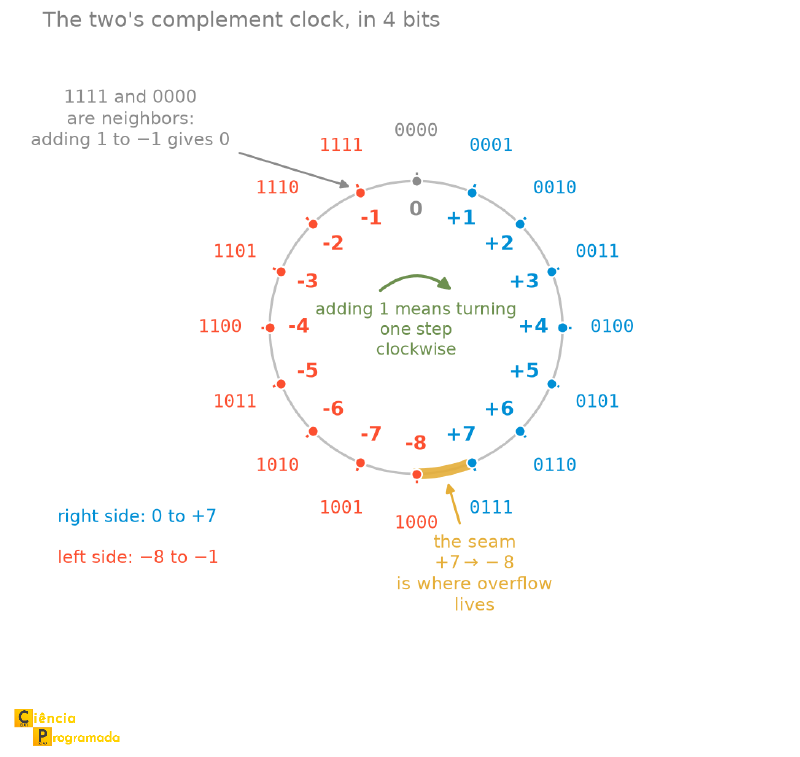
The clock answers four questions at once that this article treats in separate sections:
- Why the complement works. Walking 5 steps backward from zero lands in the same place as walking 11 forward, because the circle closes. That is why subtracting is adding the complement.
- Why the range is asymmetric. There is only one mark for zero, at the top. Since the 16 positions split into two equal halves, one combination is left over on the negative side, and that is why we go from \(-8\) to \(+7\).
- What overflow is. It is crossing the seam by accident: adding two positives and landing on the red side of the circle.
- Why \(-8\) has no opposite. \(+8\) simply does not exist on the clock. The position where it would land is occupied by \(-8\) itself.
We will come back to each of these points later, but keep the drawing.
Reference Table #
See how the range changes drastically depending on the interpretation:
| Bits (\(N\)) | Type | Minimum Value | Maximum Value |
|---|---|---|---|
| 4 bits | Unsigned | 0 | 15 |
| 4 bits | Signed | -8 | +7 |
| 8 bits | Unsigned | 0 | 255 |
| 8 bits | Signed | -128 | +127 |
| 16 bits | Unsigned | 0 | 65,535 |
| 16 bits | Signed | -32,768 | +32,767 |
Thus, if you have an 8-bit signed system and try to add \(100 + 30\), the mathematical result (130) is greater than the allowed limit (+127). The computer does not have enough bits to represent that value, causing what we call Overflow. We will understand this better later on. But first, an important detail.
The Minimum Value Paradox (A Dangerous “Gotcha”) #
If you look at the table above carefully, you will notice an asymmetry: in 8 bits, we go from -128 to +127.
This creates a curious problem: the number -128 has no positive opposite. The value +128 simply does not fit in 8 signed bits.
This asymmetry is the price of the single zero. Since two’s complement does not spend a bit pattern on \(-0\), one combination is left over on the negative side, and that combination is \(-128\). In the schemes that lost the contest back there, the range was symmetric, but at the cost of having two zeros.
What happens if we apply the “Flip and Add 1” rule precisely to -128
(10000000)? Let us see:
- Original number:
10000000(-128) - Flip the bits:
01111111(+127) - Add 1:
Result: 10000000. We are back to -128!
This means that, computationally, the opposite of -128 is itself. This behavior causes silent bugs in programming.
In C and C++, computing the absolute value abs() or negating -x of the
smallest possible integer is undefined behavior: the language standard
does not say what happens, and the compiler may optimize the code assuming
this situation never occurs.
Java has no undefined behavior, but that does not save it from the problem:
Math.abs(Integer.MIN_VALUE) is specified and returns Integer.MIN_VALUE
itself, a negative value coming out of an absolute value function. The bug is
the same in both cases; the difference is that in one it is unpredictable and
in the other it is documented.
Here we talk about 8 bits, but the same holds for 16, 32, or 64 bits. There will always be a negative number with no positive opposite.
Overflow (Capacity Overflow) #
In the examples above, we discarded the last carry and the result was right. But that is not always the case.
Overflow occurs when the result of an operation is too large (positively or negatively) to fit in the available number of bits.
Remember: in an 8-bit signed system, we can represent numbers from -128 to +127. If you try to add \(100 + 30\), the result (130) does not fit, and it will invade the sign bit, looking like a negative number.
Overflow detection follows two rules. The “human” (logical) rule and the “technical” (hardware) rule.
- Human Rule: If we add two Positive numbers and the result is Negative, there was Overflow. (The same holds for Negative + Negative = Positive).
- Technical Rule: Overflow occurs if the carry going into the sign bit is different from the carry coming out of it.
- There is a carry propagated into the sign bit with no carry coming out of it.
- There is a carry propagated out of the sign bit without it having received a carry.
Put another way: in two’s complement, overflow occurs if the carry-in (the carry that enters the sign bit) is different from the carry-out (the carry that leaves the sign bit).
Let us see this happening in practice with 8-bit numbers:
Overflow - Positive + Positive becomes Negative
Let us add \(88 + 46\). The mathematical result would be 134. But in 8 signed bits, the maximum is 127. It will go wrong.
Look at the Sign Bit (the leftmost one, bit 7).
$$ \begin{array}{c c c c c c c c c} {}&\scriptscriptstyle 1 & \scriptscriptstyle 1 & \scriptscriptstyle 1 & \scriptscriptstyle 1 & & & & & \\ {} & 0 & 1 & 0 & 1 & 1 & 0 & 0 & 0 \\ {} + & 0 & 0 & 1 & 0 & 1 & 1 & 1 & 0 \\ \hline {} & \textcolor{red}{1} & 0 & 0 & 0 & 0 & 1 & 1 & 0 \end{array} $$Here the highlighted \(\textcolor{red}{1}\) is the sign bit of the result: it is within the 8 bits, in the column of bit 7.
Analysis:
- Look at the sign bit (first column). A “carry” came in (it received 1 from the previous positions).
- But no “carry” went out of it, beyond the computation.
- It came in and did not go out? Overflow!
The binary result 10000110 starts with 1, indicating a negative number (-122). This is obviously an error, since we added two positives.
Now let us see the opposite case, with two negative numbers overflowing the lower limit (-128).
Overflow - Negative + Negative becomes Positive
Let us do \( -76 + (-68) \). The mathematical result would be -144. The lower limit is -128. It will go wrong.
We represent them in two’s complement and add:
$$ \begin{array}{c c c c c c c c c} \scriptscriptstyle 1 & & \scriptscriptstyle 1 & \scriptscriptstyle 1 & \scriptscriptstyle 1 & \scriptscriptstyle 1 & & & \\ {} & 1 & 0 & 1 & 1 & 0 & 1 & 0 & 0 \\ {} + & 1 & 0 & 1 & 1 & 1 & 1 & 0 & 0 \\ \hline \textcolor{red}{1} & 0 & 1 & 1 & 1 & 0 & 0 & 0 & 0 \end{array} $$
Careful: the highlighted \(\textcolor{red}{1}\) in this example is not the
sign bit. It is the carry that came out of the computation, in an extra
column to the left of the 8 bits, and it will be discarded. The sign bit of
the result is the 0 right next to it.
Analysis:
- Look at the sign bit. It added \(1 + 1\), generating 0 and propagating a “carry” out (the red \(\textcolor{red}{1}\)).
- But it received no “carry” from the previous column (see the empty space above the second column).
- It went out and did not come in? Overflow!
The result 01110000 starts with 0, indicating a positive number (+112). Error detected.
When Overflow Leaves the Paper #
Overflow is behind some of the most expensive failures ever recorded in software.
On June 4, 1996, the Ariane 5 rocket exploded 39 seconds after liftoff, on its maiden flight. The cause: the inertial reference system converted the horizontal velocity from a 64-bit floating-point number to a 16-bit signed integer. On the Ariane 4, that value had always fit. The Ariane 5 was faster, the number did not fit, and the conversion overflowed.
The software handled the error by shutting down the inertial reference system (IRS) itself, and the backup IRS, which ran exactly the same code, had shut down for the same reason about 72 milliseconds earlier. With no attitude reference, the rocket turned, broke apart under aerodynamic pressure, and triggered its self-destruct. The loss is estimated at US$370 million, caused by a piece of code that did not even need to be active at that point of the flight.
Not every case is tragic. Two well-known examples of the same phenomenon:
- Pac-Man, level 256. The level counter had 8 bits, that is, it went from 0 to 255. On reaching level 256, the computation that draws the screen overflowed the counter and half of the maze turned into graphical garbage. It became known as the kill screen: the level is impossible to pass, and for decades it was the absolute ceiling of the game.
- The YouTube counter, in 2014. The view count was stored in a 32-bit signed integer, whose limit is \(2^{31} - 1 = 2{,}147{,}483{,}647\). When the video of Gangnam Style passed that mark, Google migrated the field to 64 bits, and made an official joke about it. With 64 bits, the new ceiling is over 9 quintillion.
In all three cases the mechanism is the same one you just saw in the 8-bit computations above. What changes is the number of bits and, with it, the size of the damage.
Bonus Tip: Spotting Negatives in Hexadecimal #
In practice, programmers rarely look at sequences of zeros and ones. The most common representation in debuggers and memory editors is Hexadecimal.
How can you tell whether a Hex number is negative (in two’s complement) at a glance?
The rule is universal, no matter whether the number has 8, 16, 32, or 64 bits:
just look at the first digit on the left. If that digit represents a binary
value that starts with 1 (that is, \(\ge 8\)), the whole integer is negative.
The “Negative Digits” in Hexadecimal are: 8, 9, A, B, C, D, E, F
Examples:
- 8 bits:
0xFF\(\to\) Starts with F. Negative (-1). - 16 bits:
0x8000\(\to\) Starts with 8. Negative (-32,768). - 32 bits:
0xC0000005\(\to\) Starts with C. Negative. - Any size:
0x7FFF...\(\to\) Starts with 7. Positive.
If you are debugging code and see a (signed) integer variable starting with
F, know immediately that it is negative. That is all: the first digit tells
the sign, not the value. 0xF0000000 also starts with F and is worth
\(-268{,}435{,}456\), which is quite different from \(-1\).
There is, however, one unmistakable special case: when all the digits are F,
as in 0xFFFFFFFF (32 bits), then the value is indeed -1.
It may seem strange that the visually “largest” number (all filled with F or 1) represents -1. But we can prove it by applying the “Flip and Add 1” rule we just learned.
If we want to know the value of 0xFFFFFFFF (32 bits), we take the reverse
path:
- Convert to Binary: A sequence of thirty-two 1s (
1111...1111). - Flip the bits: All the 1s become 0s (
0000...0000). - Add 1: $$ 0 + 1 = 1 $$
Since the original sign bit was 1 (negative) and the magnitude found was 1,
the final value is -1.
Therefore, no matter the size of the variable (8, 16, 32, or 64 bits): if all
the bits are 1 (or all the hexadecimal digits are F), the number will
always be -1 in Two’s Complement.
In Practice: Visualizing in Python #
If you try to check what we learned here using the Python console, you will get a surprise. Python handles integers differently from languages like C or Java: it has arbitrary precision. This means numbers can have as many bits as needed, with no fixed limit (such as 8 or 32 bits).
Because of this, the built-in bin() function does not show Two’s Complement by
default. It just puts a minus sign in front:
x = -5

print(bin(x))   # -0b101
# This is not Two's Complement! It is just "negative 5".
To see how the bits are really stored (like 1111...1011), we need to force
Python to limit the number to a given number of bits, using a Bitmask with
the AND operator (&).
If we want to see the 8-bit representation, we use the mask 0xFF (which is
11111111):
x = -5

print(bin(x & 0xFF))   # 0b11111011
# Now we are talking! See the bits turned on indicating the negative.
If we want to see it in 32 bits, we use 0xFFFFFFFF:
x = -5

print(bin(x & 0xFFFFFFFF))
# 0b11111111111111111111111111111011
This happens because the & operator treats the number as a pure sequence of
bits, revealing the Two’s Complement structure that lies “under the hood”.
Summary Table #
| Concept | Rule | Example from the article |
|---|---|---|
| Radix complement in base \(b\) | \(b^d - N\), in a system of \(d\) digits | \(10^3 - 734 = 266\) |
| Two’s complement | \(2^d - N\), in a system of \(d\) bits | \(2^4 - 5 = 1011_2\) |
| Arithmetic shortcut | flip all the bits and add 1 | 0101 \(\to\) 1010 \(\to\) 1011 |
| Visual shortcut | copy from the right up to the first 1, flip the rest |
011100 \(\to\) 100100 |
| Reading a negative | subtract \(2^d\) from the unsigned value | \(251 - 256 = -5\) |
| Reading a negative (2nd way) | give the MSB weight \(-2^{d-1}\) | \(-128 + 64 + 32 + 16 + 8 + 2 + 1 = -5\) |
| Subtracting by adding | \(A - B = A + \text{comp}_2(B)\), discarding the final carry | \(25 - 19 = 6\) |
| Unsigned range | \(0\) to \(2^N - 1\) | 8 bits: 0 to 255 |
| Signed range | \(-2^{N-1}\) to \(2^{N-1} - 1\) | 8 bits: \(-128\) to \(+127\) |
| Why the range is asymmetric | there is only one zero, so one negative combination is left over | \(-128\) has no opposite |
| Overflow (human rule) | positive + positive giving negative, or the reverse | \(88 + 46 = -122\) |
| Overflow (technical rule) | the carry into the sign bit differs from the one out of it | \(-76 + (-68) = +112\) |
| Negative in hexadecimal | first digit \(\ge 8\) | 0xF0000000 is negative |
| The case of \(-1\) | all digits equal to F |
0xFFFFFFFF is worth \(-1\) |
| In Python | integers have arbitrary precision; use a mask to see the bits | bin(-5 & 0xFF) \(\to\) '0b11111011' |
Conclusion #
The Two’s Complement system is an elegant solution: thanks to it, processors can perform additions and subtractions using the same logic circuit (the adder), just flipping bits when necessary. This simplifies chip design and reduces costs.
With that, we close the cycle of integers. We know how to represent them, convert them, and operate on them, including the negatives.
But what happens when we need precision beyond the integer? How does the
computer deal with \(0.5\) or \(3.14\)? And why does the & operator work as
shown above?
These questions will be answered in the next articles of the series From Zero to Float. Stay tuned!


