

Throughout this series, we have discussed how to convert, operate on and manipulate integers in different bases. We saw that, for integers, conversion is always exact: an integer in one base always has an exact counterpart in another.
However, the real world is not made only of integers. Measurements, probabilities and physical constants depend on fractional (real) numbers. The question is: how do we represent \(0.1\) or \(3.14159\) using only zeros and ones?
In this article, we will extend our methods to handle the fractional part. You will see that, although the logic is similar, fractions bring a new challenge: precision. Unlike integers, not every finite decimal fraction has a finite representation in binary, which gives rise to the famous rounding errors in computing.
The general rule remains the same: we use the decimal base as a bridge.
- Decimal \(\to\) Base \(r\): we use Successive Multiplications.
- Base \(s\) \(\to\) Decimal: we use Positional Expansion (with negative exponents).
From Decimal to Any Base (Successive Multiplications) #
To convert the fractional part from decimal to binary, octal or hexadecimal, we use the method of successive multiplications. Unlike the integer part (where we divided), here we multiply by the target base to “push” the digits into the integer part.
The Algorithm:
-
1
Multiply by the base
Multiply the fractional part of the number by the target base \(r\). -
2
Keep the integer part
The integer part of the result becomes the next digit in the new base. -
3
Repeat with the fraction
Take only the remaining fractional part and repeat the process. -
4
Stop
Stop when the result is zero (exact) or when you reach the desired precision (in the case of repeating fractions).
Example: Convert \(0.625_{10}\) to binary (\(2\)) with 3 fractional digits
- \(0.625 \times 2 = \mathbf{1}.25\) → we keep 1, \(0.25\) remains
- \(0.25 \times 2 = \mathbf{0}.50\) → we keep 0, \(0.50\) remains
- \(0.50 \times 2 = \mathbf{1}.00\) → we keep 1, \(0.00\) remains
Since the fraction reached zero, the conversion is exact. Reading from top to bottom:
$$ 0.625_{10} = 0.101_2 $$The big challenge here is fractions that look simple in decimal but are infinite (repeating) in binary. Take the case of \(0.3\):
Example: Convert \(0.3_{10}\) to binary (\(2\)) with 5 fractional digits
- \(0.3 \times 2 = \mathbf{0}.6\) → we keep 0
- \(0.6 \times 2 = \mathbf{1}.2\) → we keep 1
- \(0.2 \times 2 = \mathbf{0}.4\) → we keep 0
- \(0.4 \times 2 = \mathbf{0}.8\) → we keep 0
- \(0.8 \times 2 = \mathbf{1}.6\) → we keep 1
Note that \(0.6\) remains, which would take us back to step 2. The result is a repeating fraction (\(0.010011001...\)). To get the 5 digits requested in the statement of the example, we truncate:
$$ 0.3_{10} \approx 0.01001_2 $$This “going back to step 2” is what produces the repeating fraction, and it is clearer when drawn. In the figure, the five steps appear in sequence, each with the bit it produces and the remainder it leaves. The red arrow marks the moment when the remainder repeats and the process enters a loop:
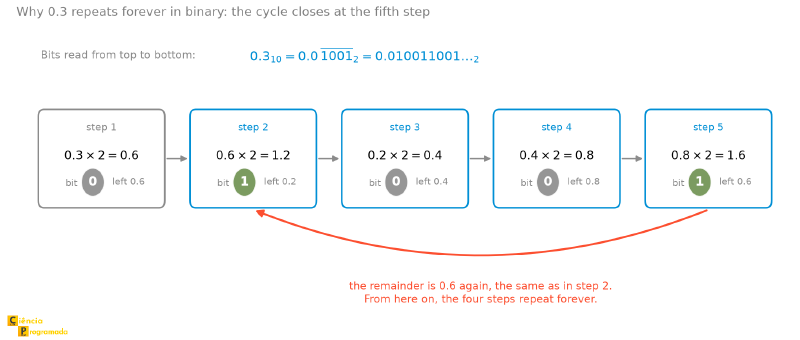
Notice that the cycle has four steps, not five: step 1 happens only once, and
what repeats is the block formed by steps 2 to 5. That is why the result is
written as \(0.0\) followed by 1001 repeated forever.
What If We Have Both an Integer and a Fractional Part? #
The strategy is the classic “divide and conquer”. You don’t need a new method; just split the number into two smaller problems:
-
1
Convert the integer part
Convert the integer part using Successive Divisions (as seen in the article on integer conversion). -
2
Convert the fractional part
Convert the fractional part using Successive Multiplications. -
3
Join the two
Join the two results with the separator point.
Mixed Example: Convert \(6.512_{10}\) to binary (\(2\)) with 5 digits of precision
Part 1: The Integer (\(6\))
We use divisions:
$$ 6 \div 2 = 3 \quad (\text{remainder } \mathbf{0}) \\ 3 \div 2 = 1 \quad (\text{remainder } \mathbf{1}) \\ 1 \div 2 = 0 \quad (\text{remainder } \mathbf{1}) $$Integer Result: \(110_2\)
Part 2: The Fraction (\(0.512\))
We use multiplications:
- \(0.512 \times 2 = \mathbf{1}.024\) → we keep 1
- \(0.024 \times 2 = \mathbf{0}.048\) → we keep 0
- \(0.048 \times 2 = \mathbf{0}.096\) → we keep 0
- \(0.096 \times 2 = \mathbf{0}.192\) → we keep 0
- \(0.192 \times 2 = \mathbf{0}.384\) → we keep 0
Fractional Result: \(0.10000..._2\)
Part 3: Union
$$ 6.512_{10} \approx 110.10000_2 $$Notice the “approximately” sign. Stop and walk the path back: \(110.10000_2\) is worth exactly \(4 + 2 + 0.5 = 6.5\). That is, stopping at 5 binary digits lost \(0.012\) along the way. There was no arithmetic mistake: the number of digits ran out before the fraction did. This is the first time in this article that you see truncation error happening, and it is exactly this mechanism that lies behind all the floating-point oddities at the end of the text.
Visualizing in Python (The X-Ray of Memory) #
Let’s use Python to see how real numbers are stored in the computer’s memory. Remember that, internally, real numbers are represented in floating point, following the IEEE 754 standard.
The IEEE 754 standard will be detailed in future articles. But the basics you need to know now is that a floating-point real number is divided into three main fields:
- Sign (1 bit): Indicates whether the number is positive (0) or negative (1).
- Exponent (8 bits for a 32-bit float): Stores the “adjusted” exponent (with a bias). The bias for 32-bit floats is 127.
- Significand (23 bits for a 32-bit float): Stores the fractional part of the number, with an implicit “hidden bit”.
Here we are using 32 bits just as an example. For other floating-point sizes (such as the 64-bit double), the field sizes are different, but the concept is the same. Again, this will be explored in depth in future articles. For now, let’s focus on how to visualize these bits in Python.
Perhaps your first reaction is to try the built-in bin() function, which we
used exhaustively in the articles on integers. But if you try to run
bin(0.625), Python will give you an error:
TypeError: 'float' object cannot be interpreted as an integer
This happens because the bin() function was made to show the exact
representation of integers. To see how a real number (float) is actually
stored in the 32 bits of memory, looking at the Sign, Exponent and
Significand fields, we need a different approach.
We will use the struct library to take the float value, pack it into raw
bytes and then read those same bytes as if they were an integer. This gives us
an “X-Ray” of the hardware. The struct library is used to convert between
Python and C representations, allowing you to manipulate binary data directly.
The following code uses the 'f' format of struct, which packs the number
into 32 bits (the C float). Remember that Python stores its floats with 64
bits ('d'), using 11 bits of exponent and 52 of significand. The structure
of sign, exponent and significand is identical; only the field sizes differ.
The 'f' and 'I' formats without a prefix use the machine’s native byte
order. Since both ends use the same order, the resulting bit pattern is the
same on any platform; the code below is portable as it stands.
Still, in an article about binary representation it is worth knowing the
explicit form: struct.unpack('<I', struct.pack('<f', number)) fixes
little-endian (and '!' would fix network order). The advantage is
documenting the intent and protecting against someone who, one day, changes
only one of the two format strings. Mixing the orders ('<I' with '>f') is
the only way to get wrong bits here.
import struct

def view_float_bits(number):
    # 'f' = float (32 bits, IEEE 754 standard)
    # 'I' = unsigned int (32-bit unsigned integer)
    # pack: converts the float number to raw bytes
    # unpack: reads those raw bytes as if they were an integer
    int_bits = struct.unpack('I', struct.pack('f', number))[0]

    # Formats as a string of 32 zeros and ones
    bit_string = f"{int_bits:032b}"

    # Let's print it in a didactic way, separating the fields
    sign = bit_string[0]
    exponent = bit_string[1:9]
    significand = bit_string[9:]

    print(f"\nAnalyzing the number: {number}")
    print(f"Raw Bits: {bit_string}")
    print(f"Split: [S:{sign}] [Exp:{exponent}] [Sig:{significand}]")

# Test 1: Purely fractional number (previous example)
view_float_bits(0.625)

# Test 2: Number with integer and fractional parts
view_float_bits(12.5)

# Test 3: Repeating number (0.1)
view_float_bits(0.1)

# Test 4: Negative number (-3.75)
view_float_bits(-3.75)
Output:
Analyzing the number: 0.625
Raw Bits: 00111111001000000000000000000000
Split: [S:0] [Exp:01111110] [Sig:01000000000000000000000]

Analyzing the number: 12.5
Raw Bits: 01000001010010000000000000000000
Split: [S:0] [Exp:10000010] [Sig:10010000000000000000000]

Analyzing the number: 0.1
Raw Bits: 00111101110011001100110011001101
Split: [S:0] [Exp:01111011] [Sig:10011001100110011001101]

Analyzing the number: -3.75
Raw Bits: 11000000011100000000000000000000
Split: [S:1] [Exp:10000000] [Sig:11100000000000000000000]
What are we seeing?
To follow the calculations below, consider that multiplying by \(2^e\) is the same as moving the point \(e\) places to the right (if \(e\) is positive) or to the left (if \(e\) is negative).
- In the case of 0.625:
- The exponent is
01111110(126 decimal). Since the bias is 127, the actual exponent is \(126 - 127 = -1\). - The stored significand is
01000.... Remember the “Hidden Bit”: the computer assumes a “1.” in front. So the actual significand is \(1.01\). - Final calculation: \(1.01_2 \times 2^{-1} = 0.101_2 = 0.625\). It matches!
- In the case of 12.5:
- The exponent is
10000010(130 decimal). Actual exponent: \(130 - 127 = 3\). - The stored significand is
1001000.... Putting the implicit “1.” in front, we have \(1.1001\). - Final calculation: \(1.1001_2 \times 2^3\). Moving the point 3 places to the right gives \(1100.1_2\), which is exactly \(12.5\) decimal.
- In the case of 0.1 (The Revealing One):
- The exponent is
01111011(123 decimal). Actual exponent: \(123 - 127 = -4\). - Look at the significand:
100110011001.... Do you notice the repeating pattern? Here is the visual proof that 0.1 is a repeating fraction in binary. - Note the last bit
1. The computer had to round the value because the sequence was infinite. It is this small “dirt” at the end that causes errors such as \(0.1 + 0.2 \neq 0.3\). - Final calculation: \(1.100110011001..._2 \times 2^{-4}\). Moving the point 4 places to the left gives \(0.0001100110011..._2\), which is the approximate binary representation of \(0.1\).
- In the case of -3.75:
- Sign:
1(Negative). - The exponent is
10000000(128 decimal). Actual exponent: \(128 - 127 = 1\). This means multiplying by \(2^1\). - The stored significand is
111000.... Adding the implicit “1.”, we have \(1.111\). - Final calculation: \(-1 \times 1.111_2 \times 2^1\). Moving the point 1 place to the right gives \(-11.11_2\).
- Translating: \(11_2\) is 3 and \(0.11_2\) is \(0.5 + 0.25 = 0.75\). Result: \(-3.75\).
If you had trouble, don’t worry. The floating-point representation has many details. That is why we dedicate an article in this series to the IEEE 754 standard, where we will detail each field (sign, exponent and significand) and explain the special cases such as NaN, Infinity and Subnormal numbers.
From Any Base to Decimal (Positional Expansion) #
To find the decimal value of a fraction in another base, we use positional expansion. The difference is that, after the point, the positions have negative exponents: \(b^{-1}, b^{-2}, b^{-3}\), and so on.
$$ 0.d_1 d_2 d_3 \dots _b = d_1 \cdot b^{-1} + d_2 \cdot b^{-2} + d_3 \cdot b^{-3} + \dots $$
Example: Convert \(0.101_2\) to decimal (\(10\))
The conversion is exact, since the sum is finite.
The General Case: Using the Decimal Bridge #
If we need to convert between any two bases (e.g., Base 6 to Octal), the safest path is:
- Convert the source fraction to Decimal (Expansion).
- Convert from Decimal to the target (Multiplication).
Example: Convert \(0.32_4\) to binary (\(2\)) with 3 fractional digits
-
Convert Base 4 to Decimal:
$$ \begin{align*} 0.32_4 & = 3 \times 4^{-1} + 2 \times 4^{-2} \\ & = 3 \times 0.25 + 2 \times 0.0625 = 0.75 + 0.125 = 0.875_{10} \end{align*} $$ -
Convert Decimal (\(0.875\)) to Binary:
- \(0.875 \times 2 = \mathbf{1}.75\) → digit 1
- \(0.75 \times 2 = \mathbf{1}.50\) → digit 1
- \(0.50 \times 2 = \mathbf{1}.00\) → digit 1
See that the fraction reached zero, so the conversion is exact.
Final result:
$$ 0.32_4 = 0.111_2 $$
Example: Convert \(0.52_6\) to octal (\(8\)) with 3 fractional digits
-
Convert Base 6 to Decimal:
$$ \begin{align*} 0.52_6 & = 5 \times 6^{-1} + 2 \times 6^{-2} \\ & = 5 \times 0.1666... + 2 \times 0.0277... \approx 0.8888_{10} \end{align*} $$(Note: For maximum precision, keep the fractions: \(5/6 + 2/36 = 32/36 = 8/9\))
-
Convert Decimal (\(8/9 \approx 0.888...\)) to Octal:
- \(0.8888... \times 8 = 7.1111...\) → digit 7
- \(0.1111... \times 8 = 0.8888...\) → digit 0
- \(0.8888... \times 8 = 7.1111...\) → digit 7
Observe that the pattern repeats, indicating a repeating fraction in octal.
Approximate result:
$$ 0.52_6 \approx 0.707_8 $$Bases Related by Powers (Shortcuts) #
As with integers, if the bases are powers of one another (such as 2, 8 and 16), we can convert by grouping or expanding bits.
For mixed numbers (which have an integer and a fractional part), the golden rule is: always start at the point and move toward the ends.
Imagine the point as a mirror. The grouping must “move away” from it in both directions:
- Integer part (left of the point): group from right to left \(\leftarrow\). If the last group is incomplete, pad with zeros on the left.
- Fractional part (right of the point): group from left to right \(\rightarrow\). If the last group is incomplete, pad with zeros on the right.
Example: Convert \(0.A7_{16}\) to binary (\(2\))
We expand each hexadecimal digit of the fractional part into 4 bits:
$$ A_{16} = 1010_2, \quad 7_{16} = 0111_2 $$Result:
$$ 0.A7_{16} = 0.10100111_2 $$Now, here is an example where zero padding is necessary.
Example: Convert \(11011.11_2\) to Hexadecimal (\(16\))
The starting point is the point. We will group 4 bits in each direction.
$$ \leftarrow \mathbf{11011} \quad . \quad \mathbf{11} \rightarrow $$Left Side (Integer):
- Group 1 (near the point): \(1011\) \(\to B\)
- Group 2 (left end): \(1\) is left over. We pad with zeros on the left: \(0001\) \(\to 1\)
Right Side (Fraction):
- Group 1 (near the point): We only have \(11\). Since we need 4 bits, we pad with zeros on the right: \(1100\) \(\to C\)
Final Result:
$$ 1B.C_{16} $$One more example to reinforce the concept:
New Example: Convert \(0.11011_2\) to Hexadecimal (\(16\))
We need to group the bits in blocks of 4, starting at the point and moving right.
Original number:
$$ 0.11011_2 $$Group 1: The first 4 bits:
$$ 1101_2 = D_{16} $$Group 2: Only the bit 1 is left. Since we need a block of 4, we pad with zeros on the right:
(Note: If we padded on the left, we would get \(0001=1\), which would be wrong, since the original bit has weight \(2^{-5}\), not \(2^{-8}\))
Final result:
$$ 0.11011_2 = 0.D8_{16} $$Floating Point in Python: Curiosities and Limitations #
Besides what we saw earlier in the section “Visualizing in Python (The X-Ray of Memory)”, there are some other interesting curiosities about how Python handles real numbers and their bases.
Unlike integers, where Python gives us easy prefixes such as 0b and
0x, dealing with non-decimal bases for fractional numbers requires different
tools.
There Is No “Fractional Binary Literal” #
You cannot write something like x = 0b1.101 in Python. The language does not
support that syntax natively.
If you need to convert a fractional binary string (such as “10.11”) to float, you will have to do it manually or use libraries. The computer’s internal logic is binary, but Python abstracts that away from the programmer.
Hexadecimal Floats #
Python lets you convert floats to hexadecimal and vice versa natively. This is useful for programmers who need to know exactly what is stored in memory, without the rounding of the decimal display.
The format uses the notation 0x...p..., where p indicates a power of 2
(similar to scientific notation, but binary).
# Converting a float to its exact representation in Hex
x = 10.5
print(x.hex())
# Output: '0x1.5000000000000p+3'
# Means: 1.5 (hex) * 2^3

# Converting back (Hex to Float)
y = float.fromhex('0x0.3p10') # 0.1875 * 1024
print(y)
# Output: 192.0
If you found this output confusing, don’t worry. This notation (float.hex)
looks like a “base salad” because it mixes Base 16 with powers of
Base 2.
Let’s detail the notation further. It follows the format: 0x[Hexadecimal Significand]p[Decimal Exponent]
The golden rule to decipher it is:
$$ \text{Value} = (\text{Hexadecimal Number}) \times 2^{(\text{Exponent after the p})} $$Let’s dissect the two examples above to understand the math behind them:
- Analyzing
0x1.5p+3(which resulted in 10.5)
- The Significand (
1.5): It is in Hexadecimal. The1is worth 1, but the5after the point is not “5 tenths”. In base 16, each place after the point divides by 16.- So
.5hex means \(5/16\) or \(0.3125\) in decimal. - Significand Value: \(1 + 0.3125 = \mathbf{1.3125}\).
- So
- The Exponent (
p+3): Thepindicates a power of 2.- Exponent Value: \(2^3 = \mathbf{8}\).
- Final Calculation: \(1.3125 \times 8 = \mathbf{10.5}\).
- Analyzing
0x0.3p10(which resulted in 192.0)
- The Significand (
0.3): Again, in Hexadecimal.- The
.3hex means \(3/16\) or \(0.1875\) in decimal.
- The
- The Exponent (
p10):- Exponent Value: \(2^{10} = \mathbf{1024}\).
- Final Calculation: \(0.1875 \times 1024 = \mathbf{192.0}\).
Why use this? This notation is useful for systems programmers because it defines the number exactly as it is stored in the hardware, without suffering the rounding errors typical of the Decimal → Binary conversion. It is an exact way to carry float numbers between different machines.
The Real Proof of the Precision Error #
Remember that we discussed how \(0.3_{10}\) becomes a repeating fraction in binary? In Python, this produces the famous floating-point arithmetic “error”.
Since the computer rounds the binary repeating fraction to the nearest representable value, the sum does not come out exact:
val1 = 0.1
val2 = 0.2
total = val1 + val2

print(f"Result: {total}")
# Output: 0.30000000000000004

print(total == 0.3)
# Output: False
It is worth pausing here to understand where this error lives. The root of it all is that the computer’s number line is not continuous: it is made of spaced marks, and most real numbers fall between two marks. The figure below shows both sides of this: on top, how the marks are distributed (dense near zero, sparse far from it) and below, a zoom around \(0.1\), where you can see that the exact value simply has no mark:
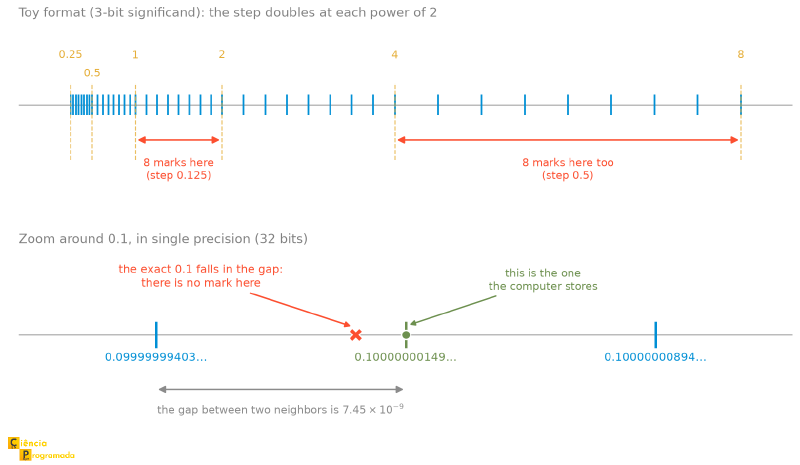
The 0.1 you type, therefore, never reaches memory whole: what gets stored is
the nearest mark. Add two of these approximations and the result escapes the
mark that would correspond to 0.3: that is literally what the output above is
showing.
For critical applications (such as financial systems) where this error is
unacceptable, Python offers the decimal module, which does arithmetic in base
10 and is exact for decimal fractions that fit in the context’s precision (28
digits by default), at the cost of performance, avoiding the conversion to
binary. Note the qualification: exact for decimal fractions, not for every
division. Decimal(1) / Decimal(3) is still a repeating fraction, and is still
rounded.
from decimal import Decimal

d1 = Decimal('0.1')
d2 = Decimal('0.2')
print(d1 + d2)
# Output: 0.3
This behavior is not a bug or an implementation flaw of Python: it is a direct consequence of the base conversion we did by hand at the beginning of the article. The official documentation has a page dedicated just to this, Floating Point Arithmetic: Issues and Limitations, and it is worth reading.
On February 25, 1991, during the Gulf War, a Patriot anti-missile battery in Dhahran, Saudi Arabia, failed to intercept a Scud missile. The attack killed 28 American soldiers.
The cause was exactly what this article describes. The system’s internal clock counted tenths of a second, and the value \(0.1\) was stored in a 24-bit register, truncated, because \(0.1\) is a repeating fraction in binary. The error of each conversion was about \(9.5 \times 10^{-8}\) seconds, negligible. But the battery had been on for about 100 hours, and the error accumulated to \(0.34\) seconds. For a Scud at 1,676 m/s, 0.34 seconds means more than half a kilometer of error in the predicted position, enough for the missile not to be where the system was looking.
The case is documented in the official GAO report (GAO/IMTEC-92-26) and is analyzed in detail on Professor Douglas Arnold’s page, at the University of Minnesota.
Strategies to Work Around the Error #
Besides using the Decimal module, there are two very common algorithmic
approaches to deal with this limitation, depending on your problem domain:
A. Working with Integers (Financial Approach)
In banking or e-commerce systems, we often avoid floats
completely. The idea is to work with the smallest monetary unit (cents) as an
integer.
Instead of storing R$10.50, we store the integer 1050. Since integer math is exact, the rounding error disappears. We only divide by 100 when displaying the value on screen.
# Approach with Floats (Dangerous for money)
price_a = 0.10
price_b = 0.20
print(price_a + price_b) # 0.30000000000000004

# Approach with Integers (Safe)
cents_a = 10
cents_b = 20
total = cents_a + cents_b
print(f"R$ {total / 100:.2f}") # R$ 0.30
B. Comparison by Tolerance (Scientific Approach)
In scientific or engineering contexts, we rarely check whether two real numbers
are strictly equal (==). Instead, we check whether they
are “close enough” to each other, within an acceptable margin of error
called the tolerance, usually denoted by \(\epsilon\) (the Greek letter
epsilon).
In Python, you can do this manually or use the math.isclose function:
import math

val1 = 0.1 + 0.2
expected = 0.3

# The wrong way
if val1 == expected:
    print("Equal") # Never gets here

# The manual way (defining a tolerance, e.g., 0.00001)
tolerance = 1e-5
if abs(val1 - expected) < tolerance:
    print("Equal (within the margin)")

# The Pythonic way (recommended)
# Here we pass your variable to 'abs_tol' (Absolute Tolerance)
if math.isclose(val1, expected, abs_tol=tolerance):
    print(f"Equal (using math.isclose with tolerance of {tolerance})")
The math.isclose function is useful because it lets you define what
“equal” means in two different ways. Understanding the difference between them
is vital to avoid silent bugs:
- Relative Tolerance (
rel_tol) - The Default
- What it is: A comparison based on percentage or magnitude. The default is
1e-9(0.000000001), which means the numbers must agree up to the 9th significant digit, which is different from the 9th decimal place: for values on the order of millions, the 9th significant digit falls well before the point. - How it works: the difference is compared with
rel_tolmultiplied by \(\max(|a|, |b|)\), that is, against the larger of the two in absolute value, and not against the second argument. - When to use: In most general cases.
- The Logic: An error of 1 meter is unacceptable if you are measuring a table (high relative error), but irrelevant if you are measuring the distance from the Earth to the Moon (low relative error).
rel_toladapts to the scale of the numbers.
- Absolute Tolerance (
abs_tol) - The Fixed Value
- What it is: A fixed margin of error, like a ruler. If you set
abs_tol=0.01, any difference smaller than 0.01 is accepted, no matter whether the numbers are huge or tiny. The default is0.0. - When to use: Mainly when comparing with Zero.
- The Logic: If you try to check
math.isclose(0.0, 0.0000001), the relative tolerance will fail (since anything compared to zero is infinitely larger in percentage terms). In that case, you need to set anabs_tolto say: “I consider zero anything smaller than \(10^{-7}\)”.
import math

# Relative Tolerance example (Default)
# Are 100 and 101 "close"? With 5% tolerance, yes.
print(math.isclose(100, 101, rel_tol=0.05)) # True

# Absolute Tolerance example (Zero)
# Comparing with zero requires abs_tol
a = 0.0
b = 1e-10 # 0.0000000001
print(math.isclose(a, b)) # False (The default fails with zero)
print(math.isclose(a, b, abs_tol=1e-9)) # True (The difference is smaller than the fixed margin)
The NumPy library, widely used in scientific contexts, also offers
functions for comparison with tolerance, such as numpy.isclose and
numpy.allclose, which are optimized for large arrays.
Summary Table #
| Idea | Rule | Example from the article |
|---|---|---|
| Fractional positional notation | digits to the right of the point have weight \(b^{-1}, b^{-2}, \dots\) | \(0.101_2 = 0.5 + 0.125 = 0.625\) |
| Decimal \(\to\) another base | successive multiplications; read the integer parts from top to bottom | \(0.625 \to 0.101_2\) |
| When the process does not end | the fraction becomes a repeating fraction in the target base | \(0.3 \to 0.01001..._2\), with a cycle |
| Mixed number | convert the two parts by different methods and join them | \(6.512 \approx 110.10000_2\) |
| Price of truncating | stopping early costs precision | \(110.10000_2\) is worth \(6.5\): \(0.012\) was lost |
| Grouping by power | start at the point and move to the ends | \(0.\mathtt{A7}_{16} = 0.10100111_2\) |
| Padding | zeros on the left in the integer part, on the right in the fractional part | \(0.11011_2 = 0.\mathtt{D8}_{16}\) |
| See the bits of a float | struct.unpack('I', struct.pack('f', x)) |
0.625 \(\to\) 00111111001000000000000000000000 |
| See the exact stored value | Decimal(x), without quotes |
Decimal(0.3) has 54 digits |
| Float in hexadecimal | float.hex() and float.fromhex() |
(10.5).hex() \(\to\) '0x1.5000000000000p+3' |
| Money | use integers in the smallest unit | 1050 cents, not 10.50 |
| Scientific comparison | math.isclose, with rel_tol (scale) or abs_tol (zero) |
isclose(0.0, 1e-10, abs_tol=1e-9) is True |
Final Thoughts: The Problem of Precision #
Throughout this article, you must have noticed that conversions such as \(0.3_{10} \to \text{Binary}\) result in infinite repeating fractions. Since the computer’s memory is finite, it cannot store “infinite bits”. It has to cut (truncate) or round this number at some point.
This means the computer almost never stores exactly the number
\(0.3\), but rather the nearest representable value. And we don’t have to
guess which one it is: the decimal module shows the stored number, digit by
digit.
from decimal import Decimal

print(Decimal(0.3))   # without quotes: converts the float already in memory
# Output: 0.299999999999999988897769753748434595763683319091796875

print(Decimal(0.1))
# Output: 0.1000000000000000055511151231257827021181583404541015625
Notice that Decimal('0.3'), with quotes, is the exact decimal number you
wrote; Decimal(0.3), without quotes, is the translation of what the hardware
actually stored. That is 54 digits to represent something you typed with a
single digit after the point.
It is this small error, inherent to the conversion of fractional bases, that
causes the “strange” behaviors in programming languages, such as
0.1 + 0.2 != 0.3.
In the article on IEEE 754, we will get into the anatomy of this standard, the universal system that defines how these bits (sign, exponent and significand) are organized to minimize these errors and allow scientific calculations.
If you want to go deeper, the classic reference on the subject is the article “What Every Computer Scientist Should Know About Floating-Point Arithmetic”, by David Goldberg (1991), dense, but it is the text everyone cites when the subject is floating-point error.
See you then!


