

In the previous articles, we studied integers. We learned that the computer uses zeros and ones to count, that it uses Two’s Complement to represent negatives and that it has clear memory limits (Overflow).
We also had a brief encounter with binary fractions: the digits to the right of the point have weights \(2^{-1}, 2^{-2}, 2^{-3}\dots\), so that \(10.101_2\) is worth \(2 + 0.5 + 0.125 = 2.625\) in decimal. But so far we have done these conversions on paper, assuming the point was “fixed” somewhere.
But how does the hardware, with its memory modules limited to 32 or 64 bits, store real numbers? How does it hold, in the same memory structure, the distance between two galaxies (\(2.5 \times 10^{19}\) km) and the diameter of an atom (\(1 \times 10^{-10}\) m)?
The answer is to let the point float. Welcome to the IEEE 754 standard, the universal rule that dictates how computers handle real numbers (Floating Point) and the reason why, sometimes, \(0.1 + 0.2\) is not exactly \(0.3\).
The Scale Problem: Why Not Use Fixed Point? #
Imagine you have 32 bits to store a number. The most naive approach would be to split that space in half: we would use 16 bits for the integer part and 16 bits for the fractional part. This is called Fixed Point.
For many financial applications, this works well (after all, cents only need two decimal places). But for science and engineering, it is a disaster.
- The Giant Problem: With 16 integer bits, the largest number we can represent is \(2^{16} - 1 = 65535\). That is not even enough to count the population of a small town, let alone astronomical distances.
- The Microscopic Problem: With 16 fraction bits, the smallest difference we can measure is \(2^{-16}\) (approx. \(0.000015\)). That is useless for measuring quantities in quantum physics.
If we increase the integer part, we lose precision in the fraction. If we increase the fraction, we lose range in the integers. The blanket is too short.
The Solution: Binary Scientific Notation #
To solve this, computer engineers adopted the same strategy as scientists: Scientific Notation.
In decimal, we do not write \(0.000000123\). We write \(1.23 \times 10^{-7}\). Note that the position of the decimal point “floats” depending on the exponent.
The computer does the same thing, but in binary. It stores numbers in the format:
\[ \pm 1.m \times 2^e \]Where:
- \(\pm\): is the sign (positive or negative).
- \(m\): is the significand (the “body” of the number, e.g., \(1.01101...\)).
- \(e\): is the exponent (which moves the point to the left or right).
By separating the value from the scale, we can represent colossally large and infinitesimally small numbers using the same number of bits.
In the early days of computing (as in the IBM System/370 mainframes), it was common to use Base 16 (Hexadecimal) for floating point. The idea was to increase the range of the exponent.
However, the IEEE 754 standard settled on Base 2. According to David Goldberg’s classic paper, “What Every Computer Scientist Should Know About Floating-Point Arithmetic”, the choice of Base 2 is mathematically superior because of the concept of Wobble (Oscillation).
In Base 16, the first significant digit can be 0001 (1) or 1111
(15). This means we can waste up to 3 bits of precision just to
represent the leading digit (e.g., 0001 has 3 useless zeros on the left).
In Base 2, on the other hand, the first digit is always 1. This maximizes the effective precision and ensures that the relative error varies far less (smaller wobble) than in larger bases.
Fun fact: IBM’s hexadecimal format did not die with the System/370. It is still available on z/Architecture mainframes today, for compatibility with code written decades ago, alongside IEEE 754, which is the format used for anything new.
The Anatomy of Floating Point (And Why We Chose 32 Bits) #
Before we dissect the bits, we need a bit of context. Until the early 1980s, each computer manufacturer (IBM, Cray, DEC) had its own format for real numbers. Code that ran on one mainframe could give different results on another. It was numerical chaos.
To solve this, the IEEE 754 standard emerged in 1985, unifying the mathematical language of processors.
The standard has an architect with a name and a surname: William Kahan, a Canadian mathematician who was a key consultant on the arithmetic design of the Intel 8087 coprocessor (1980) and turned that design into the basis of the standard that the whole industry would adopt five years later. Kahan received the 1989 Turing Award for his fundamental contributions to numerical analysis, among which is the format dissected in the next pages. This standard defines several number “sizes,” suited to different needs:
- Half Precision (16 bits): Widely used today on graphics cards (GPUs) for Artificial Intelligence and Deep Learning, where speed matters more than extreme precision.
- Single Precision (32 bits): The classic
floatof the C language. It is the standard for 3D game geometry, digital audio and graphics processing. - Double Precision (64 bits): The default
floatin Python, JavaScript and Ruby. It is essential for scientific simulations and civil engineering, where the accumulated error of 32 bits would be dangerous. - Quadruple Precision (128 bits): Used in extreme niches, such as long-term orbital dynamics, ill-conditioned linear algebra and computational chemistry, cases in which the accumulated error of 64 bits already compromises the result. (Cryptography, despite its reputation, is not on this list: it works with exact arbitrary-precision integers, not with floating point.)
Our Choice: The 32-Bit Model #
In this article, we will focus on the Single Precision (32 bits) structure. “But if I use Python (64 bits), why learn the 32-bit one?”
The answer is didactic: the logic is identical. All of them work by dividing memory into three fields (Sign, Exponent, Significand). The only difference is the number of bits in each field.
We chose 32 bits because it is a good balance: complex enough to show all the real problems (such as rounding errors), but short enough that we can write the binaries on screen without filling 3 lines with zeros and ones.
Comparison: 32 bits vs 64 bits #
Although the logical structure is the same, the field sizes change to accommodate greater precision and range in the 64-bit standard (used by Python/JS).
| Feature | Single Precision (32 bits) | Double Precision (64 bits) |
|---|---|---|
| Common Use | C float, GPUs, Games, Audio |
Python float, JS Number, C double |
| Total Size | 32 bits | 64 bits |
| Sign | 1 bit | 1 bit |
| Exponent | 8 bits | 11 bits |
| Significand | 23 bits | 52 bits |
| Bias | 127 | 1023 |
| Decimal Precision | ~7 significant digits | ~15-17 significant digits |
| Range | \( \approx 10^{-38} \) to \( 10^{38} \) | \( \approx 10^{-308} \) to \( 10^{308} \) |
Remember: when you create x = 1.5 in Python, you are using the right-hand
column (64 bits). This means you have much more precision than in the manual
32-bit examples we will work through below, but the rules of rounding error
and structure are identical.
Opening the Hood #
Now imagine a 32-bit block of memory.
Unlike integers (int), where all the bits work together
summing powers of 2 to form a single value, here the memory is sliced into
three fields with completely distinct functions. It is as if we had three
mini-variables packed inside a single one.
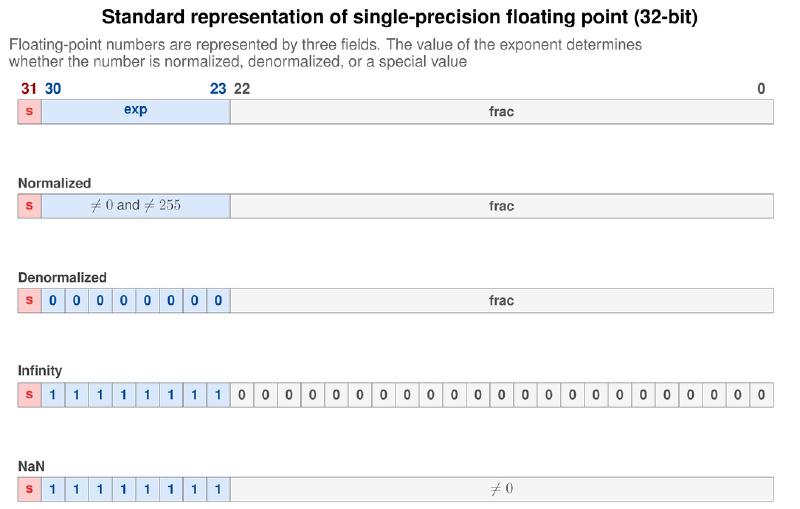
The official IEEE 754 split for 32 bits is:
| Field | Size | Bits (Position) | What does it do? |
|---|---|---|---|
| Sign | 1 bit | 31 | Defines whether it is positive (+) or negative (-). |
| Exponent | 8 bits | 30 to 23 | Defines the magnitude (scale). |
| Significand | 23 bits | 22 to 0 | Defines the precision (digits). |
Visually, the 32 bits are laid out like this:
[S] [EEEEEEEE] [MMMMMMMMMMMMMMMMMMMMMMM]
1 8 23
Or, in even more detail, as in the following figure. The concepts of normalization and special values will be explained later in the article.
Let us dissect each part of this “ruler.”
The Sign Bit (1 bit) #
The leftmost bit (MSB - Most Significant Bit) owns the sign.
- 0 indicates a Positive number.
- 1 indicates a Negative number.
Remember the three schemes that competed for the representation of signed integers, back in the article on two’s complement? Floating point chose precisely the one that lost that contest.
For integers, we use Two’s Complement, in which the sign bit has a “negative weight” and changes the arithmetic of the integer. In Floating Point, the system is Sign-Magnitude: the sign bit is just a flag (an indicator), separate from the magnitude. If you flip only that bit, the magnitude stays identical and the number goes from \(+x\) to \(-x\). Changing the sign costs the flip of a single bit.
And the flaw that condemned sign-magnitude for integers (the existence of two zeros) becomes a deliberate feature here. We will come back to this point in the section on special values.
The Exponent (8 bits) #
The next 8 bits define the Scale of the number. This is where the computer decides where the point will be.
- Think of it as the exponent of scientific notation (\(10^5\) or \(10^{-3}\)).
- Since there are 8 bits, we can have values from \(0\) to \(255\).
- This allows us to represent gigantic magnitudes (up to approx. \(3.4 \times 10^{38}\)) or tiny ones (down to \(1.18 \times 10^{-38}\), among normal numbers).
The value stored here is not the “real” exponent of mathematics, but a “biased” value. We will see this technical trick later.
The Significand (23 bits) #
The remaining 23 bits (on the right) are the Significand (or Mantissa). This is where Precision lives.
- The Significand contains the significant digits of the number.
- While the Exponent says “how big” the number is, the Significand says “how exact” it is.
- If you need to tell \(1.000001\) apart from \(1.000002\), it is the Significand that must have enough bits to hold that difference.
The Hardware Formula #
When the computer reads these 32 bits, it does not see the number all at once. It feeds the pieces into the following equation to reconstruct the real value:
$$ \text{Value} = (-1)^{\text{Sign}} \times (1.\text{Significand}) \times 2^{\text{Exponent} - \text{Bias}} $$It may look intimidating, but it is just the mathematical version of saying: “Take the sign, multiply by the body of the number (1 point something) and shift the point that many places to the left or right.”
The hardest concept to accept for those coming from Integers is that the value of a bit in Floating Point depends on its neighbor (the Exponent).
- In a 32-bit integer, the bit at position 0 is always worth \(1\) unit. The bit at position 5 is always worth \(32\) units.
- In a float, the last bit of the Significand can be worth \(0.0000001\) if the Exponent is small, or it can be worth a million if the Exponent is huge.
That is why we say that floats have relative precision, not absolute. The “size” of the bit changes with the size of the number.
Relative precision is one of those ideas that a picture settles in seconds. Below, the representable values of a reduced format (3-bit significand, to fit on the page) drawn on the number line. Notice that the number of marks between two powers of 2 is always the same; what changes is the size of the step, which doubles in each range:
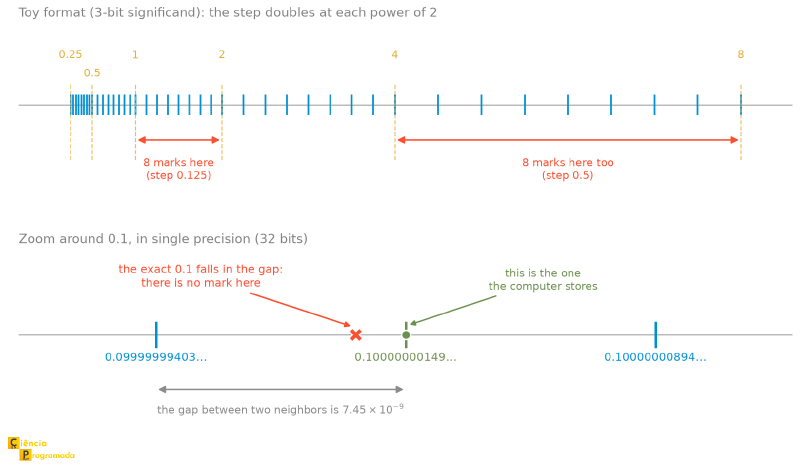
The bottom panel is a preview of the topic that closes this article: since the marks do not cover the line, most numbers (including \(0.1\)) fall in the gap between two of them. We will return to it.
The “Hidden Bit” (Implicit Bit) Trick and Normalization #
If you look at the 32-bit structure, you will see that we reserved 23 bits for the Significand. That gives us a certain precision. But the engineers who designed the IEEE 754 standard realized they could gain an extra bit “for free” by using a mathematical property of the binary system.
To understand this, we need to talk about Normalization.
What Is a Normalized Number? #
In decimal scientific notation, we can write the number 300 in several ways:
- \(300 \times 10^0\)
- \(30.0 \times 10^1\)
- \(0.3 \times 10^3\)
Although mathematically equal, this mess gets in the computer’s way (how do you compare numbers if they have different formats?). So there is a rule: scientific notation is Normalized when there is exactly one nonzero digit before the point. In the case above, the normalized form is \(3.0 \times 10^2\).
Now, on to Binary. In binary, the only digits available are \(0\) and \(1\). If we apply the normalization rule (“the first digit cannot be zero”), what is the only option left? The number 1.
This means that, in any normalized binary number (gigantic or microscopic), the form will always be:
\[ 1.\text{something} \times 2^{\text{exponent}} \]Examples:
- \(1.001 \times 2^5\)
- \(1.1101 \times 2^{-3}\)
The “Implicit 1 Bit” rule holds for the vast majority of numbers, called Normalized Numbers. However, there is an important exception for extremely tiny numbers (close to zero), where this rule is switched off to avoid calculation errors. We call these numbers Subnormal Numbers, and they will get an exclusive section further on. For now, assume the rule always holds.
The Engineering Insight: The Ghost Bit #
Here comes the standard’s trick. If every normalized number necessarily starts with \(1.\), why waste a precious bit of memory to store that “1”? It is redundant. The computer already knows it is there!
IEEE 754 discards that leading “1” before writing to memory and stores only what comes after the point (the fractional part).
When the processor reads the number back to do a calculation, it puts that bit back, automatically placing it in front of the significand. This is the so-called Hidden Bit (or Implicit Bit).
The Real Gain: Although we have only 23 physical bits in memory for the Significand, the effective precision of the system is 24 bits (23 stored + 1 implicit). This halves the relative error of calculations without costing any extra hardware for storage.
Besides saving space, normalization solves a critical architectural problem: the Uniqueness of Representation.
Imagine if the computer allowed storing the same value as
\(1.0 \times 2^1\) and \(0.1 \times 2^2\). To check whether A == B, the
processor would have to
perform complex mathematical juggling to align the exponents before
comparing.
By forcing numbers to be normalized, we guarantee that each real number (within the normalized range) has only one standard binary representation. This avoids the ambiguity of having the same number written in different ways in memory, which makes the hardware’s life much easier. Note: The exceptions to this uniqueness are Zero (which has a sign) and NaN.
However, this rule raises an obvious question: “If the number always starts with 1, how do we represent Zero?” The answer is that Zero is a special exception to the rules, which we will see in the section on “Special Values.” For now, assume every number has that invisible “1.” in front.
The Exponent and the Bias #
We already know how to represent the sign (1 bit) and the body of the number (Significand). Now we need to settle the scale.
In scientific notation, the exponent defines whether the number is gigantic (\(2^{100}\)) or microscopic (\(2^{-100}\)). Since we have 8 bits reserved for the exponent, we can represent \(256\) different values.
The obvious problem is: we need negative numbers. Without negative exponents, we could only represent numbers greater than 1. We could not represent \(0.5\) (\(2^{-1}\)) or the size of an electron.
In the article on integers, we learned that the standard solution for storing negatives is Two’s Complement. However, the IEEE 754 standard does not use Two’s Complement for the exponent. It uses a system called Biased Exponent.
The Mathematics of the Bias #
Instead of sacrificing a bit for the sign, the standard defines a “bias” value that is added to the real exponent before storing it in memory.
For single precision (32 bits), the bias is 127.
The storage formula is:
$$ E_{\text{stored}} = E_{\text{real}} + 127 $$This turns the range of exponents into a scale of positive integers without sign (Unsigned):
- If you want a Zero exponent (\(2^0\)): store \(0 + 127 = \mathbf{127}\) (\(01111111_2\)).
- If you want a Positive exponent (\(2^{10}\)): store \(10 + 127 = \mathbf{137}\).
- If you want a Negative exponent (\(2^{-10}\)): store \(-10 + 127 = \mathbf{117}\).
With this, the stored exponent ranges from \(1\) to \(254\) (remember that \(0\) and \(255\) are reserved for special cases, as we will see later).
Why Complicate Things? #
You may be wondering: “Why not use Two’s Complement, which the computer already does natively?”
The answer lies in comparison speed. Computers frequently need to answer: “Is number A greater than number B?”.
If we used Two’s Complement, numbers with negative exponents (starting with bit 1) would look arithmetically “greater” than numbers with positive exponents (starting with bit 0) if they were read as ordinary integers.
Using the Bias preserves the lexicographic order of floating-point numbers.
Thanks to the Bias, the exponent of a small number (e.g., \(2^{-10} \to 117\)) yields a smaller bit sequence than the exponent of a large number (e.g., \(2^{10} \to 137\)).
The Practical Result: This allows comparing two positive Floating Point numbers using the same simple, fast circuits that compare Unsigned Integers. For negative numbers, the logic needs only a simple sign adjustment, but the structure of the exponent still makes ordering easier.
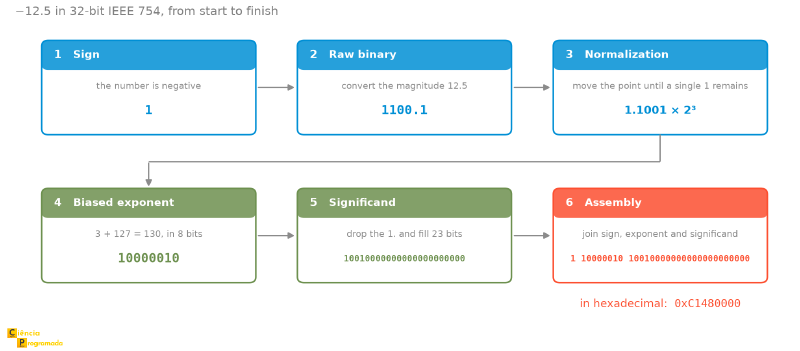
Hands On: Converting a Number (-12.5) #
Theory is good, but it is in manual conversion that we really understand how the gears fit together. Let us convert the decimal number -12.5 to the 32-bit IEEE 754 standard, step by step.
Our goal is to fill in the three fields: [Sign] [Exponent] [Significand].
Step 1: The Sign #
The number is negative (-12.5). So, the Sign Bit is 1.
Step 2: “Raw” Binary #
First, we forget the sign and convert the magnitude (\(12.5\)) to binary using the Fixed Point method we already know.
- Integer Part (12): \(1100_2\)
- Fractional Part (0.5): \(0.1_2\) (since \(1 \times 2^{-1} = 0.5\))
Putting the parts together:
\[ 12.5_{10} = 1100.1_2 \]Step 3: Normalization (Scientific Notation) #
Now we need to move the point to the left until only a single digit \(1\) remains before it. To turn \(1100.1\) into \(1.1001\), we need to move the point 3 places to the left.
\[ 1100.1 = 1.1001 \times 2^3 \]From here we extract two pieces of information:
- Real Exponent: \(3\)
- Raw Significand: \(1.1001\)
Step 4: The Biased Exponent #
The real exponent is \(3\). But remember the section on the bias: we do not store the \(3\). We store \(3 + \text{Bias}\). For single precision, the bias is \(127\).
\[ \text{Stored Exponent} = 3 + 127 = 130 \]Now we convert \(130\) to binary (8 bits). We know \(128\) is \(10000000\), so \(130\) (\(128 + 2\)) is: 10000010
Step 5: The Final Significand (The Hidden Bit) #
We look at the normalized significand from Step 3: \(\mathbf{1}.1001\). Remember the hidden bit: the leading “1.” is implicit (Hidden Bit). We discard it and store only what comes after the point.
- Bits to store:
1001 - Since we have 23 bits of space, we fill the rest with zeros on the right.
Stored Significand: 10010000000000000000000
Step 6: Final Assembly #
Now we just paste the three parts side by side:
- Sign (1 bit):
1 - Exponent (8 bits):
10000010 - Significand (23 bits):
10010000000000000000000
The 32-bit binary number is:
1 10000010 10010000000000000000000
Bonus Step: Hexadecimal #
Reading 32 bits is painful. Programmers prefer Hexadecimal. Let us group the bits in fours and convert:
$$ \begin{array}{c c c c c c c c} 1100 & 0001 & 0100 & 1000 & 0000 & 0000 & 0000 & 0000 \\ \downarrow & \downarrow & \downarrow & \downarrow & \downarrow & \downarrow & \downarrow & \downarrow \\ \mathbf{C} & \mathbf{1} & \mathbf{4} & \mathbf{8} & \mathbf{0} & \mathbf{0} & \mathbf{0} & \mathbf{0} \end{array} $$Therefore, if you inspect your computer’s memory when it stores -12.5 in a float, you will find the Hexadecimal value 0xC1480000.
You can confirm our calculation using Python’s struct module, which lets you see the raw bytes of memory:
import struct
# 'f' indicates float (32 bits), pack converts to bytes
# unpack converts bytes to an integer so we can see the hex
bits = struct.unpack('I', struct.pack('f', -12.5))[0]
print(hex(bits))
# Output: 0xc1480000
The math works!
The six steps we just went through fit into a single diagram, and it is worth keeping as a reference for when you want to redo the calculation with another number, since the sequence is always this one:
Another Example: Decimal to IEEE 754 #
The previous example was “clean” because the number had an exact binary representation. Now let us deal with a decimal number that cannot be represented exactly in binary, to see how the process handles fractions.
Goal: Convert the number \(0.085\) to single precision format (32 bits).
Let us follow a step-by-step that covers every detail:
- Determine the Sign
Since \(0.085\) is a positive number, the sign bit is 0.
- Convert to Binary Scientific Notation
We need to write the number in the format \(1.f \times 2^e\), where \(1 \le 1.f < 2\). We use successive multiplications by 2 (the same method as in the previous article) until the product exceeds 1, which identifies where the number normalizes:
- \(0.085 \times 2 = 0.17\) → Bit 0
- \(0.17 \times 2 = 0.34\) → Bit 0
- \(0.34 \times 2 = 0.68\) → Bit 0
- \(0.68 \times 2 = 1.36\) → Bit 1 \(\leftarrow\) First
1found (0.36 left over)
The first 1 appeared at the 4th multiplication, which means the point moves
back 4 positions when normalizing. Therefore, the Real Exponent is \(-4\):
This line is a bridge, and it is worth reading carefully: it deliberately mixes
a significand written in decimal (\(1.36\)) with an exponent in base 2. The
calculation checks out (\(1.36 / 16 = 0.085\)), but the \(1.36\) is not yet
what goes into memory: it itself needs to be converted to binary, and that is
what the next step does. The stored significand will be derived from the bits
that follow the 1., starting with the remaining fraction \(0.36\).
- Compute the Biased Exponent
The standard uses a bias of 127.
\[ \text{Stored Exponent} = -4 + 127 = 123 \]Converting 123 to binary (8 bits): \(123 = 01111011_2\)
- Convert the Significand to Binary
We need to convert the fraction \(0.36\) to binary by successively multiplying by 2 until we fill 23 bits (plus one extra bit for rounding):
- \(0.36 \times 2 = 0.72 \to\) Bit 0
- \(0.72 \times 2 = 1.44 \to\) Bit 1 (0.44 left over)
- \(0.44 \times 2 = 0.88 \to\) Bit 0
- \(0.88 \times 2 = 1.76 \to\) Bit 1 (0.76 left over)
- \(0.76 \times 2 = 1.52 \to\) Bit 1 (0.52 left over)
- \(0.52 \times 2 = 1.04 \to\) Bit 1 (0.04 left over)
- \(0.04 \times 2 = 0.08 \to\) Bit 0
- \(0.08 \times 2 = 0.16 \to\) Bit 0
- \(0.16 \times 2 = 0.32 \to\) Bit 0
- \(0.32 \times 2 = 0.64 \to\) Bit 0
- \(0.64 \times 2 = 1.28 \to\) Bit 1 (0.28 left over)
- \(0.28 \times 2 = 0.56 \to\) Bit 0
- \(0.56 \times 2 = 1.12 \to\) Bit 1 (0.12 left over)
- \(0.12 \times 2 = 0.24 \to\) Bit 0
- \(0.24 \times 2 = 0.48 \to\) Bit 0
- \(0.48 \times 2 = 0.96 \to\) Bit 0
- \(0.96 \times 2 = 1.92 \to\) Bit 1 (0.92 left over)
- \(0.92 \times 2 = 1.84 \to\) Bit 1 (0.84 left over)
- \(0.84 \times 2 = 1.68 \to\) Bit 1 (0.68 left over)
- \(0.68 \times 2 = 1.36 \to\) Bit 1 (0.36 left over, and the pattern restarts here)
- \(0.36 \times 2 = 0.72 \to\) Bit 0 (bit 21)
- \(0.72 \times 2 = 1.44 \to\) Bit 1 (bit 22)
- \(0.44 \times 2 = 0.88 \to\) Bit 0 (bit 23)
- \(0.88 \times 2 = 1.76 \to\) Bit 1 (bit 24, used for rounding)
The fraction \(0.36\) is periodic in binary with period 20. The rounding bit 24
is 1 and the expansion continues after it, meaning that what was left over
is strictly more than half a unit of the last stored bit. That is why bit 23
goes up from 0 to 1: it is rounding to nearest, plain and simple. (The
even rule, Round to Nearest Even, only comes into play in an exact tie, when
the remainder is exactly half; we will look at the rounding modes in detail
later.) Final 23-bit significand:
01011100001010001111011
Final Result (Bits):
Putting it all together: Sign 0, Exponent 01111011, Significand 01011100001010001111011. So:
0 01111011 01011100001010001111011
Example: IEEE 754 to Decimal #
Now that we know how to write to memory, let us do the reverse process: Reverse Engineering. How do we read an unknown bit pattern?
Goal: Find out which decimal number is stored in the bit pattern:
11000000110110011001100110011010
Following the reverse engineering of the previous section’s step-by-step:
- Slice the Bits
We separate the binary into the three fields of the standard:
- Sign (1 bit):
1 - Exponent (8 bits):
10000001 - Significand (23 bits):
10110011001100110011010
- Analyze the Sign
The bit is 1, so the number is Negative.
- Decode the Exponent
The binary value 10000001 is equivalent to \(128 + 1 = 129\) in decimal.
To find the real exponent, we subtract the bias (127):
This means we will multiply the significand by \(2^2\).
- Decode the Significand
The stored significand is 10110011.... We must remember that there is an implicit 1. in front and that each bit represents a negative power of 2 (\(2^{-1}, 2^{-2}, 2^{-3}...\)):
(Note: The fraction 0.10110011... is a repeating expansion in binary, with the pattern 0110 repeating every 4 bits from the second bit on. Summing all the terms of the series, the fraction converges to exactly \(0.7\), confirming the significand \(1.6875 + 0.0125 = 1.7\).)
- Final Calculation
Now we apply the complete formula:
\[ \begin{aligned} \text{Number} &\approx (-1)^{\text{sign}} \times (1.\text{significand}) \times 2^{\text{exponent}} \\ &\approx -1 \times 1.7 \times 2^2 \\ &\approx -1.7 \times 4 \\ &\approx -6.8 \end{aligned} \]Therefore, those bits represent the approximate decimal value \(\mathbf{-6.8}\). The value is approximate because of the nature of the binary representation of fractions.
We have already done the forward path (\(-12.5\) and \(0.085\)) and the backward path (the bits above). It is worth checking each of them in an interactive converter, which shows the three fields separately and the exact value that gets stored:
Both accept either the decimal number or the bit pattern, so they work for checking both directions. Take the chance to play with the bits one by one and watch the value change: it is the best way to fix in your mind what each field does.
Rounding and “Catastrophic Cancellation” #
So far, we have talked about how to store numbers. But the computer was made to calculate. And it is in addition and subtraction that the most subtle and dangerous errors occur.
The first point to understand is that the IEEE 754 standard does not simply “chop off” numbers that do not fit in the significand. It rounds. But it does so in a statistically clever way.
Round to Nearest Even #
In school, we learned a few variations of rounding (always up, always down, looking at the next digit), but for computers, these strategies can introduce a systematic bias.
To avoid this, the standard uses the Round to Nearest Even mode. The rule is simple: if the number is exactly in the middle (ending in …5), we round to the nearest Even number.
- \(1.5 \to 2\) (Rounded up)
- \(2.5 \to 2\) (Rounded down)
- \(3.5 \to 4\) (Rounded up)
- \(4.5 \to 4\) (Rounded down)
This way, over a long sequence of calculations, the upward and downward roundings tend to cancel out, keeping the statistical mean of the data much more faithful to reality.
The IEEE 754 standard has other modes (such as always rounding up or down), used in Interval Arithmetic to guarantee that the real result lies within a known safety margin. But for general use, “Nearest Even” is the default.
To visualize the difference between the default and the alternatives, look at the table below applied to monetary values. Pay special attention to how each mode handles the “midpoint” (x.50) and negative numbers.
| Rounding Mode | $1.40 | $1.60 | $1.50 | $2.50 | $-1.50 |
|---|---|---|---|---|---|
| Round-to-even | $1 | $2 | $2 | $2 | $-2 |
| Round-toward-zero | $1 | $1 | $1 | $2 | $-1 |
| Round-down | $1 | $1 | $1 | $2 | $-2 |
| Round-up | $2 | $2 | $2 | $3 | $-1 |
What to notice in this table:
- The .50 “Tie” (Round-to-even): Look at the $1.50 and $2.50 columns. Both were rounded to $2. This confirms the “Nearest Even” rule. If we used traditional school rounding, $1.50 would go to $2, but $2.50 would go to $3, creating an upward bias in the mean of the total data.
- Truncation (Round-toward-zero): This mode just chops off the
decimal part. It is the default behavior when you convert
int(1.9)in many languages: the result is 1, not 2. - Direction on the Number Line (Down vs Up): Careful with negatives!
- Round-down always goes to the left on the number line (toward \(-\infty\)). That is why \(-1.50\) goes down to \(-2\). It is the behavior of functions like
math.floor()in Python. - Round-up always goes to the right on the number line (toward \(+\infty\)). That is why \(-1.50\) goes up to \(-1\). It is the behavior of functions like
math.ceil()in Python.
- Round-down always goes to the left on the number line (toward \(-\infty\)). That is why \(-1.50\) goes down to \(-2\). It is the behavior of functions like
We can see these rules in action using a simple Python script. Note especially the
difference between int and floor for negative numbers, and how round rounds
to the nearest even.
import math

values = [1.5, 2.5, -1.5]

print(f"{'Num':<6} {'int':<6} {'floor':<6} {'ceil':<6} {'round':<6}")
print("-" * 40)

for n in values:
    # int() = Truncation
    # floor() = Round down (Left)
    # ceil() = Round up (Right)
    # round() = Nearest Even
    print(f"{n:<6} {int(n):<6} {math.floor(n):<6} {math.ceil(n):<6} {round(n):<6}")
Output:
Num    int    floor  ceil   round
----------------------------------------
 1.5    1      1      2      2
 2.5    2      2      3      2
-1.5   -1     -2     -1     -2
The Danger: Catastrophic Cancellation #
Rounding generates small errors in the last decimal place. Usually, this is acceptable. The real problem happens when these small errors are promoted to protagonists. This is called Catastrophic Cancellation.
It occurs when we subtract two very close numbers.
Imagine we have two values that should be exact, but suffered a tiny rounding error in the 7th decimal place:
$$ \begin{array}{r} x = 1.000000\mathbf{5} \\ y = 1.000000\mathbf{4} \end{array} $$Doing \(x - y\):
$$ 0.0000001 $$The computer now needs to Normalize this result (remember the “1 in front” rule?). It will move the point 7 places to the right to turn this into \(1.0 \times 10^{-7}\).
Where is the problem? Originally, \(x\) and \(y\) had 7 digits of reliable precision. The result of the subtraction has only 1 digit of precision. The “good” bits (the \(1.000...\)) canceled each other out. What was left was only the “dirt” or “noise” that was at the end of the numbers. If those \(...5\) and \(...4\) were the fruit of earlier rounding (garbage), now your final result is 100% garbage, but the computer will treat it as a valid and precise number.
Let us use the quadratic formula to illustrate this. The problematic case is when \(b^2\) is much larger than \(4ac\): then \(\sqrt{b^2 - 4ac}\) gets very close to \(\lvert b \rvert\).
Notice what happens with the root whose numerator is \(-b + \sqrt{b^2 - 4ac}\): we are subtracting two nearly equal numbers, and the good digits cancel out (catastrophic cancellation). The other root, with \(-b - \sqrt{b^2-4ac}\), has no problem at all, because there the values add up instead of canceling.
Solution: rewrite the formula for the problematic root, rationalizing the numerator:
$$x = \frac{2c}{-b \mp \sqrt{b^2 - 4ac}}$$It is the same root, algebraically, but now computed with a sum of values of the same sign in the denominator. It is a textbook example of how two formulas that are equivalent on paper can have completely different numerical behaviors.
This teaches us the golden lesson of Floating Point: Never blindly trust the subtraction of similar numbers.
Special Values: Infinity, NaN and Signed Zero #
So far, we have assumed that every bit pattern results in a valid number. But
what happens if the exponent is filled entirely with ones (11111111) or
entirely with zeros (00000000)?
The IEEE 754 standard reserves these extreme exponent values to represent special states. They are not normal numbers, but mathematical concepts and errors that need to be handled without crashing the computer.
Zero Has a Sign (+0 and -0) #
In integers, zero is just zero. But in Floating Point, Zero is a very specific state defined by:
- Exponent: All bits
0(00000000). - Significand: All bits
0(empty).
If the exponent is zero, but the significand has some bit 1, we are not looking at Zero, but at a Subnormal number, which we will see later.
This creates a seemingly bizarre situation: there is Positive
Zero (0 00000000 000...) and Negative Zero (1 00000000 000...).
For most logical comparisons in your code, +0 == -0 returns
True. The computer pretends they are equal.
But why does Negative Zero exist? Signed zero serves to preserve mathematical identities and solve complex problems (such as branch cuts in complex analysis). The simplest example is the function \(1/x\).
- If \(x\) approaches zero from the positive side (\(+0\)), the result must be \(+\infty\).
- If \(x\) approaches zero from the negative side (\(-0\)), the result must be \(-\infty\).
Without negative zero, we would lose the sign information in operations that result in “underflow” (numbers so small they become zero), breaking the mathematical identity \(1/(1/x) = x\).
Infinity #
What happens if you multiply \(10^{30} \times 10^{30}\)? The result (\(10^{60}\)) is larger than the maximum value that fits in 32 bits. With integers, this would cause a silent Overflow and the number would “wrap around,” becoming negative or zero. A disaster for physical calculations.
In IEEE 754, if the number blows past the limit, it becomes Infinity.
- Representation: Exponent
11111111(255) and Significand0. - Behavior: Infinity lets the mathematics continue. Depending on the
configuration of the language or processor, \(5 \div 0\) may raise an exception
(error) or silently return \(\infty\). In pure IEEE 754, the
result is defined:
- \(\infty + 1000 = \infty\)
- \(\infty + \infty = \infty\)
- \(5 \div 0 = \infty\) (Raises a “Division by Zero” flag, but the calculation goes on)
A warning for those who will test this in the console: in plain Python, 5 / 0
raises ZeroDivisionError; the language chose to protect the programmer
instead of following IEEE 754 to the letter. To see the behavior of the
standard undisguised, use numpy:
import numpy as np

np.float64(5) / np.float64(0)
# RuntimeWarning: divide by zero encountered
# np.float64(inf)
Without this, it is easy to test in the console, see the exception and conclude that the standard says something else.
This design decision allows software to keep running even after an overflow, instead of aborting execution immediately.
NaN (Not a Number) #
What if we try to do something mathematically illegal?
- Divide \(0 \div 0\).
- Compute \(\sqrt{-1}\) (in the real domain).
- Subtract \(\infty - \infty\).
The result is not a number. It is a NaN (Not a Number).
- Representation: Exponent
11111111(255) and Significand different from0.
NaN propagates. Any calculation you do with a NaN results in NaN.
\[ 50 + \text{NaN} = \text{NaN} \]NaN has a unique property: it is not equal to itself.
Although you may see code using x != x to detect it, the robust way,
recommended in production, is to use the standard library:
import math
x = float('nan')

# The right way:
if math.isnan(x):
    print("It's a NaN!")
The purpose of NaN is to enable debugging. Instead of the program closing (crashing) in the middle of a long calculation, it propagates the NaN to the end, allowing you to trace the origin of the error.
The Limbo of Subnormals (Gradual Underflow) #
Imagine you are dimming a light bulb (dimmer). You lower the light smoothly until… click. It goes out completely.
In the early days of computing, numbers worked like this. The smallest possible “normal” number in 32 bits is \(1.0 \times 2^{-126}\) (approximately \(1.18 \times 10^{-38}\)). If you tried to divide this number by 2, the result would be smaller than the minimum representable. The computer rounded straight to Zero.
This was called Abrupt Underflow (Flush-to-Zero). The problem with it is that the subtraction \(A - B\) could result in Zero, even if \(A\) and \(B\) were different! This broke mathematical algorithms and caused instability in engineering software.
The Solution: Turning Off the Implicit Bit #
To solve this, IEEE 754 created a “buffer zone” between the smallest normal number and absolute zero. These are the Subnormal Numbers (or Denormalized).
The rule is activated automatically when the Exponent is 00000000. When the processor sees the zeroed exponent, it changes its mode of operation:
- The Hidden Bit becomes 0: Instead of assuming \(1.\text{significand}\), the computer assumes \(0.\text{significand}\).
- The Exponent is fixed at -126: Even though the bits are zero, the value of the exponent does not drop to -127 (which would be logical given the bias), but stays at -126 to maintain smooth continuity with normal numbers.
The formula changes to:
\[ \text{Value} = (-1)^{\text{Sign}} \times (0.\text{Significand}) \times 2^{-126} \]The Practical Effect: Gradual Underflow #
This lets numbers “disappear” gradually, bit by bit, instead of vanishing suddenly.
- Smallest Normal: \(1.000...00 \times 2^{-126}\)
- Largest Subnormal: \(0.111...11 \times 2^{-126}\) (Slightly smaller than the one above)
- …
- Smallest Subnormal: \(0.000...01 \times 2^{-126}\) (Only the last bit on)
- Zero: \(0.000...00 \times 2^{-126}\)
The difference this makes shows up immediately when the two scenarios are compared side by side. The figure again uses the reduced format, so that the marks fit on the page, but the structure is exactly that of IEEE 754:
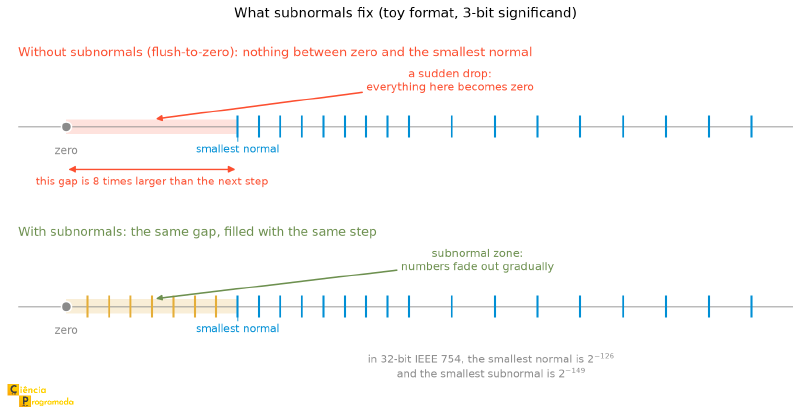
Note the detail the drawing makes evident: without subnormals, the biggest hole in the line would be right around zero, which is where you can least afford a hole, because that is where subtractions of close numbers end up.
The Cost of Subnormality #
Nothing comes for free. By using subnormal numbers, we pay a price: Loss of Precision.
Remember that scientific notation serves to keep precision always high. But with subnormals, we start filling the beginning of the number with zeros (\(0.00001...\)). These zeros take up space in the Significand and reduce the number of “useful” (significant) bits. The smaller the subnormal number, the less reliable it is. But, according to the standard, it is better to have a number with little precision than a false zero.
Computing with subnormals is hard. On many older processors (and
some modern ones), operations with subnormals are handled in software
(microcode) rather than directly in hardware, which can be dozens of times
slower.
That is why some high-performance compilers have flags such as
-ffast-math that enable “Flush-to-Zero,” sacrificing mathematical precision
in exchange for raw speed in games or simulations.
The Precision Error (0.1 + 0.2 != 0.3) #
If you open the Python console (or JavaScript, C, Java…) and type:
print(0.1 + 0.2 == 0.3) # FalseThe answer will be False. And if you ask to see the result of the sum:
print(0.1 + 0.2) # 0.30000000000000004Where did that ...4 at the end come from? Did the computer get an
elementary-school sum wrong?
No. It did the calculation perfectly, within the limits of the binary system.
The Problem of Repeating Decimals #
To understand this, we need to go back to school. In decimal (base 10), we know that some fractions cannot be represented in a finite way.
We have a repeating decimal. If you add \(0.333 + 0.333 + 0.333\), the result is \(0.999\), not \(1.0\). There was a loss of precision because we cut off the repeating decimal.
The same happens in binary, but with different numbers. In binary, we can only represent finitely the fractions that are sums of powers of 2 (like \(0.5, 0.25, 0.125\)).
The case of 0.1:
Let us try to convert decimal \(0.1\) to binary:
- \(0.1 \times 2 = 0.2\) \(\to\) Digit 0
- \(0.2 \times 2 = 0.4\) \(\to\) Digit 0
- \(0.4 \times 2 = 0.8\) \(\to\) Digit 0
- \(0.8 \times 2 = \mathbf{1}.6\) \(\to\) Digit 1 (0.6 left over)
- \(0.6 \times 2 = \mathbf{1}.2\) \(\to\) Digit 1 (0.2 left over)
- Oops! We are back to 0.2 (Step 2).
The cycle repeats forever: \(0.00011001100110011...\). The number \(0.1\) is a repeating expansion in binary.
And how does this look in the 32 bits, in practice? It is worth taking the whole path, the same one we took with \(0.085\) and with \(-12.5\), now with the most famous number on the subject:
- The first
1appeared at the 4th multiplication, so the real exponent is \(-4\) and the fraction \(0.6\) is left for the significand. - Stored exponent: \(-4 + 127 = 123 = 01111011_2\).
- Significand: \(0.6\) in binary is
1001repeated forever. Cutting at 23 bits would give10011001100110011001100, but the next bit is1(and the expansion continues), so the last bit goes up:10011001100110011001101. - Assembly:
0 01111011 10011001100110011001101.
And here the two ends of the series meet. That bit pattern that the
article on real numbers
extracted from the hardware with struct, without explaining where it came
from, was exactly this one:
import struct

bits = struct.unpack('I', struct.pack('f', 0.1))[0]

print(f"{bits:032b}")   # 00111101110011001100110011001101
print(hex(bits))        # 0x3dcccccd
Split the string into 0, 01111011 and 10011001100110011001101 and compare
it with the assembly above. Bit by bit, it is the calculation we just did on
paper.
The 23-Bit Guillotine #
As we saw in the previous sections, the IEEE 754 standard (Single Precision) has only 23 bits in the significand (plus the hidden bit). It does not have infinite room to store this repeating expansion. At some point, the computer has to bring out the “scissors” and stop writing.
When it does this, it is not storing \(0.1\). It is storing a number extremely close, but slightly smaller or larger (depending on the rounding).
In 32 bits, which is the format dissected in this article:
0.1becomes \(0.100000001490116\ldots\)0.2becomes \(0.200000002980232\ldots\)
Now, pay attention to a precision switch that often goes unnoticed: the famous
output, 0.30000000000000004, which you see in the Python console, is 64
bits, the format Python uses for every float. There, the approximations are
much finer:
0.1becomes \(0.1000000000000000055511\ldots\)0.2becomes \(0.2000000000000000111022\ldots\)
The number of digits changes, not the phenomenon. In either format, the errors of the two approximations add up and the result escapes the margin the computer uses to decide how to display the number on screen, revealing the “garbage” at the end: \(0.30000000000000004\) in 64 bits.
The error that accumulates
Everything we have seen so far is the error of a single operation. What usually brings down real code is accumulation: the error of each step added to that of the next step, thousands of times.
total = 0.0
for _ in range(10):
    total += 0.1

print(total)        # 0.9999999999999999
print(total == 1.0) # False
Adding \(0.1\) ten times does not give \(1.0\). Each term carries its little
error, and ten of them added together already show up in the last digit. Now
imagine a simulation loop with a million iterations: that is why, when you
can choose, you prefer total = n * step to adding step repeatedly.
How Wrong Can It Be? Machine Epsilon #
So far we have talked about the error qualitatively: “very close,” “almost equal,” “a bit of garbage at the end.” There is a number that answers that question exactly, and it has a name: the machine epsilon.
The definition is straightforward: it is the distance between \(1.0\) and the next representable number. In 32 bits, the significand stores 23 bits, so this step is \(2^{-23} \approx 1.19 \times 10^{-7}\). In 64 bits, with 52 bits of significand, it is \(2^{-52} \approx 2.22 \times 10^{-16}\).
Python hands you this value ready-made, along with the rest of the spec sheet
of your machine’s float:
import sys

print(sys.float_info.epsilon)   # 2.220446049250313e-16
print(sys.float_info.max)       # 1.7976931348623157e+308
print(sys.float_info.min)       # 2.2250738585072014e-308
print(sys.float_info.dig)       # 15
print(sys.float_info.mant_dig)  # 53
These are exactly the numbers from the 32 × 64 bits table we saw at the
beginning, now read from your processor instead of memorized. Two deserve
attention. mant_dig is 53, not 52, because the hidden bit counts as
precision. And min is the smallest normal number: below it there is still the
subnormal zone we just walked through.
The epsilon becomes visible the hard way:
import sys

print(1.0 + sys.float_info.epsilon)       # 1.0000000000000002
print(1.0 + sys.float_info.epsilon / 2)   # 1.0
Half of the epsilon simply vanishes. There is nowhere to store the result, and it rounds back to \(1.0\).
The epsilon is the step right after \(1.0\). The step around an arbitrary number has another name: ULP (Unit in the Last Place). And it grows along with the number. It is the relative precision we discussed in the anatomy of the format, now with concrete values:
import math

print(math.ulp(1.0))    # 2.220446049250313e-16
print(math.ulp(1e6))    # 1.1641532182693481e-10
print(math.ulp(1e16))   # 2.0
Around \(10^{16}\), the distance between two neighboring floats is already
2. The consequence is direct: 1e16 + 1 == 1e16 returns True. That 1
has nowhere to be stored.
With this, the question “how wrong can my float be?” finally has a numerical answer: in a well-executed operation, the relative error is at most half the epsilon. It seems negligible, and it is, until you chain millions of these operations, as in the summation loop we just saw.
And it is precisely because the error exists, however tiny, that comparing floats requires care.
== with Floats
Squeezing infinitely many real numbers into a finite
number of bits requires approximation. Therefore, strict equality (==) almost
never works for computed results.
The Right Way:
Check whether the numbers are “close enough” to each other, using a tiny
margin of error (called tolerance).
import math
# Correct way to compare
a = 0.1 + 0.2
b = 0.3
if math.isclose(a, b):
    print("They are equal (for practical purposes)")
With the isclose function, you can adjust the tolerance according to the
precision needed for your specific domain. Here is an example in Python:
import math
a = 0.1 + 0.2
b = 0.3
# Check whether 'a' and 'b' are close enough
if math.isclose(a, b, rel_tol=1e-9, abs_tol=0.0):
    print("They are equal (for practical purposes)")
In this example, rel_tol=1e-9 defines the relative tolerance, allowing a and
b to be considered equal if they are within a difference of
\(10^{-9}\) times the value of b. The parameter abs_tol=0.0 indicates that
there is no additional absolute tolerance. Adjust these values according to the
precision needed for your use case.
For Money:
If you are dealing with money, cents matter and rounding errors
are unacceptable. Never use Float for
money. Use Decimal types (in Python) or BigDecimal (in Java), which
work in base 10 and do not suffer from this problem.
Summary Table #
Everything this article established about 32-bit IEEE 754, on a single page:
| Concept | Rule | Example from the article |
|---|---|---|
| Fixed-point limit | a locked point sacrifices range or precision | 16 + 16 bits: ceiling of \(2^{16}-1\), step of \(2^{-16}\) |
| Floating point | scientific notation in binary: \(\pm 1.m \times 2^{e}\) | \(1100.1_2 = 1.1001_2 \times 2^3\) |
| Fields (32 bits) | 1 sign + 8 exponent + 23 significand | 1 10000010 10010000000000000000000 |
| Reading formula | \((-1)^{S} \times 1.M \times 2^{E-127}\) | \(-1 \times 1.7 \times 2^2 \approx -6.8\) |
| Sign bit | sign-magnitude, not two’s complement | flipping only this bit swaps \(+x\) for \(-x\) |
| Hidden bit | the 1. of normalization takes no space |
23 bits stored, 24 of precision |
| Exponent bias | stored \(=\) real \(+\) 127 | real exponent \(3 \to 130 = 10000010_2\) |
| Decimal \(\to\) IEEE 754 | sign, binary, normalize, bias, significand, assemble | \(-12.5 \to\) 0xC1480000 |
| IEEE 754 \(\to\) decimal | split the three fields and apply the formula | 1 10000001 10110011... \(\to -6.8\) |
| Default rounding | to nearest; only in an exact tie does it go to even | \(0.085\): bit 23 goes up from 0 to 1 |
| Catastrophic cancellation | subtracting nearly equal values destroys the good digits | quadratic formula when \(b^2 \gg 4ac\) |
Exponent all 1 |
special value: \(\pm\infty\) (significand zero) or NaN | \(0/0\) returns NaN |
| NaN | is not equal to anything, not even itself | nan == nan is False; use math.isnan |
Exponent all 0 |
subnormal zone: hidden bit becomes 0, exponent locks at \(-126\) |
\(0.M \times 2^{-126}\) |
| Why subnormals | avoid abrupt underflow and guarantee \(A - B = 0 \iff A = B\) | the “dimmer” that fades out gradually |
| Signed zero | \(+0\) and \(-0\) coexist, and are equal in comparison | 0.0 == -0.0 is True |
| Repeating expansion in binary | a decimal fraction that is not a sum of powers of 2 does not fit | \(0.1 \to 0.0\overline{0011}_2\) |
| Machine epsilon | step right above \(1.0\): \(2^{-23}\) in 32 bits, \(2^{-52}\) in 64 | 1.0 + eps/2 returns 1.0 |
| ULP | step around any number; grows with it | math.ulp(1e16) is \(2.0\) |
| Error accumulation | adding \(n\) terms adds \(n\) little errors | \(0.1\) added ten times gives 0.9999999999999999 |
| Comparing floats | tolerance, never == |
math.isclose(0.1 + 0.2, 0.3) |
| Money | Decimal, never float |
cents demand exact base 10 |
Conclusion #
Throughout this article, we went from the simple arithmetic of counting oranges with integers to the internal structure of the IEEE 754 standard.
Now you understand that when the computer displays \(0.30000000000000004\), it is not “wrong” or “broken.” It is just being finite.
Floating Point is, above all, an exercise in the engineering of trade-offs:
- The Range Trade-off: To represent the mass of the Sun and the mass of a proton in the same 32-bit variable, we had to accept that the point floats.
- The Precision Trade-off: To gain that astronomical range, we had to accept that we cannot store all real numbers. There are holes in the computer’s number line, and numbers like \(0.1\) fall into those holes, needing to be rounded.
- The Speed Trade-off: The Exponent Bias allows comparing two positive floats with the same simple, fast circuits that compare unsigned integers, and the Hidden Bit gives one extra bit of precision without taking up storage space.
What to take into your professional life? #
Now that you know the “Matrix” of real numbers, here are the golden rules to survive:
- Know where to use Float: It is perfect for 3D graphics, scientific calculations, game physics and statistics, where speed and range outweigh the need for absolute precision at the 15th decimal place.
- Know where NOT to use float: Be careful using
floatordoublefor banking or accounting systems. Money demands exact decimal precision. UseDecimallibraries. - Beware of Equality: Never compare floats with
==. Always use a margin of error (tolerance). - Beware of Subtraction: Remember “Catastrophic Cancellation” when subtracting very close numbers.
The computer is a precise machine, but within physical limits that the programmer needs to know.
That is it for this article, folks. See you next time!


