

In the previous articles, we explored
computer arithmetic. We learned how computers add, subtract using two’s
complement, and how they deal with the physical limits of memory (overflow).
In the previous article, we briefly used the & operator to reveal the
internal representation of negative numbers in Python. If you were curious
about what that & really did and what else can be done with it, the time has
come to find out.
In those arithmetic cases, the bits were treated together to represent a numeric value (positional weight). But sometimes we want to manipulate the structure of a number, not compute its value: turn on a specific “switch”, turn off a sensor, encrypt a message or check a user’s permissions.
It is time to set arithmetic aside for a while and enter the world of Bitwise Logic. Here, the processor does not see the number “5” or “10”, it sees a sequence of individual switches that can be on (1) or off (0).
The Connection with Propositional Logic #
If you follow the blog, you may have already read our article on Logic for Programmers. There, we saw how to build truth tables to decide whether a complex proposition is True (T) or False (F).
Bitwise logic is the direct application of that concept, but on an industrial scale:
- True (T) becomes 1.
- False (F) becomes 0.
Instead of comparing just two propositions (“The door is open” AND “The light is on”), the bitwise operator compares 8, 16, 32 or 64 pairs of propositions at once, in parallel.
The Big Warning: and Is Not &
#
Before we see the operators, we need to clear up a classic confusion in Python,
the language most used on this blog. Unlike languages such as C or Java, Python
is very verbal, using words like and, or and not. However, it also has
the symbols &, | and ~.
They are not the same thing.
In the article on Short-Circuiting in
Python,
we explained that the logical operators (and, or) are “lazy”. They stop
evaluating as soon as they find the answer.
The bitwise operators (&, |), on the other hand, are “tireless workers”.
They evaluate every bit, without exception, and produce a new number as the
result.
Table of Differences #
| Feature | Logical Operators | Bitwise Operators |
|---|---|---|
| Target | Boolean expressions (True/False) or objects | Integers (individual bits) |
| Evaluation | Short-circuit (lazy evaluation) | Complete (eager evaluation) |
| Result | Returns one of the operands (e.g., True) |
Returns a new integer |
| Example | if age > 18 and has_license: |
masked = flags & 0xFF |
Never use & in place of and inside an if, unless you know exactly what you are doing.
5 and 6returns6(because 5 is truthy, it goes on and returns the last one).5 & 6returns4(because it intersects the bits of 101 and 110).
They are completely different behaviors that can cause silent bugs.
Now that we have separated flow logic from bit logic, let us meet the four fundamental tools: AND, OR, XOR and NOT.
The Mathematics of Bits: AND and OR #
To understand bitwise, we need to stop looking at the decimal number (e.g., 12) and start looking at its binary representation. The operations happen vertically, aligning the corresponding bits of each number.
AND (&) - The Intersection
#
The Bitwise AND operator follows a strict rule: the result bit will be 1 if, and only if, the bits of both operands are 1.
Think of AND as a Filter or an Intersection.
1 & 1 = 11 & 0 = 00 & 1 = 00 & 0 = 0
Note that Zero is dominant: anything combined with zero becomes zero. This property makes AND the perfect tool for clearing bits or checking values (a technique known as masking).
Practical Example: 12 & 10
Let us compute 12 & 10.
- 12 in binary is
1100. - 10 in binary is
1010.
We align the bits and apply the logic column by column:
$$ \begin{array}{r c c c c l} & 1 & 1 & 0 & 0 & (12) \\ \& & 1 & 0 & 1 & 0 & (10) \\ \hline & 1 & 0 & 0 & 0 & (8) \end{array} $$Analysis:
- Bit 3 (left):
1 & 1results in 1. - Bit 2:
1 & 0results in 0. - Bit 1:
0 & 1results in 0. - Bit 0:
0 & 0results in 0.
Result: 1000 (which is 8 in decimal).
In Python:
print(12 & 10)        # 8
print(bin(12 & 10))   # 0b1000
OR (|) - The Union
#
The Bitwise OR operator is more permissive: the result bit will be 1 if at least one of the operand bits is 1.
Think of OR as a Logical Sum or Union.
1 | 1 = 11 | 0 = 10 | 1 = 10 | 0 = 0
Here, One is dominant: anything combined with 1 becomes 1. This property makes OR the ideal tool for setting bits (forcing a value to 1) without changing the others.
Practical Example: 12 | 10
Let us compute 12 | 10.
- 12 in binary is
1100. - 10 in binary is
1010.
We align the bits and apply the logic column by column:
$$ \begin{array}{r c c c c l} & 1 & 1 & 0 & 0 & (12) \\ \| & 1 & 0 & 1 & 0 & (10) \\ \hline & 1 & 1 & 1 & 0 & (14) \end{array} $$Analysis:
- Wherever there was at least one
1bit in the inputs, the output was1. - Only the last column (
0 | 0) resulted in zero.
Result: 1110 (which is 14 in decimal).
In Python:
print(12 | 10)        # 14
print(bin(12 | 10))   # 0b1110
Summary of the Logic #
So you do not forget:
- AND (
&): Used to Cut/Clear. If you want to guarantee that certain bits are zero, use AND with 0. - OR (
|): Used to Add/Set. If you want to guarantee that certain bits are one, use OR with 1.
In the next section, we will see two other operators: XOR (the difference finder) and NOT (the total inversion).
The XOR and NOT Operators #
While AND and OR are intuitive (they look like the intersection and union of sets), the next two operators have unique behaviors that are the basis of cryptography and integer arithmetic.
XOR (^) - The Difference Detective
#
The Exclusive OR (XOR) is a common operator in cryptography and hash
algorithms. The rule is: the result bit will be 1 if the operand bits are
different.
1 ^ 1 = 0(Equal \(\to\) 0)0 ^ 0 = 0(Equal \(\to\) 0)1 ^ 0 = 1(Different \(\to\) 1)0 ^ 1 = 1(Different \(\to\) 1)
Think of XOR as a Toggle.
- If you XOR with
0, the original bit is kept (1^0=1,0^0=0). - If you XOR with
1, the original bit is flipped (1^1=0,0^1=1).
Its usefulness in
cryptography
comes from a much stronger property than “there are as many 0s as 1s in the
result”: if the key bit is uniformly random, the output bit is uniformly
random, no matter what the message bit was. Looking at the result tells you
nothing about the original text, not even a little. This is the argument for
the one-time pad, the classic example of a cipher with perfect secrecy, a
result proved by Claude Shannon in 1949.
Practical Example: 12 ^ 10
Let us compute 12 ^ 10.
Analysis:
- Bit 3:
1and1are equal \(\to\) 0. - Bit 2:
1and0are different \(\to\) 1. - Bit 1:
0and1are different \(\to\) 1. - Bit 0:
0and0are equal \(\to\) 0.
Result: 0110 (which is 6 in decimal).
Cryptographic curiosity: XOR is reversible. If you compute (A ^ B) ^ B, the result goes back to A.
key = 123
message = 456

encrypted = message ^ key
print(encrypted)          # 435

print(encrypted ^ key) # 456 (XOR with the same key undoes the operation)The perfect secrecy of the previous paragraph holds under two strict conditions: the key must be random, as long as the message, and never reused. An XOR cipher with a short key repeated along the text (which is what almost everybody writes on the first attempt) falls to frequency analysis, without even needing to guess the key: positions separated by a multiple of the key length were encrypted with the same byte, which reduces the problem to a simple substitution cipher. A great bit exercise; a terrible choice for protecting anything real.
This reversibility yields a classic trick: swapping the contents of two variables without using a third one.
a, b = 5, 9

a ^= b   # a now holds the "difference" between the two
b ^= a   # b receives the original value of a
a ^= b   # a receives the original value of b

print(a, b)   # 9 5
It works, but it is worth more as a demonstration of the property than as a
technique. In Python, a, b = b, a is clearer and faster. And the trick hides
a trap: if both names point to the same position (items[i] and items[j]
with i == j), the first XOR zeroes the value and it never comes back.
NOT (~) - The Total Inversion
#
The Bitwise NOT operator is the only one that operates on a single number
(a unary operator). It simply flips all the bits: what is 0 becomes 1, and
what is 1 becomes 0.
Visually, it looks simple. But if you test it in Python, the result may confuse you:
print(~0)    # -1
print(~10)   # -11
Why is the result negative?
Here the knowledge from our previous article on two’s complement comes in.
- Python treats integers as if they had “infinite bits” on the left. The positive number
10is...00001010. - When we apply NOT (
~), we flip all the bits, including the infinite zeros on the left. The number becomes...11110101. - An infinite sequence of
1s on the left indicates a negative number.
Mathematically, in two’s complement systems, the operator ~x is equivalent to the one’s complement.
The relation with the decimal value follows the formula:
Understanding the Formula (~10)
We want to compute ~10.
- By the mathematical formula:
-(10) - 1 = -11. - By the bit view (in 8 bits for simplicity):
-
10is0000 1010. -
Flipping everything (
~):1111 0101. -
What is
1111 0101? Since the first bit is 1, it is negative. -
To find the value, we apply the inverse rule (flip and add 1):
-
Flip:
0000 1010(10) -
Add 1:
0000 1011(11) -
So the original value was -11.
In the next topic, we will see how to move these bits from side to side with the Shift operators.
Shift: The Arithmetic of Displacement #
Imagine you have the decimal number 23. If you add a zero on the right
(230), you effectively multiplied the number by 10 (the base of the system).
If you remove the last digit (the 3), you divided by 10 (integer division,
leaving 2).
In the binary system, the logic is identical, but the base is 2. In hardware and in compiled code, moving bits left or right tends to be cheaper than multiplying or dividing by powers of 2. In Python the gain is not guaranteed, and the reason to use shifting is clarity of intent.
Left Shift (<<) - The Multiplier
#
The Left Shift operator (x << n) moves all the bits of x to the left by
n positions.
- The bits that “fall” off the left are discarded (in fixed-size types) or the number grows (in Python).
- Zeros are inserted in the vacant positions on the right.
Mathematical rule:
Shifting n bits to the left is equivalent to multiplying the number by \(2^n\).
Example: 3 « 2
The number 3 in binary (8 bits) is 0000 0011.
Let us shift 2 places to the left.
- Push everything to the left.
- Fill the holes on the right with
0. $$ \begin{array}{r c c l} & 0000 & 0011 & (3) \\ \downarrow & \text{Shift Left 2} & & \\ & 0000 & 11\mathbf{00} & (12) \end{array} $$ Check: \(3 \times 2^2 = 3 \times 4 = 12\).
Right Shift (>>) - The Divider
#
The Right Shift operator (x >> n) moves the bits to the right.
- The bits on the right “fall” into the abyss and are lost.
- What enters on the left? Here is the big technical detail.
In low-level languages, there are two kinds of right shift:
- Logical Shift: Always fills with 0. Used for unsigned numbers.
- Arithmetic Shift: Fills with the value of the sign bit (the leftmost bit). If the number was negative (started with 1), it fills with 1s to keep the number negative.
How does Python do it?
Since Python handles signed numbers with arbitrary precision, the >> operator behaves as an Arithmetic Shift. It preserves the mathematical sign.
Mathematical rule:
Shifting n bits to the right is equivalent to a Floor Division by \(2^n\).
With both operators introduced, it is worth seeing the two movements drawn side by side. Notice what comes in and what goes out in each case, because this asymmetry explains why one of them is reversible and the other is not:
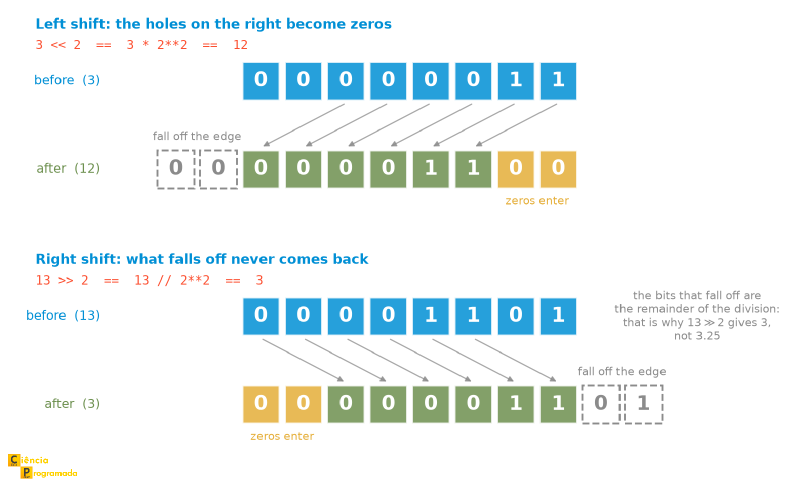
The << pushes zeros in and, as long as there is room, nothing is lost. The
>>, on the other hand, throws away the bits at the right end, and those bits
were precisely the remainder of the division. That is why the right shift is
equivalent to an integer division: the remainder does not go anywhere, it just
vanishes.
Positive vs. Negative Example
Case 1: Positive (12 » 2)
Binary: 0000 1100
Shift right, 0 enters: 0000 0011
Result: 3. (Math: \(12 / 4 = 3\)).
Case 2: Negative (-12 » 2)
Binary (two’s complement): ...1111 0100
Shift right. Since the sign bit is 1, 1s enter from the left.
Result: ...1111 1101
The result is -3. (Math: \(-12 / 4 = -3\)).
This guarantees that division by powers of 2 works correctly for both positive and negative numbers.
>> is floor, not truncation
The example above gives the impression that >> and “dividing by 4” are the
same thing, because \(-12\) is a multiple of 4 and the result comes out
round. Change the number to \(-13\) and the difference shows up: -13 >> 2
returns -4, whereas a division that truncates toward zero (like the /
between integers in C) would return -3.
The reason lies in the formula itself, \(\lfloor x / 2^n \rfloor\): the floor
rounds down, and for negative numbers “down” means away from zero. In Python
this is consistent with //, which is also floor (-13 // 4 is -4). If
you really need truncation, int(-13 / 4) returns -3.
In the next section, we will put together everything we have learned (AND, OR, NOT, SHIFT) to create practical tools called Bitmasks.
Bit Masks (Bitmasks) #
Now that we know the operators, we can combine them to make precise changes to numbers. The technique of using an auxiliary number to “select” or “modify” specific bits of another number is called Masking.
For the examples below, imagine we want to manipulate the 3rd bit (from right to left, index 2). For that, we create a mask where only that bit is 1:
MASK = 1 << 2 # Result: 0b00000100 (Decimal 4)Checking a Bit (Check) #
We want to know: “Is the 3rd bit on?”.
We use AND (&). Since AND with 0 zeroes everything, if the result is nonzero, it means our target bit was on.
flags = 0b10110111
is_on = (flags & MASK) != 0
# The result will be True if the 3rd bit is on (which is the case), False otherwise.
Note the != 0, and not > 0. With the values of this example both work, but
the previous article spent a good part of its time showing that integers can be
negative. If flags is negative (something ~ produces easily), the result of
& can be negative too, and a > 0 test would answer “bit off” for a bit that
is on. Comparing with zero by inequality is always safe.
Setting a Bit (Set) #
We want to force the 3rd bit to be 1, without touching the others.
We use OR (|). Since OR with 0 preserves the original value, and OR with 1 forces it to 1, our mask protects the rest and lights up the target.
flags = flags | MASK
# Now the 3rd bit is definitely 1. The others did not change.
Clearing a Bit (Clear) #
We want to force the 3rd bit to be 0.
This is the most logically complex operation. We need an AND (to zero), but we need a mask that has 0 at the target and 1 everywhere else (to preserve the neighbors).
How do we generate that? By inverting our original mask with NOT (~).
The Logic of Clear (Clearing a Bit)
- Original mask (
MASK):...0000 0100 - Inverted mask (
~MASK):...1111 1011 - Operation (
flags & ~MASK):...10110011
The target bit was zeroed, the others were preserved by the 1s of the mask.
flags = flags & (~MASK)Toggling a Bit (Toggle) #
We want to invert the current state: if it was on, turn it off; if it was off, turn it on.
We use XOR (^), since XOR with 1 always flips the bit.
flags = flags ^ MASKThe four operations form a closed set, and it is useful to see them together after having seen them one by one. The figure below repeats the same target bit in the four cases, with its column highlighted, so that we can compare what each operator does to the neighbors:
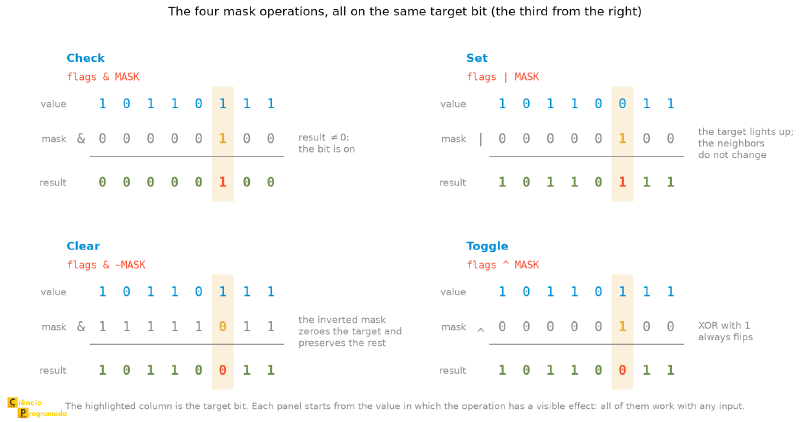
Notice the pattern: the target bit changes in all of them, and the other seven columns stay intact in all of them. That is the point of masking: changing one position without touching any other.
Two Functions That Save Work #
Python has two built-in operations that show up all the time in real bit-manipulation code and that save you from writing loops by hand:
flags = 0b10110111

flags.bit_count()   # 6  (how many bits are on; Python 3.10+)
flags.bit_length()  # 8  (how many bits are needed to represent the value)
bit_count() is what the literature calls popcount, and it answers in one
call questions like “how many permissions does this user have?” or “how many
items are checked?”. bit_length() answers “where is the most significant bit
that is on?”, useful for knowing how many bits a value really occupies.
If this kind of manipulation interested you, the practical reference on the subject is Bit Twiddling Hacks, by Sean Eron Anderson, a collection of bit tricks for tasks that, at first sight, would seem to require loops and conditionals.
Real Example: Permissions System #
Let us see where this is used in practice. Operating systems (like Linux) use bits to control file permissions. Let us simulate this in Python.
Imagine we have 3 possible permissions, represented by bits:
- Read (READ): bit 2 (value 4)
- Write (WRITE): bit 1 (value 2)
- Execute (EXEC): bit 0 (value 1)
# Defining the constants (MASKS)
READ  = 0b100  # 4
WRITE = 0b010  # 2
EXEC  = 0b001  # 1

# Scenario 1: Creating a user with Read and Execute permission
# We use OR (|) to combine the permissions
user_permissions = READ | EXEC
print(bin(user_permissions))  # Output: 0b101 (Decimal 5)

# Scenario 2: Can the user write?
# We use AND (&) to check
if (user_permissions & WRITE):
    print("Write access granted")
else:
    print("Write access denied")  # It will land here

# Scenario 3: Adding write permission dynamically
user_permissions = user_permissions | WRITE
print(bin(user_permissions))
# Now the value is 0b111 (7) - Full permission (rwx)

# Scenario 4: Revoking execute permission
# We use AND with NOT
user_permissions = user_permissions & (~EXEC)
print(bin(user_permissions))
# Now the value is 0b110 (6) - Read and Write only
Notice how we managed to store 3 independent boolean pieces of information in a single integer variable, using only 3 bits of information.
Here is a precision that often goes unnoticed: none of this takes up “3 bits of
memory”. On most current architectures, the smallest addressable unit of memory
is the byte, and a Python int, with all the arbitrary-precision machinery it
carries, takes up 28 bytes (sys.getsizeof(5) shows this). What fits in 3 bits
is the information. The real savings appear when these bits are packed by the
millions, in network protocols, file formats and compact data structures.
755 in chmod Comes From
The three bits we have just used (read, write, execute) are exactly the Unix
ones, and now we can see why the permissions command shows up in octal. A
file’s permissions are nine bits, in three groups of three: owner, group and
others. And three bits is precisely what one octal digit represents. That is,
chmod 755 is the octal notation for 111 101 101:
| Group | Octal digit | Bits | Meaning |
|---|---|---|---|
| Owner | 7 | 111 |
read, write, execute |
| Group | 5 | 101 |
read and execute |
| Others | 5 | 101 |
read and execute |
That is why the first article of this series devoted a whole section to octal: it is not a historical curiosity, it is the notation that makes nine permission bits readable at a glance. More details at file-system permissions.
Summary Table #
| Operation | What it does | Example from the article |
|---|---|---|
& (AND) |
bit 1 only if both are 1 | 12 & 10 = 8 |
| (OR) |
bit 1 if either is 1 | 12 | 10 = 14 |
^ (XOR) |
bit 1 if they differ | 12 ^ 10 = 6 |
~ (NOT) |
flips all bits: \(\sim x = -x - 1\) | ~10 = -11 |
<< |
shifts left: multiplies by \(2^n\) | 3 << 2 = 12 |
>> |
shifts right: \(\lfloor x / 2^n \rfloor\) | -12 >> 2 = -3, but -13 >> 2 = -4 |
and / or |
operate on truth values, not on bits | 5 and 6 returns 6, not 4 |
| Check bit | (flags & MASK) != 0 |
bit 2 of 0b10110111 is on |
| Set bit | flags | MASK |
preserves the neighbors |
| Clear bit | flags & ~MASK |
0b10110111 & ~0b100 = 0b10110011 |
| Toggle bit | flags ^ MASK |
XOR with 1 always flips |
| Create mask | 1 << n |
1 << 2 is 0b100 |
| Count bits on | x.bit_count() |
0b10110111 has 6 |
| Size in bits | x.bit_length() |
0b10110111 takes up 8 |
| Undo XOR | (A ^ B) ^ B == A |
basis of the cipher and of the swap without an extra variable |
Conclusion #
Entering the Bitwise world is like looking at the Matrix: beneath the numbers appears the binary structure that supports them.
Although Python is a high-level language, understanding &, |, ^ and <<
is useful for dealing with network protocols, image processing, cryptography
and algorithm optimization.
And if you do not use Python, these concepts are universal and apply to practically every programming language.
Now you know that:
- Bitwise is not Logical:
&is notand. - Masks are the key: Use
ANDto read/clear andORto write. - Bits are versatile: A single integer can hold dozens of independent “switches”.
Ready to practice? Try writing code that encrypts a string using XOR and then decrypts it using the same key, remembering the warning from above: this is a bit-manipulation exercise, not real protection.
With that, we close the chapter on integers in this series. Over the last few
articles, we saw how to represent, convert, operate on and manipulate integers
in different bases, including in the raw bit structure. Now it is time to take
the next leap: how does the computer handle fractional numbers? Why is 0.1 + 0.2 not exactly 0.3 in Python? The answer begins with something you already
master (base conversion), but now applied to the part after the decimal point.
See you next time!


