

In the previous article, Pipeline and Buses, we saw how the CPU executes multiple instructions in parallel and how buses carry information between components. But what is that information? To the hardware, everything is bits: high and low voltages, zeros and ones. The difference between a character, a negative integer, and a floating-point number lies exclusively in the interpretation convention, in the way we agreed that a bit pattern should be read.
This choice also shapes the physical design of the chip. The number of bits we choose to represent a piece of data directly dictates the width of the data bus, the capacity of the registers, and the complexity of the ALU. The first of these conventions we need to understand does not deal with heavy math, but with the way the computer learned to read and write with us: text.
This article walks through these fundamental conventions: the standards for
representing text (ASCII, Unicode, UTF-8), the three methods for signed
integers (and why two’s complement took over), bit shifts, and the IEEE 754
standard for real numbers. Understanding these representations is essential to
understand why 0.1 + 0.2 ≠ 0.3 in programming and how negative numbers work
in hardware.
If you have already read “From Zero to Float”, you can skim this
Much of this article revisits what the series From Zero to Float covers in much more depth: number bases, two’s complement, overflow, shifts, and IEEE 754. The repetition is deliberate: this series needs to be self-contained, and readers who arrived here directly should not have to leave to understand the rest. But if you come from there, the useful reading is selective: the sections on characters and on the representation of instructions in memory are new, and the rest works as a quick review.
This article, then, serves as an integrated summary of these concepts, focused on the computer architecture perspective.
Character representation #
How do we represent letters, digits, and symbols as bits? For that, the computer uses a character encoding: a convention that associates symbols with numbers.
It is important to separate three ideas that sometimes show up mixed together:
- character code: the table of symbols;
- code point: the abstract number associated with a character;
- encoding: the concrete way of storing that code point in bytes.
| System | Nature | Note |
|---|---|---|
| ASCII | 7-bit character code | 128 symbols; historical basis of text in modern systems |
| EBCDIC | 8-bit character code | Historically used in IBM environments |
| Latin-1 (ISO 8859-1) | 8-bit character code | Extension for Western languages |
| Unicode | Universal repertoire of code points | Defines the characters; does not define by itself how to store them |
| UTF-8 / UTF-16 / UTF-32 | Unicode encodings | Ways of storing code points in bytes |
ASCII, Latin-1, and the 8th bit #
ASCII (American Standard Code for Information Interchange) uses 7 bits and represents 128 symbols. It includes:
- control characters (
0to31and127, the DEL); - printable characters (
32to126), such as letters, digits, and punctuation.
Historically, in many systems the 8th bit of the byte could be used as a parity bit to detect transmission errors. In other contexts, that bit came to be used for 8-bit extensions, such as Latin-1, making it possible to represent accented characters and additional symbols.
It is worth seeing the table at work with concrete numbers, because this is where the encoding stops being an abstraction:
| Character | Decimal | Hexadecimal | Binary |
|---|---|---|---|
'0' |
48 | 0x30 |
0011 0000 |
'9' |
57 | 0x39 |
0011 1001 |
'A' |
65 | 0x41 |
0100 0001 |
'Z' |
90 | 0x5A |
0101 1010 |
'a' |
97 | 0x61 |
0110 0001 |
'z' |
122 | 0x7A |
0111 1010 |
Two things jump out of this table. The first is that digits start at 0x30,
which turns the conversion from character to number into a subtraction:
'7' - '0' = 7. The second is prettier, and it is exactly the theme of this
article:
Uppercase and lowercase versions of the same character differ by a single bit:
bit 5. 'A' is 0100 0001 and 'a' is 0110 0001; the bit of weight 32
changes and nothing else. That is why changing the case of an ASCII letter
needs no table at all, only a bitwise operation: c ^ 0x20 toggles between
uppercase and lowercase, c | 0x20 forces lowercase, and c & 0xDF forces
uppercase. The ASCII table was not ordered by chance; this regularity was
designed.
Unicode and the UTF encodings #
Unicode should not be understood as a fixed 16-bit encoding, but as a
universal repertoire of code points. Its code space goes from U+0000 to
U+10FFFF.
To store these code points in memory or in files, we use encodings such as:
| Encoding | Length | Main feature |
|---|---|---|
| UTF-8 | 1 to 4 bytes | ASCII-compatible in the first 128 codes |
| UTF-16 | 2 or 4 bytes | Uses one 16-bit unit in the BMP and surrogate pairs outside it |
| UTF-32 | 4 bytes | One code point per 32-bit unit |
So the right way to think about it is:
- Unicode = repertoire of characters;
- UTF-8 / UTF-16 / UTF-32 = ways of encoding that repertoire.
UTF-8 dominates modern practice
UTF-8 became the dominant encoding because it preserves full compatibility with ASCII in the first 128 codes and uses variable length only when necessary. For text files, protocols, and web pages, it is today the default choice.
How UTF-8 organizes the bits #
Saying that UTF-8 uses “1 to 4 bytes” leaves out the interesting part: how the program knows how many bytes to read. The scheme is a convention of leading bits, and it is the same bit-field idea that the whole article has been dealing with:
| Code point range | Bytes | Bit pattern |
|---|---|---|
U+0000 to U+007F |
1 | 0xxxxxxx |
U+0080 to U+07FF |
2 | 110xxxxx 10xxxxxx |
U+0800 to U+FFFF |
3 | 1110xxxx 10xxxxxx 10xxxxxx |
U+10000 to U+10FFFF |
4 | 11110xxx 10xxxxxx 10xxxxxx 10xxxxxx |
The x are the bits of the code point, filled from right to left. The rest is
signaling: a byte that starts with 0 is pure ASCII; one that starts with
110 announces “I am the first of two”; and every continuation byte starts
with 10.
From this comes the property that made UTF-8 win: it is self-synchronizing.
Since no continuation byte can be mistaken for a leading byte, a program that
lands in the middle of a text can find the start of the next character by
walking backward until it finds a byte that does not start with 10. Many
earlier variable-length encodings, such as Shift-JIS, did not have this.
An example with ç, code point U+00E7:
U+00E7in binary is1110 0111, with 8 bits, so it falls in the 2-byte range;- the 11 bits of the template receive
000 1110 0111; - first byte:
110+00011=1100 0011=0xC3; - second byte:
10+100111=1010 0111=0xA7.
That is, ç in UTF-8 is the bytes 0xC3 0xA7, and that is why a UTF-8 file
read as Latin-1 shows ç in place of ç: the two bytes show up as two
separate characters.
For the full story of this confusion, the canonical reference is The Absolute Minimum Every Software Developer Absolutely, Positively Must Know About Unicode and Character Sets (No Excuses!), by Joel Spolsky.
Unsigned integers #
For unsigned integers, the representation is direct: each bit corresponds to a power of 2, from the LSB (least significant bit, \(b_0\)) to the MSB (most significant bit):
$$N_{10} = \sum_{i=0}^{n-1} b_i \cdot 2^i$$Example: \(10110101_2\):
$$= 1\cdot2^7 + 0\cdot2^6 + 1\cdot2^5 + 1\cdot2^4 + 0\cdot2^3 + 1\cdot2^2 + 0\cdot2^1 + 1\cdot2^0 = 128 + 32 + 16 + 4 + 1 = 181_{10}$$Binary ↔ hexadecimal conversion #
Hexadecimal works as a compact notation for binary: group the bits in fours, from right to left, and convert each group to its equivalent hexadecimal digit (0 to 9, A to F).
| Binary | Groups of 4 | Hexadecimal | Decimal |
|---|---|---|---|
01011010 |
0101 + 1010 |
5A |
90 |
11110011 |
1111 + 0011 |
F3 |
243 |
Check: \(\text{5A}_{16} = 5 \times 16 + 10 = 80 + 10 = 90_{10}\) ✓
Signed integers #
Representing negative numbers requires an additional convention. Throughout history, three methods have been used:
Sign and magnitude #
The MSB indicates the sign (0 = positive, 1 = negative); the remaining
\(n-1\) bits represent the magnitude. Range: \(-(2^{n-1}-1)\) to
\(+(2^{n-1}-1)\). The fatal problem: two zeros (\(+0 = 0000\ 0000\) and
\(-0 = 1000\ 0000\)) complicate comparison and arithmetic circuits.
One’s complement (C1) #
The negative of a number is obtained by inverting all the bits. The result for \(-5\) in 8 bits: \(+5 = 0000\ 0101 \Rightarrow -5 = 1111\ 1010\). The arithmetic becomes simpler than in sign and magnitude, but the two-zeros problem remains (\(0000\ 0000\) and \(1111\ 1111\)). C1 is rarely used in modern systems.
Two’s complement (C2): the modern standard #
The negative is obtained by inverting all the bits and adding 1 to the result. C2 has only one zero, and subtraction reduces to addition: the ALU hardware needs only one adder to perform both operations.
$$\text{Range:} \quad -2^{n-1} \leq x \leq +(2^{n-1}-1)$$| \(n\) bits | Minimum | Maximum |
|---|---|---|
| 8 | \(-128\) | \(+127\) |
| 16 | \(-32{,}768\) | \(+32{,}767\) |
| 32 | \(-2{,}147{,}483{,}648\) | \(+2{,}147{,}483{,}647\) |
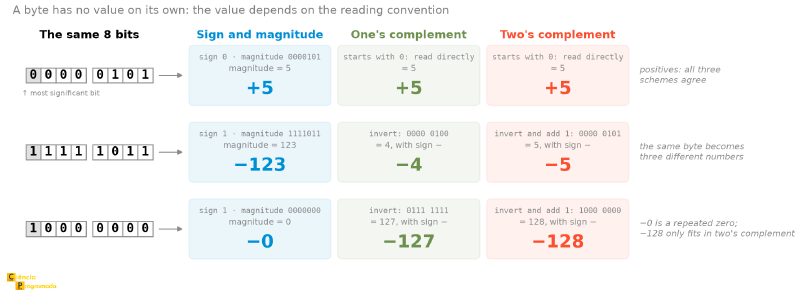
With the three methods defined, it is worth seeing them read exactly the same
bits. The figure below does this with three bytes. The first, positive, gives
the same value in all three schemes. The second shows the central point of this
article: the same byte becomes three different numbers, because the value is
not in the bits, it is in the convention used to read them. And the third,
1000 0000, is the edge case: a repeated zero in sign and magnitude, the
smallest negative of one’s complement, and the \(-128\) that only two’s
complement can represent.
Why is two’s complement the standard?
Four concrete reasons make C2 the universal standard:
- Subtraction = addition: \(A - B = A + C2(B)\), the ALU needs only an adder.
- Single zero: no ambiguity between \(+0\) and \(-0\).
- Trivial sign extension: to take a number from 8 to 16 bits, just repeat the sign bit on the left. \(11111011\) (\(-5\)) becomes \(1111111111111011\), and is still worth \(-5\). One’s complement also has this property; in sign and magnitude, extending requires moving the sign bit.
- Comparison with the same circuits as the unsigned integer: adding, subtracting, and comparing magnitudes use exactly the same hardware as the unsigned version, and the only thing that changes is the interpretation of the flags. There is no second set of circuits for signed numbers.
The asymmetric range (\(-128\) to \(+127\) in 8 bits) is sometimes listed as yet another advantage, but it is not: it is a consequence of having only one zero. With \(2^8\) patterns and one of them spent on zero, 255 remain to be distributed among positives and negatives, and the split cannot be symmetric. And far from being an advantage, it is the origin of a classic bug: \(-128\) has no representable opposite, so negating \(-128\) in 8 bits returns \(-128\).
Operations in two’s complement #
How to compute the C2 of a number (negation) #
The algorithm has three steps:
-
1
Write in binary
Write the number in binary. -
2
Invert the bits
Invert all the bits, obtaining the one’s complement. -
3
Add 1
Add 1 to the result.
| Step | Bits |
|---|---|
| \(+5\) in binary | 0000 0101 |
| Invert all the bits (C1) | 1111 1010 |
| Add 1 → result | 1111 1011 = \(-5\) ✓ |
Check (\(+5 + (-5)\) must be zero):
$$0000\ 0101 + 1111\ 1011 = \underbrace{1}_{\text{carry}}\ 0000\ 0000 \xrightarrow{\text{discard carry}} 0000\ 0000 = 0 \ \checkmark$$Subtraction as addition: \(A - B = A + C2(B)\) #
To understand how this works in practice, let us simulate the operation
5 - 3. Following the formula above, we set \(A = 5\) and \(B = 3\). Instead of
using a dedicated circuit to subtract, the CPU computes the two’s complement
of 3 (obtaining the bit representation of -3) and adds that value directly
to the number 5. The following table details this process step by step using 8
bits:
| Step | Operation | Result |
|---|---|---|
| Represent \(+3\) | binary | 0000 0011 |
| Invert bits (C1) | 1111 1100 |
|
| Add 1 → \(C2(3) = -3\) | 1111 1101 |
|
| Add \(5 + (-3)\) | 0000 0101 + 1111 1101 |
\(\underbrace{1}_{\text{carry}}\ 0000\ 0010\) |
| Discard carry | 0000 0010 = \(2\) ✓ |
Example: addition, subtraction, and overflow in 8 bits
Consider \(A = 00110010_2 = +50_{10}\) and \(B = 11010000_2\). To determine the value of B: since the MSB is 1, it is negative. \(C2(B) = 00110000_2 = 48\), therefore \(B = -48_{10}\).
a) \(A + B\):
\(00110010 + 11010000 = 1\ 00000010_2\) → discard carry → \(00000010_2 = +2_{10}\) ✓
(\(50 + (-48) = +2\); opposite signs never generate overflow)
b) \(B - A = B + C2(A)\):
\(C2(A)\): invert \(00110010 = 11001101\) + 1 = \(11001110_2\)
\(11010000 + 11001110 = 1\ 10011110_2\) → discard carry → \(10011110_2\)
MSB=1 → negative: \(C2(10011110) = 01100010 = 98\) → result = \(-98_{10}\)
(\(-48 - 50 = -98\) ✓, within the range \([-128, +127]\))
c) Can two positives add up to a negative result?
Yes: that is exactly overflow. Example: \(C = 01000001_2 = +65\) and \(D = 01100000_2 = +96\):
\(C + D = 10100001_2\) → MSB=1 → interpreted as negative (\(-95\)), but
\(65 + 96 = 161 > 127\) → overflow ❌
Detecting overflow #
Overflow in two’s complement
Overflow occurs when the correct result does not fit in the available number of bits:
- Two positives added → negative result = overflow ❌
- Two negatives added → positive result = overflow ❌
- Positive + Negative → never generates overflow ✓
Hardware rule: overflow occurs when the carry into the sign bit is different from the carry out of the sign bit.
If this part about overflow was hard for you, we have a whole article dedicated to it in the series From Zero to Float, where we explain the concept of overflow in detail, with examples and exercises.
Bit shifts #
Two’s complement also lets the hardware use mathematical “shortcuts”. The most efficient possible operation to multiply or divide by powers of 2 does not engage complex adders, but rather bit shifts: an operation solved by “pushing” bits sideways in a single ALU cycle.
| Operation | Mathematical effect | Bit inserted |
|---|---|---|
| Left shift (1 bit) | Multiplies by 2 | 0 on the right |
| Logical right shift (1 bit) | Divides by 2 (unsigned integer) | 0 on the left |
| Arithmetic right shift (1 bit) | Divides by 2 (signed integer) | Copy of the MSB (sign bit) |
The MSB copy works as follows: if the number is positive (MSB = 0), the right
shift fills with 0, keeping the result positive. If the number is negative
(MSB = 1), the shift fills with 1, preserving the negative sign. This makes
the arithmetic right shift behave like an integer division by 2, rounding
down, even for negative numbers. For example: \(-3\) in 8 bits is 1111 1101.
Shifting right arithmetically gives 1111 1110, because the MSB is 1,
indicating a negative number, and 1 is inserted on the left to keep the sign.
The result is \(-2\), which is the expected result of \(-3\) divided by 2,
rounding down.
Examples in 8 bits:
| Operation | Before | After | Value |
|---|---|---|---|
| Left shift | 0000 0011 (3) |
0000 0110 |
6 = 3 × 2 ✓ |
| Logical right shift | 0000 0110 (6) |
0000 0011 |
3 = 6 ÷ 2 ✓ |
| Arithmetic right shift | 1111 0000 (−16) |
1111 1000 |
−8 = −16 ÷ 2 ✓ |
Arithmetic right shift: careful with the interpretation #
The arithmetic right shift is often presented as a quick way to “divide by 2” signed integers. This is useful as intuition, but deserves a remark:
- for unsigned integers, the logical right shift is equivalent to integer division by 2;
- for signed integers in two’s complement, the arithmetic right shift preserves the sign bit, which makes the result behave like a rounding down in many negative cases.
So it is worth stating carefully: the arithmetic right shift is a hardware
operation that, in two’s complement, usually corresponds to integer division by
a power of 2, preserving the sign. “Usually” because the rounding is not the
same as the language’s division: the shift rounds down (toward
\(-\infty\)), while the integer division operator of many languages rounds
toward zero. For \(-13\) in 8 bits, the 2-bit shift gives \(-4\); in C,
-13 / 4 gives \(-3\).
Tip: arithmetic vs. logical
Use arithmetic shift right to divide signed integers
(it copies the sign bit, preserving it). Use logical shift for unsigned
integers (it fills with 0). Shifting left multiplies by 2 in both cases:
just make sure there is no overflow.
Example: repeated division by 2 with arithmetic shift
Consider \(A = 01011110_2 = +94_{10}\) and \(B = 10011101_2 = -99_{10}\).
Dividing A (positive) by 2 with arithmetic shift right:
\(01011110 \to 00101111 = 47 \to 00010111 = 23 \to 00001011 = 11 \to 00000101 = 5 \to 00000010 = 2 \to 00000001 = 1 \to 00000000 = 0\)
Each step divides by 2 (truncating), until reaching zero.
Dividing B (negative) by 2: the arithmetic shift copies the sign bit (MSB=1), preserving the negative sign:
\(10011101 \to 11001110 = -50 \to 11100111 = -25 \to 11110011 = -13 \to 11111001 = -7 \to 11111100 = -4 \to 11111110 = -2 \to 11111111 = -1 \to 11111111 = -1\)
For negative numbers, the process converges to −1 (not to zero), because the sign bit is never eliminated.
Floating point: the IEEE 754 standard #
Although two’s complement integers are perfect for exact counting and memory manipulation, the physical world (with its microscopic distances and astronomical quantities) demands a flexibility that fixed bits cannot offer. For continuous quantities, we need approximate real numbers. Floating point solves this by using a normalized scientific notation in base 2:
$$(-1)^S \times 1{.}\text{significand} \times 2^E$$where \(S\) is the sign bit (0 = positive, 1 = negative), \(E\) is the integer exponent, and the significand is the fractional bits after the implicit 1..
But where do the rules for storing this in bits come from? Historically, each computer manufacturer created its own way of representing floating-point numbers, which caused chaos: the same scientific calculation gave different results depending on which brand of computer ran it. To unify the industry, the IEEE (Institute of Electrical and Electronics Engineers, the world’s main standardization organization for electrical engineering and computing) published the IEEE 754 standard in 1985.
The original IEEE 754 standard defined exactly the basic single and double precision formats, establishing only minimum requirements for “extended” formats. The following table shows the 32-bit and 64-bit formats defined in the standard, in addition to the famous 80-bit extended format (an Intel/x86-specific implementation that meets the standard’s extended format requirements):
| Precision | Sign | Exponent | Significand | Total | Bias |
|---|---|---|---|---|---|
| Single (32 bits) | 1 bit | 8 bits | 23 bits | 32 bits | 127 |
| Double (64 bits) | 1 bit | 11 bits | 52 bits | 64 bits | 1,023 |
| Extended (80 bits) | 1 bit | 15 bits | 64 bits | 80 bits | 16,383 |
The exponent is stored with a bias: the real value is the stored one minus
the bias, which allows representing negative exponents without a sign bit of
their own. The 1 bit to the left of the point is implicit in single and
double: it does not need to be stored, which adds an extra bit of effective
precision (24 bits in single, 53 bits in double). In the extended format (80
bits), on the other hand, this leading integer bit is explicit and must be
stored, taking up real space and resulting in exactly 64 bits of precision in
the significand. Nowadays, the 80-bit extended format is widely considered
legacy: it was the internal standard of the old math coprocessors (x87 FPU) of
the x86 architecture. Modern processors generally perform floating-point
calculations using vector registers (SSE/AVX) optimized for the single and
double formats. However, extended is still supported on current processors
for backward compatibility (often being mapped to the long double type in
C/C++ compilers on the x86 architecture).
Below, the bit structure for the IEEE 754 single precision format (32 bits), where the sign bit is the most significant (MSB), followed by the biased exponent and the fractional significand:
 31  30        23 22                       0
 ┌───┬──────────┬──────────────────────────┐
 │ S │ Exponent │       Significand        │
 │ 1 │  8 bits  │         23 bits          │
 └───┴──────────┴──────────────────────────┘
Special cases #
IEEE 754 reserves specific patterns for edge situations:
| Exponent | Significand | Meaning |
|---|---|---|
00000000 |
000...0 |
Zero (\(\pm 0\)) |
00000000 |
\(\neq 0\) | Denormalized (subnormal) number |
11111111 |
000...0 |
\(\pm\infty\) |
11111111 |
\(\neq 0\) | NaN (Not a Number) |
The vacuum near zero and underflow
If you look at the math of IEEE 754, you will notice there is a considerable
“jump” in precision between the smallest possible normalized number and
absolute zero. To keep calculations from abruptly losing precision and
collapsing to zero when dealing with atomic-scale values (a problem known as
underflow), the standard introduced denormalized numbers. They give up
the implicit 1. in the significand to be able to represent absurdly small
values (such as \(1.4 \times 10^{-45}\) in single precision), filling this
“vacuum” with a gradual degradation of precision.
Converting to IEEE 754 single precision #
flowchart TD
    A["Signed decimal number"] --> B["1. Convert to binary"]
    B --> C["2. Normalize: 1.xxx × 2^E"]
    C --> D["3. Sign bit S
0 = positive, 1 = negative"]
    C --> Exp["4. Biased exponent
E_real + 127"]
    C --> Mant["5. Significand
bits after the implicit 1
(pad with zeros on the right)"]
    D --> R["Result: S | Exponent | Significand"]
    Exp --> R
    Mant --> R
Applying it to the example \(-5.75\):
| Step | Operation | Result |
|---|---|---|
| 1. Convert to binary | \(5 = 101_2\); \(0.75 \times 2 = 1.50\) → 1; \(0.5 \times 2 = 1.0\) → 1 | \(-101.11_2\) |
| 2. Normalize | Move the point 2 places to the left | \(-1.0111 \times 2^2\) |
| 3. Sign bit | Negative | 1 |
| 4. Biased exponent | \(E_{\text{real}} = 2\); \(2 + 127 = 129\) | \(10000001_2\) |
| 5. Significand | Bits after 1.: 0111, pad with zeros |
01110000000000000000000 |
| Final result | 1 10000001 01110000000000000000000 |
Check:
$$(-1)^1 \times 1.0111_2 \times 2^{129-127} = -1.0111_2 \times 2^2 = -101.11_2 = -5.75_{10} \ \checkmark$$
Example: decoding a custom 16-bit format
A 16-bit format uses: 1 sign bit, 5 exponent bits with bias 15, and 10 significand bits (normalized, with implicit integer part = 1).
This format is not hypothetical: it is binary16, or half precision, from IEEE 754 itself, and it is one of the formats GPUs use to train and run machine learning models, where half the precision in exchange for half the memory and twice the bandwidth is a good deal.
Given the pattern BA32₁₆ = 1011 1010 0011 0010₂:
- Sign:
1→ negative - Exponent:
01110₂ = 14→ \(E_{\text{real}} = 14 - 15 = -1\) - Significand:
1000110010₂
Value: \(-(1.1000110010_2) \times 2^{-1}\)
Converting the significand: \(1 + 2^{-1} + 2^{-5} + 2^{-6} + 2^{-9} = 1 + 0.5 + 0.03125 + 0.015625 + 0.001953\ldots \approx 1.5488\)
Result: \(-1.5488 \times 0.5 \approx -0.7744\)
Largest positive normalized value: exponent = 11110₂ = 30 → \(E = 15\); significand = 1111111111₂ → \(1.1111111111_2 \times 2^{15} = 65504\)
Smallest positive normalized value: exponent = 00001₂ = 1 → \(E = -14\); significand = 0000000000₂ → \(1.0 \times 2^{-14} \approx 0.000061\)
Example: decoding an IEEE 754 number
Number with: sign = 0 (positive), significand = 1100100₂, real exponent = −3.
Normalized number: \(+(1.1100100)_2 \times 2^{-3}\)
Converting the significand: \(1 + 2^{-1} + 2^{-2} + 2^{-5} = 1 + 0.5 + 0.25 + 0.03125 = 1.78125\)
Result: \(1.78125 \times 2^{-3} = 1.78125 / 8 = \mathbf{0.222656}\)
Going deeper: the “From Zero to Float” series
The IEEE 754 standard has many nuances beyond what we covered here:
rounding, subnormal numbers, special operations, and the pitfalls of
comparing floats. If you want to explore these topics in depth,
including why 0.1 + 0.2 ≠ 0.3 in practically every programming
language, the series From Zero to Float
covers all of it with plenty of examples.
Python bonus: inspecting bit representations #
Python offers direct tools to inspect how numbers are stored in bits, using the
struct module (for floating point) and the << and >> operators (for
integers).
import struct

# IEEE 754 single precision representation of -5.75
raw = struct.pack(">f", -5.75)          # ">f" = big-endian single float
print(f"-5.75 as bytes   : {raw.hex()}")
# c0b80000

bits = int.from_bytes(raw, "big")
print(f"In binary (32)   : {bits:032b}")
# 11000000101110000000000000000000
# S=1 | Exp=10000001 | Mant=01110000000000000000000 ✓

# Unpacking back
value = struct.unpack(">f", raw)[0]
print(f"Back to float    : {value}")
# -5.75 ✓

# Shifts and two's complement with Python integers
a = 0b00110010  # +50 in decimal
b = 0b11010000  # in 8 bits unsigned = 208, in C2 = -48

print(f"\na = {a}  ({a:08b})")
print(f"a << 1 = {a << 1}  ({a<<1:08b})  (× 2)")
print(f"a >> 1 = {a >> 1}  ({a>>1:08b})  (÷ 2)")

# Two's complement in Python (Python uses arbitrary-precision integers)
def c2_negation(n: int, bits: int = 8) -> int:
    """Return -n in two's complement representation with 'bits' bits."""
    mask = (1 << bits) - 1          # 0xFF for 8 bits
    return (~n & mask) + 1

print(f"\n-50 in C2 (8 bits) : {c2_negation(50):08b} = {c2_negation(50)}")
# 11001110 = 206 (unsigned) or -50 (C2)

# Addition truncated to 8 bits
def c2_add(a: int, b: int, bits: int = 8) -> int:
    mask = (1 << bits) - 1
    return (a + b) & mask

print(f"50 + (-48) in 8 bits: {c2_add(a, b):08b} = {c2_add(a, b)}")
# 00000010 = 2 ✓

# Checking -5.75 as a double (64 bits)
raw64 = struct.pack(">d", -5.75)
bits64 = int.from_bytes(raw64, "big")
print(f"\n-5.75 double (64 bits): {bits64:064b}")
# 1 10000000001 0111000000000000000000000000000000000000000000000000
Conclusion and next articles #
Bits alone have no meaning: meaning emerges from the interpretation convention. ASCII turns 7 bits into a character; two’s complement turns a bit pattern into a negative integer; IEEE 754 turns 32 bits into a single-precision fractional number. Understanding these conventions is understanding how the computer works.
In the next article, we will explore the representation of machine instructions: how the bit patterns make up the instructions the CPU executes, the different instruction formats, and the addressing modes that determine where to fetch the operands. Understanding data representation is the fundamental step toward understanding instruction representation, since instructions are also just bit patterns, but with a specific structure that the hardware interprets to perform operations.
See you then!


