

We have reached the last article of the series Inside the Computer. Over the previous thirteen articles, we built a complete understanding of how a computer works inside: from logic gates to their simplification, from the memory hierarchy to the cache, from the CPU components to the instruction cycle, from the pipeline to the buses, from data representation to program execution, and the input and output that connects everything to the outside world.
This article closes the cycle with the big architectural questions: why RISC principles won in the internal design of many modern processors, why CISC remains relevant at the interface of architectures such as x86, how to classify parallel architectures with Flynn’s taxonomy, and what the modern paths are to multiply performance beyond the limits of a single core.
RISC: the philosophy of simplicity #
In the 1970s, computers were dominated by CISC architectures (Complex Instruction Set Computer): processors with hundreds of complex instructions, each one able to perform multiple operations in a single call. The idea was that powerful instructions would make programs shorter and compilers simpler.
Three independent projects questioned that premise:
| Project | Institution | Resulting architecture |
|---|---|---|
| John Cocke | IBM (1975) | IBM 801 |
| John Hennessy | Stanford (1981) | MIPS |
| David Patterson | UC Berkeley (1980 to 1981) | RISC-I and, afterward, RISC-II |
The Berkeley project did not directly become a product, but it was the basis of one: the SPARC, launched by Sun Microsystems in 1987, was built on Berkeley’s RISC design. It is a common mistake to attribute the SPARC to Berkeley: the idea came from there, the processor came from Sun.
The common conclusion was empirical: analysis of real compilers showed that only a fraction of the CISC instructions was actually used. Most of the execution time involved simple operations (data movement, basic integer arithmetic, branches). Complex instructions rarely justified the cost of implementing them in hardware. It would be more efficient to have a few simple instructions, executed in one cycle, than many complex instructions, executed in several cycles.
RISC was born (Reduced Instruction Set Computer).
The seven characteristics of RISC #
- Reduced instruction set: from a few dozen to about 150 instructions; each one simple and regular.
- Fixed format: all instructions have the same size (32 bits in MIPS, 32 bits in classic ARM). This greatly simplifies the decode stage of the pipeline.
- Load/store architecture: only
LOADandSTOREaccess main memory; all other instructions operate exclusively on registers. - Large register file: 32 or more general-purpose registers (versus 8 to 16 in x86).
- Low CPI on simple instructions: most instructions are designed for fast execution, ideally with a CPI (cycles per instruction) close to 1, favoring high pipeline throughput.
- Highly efficient pipeline: the fixed format allows parallel decoding and uniform stages.
- More complex compilers: the responsibility for optimizing code moves from the hardware to the compiler; the hardware gets simpler.
On RISC numbers and characteristics
The characteristics above describe the classic profile of RISC architectures. In real processors, there are important variations between families and generations. The central point is not an exact number of instructions or a CPI rigidly equal to 1, but the pursuit of simplicity, regularity, and pipeline efficiency. The numeric ranges are typical textbook orders of magnitude: the original RISC-I, for example, had only 31 instructions.
RISC × CISC: the complete comparison #
A classic comparison, not an absolute dogma
The following table summarizes historical and didactic differences between RISC and CISC. In modern processors, several of these boundaries have become less rigid: CISC architectures use highly regular internal execution, and modern RISC architectures also incorporate complex extensions when necessary.
| Characteristic | RISC | CISC |
|---|---|---|
| Number of instructions | Small (a few dozen to ~150) | Large (200 to 500+) |
| Instruction format | Fixed (e.g., 32 bits in MIPS) | Variable (e.g., 1 to 15 bytes in x86) |
| Memory access | Only via LOAD / STORE |
Any instruction can access MM |
| Register file | Many (32+) | Few (8 to 16) |
| Cycles per instruction (CPI) | ~1 | 1 to 10+ |
| Pipeline | Simple and efficient | Complex |
| Control unit | Hardwired | Microprogrammed (usually) |
| Compilers | More complex | Simpler |
| Real examples | MIPS, SPARC, ARM, RISC-V | Intel x86, AMD64, Motorola 68000 |
What about power consumption?
It is common to find, in tables like this one, a row saying that RISC consumes less power than CISC. The association is understandable (ARM dominates cell phones and x86 dominated desktops), but it does not hold up against the data. The reference study on the subject, Power Struggles: Revisiting the RISC vs. CISC Debate on Contemporary ARM and x86 Architectures (Blem, Menon, and Sankaralingam, HPCA 2013), measured ARM processors (Cortex-A8 and A9) and x86 processors (Atom and Core i7) on real workloads and concluded that the ISA has practically no effect on power consumption or performance. What decides it is the microarchitecture (how much pipeline, speculation, and cache the design carries) and the fabrication node.
Phone ARM chips consume little because they were designed to consume little, not because they are RISC. Designed for the same level of performance, ARM and x86 have comparable power consumption.
x86 is CISC on the outside, RISC on the inside
Modern Intel and AMD processors are CISC externally: they maintain compatibility with decades of legacy code. But internally, they decompose CISC instructions into RISC micro-operations (µops) before executing them. This combines the compatibility of CISC with the efficiency of RISC, and it is why modern x86 processors are so fast even with an ISA that dates from the 1970s.
Real RISC architectures #
- ARM (Advanced RISC Machines): dominates smartphones and embedded systems, and has also gained a lot of ground in notebooks, desktops, and the cloud. The Apple Silicon line is a striking example of ARM in personal computers.
- MIPS: widely used in routers, consoles (PlayStation 1/2), and as a basis for teaching computer architecture.
- SPARC: used in Sun/Oracle servers. It implements register windows, a technique that speeds up function calls without saving registers to memory.
- RISC-V: an open, royalty-free RISC architecture. It has grown strongly in research, teaching, and embedded systems, and has been advancing quickly in commercial applications as well.
- Intel x86 / AMD64: classic CISC that dominates desktops and servers. Variable-size instructions (1 to 15 bytes). Internally it uses RISC µops.
Example: RISC × CISC, five aspects compared
| Aspect | RISC | CISC |
|---|---|---|
| Number of instructions | Small (~100), fixed format | Large (200 to 300+), variable formats |
| CPU circuits | Simpler: smaller decoder, no microprogramming | More complex: large decoder, microprogram in ROM |
| Pipeline use | Very efficient: fixed size makes uniform stages easy; ideally 1 instruction/cycle | Less efficient: variable size complicates the pipeline |
| Program size | More lines of assembly (simple operations require more instructions) | Fewer lines of assembly (each instruction does more) |
| MM accesses | Only LOAD and STORE | Any instruction can access MM |
The RISC/CISC code size paradox deserves attention: CISC produces shorter assembly programs (fewer instructions), but each instruction takes more bits in the object code (variable format, extensive fields). RISC generates more instructions, but each one takes exactly 32 bits. Depending on the comparison (assembly vs. binary), each side can look more compact, with no contradiction.
Performance metrics #
Comparing processors requires care: the wrong metric can lead to misleading conclusions.
MIPS: Millions of Instructions Per Second #
$$ MIPS = \frac{f_{\text{clock}}}{CPI \times 10^6} $$where \(f_{\text{clock}}\) is the frequency in Hz and \(CPI\) (Cycles Per Instruction) is the average number of cycles per instruction.
Example: calculating MIPS without comparing different ISAs
Consider two hypothetical CPUs that implement the same ISA:
- CPU A: \(f_{\text{clock}} = 2.0\ \text{GHz}\), \(CPI = 2\)
- CPU B: \(f_{\text{clock}} = 1.5\ \text{GHz}\), \(CPI = 1\)
For CPU A:
$$ MIPS_A = \frac{2.0 \times 10^9}{2 \times 10^6} = 1000\ \text{MIPS} $$For CPU B:
$$ MIPS_B = \frac{1.5 \times 10^9}{1 \times 10^6} = 1500\ \text{MIPS} $$Even with a lower frequency, CPU B delivers more instructions per second because its average CPI is lower.
Limitation of MIPS: it can be useful within a single comparison context, but it is not a reliable metric for comparing different architectures, because distinct instructions can perform very different amounts of work.
MFLOPS and SPECmark #
- MFLOPS (Millions of Floating Point Operations Per Second): used for scientific computing, simulations, linear algebra, deep learning. It counts floating-point operations, not instructions.
- SPECmark: metric from the SPEC benchmarks (Standard Performance Evaluation Corporation), an organization that maintains standardized suites that run a representative set of real programs and compare the result with a reference system. It overcomes the limitations of MIPS by using real workloads.
Flynn’s taxonomy #
For decades, the industry delivered more performance in two ways: by raising the clock frequency (from megahertz to gigahertz) and by optimizing the pipeline of a single core. However, these approaches hit a physical wall: the thermal limit. Since it is no longer viable to speed up the clock of a single chip without it melting, the solution was to multiply the hardware.
The wall has a name and a date: the end of Dennard scaling
In 1974, the same Robert Dennard who invented DRAM published the observation that sustained three decades of ever faster processors: when you shrink a transistor, the voltage and current it needs shrink in the same proportion, and the power density stays constant. Smaller transistors could, therefore, switch faster without getting hotter per area. This is Dennard scaling, and it is the engine behind the megahertz race.
Around 2005, it stopped holding. Below a certain thickness, the leakage current of the transistors stopped shrinking along with them, and the voltage could no longer go down without the transistors ceasing to work reliably. Power density started to rise with each generation. The industry’s response was the one this article describes: stop speeding up one core and start multiplying them. That is why a processor today has 8 cores at 3 GHz, and not 1 core at 24 GHz, and the 3.8 GHz Pentium 4 from the megahertz myth was, essentially, the last of its line.
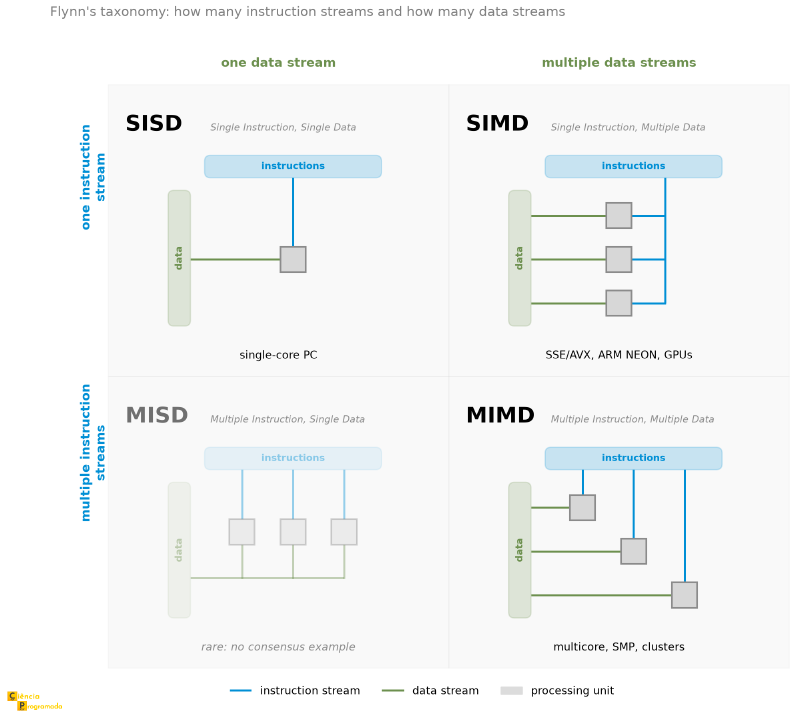
To understand and classify the various forms of parallelism, we usually use Flynn’s taxonomy, proposed in 1966 by Michael Flynn. It remains a useful reference for classifying most parallel architectures, based on two axes: the instruction stream and the data stream.
%%{init: {'flowchart': {'useMaxWidth': false}}}%%
graph TD
    Flynn["Flynn's Taxonomy
(Classification of Parallel Architectures)"]

    Flynn --> SISD["SISD
Single Instruction, Single Data
─────────────────
1 instruction, 1 data item per cycle
Classic Von Neumann
E.g.: single-core PC"]
    Flynn --> SIMD["SIMD
Single Instruction, Multiple Data
─────────────────
1 instruction → N data items simultaneously
Vector processing / GPU
E.g.: Intel SSE/AVX, CUDA"]
    Flynn --> MISD["MISD
Multiple Instruction, Single Data
─────────────────
N instructions → 1 data item
Rare and controversial category
E.g.: few convincing practical cases"]
    Flynn --> MIMD["MIMD
Multiple Instruction, Multiple Data
─────────────────
N instructions + N data items
True, general parallelism
E.g.: SMP, clusters, multicore"]
| Type | Instruction | Data | Description | Real examples |
|---|---|---|---|---|
| SISD | Single | Single | Traditional Von Neumann | Single-core PC |
| SIMD | Single | Multiple | Vector processing | Intel SSE/AVX, NVIDIA GPUs, ARM NEON |
| MISD | Multiple | Single | Rare and controversial category | Few consensus practical examples |
| MIMD | Multiple | Multiple | Full parallelism | SMP, clusters, multicore processors |
The figure below arranges the four categories in the quadrant that gives meaning to the names: the rows count the instruction streams, and the columns count the data streams. In each cell, a single stream is a single line that branches out to the processing units; multiple streams are separate lines. The MISD cell appears faded for the reason given in the table: it is rare and has no consensus example.
Example: classifying real architectures according to Flynn
- Conventional single-core PC: SISD. One instruction stream operates on one data stream.
- Intel SSE/AVX instructions: SIMD. One vector add instruction operates on
several pairs of floats simultaneously: 4 pairs with SSE (
ADDPS, 128 bits), 8 with AVX (VADDPS, 256 bits), and 16 with AVX-512 (VADDPS, 512 bits). - NVIDIA GPU with CUDA: usually described as SIMD/SIMT, because many elements execute the same idea of operation on distinct data, although the practical organization uses threads and execution groups specific to the GPU.
- Intel Core i7 processor (multicore): MIMD. Each core executes independent instructions with different data; the cores may be running completely different programs.
- Server cluster: MIMD. Each node runs its own program with its own data, communicating by message passing (MPI).
SMP: multiple processors, one memory #
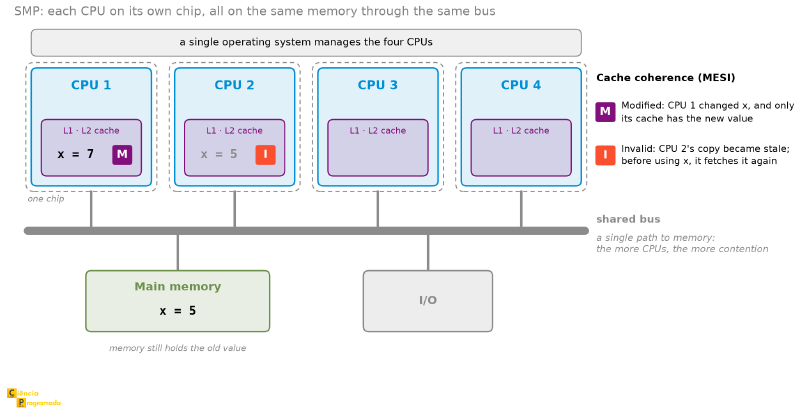
SMP (Symmetric Multi-Processing) connects several identical processors to
the same main memory and the same I/O system, managed by a single operating
system. In the figure below, each CPU is on its own chip, with its own cache,
and all of them reach memory and I/O through the same bus. The values of x in
the caches illustrate the coherence problem discussed right after.
Advantages: multiple CPUs working in parallel; the failure of one CPU does not halt the system; incremental growth (add CPUs as demand requires).
Critical problem, cache coherence: each CPU has its own caches (L1, L2). If CPU1 modifies the value of a variable in its cache, CPU2 may be reading a stale value from its cache. Coherence protocols such as MESI (Modified, Exclusive, Shared, Invalid) solve this in hardware.
That is the case in the figure above: in CPU 1’s cache, x has already been
changed to 7 and is in state M; CPU 2’s copy still says 5, and MESI marks it I,
invalid. Main memory also holds the old value: for now, the change exists only
in CPU 1’s cache.
SMP scalability bottleneck
The shared bus (or, more generally, the interconnect and the shared memory) is the main bottleneck of SMP. As the number of CPUs grows, contention for access also grows. In practice, there is a scalability limit beyond which architectures such as NUMA or clusters become more suitable.
Clusters: distributed memory, unlimited scale #
A cluster is a group of independent computers (nodes) connected by a high-speed network (Ethernet, InfiniBand), working in a coordinated way as a single system. Each node has its own memory; communication between nodes is done by message passing (MPI, Message Passing Interface).
| Characteristic | SMP | Cluster |
|---|---|---|
| Memory model | Shared | Distributed |
| Operating system | Single for all | One per node |
| Communication | Bus / MM | Network (Ethernet, InfiniBand) |
| Scalability | Limited (tens of sockets)¹ | High (up to thousands of nodes) |
| Cost per processor | High (special hardware) | Lower (standard hardware) |
| Cache coherence | Real problem (MESI protocol) | Not applicable |
| Communication latency | Nanoseconds | Microseconds to milliseconds |
¹ The SMP limit is counted in sockets, that is, in physical processors competing for the same memory, and there it is indeed low, because the shared bus saturates. Counting cores, the number changes scale: a current two-socket server exceeds 190 cores. It is the same SMP, with the parallelism packed inside each chip.
Example: SMP or cluster?
Two practical scenarios:
Scenario A (a service that needs to scale over the years): cluster. It allows adding new nodes as demand grows (horizontal scalability). You just connect more machines to the network. SMP has scalability limited by the shared bus bottleneck.
Scenario B (very limited physical space with stable demand): SMP. A single server takes up less physical space and is managed by a single operating system. There is no need for additional network infrastructure. Ideal when no growth is expected.
NUMA: the middle ground #
NUMA (Non-Uniform Memory Access) is an architecture halfway between SMP and clusters:
- Memory is physically distributed among the nodes: each processor has local RAM.
- Logically, the whole address space is unified: any CPU can address any memory location.
- Access to local RAM: fast.
- Access to remote RAM (from another node): slower, because it crosses the interconnect between nodes.
Used in modern high-performance servers, CC-NUMA combines physically distributed memory with a logically unified address space, preserving cache coherence in hardware.
Vector computing: SIMD in action #
Vector computing applies the same operation repeatedly over large data sets (scientific arrays, simulations, linear algebra, neural networks).
Two implementation paths:
| Method | Description | Examples |
|---|---|---|
| ALU pipeline | ALU organized in pipeline stages; elements processed sequentially with overlap | Cray-1 (1976) |
| Parallel ALUs | Multiple identical ALUs process several elements simultaneously (SIMD) | Intel SSE/AVX, CUDA GPUs |
The historical evolution:
- Cray-1 (1976): the first commercially successful vector supercomputer; peak of 160 MFLOPS, impressive for the time.
- Intel SSE / AVX: SIMD extensions of x86. AVX-512 processes 16 32-bit floats (or 8 64-bit doubles) in a single instruction.
- NVIDIA GPU: thousands to tens of thousands of CUDA cores operating in massive SIMD, the SIMT architecture (Single Instruction Multiple Threads).
Modern trends: multicore and many-core #
Multicore #
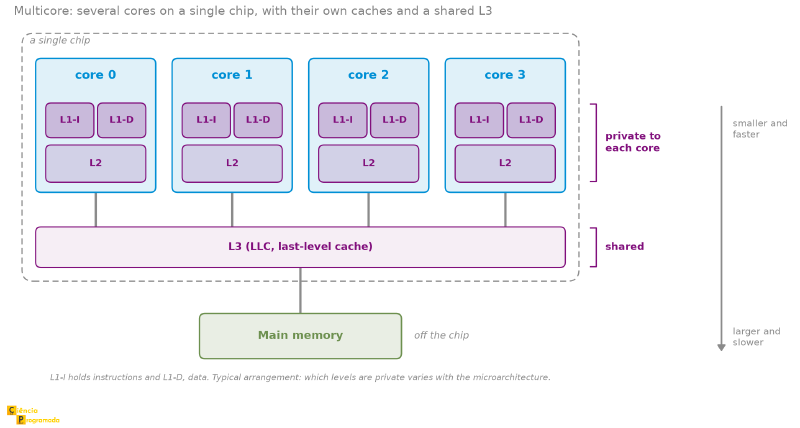
Several complete processing cores integrated into the same processor. Each core usually has private L1 and L2 caches, while higher cache levels may be shared, depending on the microarchitecture.
The figure below shows this arrangement in the same visual vocabulary as the SMP figure, and the difference jumps out: there, there was a chip boundary around each CPU; here there is just one, around the four cores and the L3 they share.
Examples: Intel Core and AMD Ryzen processors in desktops and notebooks, plus the Apple Silicon line in Macs. Classification: MIMD.
SMT: the extra cores that the task manager shows #
Open the task manager of a modern computer and it will probably say something like “8 cores, 16 logical processors”. The difference is simultaneous multithreading (SMT), which Intel markets as Hyper-Threading.
The idea starts from an observation about waste: a core spends a good part of its time waiting (for a cache miss, for a mispredicted branch), and during that wait the pipeline sits idle. With SMT, the core duplicates the registers that hold the state of a thread (PC, general-purpose registers, flags) but keeps a single copy of the rest: ALU, caches, branch predictor. Two instruction streams come to share the same execution hardware, and when one waits, the other moves forward.
The gain is real but modest: typically between 15% and 30% on workloads that benefit, and none on workloads that already saturate the core. A core with SMT is not equivalent to two cores: it is equivalent to one core that wastes less. That is why the operating system, when distributing tasks, prefers to occupy distinct physical cores first and only then the logical processors of the same core.
Many-core #
Many-core architectures bring together tens, hundreds, or thousands of simple execution units on the same chip, optimized for massive parallelism.
Typical examples are modern NVIDIA and AMD GPUs. Instead of focusing on a few very complex units, these architectures prioritize high throughput for massively parallel workloads. Approximate classification: SIMD / SIMT.
Models change; the classification stays
The hardware examples in this article are cited by family (Ryzen, Core, Apple Silicon, GeForce, Radeon) and not by model, because models are replaced every year and any specific number ages fast. What does not age is the classification: ten years from now there will be processors and GPUs with other names, more cores, and more memory, and they will still be MIMD and SIMD for the same reasons described here.
Where each architecture fits #
| Architecture | Flynn’s taxonomy |
|---|---|
| Single-core PC | SISD |
| SSE/AVX instructions | SIMD |
| GPU (CUDA/OpenCL) | SIMD / SIMT |
| Multicore processor | MIMD |
| SMP | MIMD |
| Cluster / supercomputer | MIMD |
The limit of multiplying cores: Amdahl’s Law #
If the solution to the thermal wall was to multiply the hardware, the question remains that this article raised earlier and has not yet answered: how far does this go? Does doubling the number of cores double the performance?
The answer came from Gene Amdahl, who presented the argument in 1967 (the original paper contains no equations), and the formula that bears his name is the most important one about parallelism. The idea is that almost every program has a part that cannot be parallelized: reading the input, initializing structures, combining partial results, any stretch in which one step depends on the previous one. Calling \(s\) the fraction of time spent on that serial part, the maximum gain with \(N\) cores is given by Amdahl’s Law:
$$S(N) = \frac{1}{s + \dfrac{1 - s}{N}}$$The parallel part, \(1 - s\), is divided by \(N\); the serial part, \(s\), is divided by nothing. And that is the problem. For a program with only 10% serial code (\(s = 0.1\)):
| Cores (\(N\)) | Gain \(S(N)\) |
|---|---|
| 2 | 1.82× |
| 4 | 3.08× |
| 8 | 4.71× |
| 16 | 6.40× |
| 64 | 8.77× |
| 1024 | 9.91× |
| \(\infty\) | 10× |
With 8 cores, the program does not get 8 times faster: it gets 4.7. And no number of cores takes it beyond 10×, because as \(N\) grows without bound the term \((1-s)/N\) vanishes and what remains is \(S = 1/s\). The 10% serial code, which seemed like little, becomes the ceiling.
4.71×
8 cores
8.77×
64 cores
10×
infinite cores
Amdahl is pessimistic on purpose
Amdahl’s Law assumes a fixed-size problem: the same work, distributed among more cores. In practice, whoever gets more cores usually uses them to solve bigger problems (more pixels, more data, finer simulations), and in those cases the parallel part grows while the serial part stays put. This other point of view is Gustafson’s Law (1988), and it explains why GPUs with thousands of cores are worth it. But Amdahl’s message still stands for any task of a given size: the bottleneck of parallelism is the part that cannot be parallelized, and that is where optimization effort is worth spending first.
Conclusion #
We have reached the end of the series. We started from logic gates and a memory cell (the minimal arrangements of computation and storage) and arrived at processors with multiple cache levels, pipelines, DMA, hierarchical buses, and parallel architectures at several levels. Each article revealed a different layer of the same machine that responds to your command in a fraction of a second.
The computer you use is a work of engineering with sixty years of continuous refinement. Now you know what is inside.
Stay tuned for the site’s upcoming article series. See you next time!


