

In the previous article, Instruction Representation, we saw how instructions are encoded in bits and how addressing modes determine where the processor finds each operand. But you write x = y + z in Python, not 0001 10110100. Someone has to do the translation. That someone is the toolchain that turns source code into machine code: the assembler, the compiler, the linker, and the loader.
Understanding this chain means understanding why C and C++ usually produce
native executables, why Java distributes bytecode for the JVM, and why, when
you run python script.py, the CPython interpreter first compiles the code to
bytecode and then executes it in its virtual machine. In every case, the
final goal is the same: to arrive at instructions the hardware can execute,
directly or indirectly.
From human language to silicon: a brief history #
The first programming languages were created in response to a simple demand: to make programming less error-prone and closer to human thought. The following table shows the timeline of some languages that shaped software development:
| Year | Language | Created by | Characteristics |
|---|---|---|---|
| 1957 | FORTRAN | John Backus (IBM) | Scientific/engineering: one of the first high-level compilers |
| 1958 | LISP | John McCarthy (MIT) | List processing; basis for AI |
| 1959 | COBOL | CODASYL committee (with Grace Hopper as consultant) | Business/commercial: readable like English prose |
| 1960 | ALGOL 60 | International committee | Structured algorithms; influenced C and Pascal |
| 1964 | BASIC | John Kemeny and Thomas Kurtz (Dartmouth) | Simple, educational |
| 1970 | Pascal | Niklaus Wirth (ETH Zürich) | Structured, educational |
| 1972 | C | Dennis Ritchie (Bell Labs) | Operating systems; basis of Unix |
| 1983 | Ada | Jean Ichbiah and team (CII Honeywell Bull) | Military, real time |
| 1983 | C++ | Bjarne Stroustrup (Bell Labs) | Object-oriented; extension of C |
| 1987 | Perl | Larry Wall | Text processing, scripts |
| 1991 | Python | Guido van Rossum (CWI) | General purpose, readable, multiparadigm |
| 1995 | JavaScript | Brendan Eich (Netscape) | Web; dynamic, front end and back end (Node.js); ubiquitous in browsers |
| 1995 | PHP | Rasmus Lerdorf | Server-side web; basis of WordPress and much of the web |
| 1995 | Ruby | Yukihiro Matsumoto | Pure OO, elegant; popularized by the Rails framework |
| 1996 | Java | James Gosling (Sun) | Portable, object-oriented; “Write once, run anywhere” |
| 2000 | C# | Anders Hejlsberg (Microsoft) | Microsoft/.NET; OO, similar to Java; Windows/Azure ecosystem |
| 2003 | Scala | Martin Odersky (EPFL) | JVM; combines OO and functional programming |
| 2009 | Go | Griesemer, Pike, and Thompson (Google) | Native concurrency, compiled, modern servers |
| 2012 | TypeScript | Anders Hejlsberg (Microsoft) | Typed superset of JavaScript; large-scale web projects |
| 2014 | Swift | Chris Lattner (Apple) | Replaces Objective-C for iOS/macOS |
| 2015 | Rust | Graydon Hoare (Mozilla) | Memory safety without a garbage collector; high-performance systems |
| 2016 | Kotlin | JetBrains | Modern, concise; official Android language |
A few dates deserve a note, because different versions circulate out there. COBOL sometimes appears as 1958, but the CODASYL committee was only formed in May 1959 and the specification was approved in January 1960. The year 1958 belongs to ALGOL 58, a different language. And Ada appears as 1979, the year of the preliminary manual, as 1980, the year of MIL-STD-1815, and as 1983, the year of the MIL-STD-1815A and ANSI standardization, which is the canonical date.
Many others could be listed, but these are some of the most influential and representative. Each of them was designed with specific goals in mind (readability, performance, portability, safety, or ease of use) and each contributed to the evolution of the software development ecosystem.
The abstraction hierarchy #
Languages form an abstraction pyramid: the higher the level, the closer to human language, and the farther from the hardware. Each level must be translated to the level below before the processor can execute the code.
| Level | Type | Example | How it is translated |
|---|---|---|---|
| Lowest | Machine language (binary) | 0001 1011 0100 |
Directly executable by the processor |
| Low | Assembly (mnemonics) | LDA 180 |
Assembler → machine language |
| High | High-level language | x = y + z |
Compiler or interpreter |
The only language the processor understands
The processor executes only machine language: sequences of bits. Every higher-level language must be translated, directly or indirectly, into binary code before or during execution. This whole section describes how that translation happens.
But how does this translation chain work in practice? Let’s descend to the level closest to the hardware and start with the most direct process: assembling Assembly code.
The assembly process (Assembly) #
The assembler converts assembly code into machine language. The translation is practically 1:1: each mnemonic corresponds to one machine instruction. The assembler works in two passes:
| Pass | What it does |
|---|---|
| 1st pass | Scans the source code and builds the symbol table, which maps labels to addresses |
| 2nd pass | Generates the machine code, replacing each reference with the address from the table |
Why two passes?
When the assembler finds a label being used before it is defined (a forward reference), it does not know the address yet. The 1st pass solves this: it goes through all the code, assigns addresses to all the labels, and records them in the symbol table. In the 2nd pass, all references can be resolved without ambiguity.
Assembly example: an assembly program to compute:
$$ X = Y + Z - T $$Using the hypothetical processor presented earlier in this series, with:
- \(Y\) at address
1F, containing051 - \(Z\) at address
20, containing03E - \(T\) at address
21, containing003 - \(X\) at address
22
The program starts at address 18:
| Address | Assembly | Generated code |
|---|---|---|
| 18 | LDA 1F |
11F |
| 19 | ADD 20 |
320 |
| 1A | SUB 21 |
421 |
| 1B | STR 22 |
222 |
| 1C | HLT |
000 |
| 1D and 1E | (free) | (none) |
| 1F | Data: \(Y\) | 051 |
| 20 | Data: \(Z\) | 03E |
| 21 | Data: \(T\) | 003 |
| 22 | Result \(X\) | written at run time |
Addresses 1D and 1E are left empty on purpose: the code ends at 1C and the
data starts at 1F, and the gap is just the choice of where to begin the data
block. In a real program, the assembler decides this layout.
The sequence does exactly what is expected:
- loads \(Y\) into the accumulator;
- adds \(Z\);
- subtracts \(T\);
- stores the result in \(X\);
- ends the execution.
It is worth checking the arithmetic, since that is what proves the assembly worked. In decimal,
\(Y = \text{051}_{16} = 81\), \(Z = \text{03E}_{16} = 62\), and
\(T = \text{003}_{16} = 3\), so \(X = 81 + 62 - 3 = 140\). At the end of the execution,
address 22 contains \(140_{10} = \text{08C}_{16}\).
The execution cycle for the LDA 1F instruction (which we already know from the article on the hypothetical processor) works exactly like this:
| Step | Operation | Description |
|---|---|---|
| 1 | \(MAR \leftarrow PC\) | The instruction address goes to the MAR |
| 2 | \(MDR \leftarrow M[MAR]\) | Fetches the LDA 1F instruction from memory |
| 3 | \(IR \leftarrow MDR;\ PC \leftarrow PC + 1\) | Instruction loaded into the IR; PC advances |
| 4 | Decode: LDA |
The CU identifies the operation and extracts address 1F |
| 5 | \(MAR \leftarrow 1F\) | The operand address goes to the MAR |
| 6 | \(MDR \leftarrow M[1F]\) | Fetches the operand value from memory |
| 7 | \(ACC \leftarrow MDR\) | The accumulator receives the value |
Compilation: a classic transformation pipeline #
While the assembler translates instructions very close to the hardware, the compiler solves a broader problem: transforming high-level code into a form executable on the target architecture. A classic compilation pipeline goes through stages such as lexical, syntactic, and semantic analysis, generation of an intermediate representation, optimization, and object code generation.
This flow is extremely useful as a teaching model, although real compilers may reorder, merge, or even omit some of these stages internally.
%%{init: {'flowchart': {'useMaxWidth': false}}}%%
flowchart LR
    A([Source Code]) --> B["1. Lexical Analysis
(Tokenization)"]
    B --> C["2. Syntax Analysis
(Parser / AST)"]
    C --> D["3. Semantic Analysis
(Types and Scope)"]
    D --> E["4. Intermediate
Code (TAC)"]
    E --> F["5. Optimization"]
    F --> G["6. Object Code"]
    G --> H([Linker])
    H --> I([Executable])
Phase 1: lexical analysis (tokenization) #
The lexical analyzer reads the source code character by character and groups the characters into tokens, the smallest units of meaning. It discards comments and whitespace.
Input:    x = y + z * 2

Tokens:   [ID: x] [OP: =] [ID: y] [OP: +] [ID: z] [OP: *] [NUM: 2]
Each token has a type (identifier, operator, numeric literal, keyword) and a value. Tokenization errors are the first to be detected.
Phase 2: syntax analysis (parser) #
The parser checks whether the sequence of tokens obeys the grammar of the language. If so, it builds the Abstract Syntax Tree (AST), which represents the hierarchical structure of the code.
The figure below shows the AST of x = y + z * 2. Each node sits in the column of its token, and so the tree holds two readings: from left to right, it gives back the source code; from bottom to top, it gives the order in which the operations happen.
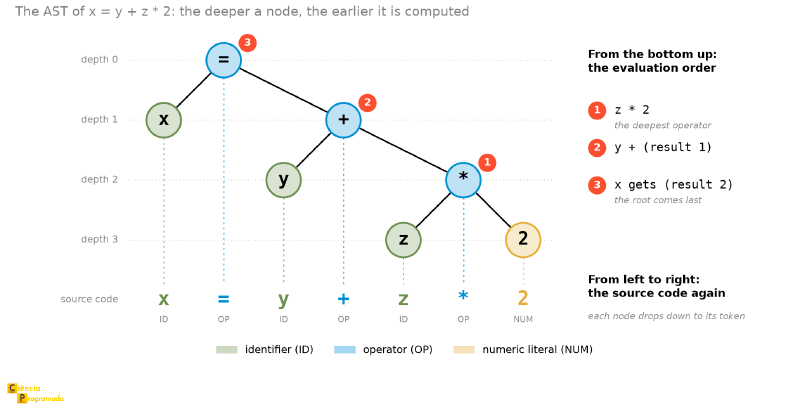
The AST captures operator precedence: * is deeper in the tree than +, which means it will be executed first.
Phase 3: semantic analysis #
Checks the meaning of the code beyond its structure:
- Were all variables declared before use?
- Are the types compatible in operations and assignments?
- Is the number of arguments in function calls correct?
int x;
x = "hello";  // Semantic ERROR: correct syntax, but incompatible type
Semantic errors go unnoticed by the parser (the syntax x = something is valid), but the semantic analyzer detects them by checking type compatibility.
Phase 4: intermediate code generation #
Produces a machine-independent representation, which eases portability and later optimization. The most common format is Three-Address Code (TAC): each instruction has at most three operands.
TAC for x = y + z * 2:
T1 = z * 2
T2 = y + T1
x  = T2
TAC resembles the language of our hypothetical processor: simple instructions, temporary registers, no nested operations.
Phase 5: optimization #
Improves the intermediate code without changing the observable result. Some classic techniques:
| Technique | Effect |
|---|---|
| Dead code elimination | Removes code that will never be executed |
| Constant propagation | Replaces variables with values known at compile time |
| Common subexpression elimination | Avoids recomputing identical expressions |
| Loop unrolling | Replicates the loop body to reduce control overhead |
In practice, real compilers (such as the famous GCC, widely used for languages like C and C++) let the programmer choose how aggressive this optimization is, and these levels have names:
| Option | What it does |
|---|---|
-O0 |
No optimization. Easy-to-debug code: each source line corresponds to a recognizable chunk of assembly |
-O1 |
Basic optimizations, without a large compile-time cost |
-O2 |
The level used in most production builds |
-O3 |
More aggressive: extra loop transformations (interchange, peeling, unswitching) and vectorization with a more liberal cost model |
-Os |
Optimizes for code size, not for speed |
Watching optimization happen #
None of this has to stay abstract. Consider this C function, which is the same expression we have been following since lexical analysis:
int calculate(int y, int z) {
    int x = y + z * 2;
    return x;
}
Compiling with gcc -S -O0 -masm=intel, the compiler generates twelve instructions, with each
variable going back and forth to memory, because without optimization it translates literally
what the program said:
calculate:
        push    rbp
        mov     rbp, rsp
        mov     DWORD PTR [rbp-20], edi   ; stores y on the stack
        mov     DWORD PTR [rbp-24], esi   ; stores z on the stack
        mov     eax, DWORD PTR [rbp-24]   ; reads z back
        lea     edx, [rax+rax]            ; edx = z * 2
        mov     eax, DWORD PTR [rbp-20]   ; reads y back
        add     eax, edx                  ; eax = y + z*2
        mov     DWORD PTR [rbp-4], eax    ; stores x on the stack
        mov     eax, DWORD PTR [rbp-4]    ; reads x back to return it
        pop     rbp
        ret
Now the same file with gcc -S -O2 -masm=intel:
calculate:
        lea     eax, [rdi+rsi*2]
        ret
One computing instruction, plus the ret. The compiler realized that the variable x does not need to exist, that
the parameters are already in registers (rdi and rsi, by the calling convention), and
that x86 has an addressing mode (base plus scaled index, which the previous
article described) capable of computing \(y + z \times 2\) in a single lea operation.
The twelve instructions of -O0 and the two of -O2 do exactly the same thing.
This is why reading optimized assembly is hard: the code no longer has a
line-by-line correspondence with the source. And this is why you debug with -O0 and
ship with -O2.
Phase 6: object code generation #
Translates the optimized intermediate code into machine instructions for the target processor. Produces an object file (.o on Linux/macOS, .obj on Windows).
At this stage, we have a binary file that the CPU understands, but it is still a loose piece. The file contains unresolved external references: for example, if your program uses a function from another file of yours, or functions from the system’s standard library (such as a print to write to the screen), the object code points to a “void”. It needs an integrator. Enter the Linker.
Linking (Linking) #
The linker combines multiple object files and libraries into a single executable, resolving all external references.
| Type | Description | Advantage | Disadvantage |
|---|---|---|---|
| Static | Copies the library code into the executable | Self-contained executable | Larger file; updating the library requires recompiling |
| Dynamic | References .dll (Windows) or .so (Linux), loaded at run time |
Smaller file; libraries shared among programs | Run-time dependency |
Dynamic linking in practice
When the system updates a shared library (for example, libc.so.6 on Linux), all the programs that use it through dynamic linking benefit immediately, without needing to be recompiled. With static linking, each program would have to be recompiled and redistributed individually. On the other hand, dynamic linking creates a run-time dependency: if the library is not installed or is incompatible, the program fails to start, the famous “DLL Hell” on Windows.
Linking and portability
Dynamic linking reduces the size of executables and eases updates of shared libraries, but it also introduces external dependencies at run time. Static linking, in turn, tends to produce more self-contained executables, although larger and less flexible for maintenance.
Loading (Loading) #
The loader transfers the executable from storage to Main Memory and prepares the environment so that it can start running. In real systems, this may involve not only copying the program into memory, but also adjusting addresses, mapping segments, and preparing shared libraries.
| Type | Description |
|---|---|
| Absolute loading | Fixed addresses: the program is always loaded at the same memory address (inflexible) |
| Relocatable loading | Addresses adjusted at load time according to the position in MM, and it uses the base + displacement mode we saw in the previous article |
| Dynamic loading | Parts of the program or libraries are loaded on demand at run time |
With the program properly assembled, compiled, linked, and loaded into Main Memory, the preparatory cycle ends. From this exact moment, the silicon takes over and the CPU starts the perpetual loop of fetch, decode, and execute that we dissected in the previous articles of the series.
Compilation × interpretation #
The distinction between compiled and interpreted languages is useful, but it must be seen as a teaching model, not as an absolute boundary.
| Characteristic | Traditional compilation | Traditional interpretation |
|---|---|---|
| Main translation | Before execution | During execution |
| Generated artifact | Object code, executable, or bytecode | Usually there is no prior native executable of the user’s program |
| Performance | Tends to be higher when there is native code | Tends to have higher runtime overhead |
| Portability | Depends on the compiled target | Depends on the interpreter or virtual machine |
| Typical examples | C, C++, Rust, Go | CPython, Ruby, shells |
In practice, modern systems often mix strategies:
- compilation to bytecode;
- interpretation by a virtual machine;
- JIT compilation at run time;
- caching of intermediate artifacts.
That is why it is better to think of a spectrum of translation and execution, not a rigid dichotomy.
Example: Python, Java, and bytecode
Python (CPython) compiles modules to bytecode, which can be cached
in .pyc files inside __pycache__. After that, this bytecode is
executed by the CPython virtual machine.
Java, in the traditional flow, uses javac to compile .java files
into .class files, which contain JVM bytecode. This bytecode is then
executed by the Java Virtual Machine.
The main difference is not “Python interprets source and Java does not”, but the way each ecosystem organizes the stages:
- in CPython, compilation to bytecode and execution usually happen transparently to the user;
- in Java, the traditional flow clearly separates the generation of the
.classfrom the execution on the JVM.
Moreover, modern versions of Java also offer source-file mode for simple single-file programs, which shows that these boundaries are not entirely rigid.
What happens when you run python script.py
python script.py
The python executable was previously compiled, linked, and installed on your
system. When you run python script.py, what happens to your
program is another stage: CPython reads the source code, compiles it to
bytecode, and executes that bytecode in its virtual machine, and it may also
reuse caches in __pycache__ when appropriate.
Typing: when types are checked #
The discussion about compilation and interpretation connects directly with typing: how and when a language checks type compatibility between variables and operations.
Static × dynamic #
| Type | When types are checked | Examples |
|---|---|---|
| Static | At compile time | C, Java, Rust, Go |
| Dynamic | At run time | Python, JavaScript, Ruby |
Strong × weak #
| Type | Behavior | Example with 3 + "5" |
|---|---|---|
| Strong | Forbids operations between incompatible types without explicit conversion | Error (TypeError in Python) |
| Weak | Allows implicit type coercion | "35" (JavaScript) |
By language #
| Language | Static/Dynamic | Note on type strength |
|---|---|---|
| C | Static | Allows several implicit coercions and potentially dangerous conversions |
| Java | Static | More restrictive in operations between incompatible types |
| Python | Dynamic | Rejects incompatible operations without explicit conversion (3 + "5" → TypeError) |
| JavaScript | Dynamic | Frequently performs implicit coercions |
Typing and execution strategy
There is a frequent correlation between static typing and compilation, and between dynamic typing and execution by interpreters or virtual machines. But this is not an absolute rule.
- Java is statically typed, but runs on the JVM.
- Python is dynamically typed, but still compiles to bytecode.
In other words: typing and translation/execution strategy are related but independent dimensions.
Conclusion and next articles #
The path from x = y + z to the bits the processor executes involves several
transformations: source code analysis, generation of internal representations,
production of object code, linking, loading, and execution. Depending on the
language and the environment, some of these stages are explicit to the programmer;
others happen invisibly inside the runtime.
If you want to keep exploring, three references cover well what this article
only introduces. Compiler Explorer shows the assembly generated
for any snippet of code, in dozens of languages and architectures, without installing
anything. It is this section’s gcc -S, with an interface. Crafting
Interpreters, by Bob Nystrom, is a complete, free
book that builds two implementations of a language from scratch, covering the
phases discussed here and going beyond them. And Linkers and Loaders, by
John Levine, is the classic reference on the stage that almost no material covers in
depth: precisely linking and loading.
In the next article, we will explore how the process happens in
practice using Python, observing each phase directly in the interpreter.
We will see how the tokenize module handles lexical analysis, how the ast module
builds the abstract syntax tree, how the compile function generates bytecode, and
how the dis module lets us inspect the generated bytecode. It will be an
opportunity to see each stage in action, using a
high-level language that many of you already know.
See you then!


