

In the introduction to this series, we described what happens in the nanoseconds between pressing Enter and seeing the result of a program. Before any processing can happen, though, there is a prior question: data and instructions must be accessible to the processor. That is where memory comes in.
“Memory” is an entire storage architecture designed to balance three forces in permanent tension: speed, capacity and cost. Memory fast enough for the processor (SRAM) is too expensive for large volumes; cheap memory (DRAM, disks) is too slow to keep up with the processor. Computer engineering solved this with the memory hierarchy: using several types at once, each in the role that suits it.
In this article you will learn:
- what memory does and what its fundamental units are;
- how the memory hierarchy is organized and why each level exists;
- the formulas that determine the size of addresses, registers and buses in any memory system;
- how the CPU and memory communicate through dedicated registers and buses;
- read and write operations in formal notation;
- the SRAM, DRAM and ROM technologies and the ECC error correction mechanism.
Fundamental concepts #
Memory is the component of a computer system responsible for storing the information that the processor (CPU) will manipulate.
Basic operations #
| Operation | Technical name | Description |
|---|---|---|
| Store | Write | Record information in memory |
| Retrieve | Read | Obtain information from memory |
Storage units #
To make things easier before we get into technical jargon, imagine memory as a gigantic warehouse with thousands of lockers (or an immense library). The whole warehouse is your computer’s memory.
The figure below illustrates this analogy: a warehouse with thousands of lockers, where each locker represents a memory cell, a numbered space of fixed size, ready to hold an exact amount of information.

Each individual locker, with room for exactly a specific number of items, is what we call a cell. So that the processor can store and retrieve information quickly without rummaging through the whole warehouse, each locker has a unique number painted on its door: that is the address. When the computer needs to read or write a piece of data, it does not look for the data by what it is, but by the address where it should be, going straight to the right locker.
With this image in mind, it is easier to understand the formal units that define this “warehouse”:
| Unit | Definition |
|---|---|
| Bit | Basic element; takes only the values 0 or 1 |
| Cell | Group of bits handled together; unit of storage and transfer |
| Address | Number that uniquely identifies each cell in memory |
| Word | Unit of information of the CPU/MM system; represents a number or an instruction |
Relation between addresses and cells
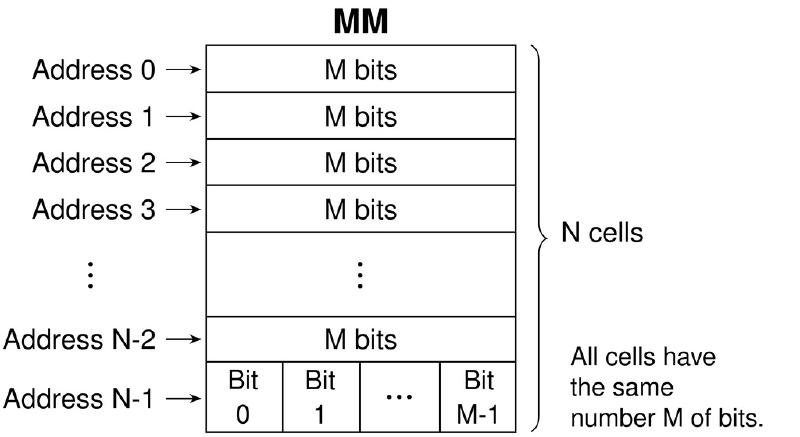
With \(E\) address bits, memory can address \(N = 2^E\) distinct cells. Therefore: \(E = \log_2 N\).
Memory is organized as a one-dimensional array of cells, each with a unique address. The processor accesses memory using these addresses, reading or writing data in specific cells. The figure below shows how information is located in memory: the processor supplies an address, the memory finds the corresponding cell and performs the read or write operation.
Memory hierarchy #
The memory hierarchy is an organizational structure that classifies the different types of memory into levels, based on their speed, cost and capacity characteristics.
The goal of this hierarchy is to optimize system performance, ensuring that the processor has fast access to the most frequently used data, while the less accessed data is stored in slower, cheaper memories. Below, we present the typical levels of the memory hierarchy, from the fastest and most expensive to the slowest and cheapest:
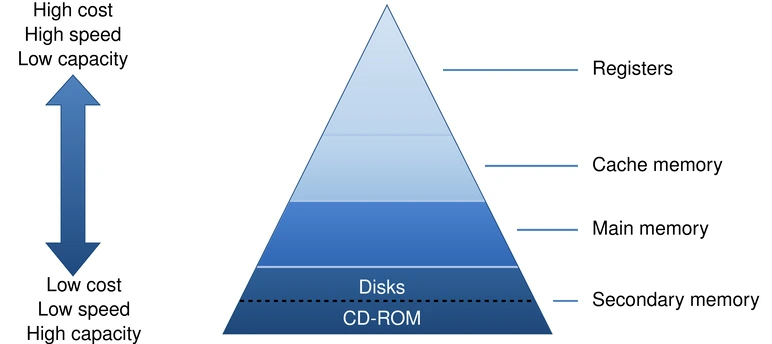
To make this pyramid concrete, the table below details the physical technologies used in each layer, showing how speed and cost behave in practice:
| Level | Typical technology | Typical access time | Cost/bit | Volatility | Example |
|---|---|---|---|---|---|
| Registers | Processor internal circuits | \(\approx 0.3\) ns | Very high | Volatile | CPU registers |
| L1/L2/L3 cache | SRAM | \(\approx 1\) ns (L1) to \(\approx 12\) ns (L3) | High | Volatile | Processor internal cache |
| Main memory | DRAM | \(\approx 80\) ns | Medium | Volatile | RAM |
| Secondary storage | Flash / magnetic | \(\approx 100\) µs (SSD) to \(\approx 10\) ms (HDD) | Low | Nonvolatile | SSD, NVMe, HDD |
For teaching purposes, media such as CD-ROM may appear in traditional classifications, but today SSDs and HDDs better represent the secondary storage found in real computers.
The times in the third column are orders of magnitude, not specifications: they vary with the microarchitecture, the model and the generation. What matters is the ratio between them, and it becomes more tangible on a human scale. If a register access took one second, an L1 cache access would take about three seconds, L3 about forty seconds, main memory four and a half minutes, an SSD almost four days and a hard disk more than a year. This disparity is what the memory hierarchy exists to hide.
For figures measured on real hardware, two sources are worth a visit: 7-cpu.com publishes cache and memory latencies by microarchitecture, in cycles and in nanoseconds; and the interactive page Latency Numbers Every Programmer Should Know shows the full scale (including SSD, disk and network) with its evolution over the years.
Memory analysis parameters #
- Access time: interval between the request and the availability of the data
- Capacity: total amount of information that can be stored
- Manufacturing technology: semiconductor, magnetic, optical, etc.
- Persistence: volatile (loses data without power) × nonvolatile
- Cost: price per byte
Although the computer uses all these levels together to balance cost and speed, the real “stage” where program execution happens is the Main Memory (RAM). So, from now on, we will leave disks and caches aside to focus exclusively on how this main memory is structured inside.
Organization of main memory #
Main memory can be described as a set of \(N\) cells, each with \(M\) bits. The address identifies the cell to be accessed, while the word is the CPU’s natural unit of processing. These two ideas do not always coincide: a word may occupy one or more cells, depending on the architecture.
Fundamental formulas #
$$N = 2^E \qquad\qquad E = \log_2 N \qquad\qquad T = N \times M$$where:
- \(N\) = number of cells
- \(E\) = number of address bits (= size of the MAR)
- \(M\) = number of bits per cell (= word size / MDR)
- \(T\) = total number of bits stored in memory
Cell, word and transfer unit #
In many systems, the cell has 8 bits (1 byte), but that does not mean the processor’s word also has 8 bits. The cell is the addressable unit of storage; the word is the CPU’s natural unit of processing; and the transfer unit is the number of bits moved in a single read or write operation.
Word is the number of bits the CPU treats as its natural unit of processing.
Historically, this varied a lot; in current general-purpose architectures, it
is usually associated with 16, 32 or 64 bits. For example, on a “32-bit” CPU,
the natural width of the integer registers and integer operations is usually
32 bits (4 bytes).
The word has important practical implications. Its width often coincides with that of the CPU’s integer registers, although that does not mean all the architecture’s registers necessarily have this size. Another consequence is alignment: many architectures prefer to store words at addresses that are multiples of their size (for example, 4-byte words at addresses that are multiples of 4), which allows more efficient accesses; misaligned accesses may require multiple cycles or special handling.
In addition, the order of the bytes within a word is determined by
endianness (little-endian or big-endian). While memory stores bytes, the
interpretation of those bytes as a word depends on this convention.
Endianness is the convention that defines the order in which the bytes of
a value larger than 1 byte are stored in memory. In the little-endian
format, the least significant byte comes first; in big-endian, the most
significant byte comes first. For example, the hexadecimal value 0x12345678
would be stored as 78 56 34 12 in little-endian and as 12 34 56 78 in
big-endian. This does not change the value itself, but it affects how the
bytes are interpreted when reading or transmitting binary data.
Finally, there is a distinction between byte addressing and word addressing: in architectures with byte addressing, each address refers to one byte; in architectures with word addressing, each address refers to an entire word.
The transfer unit may also differ from the word. For example, the width of the data bus defines how many bits can be transferred per bus operation, and a cache line defines the transfer unit between levels of the memory hierarchy. In both cases, this choice affects latency, throughput and system design.
In practice, it is common for a word to occupy multiple cells:
| Word size | Number of 8-bit cells |
|---|---|
| 8 bits | 1 cell |
| 16 bits | 2 cells |
| 32 bits | 4 cells |
| 64 bits | 8 cells |
For this reason, it is best to avoid saying that “\(M\) is at the same time the size of the cell, of the word and of the MDR”, because that only holds in specific architectures.
Most modern systems adopt the byte as the basic unit of storage.
Capacity prefixes (powers of 2) #
Since the number of cells in a modern RAM easily reaches the billions, we use multiplicative prefixes based on powers of 2 to simplify the mathematical notation:
| Prefix | Symbol | Value |
|---|---|---|
| Kilo | K | \(2^{10} = 1024\) |
| Mega | M | \(2^{20} \approx 10^6\) |
| Giga | G | \(2^{30} \approx 10^9\) |
| Tera | T | \(2^{40} \approx 10^{12}\) |
| Peta | P | \(2^{50} \approx 10^{15}\) |
Note in the table above that, although the prefixes are similar to those used in the SI, their values are based on powers of 2, not of 10. In the tradition of computer architecture, 1 KB means \(2^{10} = 1024\) bytes, and that is the sense in which the prefixes appear throughout this series. But this tradition has a naming problem that is worth knowing about.
1 kB is a thousand bytes: the binary prefix has its own name
Calling \(2^{10}\) bytes “1 kilobyte” was informal practice for decades, and
it is the origin of a confusion that persists. In the SI, the prefix k is
worth exactly 1,000, so 1 kB is 1,000 bytes. Since the IEC 60027-2 standard
(approved in 1998 and published in 1999), powers of 2 have their own
prefixes, the binary prefixes
kibi (Ki), mebi (Mi) and gibi (Gi): \(2^{10}\) bytes are 1 KiB,
\(2^{20}\) are 1 MiB and \(2^{30}\) are 1 GiB.
The practical consequence shows up on anyone’s screen: a hard drive advertised as “1 TB” holds \(10^{12}\) bytes, which the operating system displays as 931 GB. Nobody was robbed of 69 GB: the manufacturer counted in powers of 10, the system divided by \(2^{30}\), and the label the system should display is 931 GiB.
Why keep binary K, M and G here, then? Because in the case of addressed memory the power of 2 is not a convention, it is a consequence: with \(E\) address bits there are exactly \(2^E\) cells. A disk’s capacity, on the other hand, has no reason at all to be a power of 2, and that is precisely where the two systems collide.
Now that we know how to size this memory, a practical problem arises: how does the processor (which is extremely fast) manage to “talk” to main memory to read and write those billions of bits without getting lost? This is where components dedicated to building that communication bridge come in.
Registers and buses #
Communication between the CPU and main memory is done by dedicated registers and by buses.
- The MAR (Memory Address Register) holds the address of the cell to be accessed.
- The MDR (Memory Data Register) holds the data that will be read from or written to memory.
- The address bus carries addresses.
- The data bus carries the data.
- The control bus carries signals such as read, write and wait.
These elements exist to organize and enable the communication between processor and memory in a controlled way.
So that the CPU does not have to deal directly with the slowness of memory all the time, it delegates the communication to internal “waiting rooms”, the registers (MAR and MDR). These registers send and receive data through electronic communication paths called buses.
The following figure illustrates the communication model between the Central Processing Unit (CPU) and the Main Memory (MM). This integration is carried out through three structural paths that make up the system bus:
- Address Bus: connects to the CPU’s MAR (Memory Address Register) and carries the exact location of the memory cell to be accessed.
- Data Bus: connects to the MDR (Memory Data Register) and is the path along which the information (the content itself) travels toward memory (write) or coming from it (read).
- Control Bus: connects to the CU (Control Unit) and is responsible for transmitting command signals, such as the “read” or “write” orders, as well as synchronizing the operation.
On the right side, the diagram shows that the Main Memory is not connected directly to the bus wires, but uses a memory controller. This controller acts as an interface that decodes the address and control signals received from the CPU to then allow data to flow to or from the MM.
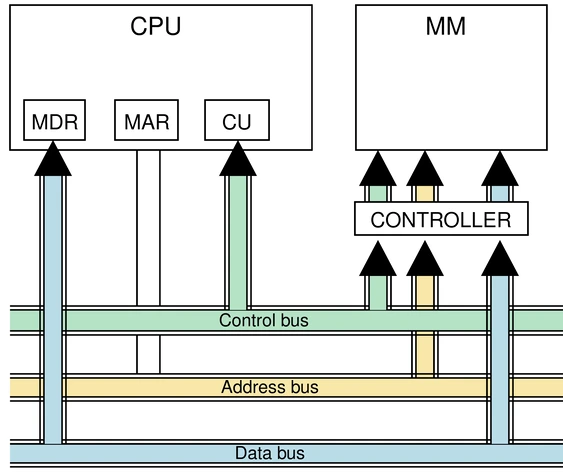
Each component illustrated in the diagram above has a strict responsibility to ensure that information travels without errors. We summarize the function and the capacity of each path and “waiting room” below:
| Component | Function | Size |
|---|---|---|
| MAR | Holds the address of the cell to be accessed | \(E\) bits |
| MDR | Holds the data in transfer (read or write) | \(M\) bits |
| AB: Address Bus | Connects MAR → Controller → MM (unidirectional) | \(E\) bits |
| DB: Data Bus | Connects MDR ↔ MM (bidirectional) | \(M\) bits |
| CB: Control Bus | Control signals: read, write, wait | Variable |
Register Transfer Language (RTL) #
RTL is a formal notation for describing data transfer operations between registers and memory.
| Notation | Meaning |
|---|---|
| \((X)\) | Contents of register or memory location \(X\) |
| \((X) \leftarrow (Y)\) | Copy contents of \(Y\) to \(X\) |
| \((MM[MAR])\) | Contents of the cell whose address is stored in the MAR |
Examples of RTL notation:
- \((MAR) \leftarrow (PC)\): copies the contents of the Program Counter to the MAR
- \((MDR) \leftarrow (MM[MAR])\): reads from the MM the cell pointed to by the MAR and places it in the MDR
- \((MM[MAR]) \leftarrow (MDR)\): writes to the MM the contents of the MDR at the position indicated by the MAR
Read and write operations #
For this section, we will use RTL notation to describe step by step how read and write operations happen in practice, from the moment the CPU decides to access memory until the data is delivered or written to the MM. Look again at the interconnection diagram between the CPU and the MM to follow the steps described below.
Read #
The read operation is a process structured in four steps. The processor says where it wants to read, triggers the command and waits for the information to arrive. Here is the exact flow of how this happens:
| Step | RTL operation | Description |
|---|---|---|
| 1 | \((MAR) \leftarrow \text{desired address}\) | The address is loaded into the MAR |
| 2 | READ signal on the CB | The controller interprets the request |
| 3 | \((MDR) \leftarrow (MM[MAR])\) | The contents of the cell are transferred to the MDR |
| 4 | CPU register \(\leftarrow (MDR)\) | The data is delivered to the processor |
The read operation is nondestructive: the data remains in the MM even after being read. The processor can read the same cell several times without changing its contents, which is essential for running programs that depend on stable data in memory.
“Nondestructive” holds for the processor, not for the physics
From the programmer’s point of view, reading changes nothing: the value is still there. At the circuit level, however, reading a DRAM is destructive. Reading a cell discharges the capacitor that held the bit, and the sense amplifier must rewrite the value immediately: a restore that happens on every read, in addition to the periodic refresh we will see in the section on DRAM. The magnetic-core memory that DRAM replaced had the same characteristic. What the model presented here guarantees is that none of this leaks outside the controller: the cell that was read still has the same value when the next access arrives.
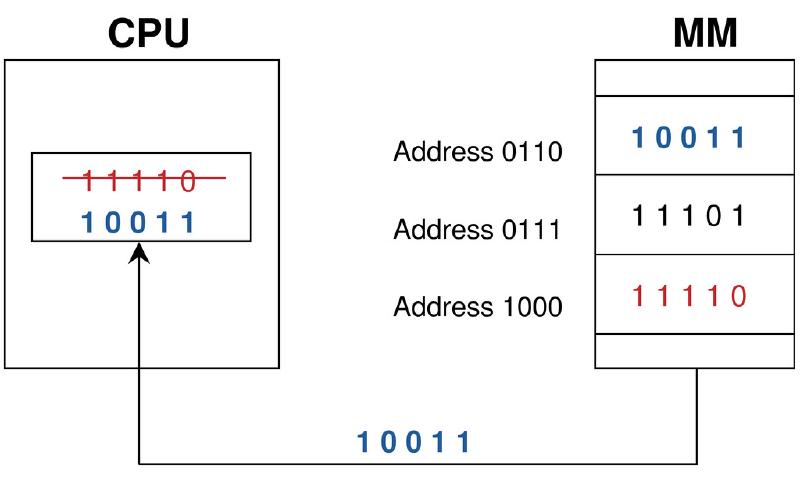
The figure below illustrates the read process. The value 10011, stored at MM
address 0110, is transferred to a CPU register, overwriting the register’s
previous value (11110) there.
Write #
Whereas in a read the processor only asks for a piece of data, in a write operation it must supply two things at the same time: the destination address and the information to be saved. The logical sequencing goes as follows:
| Step | RTL operation | Description |
|---|---|---|
| 1 | \((MAR) \leftarrow \text{address}\) | The destination address is loaded into the MAR |
| 2 | \((MDR) \leftarrow \text{data}\) | The data to be written is loaded into the MDR |
| 3 | WRITE signal on the CB | The controller receives the write command |
| 4 | \((MM[MAR]) \leftarrow (MDR)\) | The data is written to the indicated cell |
The figure below illustrates the write process. The value 11110 is
transferred (a copy) from the CPU to the MM and stored in the cell at address
1000, erasing the previous contents (00110).
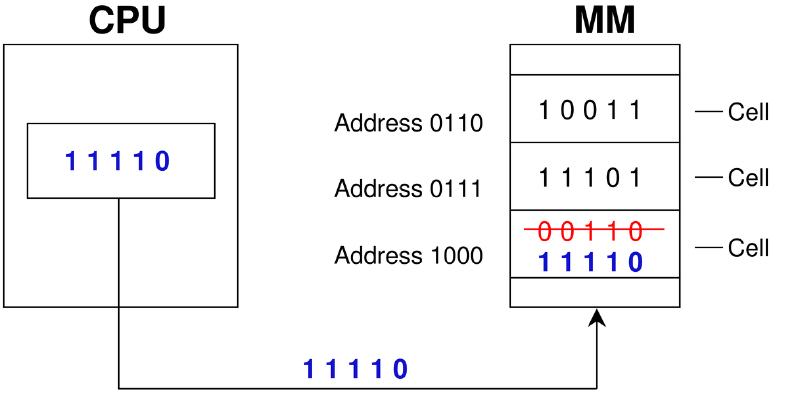
Writing is a destructive operation
A write permanently erases the previous contents of the cell with no possibility of recovery. A read, by contrast, is nondestructive: the data remains in the MM after being copied to the MDR.
Sizing in practice #
With the formulas \(N = 2^E\), \(E = \log_2 N\) and \(T = N \times M\) in hand, we go through a series of variations: each one introduces a new way of presenting the problem or a new set of given quantities.
Example: Parameters from N and M
A MM has \(N = 2K\) cells of \(M = 16\) bits. Determine \(E\) (size of the MAR) and \(T\).
\(N = 2K = 2 \times 2^{10} = 2^{11}\) cells
\(E = \log_2(2^{11}) = 11\) bits → MAR = 11 bits
\(T = N \times M = 2^{11} \times 16 = 2^{15} = \mathbf{32K}\) bits
Example 2: Finding the number of cells
Given: \(T = 256K\) bits, \(M = 8\) bits. Determine \(N\) and \(E\).
$$N = \frac{T}{M} = \frac{2^{18}}{2^3} = 2^{15} = 32K \text{ cells}$$Since \(N = 2^{15}\), we know that \(\mathbf{E = 15}\) bits.
Example 3: Working with “words” instead of bits
Watch the units! Here the capacity is given in words, not in loose bits. Given: MM with 2K words of 16 bits. Determine \(E\), the size of the MDR, the largest address and \(T\).
- \(N = 2K = 2^{11}\) words → \(\mathbf{E = 11}\) bits (size of the MAR)
- MDR = 16 bits (= word size, M)
- Largest address: \(N - 1 = 2048 - 1 = \mathbf{2047}\)
- \(T = 2^{11} \times 16 = 32K\) bits
Example 4: Reading multiple cells per access
More modern architectures can read several cells at once to save time. Given: MDR = 32 bits, MAR = 24 bits, 2 cells per access.
- Number of addressable locations: \(N = 2^{24} = 16M\)
- MDR = 32 bits holds 2 cells → each cell = \(32 / 2 = 16\) bits
- \(T = 2^{24} \times 16 = 2^{28} = 256M\) bits
- Word = MDR = 32 bits in this architecture: the statement gives the MDR as a reference, but, as we saw above, this equality is not a general rule
Example 5: Wide buses and fractional cells
An advanced scenario where the total capacity and the buses dictate the rules. Given: AB = 33 bits, DB transfers 4 words, cell = 1/8 of a word, \(T = 64G\) bits.
- \(N = 2^{33} = 8G\) cells
- \(M = T / N = 64G / 8G = 8\) bits per cell
- Since 1 cell = 1/8 word → word = \(8 \times 8 = \mathbf{64}\) bits
- DB width = \(4 \text{ words} \times 64 = \mathbf{256}\) bits
Python: computing memory parameters #
The code below implements a function memory_params that computes the basic
memory parameters from different combinations of inputs. It checks the
consistency of the data and returns a dictionary with the computed values.
import math
from typing import Optional


def _is_power_of_two(value: int) -> bool:
    return value > 0 and (value & (value - 1)) == 0


def memory_params(
    N: Optional[int] = None,
    E: Optional[int] = None,
    M: Optional[int] = None,
    T: Optional[int] = None,
) -> dict[str, int]:
    """
    Computes basic memory parameters.

    Parameters:
        N: number of cells
        E: number of address bits
        M: number of bits per cell
        T: total capacity in bits

    Exactly two compatible parameters must be given.
    """

    provided = {k: v for k, v in {"N": N, "E": E, "M": M, "T": T}.items() if v is not None}
    if len(provided) != 2:
        raise ValueError("Provide exactly two parameters.")

    if N is not None and M is not None:
        if not _is_power_of_two(N):
            raise ValueError("N must be a power of 2.")
        E = int(math.log2(N))
        T = N * M

    elif E is not None and M is not None:
        N = 2 ** E
        T = N * M

    elif T is not None and M is not None:
        if T % M != 0:
            raise ValueError("T must be divisible by M.")
        N = T // M
        if not _is_power_of_two(N):
            raise ValueError("N must be a power of 2.")
        E = int(math.log2(N))

    elif N is not None and T is not None:
        if T % N != 0:
            raise ValueError("T must be divisible by N.")
        M = T // N
        if not _is_power_of_two(N):
            raise ValueError("N must be a power of 2.")
        E = int(math.log2(N))

    elif E is not None and T is not None:
        N = 2 ** E
        if T % N != 0:
            raise ValueError("T must be divisible by N.")
        M = T // N

    else:
        raise ValueError("Unsupported parameter combination.")

    return {"N": N, "E": E, "M": M, "T": T}

# Example 1: N = 2K = 2^11, M = 16 bits
result = memory_params(N=2**11, M=16)
print(result)  # {'N': 2048, 'E': 11, 'M': 16, 'T': 32768}

# Example 4 from the previous section: MAR = 24 bits, T = 256M bits
print(memory_params(E=24, T=256 * 2**20))
# {'N': 16777216, 'E': 24, 'M': 16, 'T': 268435456}
The only combination the function rejects is \(N\) with \(E\): the two describe the same information (\(N = 2^E\)) and neither allows us to get to \(M\) or \(T\). All the other five are solvable, and the function covers all five.
SRAM, DRAM and ROM #
The main technologies discussed in introductory architecture courses are SRAM, DRAM and ROM.
- SRAM (Static RAM): faster and more expensive; widely used in cache memories.
- DRAM (Dynamic RAM): slower and cheaper; used as main memory.
- ROM (Read-Only Memory): nonvolatile memory used to store firmware.
The difference between SRAM and DRAM lies in how each bit is stored. SRAM uses more complex circuits per bit, which makes it fast, but expensive and less dense. DRAM, on the other hand, stores bits in capacitors, which must be recharged periodically through refresh. This makes it slower, but much more economical for large capacities.
The choice between them depends entirely on where the memory will be installed and what its function in the system will be:
| Type | Speed | Cost | Refresh | Main application |
|---|---|---|---|---|
| SRAM (Static RAM) | Fastest | Most expensive | Not needed | L1/L2 cache |
| DRAM (Dynamic RAM) | Slowest | Cheapest | Needed (periodic) | Conventional MM |
| ROM (Read Only Memory) | Fast reads | Variable | Not needed | BIOS, firmware |
After all, why is SRAM so much more expensive and faster, while DRAM requires this refresh? The answer lies in the physics of the thing. SRAM uses a complex circuit (usually with six transistors) for each bit. This makes it ultra-fast and stable, but it takes up a lot of physical space and costs a lot.
DRAM, in turn, stores each bit in a more ingenious and simple way: as a tiny electric charge in a capacitor. The catch? That capacitor “leaks” energy over time. So the system needs to read and rewrite (do the refresh of) this memory thousands of times per second so as not to lose the data. It is this need for constant maintenance that makes it a little slower. In return, its simple design allows billions of capacitors to fit in a small space, creating memory modules with gigabytes of capacity at a super affordable cost.
Where DRAM comes from, and where “core dump” comes from
The idea of storing a bit in a single transistor and a capacitor is Robert Dennard’s, who invented it at IBM in 1966 and patented it in 1968 (patent US 3,387,286, filed in 1967). In 1970, the Intel 1103 made DRAM a commercial product, with 1,024 bits, enough to start retiring the dominant technology until then, magnetic-core memory: tiny ferrite rings threaded with wires, magnetized in one direction or the other to store each bit.
That memory died, but it left behind a word that every programmer uses without knowing its origin: when a program crashes and the system dumps the contents of memory to disk, the resulting file is called a core dump, the dump of the cores, the ferrite cores. The name has outlived the technology by half a century.
ROM, firmware, BIOS and UEFI #
Didactically, ROM is presented as a nonvolatile memory used to store permanent system startup instructions. In current computers, however, it is more precise to speak of firmware stored in flash memory, normally associated with UEFI, while the term BIOS appears more as a historical or compatibility reference.
It is worth abandoning, therefore, the idea that “ROM cannot be rewritten”. What can be stated precisely is something else: nonvolatile memories used for firmware are not intended for ordinary writing by the CPU during the normal operation of the system, which does not mean absolute immunity to failures or tampering. Their main role is to store startup code and low-level configuration.
Main applications:
- BIOS (Basic Input/Output System)
- Bootstrap / IPL (Initial Program Load): program that initializes the system
- Firmware: microwave oven, video games, automotive electronic fuel injection
Memory errors and ECC #
Real memories are subject to occasional failures, such as bit flips caused by electrical noise, electromagnetic interference, physical defects or high-energy particles. To reduce the effects of these problems, some systems employ ECC (Error Correction Code).
ECC adds check bits to the data that is stored or transferred, allowing it to:
- detect certain errors;
- automatically correct single-bit errors;
- increase system reliability.
This mechanism is especially important in environments where integrity and availability are critical, such as servers, high-reliability workstations and scientific systems.
The ECC mechanism detects and corrects these errors:
%%{init: {'flowchart': {'useMaxWidth': false}}}%%
graph TB
    D["M data bits"]
    A1["Algorithm A
generates K1 check bits"]
    GR["Writes M + K1 bits to the MM"]
    LE["Read:
M bits + K1 stored bits"]
    A2["Algorithm A
generates K2 check bits"]
    CMP{"K1 = K2?"}
    OK["No error
Correct data"]
    ERR["Error detected
and corrected"]

    D --> A1 --> GR --> LE --> A2 --> CMP
    CMP -->|"Yes"| OK
    CMP -->|"No"| ERR
In the flow above, “Algorithm A” is a mathematical implementation based on Information Theory. It works by adding extra bits (redundancy or check bits) to the original data before writing it.
- Simple detection (parity bit): the most basic algorithm just counts how
many
1bits there are in the word and adds an extra bit so that the total is always even (even parity). If on reading the number of1s is odd, the system knows a bit flipped. The catch? It warns that there is an error, but does not know which bit is wrong, which makes correction impossible. - Active correction (Hamming code): to be able to correct, the ECC mechanism uses more sophisticated algorithms, such as the Hamming code. It interleaves several parity bits within the same word. If a bit suffers a flip, the combination of errors in the parities points to the exact position of the faulty bit. Knowing which bit is wrong, the memory simply flips it back to the correct value, delivering the information intact to the CPU.
The price of safety: ECC in practice
If ECC is so good, why doesn’t it come in every computer? The reason is the triple cost: space, money and time. For every 64 bits of data, an ECC module needs 8 extra physical bits just for control, which makes manufacturing more expensive. In addition, computing the redundancy on input and output adds a slight latency.
That is why standard desktop memories favor speed and low cost (a wrong pixel in a game is not the end of the world). ECC memories, on the other hand, are the standard in servers, data centers and critical systems, where a silently flipped bit can corrupt an entire database or change a financial value.
The alleged bit flip in a Super Mario 64 speedrun #
As we saw in the previous section, memory is not a shielded, perfect environment. Data traffic on the bus and even storage in the cells are subject to physical interference that causes bit flips (a \(0\) that becomes \(1\), or vice versa). But what causes this? It can be anything from electromagnetic noise from nearby components, power grid fluctuations, to cosmic rays (high-energy subatomic particles from space that collide with the memory chip).
Many of you may have heard of bit flips because of a curious episode in the Super Mario 64 speedrunning community. For those who don’t know, speedrunning is the practice of completing a game in the shortest possible time, and Super Mario 64 is one of the most popular games for it.
One of the most persistent myths in the Super Mario 64 speedrunning community is the claim that a cosmic ray caused an upwarp error (an unexpected vertical teleport) in the Tick Tock Clock level during a run in 2013. Although the phenomenon gained internet fame as an example of space interference in electronic hardware, experts in disassembling the code and hardware of the Nintendo 64 console argue that there is no evidence to support this theory. Instead of ionized particles from space, the most likely technical explanation lies in ordinary physical faults, such as dirty pin connections, poor contact in the cartridge slot or the natural wear of the device’s components over decades, although the exact cause was never established.
The popularization of this theory as a scientific fact is attributed to a succession of failures in game-specialized journalism, which amplified the hypothesis without checking its technical veracity with the community of TASers (Tool-Assisted Speedrunners, players who use assistance tools). The narrative gained viral strength through social media and citations on far-reaching educational channels, such as Veritasium, without due critical analysis, creating a cycle of misinformation. Today, the case serves as an example of how an attractive but incorrect theory can become truth accepted by the casual public.
The video below shows the detailed explanation of the phenomenon, debunking the bit flip myth and presenting the technical evidence that points to more plausible causes. It is worth watching to understand how the speedrunning community and hardware experts reached this conclusion.
Python: simulating a parity bit #
To take the concept out of theory, here is a simplified Python example that
implements the logic behind the even parity bit. The goal is to ensure that
the final transmitted word always has an even number of 1s.
def add_even_parity(bits):
    """Computes and adds the even parity bit to a string of bits."""
    ones_count = bits.count('1')
    parity_bit = '0' if ones_count % 2 == 0 else '1'
    return bits + parity_bit

def check_error(received_data):
    """Checks whether the received data has an error using even parity."""
    ones_count = received_data.count('1')
    if ones_count % 2 != 0:
        return "Error detected! The data was corrupted."
    return "Data apparently intact (no 1-bit errors)."

# --- Simulating in practice ---

# 1. The CPU wants to write the data "1011001" (it has four '1's)
source_data = "1011001"
written_data = add_even_parity(source_data)
print(f"Data written to memory: {written_data}")
# Expected result: 10110010 (added a 0 at the end)

# 2. Simulate interference: flip a bit in the data (not in the parity bit)
#    let's flip the bit at index 5 (0-based) of the data block
data = written_data[:-1]       # data part without the parity bit
parity = written_data[-1]      # parity bit
i = 5                          # index of the bit to flip (0-based)
corrupted_data = data[:i] + ('1' if data[i] == '0' else '0') + data[i+1:]
corrupted_word = corrupted_data + parity
print(f"Data read with a defect: {corrupted_word}")
# Expected result: 10110110 (now we have five '1's)

# 3. The memory controller performs the check
print(f"Read status: {check_error(corrupted_word)}")
# Expected result: "Error detected! The data was corrupted."
Locality of reference: the bridge to the cache #
The principles that govern how programs access memory have consequences for system design. Two empirical patterns stand out.
The principle of temporal locality observes that if a memory address was
accessed recently, there is a high probability that it will be accessed again
soon. The control variable of a for loop, for example, is read and
incremented on every iteration, and is reused throughout the execution of the
loop.
The principle of spatial locality observes that if an address was
accessed, it is likely that neighboring addresses will also be accessed in
sequence. When traversing an array, accessing element a[i] implies a high
probability of accessing a[i+1] right after.
These two principles are the justification for the existence of cache memory: it keeps recently accessed data in its slots (exploiting temporal locality) and loads entire blocks of contiguous cells on a miss (exploiting spatial locality). Without these patterns observable in real programs, the cache would be useless. With them, the cache can anticipate what the processor will need and have the data ready, without going through the slow DRAM access.
Conclusion and next articles #
Main memory is the substrate on which all program execution takes place. We started from its most basic organization (cells, addresses and buses) and arrived at the formulas that size any memory system, passing through read and write operations in RTL notation, the available types of technology and the locality principles that motivate the cache hierarchy.
In the next article, we will see how the speed difference between the CPU and DRAM motivated the emergence of the cache, the three mapping models that determine where MM blocks are stored, the replacement algorithms and the write policies.
See you then!


