

In the previous two articles, we built the foundation of the memory system: the memory hierarchy that organizes DRAM, SRAM, and secondary storage, and the cache that acts as a buffer between the processor and main memory. Now we reach the heart of the system: the Central Processing Unit (CPU).
The CPU is the component that actually computes: it performs arithmetic operations, makes logical decisions, fetches instructions from memory, and coordinates all the other subsystems. Modern processors are manufactured on a single chip, with billions of transistors, and operate at gigahertz frequencies. But the essence of the CPU remains the same as in the first computers: fetch an instruction, decode it, and execute it, over and over, until the system is turned off.
In this article you will learn:
- what the two basic functions of the CPU are and what it accomplishes in terms of primitive operations;
- what a machine instruction is and how it is structured in bits;
- which components make up the CPU and what role each one plays;
- what status flags are and why they exist;
- how the clock synchronizes everything and why frequency is not a synonym for performance;
- the microevents of the fetch cycle in RTL notation;
- the differences between CISC and RISC architectures.
The CPU in the real world #
The CPU is the component that actually executes instructions, processes data, and coordinates the operation of the system. In current computers, it usually comes in a single package connected to the motherboard, although internally it may contain one or more silicon dies, besides caches and specialized functional units.
Despite the enormous physical evolution (billions of transistors, gigahertz frequencies, and multiple cores), the fundamental idea remains the same: fetch an instruction, decode it, and execute it.
The processor in the real world
When we look at the specification of a real processor, we see not only its logical organization but also physical and integration characteristics: manufacturing technology, number of transistors, type of package, socket, number of cores, cache sizes, and the presence of units specialized in different kinds of computation, such as integers, floating point, and vectors.
What the CPU does #
The CPU has two fundamental functions:
- Data processing: performing arithmetic operations (add, subtract, multiply, divide), logical operations (AND, OR, XOR), data movement, branches, and input/output operations.
- Control: coordinating the operation of all the components of the system (main memory, I/O devices, and the other subsystems).
In practice, every complex computation is decomposed into primitive
operations: add, subtract, move data between storage locations, transfer data
to output devices. A compiler, when processing an expression such as
X = A + B*C, generates a sequence of primitive instructions that the CPU
executes one by one:
T = B * C    ; 1st instruction
X = A + T    ; 2nd instruction
The CPU never sees the high-level expression: only the elementary instructions that the compiler produced from it.
The figure below shows a simplified diagram of the CPU, highlighting its main components and how they connect to main memory. Note that the CPU is a complex system, but we can understand its basic organization from its functional blocks and the data and control flows between them.
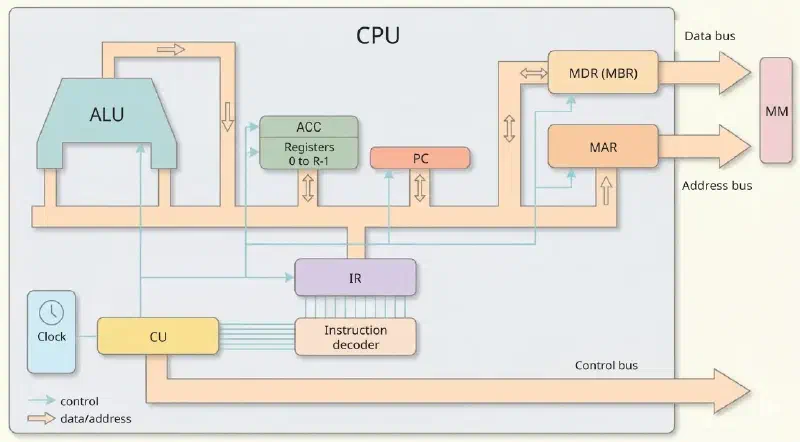
We will detail these components throughout the article, but first we need to understand what a machine instruction is.
Machine instructions #
A machine instruction is a sequence of bits that encodes exactly what the CPU must do. It has two main fields:
- Operation code (Opcode): specifies which operation to execute
- Operands: the data to operate on or the addresses from which to obtain them
For example, a 12-bit instruction with 4 bits for the opcode and 8 bits for the operands could be structured like this:
| Opcode (4 bits) | Operand 1 (4 bits) | Operand 2 (4 bits) |
     0  1  0  1       0  0  0  1            0  0  1  0
The operation above could, for example, represent ADD R1, R2: add the values
of registers R1 and R2 and store the result in an implicit destination
register (such as the ACC).
With \(n\) opcode bits, we have \(2^n\) possible operations. With 4 bits, for example, we get \(2^4 = 16\) distinct operations.
The program lives in main memory
An executable program is a sequence of machine instructions stored in consecutive cells of the MM. To start execution:
- the instructions must be in successive cells of the MM;
- the address of the first instruction must be in the PC (Program Counter);
- the CPU executes the instructions in address order, except for explicit branches.
Word size and registers #
In classic architectures, the processor’s word size usually coincides with the width of the general-purpose registers and with the number of bits handled at once by the ALU. This does not mean, however, that all the CPU’s registers necessarily have the same width.
Specialized registers can have different sizes, according to their function. For example:
- the PC and the MAR follow the size of the address;
- the MDR / MBR follows the width of the data transfer with memory;
- the general-purpose registers and the ACC normally follow the processor’s word.
The impact of word size #
Word size directly influences the amount of data the CPU can transfer and process at a time. In a simple example, if two 16-bit values need to be added:
- in a system with an 8-bit word, each value will have to be handled in two parts;
- in a system with a 16-bit word, each value can be handled at once.
This does not mean that a processor with a larger word will always be exactly twice as fast, but it helps us understand why architectures with larger words tend to reduce the number of accesses and steps needed for certain operations.
To add \(A = \text{3A25}_{16}\) and \(B = \text{172C}_{16}\) (16-bit values):
| System | Word width | MM accesses | Relative time |
|---|---|---|---|
| System 1 | 8 bits | 2 accesses (8 bits at a time) | \(T_1\) |
| System 2 | 16 bits | 1 access (16 bits at once) | \(T_2 \approx T_1/2\) |
This explains the historical evolution: from 8- and 16-bit processors to the 32- and 64-bit ones found today in any personal computer or smartphone.
CPU components #
Internally, the CPU is composed of two major functional blocks: the Control Unit (CU) and the Arithmetic Logic Unit (ALU), connected by registers and internal buses.
graph TB
    subgraph UCP["Central Processing Unit"]
        subgraph CTR["Control Unit"]
            REL["Clock"]
            UC["CU — Control Unit"]
            DEC["Decoder (Opcode → operation)"]
            CI["PC — Next instruction"]
            RI["IR — Current instruction"]
            REM["MAR — Address to MM"]
            RDM["MDR / MBR — Data from MM"]
        end
        subgraph PROC["Arithmetic Logic Unit"]
            UAL["ALU"]
            ACC["ACC — Accumulator"]
            REGS["General-purpose registers"]
            FLAGS["Flags Register (N, Z, V, C)"]
        end
        REL --> UC
        UC --> DEC
        RI --> DEC
        DEC --> UAL
        CI --> REM
        RDM --> RI
        UAL <--> ACC
        UAL <--> REGS
        UAL --> FLAGS
    end

    MP[("Main Memory")]

    REM -->|"Address Bus"| MP
    RDM <-->|"Data Bus"| MP
    UC -.->|"Control Bus"| MP
| Component | Alternative name | Function |
|---|---|---|
| ALU | Arithmetic Logic Unit | Performs arithmetic and logic operations |
| Registers | Registers | Temporarily store data, addresses, and instructions |
| ACC | Accumulator | Special register; implicit result in older architectures |
| IR | Instruction Register | Stores the instruction being executed |
| PC | Program Counter | Stores the address of the next instruction |
| MAR | Memory Address Register | Stores the address for accessing the MM |
| MDR | MBR (Memory Buffer Register) | Data buffer between the CPU and the MM |
| CU | Control Unit | Generates the control signals for all components |
| Decoder | Decoder | Identifies the operation from the opcode bits |
| Clock | Clock | Generates pulses that synchronize all operations |
Register size and processor word
General-purpose registers usually have the width of the processor’s word: this coincidence is where the habit of calling a machine a “32-bit processor” comes from. As seen above, this does not hold for all of them: specialized registers follow the quantity they handle, not the word.
The x86 shows well how this width is organized in layers. In the Intel 486,
with a 32-bit word, the general-purpose register is EAX. Its 16 least
significant bits can be accessed with the name AX, inherited from the earlier
16-bit processors; and AX, in turn, splits into a high and a low part (AH and
AL, 8 bits each), which already existed in the 8086 and were designed to
ease the migration of code from 8-bit processors. That is three generations
of compatibility stacked inside the same register, and that is why AL,
AX, and EAX appear side by side in modern assembly code.
Status flags #
The ALU calculates results and also records properties of the last result in
special bits called flags, grouped into what is usually called the
status register. These bits
are consulted by conditional branch instructions (if, while, etc.) to
decide whether the program flow should change.
A well-known historical example is the Motorola 68000 flag set:
| Flag | Meaning | Condition for being set |
|---|---|---|
| N | Negative | Result < 0 |
| Z | Zero | Result = 0 |
| V | Overflow | Register capacity exceeded |
| C | Carry | Carry generated in an arithmetic operation |
| X | Extend | Carry extension |
This set should not be read as “the universal current standard”, but as a good historical example for understanding the role of flags in a CPU.
For example, after computing A - B, the CPU checks the Z flag to know whether
the result was zero, which is equivalent to A == B. A conditional branch
instruction uses these flags to decide which instruction to execute next.
The N flag alone does not answer A < B
A < B
The temptation is natural: if A - B came out negative, then \(A < B\). In
two’s complement, however, subtraction can overflow, and then the sign of the
result lies.
Take \(A = -100\) and \(B = 100\) in 8 bits. The true result, \(-200\), does not fit in the range \([-128, +127]\); what ends up stored is \(56\), positive. The N flag is 0, even though \(A\) is clearly less than \(B\). What the CPU does in this case is set the V flag, exactly the one that appears two lines above in the table and exists to signal this situation.
The correct condition for a signed comparison is \(A < B \iff N \oplus V\) (N exclusive-or V): the sign of the result, corrected when there was overflow. This is why processors offer two sets of conditional branches: one for signed numbers, which consults N and V, and another for unsigned numbers, which consults the C flag. Choosing the wrong set is a classic source of bugs.
However, before it can calculate anything or check flags, the CPU must answer the most basic question when reading memory: “What does this sequence of zeros and ones mean?”. This is where the decoder comes into play.
The decoder #
The decoder is a combinational circuit of the \(n\)-to-\(2^n\) type: each combination of the opcode bits activates exactly one output, which corresponds to the operation to perform.
$$n\ \text{opcode bits} \implies 2^n\ \text{possible distinct operations}$$With 4 bits, for example, 16 outputs; with 8 bits, 256 outputs. Only the output corresponding to the received code is activated; the others remain inactive. This circuit is what turns the opcode bits into electrical signals that configure the ALU for the correct operation.
The ALU: Arithmetic Logic Unit #
Once the decoder has “translated” the instruction and prepared the electrical paths of the system, the stage is set for the processor’s brute force to act. The ALU obtains the data from the registers and deposits the results back into them. It is the ALU that does all the computational work proper:
| Category | Operations |
|---|---|
| Integer arithmetic | Addition, subtraction, multiplication, division |
| Floating point | Same operations on real numbers (co-processor, now integrated) |
| Bitwise logic | AND, OR, XOR, NOT |
| Bit shifting | Shift left (\(\times 2\)), Shift right (\(\div 2\)) |
| Increment/Decrement | \(+1\), \(-1\) |
The ALU does not access memory directly: it only operates on values that are already in the registers. It is up to the instruction cycle (next section) to ensure that the right data are in the right registers before the ALU operates.
The clock and the cycles #
The clock is a pulse generator that synchronizes all CPU operations. The frequency indicates how many cycles occur per second:
$$f = \frac{1}{T} \qquad \Longleftrightarrow \qquad T = \frac{1}{f}$$| Processor (example) | Frequency | Cycle period |
|---|---|---|
| M1 | 25 MHz | \(T = 1/(25 \times 10^6) = 40\ \text{ns}\) |
| M2 | 400 MHz | \(T = 1/(400 \times 10^6) = 2.5\ \text{ns}\) |
Frequency ≠ performance
A processor with a higher frequency does not necessarily execute more instructions per second. Pipeline, cache, architecture, and the average number of cycles per instruction (the CPI, for Cycles Per Instruction) also determine real performance.
The relationship between these factors fits in one line, in the so-called performance equation:
$$T_{CPU} = \frac{I \times CPI}{f}$$where \(I\) is the number of instructions executed, \(CPI\) the average number of cycles each one consumes, and \(f\) the clock frequency. The three factors weigh equally in the result: doubling the frequency and doubling the CPI comes out exactly the same.
With the equation in hand, the claim above stops being an allegation and becomes arithmetic. A 3 GHz processor with a CPI of 2 spends \(2/(3 \times 10^9) \approx 0.67\) ns per instruction; a 2 GHz one with a CPI of 1 spends \(1/(2 \times 10^9) = 0.50\) ns. The second executes 33% more instructions per second at two thirds of the frequency.
The megahertz myth
This calculation explains one of the best-known episodes in the industry. In the early 2000s, Intel bet on frequency as a selling point, and the Pentium 4 reached 3.8 GHz. The price was a very long pipeline (from 20 to 31 stages, depending on the version) that inflated the CPI and wasted many cycles on every mispredicted branch. The AMD Athlon 64, at 2.4 GHz, beat it in a good share of applications. Apple, then in its PowerPC era, ran an advertising campaign on this, and the phenomenon became known as the megahertz myth. Intel ended the line and backed off with the Core architecture, with a lower frequency and a much better CPI, and the number of gigahertz never again became the main argument of a campaign.
Each clock cycle can be subdivided into subcycles (\(t_0, t_1, t_2, \ldots, t_n\)), which correspond to internal microevents of the instruction cycle. The figure below shows this subdivision within the block diagram of the control unit: the clock pulses enter on one side, and each subcycle triggers one of the microevents that make up the execution of an instruction.
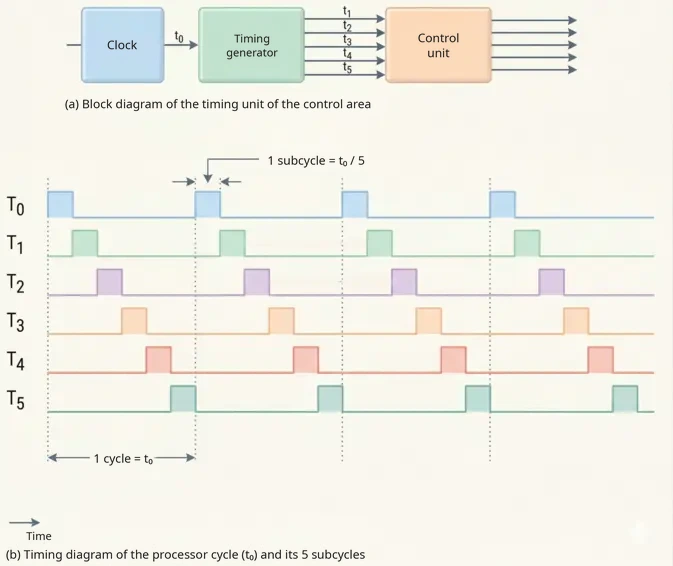
To get around the frequency limit and increase performance, processors have evolved their execution modes. Historically, CPUs operated in a strictly sequential mode (an instruction only started after the previous one finished). Today, we operate with concurrent execution (pipeline), where several instructions overlap in different stages (like an assembly line); parallel execution, with multiple cores processing instructions simultaneously; and vector execution, where a single instruction operates on multiple data at the same time.
The instruction cycle #
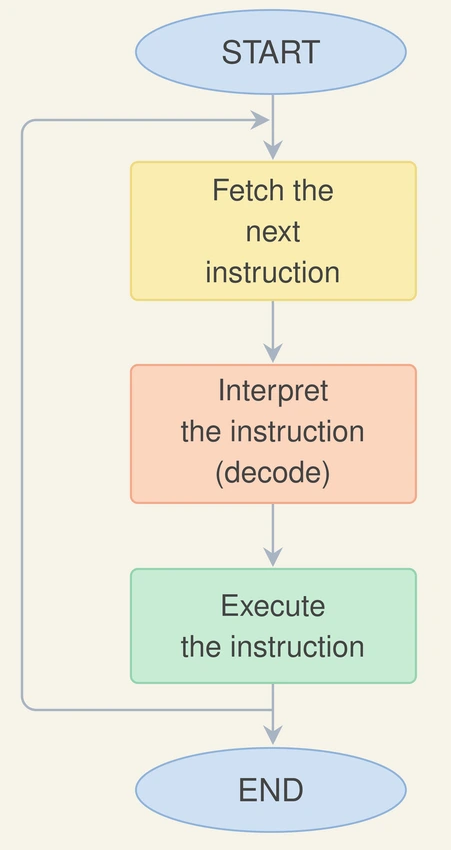
The CPU operates in a perpetual loop:
$$\text{Instruction cycle} = \text{Fetch cycle} + \text{Execute cycle}$$In practice, the choreography of this perpetual loop divides the CPU into two distinct roles. In the first stage, the processor acts as a reader looking for its next task; in the second, it becomes the executor:
| Phase | What happens |
|---|---|
| Fetch cycle | Fetches the instruction from the MM → stores it in the IR → decodes it |
| Execute cycle | Generates control signals → executes in the ALU or accesses devices |
The figure below shows a simplified flowchart of the instruction cycle, with the fetch, interpretation, and execution of an instruction.
Hardwired and microprogrammed control #
To generate the control signals of the instruction cycle, there are two classic approaches to designing the Control Unit:
- hardwired control: the signals are produced by fixed logic circuits; it tends to be faster, but also less flexible;
- microprogrammed control: the microoperations are described in an internal control memory; it tends to simplify the design of the CU, although it is normally slower than fully hardwired control.
This distinction matters because it shows that the CPU does not “understand” instructions by magic: it depends on an internal mechanism that translates each instruction into an organized sequence of control signals.
Microevents of the fetch cycle #
The fetch cycle unfolds into three consecutive micro-timings, described in RTL notation (the same one we used for memory operations in the article on the memory hierarchy):
| Subcycle | Microevent in RTL | Description |
|---|---|---|
| \(t_0\) | \(\text{MAR} \leftarrow (PC)\) | The address of the next instruction goes to the MAR; it is sent over the address bus to the MM |
| \(t_1\) | \(PC \leftarrow PC + N\) and \(\text{MDR} \leftarrow M(\text{MAR})\) | The PC is incremented (it points to the following instruction) while the MM reads the instruction and places it in the MDR |
| \(t_2\) | \(\text{IR} \leftarrow \text{MDR}\) | The instruction is transferred from the MDR to the IR, where it will be decoded by the CU |
Here, \(N\) represents the number of cells occupied by the instruction. In fixed-length instruction architectures, this increment is usually constant; in more complex architectures, it depends on the actual size of the fetched instruction.
Note that \(t_1\) has two simultaneous operations: the PC increment and the MM read can occur in parallel because they use distinct resources, the PC and the ALU (for the increment) versus the bus and the MM (for the read).
Instruction formats #
An instruction can contain a variable number of operands, depending on the architecture. The three main formats differ in how many explicit values the instruction references:
| Format | Semantics | Assembly example |
|---|---|---|
| 3 operands | \(\text{Op3} \leftarrow \text{Op1} \oplus \text{Op2}\) | ADD R1, R2, R3 → R3 = R1 + R2 |
| 2 operands | \(\text{Op1} \leftarrow \text{Op1} \oplus \text{Op2}\) | ADD R1, R2 → R1 = R1 + R2 |
| 1 operand | \(\text{ACC} \leftarrow \text{ACC} \oplus \text{Op}\) | ADD B → ACC = ACC + (B) |
The 1-operand format is characteristic of accumulator architectures: the ACC is always one of the implicit operands, which simplifies the decoder circuit at the cost of less expressiveness per instruction.
The opcode size can be fixed (simpler and faster implementation, but it limits the number of operations) or variable (more flexible, more complex decoding). CISC architectures tend to use variable formats; RISC, fixed ones.
CISC vs. RISC #
This discussion about instruction design, whether formats should be variable and full of options or fixed and lean, created two schools of thought that clashed for decades:
| Characteristic | CISC | RISC |
|---|---|---|
| Full name | Complex Instruction Set Computers | Reduced Instruction Set Computers |
| Philosophy | Many instructions, some of them complex | Few instructions, simpler and more uniform |
| Instruction format | Varied (different sizes) | Uniform (fixed size) |
| Addressing modes | More numerous | More restricted |
| Historical focus | Expressiveness per instruction | Ease of implementation, pipelining, and fast execution |
The intuition behind CISC was to reduce the number of instructions needed to represent a program. The intuition behind RISC was to simplify the instructions to make execution faster and more predictable.
In practice, modern processors mix ideas from both schools: for example, the x86 family keeps a historically CISC interface, but internally translates the instructions into simpler micro-operations. This table is just the map of the territory. We will return to CISC and RISC in depth in the last article of the series, where the comparison gains data and the conclusion is less obvious than it seems.
The article after this one explores in detail how a hypothetical processor executes concrete instructions, step by step.
Practical examples #
With all the components in mind, we can size the registers and buses of a concrete machine from its specifications:
Example: complete register design
A machine must address 4 M cells of main memory, with each cell storing 2 bytes. Each instruction contains: an operation code (at most 64 operations), one MM address operand, and one register operand (the machine has 16 registers).
Determine: (a) the size of the MAR and the address bus; (b) the instruction size in bits and in cells; (c) the size of the MDR and the DB to fetch the instruction in a single access; (d) the accesses needed if 1 cell at a time; (e) the sizes of the IR and the PC.
(a) MAR / AB: \(N = 4\text{M} = 2^{22}\) cells → \(E = 22\) bits → MAR = AB = \(\mathbf{22}\) bits
(b) Instruction size:
- Opcode: 64 operations \(= 2^6\) → \(\mathbf{6}\) bits
- Operand (address): 22 bits
- Operand (register): 16 registers \(= 2^4\) → \(\mathbf{4}\) bits
- Total: \(6 + 22 + 4 = \mathbf{32\ \text{bits}}\) = 2 cells (each cell = 16 bits)
(c) MDR / DB for 1 access: To obtain the whole instruction in 1 access → MDR = DB = \(\mathbf{32}\) bits
(d) Accesses if 1 cell at a time: Instruction = 32 bits; cell = 16 bits → \(\mathbf{2}\) accesses
(e) IR and PC:
- IR = \(\mathbf{32}\) bits (stores the complete instruction)
- PC = \(\mathbf{22}\) bits (addresses the whole MM)
The next two examples combine concepts seen here with concepts of memory hierarchy and cache seen in the previous articles, showing how the design of the CPU and of the memory are interlinked.
Example: from maximum capacity to the data bus
A machine can address 16 M cells. Each cell stores one word, and each instruction is the size of one word. The operation code supports at most 256 distinct operations and the operand is an MM address. Four fetch cycles are needed to obtain a complete instruction.
Determine: size of the PC, total capacity, MAR, IR, AB, and DB.
\(N = 16\text{ M} = 2^{24}\) cells → PC = MAR = AB = \(\mathbf{24}\) bits
Opcode: \(256 = 2^8\) → 8 bits. Operand: 24 bits. Instruction = \(8 + 24 = 32\) bits = size of one cell \((M)\).
IR = \(\mathbf{32}\) bits (stores the whole instruction for decoding).
\(T = 2^{24} \times 32 = \mathbf{512\ \text{Mbits}}\ (= 64\ \text{Mbytes})\)
DB: instruction = 32 bits in 4 fetch cycles → DB = \(32/4 = \mathbf{8}\) bits
Example: two-operand instruction and double fetch cycle
A machine has 256 M cells, with 512 distinct instructions. Each instruction contains an operation code and two MM address operands. The data bus has a width equal to half the size of an instruction.
Determine: MAR, IR, MDR, total capacity, and describe the fetch cycle.
\(N = 256\text{ M} = 2^{28}\) → MAR = \(\mathbf{28}\) bits
Opcode: \(\log_2 512 = 9\) bits. Each operand: 28 bits. Instruction = \(9 + 28 + 28 = \mathbf{65\ \text{bits}}\) → IR = MDR = \(\mathbf{65}\) bits
\(T = 2^{28} \times 65 = 256 \times 65\ \text{Mbits} = \mathbf{16{,}640\ \text{Mbits}}\)
DB = \(65/2 \approx 32\) bits → 1 bit is left over → \(\mathbf{3}\) fetch cycles for the complete instruction
Conclusion and next articles #
We now understand what the CPU is and how it is organized. We know each component (ALU, CU, registers, decoder, clock) and how the fetch cycle mobilizes them in sequence to bring an instruction from memory to the IR. But describing components and the fetch cycle is only half of the story. We have not yet seen what happens during the execute cycle: how the CPU actually processes a specific instruction, operating on concrete data.
In the next article, we will explore a hypothetical 12-bit processor with a limited instruction set. It will serve as a model for understanding the complete instruction cycle, the step-by-step execution of instructions such as LDA (load) and ADD (add), and the fundamentals of assembly, the low-level language that communicates directly with the hardware.
See you then!


