

So far in this series we have explored memory, the CPU, the pipeline, data representation, and program execution, all internal components of the computer. But a computer without input and output would be just a closed calculator: unable to receive data from the world and unable to return results. This article covers the problem that makes I/O so challenging, the three strategies for solving it, and how to calculate the impact of each one on CPU performance.
The fundamental I/O problem
External devices are orders of magnitude slower than the CPU and main memory. The CPU operates in nanoseconds (GHz); a hard disk responds in milliseconds; a human keyboard generates events every few hundred milliseconds. The whole I/O architecture exists to manage this speed mismatch without wasting the CPU’s precious cycles.
External devices: from variety to speed #
The first complication of any I/O system is the diversity of devices, each with a completely different speed, protocol, and behavior:
| Category | Examples | Typical transfer rate |
|---|---|---|
| Very slow | Keyboard | bytes per second to a few tens of B/s |
| Slow | Mouse, printer, UART | tens of B/s to KB/s |
| Medium | Hard disk (HDD), USB 2.0 | MB/s to tens of MB/s |
| Fast | SATA SSD, Gigabit network | hundreds of MB/s |
| Very fast | NVMe SSD, high-speed networks | GB/s |
Rate ranges are only orders of magnitude
The rates above serve as a teaching reference. In real systems, they vary widely with the interface, bus generation, controller, protocol, block size, and access pattern.
As for function:
| Type | Examples |
|---|---|
| Input | Keyboard, mouse, scanner, microphone, camera |
| Output | Monitor, printer, speaker |
| Input/Output | Hard disk, USB flash drive, network card, flash memory |
The figure below shows the general model of an I/O device, with its components and the interface with the CPU’s I/O module:
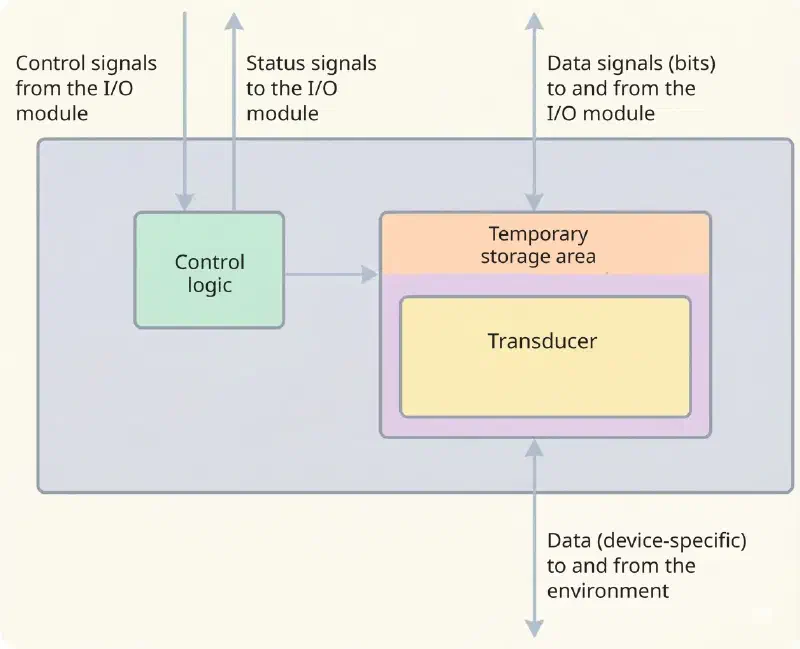
The conversation between the I/O module and the device happens through three kinds of signal, and it is worth keeping them apart:
- Control signals tell the device what to do: send data (INPUT or READ), accept data (OUTPUT or WRITE), report its status, or perform something specific to that hardware, such as positioning a disk head.
- Data is the content itself: a set of bits going or coming.
- Status signals tell what situation the device is in. The most common pair is READY / NOT-READY, whether or not it is ready to transfer.
On the device side there are two more pieces. The control logic drives the hardware in response to what the I/O module asks. And the transducer translates between worlds: on output, it converts an electrical signal into another form of energy (motion, light, sound, ink), and does the reverse on input. Since the two ends almost never work at the same pace, the transducer usually comes with a buffer, which holds the data while one end waits for the other.
The I/O interface: the middleman #
Between the CPU and the physical device sits the I/O interface (also called the I/O controller or I/O module). In practice, the CPU does not talk to the hard disk; it talks to the hard disk’s controller. This intermediate circuit takes on five vital responsibilities to isolate the CPU from the chaos of the outside world:
- Control and timing: synchronizes the data traffic between fast internal resources and slow external devices.
- Communication with the CPU: decodes commands, exchanges data over the system bus, and reports the status.
- Communication with the device: sends electrical signals or commands specific to the peripheral’s protocol.
- Temporary storage (buffering): accumulates the slow bits arriving from the device until they form a word of suitable size (8, 16, 32 bits) to send to memory all at once, compensating for the speed difference.
- Error detection: checks for mechanical problems (e.g., paper jam) or transmission failures (corrupted bits) and notifies the CPU.
To perform these tasks, every interface has at least three internal registers mapped to the CPU:
| Register | Function |
|---|---|
| Data | Holds the data to be transferred between CPU ↔ device |
| Status | Indicates the current condition: ready, busy, or error |
| Control | Receives commands from the CPU: start operation, select mode |
CPU  ←————————————→    [ I/O interface     ]  ←————————→  Device
       bus             [ Data reg.         ]   cable/protocol
                       [ Status reg.       ]
                       [ Control reg.      ]
The figure below shows the block diagram of a generic I/O module. On the outside, it connects to the rest of the computer through a set of signal lines: in practice, the lines of the system bus.
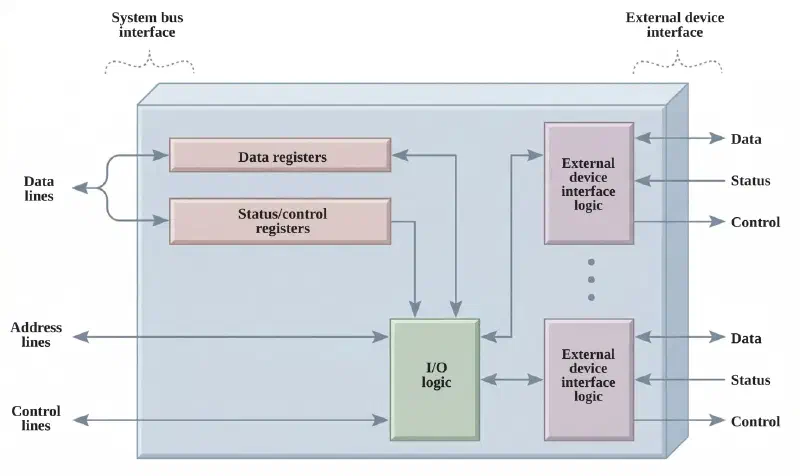
On the inside, there are data registers, which hold what is in transit, and status registers, which report the current situation. In many designs a single register accumulates the status and control functions: when read, it returns the device’s situation; when written, it accepts detailed commands from the processor. That is why reading from and writing to the same address of an interface can mean very different things.
The internal logic talks to the processor through the control lines: the processor sends commands through them, and some of these lines come back carrying arbitration and status signals. The module also needs to recognize and generate the addresses of the devices it controls: each module has a unique address or, when it drives more than one external device, a unique set of addresses. And closing the list is logic specific to each device: the part that changes from one controller to another, and the reason a different driver exists for each piece of hardware.
Serial × parallel transmission #
Data has to travel somehow between the interface and the device. Two paradigms:
| Characteristic | Parallel | Serial |
|---|---|---|
| Bits per cycle | 8, 16, or 32 simultaneously | 1 bit at a time |
| Typical distance | Short (inside the case) | Long (meters to km) |
| Number of wires | Many | Few (2 to 4) |
| Cost | Higher | Lower |
| Examples | Internal bus, LPT port | USB, RS-232, Ethernet, SATA |
Serial transmission can be further divided into:
- Synchronous: transmitter and receiver operate with a common time reference; in the classic model, this appears as a shared clock. It is more efficient, since it avoids extra synchronization bits per character.
- Asynchronous: there is no explicit shared clock between the ends, and each character is delimited by special start bits (start bit) and stop bits (stop bit). This is the standard for the UART (Universal Asynchronous Receiver-Transmitter).
I/O addressing: how the CPU accesses the interface #
How does the CPU access the registers of the I/O interface? There are two paradigms:
Memory-mapped I/O: the I/O registers are given addresses within the same
address space used by main memory. The CPU uses the same memory access
instructions (LDA, STR, MOV…) to read and write I/O registers. It is
simple and flexible. Drawback: part of the address map becomes occupied by
I/O, and not by main memory.
Port-mapped I/O (isolated I/O): there is a separate address space
reserved for I/O: the I/O ports. It requires dedicated instructions (IN
for reading, OUT for writing). It does not consume memory addresses, and the
Intel x86 architecture offers this model with ports from 0x0000 to 0xFFFF.
The x86 uses both models, and today mostly the first
It is common to see port-mapped I/O described as “the x86 model”, as opposed to memory mapping. In fact, the x86 has always had both, and the proportion between them has reversed over time.
The IN/OUT ports are a legacy of the original PC and remain there for
compatibility: the legacy keyboard, the timer, the serial port. But every
modern PCI Express device exposes its registers through MMIO, and for
concrete reasons: the port space is only 64 KB and practically exhausted,
while the 64-bit memory space is vast; MMIO works with any memory access
instruction, taking advantage of the full set of addressing modes; and
IN/OUT are instructions sensitive to the I/O privilege level (IOPL) and
slow, with no pipelining or cache.
In other words: anyone writing a driver today, for practically any card, writes MMIO.
The three I/O techniques #
The central problem is: how does the CPU know when the device has finished an operation and is ready to transfer data? Three strategies evolved historically, and the first of them, programmed I/O, is also the simplest to understand and the most expensive to use.
The figure below illustrates the three I/O techniques: Polling, Interrupt, and DMA. Each technique has a distinct interaction model between CPU, interface, and device, with clear trade-offs in terms of efficiency and overhead. They will be explored in detail below.
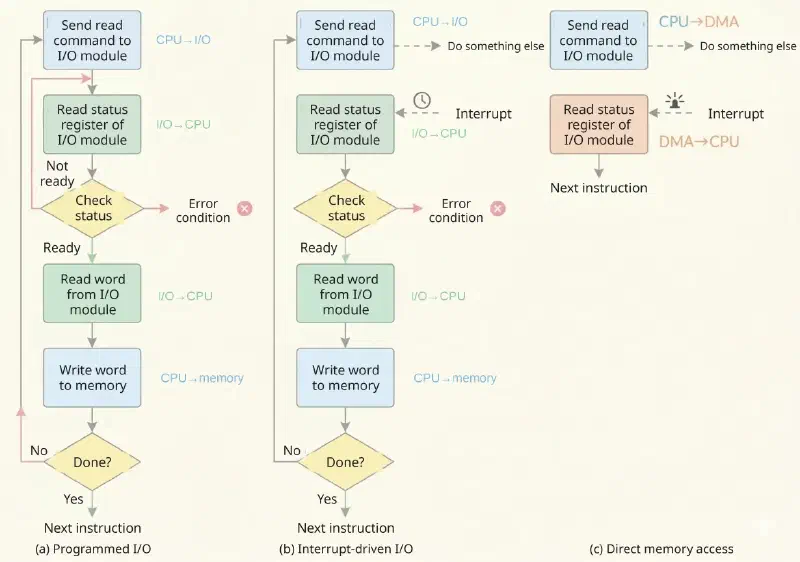
Polling: programmed I/O (busy-wait) #
The CPU continuously checks the device’s status register in a busy-wait loop:
repeat:
    read Status_Reg of the device
    if Status_Reg == READY:
        read/write Data_Reg
        exit the loop
    else:
keep checking (does nothing useful)- Advantage: extremely simple to implement in software.
- Drawback: busy-wait, in which the CPU wastes all of its cycles waiting, without doing any useful work.
Catastrophic waste with polling
In a system with a 1 GHz clock waiting for a disk with 10 ms latency:
$$\text{Wasted cycles} = 10 \times 10^{-3}\ \text{s} \times 10^9\ \frac{\text{cycles}}{\text{s}} = 10^7\text{ cycles}$$Ten million completely idle cycles, just waiting. In general-purpose multitasking systems, this is unacceptable.
Interrupt: interrupt-driven I/O #
The CPU starts the I/O operation and immediately returns to its work. When the device finishes, it sends an interrupt signal (IRQ, Interrupt Request). The CPU saves the current state, runs the interrupt service routine (ISR), and resumes exactly where it left off:
sequenceDiagram
    participant UCP as CPU
    participant Dispositivo as Device
    participant ISR as ISR (Interrupt Service Routine)

    UCP->>Dispositivo: Starts operation (writes to Control Reg.)
    UCP->>UCP: Keeps running other processes
    Dispositivo-->>UCP: Raises IRQ signal when done
    UCP->>UCP: Saves context (PC, registers)
    UCP->>ISR: Jumps to service routine
    ISR->>ISR: Reads data from Data Reg. / handles result
    ISR->>UCP: Restores context
    UCP->>UCP: Resumes execution where it left off
- Advantage: the CPU does not waste cycles waiting; it does useful work in parallel with I/O.
- Drawback: overhead of saving and restoring context on every interrupt; many interrupts per second can saturate the CPU.
Two types of interrupt deserve attention:
- Maskable: can be temporarily disabled (
CLIon the x86), useful for critical sections that must not be interrupted. - Non-maskable (NMI): in general serviced even with interrupts disabled, reserved for critical hardware errors (power failure, memory error).
How the CPU knows which routine to run #
A question is left open in the diagram above: the interrupt signal arrives, but how does the processor find out where to jump? The keyboard and the disk cannot land in the same routine.
The answer is a table in memory. Each interrupt carries a vector number, and this number indexes a table that holds the address of the corresponding routine. On the x86, it is the IDT (Interrupt Descriptor Table), whose base address sits in a dedicated processor register. Receiving interrupt number 14, then, means: look up entry 14 of the table, take the address stored there, and jump to it. The operating system fills in this table during initialization, and that is how a driver “registers” a service routine.
And if two interrupts arrive together? A dedicated controller decides. In old PCs it was the PIC (Programmable Interrupt Controller), the 8259A chip, with eight lines numbered by priority; in current systems it is the APIC, which exists in a local version (one per core) and an I/O version, and allows routing each interrupt to a specific core. That is why, in a multicore system, the load of handling interrupts can be distributed, or deliberately concentrated on one core, leaving the others free.
DMA: direct memory access #
The DMA controller is a dedicated circuit capable of transferring entire blocks of data between the device interface and main memory, without the CPU having to intervene for each word transferred. The CPU merely programs the operation (address, size, direction), and the DMA controller takes over moving the block over the bus.
The idea is older than the PC
Freeing the processor from the work of moving data is not an invention of the era of home hard disks. The IBM 709, from 1958, and the 7090 that succeeded it already had I/O channels: dedicated auxiliary processors, with their own command set, that ran transfer programs while the main CPU computed. The CPU built the “channel program”, started it, and moved on; the channel signaled when it finished.
It is exactly the pattern of this section, half a century before it showed up as a standard in the PC. And the idea kept coming back: modern NVMe controllers operate through command queues in memory, which the device reads on its own. They are I/O channels by another name.
The diagram below details the steps of the DMA operation, showing how the CPU programs the controller, how the DMA steals the bus to transfer the data, and how the CPU is notified at the end of the transfer. The result is that the CPU is practically free during the entire operation, except for a small initial overhead and a final interrupt.
sequenceDiagram
    participant UCP as CPU
    participant DMA as DMA Controller
    participant MP as Main Memory
    participant IF as Interface / Device

    UCP->>DMA: Programs DMA (MM address, size, direction)
    UCP->>UCP: Keeps running other tasks
    DMA->>UCP: Requests use of the bus
    UCP->>DMA: Grants the bus
    Note over UCP,DMA: Bus handover (here in burst mode)
    DMA->>IF: Coordinates device read/write
    DMA->>MP: Transfers the block through memory
    DMA-->>UCP: Interrupt at the end of the transfer
The diagram above details the seven steps of the DMA operation. In the first two, the CPU is still in control: it programs the DMA controller, giving it the destination address in main memory, the amount of data to transfer, and the direction of the operation (read or write). From then on, it simply keeps running other tasks: this is the fundamental gain over the earlier techniques.
When the DMA controller is ready to start the transfer, it needs to use the system bus, which belongs to the CPU. So it requests the bus (step 3), and the CPU grants it (step 4), temporarily suspending its own access to it, the handover indicated by the note in the diagram. Once the bus is granted, the DMA acts autonomously: it coordinates the read or write with the device interface (step 5) and transfers the block directly to main memory (step 6), without the CPU taking part word by word. At the end, the DMA controller sends an interrupt to the CPU (step 7), signaling that the transfer has finished and that the data is already available in memory.
It is worth noting that the diagram is an intentional simplification: it represents the transfer as a single continuous block, hiding the fact that, in real cycle stealing, the bus request and grant repeat for each word transferred. The following note details this distinction.
Cycle stealing vs. burst mode
The DMA can operate in two distinct bus control modes:
-
Cycle stealing: the DMA controller requests the bus, steals 1 cycle, transfers 1 word, and gives the bus back immediately. The CPU briefly resumes, and the process repeats for each word of the block. The impact on the CPU is spread out over time, but it is never completely free during the transfer.
-
Burst mode: the DMA takes the bus just once and keeps control for the whole duration of the transfer. The CPU is suspended for the entire block, but the bus is used much more efficiently (without the overhead of multiple negotiations).
The diagram above represents, in simplified form, burst mode: the request and grant appear only once. In real cycle stealing, this negotiation repeats word by word. In both cases, the CPU does not take part in the transfer itself and is notified only at the end, via an interrupt.
The efficiency of this “stealing” depends on how the DMA is physically connected to the motherboard. There are three classic architectural configurations:
- Single bus (standalone controller): the DMA and the device share the same system bus. To read data from the disk into RAM, the data travels from the Disk to the DMA and then from the DMA to the RAM. This uses the bus twice, suspending the CPU both times.
- Single bus (integrated controller): the DMA and the I/O interface form a single component. The data goes straight from this controller to the RAM. The CPU is suspended only once.
- Dedicated I/O bus: the system has the main bus (CPU-Memory) and a secondary bus specific to peripherals (such as PCI Express). The DMA acts as a “bridge” between the two. Transfers between devices on the secondary bus do not affect the CPU, and sending to the RAM steals the fewest cycles possible.
- Advantage: the CPU is practically free during the transfer of large blocks.
- Drawback: requires dedicated hardware (a DMA controller); higher cost and complexity.
Comparison table #
| Characteristic | Polling | Interrupt | DMA |
|---|---|---|---|
| HW complexity | Minimal | Medium | High |
| SW complexity | Low | Medium | Medium |
| CPU efficiency | Very low | Good | Very high for large blocks |
| I/O speed | Limited | Medium | High |
| Overhead per transfer | High (continuous loop) | Medium (context per event) | Low (CPU does not take part in each word) |
| Typical applications | Simple MCUs | Keyboard, mouse, timers | Disk, network, audio/video |
How to choose the right technique
- Polling: a device with a very fast response (< 1 µs) where the cost of an interrupt would be greater than the wait, or very simple embedded systems without multitasking.
- Interrupt: most general-purpose devices (keyboard, mouse, UART, timers).
- DMA: large, frequent transfers (hard disks, SSDs, network cards, audio and video).
Calculating the I/O overhead #
The I/O overhead measures the fraction of CPU cycles consumed to handle I/O operations:
$$\text{Overhead (\%)} = \frac{\text{operations/s} \times \text{cycles/operation}}{\text{total cycles/s}} \times 100$$Where:
$$\text{operations/s} = \frac{\text{transfer rate (B/s)}}{\text{size of the transferred unit (B)}}$$$$\text{total cycles/s} = f_{\text{clock}}$$The steps to solve any overhead problem:
-
1
Operations per second
Calculate how many I/O operations occur per second (rate ÷ unit size). -
2
Cycles per second
Multiply by the number of CPU cycles spent per operation. -
3
Fraction of the clock
Divide by the clock frequency. -
4
Percentage
Multiply by 100 to get the percentage.
Example: interrupt overhead of a mouse
A USB mouse sends 40 reports per second, each with 4 bytes. The CPU (1 GHz) spends 1000 cycles per interrupt.
With interrupts:
$$\text{Overhead} = \frac{40 \times 1000}{1 \times 10^9} = \frac{40{,}000}{10^9} = 0.004\%$$Practically negligible: the CPU spends only 4 out of every 100,000 cycles handling the mouse.
With polling at 1 kHz (1000 checks/s), 100 cycles per check:
$$\text{Overhead}_{\text{polling}} = \frac{1000 \times 100}{10^9} = 0.01\%$$Also small for the mouse. But the two numbers come from different premises, and it is worth saying so out loud: the cost per interrupt here is 1000 cycles and the cost per polling check is 100. The difference is real: handling an interrupt requires saving context, jumping to the service routine, and restoring everything afterward, whereas a polling check can be just a register read and a test. In the disk examples further on, the interrupt cost used is 100 cycles, assuming a service routine much leaner than the mouse’s.
Beware of the conclusion “polling is always worse”
Common sense says that polling wastes CPU and interrupts do not, and for a long time that was exactly how it was. But with very fast devices the math flips, and today polling has come back precisely where performance matters most.
The reason is that an interrupt has a fixed cost per event: saving context, jumping to the service routine, restoring. When the device takes milliseconds to respond, this cost is irrelevant. When it responds in a few microseconds and delivers hundreds of thousands of operations per second, the cost of interrupts starts to dominate, and busy-waiting for a few microseconds becomes cheaper than being interrupted.
That is why an NVMe SSD at several GB/s is not the case where polling would
be catastrophic: it is one of the cases where it is the right choice. Linux
has NAPI for high-speed networks,
which turns off interrupts and starts sweeping the queue under load;
io_uring offers a polling mode for disk I/O; and frameworks like DPDK
and SPDK use polling in place of interrupts, usually with a core dedicated
to sweeping queues. The “How to choose the right technique” box already
pointed in this direction by saying that polling suits devices with a very
fast response; here is the reason.
Teaching note on the following example
The calculation below uses a simplified and historically classic model: one interrupt per small block and a fixed transfer size. This is useful for comparing the three I/O techniques, but modern devices (especially NVMe SSDs and high-speed networks) use more sophisticated mechanisms of queuing, interrupt coalescing, and transfer.
Example: reading 1 MB from disk and comparing the three techniques
A system with a 1 GHz CPU reading 1 MB from a disk with 5 ms latency and a 100 MB/s rate.
With polling:
Transfer time: \(1\ \text{MB} / 100\ \text{MB/s} = 10\ \text{ms}\)
CPU practically blocked during the entire operation.
With interrupts (teaching model: 1 interrupt per 512 B sector):
$$\text{Interrupts} = \frac{1\ \text{MB}}{512\ \text{B}} = 2048\text{ interrupts}$$$$\text{Overhead} = 2048 \times 100\ \text{cycles} = 204{,}800\text{ cycles}$$
CPU free for most of the operation, but still needs to handle many interrupts.
With DMA:
The CPU programs the DMA just once (cost ≈ tens of cycles), the DMA transfers the whole block autonomously, 1 single interrupt at the end.
| Technique | Estimated overhead |
|---|---|
| Polling | 15,000,000 cycles (CPU blocked) |
| Interrupt | ~204,800 cycles |
| DMA | ~tens + 100 cycles |
Example: identifying techniques from pseudocode
Three distinct implementations for transferring data from a device:
Implementation 1: Configure device → Start read → wait in a loop until done → Store → Process.
Technique: polling. The keyword is the busy-wait loop before storing.
Implementation 2: Configure device → Set up the ISR routine → Keep running; when the IRQ arrives, the ISR stores the data and returns → Process.
Technique: interrupt. The keyword is the service routine (ISR) triggered by the device.
Implementation 3: Configure the DMA controller (addresses, size) → Enable → Controller transfers without CPU intervention → Interrupt at the end → Process.
Technique: DMA. The keyword is “without CPU intervention” during the transfer.
Recommended scenarios:
- Polling: exact control of the moment of reading without interrupt latencies (critical real-time data acquisition).
- Interrupt: asynchronous devices of moderate speed (mouse, keyboard, UART).
- DMA: high volumes of continuous data (video, disk, network).
Conclusion and next articles #
I/O is the point where the computer meets the physical world, and managing this boundary is fundamentally a problem of speed difference. Polling wastes CPU on busy-waiting; interrupts delegate the notification to the hardware, freeing the CPU for useful work; DMA frees the CPU completely for large blocks. The right choice depends on the volume of data, the frequency of events, and the tolerance for overhead.
In the next article, we will explore advanced processor architectures: RISC vs. CISC, performance metrics, Flynn’s taxonomy, and how modern processors move toward parallelism at multiple levels.
See you then!


