

In the previous article, Program Execution, we described a classic compilation pipeline with six stages: lexical analysis, syntax analysis, semantic analysis, intermediate code generation, optimization, and object code generation. Python has something rare from a teaching standpoint: it exposes several important stages of this process through standard library modules. Not as cleanly separated as in a theoretical compiler, but enough to make much of the theory concrete.
We will use the same expression from the previous article as our common thread:
x = y + z * 2Each section is inspired by one of those stages, looking for a didactic correspondence with tools exposed by CPython.
The real scope of this article
This article builds a bridge between compiler theory and CPython’s
introspection tools. Some stages show up very clearly (tokenize, ast,
compile, dis); others appear only indirectly or partially. So the goal
here is not to claim that Python publicly exposes “the six phases” of a
classic compiler in isolation, but to show how several of these
transformations can be observed in practice.
By the way, we often hear that “Python is an interpreted language”, but that is only half the truth. In the standard implementation (CPython), the code is not read and executed line by line straight from the original text. Before running any statement, Python compiles your source code to a lower-level intermediate format called bytecode. Only then is this bytecode interpreted by an internal virtual machine (the Python Virtual Machine, PVM). This silent compilation process is exactly what we are going to dissect now.
Phase 1: lexical analysis with the tokenize module
#
The first phase turns the source code into a sequence of tokens. The
tokenize module does exactly what a real lexical analyzer does, and lets us
inspect the result:
import tokenize
import io

code = "x = y + z * 2"

tokens = tokenize.generate_tokens(io.StringIO(code).readline)
for tok in tokens:
    print(tok)
Output (simplified):
TokenInfo(type=1 (NAME),   string='x',  ...)   # identifier
TokenInfo(type=55 (OP),    string='=',  ...)   # operator
TokenInfo(type=1 (NAME),   string='y',  ...)
TokenInfo(type=55 (OP),    string='+',  ...)
TokenInfo(type=1 (NAME),   string='z',  ...)
TokenInfo(type=55 (OP),    string='*',  ...)
TokenInfo(type=2 (NUMBER), string='2',  ...)
TokenInfo(type=4 (NEWLINE),string='\n', ...)
TokenInfo(type=0 (ENDMARKER), ...)
Token type numbers change between versions
The same warning this article makes about bytecode applies here: token.OP
is 55 in Python 3.12, but it was 54 in 3.11 and earlier, because 3.12 added
new token types in the middle of the numbering. The other ones in this
output have been stable for a long time (NAME = 1, NUMBER = 2,
NEWLINE = 4, ENDMARKER = 0), but relying on any of them by number is
fragile.
The second version of the code, right below, is immune to this: it uses
token.tok_name to translate the number into a name, which is the correct
way to write code that survives an interpreter upgrade.
Compare with what we described in the theory in earlier articles:
Input:  x = y + z * 2
Tokens: [ID: x] [OP: =] [ID: y] [OP: +] [ID: z] [OP: *] [NUM: 2]
tokenize produces exactly this list, plus position metadata (line and
column) that would be used for precise error messages.
# More readable version: show only type and value
import tokenize, io, token

code = "x = y + z * 2"
for tok in tokenize.generate_tokens(io.StringIO(code).readline):
    if tok.type not in (token.NEWLINE, token.NL, token.ENDMARKER, token.ENCODING):
        print(f"{token.tok_name[tok.type]:10} | {tok.string!r}")
NAME | 'x'
OP | '='
NAME | 'y'
OP | '+'
NAME | 'z'
OP | '*'
NUMBER | '2'Phase 2: syntax analysis with the ast module
#
The second phase organizes the tokens into a hierarchical structure that
reflects the grammar of the language: the Abstract Syntax Tree (AST). The
ast module exposes this
structure directly:
import ast

code = "x = y + z * 2"
tree = ast.parse(code)

print(ast.dump(tree, indent=2))
Output (simplified):
Module(
  body=[
    Assign(
      targets=[Name(id='x')],
      value=BinOp(
        left=Name(id='y'),
        op=Add(),
        right=BinOp(
          left=Name(id='z'),
          op=Mult(),
          right=Constant(value=2)
        )
      )
    )
  ]
)
Compare with the tree drawn in the previous article, here in text form:
        assign
       /      \
      x         +
               / \
              y   *
                 / \
                z   2
It is the same structure: ast.dump is just the serialized version of the
tree. The BinOp with Mult appears deeper than the BinOp with Add,
capturing the precedence of * over +.
Transforming the AST before compilation #
The ast module lets us inspect and also transform the tree before
compiling, the basis of tools like linters, formatters, and optimizers. We
can, for example, write a script that walks the tree looking for
multiplications by powers of 2 and replaces them with bit shifts. As we saw
in the article on The Hypothetical Processor, the ALU performs shifts much
faster than it does with complex adders:
import ast

class ReplaceMultiplicationWithShift(ast.NodeTransformer):
    """
    Replaces multiplications by constants that are powers of 2
    with left shifts (more efficient).
    """
    def visit_BinOp(self, node):
        self.generic_visit(node)  # process children first
        if isinstance(node.op, ast.Mult) and isinstance(node.right, ast.Constant):
            n = node.right.value
            if isinstance(n, int) and n > 0 and (n & (n - 1)) == 0:
                shift = n.bit_length() - 1
                print(f"Optimizing: * {n} → << {shift}")
                return ast.BinOp(
                    left=node.left,
                    op=ast.LShift(),
                    right=ast.Constant(value=shift),
                )
        return node

code = "result = z * 4"
tree = ast.parse(code)
optimized_tree = ReplaceMultiplicationWithShift().visit(tree)
ast.fix_missing_locations(optimized_tree)

compiled_code = compile(optimized_tree, "<transformed>", "exec")
print(ast.dump(optimized_tree, indent=2))

# Proof that the transformation reached the bytecode:
import dis
dis.dis(compiled_code)
In the dis output there is a BINARY_OP 3 (<<) where there would
otherwise be BINARY_OP 5 (*): the rewritten tree became different bytecode,
and that is the only evidence that matters. Without this step, the example
would show only that the AST changed, not that the change survived
compilation.
What this example really shows
This transformation with ast.NodeTransformer is a great example of
syntactic rewriting of the AST. It looks like a compiler optimization,
but it should not be sold here as a “guaranteed real performance
optimization” in Python. In CPython, the execution cost involves Python
objects, dynamic dispatch, and other factors that go far beyond the abstract
arithmetic operation.
And there is a more serious problem: the transformation is wrong
Not wrong as code: wrong as an optimization. The rewrite
z * 4 → z << 2 only holds if z is an integer. If z is a float,
z * 4 works perfectly and z << 2 raises TypeError: unsupported operand type(s) for <<: 'float' and 'int'. The transformer only looks at syntax: it
sees a multiplication by a power of 2 and rewrites it, knowing nothing about
the type of z.
And that is exactly the argument for why a real compiler needs semantic analysis before optimizing: it is what discovers the types, and without types there is no way to know whether a rewrite preserves the meaning of the program. The next section is precisely about that phase. An optimizer that runs without it does not optimize: it gambles.
Phase 3: semantics and runtime checks #
In traditional compilers, semantic analysis includes tasks such as type checking, name usage, operation compatibility, and scope consistency. In CPython, an important part of these checks happens at runtime, and not as a public phase separate from compilation.
So this stage should be understood here only approximately: Python does not expose a public “complete semantic analysis” API comparable to that of a classic static compiler.
A useful example is to show that certain expressions are accepted syntactically but fail when executed:
# Type check at runtime (not at compile time):
try:
    result = 3 + "5"
except TypeError as e:
    print(f"TypeError at runtime: {e}")
    # TypeError at runtime: unsupported operand type(s) for +: 'int' and 'str'
It is also worth noting that ast.literal_eval() is not a general semantic
analyzer for Python. It only evaluates, without executing code, simple
literal structures such as numbers, strings, lists, tuples, dictionaries,
sets, None, and booleans. The documentation advises against using it with
untrusted data, because a small input can exhaust the interpreter’s memory or
stack.
import ast

# ast.literal_eval evaluates literals without executing arbitrary code
# (but it is not recommended for untrusted strings: it can exhaust memory or stack)
try:
    result = ast.literal_eval("[1, 2, 3]")
    print(result)          # [1, 2, 3]
    print(type(result))    # <class 'list'>

    # Trying to evaluate a non-literal expression → ValueError
    ast.literal_eval("x + 1")  # ERROR: contains a variable
except ValueError as e:
    print(f"Expected failure: {e}")
The correct reading of this phase, therefore, is:
- in classic compilers: explicit semantic analysis;
- in CPython: several relevant semantic checks show up at runtime.
Phase 4: compile() and object code generation
#
The compile() function converts Python source code (or an already built
AST) into a code object. This object can be executed by exec() or
eval().
This should not be interpreted as if Python exposed a classic intermediate
representation in the style of TAC (Three-Address Code). The object
generated by compile() is already much closer to the executable form used
by the CPython virtual machine than to a didactic compiler IR.
# compile(source, filename, mode)
# mode: 'exec' for modules, 'eval' for expressions, 'single' for the REPL
obj = compile("x = y + z * 2", "<string>", "exec")

print(type(obj))           # <class 'code'>
print(obj.co_consts)       # constants used: (2, None)
print(obj.co_names)        # global variable names: ('y', 'z', 'x')
print(obj.co_stacksize)    # maximum stack size needed
The code object is CPython’s internal executable unit, and it is this kind of
object that can be serialized into .pyc files for load caching.
About writing .pyc by hand
.pyc by hand
It is technically possible to serialize a code object with the marshal
module and assemble a .pyc manually, but it is not worth it, not even as a
demonstration. The marshal format is specific to Python, deliberately not
documented in detail, and changes between versions; and the .pyc header
starts with a magic number that identifies the exact interpreter version:
making up this number produces a file that Python refuses to import.
To observe .pyc in practice, the way is to let Python itself generate it,
which is what the next section does.
Practical example: letting Python generate the compiled cache #
Instead of writing a .pyc file by hand, the proper way is to let Python
generate the cache automatically.
# Save this content in a file called example_module.py:
#
# value = 42
# def double(x):
#     return x * 2
#
# Then, in another Python file or in the REPL:

import example_module

print(example_module.value)       # 42
print(example_module.double(10))  # 20
After the import, Python tends to create a __pycache__/ directory with a
.pyc file corresponding to the module, when appropriate. This file stores a
version compiled to bytecode to speed up future loads.
Phase 5: some observable compiler optimizations #
CPython performs some optimizations during compilation, but they do not appear as a separate, configurable “public phase” the way they do in a classic compiler. The easiest example to observe here is constant folding: expressions made up only of constants can be precomputed at compile time.
import dis

# Without constant folding: variables must be resolved at runtime
code_vars = compile("result = y + z * 2", "<string>", "exec")

# With constant folding: pure constants are evaluated at compile time
code_const = compile("result = 3 + 4 * 2", "<string>", "exec")

print("With variables — constants in the AST:")
print(compile("y + z * 2", "<string>", "eval").co_consts)
# (2,)  ← only the literal 2 is a constant

print("\nWith only constants — after constant folding:")
print(compile("3 + 4 * 2", "<string>", "eval").co_consts)
# (11,)  ← Python precomputed 3 + 4*2 = 11 at compile time!
Why None shows up in exec and not in eval
None shows up in exec and not in eval
Compare with the previous section, where
compile("x = y + z * 2", "<string>", "exec").co_consts returned
(2, None). The difference is the mode. In exec mode, the code object is
a module, and every module implicitly ends with return None, hence the
extra constant. In eval mode, the code object is an expression, which
returns its own value: there is no implicit return, and None does not
appear.
It is worth knowing this because the order and contents of co_consts have
already changed between CPython versions, and this is the kind of detail
where an example copied from an old text stops matching what the
interpreter shows. The values here were checked on Python 3.12.
Phase 6: object code with the dis module
#
The dis (disassembler)
module shows the bytecode instructions that CPython is going to execute, the
closest we can get, in pure Python, to inspecting the code that the CPython
virtual machine will run.
Important: bytecode depends on the CPython version
The dis module works on CPython’s bytecode, and this bytecode is an
implementation detail. It can change between Python versions and should not
be treated as a stable language that is portable across VMs or releases.
import dis

def calculate(y, z):
    x = y + z * 2
    return x

dis.dis(calculate)
Typical output (Python 3.11 and 3.12; from 3.13 on, the two LOAD_FAST
become a single LOAD_FAST_LOAD_FAST instruction):
  2           0 RESUME                   0

  3           2 LOAD_FAST                0 (y)
              4 LOAD_FAST                1 (z)
              6 LOAD_CONST               1 (2)
              8 BINARY_OP               5 (*)
             12 BINARY_OP               0 (+)
             16 STORE_FAST               2 (x)

  4          18 LOAD_FAST                2 (x)
             20 RETURN_VALUE
Each line is a bytecode instruction: an opcode (such as LOAD_FAST,
BINARY_OP) plus an argument. Notice the correspondence with the TAC from the
previous article:
| CPython bytecode | Approximate logical role |
|---|---|
LOAD_FAST y |
loads y onto the stack |
LOAD_FAST z |
loads z onto the stack |
LOAD_CONST 2 |
loads the constant 2 |
BINARY_OP * |
combines z and 2 |
BINARY_OP + |
combines y with the previous result |
STORE_FAST x |
stores the result in x |
This table does not aim to reproduce a classic TAC literally; it only shows the approximate logical correspondence between CPython’s stack bytecode and the operations of the original expression.
The order may look inverted, but CPython uses an evaluation stack: each
LOAD pushes a value; each BINARY_OP pops two operands, operates, and
pushes the result.
Stack architecture vs. registers
If you followed our articles on the CPU, you should remember that our hypothetical processor used an accumulator or registers to do arithmetic. The CPython interpreter, however, simulates a Stack Machine. In it, we do not say where to save the result of an addition in the instruction itself; operations simply take the data at the top of the stack, compute, and put the result back on top.
Inspecting the bytecode of a complete module #
import dis, ast

# Complete pipeline: source code → tokens → AST → bytecode
source_code = """
def sum_of_squares(a, b):
    return a**2 + b**2
"""

print("=== TOKENS ===")
import tokenize, io, token as tok_mod
for t in tokenize.generate_tokens(io.StringIO(source_code).readline):
    if t.type not in (tok_mod.NL, tok_mod.NEWLINE, tok_mod.ENDMARKER, tok_mod.ENCODING, tok_mod.INDENT, tok_mod.DEDENT):
        print(f"  {tok_mod.tok_name[t.type]:10} {t.string!r}")

print("\n=== AST ===")
tree = ast.parse(source_code)
print(ast.dump(tree, indent=2))

print("\n=== BYTECODE ===")
compiled_code = compile(source_code, "<inline>", "exec")
# the function is inside the module — we need to extract it
exec(compiled_code, globals())
dis.dis(sum_of_squares)
Putting the pieces together #
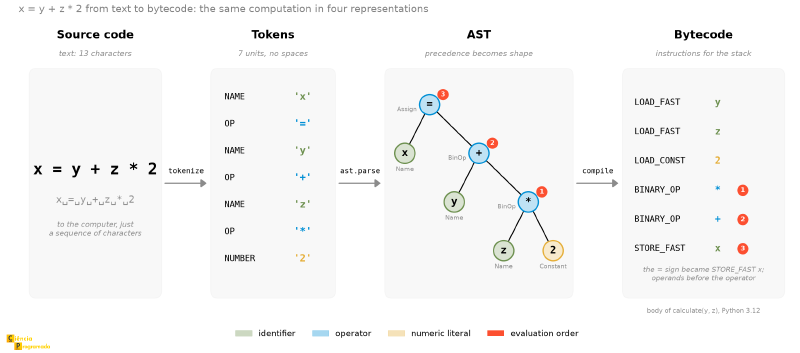
Before the table, the whole expression at once. The figure below puts side by
side the four forms that x = y + z * 2 took throughout the article, with
the tool that leads from one to the next. The colors follow each token from
start to finish, and the numbers mark the same evaluation order in the tree
and in the bytecode: the stack executes the operators from the bottom to the
top of the AST. The tree has the same drawing as the figure in Program
Execution.
The following table maps each theoretical phase described in Program Execution to the corresponding Python tool:
| Phase | Theory | Python tool | What to observe |
|---|---|---|---|
| 1. Lexical analysis | Tokenization | tokenize |
List of tokens with type and value |
| 2. Syntax analysis | Parser / AST | ast.parse() + ast.dump() |
Hierarchical tree with precedences |
| 3. Semantics / checks | Types and operational consistency | Runtime (TypeError, etc.) |
An important part of the consistency is checked during execution |
| 4. Executable code object | Internal executable representation | compile() → co_consts, co_names, co_stacksize |
Code object that CPython can execute |
| 5. Optimization | Constant folding, etc. | co_consts (compare with/without constants) |
Constant expressions precomputed |
| 6. Object code | Bytecode | dis.dis() |
Evaluation stack bytecode instructions |
Reading the table correctly
The table above does not mean that CPython exposes a public, independent API for each phase of a classic compiler. Rather, it shows an approximate didactic correspondence between the theory and the tools that Python offers for introspection.
Conclusion and next articles #
Python is a good language for observing several internal transformations of
the compilation and execution process. tokenize, ast, compile, and
dis make concrete stages that, in many compilers, stay hidden behind
internal tools or outputs that are hard to inspect.
The next time you run python script.py, you will have a much clearer view
of what happens behind the scenes.
For those who want to go down one more level, the CPython InternalDocs, maintained alongside the source code and pointed to by the developer guide, document the compiler from the inside: the same phases seen here, but from the point of view of whoever maintains the interpreter, with the source files for each stage. It is free, official, and covers the pipeline of this article.
About __pycache__
__pycache__
Python stores compiled .pyc versions in __pycache__ to speed up module
loading. This process is automatic: the interpreter compares the cache with
the source and recompiles when necessary.
In the next article, we will talk about input and output, that is, how the computer communicates with the outside world: polling, interrupts, and direct memory access (DMA), and why the choice of I/O mechanism affects the performance of the whole system.
See you then!


