

In the previous article, CPU in Action: The Hypothetical Processor, we followed our 12-bit processor executing one instruction at a time: fetch from memory, decode, execute, write the result, and start over. The sequence is correct and complete, but it carries a fundamental inefficiency: while the ALU executes an instruction, the memory bus sits idle; while a new fetch happens, the ALU waits. It is as if an automobile assembly line never touched the next car before the previous one was completely finished.
The pipeline technique eliminates exactly this waste: just as an industrial assembly line keeps several cars at different stages at the same time, the pipeline keeps several instructions at different stages of the cycle simultaneously. The result is a significant increase in throughput without any individual instruction becoming faster, all thanks to overlapping operations.
In this article you will understand:
- the assembly line analogy and the performance formulas;
- the classic 2-stage and 5-stage pipelines;
- the three types of hazards that interrupt the pipeline flow;
- how to calculate the real speedup with numerical examples;
- the hierarchy of buses that connects CPU, memory, and peripherals;
- the differences between synchronous and asynchronous buses;
- the two ways to implement the control unit: hardwired and microprogrammed.
The assembly line analogy #
Imagine a factory that builds cars in four independent steps (frame, engine, paint, and finishing), each taking exactly one week. Without a pipeline, the second car only enters the line when the first is completely finished: four cars take 16 weeks. With a pipeline, each step receives a different car every week: after the initial four weeks of “filling” the line, one finished car comes out every week.
| Situation | 1 car | 4 cars |
|---|---|---|
| Without pipeline | 4 weeks | 16 weeks |
| With pipeline | 4 weeks | 7 weeks |
The pipeline technique works like an assembly line: different instructions occupy different stages at the same time. The gain does not come from making an individual instruction faster, but from increasing the number of instructions completed per unit of time (throughput).
In an idealized model, in which:
- all stages take exactly 1 cycle;
- there are no hazards;
- there are no resource conflicts;
- the pipeline is always kept fed,
we have:
$$ T_{\text{without pipeline}} = N \times K $$$$ T_{\text{with pipeline}} = K + (N - 1) $$where:
- \(N\) = number of instructions;
- \(K\) = number of pipeline stages.
The term \(K\) represents the initial filling time of the line. After that, in the ideal regime, one instruction finishes per cycle. The term \((N-1)\) is the additional cycles after the first stage is full. For large programs, where \(N \gg K\), the time tends to \(N\) cycles, that is, one instruction finished per cycle.
These formulas hold for the ideal case
In real processors, data, control, and structural hazards can insert stalls and flushes, reducing the effective gain of the pipeline.
The fixed overhead of \(K\) cycles to fill the pipeline is diluted as more instructions are processed. For a program with millions of instructions, the speedup approaches \(K\) times. For few instructions, the startup cost can make the pipeline less advantageous than sequential execution.
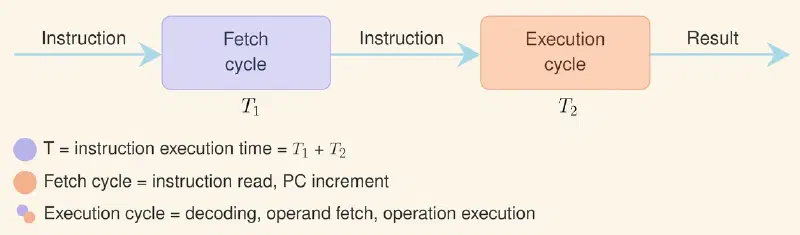
To understand this, let us recall the traditional instruction cycle seen in earlier articles, which is divided into steps such as fetch, decode, execute, and write result. The pipeline divides this cycle into stages that can be processed simultaneously by different instructions. The figure below recovers this cycle with the steps named, to serve as a reference for what comes next:
In sequential execution, each instruction goes through all the steps before the next one starts, as illustrated below:
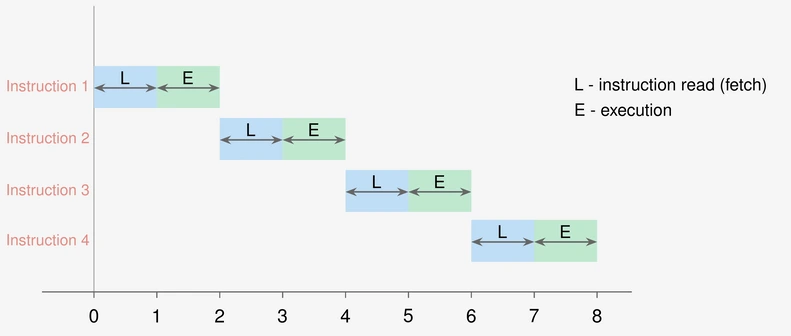
Note that, assuming each stage takes the same time T, executing the 4 instructions sequentially would take 8T (4 instructions × 2 stages each).
In the next sections, we will explore how the pipeline stages are organized and what challenges arise when multiple instructions compete for shared resources.
The pipeline stages #
Two-stage pipeline #
The simplest division separates the cycle into fetch (Fetch) and execution (Execute). While the ALU executes instruction \(i\), the CU already fetches instruction \(i+1\) from memory: the two stages work in parallel.
| Stage | Function |
|---|---|
| Fetch | Fetches the next instruction from memory via MAR/MDR |
| Execute | Decodes the instruction and performs the operation |
The figure below illustrates what happens with the same 4-instruction program seen earlier, but now with the 2-stage pipeline. Note that from the second cycle on, the instructions overlap: while the first is executing, the second is already being fetched; when the second is executing, the third is already being fetched; and so on:
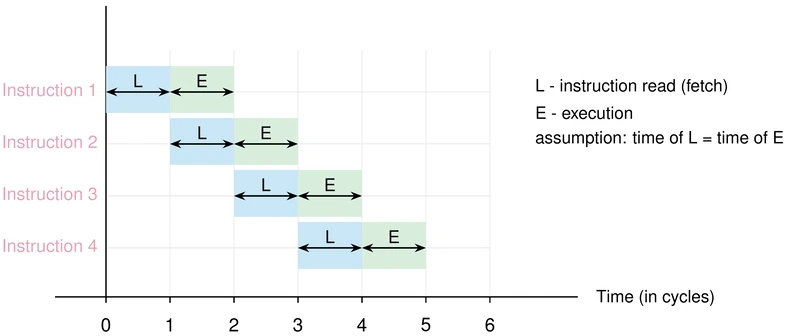
In the figure, the stages appear abbreviated as L (leitura, “read”, the same as the Fetch stage) and E (execução, execution).
Thanks to the overlap, the total time for the 4 instructions drops from 8T to 5T, a gain of 1.6×.
The problem arises with conditional branch instructions (such as JZ or JP in our hypothetical processor): when the condition is tested in the Execute stage, the instruction already fetched in the Fetch stage may be the wrong one. It must be discarded (flush) and the instruction at the correct branch address must be fetched.
The solution is branch prediction. The simplest form of it is static “not-taken” prediction: we assume the branch will not occur and keep fetching instructions sequentially. If the prediction fails, we flush and restart the fetch. Correct predictions eliminate the penalty; wrong predictions impose, in this two-stage model, only a one-cycle delay.
Modern processors do not stop there. They use dynamic predictors, which learn the behavior of each branch during execution: 2-bit saturating counters (which only change their mind after being wrong twice in a row, which gets loops right almost always), two-level predictors correlating the history of several branches, and more elaborate schemes such as TAGE and perceptron-based predictors. The hit rate exceeds 95% on real code, and that is exactly why a miss hurts so much in a deep pipeline, which already has dozens of instructions in flight when it discovers it bet on the wrong path.
When speculation became a vulnerability
Getting work done ahead of time based on a guess has a consequence that only became clear in 2018, with Spectre. When the processor speculatively executes instructions from a path that will end up discarded, it undoes the effect on the program’s visible state (registers, memory), but it does not undo the effect on the cache. The blocks loaded during that discarded work are still there.
This opens a door: a malicious program can induce the processor to speculate on an access it would not be allowed to make and then discover what was read just by measuring cache access times. There is no implementation bug: branch prediction worked as designed. The attack exploits the difference between what the processor undoes and what it leaves as a trace, and it forced the entire industry to revise, at a real performance cost, a technique that dated from the 1980s.
Branch penalty
In very simple models, the penalty can be just 1 cycle. In deeper pipelines, the penalty can be larger, because more instructions will already have been partially processed before the branch is resolved.
Five-stage pipeline #
RISC architectures refined the pipeline to five stages, making each step more granular, and therefore faster, since each stage requires less logic. The classic RISC pipeline uses the stages IF, ID, EX, MEM, and WB (fetch, decode, execute, memory access, and write back). Here we adopt a similar didactic division, which separates the address calculation from the operand fetch:
flowchart LR
    B["F
Fetch"] --> D["D
Decode"] --> C["C
Address
Calculation"] --> O["O
Operand
Fetch"] --> E["E
Execute"]
| Stage | Abbreviation | Function |
|---|---|---|
| Fetch | F | Fetches the instruction from main memory (MM) via PC |
| Decode | D | Decodes the opcode; identifies operands in registers |
| Address calculation | C | Computes the effective address of the operand in memory |
| Operand fetch | O | Fetches the operand from MM or from a register |
| Execute | E | Performs the operation in the ALU and/or stores the result |
With five stages, the pipeline can keep five instructions in progress simultaneously: each one in a different stage. The clock frequency can be increased because each stage is simpler; and the throughput, in steady state, approaches one instruction completed per cycle.
The figure below shows the same 4-instruction program, now with the 5-stage pipeline. In the ideal case, from the fifth cycle on all five steps would be busy and one instruction would finish every cycle. That is not what happens here, and the figure shows why: the blue blocks are the stages that access memory, the hatched areas are waits, and the bottom strip indicates which instruction memory is serving in each cycle.
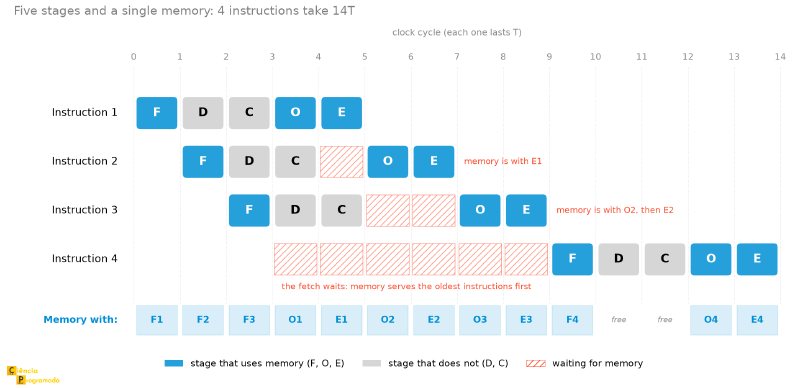
If the pipeline were sequential, the 4 instructions would take 20T (4 instructions × 5 stages each). With the 5-stage pipeline, the total time drops to 14T, a gain of approximately 1.43×.
But 14T is not what the ideal-case formula predicts. With \(K = 5\) and \(N = 4\), \(K + (N-1)\) would give 8T. The difference of six cycles has a concrete cause, and it is the first appearance of a hazard in this article: only one memory access can be performed at a time. And three of the five stages need it: F fetches the instruction, O fetches the operand, and E writes the result. When two of them want the memory in the same cycle, one waits. This is what the next section calls a structural hazard, and it is why the figure shows waits where the ideal model would show a continuous diagonal.
You can follow each wait in the bottom strip. Between 4 and 5, instruction 2 could already fetch its operand, but memory is with E1, which writes the result of instruction 1. Instruction 3 waits two cycles for the same reason, now with O2 and E2. And instruction 4, whose fetch could start at 3, only gets memory at 9, because until then it is always served last.
About the scheduling in the figure
The figure follows a simple rule: in each cycle, memory goes to the oldest instruction that needs it. It is a reasonable rule (what started first finishes first), but it is not the best possible. Starting the fetch of the fourth instruction at 7, before the third finishes, the total would drop to 12T. With a different priority policy, the total changes. What is worth taking away is the existence of the conflict and the order of magnitude of what it costs, not the exact value of 14T, which depends on the rule adopted.
And there is a number that bothers us: the 5-stage pipeline yielded 1.43×, less than the 1.6× of the 2-stage pipeline. Do more stages make performance worse? No. There are two combined effects, and neither is the fault of depth itself:
- The memory conflict we just saw. Without it, the 4 instructions would finish in 8T, which would give 2.5×, well above the 2-stage pipeline.
- The short program. A pipeline with \(K\) stages spends \(K - 1\) cycles before completing the first instruction, and this fixed cost is only diluted with many instructions. With \(N = 4\), the filling is almost the entire program.
The speedup calculation section, further ahead, shows the same 5-stage pipeline reaching 3.27× with 100 instructions, against 1.68× for the 2-stage one. The hierarchy flips as soon as the program has a realistic size, and the trend, for \(N \gg K\), is for the gain to approach \(K\).
Hazards: when the pipeline stumbles #
The ideal pipeline assumes that each stage finishes in the same time and that instructions are independent of each other. In practice, three situations break this assumption, the so-called hazards:
When a hazard is detected, the pipeline may need stalls (bubbles, that is, cycles wasted waiting) or flushes (discarding instructions already fetched). Real performance falls below the theoretical ideal.
| Type | Cause | Solution |
|---|---|---|
| Structural | Two stages need the same hardware resource at the same time (e.g., a single memory bank for fetch and for data) | Duplicate the resource (separate instruction and data caches); insert a stall |
| Data | An instruction depends on the result of a previous instruction that has not yet finished executing | Forwarding (passing the result directly between stages); stall |
| Control | A conditional branch instruction invalidates instructions already fetched | Branch prediction; flush of the incorrect instructions |
These hazards are the main reason why the real performance of the pipeline falls below the theoretical limit.
Most optimizations in modern compilers (such as instruction reordering and loop unrolling) aim precisely at reducing the frequency of data and control hazards.
Calculating performance #
Even with the delays caused by hazards, the mathematics of the pipeline still proves its superiority over sequential execution at large scale. To consolidate this concept, the following examples illustrate how to apply the formulas in practice. The most important result is not the final number itself, but the intuition about when it is worth using this technique (or not).
Example: four-stage pipeline
Consider an instruction divided into 6 blocks with times:
$$ A=80,\ B=20,\ C=70,\ D=40,\ E=60,\ F=10\ \text{ps} $$The execution time of an instruction without a pipeline is the sum of all the blocks:
$$ T_{\text{instr}} = 80+20+70+40+60+10 = 280\ \text{ps} $$For 10 instructions executed sequentially, the total time will be:
$$ T_{\text{seq}} = 10 \times 280 = 2800\ \text{ps} $$Now, to implement a 4-stage pipeline, we group the blocks so as to try to balance the times:
- Stage 1: \(A = 80\) ps
- Stage 2: \(B + C = 20 + 70 = 90\) ps
- Stage 3: \(D = 40\) ps
- Stage 4: \(E + F = 60 + 10 = 70\) ps
The pipeline cycle is determined by the slowest stage:
$$ T_{\text{cycle}} = \max(80,90,40,70) = 90\ \text{ps} $$For 10 instructions, the total time with the pipeline will be:
$$ T_{\text{pipeline}} = 4 \times 90 + (10-1)\times 90 $$$$ T_{\text{pipeline}} = 360 + 810 = 1170\ \text{ps} $$
The speedup is:
$$ \text{Speedup} = \frac{T_{\text{seq}}}{T_{\text{pipeline}}} = \frac{2800}{1170} \approx 2.39 $$Therefore:
- time without pipeline: \(2800\ \text{ps}\)
- time with pipeline: \(1170\ \text{ps}\)
- speedup: \(\approx 2.39\times\)
The central point is this: the performance of the pipeline depends heavily on the balance between the stages. The slowest stage sets the pace of the whole line, so the machine must be designed with all stages running at the time of the slowest one: in this case, 90 ps.
Example: pipeline with real instructions (2 and 5 stages)
A machine divides each instruction into five blocks with the following durations: Fetch (IF = 10 ps), Decode (ID = 2 ps), Address calculation (AC = 2 ps), Operand fetch (OF = 10 ps), and Execute (EX = 10 ps). Calculate the time to execute 100 instructions in the three configurations.
a) Sequential:
$$T_{\text{instr}} = 10+2+2+10+10 = 34\ \text{ps} \quad\Rightarrow\quad T_{\text{total}} = 100 \times 34 = \mathbf{3400\ \text{ps}}$$b) 2-stage pipeline (S1 = {IF, ID, AC} = 14 ps; S2 = {OF, EX} = 20 ps):
$$T_{\text{cycle}} = \max(14, 20) = 20\ \text{ps}$$$$T_{\text{total}} = \bigl[2 + (100-1)\bigr] \times 20 = 101 \times 20 = \mathbf{2020\ \text{ps}}$$
c) 5-stage pipeline (each original block is a stage):
$$T_{\text{cycle}} = \max(10, 2, 2, 10, 10) = 10\ \text{ps}$$$$T_{\text{total}} = \bigl[5 + (100-1)\bigr] \times 10 = 104 \times 10 = \mathbf{1040\ \text{ps}}$$
| Configuration | Total time | Speedup |
|---|---|---|
| Sequential | 3400 ps | 1× |
| 2-stage pipeline | 2020 ps | 1.68× |
| 5-stage pipeline | 1040 ps | 3.27× |
The 5-stage pipeline offers a speedup of 3.27× with the same hardware blocks, just by reorganizing the execution flow.
The two previous examples use the ideal model: no overhead beyond the initial filling of the pipeline. The following example introduces an extra startup cost, representing real situations where the pipeline needs to be “warmed up” by preparatory instructions before reaching steady state. This overhead makes the break-even point nontrivial and more instructive.
Example: when is it worth using the pipeline?
Consider again the machine with a 2.5 GHz clock:
$$T_{\text{cycle}} = \frac{1}{2.5 \times 10^9} = 0.4\ \text{ns per cycle}$$Each instruction takes 2 cycles in sequential execution. For 1250 instructions:
$$T_{\text{seq}} = 1250 \times 2 \times 0.4 = \mathbf{1000\ \text{ns}}$$2-stage pipeline with 2 initialization instructions (each = 2 stages):
$$T_{\text{init}} = 2 \times 2 \times 0.4 = 1.6\ \text{ns}$$$$T_{\text{pipeline}}(N) = 1.6 + 2 \times 0.4 + (N-1) \times 0.4 = 0.4N + 2.0\ \text{ns}$$
For the pipeline to pay off: \(0.4N + 2.0 \leq 0.8N\), that is, \(N \geq 5\) instructions.
3-stage pipeline with 2 initialization instructions. Note the change of reference: dividing the instruction into three stages means the equivalent sequential machine spends 3 cycles per instruction, not 2, so the fair comparison is now against \(3 \times 0.4N = 1.2N\).
$$T_{\text{pipeline}}(N) = 2 \times 3 \times 0.4 + 3 \times 0.4 + (N-1) \times 0.4 = 0.4N + 3.2\ \text{ns}$$For it to pay off: \(0.4N + 3.2 \leq 1.2N\), that is, \(N \geq 4\) instructions.
Notice that the 3-stage pipeline pays off with fewer instructions (4) than the 2-stage one (5), which seems contradictory at first glance. The reason is that the baseline against which it is measured also became slower, for having more stages. Comparing pipelines of different depths requires attention to what each one is being measured against.
The practical conclusion: pipelines with very few instructions can be slower than sequential execution, due to the startup overhead. For real programs with thousands of instructions, the pipeline is always advantageous.
Buses: the backbone of communication #
While the pipeline speeds up the execution of instructions inside the CPU, buses solve a different problem: how CPU, memory, and peripherals exchange data with each other. A bus is simply a set of shared electrical lines: a collective communication channel.
There are three functional types of bus, each carrying one kind of information:
| Bus | Function | Example signals |
|---|---|---|
| Data (DB) | Transfers data between components | 8-, 16-, 32-, or 64-bit words |
| Address (AB) | Carries addresses issued by the CPU | Address of the cell to read or write |
| Control (CB) | Carries timing and control signals | READ, WRITE, CLOCK, RESET, INTERRUPT |
The width of the address bus determines the theoretical addressing space:
$$ \text{Possible addresses} = 2^N $$where \(N\) is the number of bits of the AB.
For example, an address bus with 32 bits can represent \(2^{32}\) distinct addresses. In byte-addressable systems, this corresponds to a theoretical space of \(2^{32}\) bytes.
Bus hierarchy #
A real computer does not have a single global bus, which would create an enormous bottleneck.
Historically, personal computers used a hierarchy of buses with elements such as FSB, Northbridge, Southbridge, AGP, and ISA, with different speeds suited to each component:
flowchart TD
    UCP["CPU
(Processor)"] <--> BL["Local Bus / FSB
(Front-Side Bus)"]
    BL <--> CacheL2["L2 Cache"]
    BL <--> PN["Northbridge"]
    PN <--> MP["Main Memory"]
    PN <--> BAD["High-Performance Bus
(AGP / PCIe)"]
    BAD <--> GPU["Graphics Card / GPU"]
    PN <--> PS["Southbridge"]
    PS <--> BExp["Expansion Bus
(PCI / ISA / USB)"]
    BExp <--> Per1["Disks / Storage"]
    BExp <--> Per2["USB Peripherals"]
The Northbridge manages the high-speed traffic between CPU, RAM, and graphics card. The Southbridge takes care of the slower peripherals (disks, USB, audio). In modern architectures, much of this logic has been absorbed into the processor itself, but the hierarchical concept remains.
This organization is an excellent didactic reference, but it no longer represents the main way modern platforms are organized.
For a present-day reader, it is worth presenting this in two layers:
Historical view #
- CPU connected to the chipset by the front-side bus (Front-Side Bus);
- Northbridge handling RAM and video;
- Southbridge handling USB, disks, and slow peripherals.
Modern view #
- the memory controller is usually integrated into the processor itself;
- communication with high-speed devices happens through interconnects such as PCI Express;
- the link to the chipset/PCH happens through dedicated links;
- the hierarchy still exists, but with fewer explicit “bridges” visible to the user.
History and design characteristics #
For this hierarchical architecture to work without creating traffic bottlenecks, the communication paths had to widen and speed up over time. The evolution of expansion bus standards over the decades reveals exactly this continuous search for greater bandwidth:
| Bus | Year | Width | Clock | Transfer Rate |
|---|---|---|---|---|
| ISA (original PC) | 1981 | 8 bits | n/a | ~1 MB/s |
| ISA (AT) | 1984 | 16 bits | 8 MHz | ~8 MB/s |
| PCI | 1992 | 32 bits | 33 MHz | 133 MB/s |
| PCI (extended) | 1995 | 64 bits | 66 MHz | 533 MB/s |
| AGP 1× | 1997 | 32 bits | 66 MHz | 266 MB/s |
| AGP 8× | 2002 | 32 bits | 533 MHz effective | 2,133 MB/s |
| USB 1.0 | 1996 | Serial | n/a | 1.5 / 12 Mbit/s |
| USB 2.0 | 2000 | Serial | n/a | 480 Mbit/s |
With the years in the table, the arc becomes visible: over two decades, the transfer rate of the expansion bus went from about 1 MB/s to more than 2 GB/s, a factor of two thousand. And the table could continue with the most recent standards: PCI Express, which debuts in 2003 and reaches versions 4.0, 5.0, and 6.0 with bandwidths in the range of GB/s per lane, combining multiple lanes to reach even higher rates.
Four design parameters determine the performance of a bus:
- Width: number of data lines (more lines allow transferring more bits per cycle);
- Protocol: defines the timing of each signal and the handshake between devices;
- Speed: bus clock frequency;
- Transfer modes: one block per cycle, or multiple consecutive blocks (burst mode).
The bus cycle: who speaks and when #
Any transfer on a bus involves two roles and an arbiter:
| Role | Who takes it | Function |
|---|---|---|
| Master | CPU, DMA controller | Starts the transfer |
| Slave | Main memory, I/O device | Responds to the request |
| Arbiter | Dedicated circuit | Decides who uses the bus when there is a conflict |
The basic sequence is:
$$ \text{request} \to \text{grant} \to \text{use} \to \text{release} $$The CPU’s Control Unit takes part in generating the internal and external signals needed for operation, but bus arbitration should be treated as a function of the interconnect subsystem’s arbitration mechanism, and not as the exclusive responsibility of the CU.
Direct Memory Access (DMA)
As we have seen, the CPU is the natural master of the system. However, if the CPU had to act as an intermediary for every byte read from a large file on the hard disk into RAM, it would waste millions of cycles just moving data, without processing anything.
The hardware solution for this is DMA (Direct Memory Access). It allows peripheral controllers (such as that of the hard disk or the graphics card) to temporarily take on the role of bus Master. With the arbiter’s permission, the disk writes the file directly into Main Memory, leaving the CPU completely free to execute other instructions in parallel.
Synchronous × asynchronous #
The central difference between synchronous and asynchronous buses is not simply “one being faster than the other”, but how the timing coordination is done.
| Characteristic | Synchronous | Asynchronous |
|---|---|---|
| Coordination | Based on a common clock | Based on request and acknowledge signals |
| Implementation | Simpler to test and integrate | More flexible for heterogeneous components |
| Adaptation to slow devices | More limited | Better adaptation |
| Typical use | Fast, nearby components | Devices with varying timings |
In summary:
- the synchronous bus is simpler when the components operate at a similar pace;
- the asynchronous bus is more appropriate when there is great speed variation among the devices.
Handshake protocol (asynchronous bus)
On the asynchronous bus, the master sends a request (REQ) signal and waits for the slave’s acknowledgment (ACK) before proceeding. Only after receiving the ACK is the next operation started. This three-step protocol allows devices with very different speeds to be integrated on the same bus: the bus adapts to the pace of the slowest component, without requiring all of them to share a common clock.
The Control Unit from the inside #
With the assembly line of instructions (pipeline) running at high speed and the communication paths (buses) established, one last question remains: who manages this whole orchestra? The answer takes us back to the heart of the CPU: the Control Unit (CU). It is the one that fetches each instruction, decodes the opcode, and emits the electrical signals that activate each component at the right time, including bus arbitration.
Although we have focused on fetch and execution so far, in practice the CU divides the processor’s time into four fundamental subcycles:
-
1
Fetch
Goes to memory and brings the instruction. -
2
Indirect
If the instruction uses a pointer (indirect addressing), the CU must do an extra memory read to discover the real address of the data. -
3
Execute
Triggers the ALU or moves the data as decoded. -
4
Interrupt
The CU pauses what it is doing to handle an urgent external event (such as a network packet arriving or a hardware error) before fetching the next instruction.
But how does the CU itself “know” how to do this? It must be built in some physical form, and there are two classic approaches for that.
Hardwired implementation #
The hardwired CU is built entirely in fixed hardware: logic gates, flip-flops, and dedicated combinational circuits. Each instruction of the instruction set corresponds to a specific logical path in the circuit. The result is an extremely fast CU, since the control logic runs directly in hardware with no memory lookup.
For those familiar with programming, the best way to picture a hardwired CU is
to imagine a gigantic set of IF/AND/OR conditionals physically converted into
wires and transistors.
For example, if the CPU needs to activate the control signal \(C_5\) (which
opens a register’s gate) only during time cycle \(t_2\) of an addition
instruction (ADD), the engineers create a logic circuit that solves the
Boolean equation: \(C_5 = \text{ADD} \text{ AND } t_2\). When electricity flows
through that specific combination, the gate opens. It is pure mathematics
governing silicon.
The drawback is rigidity: any change to the instruction set requires redesigning the physical circuit. That is why the hardwired implementation is the natural choice for RISC architectures, whose instruction set is small, regular, and stable.
Microprogrammed implementation #
In the microprogrammed implementation, the Control Unit executes microinstructions stored in an internal control memory. Instead of relying only on fixed combinational circuits, the behavior of each instruction is described by an organized sequence of microoperations.
This makes the CU design more flexible and easier to structure than a fully hardwired control, although usually at a lower speed. Microprogramming makes it easier to implement and evolve the control logic, especially in architectures with more complex instructions.
Microinstructions can be organized in two ways:
| Type | Word width | Parallelism | Encoding |
|---|---|---|---|
| Horizontal | Long (many bits) | High: several micro-ops at once | Minimal: almost one bit per control signal |
| Vertical | Short and compact | Low: few active fields at a time | High: needs an additional decoder |
Overall comparison #
| Characteristic | Hardwired | Microprogrammed |
|---|---|---|
| Speed | Very fast | Moderate |
| Flexibility | Low | High |
| Cost of change | High (hardware redesign) | Low (firmware update) |
| Design complexity | High | Moderate |
| Typical architecture | RISC | CISC |
Python bonus: calculating pipeline performance #
The pipeline formulas are simple enough to become reusable Python functions. With them, you can quickly explore how different groupings of stages affect the total time:
def sequential_time(stage_durations: list[float], n_instructions: int) -> float:
    """Total execution time without pipeline (all stages in series)."""
    return sum(stage_durations) * n_instructions


def pipeline_time(stage_durations: list[float], n_instructions: int) -> float:
    """
    Total time with pipeline.
    The cycle width is set by the slowest stage (bottleneck).
    """
    k = len(stage_durations)
    cycle_width = max(stage_durations)
    cycles = k + (n_instructions - 1)
    return cycles * cycle_width


def speedup(t_seq: float, t_pip: float) -> float:
    return t_seq / t_pip


# Example: 6 tasks with durations 3, 1, 2, 3, 2, 2 ns grouped into 4 stages
stages = [3, 3, 3, 4]   # sum per stage after grouping
n = 6

t_s = sequential_time([3, 1, 2, 3, 2, 2], n)
t_p = pipeline_time(stages, n)

print(f"Sequential : {t_s:.0f} ns")
print(f"Pipeline   : {t_p:.0f} ns")
print(f"Speedup    : {speedup(t_s, t_p):.2f}×")
# Sequential : 78 ns
# Pipeline   : 36 ns
# Speedup    : 2.17×

# Find the minimum number of instructions for the pipeline to pay off
# (with startup cost)
def min_pipeline_instructions(
    pipeline_cycle_time: float,
    seq_cycles_per_instr: int,
    base_cycle_time: float,
    n_init_instructions: int,
    init_stages: int,
) -> int:
    """Returns the minimum N such that the pipeline is faster than sequential."""
    t_init = n_init_instructions * init_stages * base_cycle_time
    for n in range(1, 10_000):
        t_pip = t_init + init_stages * pipeline_cycle_time + (n - 1) * pipeline_cycle_time
        t_seq = n * seq_cycles_per_instr * base_cycle_time
        if t_pip <= t_seq:
            return n
    return -1  # does not converge in the tested range


# Machine at 2.5 GHz: cycle time = 0.4 ns
t_base = 0.4  # ns
print(f"Min. instrs (K=2): {min_pipeline_instructions(t_base, 2, t_base, 2, 2)}")
print(f"Min. instrs (K=3): {min_pipeline_instructions(t_base, 3, t_base, 2, 3)}")
# Min. instrs (K=2): 5
# Min. instrs (K=3): 4
Conclusion and next articles #
The pipeline turns sequential execution into an assembly line of instructions, multiplying the throughput by the number of stages, with the caveat that data, control, and structural hazards can introduce stalls that reduce the real gain. Buses, in turn, form the communication infrastructure among all components, with synchronous protocols for fast components and asynchronous ones for peripherals of varying speeds. And the choice between hardwired and microprogrammed CU reflects the tradeoff between speed and flexibility.
In the next article, we will study data representation: how integers, text, and real numbers are encoded in bits. We will explore the most common encoding standards (ASCII, Unicode, two’s complement, and the IEEE 754 standard) and understand the implications of each choice for data processing.
See you then!


