

In the previous article, CPU: Components and Instruction Cycle, we introduced the blocks that make up the CPU: ALU, CU, registers, decoder, and clock. We described the microevents of the fetch cycle in RTL notation and saw how the PC, the MAR, and the IR cooperate to bring an instruction from memory. But we described everything in general terms. Now let’s get concrete: we will follow a hypothetical processor executing real instructions, bit by bit.
Using a simplified processor as a teaching model is a classic strategy in the field: we eliminate the complexity of commercial architectures (x86, ARM) and focus on the fundamental mechanisms that any real processor shares.
In this article you will learn:
- the organization of the hypothetical 12-bit processor;
- the complete instruction set and its RTL notation;
- how to encode an instruction in binary and hexadecimal;
- the flowchart of the complete instruction cycle;
- the step-by-step execution of LDA and ADD with state tables;
- the fundamentals of assembly language;
- complete assembly programs for practical problems.
The hypothetical processor #
Despite all the physical complexity of modern chips, the logical foundations that operate inside them remain surprisingly similar to those of their ancestors. To understand how the CPU fetches and executes instructions without the “pollution” of billions of transistors and complex pipelines, let’s take a step back. We will use as a base a hypothetical computer model of just 12 bits.
The hypothetical processor has a lean organization that keeps all the essential components of a real processor. Its complete specification:
| Component | Size | Rationale |
|---|---|---|
| Word | 12 bits | Size of every memory cell |
| Addresses | 8 bits | \(2^8 = 256\) addressable cells |
| Memory cells | 12 bits | One instruction or datum per cell |
| ACC (Accumulator) | 12 bits | Same size as the word |
| PC | 8 bits | Enough to address the 256 cells |
| MAR | 8 bits | Same size as the addresses |
| MDR / MBR | 12 bits | Same size as the word |
| IR | 12 bits | Stores a complete instruction |
Notice the coherence: the PC has 8 bits because 8 bits suffice to address 256 cells; the MAR also has 8 bits because it needs to carry addresses; the MDR, the IR, and the ACC have 12 bits because they work with complete words.
Instruction format #
Each instruction occupies exactly one memory cell, with 12 bits divided into two fields:
$$\underbrace{b_{11}\ b_{10}\ b_9\ b_8}_{\text{Opcode (4 bits)}} \quad \underbrace{b_7\ b_6\ b_5\ b_4\ b_3\ b_2\ b_1\ b_0}_{\text{Operand (8 bits)}}$$- 4 opcode bits → \(2^4 = 16\) distinct possible operations
- 8 operand bits → \(2^8 = 256\) addresses, covering the entire memory
The figure below shows this same division with a real instruction filled in:
1B4, which appears later in the article. Two things are worth noticing: each
hexadecimal digit corresponds to exactly four bits, which is why the opcode
takes up the entire first digit; and the operand, with its eight bits, goes
from 00 to FF, the limit that every address of this processor must respect.
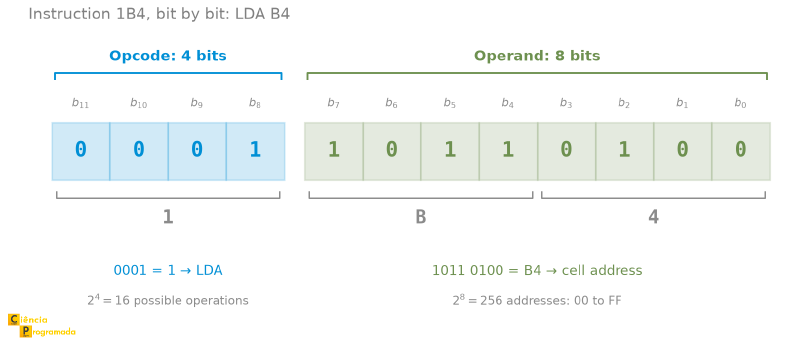
The number of possible operations and the addressing space grow exponentially with the available bits. Adding 1 bit to the opcode doubles the number of instructions; adding 1 bit to the operand doubles the addressable memory space.
Example: sizing an instruction set
A processor has 128 distinct instructions and a memory with 512 words. How many bits are needed for the opcode and for the operand? What is the total size of the instruction?
Opcode: \(\log_2 128 = \log_2 2^7 = \mathbf{7\ \text{bits}}\)
Operand: \(\log_2 512 = \log_2 2^9 = \mathbf{9\ \text{bits}}\)
Instruction = \(7 + 9 = \mathbf{16\ \text{bits}}\)
Registers: PC and MAR → \(\mathbf{9}\) bits (they address memory); MDR and IR → \(\mathbf{16}\) bits (they store words). Total capacity: \(512 \times 16 = 8192\ \text{bits} = > 1\ \text{Kbyte}\).
Effect of adding 1 bit to the opcode
If this processor went from 16 to 17 bits per instruction (keeping the operand at 9 bits), the opcode would have \(17 - 9 = 8\) bits → \(\mathbf{256}\) possible operations. A single extra bit doubles the instruction repertoire.
The instruction set #
The instruction set of the hypothetical processor has 15 entries, covering arithmetic operations, data movement, conditional and unconditional branches, and I/O:
| Opcode (hex) | Mnemonic | Operation in RTL | Description |
|---|---|---|---|
| 0 | HLT | (none) | Stop execution |
| 1 | LDA Op | \(\text{ACC} \leftarrow (Op)\) | Load from memory into the ACC |
| 2 | STR Op | \((Op) \leftarrow \text{ACC}\) | Store the ACC in memory |
| 3 | ADD Op | \(\text{ACC} \leftarrow \text{ACC} + (Op)\) | Add |
| 4 | SUB Op | \(\text{ACC} \leftarrow \text{ACC} - (Op)\) | Subtract |
| 5 | JZ Op | If \(\text{ACC} = 0\): \(\text{PC} \leftarrow Op\) | Branch if zero |
| 6 | JP Op | If \(\text{ACC} > 0\): \(\text{PC} \leftarrow Op\) | Branch if positive |
| 7 | JN Op | If \(\text{ACC} < 0\): \(\text{PC} \leftarrow Op\) | Branch if negative |
| 8 | JMP Op | \(\text{PC} \leftarrow Op\) | Unconditional branch |
| 9 | GET Op | Input \(\rightarrow (Op)\) | Read from the input port |
| A | PRT Op | \((Op) \rightarrow\) output | Print/send to output |
| B | MPY Op | \(\text{ACC} \leftarrow \text{ACC} \times (Op)\) | Multiply |
| C | DIV Op | \(\text{ACC} \leftarrow \text{ACC} \div (Op)\) | Divide |
| D | INC | \(\text{ACC} \leftarrow \text{ACC} + 1\) | Increment the ACC |
| E | DCR | \(\text{ACC} \leftarrow \text{ACC} - 1\) | Decrement the ACC |
The code F remains free for future extensions or reserved.
This processor has relatives, and one of them runs in the browser
The machine in this article is not an isolated invention. Practically every architecture course builds a similar one, and several of them have a name, a book, and an implementation. The best known are Neander and Ramses, defined by Raul and Taisy Weber, from UFRGS, described in Fundamentos de Arquitetura de Computadores and used in dozens of Brazilian courses; MARIE, by Null and Lobur; MIC-1, by Tanenbaum; SAP-1, by Malvino; and the Little Man Computer, proposed by Stuart Madnick in 1965. The processor presented here is, in essence, a Neander with more instructions: a single accumulator, one instruction per word, conditional branches that test the ACC.
Knowing this has a practical advantage: you can run the programs instead of
merely following them on paper. The Little Man Computer has a web
simulator that works in the browser,
without installing anything: you type the program, run it step by step, and
watch the accumulator and the program counter change at each cycle. Its
repertoire is smaller than this article’s, but it translates directly: LDA,
ADD, SUB, and STA do the same thing, BRZ and BRP are the branches,
INP and OUT are GET and PRT. Watching the PC advance on its own for
the first time teaches more than any trace table.
We usually refer to the instruction set as the ISA (Instruction Set Architecture). It defines the interface between software and hardware: which operations the processor can perform and how they are encoded.
The conditional branch instructions (JZ, JP, JN) change the PC only if the condition is true. Otherwise, execution continues normally: the PC has already been incremented in the fetch cycle, so the next sequential instruction is executed automatically.
Encoding instructions #
To encode an instruction in hexadecimal, just concatenate the opcode bits with the operand bits:
LDA 180\(_{10}\):
- Opcode of LDA: \(1_{10} = 0001_2\)
- Operand address: \(180_{10} = 1011\ 0100_2 = \text{B4}_{16}\)
- Complete instruction (12 bits): \(\underbrace{0001}_{\text{opcode}} \underbrace{10110100}_{\text{operand}} = \mathbf{1\text{B}4}_{16}\)
ADD 181\(_{10}\):
- Opcode of ADD: \(3_{10} = 0011_2\)
- Operand address: \(181_{10} = 1011\ 0101_2 = \text{B5}_{16}\)
- Complete instruction: \(\underbrace{0011}_{\text{opcode}} \underbrace{10110101}_{\text{operand}} = \mathbf{3\text{B}5}_{16}\)
The inverse process (decoding a hexadecimal instruction) is just as straightforward. Just separate the 4 most significant bits (opcode) from the 8 least significant bits (operand):
Example: decoding \(\text{135}_{16}\)
\(\text{135}_{16} = 0001\ 0011\ 0101_2\)
Opcode = \(0001_2 = 1_{10}\) → LDA
Operand = \(0011\ 0101_2 = \text{35}_{16} = 53_{10}\) → address 53
Decoded instruction: LDA 53
The complete instruction cycle #
With the instruction set defined, the flowchart of the instruction cycle is complete. It runs indefinitely until it finds HLT:
flowchart TD
    START(["▶ START"])

    subgraph BUSCA["Fetch Cycle"]
        B1["MAR ← PC
Sends address to the bus"]
        B2["MDR ← M(MAR)
Reads instruction from MM"]
        B3["IR ← MDR
PC ← PC + 1"]
    end

    subgraph EXEC["Execute Cycle"]
        E1{"Decode
opcode in IR"}
        E2{"Need to
fetch operand?"}
        E3["MAR ← operand in IR
MDR ← M(MAR)"]
        E4["Execute operation
(ALU or CU)"]
    end

    HLT{"HLT?"}
    STOP(["⏹ STOP"])

    START --> B1
    B1 --> B2
    B2 --> B3
    B3 --> E1
    E1 --> E2
    E2 -->|"Yes"| E3
    E3 --> E4
    E2 -->|"No"| E4
    E4 --> HLT
    HLT -->|"No"| B1
    HLT -->|"Yes"| STOP
Note that the PC is incremented in the fetch cycle, before execution. While the current instruction is being executed, the PC already points to the next one. This matters for the branch instructions: JMP and the conditional variants overwrite the PC during execution, redirecting the program flow.
Step-by-step execution: LDA #
The next two tables follow LDA B4 and then ADD B5 register by register, and
that requires keeping five addresses in your head at the same time. The figure
below serves as a map for reading. It shows the stretch of memory that the two
executions use and the path of each one, in three numbered steps: the PC points
to the instruction’s cell, the instruction’s operand points to the datum’s cell,
and the datum arrives at the accumulator.
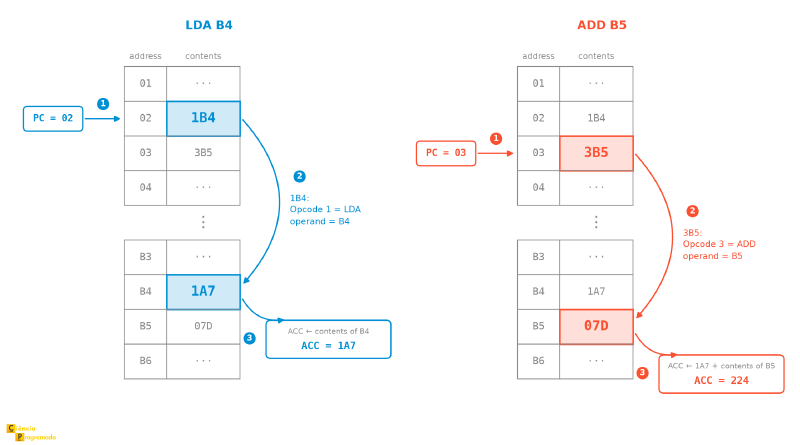
Let’s follow the execution of LDA B4 (the instruction that the previous
encoding produced, \(\text{1B4}_{16}\)) with the initial state: PC = 02;
MM[02] = \(\text{1B4}_{16}\) (the instruction); MM[B4] = \(\text{1A7}_{16}\) (the
datum to load).
| Step | Operation in RTL | Register state |
|---|---|---|
| 1 | \(\text{MAR} \leftarrow (\text{PC})\) | MAR = 02 |
| 2 | \(\text{MDR} \leftarrow M(\text{MAR})\) | MDR = 1B4 |
| 3 | \(\text{IR} \leftarrow \text{MDR}\) | IR = 1B4 |
| 4 | \(\text{PC} \leftarrow \text{PC} + 1\) | PC = 03 |
| 5 | Decoding: 4 MSBs of 1B4 = 0001 → LDA | no change |
| 6 | Operand B4 → MAR | MAR = B4 |
| 7 | CU activates READ on the control bus | no change |
| 8 | \(\text{MDR} \leftarrow M(\text{B4})\) | MDR = 1A7 |
| 9 | \(\text{ACC} \leftarrow \text{MDR}\) | ACC = 1A7 ✓ |
Steps 1 to 4 are the fetch cycle (the same \(t_0, t_1, t_2\) of the previous article). Steps 5 to 9 are the execute cycle specific to LDA.
Step-by-step execution: ADD #
Continuing from the state left by LDA: PC = 03; MM[03] = \(\text{3B5}_{16}\); ACC = \(\text{1A7}_{16}\); MM[B5] = \(\text{07D}_{16}\).
| Step | Operation in RTL | Register state |
|---|---|---|
| 1 | \(\text{MAR} \leftarrow (\text{PC})\) | MAR = 03 |
| 2 | \(\text{MDR} \leftarrow M(\text{MAR})\) | MDR = 3B5 |
| 3 | \(\text{IR} \leftarrow \text{MDR}\) | IR = 3B5 |
| 4 | \(\text{PC} \leftarrow \text{PC} + 1\) | PC = 04 |
| 5 | Decoding: 4 MSBs of 3B5 = 0011 → ADD | no change |
| 6 | Operand B5 → MAR | MAR = B5 |
| 7 | CU activates READ | no change |
| 8 | \(\text{MDR} \leftarrow M(\text{B5})\) | MDR = 07D |
| 9 | ALU receives ACC = 1A7 and MDR = 07D | no change |
| 10 | ALU computes: \(\text{1A7}_{16} + \text{07D}_{16}\) | no change |
| 11 | \(\text{ACC} \leftarrow \text{result}\) | ACC = 224 ✓ |
Check: \(\text{1A7}_{16} = 423_{10}\); \(\text{07D}_{16} = 125_{10}\); \(423 + 125 = 548_{10} = \text{224}_{16}\) ✓
Executing branches: JMP and JZ #
Branches differ from LDA and ADD in one important respect: instead of
fetching a datum for the ALU to process, they change the execution flow through
the Program Counter.
JMP 09 (unconditional branch):
- Normal fetch → the IR receives the JMP instruction; the PC is incremented.
- Decoding: the CU identifies JMP → signals an unconditional jump.
- \(\text{PC} \leftarrow 09\): the operand goes straight to the PC, with no access to MM.
- The next fetch occurs at address
09.
JZ 07 (branch if ACC = 0):
- Normal fetch → IR = JZ 07; the PC is incremented.
- Decoding: the CU identifies JZ → signals a conditional jump.
- The ALU checks whether ACC = 0.
- If ACC = 0: \(\text{PC} \leftarrow 07\) → next execution at address
07. - If ACC ≠ 0: the PC stays incremented → next sequential instruction.
The same logic applies to JP (branch if ACC > 0) and JN (branch if ACC < 0): the condition is evaluated by the ALU using the status flags, and the PC is overwritten only if the condition is true.
About flags in this hypothetical processor
In real CPUs, conditional branches usually depend on status flags produced by
the ALU, such as Zero, Negative, Carry, and Overflow. We have already talked
about flags in this article.
In this teaching processor, however, the JZ, JP, and JN branches can be
understood more simply: they directly test the logical value of the
accumulator (ACC = 0, ACC > 0, ACC < 0).
From machine language to assembly #
Programming directly in hexadecimal is laborious and error-prone. Assembly language solves this by replacing the binary codes with alphanumeric mnemonics that keep a direct relationship with the machine instructions.
| Aspect | Details |
|---|---|
| Relationship with the machine | 1:1 (one assembly instruction = one machine instruction) |
| Readability | Much greater than hexadecimal code |
| Translation | Performed by a program called an Assembler |
| Portability | Low: specific to each architecture |
Compiler vs. Assembler
- Assembler: translates assembly language into machine code for the target architecture, normally preserving a very close correspondence with the processor’s actual instructions.
- Compiler: translates a higher-level language into some form of executable or intermediate representation, which can later be converted into machine code.
In teaching models like this one, it is common to treat assembly as having an almost direct relationship with the machine’s instructions. In real tools, however, pseudoinstructions, macros, and optimizations can break a strictly 1:1 correspondence.
Structure of an assembly line #
Label       Operation   Operands     ; Comment
START:      LDA         A            ; Loads the value of A into the ACC
The label is optional and identifies the instruction’s address (useful for branches). The operation is the mnemonic. The comment is ignored by the assembler.
Example: \(X = A + B - C\) #
In a high-level language, one line. In assembly, four instructions, one for each primitive CPU operation:
LDA A    ; ACC ← (A)
ADD B    ; ACC ← ACC + (B)
SUB C    ; ACC ← ACC − (C)
STR X    ; (X) ← ACC
Each line corresponds exactly to one machine instruction. The compiler, when processing the high-level expression, generates a sequence similar to this.
Assembly in practice #
Next, complete programs that illustrate the use of the hypothetical processor’s instruction set on real problems. Memory addresses are expressed in hexadecimal.
Password check with scrambling #
A system stores the password in scrambled form at address 42: the stored
value is \(S/2 - (30)\), where \((30)\) is the content of address 30. The
user types their attempt at address 20. The program must check whether the
attempt matches and write 1 to 22 (match) or 0 (mismatch).
Auxiliary addresses: 40 = 0, 41 = 1, 43 = 2.
; Strategy: scramble what the user typed and compare it with the stored value
00: LDA 20   ; ACC ← user's attempt
01: DIV 43   ; ACC ← ACC / 2
02: SUB 30   ; ACC ← ACC − (30): now ACC holds the scrambled attempt
03: SUB 42   ; ACC ← computed scrambled value − stored scrambled value
04: JZ 08    ; If ACC = 0 → passwords match; jump to 08
05: LDA 40   ; ACC ← 0
06: STR 22   ; (22) ← 0: wrong password
07: HLT
08: LDA 41   ; ACC ← 1
09: STR 22   ; (22) ← 1: correct password
0A: HLT
Notice that all addresses have two hexadecimal digits, and this is not
aesthetics: the operand has 8 bits, so the largest possible address is FF. A
program that cited an address such as 120 would be outside this machine’s
memory.
The SUB → JZ/JP/JN pattern is the way to implement a comparison on the
hypothetical processor: subtract the two values and check whether the result is
zero, positive, or negative.
The scrambling by division has a flaw
This processor’s ALU only works with integers, and DIV discards the
remainder. This means consecutive passwords collide: if the true password is
\(S = 7\), the stored value is \(7/2 - (30) = 3 - (30)\), and the attempt
\(6\) produces \(6/2 - (30) = 3 - (30)\), exactly the same. The program would
accept both.
The problem is not in the assembly, it is in the scrambling scheme: any transformation that loses information accepts more than one input. A scrambling that only added, subtracted, or multiplied would not have this effect. It serves as a reminder that integer division is not division: the same care that appears in the sensor average later on.
The same thing using GET and PRT
GET and PRT
The statement says “the user types their attempt at address 20”. But who
puts the value there? In the program above, someone from outside. The
processor’s repertoire has instructions for exactly this: GET reads from the
input port and PRT writes to the output port. With them, the program stops
depending on external magic:
00: GET 20   ; reads the user's attempt straight into (20)
01: LDA 20   ; ACC ← attempt
02: DIV 43   ; ACC ← ACC / 2
03: SUB 30   ; ACC ← scrambled attempt
04: SUB 42   ; compares with the stored scrambled password
05: JZ 0A    ; match → jump to 0A
06: LDA 40   ; ACC ← 0
07: STR 22   ; (22) ← 0
08: PRT 22   ; shows the result (0 = wrong password)
09: HLT
0A: LDA 41   ; ACC ← 1
0B: STR 22   ; (22) ← 1
0C: PRT 22   ; shows the result (1 = correct password)
0D: HLT
Two more instructions and the program gains real input and output. The previous version remains valid: in exams and books it is common for the data to appear already “placed in memory”, and knowing how to read both styles is part of the game.
Payroll with a salary cap #
Compute an employee’s total pay:
$$\text{Total\_Pay} = \min(\text{Gross\_Pay} + \text{Bonus},\ \text{Cap}) + \text{Extra\_Pay}$$Data: 15 = Gross_Pay, 16 = Bonus, 17 = Cap, 18 = Extra_Pay, 19 = Total_Pay.
00: LDA 15   ; ACC ← Gross_Pay
01: ADD 16   ; ACC ← Gross + Bonus
02: SUB 17   ; ACC ← (Gross + Bonus) − Cap
03: JP 07    ; If ACC > 0 (exceeded the cap) → jump to 07
04: LDA 15   ; Did not exceed: reload Gross_Pay
05: ADD 16   ; ACC ← Gross + Bonus
06: JMP 08   ; Jump to add the extra pay
07: LDA 17   ; Exceeded: use the Cap as the base
08: ADD 18   ; ACC ← base + Extra_Pay
09: STR 19   ; Total_Pay ← ACC
0A: HLT
Average of four sensors #
Four sensor readings are at addresses 15, 16, 17, and 18. Compute the
average and store it at 13. Address 14 contains the value 2.
; Division by 4 = two consecutive DIVs by 2
00: LDA 15   ; ACC ← sensor1
01: ADD 16   ; ACC ← ACC + sensor2
02: ADD 17   ; ACC ← ACC + sensor3
03: ADD 18   ; ACC ← ACC + sensor4  (total sum)
04: DIV 14   ; ACC ← ACC / 2
05: DIV 14   ; ACC ← ACC / 2  (total: divided by 4)
06: STR 13   ; average ← ACC
07: HLT
In this processor, DIV is an explicit instruction of the repertoire. In a
real CPU, dividing by 4 can also be implemented with bit shifts, but that is an
implementation detail of the ALU, not a requirement of the assembly program.
Dividing by 4 is equivalent to two 1-bit arithmetic right shifts, the same as
>> 2 in modern programming languages.
Average and count of critical values #
Three measurements at addresses 30, 31, and 32. (a) Compute the average
and store it at 40. (b) Count how many measurements exceed 50 and store the
count at 41.
Auxiliary addresses: 50 = 0, 51 = 1, 53 = 3, 55 = critical value 50.
; --- Part A: Average ---
00: LDA 30   ; ACC ← meas1
01: ADD 31   ; ACC ← ACC + meas2
02: ADD 32   ; ACC ← ACC + meas3
03: DIV 53   ; ACC ← ACC / 3
04: STR 40   ; average ← ACC

; --- Part B: Count of values > 50 ---
05: LDA 50   ; ACC ← 0 (initialize counter)
06: STR 41   ; counter ← 0

; --- Test meas1 > 50 ---
07: LDA 30
08: SUB 55   ; ACC ← meas1 − 50
09: JN 0E    ; if meas1 < 50, do not count
0A: JZ 0E    ; if meas1 = 50, do not count either
0B: LDA 41
0C: ADD 51
0D: STR 41

; --- Test meas2 > 50 ---
0E: LDA 31
0F: SUB 55
10: JN 15
11: JZ 15
12: LDA 41
13: ADD 51
14: STR 41

; --- Test meas3 > 50 ---
15: LDA 32
16: SUB 55
17: JN 1C
18: JZ 1C
19: LDA 41
1A: ADD 51
1B: STR 41

1C: HLT
The correct pattern for testing “greater than” with this processor is:
- subtract the threshold;
- discard the negative case with JN;
- discard the equal case with JZ;
- only then increment the counter.
The same thing using INC
INC
The snippet that increments the counter appears three times in the program above:
LDA 41   ; ACC ← counter
ADD 51   ; ACC ← counter + 1   — (51) holds the number 1
STR 41   ; counter ← ACC
The repertoire has INC, which adds 1 to the ACC and needs no operand at all:
LDA 41   ; ACC ← counter
INC      ; ACC ← counter + 1
STR 41   ; counter ← ACC
The gain here is not in instructions: there are three in both versions. It is
in data memory: address 51, which existed only to hold the number 1, is no
longer needed. On a machine with 256 cells, every saved address counts. The
DCR instruction does the symmetric thing, and it is what you use to count
down to zero, the pattern of the loop in the next section.
Multiplication by successive additions #
The programs so far have used ADD, SUB, and DIV. The classic case is
missing: how do you multiply when there is no multiplication instruction? The
answer is a loop that adds the multiplicand as many times as the multiplier
says. It is worth building, for two reasons: it is how computers without a
multiplication instruction multiplied, like most minicomputers until the end of
the 1970s, and it is the first program in this article with a real repetition
structure.
Let’s compute \((62) = (60) \times (61)\).
Auxiliary addresses: 63 = 0, 64 = 1, 65 = working counter.
; product ← 0; repeat (61) times: product ← product + (60)
00: LDA 63   ; ACC ← 0
01: STR 62   ; product ← 0
02: LDA 61   ; ACC ← multiplier
03: STR 65   ; counter ← multiplier
04: LDA 65   ; ACC ← counter
05: JZ 0D    ; counter = 0 → done
06: LDA 62   ; ACC ← partial product
07: ADD 60   ; ACC ← product + multiplicand
08: STR 62   ; product ← ACC
09: LDA 65   ; ACC ← counter
0A: SUB 64   ; ACC ← counter − 1
0B: STR 65   ; counter ← ACC
0C: JMP 04   ; back to the test
0D: HLT
Following with \((60) = 3\) and \((61) = 2\): the counter starts at 2, the
product goes through 0, 3, and 6, the counter drops to 1 and then to 0, and the
JZ at address 04 ends the execution with \((62) = 6\). That is fourteen
instructions for one multiplication, and the execution time grows with the
value of the multiplier, not with its number of bits. Multiplying by 1000 costs
a thousand trips around the loop.
The same thing using MPY
MPY
This processor has MPY in its repertoire, and with it the whole program
collapses to four instructions:
00: LDA 60   ; ACC ← multiplicand
01: MPY 61   ; ACC ← multiplicand × multiplier
02: STR 62   ; product ← ACC
03: HLT
Fourteen instructions become four, the three auxiliary addresses disappear, and the execution time stops depending on the values of the operands. The work did not vanish: it went down to the hardware, where a multiplier circuit does in parallel what the loop did in series. It is exactly the trade-off that the CISC vs. RISC discussion presents (more work per instruction versus simpler instructions), seen from the side of whoever writes the program.
It is worth knowing how to do it both ways. The loop version is what is asked
for when the goal is to understand the operation from the inside; the MPY
version is what you write when the instruction exists.
The reverse path: STR (Store) #
While the LDA and ADD instructions bring data from memory into the CPU, the
STR instruction does the exact opposite: it saves the Accumulator’s result
back into Main Memory. The flow of microevents closes the communication cycle:
(MAR) <- (IR[address]): The destination address (where the datum will be saved) is copied into the MAR.(MDR) <- (ACC): The already computed datum leaves the Accumulator and goes to the MDR (the output “waiting room”).(MM(MAR)) <- (MDR): The Control Unit issues the write signal over the control bus, and the memory physically records the datum at the specified address.
This flow closes the complete communication cycle between CPU and memory: fetch, process, and store the result.
Inside the ALU: how does silicon calculate? #
Up to this point, we have treated the ADD operation without much detail. The
decoder sends a signal and the ALU simply “adds” the values that arrived from
memory. But how can a piece of silicon do math?
The answer is that the ALU does not understand numbers; it understands electricity. It is built from thousands of microscopic switches organized into circuits called logic gates (such as AND, OR, NOT, and XOR). Each gate receives electrical signals (zeros and ones) and emits an answer based on a simple logical rule. If you have a bit of difficulty, I recommend this series' article on Boolean Algebra.
To actually perform the addition when the ADD instruction is executed, the
CPU combines these logic gates into mathematical blocks:
- Half Adder: A simple circuit that uses logic gates to add two individual bits, producing a result and a “carry”. Its flaw is that it cannot receive a carry from a previous operation.
- Full Adder: The evolution of the circuit, capable of adding three bits (the two operands plus the carry from the neighboring column).
By lining up several Full Adders side by side, the ALU can add entire words of 12, 32, or 64 bits, propagating the carry from the least significant bit to the end. This cascade arrangement (ripple-carry) is the simplest, but the delay grows with the number of bits, which is why real processors use faster variants, such as the carry-lookahead adder. This is how the abstract Assembly command becomes a real electrical flow.
Bit shifts #
Besides using branches to optimize the program flow, the CPU also has “shortcuts” implemented directly in hardware to speed up heavy math. Instead of triggering the adders multiple times to do simple multiplications or divisions, the ALU includes shift operations. They are equivalent to multiplying or dividing by powers of 2, but executed almost instantly by “pushing” the bits sideways:
$$\text{Shift left}\ n\ \text{bits} = \times\ 2^n \qquad \text{Shift right}\ n\ \text{bits} = \div\ 2^n$$We have already covered this in an article on bitwise operators, which explored bit-by-bit operations. Let’s look at a practical example to fix the idea.
For \(5_{10} = 0101_2\):
| Operation | Binary result | Decimal result |
|---|---|---|
| Shift left 1 bit | \(1010_2\) | \(10_{10}\) (\(5 \times 2\)) ✓ |
| Shift right 1 bit | \(0010_2\) | \(2_{10}\) (\(5 \div 2\), truncated) ✓ |
The sensor average example (dividing the sum by 4 with two DIV 14 where
(14) = 2) is exactly two consecutive right shifts.
Scope of this remark
The example above describes a common mechanism in real ALUs. It does not
automatically mean that this article’s hypothetical processor has explicit
SHL or SHR instructions in its assembly repertoire.
The execution trace (tracer) #
To visualize the CPU’s behavior over time, it is useful to build a trace table that records the state of the main registers at each fetch and execute phase.
The table below is a didactic construction, inspired by the operation of the
hypothetical processor, to follow the sequence LDA 20, ADD 21, STR 22
assuming MM[20] = 5 and MM[21] = 3:
| Step | Phase | PC | MAR | MDR | IR | ACC |
|---|---|---|---|---|---|---|
| 1 | Fetch | 01 | 00 | LDA 20 |
LDA 20 |
0 |
| 2 | Execute | 01 | 20 | 5 | LDA 20 |
5 |
| 3 | Fetch | 02 | 01 | ADD 21 |
ADD 21 |
5 |
| 4 | Execute | 02 | 21 | 3 | ADD 21 |
8 |
| 5 | Fetch | 03 | 02 | STR 22 |
STR 22 |
8 |
| 6 | Execute | 03 | 22 | 8 | STR 22 |
8 |
This kind of table works like an “X-ray” of the instruction cycle.
Observe the perfect flow: in step 6, the value 8, which was in the
Accumulator, was thrown to the MDR to be physically written at address 22 of
memory. The CPU works to the rhythm of the clock.
Conclusion and next articles #
The hypothetical processor condenses the essential mechanisms of any real processor: an instruction repertoire encoded in bits, a cycle that fetches and executes each instruction in sequence, and branches that alter that flow based on conditions. Assembly reveals the direct correspondence between those instructions and the code the hardware executes.
In the next article, we will move on to the parallel execution of multiple instructions with the pipeline technique. We will see how it multiplies performance, which hazards can interrupt that flow, and how the control unit coordinates everything to keep execution flowing.
See you then!


