

Monte Carlo methods are computational algorithms that rely on random samples to obtain numerical results. In this article, we will see how to obtain the value of pi with these methods.
An interactive version of the code shown on this page, built with Streamlit, can be used online by clicking the following button:
Streamlit appMonte Carlo Method #
Monte Carlo methods are computational algorithms that rely on random samples to obtain numerical results. The principle is to use randomness in the data to generate results for problems that are, a priori, deterministic.
A Bit of History #
The name Monte Carlo comes from the fact that the idea was developed by the mathematician Stanislaw Ulam while thinking about games of chance, such as those in casinos. It is thus a reference to the Monte Carlo Casino, in Monaco. Ulam was looking for more practical methods to calculate the probability of getting good hands in card games. Readers with some knowledge of statistics and probability may be thinking this is an already solved problem, since combinatorics can be used. However, the calculations can be laborious and time-consuming.
Below, the casino that gave the method its name:

Ulam developed his ideas in the mid-1940s. At that time, computers were just beginning to be developed. They were slow, gigantic, and hard to access. Now is the moment to give one more piece of information about Ulam: he worked at the Los Alamos National Laboratory, where nuclear weapons were studied in the famous Manhattan Project, which culminated in the development of the nuclear weapons used in World War II. Thus, he could have access to the most powerful computers of the time, such as the ENIAC.
In the photo below, the ENIAC:

Well, then why was he studying card games? Simple: he was ill and played a lot while recovering. However, he soon realized that the ideas he was developing could be applied to nuclear problems, such as neutron diffusion. Interesting, isn’t it?
Characteristics #
The methods vary, but they usually follow these steps:
-
1
Define the domain
Define a domain of possible inputs. -
2
Generate random inputs
Generate inputs randomly from a probability distribution over the domain. -
3
Compute
Perform deterministic computations on the inputs. -
4
Aggregate
Aggregate the results.
They are used in many scientific problems where analytical solutions are complex or impossible. For example, in kinetic models of gases and fluid dynamics. However, there are many applications in broader scenarios, such as stock portfolio analysis in the financial market.
A characteristic of such methods is the use of a large number of randomly generated, uniformly distributed values. Hence their growing relevance as computational capacity increased over the years, since more powerful computers are better able to generate pseudorandom numbers.
From what has been described so far, we see that this is a study within inferential statistics, since the goal is to make statements about a universe from a representative set of values (a sample). In this case, random samples, which tend to exhibit the same properties as the population they are drawn from.
Law of Large Numbers #
In the previous section, we mentioned that Monte Carlo methods use a large number of random values. This characteristic makes the so-called law of large numbers relevant in this context. This law is fundamental in probability theory and states that the arithmetic mean of the results of repeating the same experiment many times tends to approach the expected value as more trials are performed. Mathematically,
$$ \lim_{n \to \infty} \frac{1}{n} \sum_{i=1}^{n} X_i = \mu $$This law will become evident in the examples shown next.
Computing the Value of Pi #
We recently wrote here on the site about the number pi, showing a bit of the history of how different approximations were used over time. In this article, we will explore another way of obtaining the value, with a Monte Carlo method.
The Python code used here can be obtained by clicking the following button, which will redirect you to a GitHub repository:
The code can be downloaded as a zip file, or the repository can be cloned using Git.
An interactive version can be used online by clicking the following button:
Streamlit appThis interactive version lets you change the parameters (which will be detailed below), as shown in the following animation:
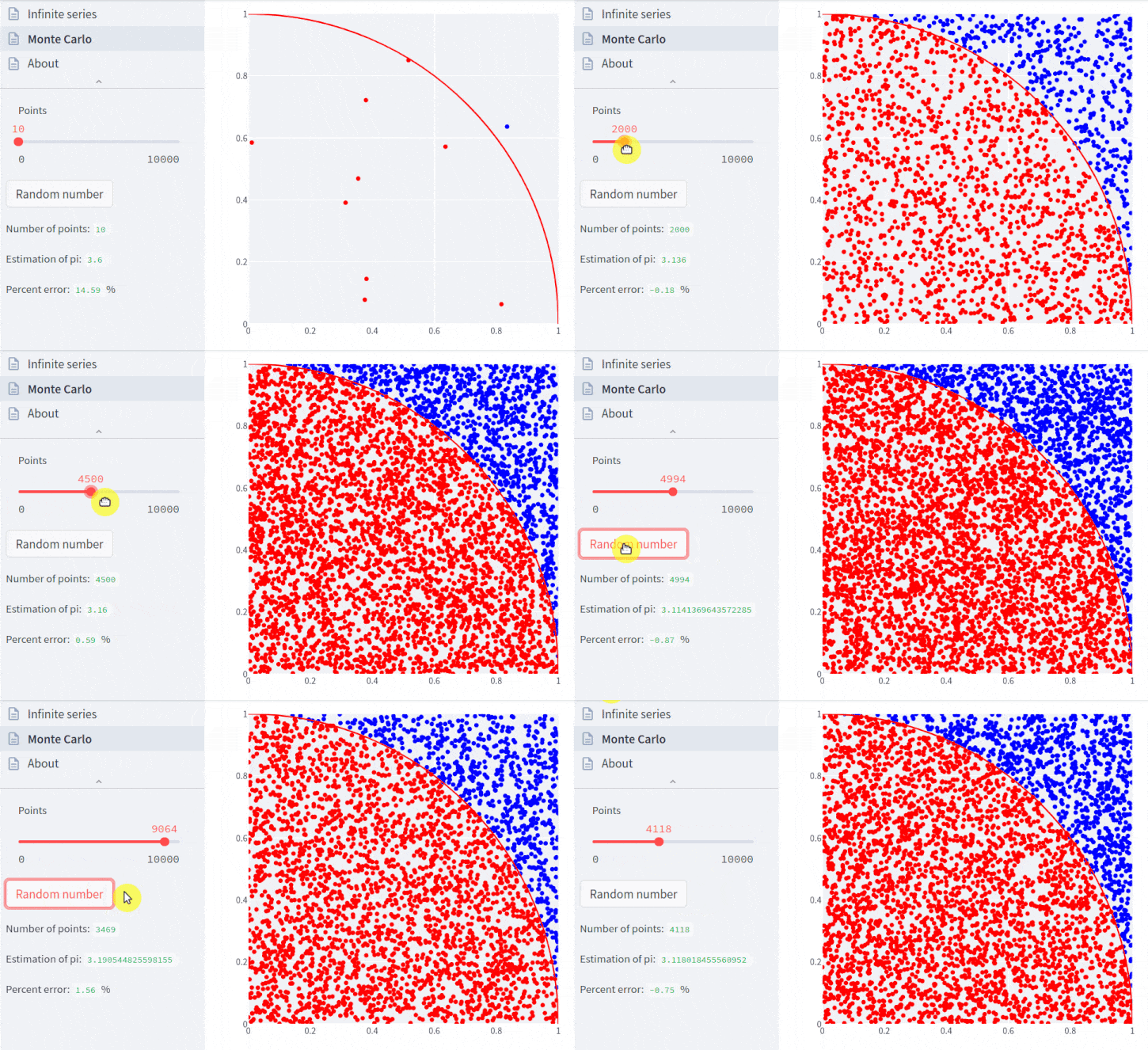
To understand the calculation steps, recall that the area of a square is its side squared, and the area of a circle is π times the radius squared.
To compute the value of pi, we will consider the following steps:
- draw a square of unit side and inscribe a quadrant (the circular sector corresponding to a quarter of a circle) in this square
- the radius of the circle will also be one
- the area of the square is one and the area of the quadrant is π / 4, so the ratio between the areas is π / 4
- uniformly distribute a given number of points in this square
- count the number of points that fall inside the circular sector
- the ratio between the number of points inside the circular sector and the total number of points is an estimate of the ratio between the two areas, π / 4
- thus, to estimate the value of pi, just multiply the ratio by 4
I imagine this is still quite abstract, so let’s visualize it. In the following
cell, we will import what is needed to demonstrate the method with the Python
language. The PiMonteCarlo class was created by me and its code is in the
repository linked above.
import matplotlib.pyplot as plt
import matplotlib.colors as mcolors
import matplotlib.cm as cm
import matplotlib.ticker as mtick

import numpy as np

from src.compute_pi import PiMonteCarlo
Let’s look at the attributes and methods of this class. The role of each one will be seen throughout the article.
[x for x in dir(PiMonteCarlo) if not x.startswith('_')]['calculate',
'coords',
'count_inside_quadrant',
'error',
'plot',
'points',
'seed']
The class can be initialized with an integer, which represents the number of
points to be uniformly distributed in the unit square. The plot method draws
the square with the points:
pi = PiMonteCarlo(100)
pi.plot();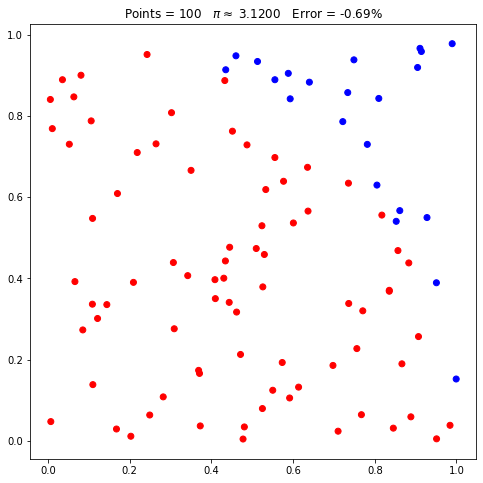
Notice in the plot above that there are red and blue points. The red ones
represent the points that lie within a distance of 1 unit from the origin of the
plot. That is, the points that lie inside the quadrant. To make this easier, we
can use the boolean parameter arc of the method to draw the boundary of the
quadrant:
pi.plot(arc=True);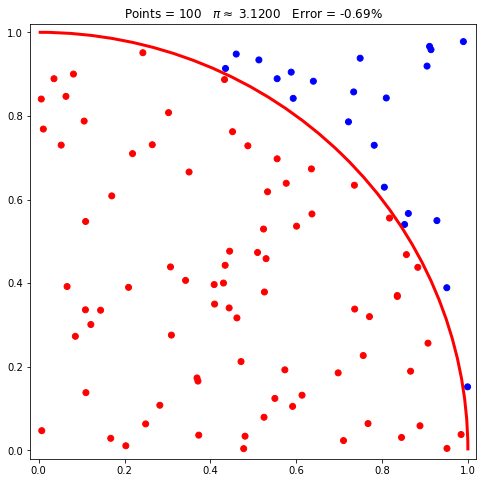
At the top of the plot appear the number of points, the estimated value of π, and the error of the estimate relative to the known value. However, you may have difficulty seeing how the points relate to a quadrant. Let’s increase the number of points:
pi.points = 1000
pi.plot();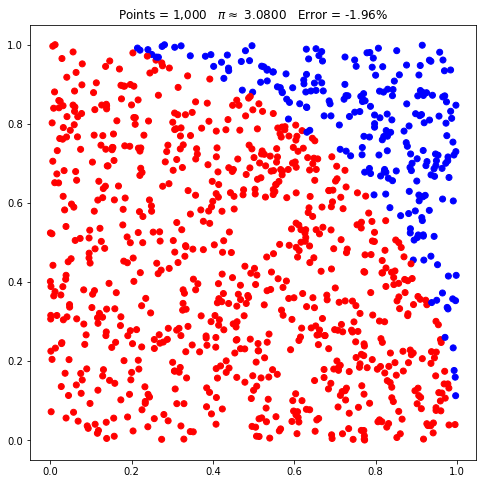
Now, with 1000 points, it should be easier to see the quadrant, even without the auxiliary line that delimits it. Let’s add the line just to make it even easier:
pi.plot(arc=True);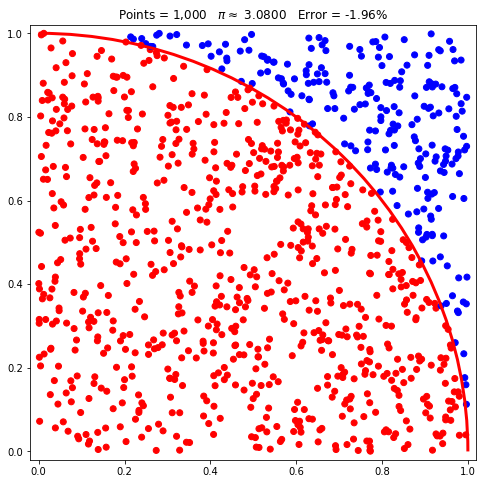
Each point can be described by coordinates, which can be viewed with the
coords property. In the next cell, we see the coordinates of the first 10
points:
pi.coords[:10](Coordinate(x=0.581428494323093, y=0.6131917506200556),
Coordinate(x=0.5438194696485, y=0.4252612829893858),
Coordinate(x=0.004676373123996713, y=0.8022562182039947),
Coordinate(x=0.7927237972419394, y=0.31656658515605185),
Coordinate(x=0.3573345769772017, y=0.8554767653880233),
Coordinate(x=0.9126151772173419, y=0.8232838228460756),
Coordinate(x=0.1376483536535691, y=0.0455611181699167),
Coordinate(x=0.7713742399091441, y=0.24378362303324952),
Coordinate(x=0.6374898695743463, y=0.491154209189236),
Coordinate(x=0.18317750261662535, y=0.7442699731680038))
Now, let’s understand the value of the estimate shown above the plot. According
to the calculation steps described earlier, we need to count how many of the
1000 points lie within the radius of the quadrant. The count_inside_quadrant
method does exactly that:
pi.count_inside_quadrant()770
The next step is to divide this number by the total number of points and multiply by 4:
(pi.count_inside_quadrant() / len(pi.coords)) * 43.08
Thus, we obtained exactly the value shown above the plot. But, with the class
code, we do not need to do this step manually. The calculate property serves
this purpose:
pi.calculate3.08
Internally, calculate does exactly the computation shown in the previous cell.
Finally, the error method computes the error of the estimate relative to the
currently known value of pi:
pi.error()-0.01960555055392467
Note that this is the value shown above the plot; the only difference is that the value in the plot is presented as a percentage, being 100 times the value in the previous cell.
We discussed at the beginning of the article that the estimates tend to get better the more points are used. Notice the word tend: it is a tendency and not a certainty, since this is a random process. We will return to this issue later. First, let’s increase the number of points to 10,000:
pi.points = 10_000
pi.plot();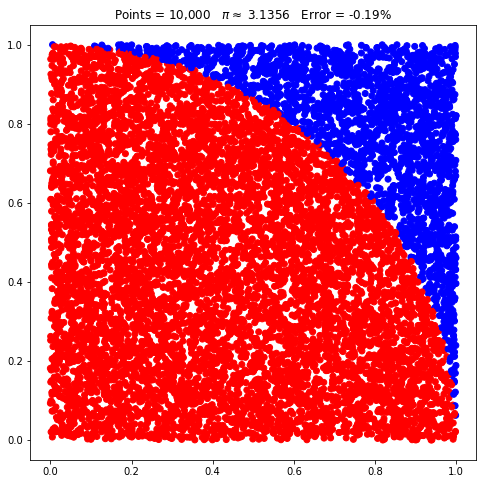
Notice that the quadrant is much more evident now. And the error decreased compared to the previous case.
And with 100,000 points:
pi.points = 100_000
pi.plot();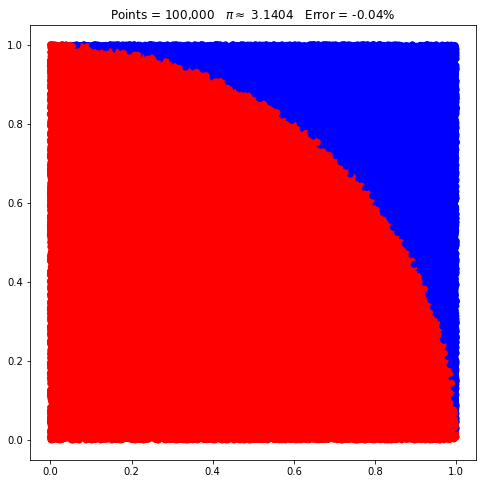
Again, the quadrant is very evident and the error is smaller.
Moving on to 1 million points:
pi.points = 1_000_000
pi.plot();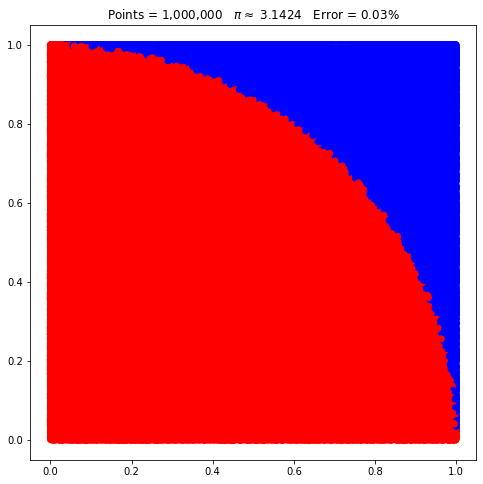
Notice that there is now no significant difference compared to the previous case. In the first part of the article, we saw that there is a tendency toward a value as the number of samples increases. That is what we just witnessed by increasing the number of points in each example.
We can formalize this a bit better. In the following cells, we generate 500 example cases, with the number of points ranging from 10 to 1 million. At the end, we generate a plot showing how the percentage error varies as more points are used:
errors = []
points = []

for i in np.logspace(1, 6, 500):
    points.append(int(i))
    errors.append(PiMonteCarlo(int(i)).error())

fig, ax = plt.subplots(figsize=(12, 6), facecolor=(1, 1, 1))

norm_colors = mcolors.SymLogNorm(linthresh=0.01, linscale=0.75,
                                 vmin=np.min(errors), vmax=np.max(errors))
colormap = cm.seismic_r

ax.scatter(points, errors, c=errors, cmap=colormap, norm=norm_colors)
ax.semilogx()
ax.yaxis.set_major_locator(mtick.MultipleLocator(0.05))
ax.yaxis.set_major_formatter(mtick.PercentFormatter(1))
ax.grid(True, linestyle='dashed')
ax.set_axisbelow(True)
ax.set_title('Change in error as the number of points increases',
             size=18)


scalarmappable = cm.ScalarMappable(norm=norm_colors, cmap=colormap)
scalarmappable.set_array(errors)
colorbar = fig.colorbar(scalarmappable,
                        format=mtick.FuncFormatter(lambda x, pos: "{:.2%}".format(x)),
                        ticks=mtick.FixedLocator([-0.25, -0.1, -0.05, -0.01, -0.005,
                                                  0, 0.005, 0.01, 0.05, 0.1, 0.25]))

plt.show()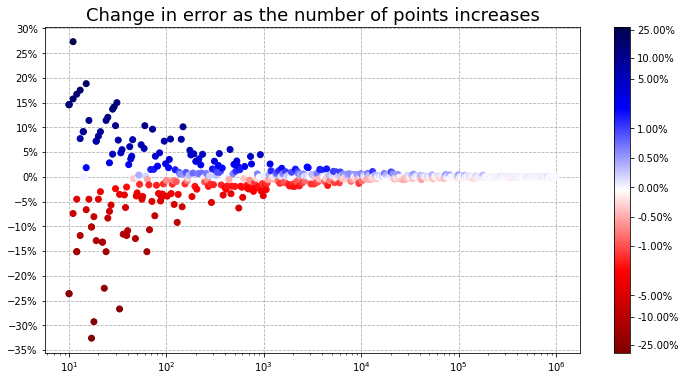
Notice that the plot is symmetric, showing that errors can be positive or negative and tend to occur randomly. Note that, even with few points, there can be simulations with small errors (points with a fainter color). However, this becomes more and more common with more points, indicating that the estimated value gets ever closer to the real one. From 10,000 points on, practically all estimates are already below 1 % error.
Finally, there is still one attribute of the class that we have not discussed,
seed. To make its role more evident, let’s reset the number of points to a
relatively low value, such as 50:
pi.points = 50
pi.plot();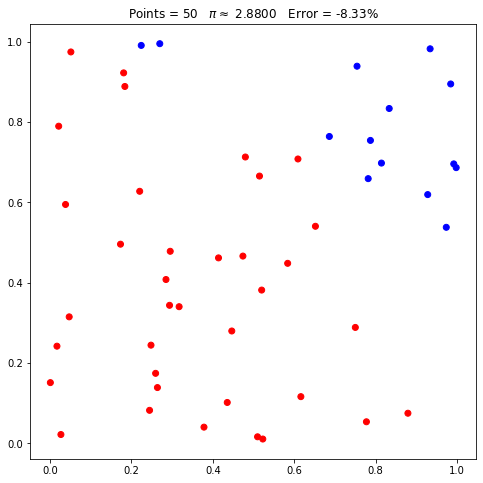
What happens if we set the number of points to 50 again:
pi.points = 50
pi.plot();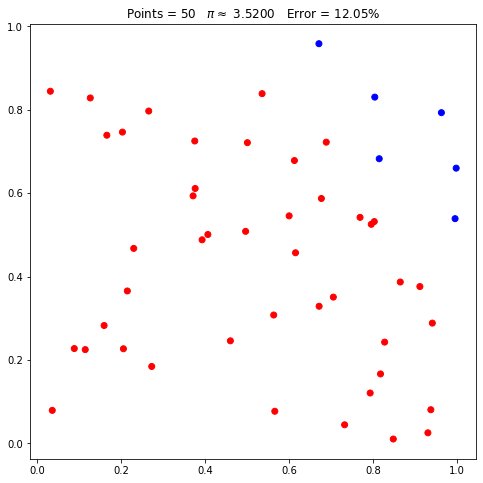
Notice that, even though the requested number of points is the same, their placement changed, as did the estimate of pi. This happens because, internally, the class uses a random generator. More specifically, the NumPy random generator. Thus, even if the requested number of points is the same, they will not necessarily have the same coordinates.
However, usually when we talk about random numbers produced by programs we are, in reality, talking about pseudorandom numbers. That is, numbers that look random but are obtained by algorithms. Such algorithms usually start from what we call a seed. This way, if we initialize a pseudorandom number generator with the same seed, the results obtained will always be the same.
When we created our class, we did not provide a seed value. Thus, this value will change every time. However, we can fix this value:
pi.seed = 42
pi.points = 50
pi.plot();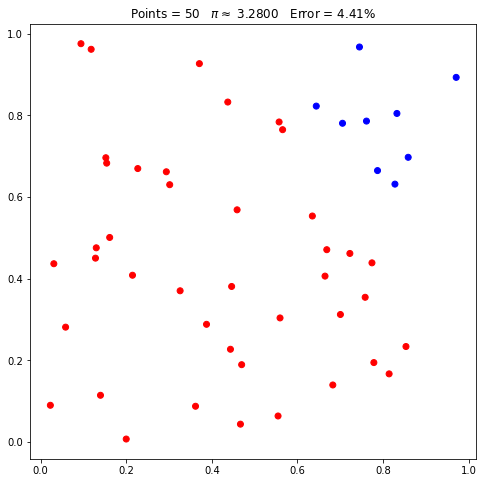
Now, let’s request 50 points again, twice in a row:
pi.points = 50
pi.plot();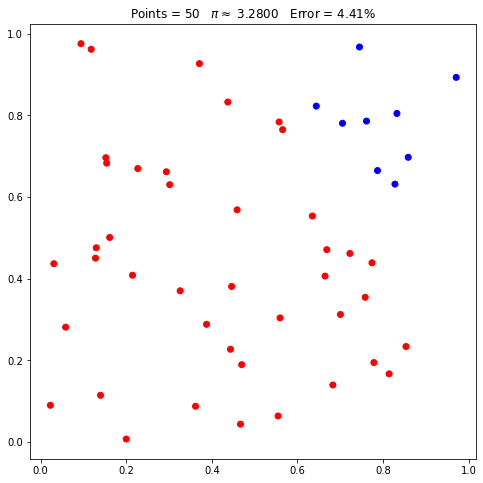
pi.points = 50
pi.plot();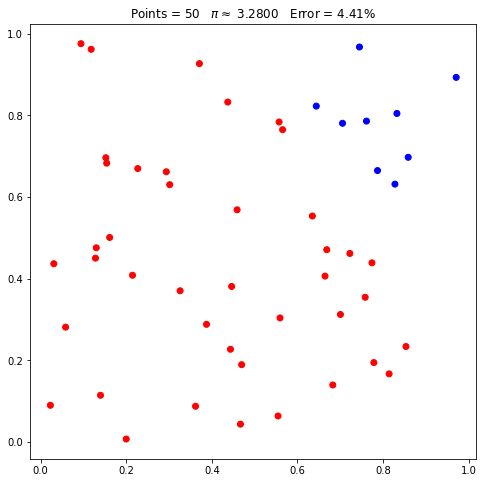
Observe that the same points were shown (same positions in the plots) and the same estimates. If we change the seed or reset it by passing None, the coordinates will change:
pi.seed = 0
pi.points = 50
pi.plot();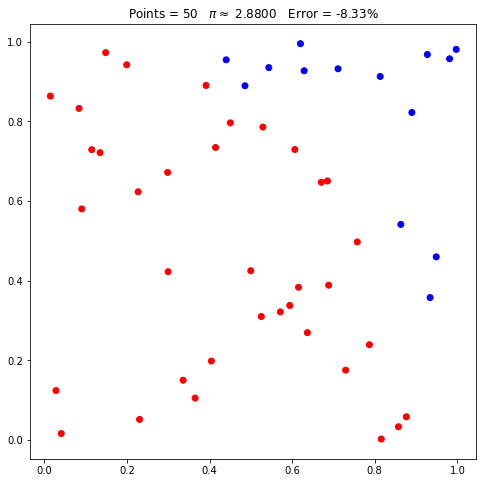
The subject of random (or pseudorandom) numbers is quite extensive and will be covered in another article in the near future. But keep in mind that, in computing, not everything that looks random really is. The links presented, in particular the one to the NumPy documentation, are great sources of information about it.
Reading Recommendations #
The number pi has been studied for centuries, since ancient times, as I already covered in another article. For example, Archimedes made estimates using geometry. For more details on Archimedes’ work, I recommend the book Arquimedes: uma porta para a ciência (in Portuguese) by Jeanne Bendick, from the incredible Coleção Imortais da Ciência (in Portuguese).
For mathematics in general, there is O livro da matemática, the Portuguese edition of DK’s The Maths Book, from the series As grandes ideias de todos os tempos (Big Ideas Simply Explained).
Those who want to go deeper into Monte Carlo methods can buy the book Monte Carlo Statistical Methods.
Finally, a good book for Python beginners is Automatize tarefas maçantes com Python (in Portuguese, the Brazilian edition of Automate the Boring Stuff with Python). A book with practical, easy-to-read examples.
Conclusion #
Monte Carlo methods are very important in the scientific context. In this article, we used visual resources to understand the nature of such methods.
We already saw in another article that there are very fast and exact methods to obtain the number pi, so the method presented here is not, in practice, used to estimate pi when great accuracy is needed. However, in other areas of science it turns out to be one of the best alternatives available for estimating quantities, especially with the ever more available computational power today. The visualization presented here is didactic and serves as a reference for other approximations in other contexts.
See you next time.


