

A chemist calibrating a spectrophotometer follows the usual procedure: she prepares solutions of known concentration, measures the absorbance of each one, and writes down the (concentration, absorbance) pairs. In the end, she has a set of points scattered on a plot, not a formula. The Beer-Lambert law promises a linear relationship between concentration and absorbance, but no measured point falls exactly on any line: there is instrument noise, impurities, temperature variation. The practical question is always the same: which line (or curve) best describes these points, and how much can I trust it?
This is not a problem of finding a root, nor of manipulating a polynomial we already know. It is the opposite problem: given the points, find the polynomial. SymPy, for all its symbolic power, has no answer for this: there is no such thing as symbolic regression. This is where NumPy comes in.
Why Does Curve Fitting Matter? #
- Scientific instrumentation: every measuring instrument (from spectrophotometers to precision balances) needs a calibration curve, obtained by fitting a model to known points.
- Materials and structural engineering: mechanical properties such as elastic modulus, hardness, or fatigue strength come from fitting curves to physical test data, almost always noisy.
- Experimental physics: recovering a quantity (acceleration, decay constant, frequency) from direct measurements is, almost always, a curve-fitting problem.
- Data science and machine learning: polynomial regression is the simplest example of a principle central to all machine learning: fitting a model to observed data and evaluating how well it generalizes, instead of merely memorizing the points.
Fitting a Polynomial to Data #
In the previous article
we saw numpy.polynomial.Polynomial as an object: construction, roots,
derivative, integral, division, always starting from coefficients we
already had. Now we go in the opposite direction: start from experimental
points and find the polynomial.
Example 1: Calibrating a spectrophotometer
Statement: A chemist measures the absorbance of 8 solutions of known concentration, between 0 and 5 mmol/L. Fit a line (absorbance as a function of concentration) to the measured data.
Solution:
import numpy as np
from numpy.polynomial import Polynomial

c_calibration = np.linspace(0, 5, 8)   # 8 solutions between 0 and 5 mmol/L
A_calibration = np.array([0.0012, 0.1377, 0.2847, 0.4233, 0.5478,
                          0.6844, 0.8224, 0.9511])

p_calibration = Polynomial.fit(c_calibration, A_calibration, deg=1)
print(p_calibration)
print("domain:", p_calibration.domain)
0.481575 + 0.47485·(-1.0 + 0.4x)
domain: [0. 5.]Notice that p_calibration does not print coefficients that are
recognizable at first sight. By default, Polynomial.fit() rescales x
internally to the interval \([-1, 1]\), and the .domain attribute
keeps the original interval (here, \([0, 5]\), the range of the data).
This is the most common source of confusion for anyone trying to compare
these coefficients with a manual calculation: they are not on the scale
of \(c\) in mmol/L, they are on the rescaled scale. To get the
coefficients in the natural basis, use .convert():
import numpy as np
from numpy.polynomial import Polynomial

c_calibration = np.linspace(0, 5, 8)   # 8 solutions between 0 and 5 mmol/L
A_calibration = np.array([0.0012, 0.1377, 0.2847, 0.4233, 0.5478,
                          0.6844, 0.8224, 0.9511])

p_calibration = Polynomial.fit(c_calibration, A_calibration, deg=1)

natural_coefs = p_calibration.convert().coef
print("[intercept, slope]:", natural_coefs)
[intercept, slope]: [0.006725 0.18994 ]The fitted slope, \(0.190\), is close to the value used to generate the data, \(0.20\); the difference comes from measurement noise.
A naming detail that often goes unnoticed: the Beer-Lambert law is \(A = \varepsilon \ell c\), so the slope of the line is not the molar absorptivity \(\varepsilon\) alone, but the product \(\varepsilon \ell\), the absorptivity times the optical path length of the cuvette. Here the two coincide numerically because \(\ell = 1\) cm, the laboratory standard; with a cuvette of another size, they would no longer coincide.
The residuals (the difference between each measured point and the value predicted by the line) show how well the fit describes the data:
import numpy as np
from numpy.polynomial import Polynomial

c_calibration = np.linspace(0, 5, 8)   # 8 solutions between 0 and 5 mmol/L
A_calibration = np.array([0.0012, 0.1377, 0.2847, 0.4233, 0.5478,
                          0.6844, 0.8224, 0.9511])

p_calibration = Polynomial.fit(c_calibration, A_calibration, deg=1)

residuals = A_calibration - p_calibration(c_calibration)
print("max residual:", np.max(np.abs(residuals)))
max residual: 0.009560714285714145A maximum residual of \(0.0096\) on an absorbance scale that goes up to \(\approx 1\) is a reasonable fit for noisy data.
But the number alone says little. What a real analyst looks at is the plot of these residuals, the cheapest diagnostic tool there is in curve fitting:
import matplotlib.pyplot as plt
import numpy as np
from numpy.polynomial import Polynomial

c_calibration = np.linspace(0, 5, 8)   # 8 solutions between 0 and 5 mmol/L
A_calibration = np.array([0.0012, 0.1377, 0.2847, 0.4233, 0.5478,
                          0.6844, 0.8224, 0.9511])

p_calibration = Polynomial.fit(c_calibration, A_calibration, deg=1)

residuals = A_calibration - p_calibration(c_calibration)

fig, ax = plt.subplots(figsize=(8, 4.2))
ax.axhline(0, color="gray", linewidth=1.2, zorder=1)
ax.stem(c_calibration, residuals, basefmt=" ")
ax.set_xlabel("concentration (mmol/L)")
ax.set_ylabel("residual (measured − fitted)")

print("signs:", "".join("+" if r > 0 else "-" for r in residuals))
signs: --++--+-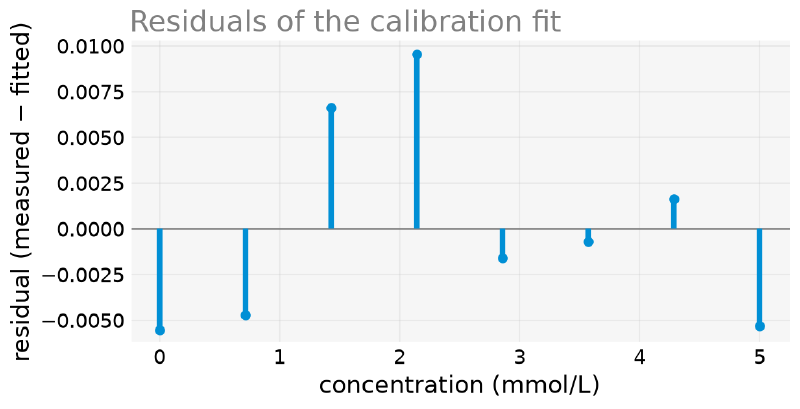
The question is not “are the residuals small?”, but “do they have structure?”.
- No pattern, alternating in sign at random, as here
(
--++--+-): the model captured the shape of the data, and what is left is noise. This is what you want to see. - A U-shaped or arc-shaped pattern (all negative at the ends and positive in the middle, or the reverse): the model has the wrong shape, because it lacks curvature. It is the classic sign that degree 1 should be degree 2.
- A fan opening up: the measurement uncertainty grows with \(x\), and the fit should be weighted.
Here there is no structure, and that is what makes the example interesting: the curvature exists (the true relationship saturates), but within 0 to 5 mmol/L it is smaller than the instrument noise. No statistical diagnostic could detect it with this data, and that is exactly why the extrapolation disaster, in the next section, is invisible from the calibration. The fit has no way of warning about a regime it has never seen.
Polynomial.fit() has a legacy version, like poly1d
Just as numpy.poly1d is the legacy construction of
numpy.polynomial.Polynomial (seen in the
previous article),
numpy.polyfit is the legacy version of Polynomial.fit(): it takes the
same data, but returns only an array of coefficients in decreasing
order, not a Polynomial object with .domain built in. Prefer
Polynomial.fit() in new code, for the same reason as in the previous
article.
Why Extrapolating Is Dangerous #
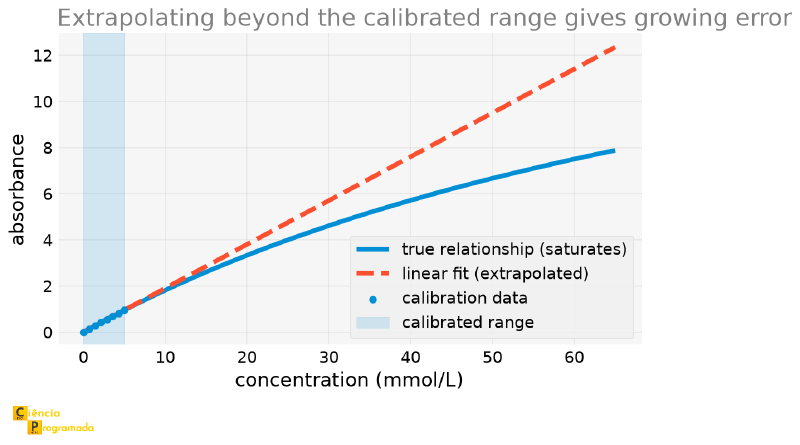
The chemist calibrated the instrument between 0 and 5 mmol/L. What happens if we use this same line to predict the absorbance of a much more concentrated solution? To answer, I need to “cheat”: since the data above was simulated, I know the true relationship behind it, something that, with real data, we could never know beforehand. I use this true relationship only to measure the extrapolation error, not for the fit itself:
import numpy as np
from numpy.polynomial import Polynomial

c_calibration = np.linspace(0, 5, 8)   # 8 solutions between 0 and 5 mmol/L
A_calibration = np.array([0.0012, 0.1377, 0.2847, 0.4233, 0.5478,
                          0.6844, 0.8224, 0.9511])

p_calibration = Polynomial.fit(c_calibration, A_calibration, deg=1)


def true_absorbance(c):
    return 0.20 * c / (1 + 0.01 * c)  # "true" relationship (unknown in practice)


for c_outside in [10, 30, 60]:
    predicted = p_calibration(c_outside)
    true = true_absorbance(c_outside)
    error_pct = 100 * (predicted - true) / true
    print(f"c={c_outside} mmol/L: predicted={predicted:.3f}, true={true:.3f}, error={error_pct:.1f}%")
c=10 mmol/L: predicted=1.906, true=1.818, error=4.8%
c=30 mmol/L: predicted=5.705, true=4.615, error=23.6%
c=60 mmol/L: predicted=11.403, true=7.500, error=52.0%Real spectrophotometers stop responding linearly at high concentrations, for several reasons at once: stray light in the detector, association between analyte molecules, finite bandwidth of the monochromator. The saturation curve used here, \(A = \varepsilon c/(1 + \alpha c)\), is a generic stand-in for this set of effects, not the exact model of any of them. All that matters for the argument is the shape: the true response saturates, and the fitted line has no way of knowing this, because it only “saw” data up to 5 mmol/L. At 10 mmol/L (twice the calibrated range), the error is already \(4.8\%\); at 60 mmol/L, it reaches \(52\%\). A fit is a statement about the observed data, not a universal law: it holds only within the measured range.
The following plot shows the fitted line (dashed), the true relationship with saturation (solid), and the calibration points, with the calibrated range highlighted:
When High Degree Is a Problem: Runge’s Phenomenon #
A natural temptation is to think that, if a degree 1 polynomial fits well, a higher-degree one fits even better, after all, it has more free parameters to adapt to the data. To expose why this intuition fails, we will use the classic function that the German mathematician Carl Runge used to demonstrate the problem, in 1901: \(f(x) = 1/(1+25x^2)\).
The article on Usain Bolt's record already mentioned this phenomenon in passing, when choosing splines (low-degree polynomials, one per piece) instead of a single high-degree polynomial to interpolate the athlete’s position over time. Here, we reproduce the phenomenon on purpose.
import numpy as np
from numpy.polynomial import Polynomial

def runge_function(x):
    return 1 / (1 + 25 * x**2)


n_points = 15
x_nodes = np.linspace(-1, 1, n_points)
y_nodes = runge_function(x_nodes)
p_interp = Polynomial.fit(x_nodes, y_nodes, deg=n_points - 1)
With 15 equally spaced points, the interpolating polynomial has degree 14: it passes exactly through each point. Let us compare it with the true function on a much finer grid:
import numpy as np
from numpy.polynomial import Polynomial

def runge_function(x):
    return 1 / (1 + 25 * x**2)


x_fine = np.linspace(-1, 1, 2000)
y_true = runge_function(x_fine)

n_points = 15
x_nodes = np.linspace(-1, 1, n_points)
p_interp = Polynomial.fit(x_nodes, runge_function(x_nodes), deg=n_points - 1)

interp_error = np.abs(p_interp(x_fine) - y_true)
worst_idx = np.argmax(interp_error)
print(f"largest error of the degree {n_points - 1} interpolation: {interp_error[worst_idx]:.4f}")
largest error of the degree 14 interpolation: 7.1949A maximum error of \(7.19\), for a function that varies only between 0 and 1! The polynomial passes exactly through the 15 points used to build it, but between them, near the edges of the interval, it oscillates and diverges. Now we compare it with a regression of much lower degree, using many more points (but without requiring the polynomial to pass exactly through each one):
import numpy as np
from numpy.polynomial import Polynomial

def runge_function(x):
    return 1 / (1 + 25 * x**2)


x_fine = np.linspace(-1, 1, 2000)
y_true = runge_function(x_fine)

x_many = np.linspace(-1, 1, 200)
y_many = runge_function(x_many)
p_regression = Polynomial.fit(x_many, y_many, deg=6)

regression_error = np.abs(p_regression(x_fine) - y_true)
print(f"largest error of the degree 6 regression: {np.max(regression_error):.4f}")
largest error of the degree 6 regression: 0.2240A maximum error of \(0.22\), more than 30 times smaller, with a lower-degree polynomial.
The conclusion seems obvious: high degree is the villain. But that is the wrong conclusion, and the counterexample fits on the same plot.
The Culprit Is Where the Nodes Are #
Notice that the comparison above changed three things at once: the degree (14 → 6), the method (exact interpolation → least squares), and the number of points (15 → 200). With three variables changing together, we cannot tell which one produced the improvement.
Let us isolate. Keeping the degree at exactly 14, the method as exact interpolation, and the number of points at exactly 15, changing only where those 15 points are. Instead of equally spaced, we use the Chebyshev nodes.
The \(n\) Chebyshev nodes in the interval \([-1, 1]\) are
$$x_k = \cos\left(\frac{2k+1}{2n}\pi\right), \qquad k = 0, 1, \ldots, n-1$$or, on any interval \([a,b]\), shifting and rescaling:
$$x_k = \frac{a+b}{2} + \frac{b-a}{2}\cos\left(\frac{2k+1}{2n}\pi\right)$$They are exactly the roots of the Chebyshev polynomial of degree \(n\), the same family that appears later in this article, now from the other side: there as a representation basis, here as sampling positions.
The formula becomes much clearer in its geometric construction: spread \(n\) points equally spaced by angle over a semicircle and project each one vertically onto the diameter. The cosine in the formula is literally that projection.
The effect of this projection is what matters. Near the top of the arc, the curve is almost horizontal: one angular step shifts the projection a lot. Near the ends, the curve is almost vertical: the same angular step barely moves the projection along the axis, and the points pile up there. The following figure shows the construction, with the equally spaced nodes drawn below for comparison:
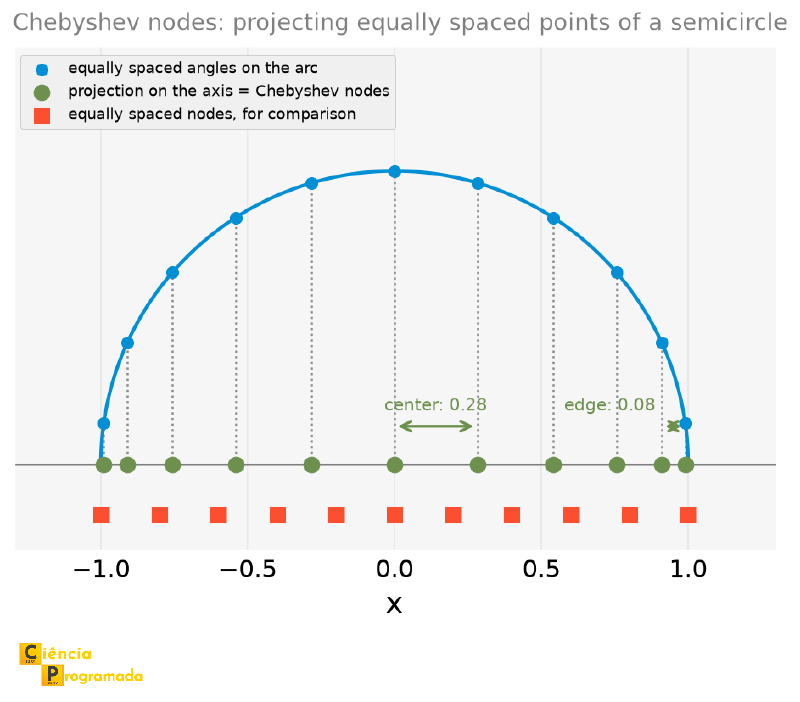
With \(11\) nodes, the distance between neighbors drops from \(0.28\) at the center to \(0.08\) at the edge: a \(3.5\)-fold crowding exactly where equispaced interpolation failed. In code:
import numpy as np
from numpy.polynomial import Polynomial

def runge_function(x):
    return 1 / (1 + 25 * x**2)


x_fine = np.linspace(-1, 1, 2000)
y_true = runge_function(x_fine)


def chebyshev_nodes(n, a=-1.0, b=1.0):
    """The n Chebyshev nodes in [a, b]: they crowd near the edges."""
    k = np.arange(n)
    return 0.5 * (a + b) + 0.5 * (b - a) * np.cos((2 * k + 1) * np.pi / (2 * n))


n_points = 15
x_cheb = chebyshev_nodes(n_points)
p_cheb_nodes = Polynomial.fit(x_cheb, runge_function(x_cheb), deg=n_points - 1)
print(f"same degree 14, Chebyshev nodes: {np.max(np.abs(p_cheb_nodes(x_fine) - y_true)):.4f}")
same degree 14, Chebyshev nodes: 0.0466From \(7.19\) to \(0.047\), 150 times smaller, without lowering the degree at all. It is even 5 times better than the degree 6 regression we just praised. And, if we raise the degree, it gets even better:
import numpy as np
from numpy.polynomial import Polynomial

def runge_function(x):
    return 1 / (1 + 25 * x**2)


x_fine = np.linspace(-1, 1, 2000)
y_true = runge_function(x_fine)


def chebyshev_nodes(n, a=-1.0, b=1.0):
    """The n Chebyshev nodes in [a, b]: they crowd near the edges."""
    k = np.arange(n)
    return 0.5 * (a + b) + 0.5 * (b - a) * np.cos((2 * k + 1) * np.pi / (2 * n))


for n in (15, 21, 31):
    xe, xc = np.linspace(-1, 1, n), chebyshev_nodes(n)
    ee = np.max(np.abs(Polynomial.fit(xe, runge_function(xe), deg=n - 1)(x_fine) - y_true))
    ec = np.max(np.abs(Polynomial.fit(xc, runge_function(xc), deg=n - 1)(x_fine) - y_true))
    print(f"n={n:3d} (degree {n-1:3d}): equispaced={ee:10.4f}   Chebyshev={ec:9.5f}")
n= 15 (degree 14): equispaced= 7.1949 Chebyshev= 0.04660
n= 21 (degree 20): equispaced= 59.8223 Chebyshev= 0.01533
n= 31 (degree 30): equispaced= 2388.2632 Chebyshev= 0.00206Two columns, two opposite behaviors. With equally spaced nodes, raising the degree is catastrophic: the error explodes from 7 to 2388. With Chebyshev nodes, for this function, raising the degree improves things monotonically, and degree 30 reaches an error of \(0.002\). The following plot shows the three cases side by side:
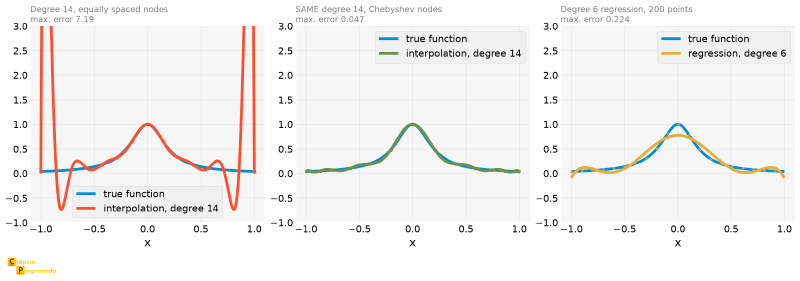
It is common to hear “a high-degree polynomial oscillates” as if it were an unavoidable property. Runge’s phenomenon is what happens when interpolating at equally spaced points: near the edges of the interval, the basis polynomials become too large, and, for Runge’s function, the error grows exponentially with the degree.
Chebyshev nodes, which are the projections of equally spaced points on a semicircle, and therefore pile up at the ends, minimize this effect. That is why they appear in quadrature and spectral methods.
So we are left with a lesson in two parts:
- If you choose where to sample (a simulation, a function you can evaluate at any point), do not be afraid of high degree: just do not sample at equally spaced points.
- If the points are given (laboratory measurements, almost always equally spaced and noisy), then do prefer a low-degree least-squares polynomial. Not because high degree oscillates by nature, but because exactly interpolating noisy points on a uniform grid combines both problems at once.
The following figure closes the argument by sweeping the degree from 4 to 30, with both choices of nodes:
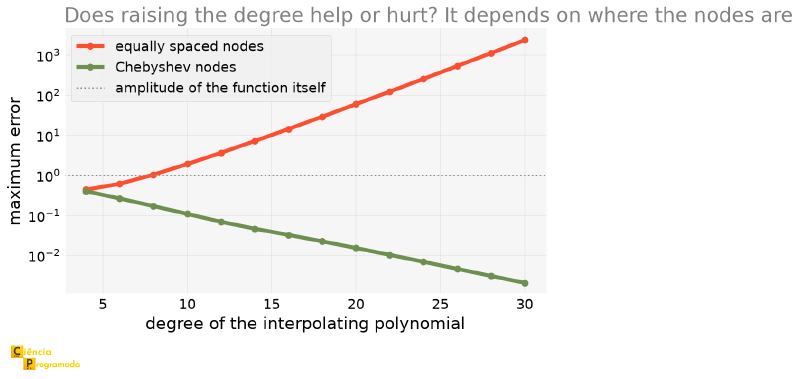
Two curves, opposite directions, same function and same degree at each point. The dotted line marks the amplitude of the function itself: above it, the “interpolant” no longer bears any relation to what it should approximate.
If you extend this sweep, you will find a NumPy RankWarning and
numbers that stop making sense: at degree 40, the equispaced error
appears smaller than at degree 30. This is not an improvement: it is
the least-squares fit itself that became ill-conditioned, for the same
reason as the Wilkinson polynomial in the
previous article. The
Vandermonde matrix with powers up to \(x^{40}\) has nearly parallel
columns, and the solution is no longer reliable. That is why the plot
stops at 30.
And When You Cannot Choose the Nodes? #
The Chebyshev way out assumes you choose where to sample, which is true in a simulation and false in a laboratory. Experimental data comes on the grid the instrument produced, almost always uniform.
In that case the way out is not to change the nodes; it is to change the family of interpolants. Instead of a single high-degree polynomial, several low-degree polynomials (one per piece) glued together with continuity: a spline.
import numpy as np
from numpy.polynomial import Polynomial

from scipy.interpolate import CubicSpline, PchipInterpolator


def runge_function(x):
    return 1 / (1 + 25 * x**2)


x_fine = np.linspace(-1, 1, 2000)
y_true = runge_function(x_fine)

x_nodes = np.linspace(-1, 1, 15)
y_nodes = runge_function(x_nodes)
p_interp = Polynomial.fit(x_nodes, y_nodes, deg=14)

cubic_spline = CubicSpline(x_nodes, y_nodes)      # the SAME 15 equispaced nodes
pchip_spline = PchipInterpolator(x_nodes, y_nodes)

for name, interp in (("degree 14 polynomial", p_interp),
                     ("CubicSpline", cubic_spline),
                     ("PchipInterpolator", pchip_spline)):
    print(f"{name:>22}: max error = {np.max(np.abs(interp(x_fine) - y_true)):.4f}")
degree 14 polynomial: max error = 7.1949
CubicSpline: max error = 0.0025
PchipInterpolator: max error = 0.0170The same 15 points, the same uniform grid, and the error drops from \(7.19\) to \(0.0025\). That is almost three thousand times better, and even better than Chebyshev nodes of the same size (\(0.047\)).
The following figure overlays the two interpolations on the true function:
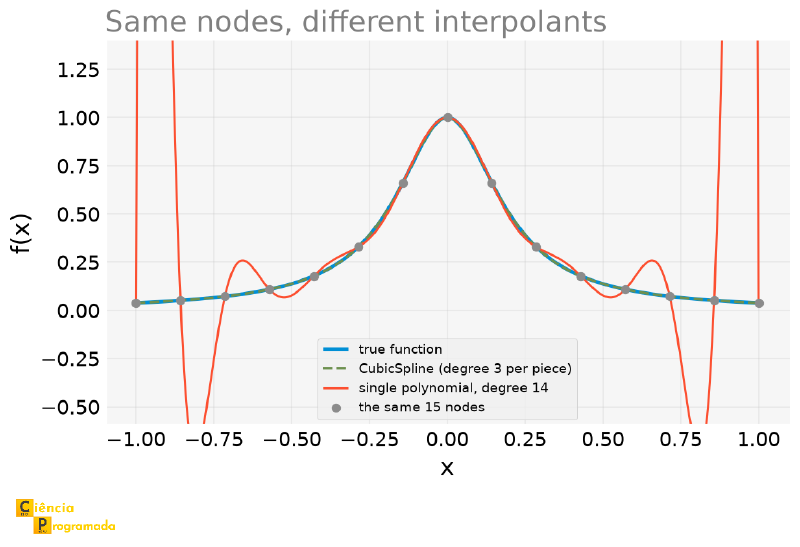
The reason is simple: each piece of the spline is a degree 3 polynomial,
and degree 3 has no room to oscillate. The price is that the spline is not
a single formula, it is a table of pieces, and its higher-order derivative
is not continuous. PchipInterpolator pays a little more error in
exchange for an extra guarantee: it preserves monotonicity, that is, it
does not invent valleys and peaks where the data has none. For calibration
data, this is usually worth more than the extra digits.
The article on Usain Bolt's record
used exactly CubicSpline to interpolate the athlete’s position between
the 10 m marks, and differentiate it to obtain the velocity. Now we can
say why: the splits come on a fixed grid every 10 meters, with no option
to choose the nodes, and a single degree 10 polynomial over them would
produce exactly the disaster in the figure above.
So we are left with a lesson in three parts:
- If you choose where to sample, do not be afraid of high degree: just do not sample at equally spaced points.
- If the nodes are given and you want to pass through all of them, use splines.
- If the data is noisy, do not pass through all of it: fit a low-degree polynomial by least squares. Exactly interpolating noisy points is interpolating the noise.
It is the third case that dominates the rest of this article, since we are talking about experimental data.
Physics: Recovering the Acceleration of Gravity #
Example 2: Free fall
Statement: An object is dropped from a height of \(10\) m. Its position is measured at 9 instants between \(0\) and \(1.2\) s, with measurement noise. Fit a degree 2 polynomial and recover the acceleration of gravity.
Solution: The position in free fall follows \(y(t) = y_0 + v_0 t - \frac{1}{2}g t^2\), a degree 2 polynomial in \(t\). The coefficient of the quadratic term is \(-g/2\):
import numpy as np
from numpy.polynomial import Polynomial

t_data = np.array([0., 0.15, 0.3, 0.45, 0.6, 0.75, 0.9, 1.05, 1.2])
y_data = np.array([10.0, 9.8987, 9.5508, 8.9810, 8.2224,
                   7.2140, 6.0328, 4.6380, 2.9292])  # meters, with noise

p_fall = Polynomial.fit(t_data, y_data, deg=2)
fall_coefs = p_fall.convert().coef
g_estimated = -2 * fall_coefs[2]
print(f"estimated g: {g_estimated:.3f} m/s²")
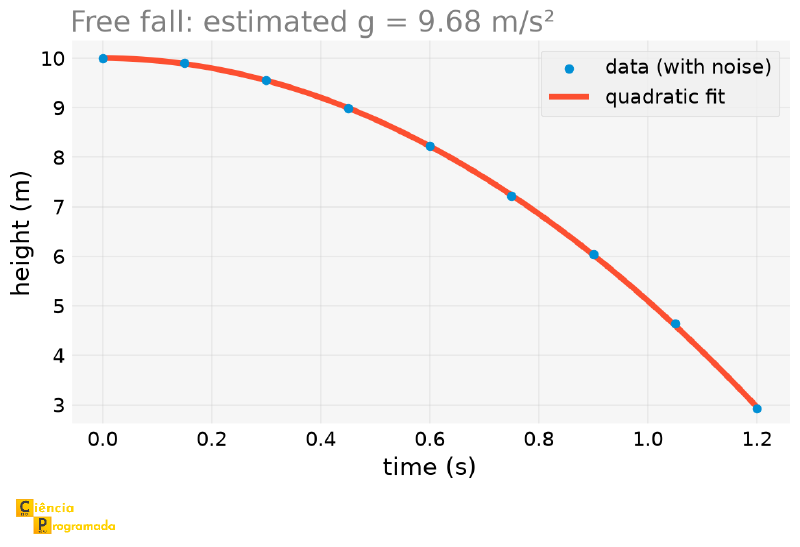
estimated g: 9.683 m/s²The true value used to generate the data was \(9.8\) m/s², an error of \(-1.2\%\), entirely explained by measurement noise.
The following plot shows the nine measured points and the fitted parabola passing between them. Notice that the curve does not pass exactly through any point, and that is precisely why it can estimate \(g\) better than any isolated pair of measurements could:
Engineering: Elastic Modulus and the Limits of Fitting #
Example 3: Elastic modulus of a steel
Statement: A tensile test measures stress as a function of strain for a structural steel specimen. The material has a true elastic modulus \(E = 200\) GPa and, in this simplified model, stops being linear at \(0.2\%\) strain. Fit a line to the data and recover \(E\): first using only the elastic region, then using all the test data, including points beyond yielding.
Solution:
import numpy as np
from numpy.polynomial import Polynomial

# strain below yielding (0.2%), stress in MPa, with noise
elastic_strain = np.array([0., 0.000286, 0.000571, 0.000857,
                           0.001143, 0.001429, 0.001714, 0.002])
elastic_stress = np.array([7.3, 44.9, 118.0, 171.7,
                           233.9, 287.3, 350.1, 400.1])

p_elastic = Polynomial.fit(elastic_strain, elastic_stress, deg=1)
E_correct = p_elastic.convert().coef[1]

# strain up to 1%, including points beyond yielding
full_strain = np.linspace(0, 0.01, 15)
full_stress = np.array([-2.1, 145.2, 287.4, 398.9, 400.7, 406.0,
                        407.4, 404.0, 406.0, 401.6, 417.0, 410.8,
                        418.5, 416.2, 423.8])

p_full = Polynomial.fit(full_strain, full_stress, deg=1)
E_wrong = p_full.convert().coef[1]

print(f"E (elastic region only): {E_correct:.0f} MPa")
print(f"E (including plastic region): {E_wrong:.0f} MPa")
E (elastic region only): 201902 MPa
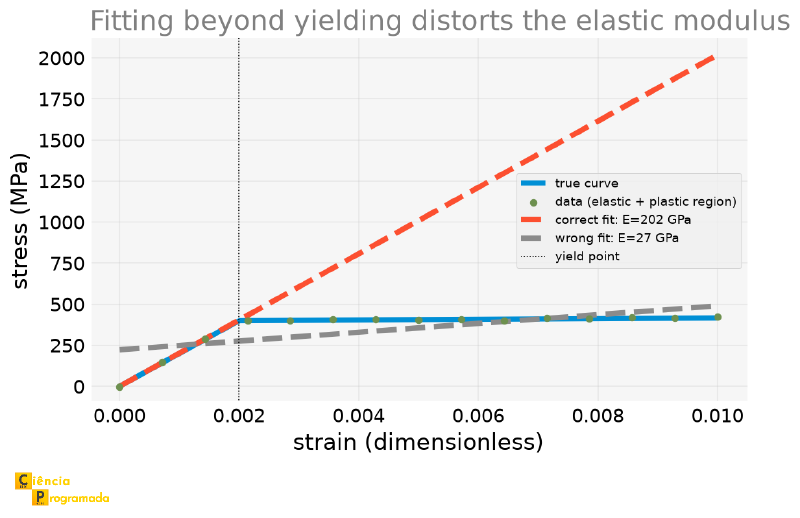
E (including plastic region): 26746 MPaUsing only the elastic region, the fit is off by \(1.0\%\) (\(201{,}902\) MPa against the true \(200{,}000\) MPa), an error consistent with the \(4\) MPa noise of the measurements, and not with a flaw of the method. Including points beyond yielding, where the relationship stops being linear, distorts the result by \(-86.6\%\): the fitted “modulus”, \(27\) GPa, describes nothing physical at all.
The comparison between the two errors is the point: \(1\%\) is the honest uncertainty of measuring \(E\) with this data; \(87\%\) is the result of fitting the wrong model. The two are not on the same scale, and no statistical refinement saves the second.
The following plot makes the damage visible: the line fitted only to the elastic region follows the initial stretch closely, while the one fitted to all the points is flattened and describes neither the elastic nor the plastic region:
Beware of a numerical coincidence: in real tests, the yield strength of a steel is usually defined by the 0.2% offset method, in which a line is drawn parallel to the elastic stretch, shifted by \(0.002\) of strain, and yielding is where it crosses the measured curve. This is a measurement procedure, not a property.
Here, \(0.002\) is something else: it is simply the strain at which the synthetic bilinear model changes slope. The two numbers coincide because both come from the same typical order of magnitude for steel, but they are not the same concept.
This is the same lesson as the extrapolation with the Beer-Lambert law, only inverted: there, the problem was using the fit outside the range where the data was measured; here, the problem is including, in the fit itself, data from a physical regime (the plastic region) different from the one the linear model intends to describe. In both cases, the root is the same: a fit is only reliable within the regime it actually models.
Other Bases: Orthogonal Polynomials #
All the fits in this article used the “natural” basis of powers (\(1, x, x^2, x^3, \ldots\)), which is what Polynomial uses by default.
But it is not the only possible basis, and numpy.polynomial includes
whole families of ready-made orthogonal polynomials: Legendre, Chebyshev,
Hermite, Laguerre.
A family of polynomials \(P_0, P_1, P_2, \ldots\) is orthogonal on an interval \([a, b]\) when, for any two different polynomials of the family, the integral of their product is zero: \(\int_a^b P_m(x) P_n(x) w(x) dx = 0\) for \(m \neq n\), where \(w(x)\) is a weight function specific to each family (for Legendre, \(w(x) = 1\), on the interval \([-1, 1]\)). It is the same concept as orthogonal vectors in linear algebra, only the “inner product” between two polynomials is this integral, instead of the usual dot product.
The following plot shows the first five polynomials of each family:
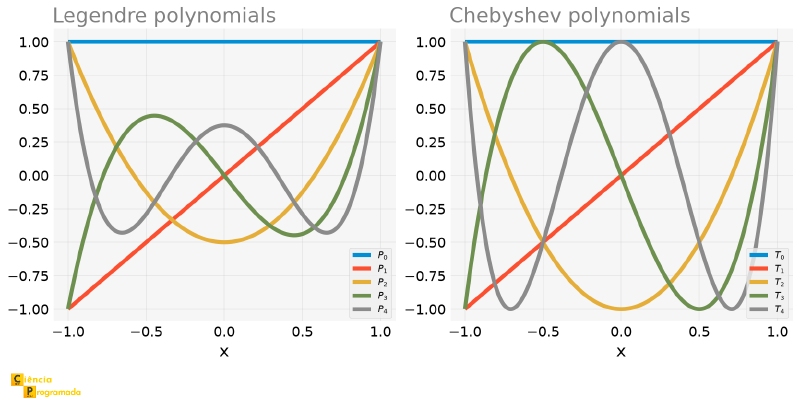
We can check this property numerically, by integrating two Legendre polynomials of different degrees and two of the same degree:
import numpy as np
from numpy.polynomial import Legendre

# np.trapezoid requires NumPy >= 2.0; in earlier versions it was called np.trapz
x = np.linspace(-1, 1, 200_000)
product_different_degrees = np.trapezoid(Legendre.basis(2)(x) * Legendre.basis(3)(x), x)
product_same_degree = np.trapezoid(Legendre.basis(2)(x) * Legendre.basis(2)(x), x)

print(f"integral P2*P3 (different degrees): {product_different_degrees:.2e}")
print(f"integral P2*P2 (same degree): {product_same_degree:.4f}")
integral P2*P3 (different degrees): 2.78e-17
integral P2*P2 (same degree): 0.4000The integral between different degrees is, up to rounding error, zero: the orthogonality of the definition, confirmed numerically. Between polynomials of the same degree, the integral does not vanish, and in this case it even matches the known exact value, \(2/5\).
In practice, Chebyshev.fit() and Legendre.fit()
have exactly the same interface as Polynomial.fit(), and can
replace it directly. Redoing the free-fall fit (Example 2)
with the Chebyshev basis instead of the natural basis:
import numpy as np
from numpy.polynomial import Chebyshev, Polynomial

t_data = np.array([0., 0.15, 0.3, 0.45, 0.6, 0.75, 0.9, 1.05, 1.2])
y_data = np.array([10.0, 9.8987, 9.5508, 8.9810, 8.2224,
                   7.2140, 6.0328, 4.6380, 2.9292])  # meters, with noise

p_cheb = Chebyshev.fit(t_data, y_data, deg=2)
g_via_chebyshev = -2 * p_cheb.convert(kind=Polynomial).coef[2]
print(f"estimated g (Chebyshev basis): {g_via_chebyshev:.3f} m/s²")
estimated g (Chebyshev basis): 9.683 m/s²The same result as Example 2, \(9.683\) m/s², as it should be, since it
is the same polynomial, only described in a different basis (that is why
.convert(kind=Polynomial) is necessary: without it, the coefficients are
in the Chebyshev basis, not in the natural basis, and do not have the same
direct interpretation).
Solving the Wilkinson Polynomial #
The practical advantage of orthogonal bases is not just avoiding an exotic object. It attacks head-on the problem that closed the
previous article: the
Wilkinson polynomial, \((x-1)(x-2)\cdots(x-20)\), whose roots
blow up with a tiny perturbation of \(2^{-23}\) in a single
coefficient. Rebuilding the same polynomial in the Chebyshev basis, but
now using what we have already learned about .domain in this section,
mapping the domain to the interval \([1, 20]\) of the roots, instead of
the default \([-1, 1]\):
import numpy as np
from numpy.polynomial import Chebyshev, Polynomial

W_natural = Polynomial.fromroots(np.arange(1, 21))
W_cheb = Chebyshev.fromroots(np.arange(1, 21), domain=[1, 20])

print(f"largest |coefficient|, natural basis: {np.max(np.abs(W_natural.coef)):.2e}")
print(f"largest |coefficient|, Chebyshev basis: {np.max(np.abs(W_cheb.coef)):.2e}")
largest |coefficient|, natural basis: 1.38e+19
largest |coefficient|, Chebyshev basis: 3.12e+15The basis of powers \(1, x, x^2, x^3, \ldots\) has a defect that
worsens with the degree: its elements become more and more similar to
each other. On \([1, 20]\), the functions \(x^{18}\), \(x^{19}\), and
\(x^{20}\) are practically proportional: all almost zero near 1
and all astronomical near 20. Such a basis is the analog, in function
space, of trying to describe a plane using two nearly parallel vectors:
any rounding error in the coordinates produces an enormous shift
in the result. It is the same ill-conditioned Vandermonde matrix that
appeared in the note about RankWarning, above.
The Chebyshev polynomials \(T_n\) are built for the opposite: they are orthogonal to each other (with an appropriate weight) and bounded by 1 over the whole domain, for any degree. None of them resembles another, and none dominates the others in magnitude. The coordinates in this basis are, therefore, all of the same order of magnitude, and a small relative error in one of them remains small in the result.
It is the same idea behind preferring an orthonormal basis in linear algebra, carried over to polynomials.
The coefficients are born almost four orders of magnitude smaller. The test that matters, though, is the sensitivity of the roots, perturbing the coefficients of each basis by the same relative amount:
import numpy as np
from numpy.polynomial import Chebyshev, Polynomial

W_natural = Polynomial.fromroots(np.arange(1, 21))
W_cheb = Chebyshev.fromroots(np.arange(1, 21), domain=[1, 20])

rng = np.random.default_rng(0)
rel_perturbation = 1e-10

perturbed_natural_coefs = W_natural.coef * (1 + rel_perturbation * rng.normal(size=21))
natural_error = np.max(np.abs(
    np.sort(W_natural.roots()) - np.sort_complex(Polynomial(perturbed_natural_coefs).roots())
))

rng = np.random.default_rng(0)  # same relative perturbation, same seed
perturbed_cheb_coefs = W_cheb.coef * (1 + rel_perturbation * rng.normal(size=21))
W_cheb_pert = Chebyshev(perturbed_cheb_coefs, domain=W_cheb.domain, window=W_cheb.window)
cheb_error = np.max(np.abs(np.sort(W_cheb.roots()) - np.sort_complex(W_cheb_pert.roots())))

print(f"max error in the roots, natural basis: {natural_error:.4f}")
print(f"max error in the roots, Chebyshev basis: {cheb_error:.2e}")
max error in the roots, natural basis: 4.9929
max error in the roots, Chebyshev basis: 2.32e-07Comparing with the previous article requires care, because the two perturbations are of different natures. There, we subtracted \(2^{-23}\) from a coefficient worth \(-210\): an absolute perturbation. Here, we multiply each coefficient by \((1 + 10^{-10}\varepsilon)\): a relative perturbation. To compare them, we need to put both in the same currency:
$$ \frac{2^{-23}}{|-210|} = 5.68 \times 10^{-10} $$That is, in relative terms, the perturbation there was only 5.7 times
larger than the one here, not a thousand times. Even so, the effect is
brutal: a relative perturbation of \(10^{-10}\), of the order of the
rounding error that any float64 carries for free, shifts the roots by
almost \(5\) units in the natural basis.
In the Chebyshev basis, with the domain correctly mapped, the same relative perturbation shifts the roots by only \(2.3 \times 10^{-7}\), an error 21 million times smaller.
≈ 5
natural basis
2.3 × 10⁻⁷
Chebyshev basis
21 million ×
smaller
An attentive reader might object: relatively perturbing the coefficients of the two bases is not perturbing the same function. And that is true: the coefficients in the natural basis reach \(1.4\times10^{19}\), so \(10^{-10}\) relative changes the value of the polynomial by about \(10^9\) near \(x=20\); in the Chebyshev basis, whose coefficients are \(10^{15}\) and whose basis functions are bounded by 1 on the domain, the same relative \(10^{-10}\) changes the value by about \(10^5\).
The comparison is still the right one in practice, because it is exactly
the error that each representation carries when stored in floating
point: float64 always errs a little in relative terms, not absolute
ones. But the conclusion must be stated carefully: it is not that the
polynomial stops being sensitive, but that the Chebyshev basis does not
amplify rounding error the way the power basis does.
With this caveat: Wilkinson’s ill-conditioning is not a curse of the polynomial, it is a consequence of representing it in a bad basis for the interval where the roots live.
Summary Table #
| Tool | Use | Note |
|---|---|---|
Polynomial.fit(x, y, deg) |
Fits a degree deg polynomial to the data |
Rescales x internally; use .domain and .convert() |
numpy.polyfit |
Legacy version of Polynomial.fit() |
Returns only coefficients, in decreasing order, avoid in new code |
| Residuals | y - p(x) |
Measures how well the fit describes the observed data |
| Extrapolation | Evaluate p(x) outside the range of x used in the fit |
No guarantee whatsoever, the fit only “saw” the calibrated range |
| Fit outside the valid regime | Include, in the fit itself, data from a physical regime different from the one the model describes | Inverse of the extrapolation error: elastic modulus distorted by \(-86.6\%\) when including the plastic region |
| Runge’s phenomenon | Exact high-degree interpolation at equally spaced points | Oscillates near the edges; prefer low-degree regression |
Legendre.fit(), Chebyshev.fit() |
Fit with orthogonal bases, same interface as Polynomial.fit() |
Alternative to \(1, x, x^2, \ldots\); same result, better conditioning at high degree |
| Wilkinson polynomial, solved | Chebyshev.fromroots() with .domain mapped to where the roots live |
Error in the roots drops from \(4.99\) to \(2.3\times10^{-7}\), 21 million times smaller |
Next Steps #
This article and the previous one
form a pair: first we learned to manipulate an already known polynomial
as an object (roots, derivative, integral, division), then we learned to
find a polynomial from data that comes with no formula
attached. Together they cover the essentials of polynomials in NumPy, but
they leave out a neighboring problem: what if what we need to compute is
not a polynomial, but the derivative of a function that exists only as
discrete data, with no closed form? In the
next article,
we use finite differences and scipy.differentiate to attack
exactly this problem.


