

In 1609, the German astronomer Johannes Kepler published two laws of planetary motion. The first went against tradition: orbits are not perfect circles, as Ptolemy and even Copernicus believed, but ellipses, with the Sun at one of the foci. The second, the “law of areas,” said that a planet sweeps out equal areas in equal times along its orbit: faster near the Sun, slower far from it.
Beautiful from a geometric point of view. But it hid an annoying practical problem. If an astronomer wanted to know exactly where a planet would be at a specific instant (not “at some point,” but at 2:32 p.m. on a given date), they had to solve an equation. That equation, later named Kepler’s equation, is:
$$ M = E - e \sin(E) $$where \(M\) is the mean anomaly (proportional to the elapsed time, easy to compute), \(e\) is the orbit’s eccentricity (how “flattened” the ellipse is) and \(E\) is the eccentric anomaly, the angle that actually connects time to the planet’s position on the orbit. Given \(M\) and \(e\), we want \(E\).
The problem: this equation mixes a free \(E\) with \(\sin(E)\). There is no algebraic manipulation capable of isolating \(E\) on one side. Many astronomers, from Kepler onward, developed methods and tables to deal with this equation, long before “numerical method” was a formal term.
Does any modern tool solve this exactly? Let’s let SymPy try:
import sympy as sp

E, M, e = sp.symbols("E M e")
kepler_eq = sp.Eq(M, E - e * sp.sin(E))

sp.solve(kepler_eq, E)
NotImplementedError: multiple generators [E, sin(E)]
No algorithms are implemented to solve equation M + (-E + e*sin(E))Not even SymPy, with all its symbolic power, can handle it, and the reason is not that the library is “weak”: it is the nature of the equation that gets in the way. It mixes a polynomial term (\(E\)) with a transcendental function (\(\sin E\)) in the same unknown, and there is no closed-form formula, in terms of elementary functions, that solves this in general.
This is the first of three articles about one of those solutions: solving numerically, with SciPy, equations that SymPy cannot solve symbolically.
Why Does Solving Equations Numerically Matter? #
Equations with no closed-form solution show up all the time in real problems, and Kepler’s is just one of them:
- Engineering: the friction factor for fluid flow in pipes (the Colebrook
equation) is defined implicitly, and decades of engineers solved it by hand
iteration before
scipy.optimizeexisted. - Chemistry: equations of state for real gases (such as van der Waals) and full chemical equilibria, without the simplifying textbook approximations, become polynomials or transcendental equations with no practical closed form.
- Astronomy and aerospace: Kepler’s equation itself is solved numerically in orbit propagation software for satellites and space probes.
- Finance: the internal rate of return (IRR) of a cash flow is a root of a polynomial and, for high degrees, there is no guarantee of a closed form (see the note below).
- Data science and optimization: finding critical points of complex loss functions is, at bottom, solving “derivative equals zero,” an equation that rarely has a closed-form solution in nontrivial models.
In 1824, the Norwegian mathematician Niels Henrik Abel proved that there is no general formula, involving only radicals, that solves every polynomial equation of degree 5 or higher: the Abel-Ruffini theorem. In other words, even restricting ourselves to purely polynomial problems (no sines or exponentials), the absence of a closed-form solution is the rule from a certain degree on. Numerical methods are often the only tool that exists.
The Italian Paolo Ruffini published a first proof in 1799, with a gap; Abel presented a complete proof in 1824. But it was the Frenchman Évariste Galois who, around 1832, answered the bigger question: not only that there is no general formula, but which specific equations are solvable by radicals and which are not. The answer depends on the symmetry structure of the roots, giving rise to group theory. Galois died in a duel at age 20, and his manuscripts were only understood more than a decade later.
We have already written plenty on this site about SymPy, the symbolic library for Python: it solves equations and systems exactly whenever a closed-form solution exists. SciPy comes in exactly where SymPy stops: when there is no formula, it approximates the answer numerically, with error control and (almost always) lots of speed.
Familiar Ground, Now in Numbers #
Before attacking what SymPy cannot solve, it is worth seeing how SciPy does on problems that SymPy already solves exactly, so we can compare directly. And since NumPy will appear throughout the article alongside SciPy, it is worth explaining why before moving on.
SciPy is built on top of NumPy: it uses the same array (ndarray) as its
central data structure and depends on it to work. The division of labor,
historically, ended up like this: NumPy takes care of the array itself
(elementary operations, a bit of linear algebra and Fourier transforms,
random number generation, and a few generic comparison utilities). SciPy
adds domain-specialized algorithms, organized in subpackages;
scipy.optimize, the subject of this article, is one of them. SciPy never
reimplements what NumPy already does well, so it is normal for the two to
appear side by side in the same piece of code.
There is also a real point of overlap: numpy.linalg.solve (used in
Example 2 just below) and scipy.linalg.solve do essentially the same
thing, and the SciPy version is usually the more recommended one when both
are installed (more options, always via LAPACK). We use NumPy’s here only
because it is the better known; for a simple system like this one, it makes
no practical difference.
The table below summarizes where each tool used in this article comes from, and why:
| Tool | Comes from | Role |
|---|---|---|
numpy.roots |
NumPy | Roots of a polynomial (via eigenvalues of the companion matrix) |
numpy.linalg.solve |
NumPy | Linear system (scipy.linalg.solve is equivalent) |
numpy.isclose / numpy.allclose |
NumPy | Float comparison with tolerance |
numpy.sign, numpy.diff, numpy.linspace |
NumPy | Basic array operations |
scipy.optimize.bisect / brentq |
SciPy | Root finding by bracket |
scipy.optimize.newton |
SciPy | Newton’s method |
scipy.optimize.fsolve / root |
SciPy | Systems of nonlinear equations |
Example 1: the same quadratic from the equations article
Statement: In the article
Solving Equations with SymPy,
we solved \(x^2 + 2x - 8 = 0\) with sympy.solve, obtaining the exact
roots \(-4\) and \(2\). What does the same problem look like solved
numerically?
Solution: The numerical equivalent is numpy.roots, which takes the
coefficients from the highest degree to the lowest, the same convention as
SymPy’s all_coeffs():
import numpy as np

print(np.roots([1, 2, -8]))
[-4. 2.]Same result, now as float64 instead of SymPy’s exact integers. For a
simple quadratic like this, the difference is cosmetic. Later on it stops
being so.
Example 2: the same linear system
Statement: The same article solved the system \(x + y = 3\),
\(3x - 2y = 0\) with sympy.solve, obtaining \(x = 6/5\),
\(y = 9/5\), exactly. And numerically?
Solution: In matrix form \(A\mathbf{x} = \mathbf{b}\), the numerical
equivalent is numpy.linalg.solve:
import numpy as np

A = np.array([[1.0, 1.0], [3.0, -2.0]])
b = np.array([3.0, 0.0])

linear_sol = np.linalg.solve(A, b)
print(linear_sol)
[1.2 1.8]Once again, the same result (\(1.2 = 6/5\) and \(1.8 = 9/5\)), only as a floating-point approximation.
In the original article, comparing the solution with == after
substituting 6/5 as a float gave False on one of the equations and only
worked with Rational
(see why). Here the
situation is reversed: we are deliberately working in floating point, so
the “is this solution correct?” check must never use == against zero.
import numpy as np

A = np.array([[1.0, 1.0], [3.0, -2.0]])
b = np.array([3.0, 0.0])
linear_sol = np.linalg.solve(A, b)

residual = A @ linear_sol - b
print("residual A@x - b:", residual)
print("is it zero, within tolerance?", np.allclose(residual, 0))
print("is it exactly zero? (don't do this)", np.all(residual == 0))
residual A@x - b: [4.4408921e-16 0.0000000e+00]
is it zero, within tolerance? True
is it exactly zero? (don't do this) FalseThe residual is practically zero (\(4.4 \times 10^{-16}\), the order of
magnitude of the rounding error of double-precision floating point), but
comparing exactly against zero fails because one of the entries carries a
bit of rounding residue. From here on, every “is this a solution?” check in
this article (and in the next two) uses
numpy.isclose
(compares two numbers and tells whether the difference between them is
smaller than a tolerance) or its version for whole arrays,
numpy.allclose.
The Idea of Bisection: bisect and brentq
#
Back to the real problem: equations with no closed form, like \(e^x = x^{100}\). Yes, this equation has already appeared around here, in the article on limits, when we compared the growth of an exponential against that of a power. There, SymPy found one of the roots, \(647.2775124394\), already in numerical form. The exact form of this root exists, but it uses the Lambert W function, which is not elementary.
The simplest and most robust idea for finding roots numerically comes straight from the Intermediate Value Theorem, probably already seen in any calculus course:
If \(f\) is continuous on \([a, b]\) and \(f(a)\) and \(f(b)\) have opposite signs, then there exists at least one \(c \in (a, b)\) such that \(f(c) = 0\).
An interval \([a, b]\) where \(f\) changes sign is called a bracket, the term the numerical methods literature uses to designate exactly this interval that “contains” the root. It is the minimum guarantee that a root exists in there, and it is exactly this guarantee that bisection exploits: split the interval in half, see on which side the sign changes, discard the other half, repeat.
SciPy implements this idea to the letter in scipy.optimize.bisect, with no
extra cleverness, just the interval splitting repeated until the desired
tolerance. Let’s apply it to the same \(f(x) = x^2 - 2\) that reappears
later in this article, looking for \(\sqrt{2}\) in the bracket
\([1, 2]\) (\(f(1) = -1\), \(f(2) = 2\), opposite signs, hence a valid
bracket):
from scipy import optimize


def f(x):
    return x**2 - 2


print(optimize.bisect(f, 1.0, 2.0))1.4142135623715149Correct to the 11th decimal place, compared with the exact value
\(\sqrt{2} \approx 1.4142135623730951\). The error is
\(1.6 \times 10^{-12}\), exactly the order of bisect’s default
tolerance. It works and is guaranteed, but it is slow: each iteration only
halves the interval (the section on orders of convergence, later in this
article, shows exactly how much slower).
It is worth opening the black box and watching the first four iterations by hand. The rule is always the same: compute the midpoint \(m\), check whether \(f(m)\) has the same sign as \(f(a)\), and discard the half where the root cannot be:
| Iteration | Interval \([a, b]\) | \(m = \frac{a+b}{2}\) | \(f(m)\) | Discarded half | New width |
|---|---|---|---|---|---|
| 1 | [1.0000, 2.0000] | \(1.5000\) | \(+0.2500\) | [1.5000, 2.0000] | \(0.5000\) |
| 2 | [1.0000, 1.5000] | \(1.2500\) | \(-0.4375\) | [1.0000, 1.2500] | \(0.2500\) |
| 3 | [1.2500, 1.5000] | \(1.3750\) | \(-0.1094\) | [1.2500, 1.3750] | \(0.1250\) |
| 4 | [1.3750, 1.5000] | \(1.4375\) | \(+0.0664\) | [1.4375, 1.5000] | \(0.0625\) |
Since \(f(1) = -1\) is negative, whenever \(f(m)\) is also negative the root is on the right side of \(m\), and the left half goes out, and vice versa. After 4 iterations we know that \(\sqrt{2}\) lies between \(1.3750\) and \(1.4375\), and indeed it does. Note the last column: the width drops by an exact factor of 2 at each step, always, regardless of the function. That is the guarantee bisection offers, and only that.
For most cases, SciPy offers a turbocharged version of the same idea: the
function scipy.optimize.brentq, which uses Brent’s method, a
combination of bisection with inverse quadratic interpolation that preserves
the convergence guarantee of bisection but is usually much faster in
practice.
Let’s apply it to the same equation from the limits article. But there is one detail: the function \(f(x) = e^x - x^{100}\) ranges from \(10^0\) to \(10^{304}\) over this range of \(x\), and an ordinary plot of the value of \(f(x)\) is visually useless (a line flattened at zero until almost the end). To choose a bracket, what matters is the sign of \(f(x)\), not its magnitude, so the sign is what we plot. The following code generates the figure right below:
import matplotlib.pyplot as plt
import numpy as np
from scipy import optimize


def f(x):
    return np.exp(x) - x**100


root = optimize.brentq(f, 600, 700)

x_vals = np.linspace(600, 700, 2000)
sign_vals = np.sign(f(x_vals))

fig, ax = plt.subplots(figsize=(8, 5))
ax.step(x_vals, sign_vals, color="C0", where="post")
ax.axhline(0, color="gray", linewidth=1, zorder=0)
ax.axvline(root, color="C1", linestyle="--", label=f"root ≈ {root:.2f}")
ax.set_yticks([-1, 0, 1])
ax.set_xlabel("x")
ax.set_ylabel(r"sign of $e^x - x^{100}$")
ax.set_title("Choosing the bracket for brentq: where the sign changes")
ax.legend()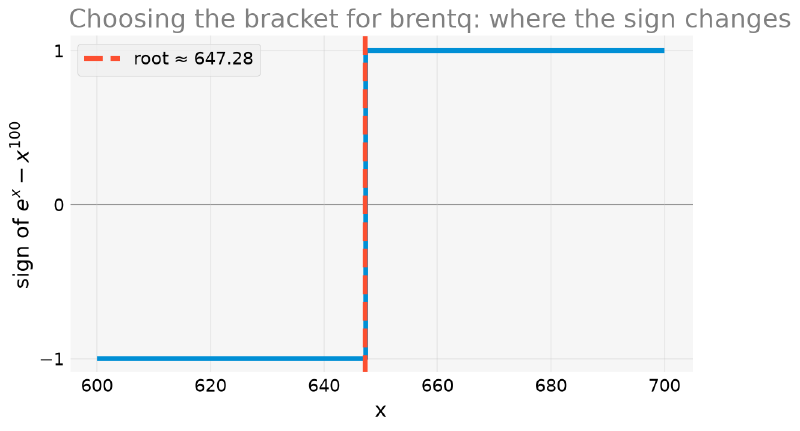
But how do we arrive at a plot like that without already knowing where to look? In practice, nobody “guesses” a bracket: it comes from knowledge of the problem (reasonable physical limits, for example) or from a simple computational scan, in which the function is evaluated on a set of evenly spaced points and we look for where the sign changes from one point to the next.
import numpy as np


def f(x):
    return np.exp(x) - x**100


x_scan = np.linspace(600, 700, 1000)
signs = np.sign(f(x_scan))
changes = np.where(np.diff(signs) != 0)[0]
print("sign changes between x =", x_scan[changes], "and x =", x_scan[changes + 1])
sign changes between x = [647.24724725] and x = [647.34734735]numpy.diff computes the difference between consecutive elements of the
array of signs. Where that difference is nonzero, the sign changed from one
point to the next, and there is the bracket we were after:
(647.247..., 647.347...), right around the already known root
\(647.28\). This same logic (scan, compare consecutive signs, refine the
interval) is what more sophisticated root-finding algorithms automate under
the hood.
import numpy as np
from scipy import optimize


def f(x):
    return np.exp(x) - x**100


root = optimize.brentq(f, 600, 700)
print("root found:", root)
root found: 647.2775124394004The same value as in the limits article, now obtained with explicit control
over the method used. But brentq is not magic: it requires the bracket. An
interval without a sign change fails explicitly, instead of silently
returning something wrong:
import numpy as np
from scipy import optimize


def f(x):
    return np.exp(x) - x**100


optimize.brentq(f, 2, 5)
ValueError: f(a) and f(b) must have different signs(0, 10) would not be a good counterexample here: there is a much smaller
root in that range, \(x \approx 1.01\) (also mentioned in the limits
article), so the sign changes there and brentq would work normally. The
error above only shows up because I chose an interval, (2, 5), where
\(f\) stays negative the whole time, between the two neighboring roots.
Always plot the function (or, as here, its sign) before choosing a
bracket.
Newton’s Method #
Bisection (and brentq, by extension) is robust but “blind”: it only uses
the sign of the function, ignoring all the information about how fast it is
changing. Newton’s method (or Newton-Raphson) uses the derivative to take
much smarter steps and, in exchange, loses the unconditional guarantee of
convergence.
Given an estimate \(x_n\) for the root of \(f\), draw the tangent line to the graph of \(f\) at \(x_n\) and use the point where that tangent crosses the \(x\) axis as the next estimate:
$$x_{n+1} = x_n - \frac{f(x_n)}{f'(x_n)}$$Repeat until the value converges within a desired tolerance.
This formula does not need to be memorized: it comes out in two lines. The tangent line to the graph of \(f\) at the point \(x_n\) is
$$ y = f(x_n) + f'(x_n)(x - x_n) $$We want where this line crosses the \(x\) axis, that is, where \(y = 0\):
$$ 0 = f(x_n) + f'(x_n)(x - x_n) \quad\Longrightarrow\quad x = x_n - \frac{f(x_n)}{f'(x_n)} $$And this \(x\) is precisely the next guess, \(x_{n+1}\). The whole formula is this: replace the function with its tangent and solve the easy problem in place of the hard one. It becomes clear, in passing, where the method’s fragility comes from: if \(f^{\prime}(x_n)\) is zero, the tangent is horizontal and never crosses the axis; if it is nearly zero, it crosses very far away. That is exactly what we are about to see fail.
Before treating scipy.optimize.newton as a black box, it is worth
rebuilding by hand what it does, in the most classic example possible:
finding \(\sqrt{2}\) by solving \(f(x) = x^2 - 2 = 0\).
import numpy as np


def f(x):
    return x**2 - 2


def fp(x):
    return 2 * x


def newton_manual(f, fp, x0, n_iter):
    xs = [x0]
    for _ in range(n_iter):
        x_curr = xs[-1]
        xs.append(x_curr - f(x_curr) / fp(x_curr))
    return xs


xs = newton_manual(f, fp, x0=1.0, n_iter=4)
for i, x_i in enumerate(xs):
    print(f"x_{i} = {x_i:.10f}   (error: {abs(x_i - np.sqrt(2)):.2e})")
x_0 = 1.0000000000 (error: 4.14e-01)
x_1 = 1.5000000000 (error: 8.58e-02)
x_2 = 1.4166666667 (error: 2.45e-03)
x_3 = 1.4142156863 (error: 2.12e-06)
x_4 = 1.4142135624 (error: 1.59e-12)Note the speed: the number of correct digits practically doubles at each step (from 1 to 2, to 5, to 12). This is the so-called quadratic convergence of Newton’s method, and it is the reason it is so popular when the derivative is available. The figure below shows the first 3 steps visually, with the tangent lines converging rapidly to \(\sqrt{2}\) (from the fourth step on, the tangent is already too close to the root to be distinguishable in the drawing).
import matplotlib.pyplot as plt
import numpy as np


def f(x):
    return x**2 - 2


def fp(x):
    return 2 * x


def newton_manual(f, fp, x0, n_iter):
    xs = [x0]
    for _ in range(n_iter):
        x_curr = xs[-1]
        xs.append(x_curr - f(x_curr) / fp(x_curr))
    return xs


xs_plot = newton_manual(f, fp, x0=1.0, n_iter=2)   # x_0, x_1, x_2

x_plot = np.linspace(0.8, 2.1, 400)
fig, ax = plt.subplots(figsize=(8, 6))
ax.plot(x_plot, f(x_plot), color="C0", label=r"$f(x) = x^2 - 2$", zorder=2)
ax.axhline(0, color="gray", linewidth=1, zorder=0)

for i in range(len(xs_plot) - 1):
    x_curr = xs_plot[i]
    x_new = xs_plot[i + 1]
    # tangent line at x_curr, drawn until it crosses y=0 (which is x_new)
    tangent_x = np.array([x_curr, x_new])
    tangent_y = np.array([f(x_curr), 0.0])
    ax.plot(tangent_x, tangent_y, color="C1", linestyle="--", linewidth=1.5, zorder=1)
    ax.scatter([x_curr], [f(x_curr)], color="C1", zorder=3)
    ax.annotate(f"$x_{i}$", (x_curr, f(x_curr)), textcoords="offset points",
                xytext=(6, 8))

ax.axvline(np.sqrt(2), color="C2", linestyle=":", label=r"$\sqrt{2}$ (exact root)")
ax.legend()
ax.set_xlabel("x")
ax.set_ylabel("f(x)")
ax.set_title(r"Newton step by step: successive tangents converging to $\sqrt{2}$")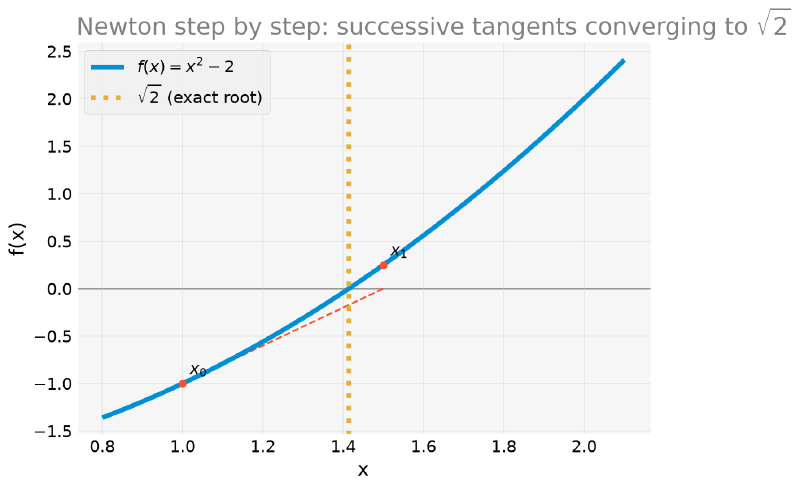
The official SciPy version does exactly this, only faster and with more robust stopping criteria:
from scipy import optimize


def f(x):
    return x**2 - 2


def fp(x):
    return 2 * x


print(optimize.newton(f, x0=1.0, fprime=fp))1.4142135623730951When Newton Fails #
Newton’s speed has a price: without the guarantee of a bracket, it can diverge. And we do not even need a contrived example, because the following case is a classic of any numerical analysis textbook: \(f(x) = x^3 - 2x + 2\), starting from \(x_0 = 0\).
from scipy import optimize


def f(x):
    return x**3 - 2*x + 2


def fp(x):
    return 3*x**2 - 2


optimize.newton(f, x0=0.0, fprime=fp)
RuntimeError: Failed to converge after 50 iterations, value is 0.0.To see exactly what happens, it is worth working out the first two steps by hand, using the same formula \(x_{n+1} = x_n - f(x_n)/f^{\prime}(x_n)\) that we just derived:
- At \(x_0 = 0\): \(f(0) = 2\) and \(f^{\prime}(0) = -2\), so \(x_1 = 0 - \dfrac{2}{-2} = 1\).
- At \(x_1 = 1\): \(f(1) = 1\) and \(f^{\prime}(1) = 1\), so \(x_2 = 1 - \dfrac{1}{1} = 0\), back, exactly, to \(x_0\).
The method returns exactly to the start, with no approximation: it is a perfect cycle of period 2. From here on, the method jumps forever between \(0\) and \(1\), never getting close to the real root (which exists, and is unique, around \(x \approx -1.77\)). The following figure draws this back and forth: the two dashed tangent lines, which cross instead of converging, and the dotted lines that close the cycle (down the tangent to the axis, back up to the curve, repeat).
import matplotlib.pyplot as plt
import numpy as np


def f(x):
    return x**3 - 2*x + 2


real_root = -1.7692923542386314

x_vals = np.linspace(-2.5, 2.5, 500)
fig, ax = plt.subplots(figsize=(8, 5.5))
ax.plot(x_vals, f(x_vals), color="C0", label=r"$f(x) = x^3 - 2x + 2$", zorder=2)
ax.axhline(0, color="gray", linewidth=1, zorder=0)

# tangent at x=0 leads to x=1; tangent at x=1 leads back to x=0
for x_curr, x_new in [(0.0, 1.0), (1.0, 0.0)]:
    ax.plot([x_curr, x_new], [f(x_curr), 0.0],
            color="C1", linestyle="--", linewidth=1.6, zorder=3)
    ax.plot([x_new, x_new], [0.0, f(x_new)],
            color="C1", linestyle=":", linewidth=1.2, alpha=0.7, zorder=1)

ax.scatter([0.0, 1.0], [f(0.0), f(1.0)], color="C1", s=60, zorder=4,
           label="cycle tangents")
ax.scatter([real_root], [0.0], color="C2", s=90, marker="*", zorder=4,
           label=f"real root (≈ {real_root:.2f})")
ax.set_ylim(-2.5, 5.5)
ax.legend(loc="upper left")
ax.set_xlabel("x")
ax.set_ylabel("f(x)")
ax.set_title("Newton in a cycle: the two tangents that alternate forever")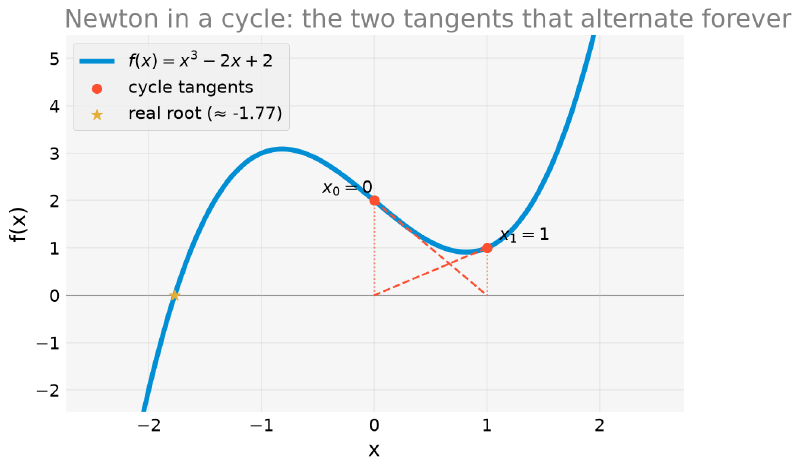
With a better initial guess, the same method converges without obstacles:
from scipy import optimize


def f(x):
    return x**3 - 2*x + 2


def fp(x):
    return 3*x**2 - 2


print(optimize.newton(f, x0=-2.0, fprime=fp))-1.7692923542386314Sweeping Thousands of Initial Guesses #
It might seem that \(x_0 = 0\) was just an unlucky guess, a singular point that can be avoided with a little care. That is not the case. We can sweep thousands of initial guesses, run Newton from each one, and classify: did it converge to the real root, or not?
import numpy as np


def f(x):
    return x**3 - 2*x + 2


def fp(x):
    return 3*x**2 - 2


real_root = -1.7692923542386314


def newton_destination(x0, n_iter=200):
    """Run Newton from x0 and return the final point (or nan if it escaped)."""
    x = float(x0)
    for _ in range(n_iter):
        derivative = fp(x)
        if abs(derivative) < 1e-14:
            return np.nan
        x = x - f(x) / derivative
        if not np.isfinite(x) or abs(x) > 1e8:
            return np.nan
    return x


x0_grid = np.linspace(-3, 3, 6001)
converged = np.array([abs(newton_destination(x0) - real_root) < 1e-6 for x0 in x0_grid])
print(f"fraction of guesses that converge: {converged.mean():.1%}")
fraction of guesses that converge: 80.2%Almost one in every five initial guesses in this range fails, and their distribution is anything but intuitive, as the following figure shows, with the \(x_0\) that converge painted green and those that do not painted red:
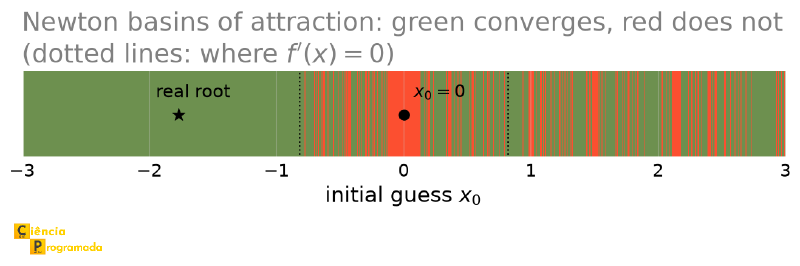
Far from the center, everything is green: Newton behaves. But between the two dotted lines, which mark where \(f^{\prime}(x) = 3x^2 - 2 = 0\), that is, \(x = \pm\sqrt{2/3} \approx \pm 0.816\), things fall apart. There is a wide red band around \(x_0 = 0\) (our cycle, which drags a whole neighborhood along with it) and, around it, green and red stripes that alternate ever finer as they approach the points where the derivative vanishes. In this interval, this alternation never “ends”: no matter how far you zoom in, stripes keep appearing, because the boundary between converging and not converging is fractal.
That is why “choose a better initial guess” is harder advice to follow than it seems: over a good part of the domain, neighboring guesses can have completely different destinations.
Newton is not “no good”: it is sensitive to the initial guess in a way that
brentq simply is not (as long as the bracket is valid). Treat newton as
the fast tool for when you already have a good idea of where the root is;
treat brentq as the default tool, more tolerant of initial ignorance.
Comparing Orders of Convergence #
The “quadratic convergence” (Newton) and the robustness guarantee of
bisection make more sense side by side, with numbers. Let’s solve the same
\(f(x) = x^2 - 2\) with both methods and track the error at each
iteration, on a logarithmic scale. To do this, we reimplement bisection by
hand instead of calling scipy.optimize.bisect directly, the only way to
store the value at each iteration for the plot, since the ready-made
function only returns the final result.
The pointwise error of the midpoint, \(|x_n - \sqrt{2}|\), does not decrease monotonically: the midpoint may “jump” to the other side of the root at each step. This is normal, but it produces a jagged and confusing plot. What bisection really guarantees, always, is to halve the interval width at each iteration, and this width is a reliable upper bound on the error. That is the quantity that appears in the plot below, in place of the raw pointwise error.
import matplotlib.pyplot as plt
import numpy as np


def f(x):
    return x**2 - 2


def fp(x):
    return 2 * x


def newton_manual(f, fp, x0, n_iter):
    xs = [x0]
    for _ in range(n_iter):
        x_curr = xs[-1]
        xs.append(x_curr - f(x_curr) / fp(x_curr))
    return xs


def bisection_with_history(f, a, b, n_iter):
    xs, widths = [], []
    for _ in range(n_iter):
        m = (a + b) / 2
        xs.append(m)
        widths.append(b - a)
        if np.sign(f(a)) == np.sign(f(m)):
            a = m
        else:
            b = m
    return xs, widths


exact_root = np.sqrt(2)
n_iter = 12

xs_bisection, widths_bisection = bisection_with_history(f, a=1.0, b=2.0, n_iter=n_iter)

xs_newton_conv = newton_manual(f, fp, x0=1.0, n_iter=n_iter)[1:]
newton_error = [abs(x - exact_root) for x in xs_newton_conv]

fig, ax = plt.subplots(figsize=(8, 5))
ax.semilogy(range(1, len(widths_bisection) + 1), widths_bisection, "o-", color="C0",
            label="bisection (interval width, linear)")
ax.semilogy(range(1, len(newton_error) + 1), newton_error, "o-", color="C1",
            label="Newton (error, quadratic)")
ax.axhline(1e-15, color="gray", linestyle=":", linewidth=1, label="machine precision")
ax.set_xlabel("iteration")
ax.set_ylabel("error (or upper bound on the error)")
ax.set_title("Order of convergence: bisection vs. Newton")
ax.legend()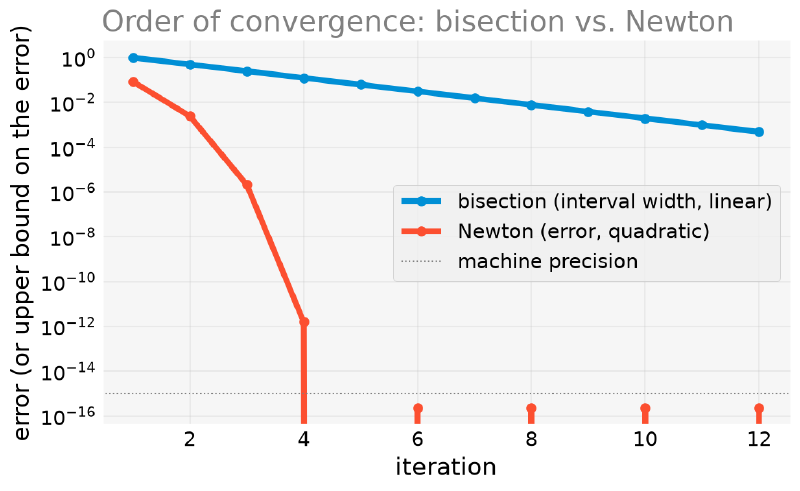
The visual difference is glaring: bisection is a well-behaved straight line on
a log scale (it loses a constant amount of error at each step, that is,
linear convergence); Newton plunges almost vertically after a few
iterations (quadratic convergence). And brentq, which combines both
worlds, solves the same problem in very few iterations:
from scipy import optimize


def f(x):
    return x**2 - 2


_, info = optimize.brentq(f, 1.0, 2.0, full_output=True)
print("brentq converged in", info.iterations, "iterations,",
      info.function_calls, "function evaluations")
brentq converged in 7 iterations, 8 function evaluationsFast like Newton, without requiring a derivative and without the risk of divergence, in most practical cases.
Systems of Nonlinear Equations: fsolve and root
#
Everything so far solved one equation in one variable. And when there is more
than one unknown and the equations are not linear, a situation in which
sympy.solve has no
guarantee of finding (or cannot always find) a closed form? SciPy solves it
with scipy.optimize.fsolve.
Consider the intersection between a circle, \(x^2+y^2=4\), and a parabola, \(y=x^2\), with two solutions by symmetry in \(x\).
from scipy import optimize


def system(vars_):
    x, y = vars_
    return [x**2 + y**2 - 4, y - x**2]


sol_a = optimize.fsolve(system, [1, 1])
sol_b = optimize.fsolve(system, [-1, 1])
print("from (1, 1):", sol_a)
print("from (-1, 1):", sol_b)
from (1, 1): [1.24962107 1.56155281]
from (-1, 1): [-1.24962107 1.56155281]The plot below shows the two curves and the two solutions found.
import matplotlib.pyplot as plt
import numpy as np
from scipy import optimize


def system(vars_):
    x, y = vars_
    return [x**2 + y**2 - 4, y - x**2]


sol_a = optimize.fsolve(system, [1, 1])
sol_b = optimize.fsolve(system, [-1, 1])

theta = np.linspace(0, 2 * np.pi, 300)
x_circ, y_circ = 2 * np.cos(theta), 2 * np.sin(theta)
x_par = np.linspace(-2, 2, 300)
y_par = x_par**2

fig, ax = plt.subplots(figsize=(7, 7))
ax.plot(x_circ, y_circ, color="C0", label=r"$x^2+y^2=4$")
ax.plot(x_par, y_par, color="C1", label=r"$y=x^2$")
ax.scatter(*sol_a, color="C2", zorder=3)
ax.scatter(*sol_b, color="C2", zorder=3, label="solutions (fsolve)")
ax.set_aspect("equal")
ax.legend()
ax.set_xlabel("x")
ax.set_ylabel("y")
ax.set_title("Nonlinear system: circle × parabola")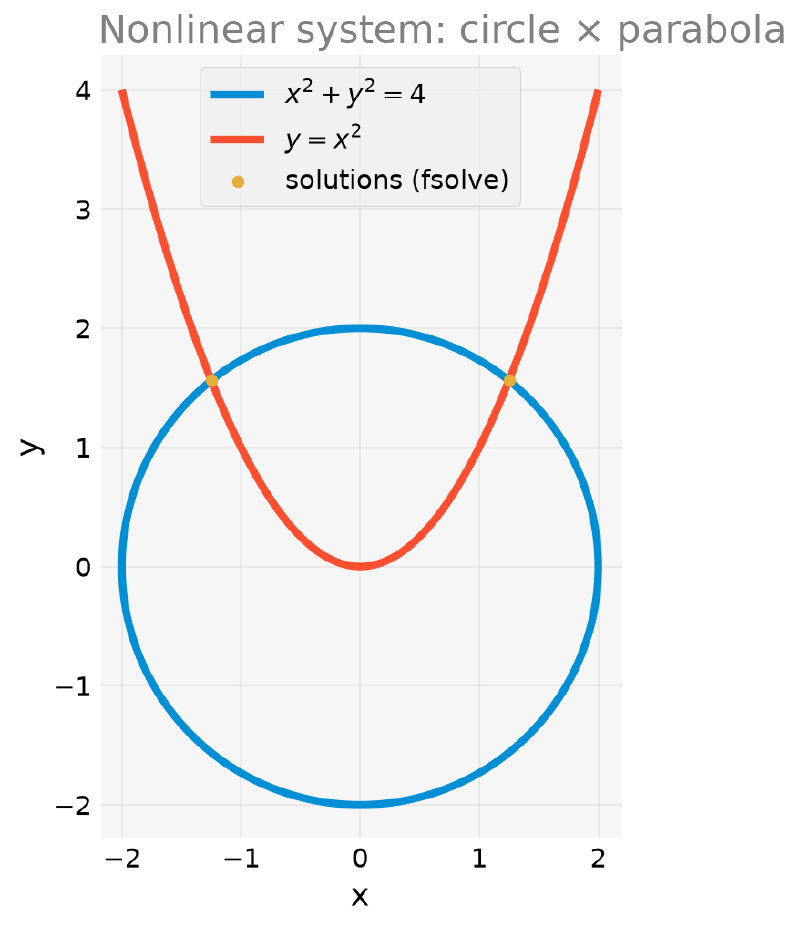
Note that we had to vary the initial guess to find each solution, unlike
sympy.solve, which would return both at once when it manages to solve
symbolically. fsolve finds one solution per call, the one closest to the
guess provided.
What if the Initial Guess Is Bad? #
Just as brentq requires a valid bracket and Newton can diverge with a bad
guess, fsolve also has no guarantee of convergence and, unlike brentq,
does not warn you with an error by default. To investigate, we use
full_output=True, which makes fsolve return, besides the solution, a
status code called ier, a simple integer that works as a flag: 1 means
success; any other value indicates that something went wrong (the specific
reason is described separately, in the msg message). This pattern of
returning an integer as a “verdict” comes from the numerical routines of the
MINPACK package (originally written in Fortran) that fsolve uses under the
hood.
import numpy as np
from scipy import optimize


def system(vars_):
    x, y = vars_
    return [x**2 + y**2 - 4, y - x**2]


solution, info, ier, msg = optimize.fsolve(system, [0, 0], full_output=True)
print("returned solution:", solution)
print("converged (ier == 1)?", ier == 1)
print("solver message:", msg)
print("residual at the returned point:", np.array(system(solution)))
returned solution: [0. 0.]
converged (ier == 1)? False
solver message: The iteration is not making good progress, as measured by the
improvement from the last ten iterations.
residual at the returned point: [-4. 0.]fsolve did not even move: it returned the guess itself as the “solution,”
with residual \([-4, 0]\), clearly wrong. The reason is exactly the same
one that makes Newton’s method stall when the derivative is zero, only
generalized to systems: in place of the derivative \(f^{\prime}(x)\), we
have the matrix of partial derivatives of all the equations with respect to
all the unknowns, the Jacobian. For our system,
Evaluating at the guess \((0,0)\):
$$ J(0, 0) = \begin{pmatrix} 0 & 0 \\ 0 & 1 \end{pmatrix} $$The entire first row vanishes. This means that, in the neighborhood of
\((0,0)\), the circle equation does not “respond” to any change in
\(x\) or in \(y\): to first order, it is insensitive to both unknowns at
once. The determinant is zero, the Jacobian is singular, and the generalized
Newton step (which needs to solve a linear system with this matrix) has
nowhere to go. Hence fsolve returns the guess itself.
ier and the residual
By default, fsolve returns only the solution array; without
full_output=True, the error above would pass silently. In any serious
use, it is worth checking ier or, at the very least, substituting the
“solution” back into the system and confirming that the residual is close
to zero.
fsolve Is a Wrapper: Meet root
#
fsolve has existed in SciPy for decades and shares the same core (MINPACK)
with a newer and more uniform interface: scipy.optimize.root. The advantage
of root is that it always returns an OptimizeResult object, with .x
(the solution) and .success (a boolean) directly, without having to
remember to pass full_output=True to find out whether it converged.
from scipy import optimize


def system(vars_):
    x, y = vars_
    return [x**2 + y**2 - 4, y - x**2]


result = optimize.root(system, [1, 1])
print("solution:", result.x)
print("converged?", result.success)
solution: [1.24962107 1.56155281]
converged? TrueAnd, of course, root suffers from exactly the same problem with the guess
\((0, 0)\), because internally root’s default method ('hybr') is the
same algorithm that fsolve uses:
from scipy import optimize


def system(vars_):
    x, y = vars_
    return [x**2 + y**2 - 4, y - x**2]


bad_result = optimize.root(system, [0, 0])
print("solution:", bad_result.x)
print("converged?", bad_result.success)
print("message:", bad_result.message)
solution: [0. 0.]
converged? False
message: The iteration is not making good progress, as measured by the
improvement from the last ten iterations.Same result as before, but with a direct success check, without
full_output. root also accepts other algorithms via method
('broyden1', 'krylov', among others) for larger or harder systems; for
the systems in this article, the default already does well. The
recommendation stands: in new code, prefer root to fsolve just for the
clarity of the interface.
Summary Table of the Methods #
The table below summarizes when to use each method seen in this article.
| Method | Needs a bracket? | Needs a derivative? | Guaranteed convergence? | Order of convergence | When to use |
|---|---|---|---|---|---|
bisect |
Yes (sign change) | No | Yes, if the bracket is valid | Linear | Robustness above all; speed does not matter |
brentq |
Yes (sign change) | No | Yes, if the bracket is valid | Superlinear, fast in practice | Default choice for one variable |
newton (with fprime) |
No | Yes | No, depends on the initial guess | Quadratic | Derivative available and a good initial guess |
newton (without fprime) |
No | No (secant) | No, depends on the initial guess | Superlinear | No derivative, but a reasonable guess |
fsolve / root |
No | Optional (Jacobian) | No, depends on the initial guess | Varies with the inner method | Systems with more than one equation/variable |
Rule of thumb: for a single variable, start with brentq, which does not
require a derivative and is reliable. Use newton when you already have the
derivative and need more speed. For systems, fsolve/root, but always
validate the residual, because there is no guarantee of convergence.
Next Steps #
All the methods in this article were tested on didactic problems: equations chosen to illustrate a specific behavior (a bracket, a divergence, a slow convergence), not to solve a real problem from end to end. What remains is to apply these same tools to equations that come from a real physical, chemical, or engineering problem, with the units, the interpretations, and the pitfalls that only appear outside the didactic lab.
In fact, the question that opened this article is still pending: what, after
all, is the position of a planet on an elliptical orbit given its mean
anomaly and eccentricity? Now we have the tools to answer: newton, with the
exact derivative of Kepler’s equation, converges rapidly to the eccentric
anomaly \(E\). In the
next article,
we solve this equation for real, visualize the resulting orbit, and apply the
same methods to the range of a projectile under air resistance, another
physics classic with no closed-form solution.
Afterward, in From Chemistry to Engineering, we will see three real equations from chemistry and engineering (the molar volume of a real gas, the pH of a weak acid, and the Colebrook friction factor), all solved with the same tools presented here.


