

Sizing a cylindrical tank of minimum cost, given a fixed volume, is a classic exercise: you write the cost as a function of diameter and height, use the volume constraint to eliminate one of the two variables, differentiate what is left and set it to zero. Three lines of algebra and the problem is solved. But that elegance depends on a condition that goes unnoticed: you could isolate one variable as a function of the other in a closed expression. What if you could not, because the relation between the variables is too complicated, or because there is more than one constraint, or because the cost function has no tractable symbolic derivative? The calculation that solves everything by differentiating and setting to zero, by hand, breaks down.
Why Does Numerical Optimization Matter? #
- Engineering: sizing equipment and structures almost always involves several design variables and simultaneous constraints (cost, safety, available space), and rarely fits in a single algebraic substitution.
- Data science and machine learning: training a model is, at heart, minimizing a loss function with thousands (or millions) of parameters, impossible to solve by differentiating by hand.
- Economics and operations research: allocating limited resources optimally is a constrained optimization problem almost by definition.
- Natural sciences: fitting the parameters of a nonlinear model to experimental data is minimizing the error between model and measurement, that is, optimization disguised as curve fitting.
From the f’=0 Criterion to scipy.optimize
#
The SymPy optimization article
solved \(f(x) = x^3 - 2x^2 + x\) the symbolic way: diff to
find the derivative, solve to set it to zero. The result is a list
with all the critical points at once, \(x=1/3\) (local maximum)
and \(x=1\) (local minimum):
import sympy as sp

x = sp.symbols("x")
f_sym = x**3 - 2 * x**2 + x
critical_points = sp.solve(sp.diff(f_sym, x), x)
print(critical_points)
[1/3, 1]scipy.optimize.minimize_scalar attacks the same kind of problem in a
different way: instead of solving a symbolic equation, it does a numerical
search for a minimum inside an interval. The difference in philosophy
already shows up here, because minimize_scalar only looks for a minimum,
so it will never return the local maximum at \(1/3\), no matter the
interval:
import sympy as sp
from scipy.optimize import minimize_scalar

x = sp.symbols("x")
f_sym = x**3 - 2 * x**2 + x
f_num = sp.lambdify(x, f_sym)

res = minimize_scalar(f_num, bounds=(0.5, 1.5), method="bounded")
print(res.x, res.fun, res.success)
1.0000000114867313 0.0 TrueIt matches \(x=1\), the local minimum, within the expected numerical tolerance.
method="bounded"
minimize_scalar has three methods, and the choice is not immaterial:
| Method | Needs an interval? | Notes |
|---|---|---|
brent (default) |
No, accepts an optional bracket |
Combines golden-section search with parabolic interpolation; it is the analog of brentq for minimization |
golden |
No | Pure golden-section search; slower, of historical value |
bounded |
Yes, required | The only one that respects bounds and never leaves the interval |
The distinction matters: bounds is only honored by bounded. With
brent, the optimizer may perfectly well wander outside the interval you
thought you had imposed, and in a problem with physical meaning (a
concentration, an absolute temperature) that usually ends in the function
being evaluated at meaningless values.
scipy.optimize has no maximize function. It is not missed: maximizing
\(f\) is the same as minimizing \(-f\), since flipping the function
upside down swaps peaks for valleys without moving any of them. It is the
most used trick in the whole library, and it
solves the maximum at \(1/3\) that minimize_scalar “cannot find”:
import sympy as sp
from scipy.optimize import minimize_scalar

x = sp.symbols("x")
f_sym = x**3 - 2 * x**2 + x
f_num = sp.lambdify(x, f_sym)

res_max = minimize_scalar(lambda t: -f_num(t), bounds=(0, 0.8), method="bounded")
print("x of the maximum:", res_max.x)
print("f(x) at the maximum:", -res_max.fun)  # undo the sign!
x of the maximum: 0.3333331957133562
f(x) at the maximum: 0.1481481481481292It matches \(x = 1/3\) and \(f(1/3) = 4/27 \approx 0.1481\).
Two pitfalls in this pattern, both easy to fall into:
res.funcomes with the sign flipped. It holds the value of \(-f\), which is what was minimized. Forgetting the-when reading the result gives a maximum with the wrong sign, and nothing warns you.- The interval starts to matter in a different way. Here I used \((0,\ 0.8)\) and not \((0.5,\ 1.5)\), because the maximum is at \(1/3\), outside the interval of the previous example. Changing the objective usually requires changing the interval too.
This same trick reappears in the
next article
four times in a row: there the goal is to maximize profit and range, and
all the functions are written as minus_profit, minus_conversion,
-projectile_range. The “minus” prefix in the name is not style: it is
the trick.
Restricting the search to \([0, 1]\) would seem more natural (it contains both critical points), but this function has a coincidence, \(f(0) = f(1) = 0\), and the two ends of the interval tie at the minimum value. That does not invalidate the method, but it makes the check less clean (the optimizer converges to near one of the ends, with less precision, because the minimum is on the edge). Choosing an interval where the minimum falls strictly inside, such as \([0.5, 1.5]\), avoids this ambiguity.
The Cylindrical Tank, Without Isolating Any Variable #
The same SymPy optimization article cited above, besides the introductory example, also posed a more elaborate problem: sizing a cylindrical tank of fixed volume (\(V\)) while minimizing the construction cost, given the cost per unit area of the side (\(c_s\)) and of the top/bottom (\(c_t\)). It is worth revisiting it in full, with the same symbols.
Let us recall where the cost function comes from. With a bit of basic geometry (the lateral area of a cylinder is \(\pi D L\), and the area of the top plus the bottom is \(2 \times \frac{\pi}{4}D^2 = \frac{\pi}{2}D^2\)), we arrive at the cost function:
$$ f = c_s \pi D L + c_t \frac{\pi}{2} D^2 $$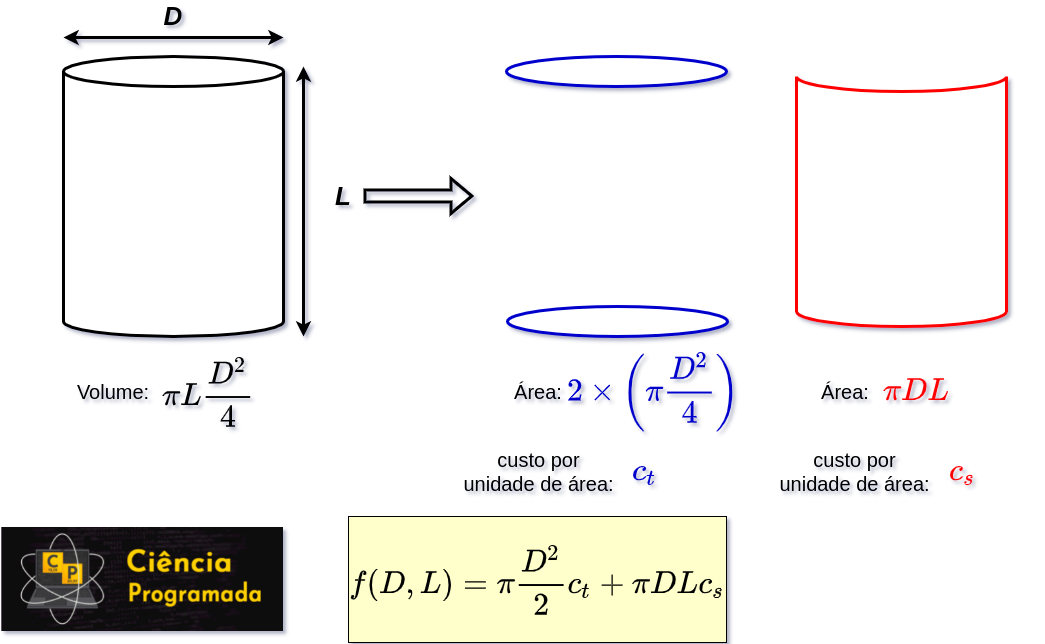
This function is subject to the volume being fixed, \(\frac{\pi}{4}D^2 L = V\), the same constraint as in the original article.
Example 1: Revalidating the published result
Statement: With \(c_s = c_t = 1\) and \(V=10\), find the diameter that minimizes the cost, isolating \(L\) as a function of \(V\) first, the same way as the original article.
Solution:
import numpy as np
from scipy.optimize import minimize_scalar

V, cs, ct = 10.0, 1.0, 1.0


def cost_1var(D):
    L = 4 * V / (np.pi * D**2)
    return cs * np.pi * D * L + ct * (np.pi / 2) * D**2


res_1var = minimize_scalar(cost_1var, bounds=(0.01, 20), method="bounded")
print("Optimal D:", res_1var.x)
Optimal D: 2.335088713257265The symbolic value published in the original article was \(2.33508864988147\); it matches up to the 6th decimal place, within the optimizer’s default tolerance.
The following plot shows the cost curve as a function of \(D\), with the minimum found marked:
import matplotlib.pyplot as plt
import numpy as np
from scipy.optimize import minimize_scalar

V, cs, ct = 10.0, 1.0, 1.0


def cost_1var(D):
    L = 4 * V / (np.pi * D**2)
    return cs * np.pi * D * L + ct * (np.pi / 2) * D**2


res_1var = minimize_scalar(cost_1var, bounds=(0.01, 20), method="bounded")

Ds = np.linspace(0.5, 6, 200)
fig, ax = plt.subplots()
ax.plot(Ds, cost_1var(Ds))
ax.plot(res_1var.x, res_1var.fun, "o", color="black")
ax.set_xlabel("D (m)")
ax.set_ylabel("cost")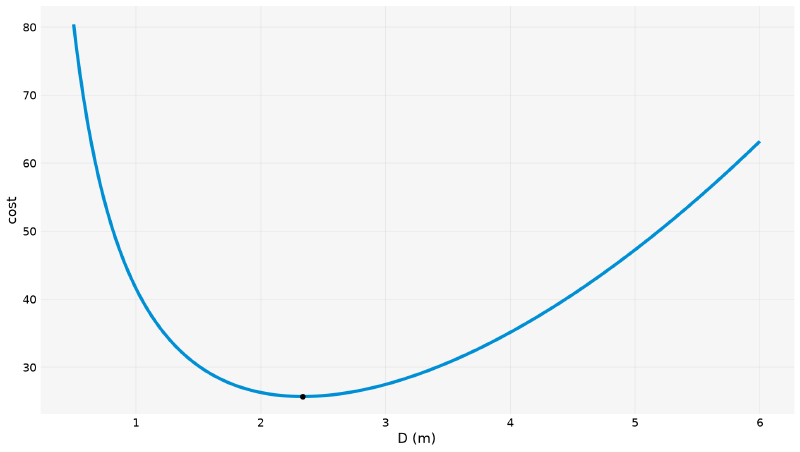
This part only confirms that the numerical route agrees with the symbolic route when both are possible. The central point of the article is the next step: solving the same problem without isolating \(L\), as if that elimination were not convenient (or did not exist). That is an optimization in two variables, \((D, L)\), subject to an equality constraint:
import numpy as np
from scipy.optimize import minimize

V, cs, ct = 10.0, 1.0, 1.0


def cost_2var(v):
    D, L = v
    return cs * np.pi * D * L + ct * (np.pi / 2) * D**2


def volume_constraint(v):
    D, L = v
    return (np.pi / 4) * D**2 * L - V


res_2var = minimize(
    cost_2var,
    x0=[1.0, 1.0],
    method="SLSQP",
    constraints={"type": "eq", "fun": volume_constraint},
    bounds=[(1e-6, None), (1e-6, None)],
    tol=1e-12,
)
print(res_2var.x, res_2var.success)
[2.33508865 2.33508864] Truemethod="SLSQP" ("sequential least squares programming") is SciPy’s
default method for constrained optimization. The constraint enters as
a dictionary: 'type': 'eq' says that volume_constraint must be
exactly zero at the solution, the same volume equation as in the original
article, only without solving for \(L\) before optimizing. D and L
come out practically equal, confirming the relation \(D=L\) that the
original article had derived symbolically for equal costs.
Example 2: Second validation: distinct costs
Statement: Repeat the previous problem with the side cost equal to twice the top cost (\(c_s=2\), \(c_t=1\), \(V=10\) remain).
Solution:
import numpy as np
from scipy.optimize import minimize

V, cs, ct = 10.0, 1.0, 1.0


def volume_constraint(v):
    D, L = v
    return (np.pi / 4) * D**2 * L - V


cs_dist = 2.0
res_dist = minimize(
    lambda v: cs_dist * np.pi * v[0] * v[1] + ct * (np.pi / 2) * v[0] ** 2,
    x0=[2.0, 2.0],
    method="SLSQP",
    constraints={"type": "eq", "fun": volume_constraint},
    bounds=[(1e-6, None), (1e-6, None)],
    tol=1e-14,
)
print(res_dist.x)
[2.94202732 1.47101369]The value published in the original article was \(D=2.94202734335627\); it matches up to the 7th decimal place.
Bounds: Limits That Physics Demands #
The tank example already used bounds=[(1e-6, None), (1e-6, None)] without
explaining why. The reason is more serious than “avoiding ugly negative
values”: without that limit, the problem has no finite minimum. Rewritten
as a function of \(D\) only (eliminating \(L\)), the cost is
\(4c_sV/D + c_t\frac{\pi}{2}D^2\); for negative \(D\), the first
term plunges without limit as \(D \to 0^-\).
import numpy as np
from scipy.optimize import minimize

V, cs, ct = 10.0, 1.0, 1.0


def cost_2var(v):
    D, L = v
    return cs * np.pi * D * L + ct * (np.pi / 2) * D**2


def volume_constraint(v):
    D, L = v
    return (np.pi / 4) * D**2 * L - V


res_no_bounds = minimize(
    cost_2var,
    x0=[-0.5, 40.0],
    method="SLSQP",
    constraints={"type": "eq", "fun": volume_constraint},
)
print(res_no_bounds.x, res_no_bounds.fun, res_no_bounds.success, res_no_bounds.message)
[-8.51038777e-05 1.53038608e+09] -409166.6491516873 False Iteration limit reachedbounds, the optimizer can “find” a physical absurdity
Starting from a negative diameter, the optimizer does not end up just a
little wrong: it chases an ever more negative cost, with L
blowing up to more than a billion, and does not even converge
(success=False). Redoing it with the same bounds as in the previous
example, from the same bad guess:
import numpy as np
from scipy.optimize import minimize

V, cs, ct = 10.0, 1.0, 1.0


def cost_2var(v):
    D, L = v
    return cs * np.pi * D * L + ct * (np.pi / 2) * D**2


def volume_constraint(v):
    D, L = v
    return (np.pi / 4) * D**2 * L - V


res_with_bounds = minimize(
    cost_2var,
    x0=[-0.5, 40.0],
    method="SLSQP",
    constraints={"type": "eq", "fun": volume_constraint},
    bounds=[(1e-6, None), (1e-6, None)],
    tol=1e-12,
)
print(res_with_bounds.x, res_with_bounds.success)
[2.33508866 2.33508863] TrueSame guess, completely different result, just because of the
bounds. Physical dimensions (diameters, lengths, concentrations,
absolute temperatures) almost always call for an explicit lower bound of
zero.
Unconstrained Multivariable Optimization: Rosenbrock #
For problems with no constraints at all, scipy.optimize.minimize accepts
several methods. The classic benchmark for comparing all of them is the
Rosenbrock function (the “banana function”), \(f(x,y) = (1-x)^2 +
100(y-x^2)^2\), with a known minimum at \((1,1)\), \(f=0\): a
narrow, curved valley, purposely designed to be difficult.
import numpy as np


def rosenbrock(v):
    x, y = v
    return (1 - x) ** 2 + 100 * (y - x**2) ** 2


x_ros = np.linspace(-2, 2, 300)
y_ros = np.linspace(-1, 3, 300)
X_ros, Y_ros = np.meshgrid(x_ros, y_ros)
Z_ros = rosenbrock([X_ros, Y_ros])
Since \(f\) has two input variables and one output, it is literally a surface in 3D space: each point \((x,y)\) has a “height” \(f(x,y)\). It is worth plotting that surface for real first:
import matplotlib.pyplot as plt
import numpy as np


def rosenbrock(v):
    x, y = v
    return (1 - x) ** 2 + 100 * (y - x**2) ** 2


x_ros = np.linspace(-2, 2, 300)
y_ros = np.linspace(-1, 3, 300)
X_ros, Y_ros = np.meshgrid(x_ros, y_ros)
Z_ros = rosenbrock([X_ros, Y_ros])

fig = plt.figure()
ax = fig.add_subplot(projection="3d")
ax.plot_surface(X_ros, Y_ros, Z_ros, cmap="viridis")
ax.set_xlabel("x")
ax.set_ylabel("y")
ax.set_zlabel("f(x,y)")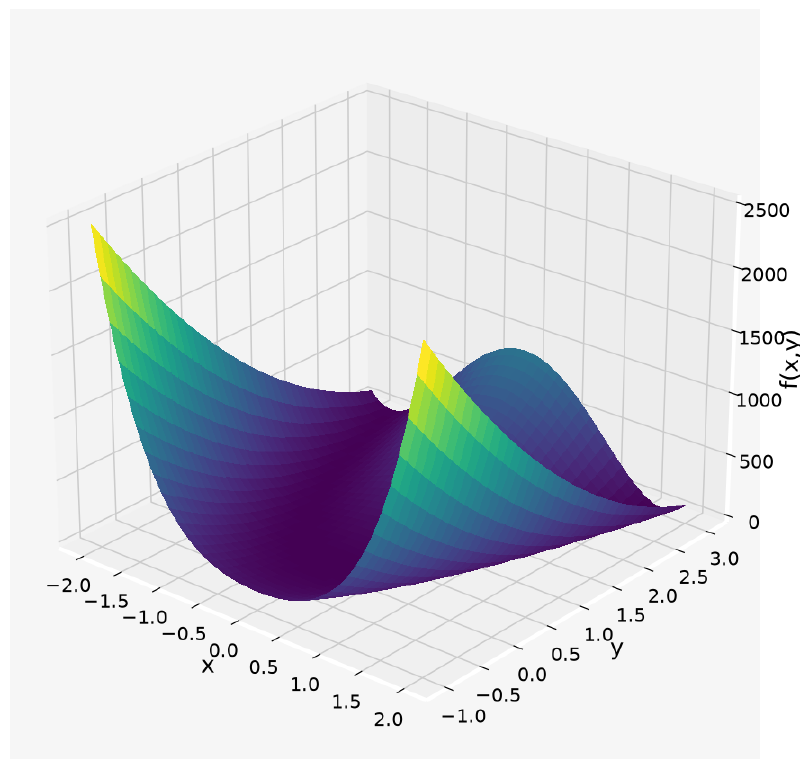
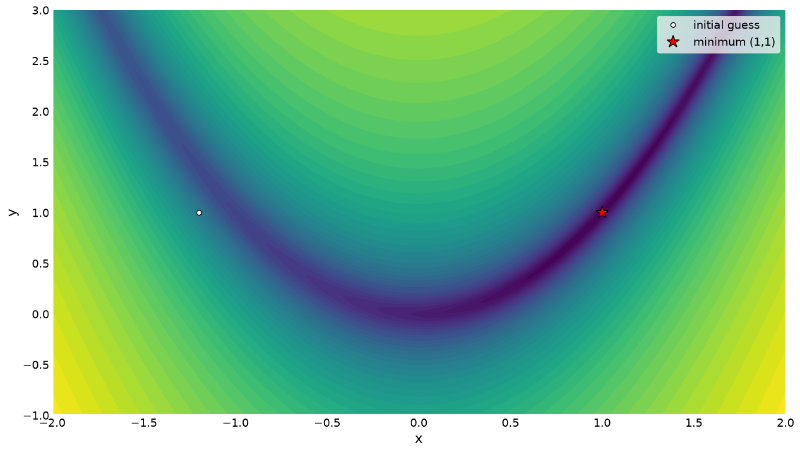
The valley is there (it is the darkest band at the base), but the 3D perspective has two problems: part of the surface sits behind another part (occlusion), and the vertical scale, which has to reach \(\approx 2500\) to accommodate the slopes, squeezes exactly the region that matters most. A better way to see the valley is to flatten that surface and look from above, with the third dimension (the height) encoded in a color scale instead of vertical position. That is exactly what a contour map does.
import matplotlib.pyplot as plt
import numpy as np


def rosenbrock(v):
    x, y = v
    return (1 - x) ** 2 + 100 * (y - x**2) ** 2


x_ros = np.linspace(-2, 2, 300)
y_ros = np.linspace(-1, 3, 300)
X_ros, Y_ros = np.meshgrid(x_ros, y_ros)
Z_ros = rosenbrock([X_ros, Y_ros])

fig, ax = plt.subplots()
ax.contourf(X_ros, Y_ros, np.log10(Z_ros + 1), levels=50, cmap="viridis")
ax.plot(-1.2, 1.0, "o", color="white", markeredgecolor="black", label="initial guess")
ax.plot(1, 1, "*", color="red", markersize=16, markeredgecolor="black", label="minimum (1,1)")
ax.set_xlabel("x")
ax.set_ylabel("y")
ax.legend()
In the viridis color palette, dark purple corresponds to low values
of \(f\) (near the minimum) and yellow to high values (the slopes). The
code uses log10(Z+1), not plain \(Z\), in the color scale, for the same
reason as in 3D: near the minimum \(f\) is almost zero, far from it it
exceeds thousands, and on a linear scale that huge difference would make
almost the whole plot a single color (that of the edges), erasing the valley
again. The logarithm compresses that giant range of values into something
where the valley floor and the edges are visible in the same image (the +1
avoids log10(0), which does not exist). The name “banana function”
comes exactly from this shape:
A method that follows the steepest descent direction at each step, with a fixed step size, tends to “ricochet” from one side to the other inside this narrow valley, instead of walking straight to the minimum. This does not have to stay in words. You can implement steepest descent in five lines and draw the path:
import numpy as np


def rosenbrock(v):
    x, y = v
    return (1 - x) ** 2 + 100 * (y - x**2) ** 2


def grad_rosenbrock(v):
    x, y = v
    return np.array([-2 * (1 - x) - 400 * x * (y - x**2), 200 * (y - x**2)])


fixed_step = 3e-3
v = np.array([-1.2, 1.0])
path = [v.copy()]
for _ in range(2000):
    v = v - fixed_step * grad_rosenbrock(v)
    path.append(v.copy())
path = np.array(path)

side = path[:, 1] - path[:, 0] ** 2   # which side of the valley it is on
print("crossed the valley", int((np.diff(np.sign(side)) != 0).sum()), "times")
print(f"final f: {rosenbrock(path[-1]):.4f}")
crossed the valley 1071 times
final f: 0.3268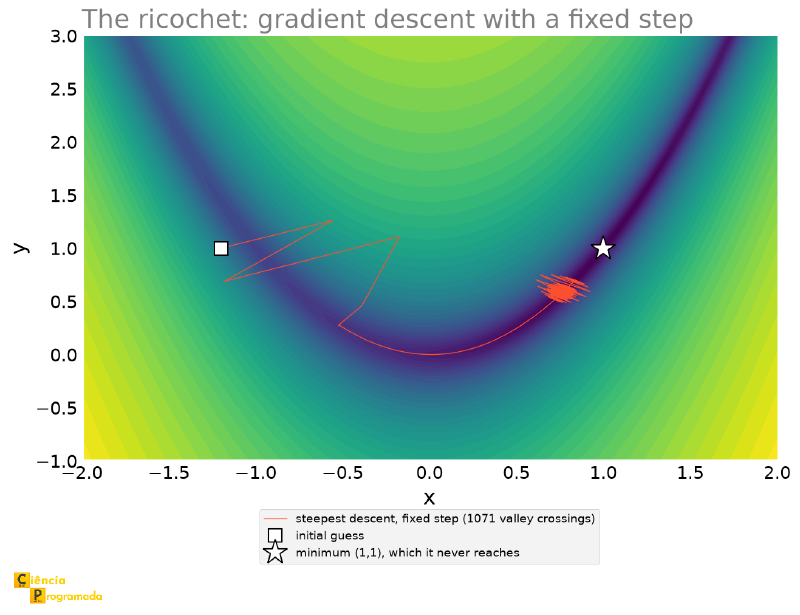
That is 2000 steps to reach \(f = 0.33\), and the method does not even reach the minimum: it gets stuck in a tangle around \(x = 0.74\), crossing the valley from side to side more than a thousand times. This is the waste that real methods avoid.
And they do avoid it. The callback parameter of minimize is called at
each iteration and lets you record the path that SciPy’s methods follow,
which, as we will see, does not ricochet:
import matplotlib.pyplot as plt
import numpy as np
from scipy.optimize import minimize


def rosenbrock(v):
    x, y = v
    return (1 - x) ** 2 + 100 * (y - x**2) ** 2


x_ros = np.linspace(-2, 2, 300)
y_ros = np.linspace(-1, 3, 300)
X_ros, Y_ros = np.meshgrid(x_ros, y_ros)
Z_ros = rosenbrock([X_ros, Y_ros])

fig, ax = plt.subplots(figsize=(9, 6.5))
ax.contourf(X_ros, Y_ros, np.log10(Z_ros + 1), levels=50, cmap="viridis")

for method, color in (("Nelder-Mead", "C1"), ("BFGS", "C3"), ("Powell", "C5")):
    path = [np.array([-1.2, 1.0])]
    res_traj = minimize(rosenbrock, x0=[-1.2, 1.0], method=method,
                        callback=lambda xk, c=path: c.append(np.copy(xk)))
    traj = np.array(path)
    ax.plot(traj[:, 0], traj[:, 1], "o-", color=color, markersize=4, linewidth=1.6,
            label=f"{method} ({res_traj.nit} iterations, {res_traj.nfev} evaluations)")

ax.plot(1, 1, "*", color="white", markeredgecolor="black", markersize=20)
ax.legend(loc="upper left", fontsize=9)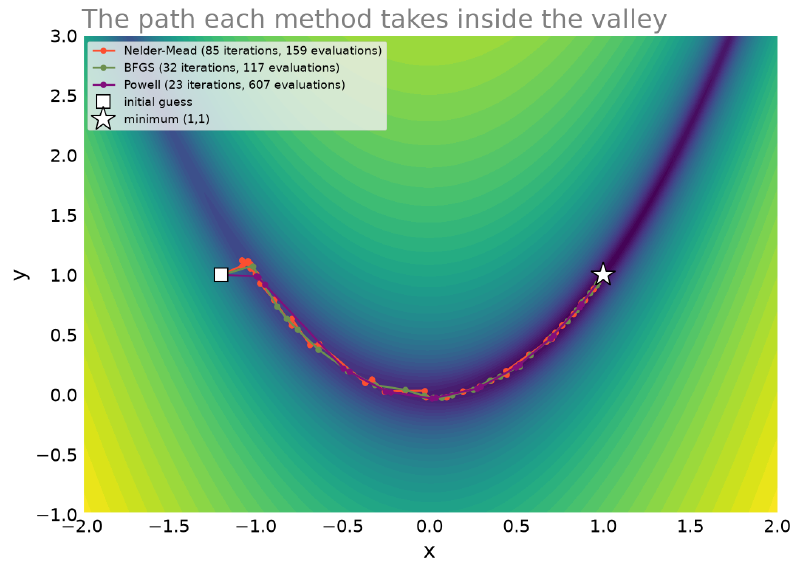
The three trajectories are almost indistinguishable, and that is the result, not a flaw in the figure: all three methods settle the step size before taking each step (that is what a line search does), so each iterate already lands near the valley floor. The ricochet in the previous figure is the price of not doing that.
None of the three goes in a straight line. All of them have to follow the curve of the valley, and that is exactly where the iterations are spent: the minimum is a short distance from the initial guess in a straight line, but far in “distance traveled inside the valley”.
import numpy as np
from scipy.optimize import minimize


def rosenbrock(v):
    x, y = v
    return (1 - x) ** 2 + 100 * (y - x**2) ** 2


for method in ["Nelder-Mead", "BFGS", "Powell"]:
    res = minimize(rosenbrock, x0=[-1.2, 1.0], method=method)
    print(f"{method:12s} x={np.round(res.x, 5)}  f={res.fun:.2e}  nit={res.nit}  nfev={res.nfev}")
Nelder-Mead x=[1.00002 1.00004] f=8.18e-10 nit=85 nfev=159
BFGS x=[1. 0.99999] f=2.02e-11 nit=32 nfev=117
Powell x=[1. 1.] f=1.79e-26 nit=23 nfev=607All three get close to \((1,1)\), but at very different costs,
summed up in two counts that every minimize result carries:
nit × nfev
nit (number of iterations) counts how many times the algorithm
repeated its main loop; each iteration typically updates the estimate
of the optimal point once. nfev (number of function evaluations)
counts how many times \(f\) was actually called in total, including
all the internal sub-calls of each iteration (line searches,
numerical gradient estimation, etc.).
When \(f\) is expensive to compute (a simulation, a network call,
a heavy model), nfev is usually the metric that really matters,
because it measures the actual computational cost. A low nit does not
guarantee cheap: here, Powell has the lowest nit (\(23\)) but the
highest nfev (\(607\)), because each of its iterations does a
complete line search along several directions, so “few iterations” does
not mean “little work”.
Nelder-Mead is derivative-free (it does not use the gradient, it only
evaluates the function at points and compares), simple and robust, but it
needs more iterations in the curved valley (\(\approx1.9\) evaluations per
iteration). BFGS uses a numerical approximation of the gradient
internally, so it converges in fewer iterations (\(32\)), but each one
already carries the cost of estimating that gradient (\(\approx3.7\)
evaluations per iteration). Powell, also derivative-free, does a
thorough line search at each iteration: few iterations, many evaluations,
and here that paid off with excellent precision (\(f \approx 10^{-26}\)).
The acronym (Broyden, Fletcher, Goldfarb and Shanno) says nothing about the method, and it is worth knowing what it does differently.
Pure gradient descent always walks in the direction of steepest slope. In a narrow, crooked valley like Rosenbrock’s, that direction points to the wall of the valley, not to its floor, hence the ricocheting. What would fix this is knowing the curvature, which lives in the Hessian matrix (the second derivatives); with it, Newton’s method would take steps that, on a quadratic, would lead straight to the minimum.
The problem is that the Hessian of a problem with \(n\) variables has \(n^2\) entries, and computing it is usually prohibitive. The trick of BFGS is not to compute it: it starts with a rough guess for the Hessian (the identity) and keeps correcting that estimate at each step, using the differences between consecutive gradients and between consecutive positions, information it already has for free. Hence the name of the family: quasi-Newton methods.
In most cases, this gives almost the speed of Newton, without the cost
of building the Hessian. And that is the reason BFGS is the
default of minimize when there are no constraints.
Supplying the Gradient with jac
#
The numerical derivatives article
promised that this accounting would return: when the analytic gradient is
not available, the optimizer estimates it by finite differences, and pays
one extra function evaluation per variable, at each iteration. That is where
the \(117\) evaluations of BFGS above come from, for just \(32\)
iterations.
When you can write the gradient by hand, the jac parameter avoids that
entire cost. For Rosenbrock it takes two lines:
import numpy as np
from scipy.optimize import minimize


def rosenbrock(v):
    x, y = v
    return (1 - x) ** 2 + 100 * (y - x**2) ** 2


def jac_rosenbrock(v):
    x, y = v
    return np.array([-2 * (1 - x) - 400 * x * (y - x**2),
                     200 * (y - x**2)])


for label, jac in (("without jac (finite differences)", None),
                   ("with analytic jac", jac_rosenbrock)):
    r = minimize(rosenbrock, x0=[-1.2, 1.0], method="BFGS", jac=jac)
    print(f"{label:>32}: nit={r.nit:>3}  nfev={r.nfev:>4}  njev={r.njev:>3}  f={r.fun:.2e}")
without jac (finite differences): nit= 32 nfev= 117 njev= 39 f=2.02e-11
with analytic jac: nit= 32 nfev= 39 njev= 39 f=2.54e-15Two gains at once, and the second is the more interesting:
- Three times fewer function evaluations (117 → 39), with the same number of iterations. The evaluations that vanished were exactly those spent estimating the gradient.
- Ten thousand times better precision (\(2\times10^{-11}\) → \(2.5\times10^{-15}\)). The gradient estimated by finite differences carries the same \(U\) error as in the numerical derivatives article, and that error propagates to the solution. The analytic gradient is exact.
3×
fewer evaluations
10,000×
more precision
When \(f\) is expensive (a simulation, an ODE solved at each call, as in the next article), the first gain is the one that matters. When you need many digits, the second.
| Method | Name behind the acronym | Uses gradient? | When to use |
|---|---|---|---|
Nelder-Mead |
Nelder and Mead’s simplex method | No | Non-smooth or noisy function; few variables; robustness over speed |
Powell |
Powell’s method (line searches along conjugate directions) | No | No gradient available, but a function smooth enough for line searches to pay off; good final precision |
BFGS |
Broyden-Fletcher-Goldfarb-Shanno | Yes (numerically approximated if not supplied) | Smooth, differentiable function; default choice when there are no constraints |
L-BFGS-B |
Limited-memory BFGS with Bounds | Yes (approximated) | Like BFGS, but with bounds, a memory-efficient version, better for many variables |
SLSQP |
Sequential Least Squares Programming | Yes (approximated) | When there are equality/inequality constraints (seen in the tank section) |
There is no single “best method”: the choice trades robustness, speed and final precision depending on what is being optimized, and on what really is expensive in the problem.
Local × Global Minima #
This whole section so far has a silent assumption: that the method converges to the right minimum. That is only guaranteed when there is a single minimum. As soon as the function has more than one, the result depends on where the search starts.
Example 3: Himmelblau: the result depends on the initial guess
Statement: The Himmelblau function, \(f(x,y) = (x^2+y-11)^2 + (x+y^2-7)^2\), has four known global minima, all with \(f=0\). Minimize it from 5 scattered initial guesses and compare the results.
Solution:
import numpy as np
from scipy.optimize import minimize


def himmelblau(v):
    x, y = v
    return (x**2 + y - 11) ** 2 + (x + y**2 - 7) ** 2


guesses = [(0, 0), (-4, 4), (4, -4), (-4, -4), (5, 5)]
for c in guesses:
    res = minimize(himmelblau, x0=c, method="BFGS")
    print(f"guess={str(c):<8}  ->  x={str(np.round(res.x, 4)):<17} f={res.fun:.2e}")
guess=(0, 0) -> x=[3. 2.] f=1.38e-13
guess=(-4, 4) -> x=[-2.8051 3.1313] f=1.02e-13
guess=(4, -4) -> x=[ 3.5844 -1.8481] f=6.51e-16
guess=(-4, -4) -> x=[-3.7793 -3.2832] f=1.92e-14
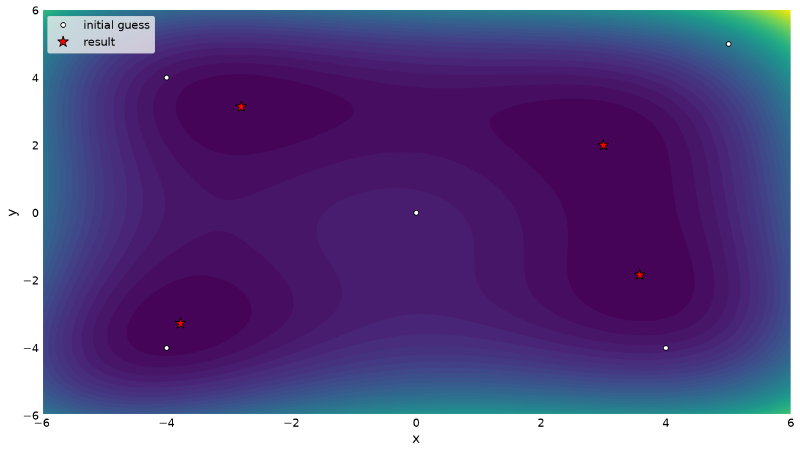
guess=(5, 5) -> x=[3. 2.] f=1.20e-12Five guesses, four different results (two of them land on the same
minimum, \((3,2)\)), all equally correct, in the sense that
all of them are actual global minima. There is no such thing in the
SymPy world: solve on the derivative would return all four at once,
without depending on any guess.
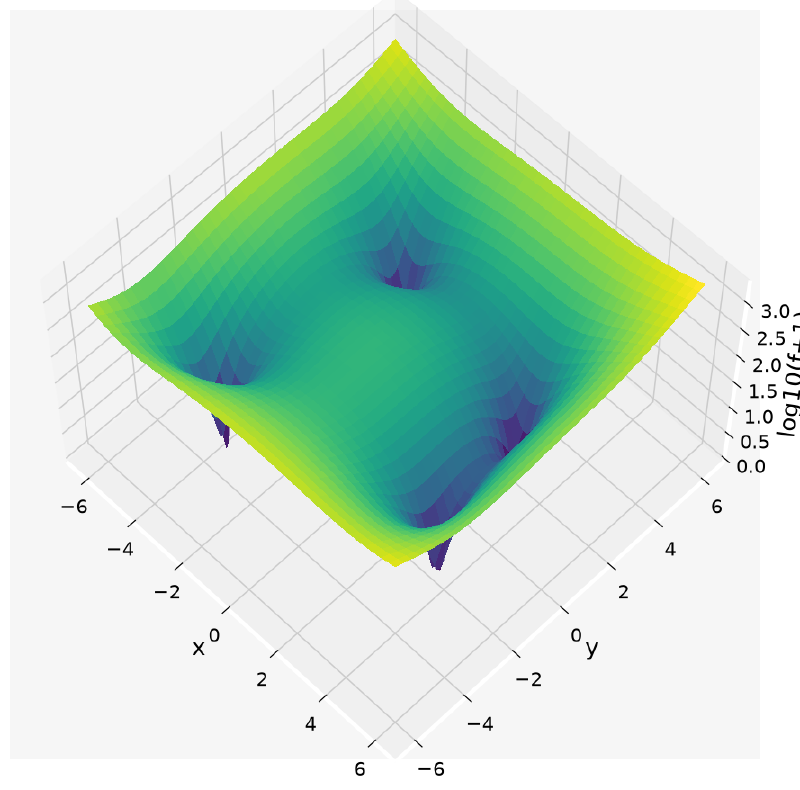
As in the Rosenbrock case, it is worth seeing the whole surface before flattening it:
import matplotlib.pyplot as plt
import numpy as np


def himmelblau(v):
    x, y = v
    return (x**2 + y - 11) ** 2 + (x + y**2 - 7) ** 2


x_grid = np.linspace(-6, 6, 300)
y_grid = np.linspace(-6, 6, 300)
X, Y = np.meshgrid(x_grid, y_grid)
Z = himmelblau([X, Y])

fig = plt.figure()
ax = fig.add_subplot(projection="3d")
ax.plot_surface(X, Y, np.log10(Z + 1), cmap="viridis")
ax.set_xlabel("x")
ax.set_ylabel("y")
ax.set_zlabel("log10(f+1)")
ax.view_init(elev=60, azim=-45)
Once again on a logarithmic scale, for the same reason as before. The four minima show up as four sharp holes in the surface, one at each “corner” of the relief:
Flattening this same surface into a contour map (now without
needing the log, because the viridis color scale already distinguishes the
bottom of each basin well even in linear values):
import matplotlib.pyplot as plt
import numpy as np
from scipy.optimize import minimize


def himmelblau(v):
    x, y = v
    return (x**2 + y - 11) ** 2 + (x + y**2 - 7) ** 2


x_grid = np.linspace(-6, 6, 300)
y_grid = np.linspace(-6, 6, 300)
X, Y = np.meshgrid(x_grid, y_grid)
Z = himmelblau([X, Y])

guesses = [(0, 0), (-4, 4), (4, -4), (-4, -4), (5, 5)]
himmelblau_results = [minimize(himmelblau, x0=c, method="BFGS").x for c in guesses]

fig, ax = plt.subplots()
ax.contourf(X, Y, Z, levels=50, cmap="viridis")
ax.plot([], [], "o", color="white", markeredgecolor="black", label="initial guess")
ax.plot([], [], "*", color="red", markersize=14, markeredgecolor="black", label="result")
for c, xr in zip(guesses, himmelblau_results):
    ax.plot(*c, "o", color="white", markeredgecolor="black")
    ax.plot(*xr, "*", color="red", markersize=14, markeredgecolor="black")
ax.set_xlabel("x")
ax.set_ylabel("y")
ax.legend()
The heat map below shows the four basins of attraction (dark regions) and how each guess (white circle) falls into one of the four minima (red star):
Five guesses make a snapshot. You can turn them into a map:
color each point of the plane by the color of the minimum BFGS converges
to starting from there. These are the basins of attraction.
import numpy as np
from scipy.optimize import minimize


def himmelblau(v):
    x, y = v
    return (x**2 + y - 11) ** 2 + (x + y**2 - 7) ** 2


minima = np.array([[3.0, 2.0], [-2.805118, 3.131312],
                   [-3.779310, -3.283186], [3.584428, -1.848126]])

n_grid = 130
xs_b = ys_b = np.linspace(-6, 6, n_grid)
basin = np.full((n_grid, n_grid), -1, dtype=int)
for i, yv in enumerate(ys_b):
    for j, xv in enumerate(xs_b):
        r = minimize(himmelblau, x0=[xv, yv], method="BFGS")
        d = np.linalg.norm(minima - r.x, axis=1)
        if d.min() < 1e-3:
            basin[i, j] = int(np.argmin(d))

for k in range(4):
    print(f"minimum {tuple(np.round(minima[k], 2).tolist())}: {(basin == k).mean():.1%} of the plane")
minimum (3.0, 2.0): 24.1% of the plane
minimum (-2.81, 3.13): 26.1% of the plane
minimum (-3.78, -3.28): 24.5% of the plane
minimum (3.58, -1.85): 25.3% of the plane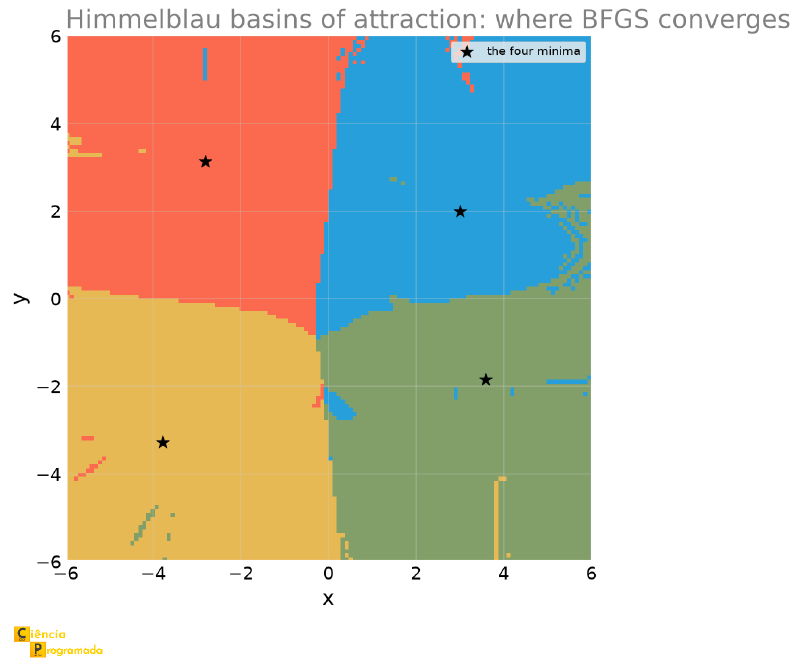
Two readings. The first is reassuring: the four basins get a quarter of the plane each, and every point tested converges to some minimum. The second, not so much: look at the borders. They are neither straight nor smooth: they are irregular, and there are isolated islands of one color right in the middle of another’s territory. Near them, two nearly identical initial guesses end up in different minima.
It is the same structure that appeared in the Newton basins of the first article in this series, and for the same reason: iterative methods that follow the local geometry cannot guarantee continuity in the final destination.
Himmelblau has a particularity: its four minima are equally
good (all with \(f=0\)). The more common problem in practice is another:
local minima that are genuinely worse than the global minimum.
In that case, every method seen so far (Nelder-Mead, BFGS,
Powell, SLSQP) has the same limitation: it starts from a single guess
and only sees its neighborhood.
scipy.optimize.differential_evolution attacks the problem differently.
Instead of refining a single estimate step by step, it keeps an
entire population of candidates spread across the domain and makes them
evolve through generations (combining pairs, applying random mutations,
discarding the worst), an evolutionary algorithm, in the same spirit as
genetic algorithms. Because it sweeps the entire domain, instead of refining
from a single point, it needs no initial guess at all, only the search
bounds. The cost is the number of function evaluations, much larger
than that of a local method.
Example 4: One minimum worse than the other
Statement: \(f(x) = x^2 + 10\sin(x)\) has only two local minima
in the interval \([-10, 10]\) (the derivative, \(f^{\prime}(x)=2x+10\cos x\), only
vanishes for \(|x| \lesssim 5\)). Find both and compare with what
differential_evolution returns, with no initial guess at all.
Solution:
import numpy as np
from scipy.optimize import differential_evolution, minimize


def f_two_minima(x):
    return x**2 + 10 * np.sin(x)


for c in [-8, -5, -2, 0, 2, 5, 8]:
    res = minimize(f_two_minima, x0=[c], method="BFGS")
    print(f"guess={c:5.1f}  ->  x={res.x[0]:.4f}  f={res.fun:.4f}")

res_de = differential_evolution(lambda v: f_two_minima(v[0]), bounds=[(-10, 10)], seed=1)
print("differential_evolution:", res_de.x, res_de.fun)
guess= -8.0 -> x=-1.3064 f=-7.9458
guess= -5.0 -> x=-1.3064 f=-7.9458
guess= -2.0 -> x=-1.3064 f=-7.9458
guess= 0.0 -> x=-1.3064 f=-7.9458
guess= 2.0 -> x=3.8375 f=8.3156
guess= 5.0 -> x=3.8375 f=8.3156
guess= 8.0 -> x=3.8375 f=8.3156
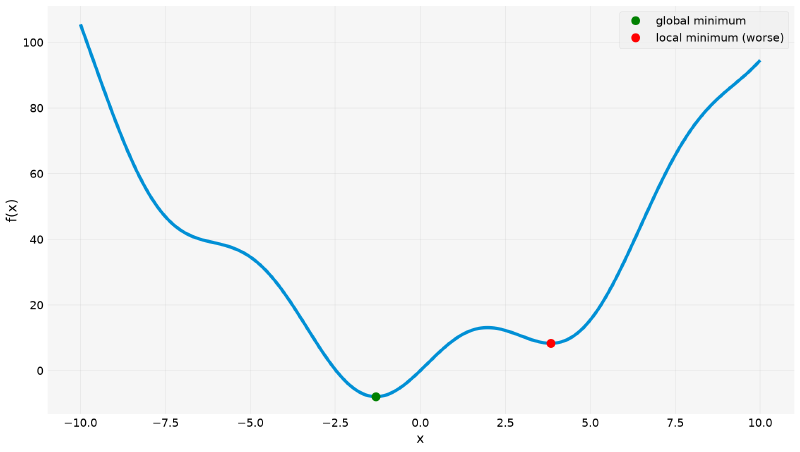
differential_evolution: [-1.30644002] -7.945823375615283Negative or zero guesses land on the global minimum (\(f\approx-7.95\));
positive guesses get stuck at the worse local minimum (\(f\approx
8.32\): it is not even negative!). differential_evolution finds the
global minimum on the first try, without any guess being supplied.
import matplotlib.pyplot as plt
import numpy as np


def f_two_minima(x):
    return x**2 + 10 * np.sin(x)


xs_plot = np.linspace(-10, 10, 400)
fig, ax = plt.subplots()
ax.plot(xs_plot, f_two_minima(xs_plot))
ax.plot(-1.3064, f_two_minima(-1.3064), "o", color="green", markersize=10, label="global minimum")
ax.plot(3.8375, f_two_minima(3.8375), "o", color="red", markersize=10, label="local minimum (worse)")
ax.set_xlabel("x")
ax.set_ylabel("f(x)")
ax.legend()
The following plot shows the two minima, side by side:
Rastrigin: Where Global Search Stops Being a Luxury #
With only two minima, differential_evolution seems overkill: a
minimize from two or three guesses would do. The case where it
becomes indispensable is another: when the local minima number in the dozens.
The Rastrigin function is the canonical benchmark for that. It is a simple paraboloid with a superimposed cosine ripple, which creates a regular grid of holes:
$$ f(\mathbf{x}) = 10n + \sum_{i=1}^{n}\left[x_i^2 - 10\cos(2\pi x_i)\right] $$The global minimum is trivially known, the origin, with \(f = 0\), which makes it perfect for testing whether a method finds it.
import numpy as np
from scipy.optimize import differential_evolution, minimize


def rastrigin(v):
    return 20 + sum(x**2 - 10 * np.cos(2 * np.pi * x) for x in v)

for c in [(-4, -4), (-2, 3), (1, 1), (3, -2), (4.5, 4.5)]:
    r = minimize(rastrigin, x0=c, method="BFGS")
    print(f"guess {str(c):>11} -> x={np.round(r.x, 3)}  f={r.fun:.4f}")

res_rast = differential_evolution(rastrigin, bounds=[(-5.12, 5.12)] * 2, seed=1)
print(f"differential_evolution -> x={np.round(res_rast.x, 4)}  f={res_rast.fun:.2e}")
guess (-4, -4) -> x=[-3.98 -3.98] f=31.8385
guess (-2, 3) -> x=[-1.99 2.985] f=12.9344
guess (1, 1) -> x=[0.995 0.995] f=1.9899
guess (3, -2) -> x=[ 2.985 -1.99 ] f=12.9344
guess (4.5, 4.5) -> x=[3.98 3.98] f=31.8385
differential_evolution -> x=[-0. -0.] f=0.00e+00Five guesses, five different local minima, and none of them is the
global one. The best BFGS result was \(f = 1.99\); the global is
\(0\). Notice the pattern. The method always stops at the hole closest to
the guess: \((-3.98,\ -3.98)\), \((0.995,\ 0.995)\) and so
on, all near integers, which is where the Rastrigin holes are.
The following figure shows the relief and where each search ended up:
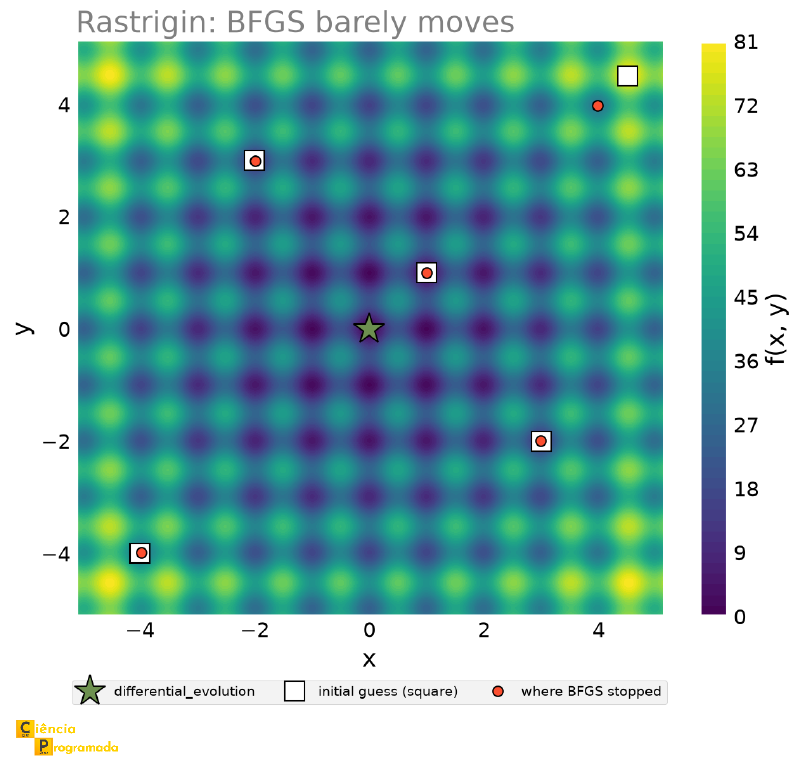
Notice what the figure does not show: any path. In four of the five
guesses the result circle is drawn inside the starting square,
because the total displacement was \(0.007\) to \(0.029\) units,
on a plot \(10\) units wide, less than \(0.3\%\) of the
figure. There is no line to draw: BFGS is born inside the hole it
is going to die in.
The exception is the guess \((4.5,\ 4.5)\), in the upper right corner, the only one that falls between two holes instead of inside one. It travels \(0.736\), enough for the eye to see, and even so it only rolls into the neighboring hole, at \((3.98,\ 3.98)\), as far from the global as the others.
differential_evolution hits the global exactly, at the cost of
\(2163\) function evaluations, against the few dozen of each BFGS.
That is the trade: local search is cheap and lies; global search is expensive and does not lie. With a function that is cheap to evaluate, pay for global search. With an expensive function, use local search from several guesses (multistart) and know that you may be in some arbitrary hole.
Points of Attention #
result.success
minimize can return a result without having actually converged.
Artificially limiting the number of iterations in the Rosenbrock
example:
import numpy as np
from scipy.optimize import minimize


def rosenbrock(v):
    x, y = v
    return (1 - x) ** 2 + 100 * (y - x**2) ** 2


res_fail = minimize(rosenbrock, x0=[-1.2, 1.0], method="Nelder-Mead", options={"maxiter": 5})
print(res_fail.success, res_fail.message, res_fail.x, res_fail.fun)
False Maximum number of iterations has been exceeded. [-1.065 1.1 ] 4.381360062499992The result, \((-1.065,\ 1.1)\) with \(f\approx4.38\), looks like
any number: nothing in it visually warns that it is far from the
true minimum, \((1,1)\) with \(f=0\). Only result.success (and
result.message) reveal the problem.
Variable Scale: the Condition Number #
One last point of attention, and the easiest to ignore: the scale of the variables affects how hard the optimizer works. The cause has a name, and it is the same concept that appeared in the polynomials article: ill-conditioning.
Consider \(f(x,y) = x^2 + 10^6 y^2\). It is a perfectly ordinary paraboloid, with its minimum at \((0,0)\), but extremely elongated: the curvature in the \(y\) direction is a million times greater than in the \(x\) direction. The level curves are not circles, they are extremely thin ellipses, and an optimizer that walks “downhill” ends up ricocheting between the walls of the valley, as in Rosenbrock, only for a different reason.
import numpy as np
from scipy.optimize import minimize

ill_conditioned = lambda v: v[0] ** 2 + 1e6 * v[1] ** 2
well_conditioned = lambda v: v[0] ** 2 + v[1] ** 2   # after rescaling y

for method in ("Nelder-Mead", "BFGS"):
    r_ill = minimize(ill_conditioned, x0=[1.0, 1.0], method=method)
    r_well = minimize(well_conditioned, x0=[1.0, 1.0], method=method)
    print(f"{method:12s} ill-conditioned: nfev={r_ill.nfev:4d} | "
          f"rescaled: nfev={r_well.nfev:3d}")
Nelder-Mead ill-conditioned: nfev= 134 | rescaled: nfev= 69
BFGS ill-conditioned: nfev= 21 | rescaled: nfev= 9Both methods spend about twice as many evaluations on the elongated problem, and it is literally the same problem, up to a change of variable \(y^{\prime} = 1000y\). Nothing was gained in precision; you only paid more for it.
The condition number of the Hessian measures exactly this elongation: it is the ratio between the largest and the smallest curvature. Here it is \(10^6\); in the rescaled problem, it is \(1\). The practical rule to take from this:
If your variables have very different orders of magnitude (a temperature in kelvin (\(\sim 10^2\)) next to a concentration in mol/L (\(\sim 10^{-3}\)), for example), rescale them all to something around 1 before calling the optimizer, and undo the scaling at the end. It is cheap, and is usually the difference between converging quickly and not converging.
SLSQP expects an 'ineq' constraint to return a value
\(\geq 0\) when satisfied. Flipping that sign by mistake does not raise
an exception, it just optimizes the wrong region, silently:
from scipy.optimize import minimize


def simple_objective(v):
    x, y = v
    return x**2 + y**2


res_correct = minimize(
    simple_objective, x0=[0, 0], method="SLSQP",
    constraints={"type": "ineq", "fun": lambda v: v[0] + v[1] - 1},  # x+y >= 1
)
res_wrong = minimize(
    simple_objective, x0=[0, 0], method="SLSQP",
    constraints={"type": "ineq", "fun": lambda v: 1 - (v[0] + v[1])},  # becomes x+y <= 1
)
print("correct:", res_correct.x, res_correct.success)
print("flipped sign:", res_wrong.x, res_wrong.success)
correct: [0.5 0.5] True
flipped sign: [0. 0.] TrueBoth calls return success=True: the second simply
solved \(x+y\leq1\) instead of \(x+y\geq1\), and the minimum of
\(x^2+y^2\) subject to this swapped constraint is trivially
\((0,0)\), the origin, which satisfies the inverted constraint with no
problem at all. Nothing in the return value warns that the intended
constraint was a different one.
Summary Table #
| Tool / concept | Use | Notes |
|---|---|---|
minimize_scalar |
Minimization in 1 variable | Only looks for a minimum, never returns a local maximum |
minimize(..., method=) |
Multivariable minimization | 'Nelder-Mead'/'Powell' (no gradient), 'BFGS' (with approximated gradient) |
constraints={'type': 'eq'/'ineq', 'fun': ...} |
Equality/inequality constraints (SLSQP) |
'ineq' requires fun(x) >= 0, a flipped sign silently gets the region wrong |
bounds=[(min, max), ...] |
Box limits per variable | Without them, the optimizer may search a physically absurd domain, or not even converge |
nit × nfev |
Algorithm iterations × total function calls | nfev is the real cost metric when f is expensive to compute |
| 3D surface → contour map | Visualize f(x,y) by flattening the third dimension into color |
log10(Z+1) in the color scale keeps extreme values from erasing the relief near the minimum |
| Local × global minimum | Result depends on the initial guess when there is more than one minimum | SymPy’s solve finds all of them at once; minimize only the one closest to the guess |
differential_evolution |
Global search, needs no initial guess | More computationally expensive; useful when there are multiple minima of different quality |
result.success / result.message |
Explicit confirmation of convergence | Never assume a minimize converged without checking |
| Variable scale | Affects the number of evaluations until convergence | Normalizing to comparable orders of magnitude speeds up the search |
Next Steps #
This article covered the fundamentals of scipy.optimize with a single
truly real problem, the cylindrical tank, generalizing what the SymPy
optimization article solved symbolically. But real
optimization rarely stops at a single equality constraint in two
variables: chemistry, physics and engineering bring problems with
inequality constraints, more elaborate cost functions, and situations in
which a system’s own differential equation is part of what you want to
optimize. In the
next article,
those real applications come into play, including one that directly reuses
the solve_ivp from this series’ differential equations article.


